1
Selecting the Image Display Mode
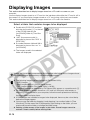
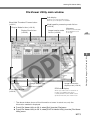
You can select the mode and size used when images are displayed. You can also display the
AF point and choose whether the information frame for thumbnail images is displayed.
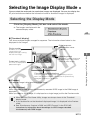
Selecting the Display Mode
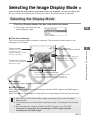
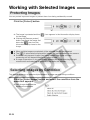
Click the [Display Mode] list box and select the mode.
\ The images are displayed in the
selected display mode.
W
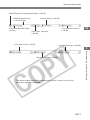
■ [Thumbnail display]
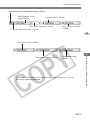
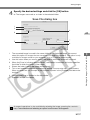
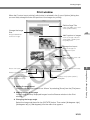
This shows multiple images arranged in sequence. The information shown below is also
displayed for the images.
Digital exposure
compensation value (➞W-28)
Numbers are assigned
sequentially to the
displayed images starting
with the first image.
Recording format
The [RAW] symbol is displayed
for RAW images. No symbol is
shown for JPEG images.
Protect mark (➞W-24)
This mark is displayed for
protected images.
File name or shooting date/time
The items selected in the [Image Lower Display Item]
list box in the [General Settings] tab sheet of the
[Preferences] dialog box (➞W-42) are displayed.
■ [Preview]
The selected image is displayed as a single image.
■ [JPEG Preview]
When you select a RAW image, simultaneously recorded JPEG image in the RAW image is
displayed.
When you select a JPEG image, it is displayed as a single image just like the Preview mode.
● When you start File Viewer Utility, images are always shown in the Thumbnail
display mode.
● If you double-click on the thumbnail-displayed image, it is displayed in the Preview
mode.
● See “Simultaneous Capture in RAW and JPEG Formats” in the EOS 10D
Instructions for information about the settings for JPEG images recorded
simultaneously with RAW images.
W-21
3
Working with Images in File Viewer Utility
Display number



























































![2 Fare clic sul pulsante [OK].](http://vs1.manualzilla.com/store/data/006152136_1-e1647c162105ef5d18e6e04bea0c5930-150x150.png)


![1 Sélectionnez le menu [Fichier]](http://vs1.manualzilla.com/store/data/006414880_1-7fd5d1aa0838e2e6203eddbbda503b57-150x150.png)