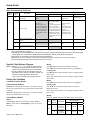
1
Setup Guide
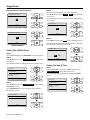
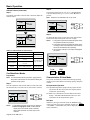
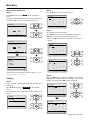
Entering Maintenance Contact Information
(Continued)
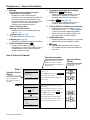
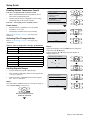
Step 4.
Press the Menu/OK button, and the setting confirmation
screen is displayed as shown in Step 5.
Maintenance Contact
0123–45––––––––––
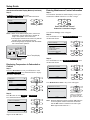
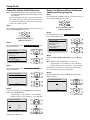
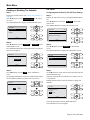
Step 2.
Press the ▼ button to select Maintenance Information .
Press the Menu/OK button.
Main Menu
1/2
Schedule
Off Timer
Celsius / Fahrenheit
Maintenance Information
Setting
Press Menu/OK button.
Main menu screen
Setting
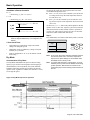
The registered contact information details are displayed.
Step 5.
Select Yes and press the Menu/OK button.
<Setting confirmation screen>
Maintenance Contact
Save the settings?
Maintenance Information
Contact Info
0123-456-7890
Registered details
are displayed.
Indoor Model ——/000
Outdoor Model ——/000
Setting
Yes
No
Press Menu/OK button.
Main menu screen
Step 3.
Press the “Cancel” button twice, and the basic screen returns.
Setting
▼
<Service Settings menu screen>
Setting details are determined and the “Service Settings”
menu screen returns.
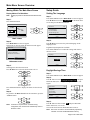
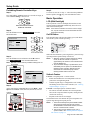
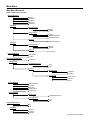
Confirmation Registered Details
Step 1.
Press the Menu/OK button in the basic screen.
Cool
Return
Set to
Cool 68F
Setting
Basic screen
Main menu is displayed.
Press Menu/OK button.
Press the “Cancel” button twice.
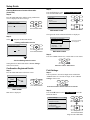
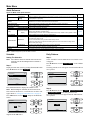
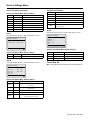
Field Settings
Step 1.
Push any button to activate backlight. Press and hold the
“Cancel” button for 4 seconds or longer, to enter “Service
Settings” menu screen.
Press and hold the “Cancel” button for 4 seconds.
Step 2.
Press the ▲▼ button to select Field Settings . Press the
Menu/OK button.
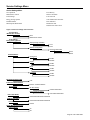
Service Settings
1/3
Test Operation
Maintenance Contact
Field Settings
Energy Saving Options
Prohibit Buttons
Min Setpoints Differential
Setting
Press Menu/OK button.
Page 13 of 36 / OM 1169-1