1
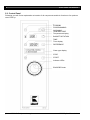
16 Error! Style not defined. 5.3 Description of operating elements Following you will find the description of switches, keys, knob and displays 5.3.1 Basket handle Pull out / push in the basket using the basket handle. 5.3.2 Door handle NOTE: Only open the door using the door handle after the basket has been removed completely from the equipment! Never use the door handle to carry the RoFry®! 5.3.3 Main switch By pushing the main switch the device is being turned on or off. 5.3.4 STANDBY By pushing the STANDBY key RoFry® will be activated (cold standby) and the program that has been used the last time appears in the clear type display. 5.3.5 PROGRAMMING By pushing the PROGRAMMING key the programming-mode will be activated and the operator gets access to the programming-level. 5.3.6 CLEANING By pushing the CLEANING key the cleaning-mode will be activated and the cleaningprogram that has been used the last time appears in the clear-type display. 5.3.7 TEMPERATURE By pushing the TEMPERATURE key the set requested temperature of the current phase appears on the Temperature display. The requested temperature appears as long as the TEMPERATURE key is pushed. 5.3.8 Temperature display Display of actual temperature or set temperature. printed: 05/2013 Subject to change! RoFryUserManual.doc