1
Your FOXTEL iQ
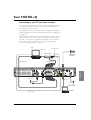
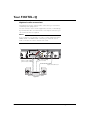
Connecting to your TV and video recorder
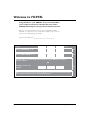
The connection diagram below shows how your FOXTEL iQ may be
connected up to your TV, second TV and video recorder. Other
connection set-ups are possible.
The diagram shows a cable FOXTEL iQ. For a diagram showing the
satellite FOXTEL iQ rear view, and information about its signal inputs,
see page 63.
The dotted lines marked ‘Phono lead’ and ‘S-Video lead’ show optional
video connections. You can use these to connect to your TV, video
recorder or other item of equipment, if required. If you use either of
these connectors, you must also use one of the optional audio
connection methods shown on page 66.
TV
RF lead
S-Video lead
Video recorder
SCART lead
RF lead
Terrestrial
TV aerial
SCART lead
FOXTEL iQ
Mains lead
RF lead
Telephone lead
Phono lead
Lead from
your cable
signal input*
Second TV
65