1
?
Index
3 of 21
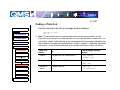
Setting the Default Resolution
Main
CrownNet Setup
Menu
Choices
CrownNet Admin.
CrownAdmin 3
Default
QMS 3260/4032
Consumables
Printer Care
Printer Jams
Print Quality
Printer Features
Troubleshooting
Config. Menus
Specifications
Support Info.
Notes
Administration/Engine/Def Resolution
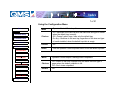
300 dpi—300x300 dpi resolution
600 dpi—600x600 dpi resolution
1200 dpi—1200x600 dpi resolution (1200x1200 dpi resolution with the
optional multi-res daughterboard installed)
600 dpi
Whenever possible, set the print resolution through your application. If
the print resolution can’t be set through the application, you can set it
through the configuration menu, the printer driver, or QMS Document
Option Commands (DOCs).
If you want the printer to use a lower default resolution when you restore
defaults, set this option to your choice (and make any other necessary
configuration settings), and then use the
Administration/Miscellaneous/Save Defaults menu to save your custom
defaults.
In addition, after you lower the default resolution, you should reconfigure
the printer memory (using Quick Config or Manual Config under the
Administration/Memory configuration menu) to redistribute memory for
that particular resolution. For example, if you set the default resolution to
600 dpi when your printer has enough memory to print at 1200x600 dpi,
the frame buffer remains configured for 1200x600 dpi, which means that
printer memory usage is not efficient. The memory being reserved for
frame buffer could be used to improve performance in other memory
clients.