1
?
Index
21 of 21
Ending a Print Job
Main
CrownNet Setup
CrownNet Admin.
CrownAdmin 3
QMS 3260/4032
Consumables
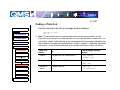
Use this procedure when the message window displays
WAITING ON INPUT
END JOB?
» Note: This procedure does not end print jobs that are still receiving data. Its only
purpose is to provide an end-of-job indicator for a print job that does not have one. You
can identify an end-of-job indicator in the Administration/Communications/Parallel and
Administration/Communications/Serial menu. (Refer to chapter 3, “Additional Technical
Information,” in the Reference Manual for a complete discussion of End Job Mode.
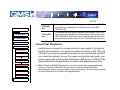
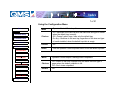
Press this
button...
to...
The message window
reads...
Printer Care
Cancel
Access the Job Cancel menu.
JOB CANCEL
CANCEL JOB
Next (twice)
Advance to the End Job mode.
JOB CANCEL
END JOB
Cancel or
Select
Select End Job.
END JOB
IS SELECTED
Printer Jams
Print Quality
Printer Features
Troubleshooting
Config. Menus
Specifications
Support Info.