1
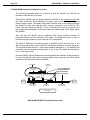
RIGHT. FROM THE START.
RIGHT. FROM THE START.
RIGHT. FROM THE START.
RIGHT. FROM THE START.
RIGHT. FROM THE START.
RIGHT. FROM THE START.
RIGHT. FROM THE START.
Roadrunner 040
Eagle 100, AM-3000M/LC
and AM-3000VME Upgrade
Installation Instructions
RIGHT. FROM THE START.
RIGHT. FROM THE START.
RIGHT. FROM THE START.
RIGHT. FROM THE START.
RIGHT. FROM THE START.
RIGHT. FROM THE START.
PDI-00172-60 A02
© 1995 Alpha Microsystems
REVISIONS INCORPORATED
REVISION
DATE
A00
August 1995
A01
October 1995
A02
November 1995
Roadrunner 040, Eagle 100, AM-3000M/LC and Am-3000 VME Upgrade Installation Instructions
To re-order this document, request part number PDI-00172-60
The information contained in this manual is believed to be accurate and reliable. However, no responsibility
for the accuracy, completeness or use of this information is assumed by Alpha Microsystems.
This document may contain references to products covered under U.S. Patent Number 4,530,048.
The following are registered trademarks of Alpha Microsystems, Santa Ana, CA 92799:
AMIGOS
AlphaBASIC
AlphaFORTRAN 77
AlphaMATE
AlphaWRITE
VIDEOTRAX
AMOS
AlphaCALC
AlphaLAN
AlphaNET
CASELODE
Alpha Micro
AlphaCOBOL
AlphaLEDGER
AlphaPASCAL
OmniBASIC
AlphaACCOUNTING
AlphaDDE
AlphaMAIL
AlphaRJE
VER-A-TEL
The following are trademarks of Alpha Microsystems, Santa Ana, CA 92799:
AlphaBASIC PLUS
DART
inFront/am
AlphaVUE
ESP
AM-PC
MULTI
All other copyrights and trademarks are the property of their respective holders.
ALPHA MICROSYSTEMS
2722 S. Fairview St.
P.O. Box 25059
Santa Ana, CA 92799
AMTEC
inSight/am
Installation Instructions: Roadrunner 040 EAGLE 100/AM-3000M/VME Upgrade
Page i
TABLE OF CONTENTS
CHAPTER 1 - COMPATIBILITY AND BOARD SETUP
1.1 INTRODUCTION . . . . . . . . . . . . . . . . . . . . . . . . . . . . . . . . . . . . . . . . . .
1.2 GENERAL PRODUCT DESCRIPTION . . . . . . . . . . . . . . . . . . . . . . . . .
1.2.1 Features . . . . . . . . . . . . . . . . . . . . . . . . . . . . . . . . . . . . . . . . . .
1.2.2 Environmental Specifications . . . . . . . . . . . . . . . . . . . . . . . . . .
1.2.3 Power Specifications . . . . . . . . . . . . . . . . . . . . . . . . . . . . . . . .
1.3 MECHANICAL REQUIREMENTS . . . . . . . . . . . . . . . . . . . . . . . . . . . . .
1.4 SOFTWARE COMPATIBILITY . . . . . . . . . . . . . . . . . . . . . . . . . . . . . . . .
1.5 SYSTEM BOARD COMPATIBILITY . . . . . . . . . . . . . . . . . . . . . . . . . . . .
1.5.1 AM-174 Roadrunner Requirements . . . . . . . . . . . . . . . . . . . . .
1.5.2 AM-140 (AM-3000M CPU Board) Requirements . . . . . . . . . . .
1.5.3 AM-3000M Compatible System Boards . . . . . . . . . . . . . . . . . .
1.5.4 AM-3000 VME Compatible System Boards . . . . . . . . . . . . . . .
1.5.5 EAGLE 100 Compatible System Boards . . . . . . . . . . . . . . . . .
1.5.6 AM-355 I/O Bus Compatible Paddle Boards . . . . . . . . . . . . . .
1.6 ROADRUNNER SCSI TAPE DRIVE REQUIREMENTS . . . . . . . . . . . .
1.6.1 Tandberg 1/4" Streaming Tape Drives . . . . . . . . . . . . . . . . . .
1.6.2 AM-645 8mm Magnetic Tape Subsystem . . . . . . . . . . . . . . . .
1.6.3 AM-647 DAT Magnetic Tape Subsystem . . . . . . . . . . . . . . . .
1.7 SCSI HARD DISK DRIVE COMPATIBILITY . . . . . . . . . . . . . . . . . . . . .
1.7.1 Maxtor and Quantum SCSI Disk Considerations . . . . . . . . . . .
1.7.2 SCSI Bus and SASI Bus Compatibility . . . . . . . . . . . . . . . . . .
1.8 SCSI DISPATCHER . . . . . . . . . . . . . . . . . . . . . . . . . . . . . . . . . . . . . . . .
1.9 AM-174 ROADRUNNER BOARD CONFIGURATION . . . . . . . . . . . . . .
1.9.1 Installing Memory . . . . . . . . . . . . . . . . . . . . . . . . . . . . . . . . . . .
1.9.2 Upgrading Roadrunner On-Board Memory . . . . . . . . . . . . . . .
1.9.3 Boot PROM Removal and Installation . . . . . . . . . . . . . . . . . . .
1.10 AM-987 JUMPER CONFIGURATION . . . . . . . . . . . . . . . . . . . . . . . . .
1-1
1-1
1-2
1-2
1-2
1-3
1-3
1-3
1-3
1-4
1-4
1-4
1-4
1-5
1-5
1-5
1-8
1-8
1-8
1-8
1-9
1-9
1-10
1-11
1-11
1-12
1-12
CHAPTER 2 - EAGLE 100 HARDWARE INSTALLATION
2.1 EAGLE 100 BOOT DRIVE GUIDELINES . . . . . . . . . . . . . . . . . . . . . . . .
2.2 EAGLE 100 HARDWARE INSTALLATION . . . . . . . . . . . . . . . . . . . . . .
2.2.1 Preparing the AM-987 Board . . . . . . . . . . . . . . . . . . . . . . . . . .
2.2.2 Installing the AM-987 Board . . . . . . . . . . . . . . . . . . . . . . . . . .
2.2.3 Mounting the Roadrunner Board . . . . . . . . . . . . . . . . . . . . . . .
2.2.4 Installing the Corner Bracket . . . . . . . . . . . . . . . . . . . . . . . . . .
2.2.5 AM-987 and AM-174 Cable Connections . . . . . . . . . . . . . . . .
2-1
2-2
2-2
2-3
2-6
2-8
2-11
PDI-00172-60, Rev. A02
Page ii
Installation Instructions: Roadrunner 040 EAGLE 100/AM-3000M/VME Upgrade
CHAPTER 3 - AM-3000M/LC HARDWARE INSTALLATION
3.1 HARD DRIVE CONSIDERATIONS . . . . . . . . . . . . . . . . . . . . . . . . . . . .
3.1.1 Roadrunner Boot PROM Routines . . . . . . . . . . . . . . . . . . . . .
3.1.2 Attaching Hard Drives to Opposite Bus Ports . . . . . . . . . . . . .
3.1.3 Upgrading a Standard AM-3000M System . . . . . . . . . . . . . . .
3.1.4 Upgrading an AM-540 Modified AM-3000M System . . . . . . . .
3.2 AM-3000M HARDWARE INSTALLATION . . . . . . . . . . . . . . . . . . . . . . .
3.2.1 AM-140 (AM-3000M CPU Board) Required Rework . . . . . . . .
3.2.2 AM-3000M Hardware Installation Overview . . . . . . . . . . . . . .
3.2.3 Installing the AM-987 on the AM-140 CPU Board . . . . . . . . . .
3.2.4 Installing the Roadrunner Board . . . . . . . . . . . . . . . . . . . . . . .
3.3 34-PIN X-BUS CABLING PRECAUTIONS . . . . . . . . . . . . . . . . . . . . . . .
3.3.1 AM-987 to AM-174 34-Pin X-bus Cabling Instructions . . . . . .
3.3.2 Connecting the 50-Pin SCSI Interface Cable . . . . . . . . . . . . .
3.3.3 Connecting DC Power Cable to Roadrunner Board . . . . . . . .
3-1
3-1
3-2
3-2
3-3
3-4
3-5
3-6
3-7
3-11
3-14
3-14
3-16
3-16
CHAPTER 4 - AM-3000 VME HARDWARE INSTALLATION
4.1 HARD DRIVE CONSIDERATIONS . . . . . . . . . . . . . . . . . . . . . . . . . . . .
4.1.1 Roadrunner Boot PROM Routine . . . . . . . . . . . . . . . . . . . . . .
4.1.2 Attaching Hard Drives to Opposite Bus Ports . . . . . . . . . . . . .
4.1.3 AM-3000 VME Boot Drive Guidelines . . . . . . . . . . . . . . . . . . .
4.2 AM-3000 VME HARDWARE INSTALLATION . . . . . . . . . . . . . . . . . . . .
4.2.1 Installing the AM-987 Board . . . . . . . . . . . . . . . . . . . . . . . . . .
4.2.2 Installing the Roadrunner Board . . . . . . . . . . . . . . . . . . . . . . .
4.2.3 AM-987 to AM-174 34-Pin X-bus Cabling Instructions . . . . . .
4.2.4 Connecting the 50-Pin SCSI Interface Cable . . . . . . . . . . . . .
4.2.5 Connecting DC Power Cable to Roadrunner Board . . . . . . . .
4-1
4-1
4-1
4-2
4-3
4-4
4-8
4-9
4-10
4-11
CHAPTER 5 - INITIAL OPERATION AND TESTING
5.1 BOOTING THE NEW ROADRUNNER HARDWARE . . . . . . . . . . . . . . .
5.2 INITIAL SYSTEM TESTING . . . . . . . . . . . . . . . . . . . . . . . . . . . . . . . . . .
5.3 MAKING A ROADRUNNER COMPATIBLE WARM-BOOT TAPE . . . . .
5.4 ROADRUNNER LOGO . . . . . . . . . . . . . . . . . . . . . . . . . . . . . . . . . . . . .
5.5 OPERATIONAL NOTES . . . . . . . . . . . . . . . . . . . . . . . . . . . . . . . . . . . . .
5.6 ADDITIONAL DOCUMENTATION . . . . . . . . . . . . . . . . . . . . . . . . . . . . .
5-1
5-2
5-2
5-4
5-4
5-7
PDI-00172-60, Rev. A02
Installation Instructions: Roadrunner 040 EAGLE 100/AM-3000M/VME Upgrade
Page iii
APPENDIX A - SCSI TERMINATION
A.1 SCSI TERMINATION USING EXTERNAL TERMINATOR OPTION . . . A-1
A.1.1 Termination Procedure (Without External Terminator) . . . . . . A-3
A.2 TERMINATION POWER . . . . . . . . . . . . . . . . . . . . . . . . . . . . . . . . . . . . A-3
APPENDIX B - READ-AHEAD AND WRITE BUFFERING
B.1 INTRODUCTION . . . . . . . . . . . . . . . . . . . . . . . . . . . . . . . . . . . . . . . . . .
B.2 READ AHEAD . . . . . . . . . . . . . . . . . . . . . . . . . . . . . . . . . . . . . . . . . . . .
B.2.1 Controlling Read-Ahead . . . . . . . . . . . . . . . . . . . . . . . . . . . . .
B.3 WRITE BUFFERING FOR SCSI-1 AND SCSI-2 DISK DRIVES . . . . . .
B.3.1 Potential Pitfalls . . . . . . . . . . . . . . . . . . . . . . . . . . . . . . . . . . . .
B.3.2 Setting Up Write Buffering . . . . . . . . . . . . . . . . . . . . . . . . . . . .
B.4 FINAL NOTES . . . . . . . . . . . . . . . . . . . . . . . . . . . . . . . . . . . . . . . . . . . .
B.4.1 Sample AMOS32.INI File . . . . . . . . . . . . . . . . . . . . . . . . . . . .
B-1
B-2
B-2
B-3
B-3
B-4
B-5
B-5
APPENDIX C - ROADRUNNER SOFTWARE CONFIGURATION
C.1 PREPARING FOR A ROADRUNNER UPGRADE . . . . . . . . . . . . . . . .
C.2 PROTECTING YOUR DATA . . . . . . . . . . . . . . . . . . . . . . . . . . . . . . . . .
C.2.1 Warm Boot Ability . . . . . . . . . . . . . . . . . . . . . . . . . . . . . . . . . .
C.2.2 Booting from a Floppy Drive . . . . . . . . . . . . . . . . . . . . . . . . . .
C.3 UPGRADING YOUR AMOS OPERATING SOFTWARE . . . . . . . . . . . .
C.3.1 Booting from the Main CPU SASI Port . . . . . . . . . . . . . . . . . .
C.3.2 Booting from the Roadrunner SCSI Port . . . . . . . . . . . . . . . . .
C.4 ROADRUNNER INSTALLATION CHECKLIST . . . . . . . . . . . . . . . . . . .
C.5 AM-987 SOFTWARE SUPPORT PACKAGE - MINIMUM VERSIONS .
C-1
C-1
C-2
C-2
C-2
C-3
C-4
C-6
C-7
APPENDIX D - ROADRUNNER AM-174 PROGRAMMING INFORMATION
D.1 ROADRUNNER AM-174 PROGRAMMING INFORMATION . . . . . . . .
D.1.1 The Problem and Why It’s A Problem . . . . . . . . . . . . . . . . . . .
D.1.2 What You Must Do.. . . . . . . . . . . . . . . . . . . . . . . . . . . . . . . . .
D.1.3 One More Caution . . . . . . . . . . . . . . . . . . . . . . . . . . . . . . . . . .
D.1.4 New Cache Control Program . . . . . . . . . . . . . . . . . . . . . . . . .
D-1
D-1
D-2
D-3
D-3
APPENDIX E - AM-3000 VME RACK MOUNT INSTALLATION
E.1 RACK MOUNT INSTALLATION . . . . . . . . . . . . . . . . . . . . . . . . . . . . . . E-1
PDI-00172-60, Rev. A02
CHAPTER 1
Compatibility and Board Setup
1.1INTRODUCTION
The Roadrunner product kit described in this document is designed for upgrading the
following Alpha Micro computers: AM-3000M/LC (AM-140 CPU), AM-3000 VME
(AM-185 and AM-185-50 CPU’s), and the EAGLE 100 (AM-137 CPU).
Though there are two types of Roadrunner boards available: the MC68030 based
AM-172 board and the MC68040 based AM-174 board, upgrading an existing 030
based CPU board to an 030 based Roadrunner would be of little benefit and so
this manual is primarily targeted to an 040 based Roadrunner (AM-174) upgrade!
At this writing the RR "030" upgrade configuration is NOT supported!
Your product installation kit includes one Roadrunner 040 Board (AM-174), one AM-987
Interface Board, two 34-pin cables, and all necessary mounting hardware.
With a Motorola MC68040 CPU, integral high performance SCSI interface, and memory
expansion up to 64 megabytes, Roadrunner provides incredible power and easy
installation. Simply update your operating system, install the Roadrunner hardware into
your computer, and you’re ready to take advantage of a whole new level of performance!
1.2GENERAL PRODUCT DESCRIPTION
This section outlines Roadrunner’s basic features and specifications.
Depending on your order, some SCSI disk drives are factory loaded with a bootable
copy of Roadrunner compatible AMOS software. If you ordered a SCSI disk drive
without the factory loaded software, or if you choose to use your existing drive, you will
need to download and configure a Roadrunner compatible AMOS operating system
using the instructions found in Appendix C at the end of this document.
ESDI and ST-506 disk drives are not supported in Alpha Micro computers upgraded
with Roadrunner hardware. Additionally, this Roadrunner upgrade replaces the AM-540
SCSI disk accelerator board on AM-3000M systems if installed.
PDI-00172-60, Rev. A02
Page 1-2
Compatibility and Board Setup
1.2.1Features
The AM-174 Roadrunner specific features include:
MC68040 CPU.
66MHz or 80MHz CPU clock rate (depending on model).
4KB internal instruction cache
32KB external cache.
One on-board (SIMM) Single Inline Memory Module expansion slot, which
supports 4, 8, 16, 32, and 64 megabyte 60ns DRAMs.
32-bit bidirectional data path.
32-bit address path.
Seven interrupt levels with vector capability.
DMA channel capability.
On-board bootstrap PROM containing several boot routines that enable
you to change the I/O device the computer boots from. Also contains full
power-up self-test of various system features.
On-board high performance SCSI expansion interface, which supports
both SCSI-1 and SCSI-2 peripherals.
1.2.2Environmental Specifications
Computer operating
temperature--external
60 to 80 degrees F (16 to 27 degrees C)
Humidity
10% to 90% (non-condensing)
1.2.3Power Specifications
DC power requirements (maximum):
Board
Current Draw
AM-174
AM-987
2.9 A
200 ma
@5v
@5v
PDI-00172-60, Rev. A02
Installation Instructions: Roadrunner 040 EAGLE 100/AM-3000M/VME Upgrade
Page 1-3
1.3MECHANICAL REQUIREMENTS
The Roadrunner hardware kit included with this product upgrade is mechanically
compatible with the type of system(s) listed in this document.
On VME systems, once the Roadrunner hardware is installed, the VME slot just above
the CPU board will no longer be accessible. However, because Roadrunner has its own
on-board memory, you will have at least one extra vacant slot based on the removal of
your original AM-730 or AM-740 memory board.
1.4SOFTWARE COMPATIBILITY
For information on third party software compatibility, see the Roadrunner SIG (Special
Interest Group) located on Alpha Micro’s online AMTEC+. The Roadrunner SIG is also a
valuable source of other Roadrunner related information.
In order to be Roadrunner 040 compatible, your AMOS operating system must be
AMOS 1.4C or AMOS 2.2C version PR5/95 or later! Additionally, operating system
versions PR5/95 and PR8/95 require special AM-987 support softwareoverlaid on top of
the standard AMOS O/S. If a new (bootable) SCSI hard disk drive is ordered with the
Roadrunner upgrade, then the special support software will be installed on the drive
prior to shipment. If no hard drive is ordered, then the AM-987 support software must be
obtained from Alpha Micro Technical Support, either on a specific media or via AMTEC+.
Appendix D contains some important programming information related to the use of
self-modifying code and the Roadrunner 040’s large 4KB instruction cache. All
Roadrunner 040 users should carefully read the information in Appendix D before
running third party application programs.
1.5SYSTEM BOARD COMPATIBILITY
To be compatible with Roadrunner hardware, various circuit boards in your computer
need to meet minimum revision level requirements. Refer to the following lists of board
requirements as applicable to the system type you are upgrading:
1.5.1AM-174 Roadrunner Requirements
For system upgrade compatibility the AM-174 Roadrunner board must be
at revision A23 or later, with its boot PROM revision K00 or later.
AM-174 Roadrunner boards that meet the above revision level
requirements are compatible with all previous system CPU board boot
PROM revision levels. The boot switch settings documented in your
computer owner’s manual are still valid.
PDI-00172-60, Rev. A02
Page 1-4
Compatibility and Board Setup
1.5.2AM-140 (AM-3000M CPU Board) Requirements
The AM-987 board is compatible with all revisions of the AM-140 CPU board. However,
the AM-140 requires a minor rework modification to work with the AM-987 Interface
board. THE AM-987 WILL NOT FUNCTION WITHOUT THIS REWORK!
See the AM-3000M HARDWARE INSTALLATION section of this document for rework
details.
1.5.3AM-3000M Compatible System Boards
After the AM-140 CPU board has been Roadrunner upgraded, all of your current
hardware should be compatible with the upgrade, with the exception of the following
items which are NOT compatible:
AM-540 SCSI disk accelerator board.
AM-121 VPC (Virtual Personal Computer) board.
ESDI disk drives, AM-522 and AM-528 ESDI controllers.
Any Memory board(s) currently plugged onto your AM-140 CPU board.
An optional Math Co-processor chip designed to plug into the AM-140
board at location U131.
1.5.4AM-3000 VME Compatible System Boards
AM-630 VCR controller
Revision B07/C05
AM-212 floppy controller.
Revison A04
AM-515, AM-520, AM-730, AM-740, and any other VME board which does
not appear on the above list is NOT compatible with a Roadrunner
enhanced AM-3000 VME computer.
1.5.5EAGLE 100 Compatible System Boards
All of your current hardware should be compatible with the Roadrunner upgrade.
PDI-00172-60, Rev. A02
Installation Instructions: Roadrunner 040 EAGLE 100/AM-3000M/VME Upgrade
Page 1-5
1.5.6AM-355 I/O Bus Compatible Paddle Boards
All AM-355 I/O Bus paddle cards that meet the following revision levels are compatible
with the Roadrunner upgrade.
AM-324 parallel printer boards
Revision A08
AM-333 RJE paddle boards
Revision A00
AM-355 6-port serial I/O boards
Revision A00/B00
AM-358 8-port serial I/O boards
Revision C01
AM-359 8-port serial I/O boards
Revision C02
AM-362 EtherNet boards
All Revisions
1.6ROADRUNNER SCSI TAPE DRIVE REQUIREMENTS
Roadrunner has an on-board high performance SCSI interface incorporated into its
design. To insure a successful installation, you should carefully read the next few
sections dealing with SCSI peripherals and Roadrunner compatibility.
The Roadrunner’s on-board high performance SCSI interface supports both SCSI-1 and
SCSI-2 hard disk and magnetic tape devices. However, because of the potential
performance increase, we highly recommend the use of peripherals that support SCSI-2.
1.6.1Tandberg 1/4" Streaming Tape Drives
In order to warm boot from a Tandberg tape drive, it must be set to a higher numerical
SCSI ID (1 through 6) than any other tape device connected to the SCSI bus.
1.In order to be Roadrunner compatible, the AM-625 Tandberg 150MB tape
drive must have firmware at revision -06:00 or later. You can use the
SCSI.LIT program (included in AMOS 2.2C and 1.4C operating system
releases) to determine the firmware revision of your tape drive. Simply
type in the command SCSI at the AMOS prompt and the program will
display a string of numbers which includes the firmware revision. The
AM-625 is a SCSI-1 device; it cannot be upgraded to SCSI-2. AM-625
backups are not able to span tapes.
2.AM-626 525MB Tandberg SCSI tape drives can be upgraded to SCSI-2 in
two ways. Older models of the TDC 3800 with firmware revisions earlier
than -07:01 must be upgraded by physically upgrading the firmware
PROM located inside the drive (p/n PDB-00626-90). Newer models of the
TDC 3800 with firmware revisions -07:01 or later, use flash ROM similar to
the larger Tandberg 1GB and 2GB streamer drives. The flash ROM type
PDI-00172-60, Rev. A02
Page 1-6
Compatibility and Board Setup
drives can be upgraded without removing the drive from the computer. To
upgrade the newer model of the 3800 see step 3.
If the firmware is not upgraded, the drive can still be used with Roadrunner
hardware as a SCSI-1 device, but only if it has firmware at revision -04:08
or later. You can use the SCSI.LIT program as explained in step 1 to
determine the firmware revision of your tape drive.
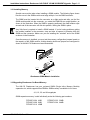
To replace the firmware PROM, you simply remove the two TORX screws
holding the drive’s top cover in place; lift off the top cover; gently pry out
the old PROM; and install the new PROM as shown in the following
illustration:
TORX SCREWS
Make sure the notch
in the chip (indicating
pin-1) points toward
the rear of the drive.
FIRMWARE PROM
LOCATION
MAC860
AM-626 Physical PROM Replacement
PDI-00172-60, Rev. A02
Installation Instructions: Roadrunner 040 EAGLE 100/AM-3000M/VME Upgrade
Page 1-7
3.AM-627 1GB, AM-628 2GB, and newer models of the AM-626 525MB
Tandberg SCSI tape drives also require a firmware update to be SCSI-2
compatible. However, these drives use a flash ROM for their firmware
which can be updated without removing the drive from the computer. To
update the drive’s firmware proceed as follows:
Once the computer has completed booting, enter the following commands
to update the tape drive firmware for SCSI-2 operation:
LOG OPR: RETURN
FWUPD DVR:xxxxxx.FW RETURN
Loading Firmware ........
Enter Target Device (ie. STR0:):
STR0: RETURN
Sending firmware to drive ..........
where xxxxxx is the name of the firmware update file you want to load.
After the firmware has been downloaded, allow at least 30 seconds for the
streamer drive to update its firmware, then reboot your computer to reset
and initialize the new tape drive parameters.
The following is a list of firmware update files currently available:
Tape Drive Current Firmware
(as reported by the SCSI command)
Operation
Filename
Tandberg TDC 4xx0 firmware 05:07 or earlier
SCSI-2
SCSI-1
TSCZ2.FW
TSCZ1.FW
Tandberg TDC 4xx0 firmware 07:05
SCSI-2
SCSI-1
S20705.FW
S10705.FW
Tandberg TDC 3800 firmware 07:01 or later
SCSI-2
SCSI-1
38S275.FW
38S171.FW
Once the firmware has been updated, the drive is only compatible with
AM-4000/4000M’s, AM-3000M’s with AM-540’s, Eagle’s, and all Roadrunner enhanced
computers. If the drive is ever used in a configuration with an earlier style CPU board,
the firmware must be converted back to SCSI-1 operation.
PDI-00172-60, Rev. A02
Page 1-8
Compatibility and Board Setup
1.6.2AM-645 8mm Magnetic Tape Subsystem
In order for the Exabyte tape drive to work with the Roadrunner hardware, new firmware
must be installed in the drive. The updated firmware is available from Alpha Micro under
part number PDB-00645-90. Once the new firmware is installed, the Exabyte tape drive
will operate in SCSI-1 mode only. The ability to span tapes is not supported on the
Exabyte tape drive.
1.6.3AM-647 DAT Magnetic Tape Subsystem
The DAT tape drive is SCSI-2 ready and does not require any firmware updates to be
compatible with Roadrunner hardware. However, on the back of the DAT drive a change
needs to be made to one of the configuration switches. Switch S4 must be placed in the
"ON" position in order for the drive to operate in SCSI-2 mode.
After making the configuration switch change, you must turn the tape drive power off
and then back on in order for the switch change to take affect.
1.7SCSI HARD DISK DRIVE COMPATIBILITY
Depending on your order, your new SCSI drive may already be loaded with a
Roadrunner compatible AMOS operating system. If this is the case, the drive will be
clearly labeled indicating how it was configured.
Precautions concerning hard disk drives must be taken prior to performing the actual
hardware installation. The following chapters highlight the various system configurations
and how to deal with them. Be sure you read the applicable hardware installation
chapter carefully and have a good understanding of the procedure before you begin
disassembling your working system!
All installation procedures and descriptions are aimed at technically qualified personnel
who are already thoroughly familiar with Alpha Micro system hardware and software.
1.7.1Maxtor and Quantum SCSI Disk Considerations
Maxtor LXT, MXT, and 7200 series SCSI disk drives supplied by Alpha Micro are
supported for use on the Roadrunner’s SCSI port. However, for use on your computer’s
SASI port (if applicable), Maxtor MXT SCSI drives must have revision 1.5 firmware or
later. Also, in order to be compatible with the Roadrunner hardware, your Maxtor MXT
SCSI-2 compatible disk drive must have a sticker indicating it has special 6F+ firmware
or it must be using 1.5 or later production firmware.
Quantum LPS, Empire, Lightning, Trailblazer, and Fireball SCSI disk drives sold by
Alpha Micro are also supported on the Roadrunner’s SCSI port.
PDI-00172-60, Rev. A02
Installation Instructions: Roadrunner 040 EAGLE 100/AM-3000M/VME Upgrade
Page 1-9
1.7.2SCSI Bus and SASI Bus Compatibility
In most cases, you will be attaching your SCSI peripherals to the high performance
SCSI port on the Roadrunner board. However, the Roadrunner hardware also supports
SCSI peripherals connected to the SASI port on AM-3000 VME systems (AM-185 &
AM-185-50 CPU boards), and on standard (NON AM-540 modified) AM-3000M/LC
systems (AM-140 CPU boards).
If you wish to use your existing SASI/SCSI-1 hard drive as the boot drive on the old
SASI port, then you must also attach any other peripheral devices to the SASI port as
well. And, conversly, if you attach the boot drive to the enhanced SCSI port on the
Roadrunner, then you must attach any other SCSI peripheral devices to that port also.
It would make little sense to have your SCSI boot drive and peripherals connected
to the CPU SASI port. One of the main advantages of the Roadrunner upgrade is
approximately three times the throughput of its SCSI port, compared to the old CPU
SASI port! Additionally, the SCSI command and the high-performance SCSI
Dispatcher can only detect and enhance devices which are connected to the
Roadrunner’s SCSI port!
If necessary, you may attach a hard disk drive to the opposite port and access it as a
sub-system drive. You would use the FIXLOG program to create the new sub-system
driver. If the drive is attached to the SASI port you would imbed the generic
SCZDVR.DVR to create the new driver. If the drive is attached to the Roadrunner’s SCSI
port you would imbed the generic SCZRR.DVR to create the new driver.
1.8SCSI DISPATCHER
In order to use the Roadrunner’s on-board high performance SCSI controller, you must
define the "SCSI Dispatcher" in your system initialization command file. AMOS uses the
dispatcher to communicate with the SCSI controller chip. All communications with the
SCSI controller chip are handled by the dispatcher.
There are two versions of the SCSI dispatcher. SCZRR.SYS is a high performance SSD
protected version of the SCSI dispatcher, which supports command queueing,
synchronous transfers, multi-threaded, and scatter-gather operations. SIMRR.SYS is a
simplified version of the SCSI dispatcher, which is not SSD protected and does not
support the high performance features supported in SCZRR.SYS. SIMRR.SYS is used
when making warm boot tapes and for temporary situations with computers which do
not have an SSD chip; it is not intended for normal operation. While both of these
dispatchers support SCSI devices, there is a tremendous performance increase using
the SCZRR.SYS dispatcher.
The PIC code for the SCSI dispatcher must be purchased separately from Alpha Micro.
See Appendix C for information on how to install the SCSI dispatcher and its PIC code.
If you have any SCSI peripherals attached to the Roadrunner’s SCSI port, you must
define the dispatcher in your boot INI, regardless of whether you are using SCSI-1 or
SCSI-2 peripheral devices.
PDI-00172-60, Rev. A02
Page 1-10
Compatibility and Board Setup
1.9AM-174 ROADRUNNER BOARD CONFIGURATION
The illustration below shows the AM-174 board configured as shipped by Alpha Micro.
The only user configurable jumpers on this board are JP1 & JP2 for SCSI termination,
and JP11, JP12, and JP13 for memory configuration. These jumpers only need to be
reconfigured if your system has a unique termination requirement, or if you change the
amount of memory installed on your Roadrunner. All other jumpers on the board should
be left in their factory configured positions. All possible configurations for the memory
jumpers are shown in the illustration. Refer to Appendix A for more details on SCSI bus
termination and termination power.
1
2
3
JP2
1
2
3
JP1
JP2 SET TO PINS 1 AND 2 = TERMPOWER DISABLED
JP2 SET TO PINS 2 AND 3 = TERMPOWER ENABLED (FACTORY DEFAULT)
JP1 SET TO PINS 1 AND 2 = SCSI BUS ACTIVE TERMINATION ENABLED (FACTORY DEFAULT)
JP1 SET TO PINS 2 AND 3 = SCSI BUS ACTIVE TERMINATION DISABLED
OSCILLATOR JUMPER (DO NOT REMOVE)
MEMORY SIMM CONNECTOR
JP2
J1
JP1
JP7
ALPHA
MICROSYSTEMS
J4
N C R
PIN-1 INDICATOR
JP6
50-PIN SCSI
CONNECTOR
X-BUS
CONNECTORS
JP13
JP12 JP11
BOOT PROM
JP10
JP15
JP14
JP9
ALPHA MICROSYSTEMS AM-174
MC1057
FACTORY USE ONLY, NO JUMPERS INSTALLED
JP13
JP13
JP12 JP11
JP13
JP12 JP11
JP12 JP11
JP13
JP12 JP11
X-BUS ACTIVE TERMINATION
IN = ENABLED (FACTORY DEFAULT)
OUT = DISABLED
MEMORY CONFIGURATION JUMPERS
8MB
16MB 32MB 64MB
4MB
JP13
OSCILLATOR JUMPERS
(DO NOT REMOVE OR RECONFIGURE)
JP12 JP11
JP17
J3
040
JP16
J2
INDICATES PIN-1
FOR ALL CONNECTORS
AM-174 Board Configuration
PDI-00172-60, Rev. A02
Installation Instructions: Roadrunner 040 EAGLE 100/AM-3000M/VME Upgrade Page 1-11
1.9.1Installing Memory
Special care must be taken when installing a SIMM module. The following figure shows
how the curve in the SIMM module must align with pin-1 on the SIMM connector.
The SIMM must be inserted into the connector at a slight angle and after you feel the
SIMM module settle into the connector, you rotate the SIMM into an upright position, as
shown in the illustration. When the SIMM is properly positioned, the metal retainer clips
at each end of the connector will click into position, locking the SIMM in place.
Very little force is required to install a SIMM module. If you’re having problems getting
the module installed in the connector, stop and take a moment to examine both the
SIMM and the connector. Make sure you are installing the "notched" end of the SIMM
as shown in the illustration.
Once the memory is installed, you must set the memory configuration jumpers based on
the capacity of the SIMM module. A table showing how these jumpers are configured is
shown in the AM-174 Roadrunner board illustrations.
MAKE SURE THIS CURVE
IN THE SIMM CARD ALIGNS
WITH PIN-1 IN THE
SIMM CONNECTOR.
SIMM (SINGLE INLINE
MEMORY MODULE)
METAL RETAINER
CLIP
MC1059
METAL RETAINER
CLIP
SIMM
CONNECTOR
PIN-1 INDICATOR
Roadrunner SIMM Module Installation
1.9.2Upgrading Roadrunner On-Board Memory
The AM-174 Roadrunner has one on-board SIMM (Single Inline Memory Module)
expansion slot, which supports 60ns DRAMs. SIMM memory is available in five sizes:
4, 8, 16, 32, and 64 megabytes
SIMM expansion memory is sold individually under the following part numbers:
PFB-00712-04 4MB
PFB-00712-08 8MB
PFB-00712-16 16MB
PDI-00172-60, Rev. A02
PFB-00712-32 32MB
PFB-00712-64 64MB
Page 1-12
Compatibility and Board Setup
1.9.3Boot PROM Removal and Installation
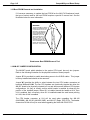
If it becomes necessary to update the boot PROM on the AM-174 Roadrunner board,
the type of socket used for the boot PROM requires a special IC removal tool. See the
illustration below for more information:
WARNING!
The boot PROM IC used on
Roadrunner boards requires
a specialized tool for its
removal. If you attempt to
remove the boot PROM
using a screwdriver or
pocketknife, you could
easily damage both
the chip and the
socket. Use a chip
extraction tool like this,
which is available at retail
stores that specialize in
electronic components.
MC1107
Roadrunner Boot PROM Removal Tool
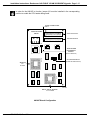
1.10AM-987 JUMPER CONFIGURATION
The AM-987 board, which attaches to the system CPU board, has only two jumpers.
Refer to the following illustration for the physical locations of these jumpers.
Jumper JP1 is provided to enable termination power to the X-BUS cables. This jumper
is factory installed and should not be removed!
Jumper W1 provides the ability to select between the two CPU header connectors at
locations U14 and U14A. The two CPU headers are functionally identical but allow the
AM-987 board to be physically oriented to fit on and within several different CPU/system
configurations. It’s easy to visually confirm which header is enabled by observing the
position of the installed jumper. When W1 is installed toward the header at U14, then
U14 is enabled. And, conversely, when W1 is installed toward the small arrow pointing
to U14A, then U14A is enabled.
The CPU header connector at U14 will be used when upgrading the AM-140
(AM-3000M), AM-185-50 (AM-3000 VME), and AM-137 (Eagle 100) CPU’s. The header
connector at U14A will only be used when upgrading the older AM-185-00 CPU.
PDI-00172-60, Rev. A02
Installation Instructions: Roadrunner 040 EAGLE 100/AM-3000M/VME Upgrade Page 1-13
In order for the AM-987 to function, jumper W1 must be installed in the corresponding
position to enable the CPU header being used!
X-BUS CONNECTORS
PIN-1
ALPHA
MICROSYSTEMS
AM-987
A D D R E S S / D ATA
P1
CONTROL/STATUS
P3
P2
JP1
TERM POWER
DISCONNECT
JUMPER
(DO NOT REMOVE)
U14A
CPU HEADER SELECT
W1
(SHOWN IN U14 POSITION)
AM-185-00
CPU
HEADER
U14
MC1222
AM-137, AM-140, AM-185-50
CPU HEADER
AM-987 Board Configuration
PDI-00172-60, Rev. A02
CHAPTER 2
Eagle 100 Hardware Installation
2.1EAGLE 100 BOOT DRIVE GUIDELINES
If you are installing a new pre-configured Roadrunner bootableSCSI drive along with
the Roadrunner hardware upgrade, use the following steps as a guide:
1.You can leave your existing SCSI drive attached to the SCSI bus cable,
but you must change its drive I.D. to something higher than zero (usually
I.D.1) so that it won’t conflict with the new Roadrunner boot drive.
2.After the Roadrunner has been installed and the system rebooted, you
must then create a sub-system driver to access your original drive. The
new driver must be created with the FIXLOG program and the SCZRR.DVR
Roadrunner SCSI port driver.
3.Once the SCSI sub-system driver has been created (and saved) it must be
added to the new Roadrunner’s boot INI under the DEVTBL, BITMAP, and
SYSTEM statements.
4.After rebooting the system again, you can mount your original hard drive
using the device driver you just created, and copy any or all of your
application software to the new SCSI boot drive.
Be sure to use the /NOD switch when you copy software to the new boot drive! If
you accidentally over-write the new AMOS Operating System software with your
old O/S software, the system will NOT boot on the Roadrunner!
If you intend you use your existing SCSI hard drive as the main boot drive, you must
first make sure your AMOS Operating System is version PR5/95 or later andhas been
overlaid with the current AM-987 software support package!
All you need do is MONGEN the SCZRR.DVR into the new boot monitor prior to the
hardware installation.
No changes are required to your existing boot INI since the system I/O hardware
configuration will remain essentially the same. Your TRMDEF and SCSI Dispatcher
statements do not require any changes.
PDI-00172-60, Rev. A02
Page 2-2
Eagle 100 Hardware Installation
2.2EAGLE 100 HARDWARE INSTALLATION
The following sections describe the steps required to perform the actual Roadrunner
upgrade hardware installation. You should review each section and be familiar with the
requirements prior to disassembling your working system.
If you did not order a SCSI disk drive that was pre-loaded with a Roadrunner compatible
AMOS operating system, you need to update the software on your existing drive. The
software download and configuration procedure, located in Appendix C, must be
completed before the Roadrunner hardware is installed in your computer.
2.2.1Preparing the AM-987 Board
Prior to installing the AM-987 board, refer to the following illustration and install three
plastic standoffs on the solder side, using plastic screws from the component side. Be
sure to install the standoffs where indicated.
Also, ensure jumper W1 is installed to enable the CPU header at U14. The jumper must
be installed in the position toward the header at U14.
MC1243
ALPHA
MICROSYSTEMS
AM-987
P1
P3
P2
JP1
U14A
W1
Set W1 to enable
header at U14
U14
Install three plastic standoffs on solder
side, using plastic screws from top
AM-987 Preparation for Mounting
PDI-00172-60, Rev. A02
Installation Instructions: Roadrunner 040 EAGLE 100/AM-3000M/VME Upgrade
Page 2-3
2.2.2Installing the AM-987 Board
With the AC power cord unplugged and the top cover removed, the components inside
your computer are vulnerable to damage caused by static discharge. Your body and
clothing are capable of storing an electrical charge that can damage or destroy
unprotected electronic components. Prior to handling any computer hardware, be sure
you and your work area are properly protected against static discharge. There are a
number of commercially available static protection devices designed specifically to
protect your equipment from harmful static discharge.
1.Remove the Eagle chassis cover by removing the four screws located
along the rear side edges of the cover, then lifting the rear of the cover up
and sliding it back.
2.Next, the 68030 CPU chip must be removed from its socket (U30) on the
AM-137. To remove the chip, gently pry the chip loose using a small flat
blade screw driver. Work around the chip lifting from corner to corner and
side to side until the chip pops loose from the socket. Don’t rush this
operation, if too much force is used you could break some of the pins or
the ceramic case on the CPU chip.
3.At this point, your AM-987 board should be ready to install. The AM-987
board sits on top of the AM-137 board, plugging into the vacated CPU
socket at U30. You will notice there is an extra CPU socket installed on the
bottom of the AM-987 board. The socket serves two purposes: it adds
extra height to the AM-987 board so it will not make contact with
components on the CPU board; it also protects the pins on the AM-987
board. If a pin does break, you want it to be a pin on the inexpensive
socket, not one of the pins on the AM-987 board!
Refer to the following illustration for proper placement of the AM-987 board
on the main CPU board. There is a cutout on the AM-987 board that
makes it easy to align the board with the CPU socket on the main CPU
board. Remove the protective foam from the socket on the bottom of the
AM-987, making sure no foam residue remains. Place the AM-987 board
into position, using the cutout to align the pins with the socket. If everything
is properly aligned, you will feel the board settle into position in the socket.
This is another operation where it is best to take your time and be sure the
AM-987 and the CPU socket are properly aligned. When you’re sure the
AM-987 board is in position, gently press the AM-987 board into the socket.
When installing the AM-987 board, make sure all the pins are properly
aligned. If you plug the board in incorrectly, it is possible to short power to
ground, resulting in possible damage to the AM-987 or AM-137 boards.
PDI-00172-60, Rev. A02
Page 2-4
Eagle 100 Hardware Installation
W4
W2
J9
J3
W10
J8
J2
W6
ALPHA MICROSYSTEMS
J11
DISK
RUN
POWER
W9
U14
J5
P2
JP1
P1
AM-987
ALPHA
MICROSYSTEMS
U14A
P3
BA
TT
ER
Y
AM-137
J1
W1
J4
J10
J900
P1 P2
W5
U14
U28
J7
W12
W8
U29
U15
SSD
W3
W1
J6
MC1240
AM-987 positioned on
the AM-137 board
AM-987 Installed on AM-137 CPU Board
4.Refer to the following two illustrations and secure the AM-987 board to the
AM-137 CPU board as follows:
A.Remove the nine phillips-head screws holding the side mounting
plate in place.
B.Remove the mounting plate by tilting it back and lifting it up and out
of the chassis bottom channel.
C.From the solder side of the AM-137 board, install two plastic screws
through the mounting holes near the bottom left edge of the board,
and into the plastic standoffs previously attached to the AM-987.
D.After the AM-987 is secured, reinstall the side mounting plate.
PDI-00172-60, Rev. A02
Installation Instructions: Roadrunner 040 EAGLE 100/AM-3000M/VME Upgrade
POWER SUPPLY
SIDE MOUNTING PLATE
Remove these screws and lift
out the side mounting plate
MC1244
Removing the Side Mounting Plate
POWER SUPPLY
CPU BOARD MOUNTING BRACKET
AM-137 Solder Side
MC1245
Plastic screws installed through back of AM-137 and
into the standoffs on solder side of AM-987 board
Securing the AM-987 to the AM-137 Board
PDI-00172-60, Rev. A02
Page 2-5
Page 2-6
Eagle 100 Hardware Installation
2.2.3Mounting the Roadrunner Board
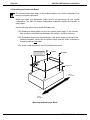
To install the Roadrunner board in the Eagle chassis, special mounting hardware is
required. The mounting hardware consists of a metal corner bracket and flat mounting
plate. These two additional items are included with your Eagle installation kit.
The illustration below shows the additional mounting hardware and their corresponding
Alpha Micro part numbers:
MC1254
Corner Bracket
DWF-20753-07
Mounting Plate
DWF-20754-01
Eagle Chassis Mounting Hardware
The inside area of the mounting plate contains two separate sets of metal standoffs.
One set of standoffs is slightly higher than the other. The higher set of standoffs are
located near the outside edges of the mounting plate and are not used with this
installation. The AM-174 board will mount on the lower set of standoffs and must be
properly oriented to avoid any shorts to the circuitry on the solder side of the board. The
following illustration indicates the correct locations of the AM-174 mounting standoffs.
NOTE: The following illustrations showing the inside view of the mounting plate are
purposely displayed upside-down to show the actual position required when connecting
the AM-174 to the Eagle system.
PDI-00172-60, Rev. A02
Installation Instructions: Roadrunner 040 EAGLE 100/AM-3000M/VME Upgrade
Page 2-7
BOTTOM OF MOUNTING PLATE
The AM-174 mounts
on top of the inner
(lower) set of standoffs where indicated.
Inside of Plate
(upside-down)
MC1255
TOP OF MOUNTING PLATE
AM-174 Mounting Standoffs
Before you install your Roadrunner, make sure it’s set up properly for your system
configuration. The AM-174 jumper configuration illustration in the chapter on "Board
Setup" explains the function of each jumper.
The Roadrunner board installs on top of the six metal standoffs located inside the metal
mounting plate.
Position the Roadrunner board as shown in the following illustration. Ensure the side of
the board with the SCSI bus connector (J1) is located nearest to the "handle" side of the
mounting plate!
The board is held in place with six 6-32 phillips-head screws.
PDI-00172-60, Rev. A02
Page 2-8
Eagle 100 Hardware Installation
BOTTOM OF MOUNTING PLATE
ADDRESS/DATA
JP16
J1
J2
JP17
J3
JP2
JP6
CONTROL/STATUS
JP15
JP14
Position the AM-174 as
shown, and secure it
with six #6 phillipshead screws.
JP1
040
JP7
NCR
ALPHA
MICROSYSTEMS
ALPHA MICROSYSTEMS AM-174
JP10
JP9
JP12
JP11
JP13
J4
MC1256
TOP OF MOUNTING PLATE
Installing the AM-174 on the Mounting Plate
2.2.4Installing the Corner Bracket
After the Roadrunner board is installed on the mounting plate, temporarily set the
assembly aside to install the corner fastening bracket.
The corner fastening bracket fits flush on the inside of the Eagle chassis back panel and
is used to hold the Roadrunner mounting plate in place. In order to install the corner
bracket flush, you will have to remove the extra fan hole cover plate attached to the rear
I/O mounting panel. Once the cover plate is removed, the corner bracket is positioned
over the fan vent holes and the detached cover plate is re-installed over it.
The following steps explain how to remove the fan cover plate and install the corner
fastening bracket:
PDI-00172-60, Rev. A02
Installation Instructions: Roadrunner 040 EAGLE 100/AM-3000M/VME Upgrade
Page 2-9
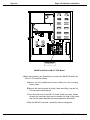
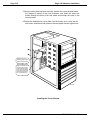
1.Refer to the following illustration to locate and remove the four nuts and
screws holding the fan cover plate in place.
2.After removing the screws, bend the cover plate back and forth until the
plate separates (breaks off) from I/O mounting panel.
The rear I/O panel is made of thin sheet metal and should not take much
effort to detach the adjoining fan cover plate. You may however, need a
flat blade screwdriver to pry the plate away from the chassis rear panel to
make the first bend.
Remove the four
nuts and screws
that hold the fan
cover plate in place.
Then bend the plate
back and forth until
it breaks off from the
rear I/O panel.
MC1252
Removing the Extra Fan Cover Plate
PDI-00172-60, Rev. A02
Page 2-10
Eagle 100 Hardware Installation
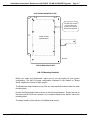
3.Once the cover plate has been removed, position the corner bracket inside
the chassis as shown in the next illustration, and insert the same four
screws through the back of the rear panel and through the holes in the
corner bracket.
4.Position the detached fan cover plate over the screws so it covers the fan
hole cutout, and secure both pieces to the rear panel with the original nuts.
Position the corner
mounting bracket over
the fan hole as shown.
When the bracket is in
position, align the fan
cover plate over the fan
hole cutout and fasten
both pieces to the rear
panel using the same
four screws and nuts.
MC1253
Installing the Corner Bracket
PDI-00172-60, Rev. A02
Installation Instructions: Roadrunner 040 EAGLE 100/AM-3000M/VME Upgrade Page 2-11
2.2.5AM-987 and AM-174 Cable Connections
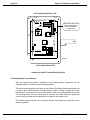
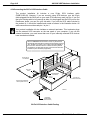
Refer to the following steps and illustration for cable inter-connections. Ensure that all
cable connections are made pin-1 to pin-1.
1.Lay the Roadrunner assembly down flat next to the Eagle chassis. Be sure
it’s positioned as shown, with the cable connectors toward the insideof
the chassis.
2.Unplug the 50-pin SCSI cable from J9 on the AM-137 board, and plug it
into J1 on the AM-174 Roadrunner board.
3.The AM-987 and Roadrunner boards are linked together with two 34-pin
cables included in the installation kit. These two cables make up the data
path between the AM-987 and Roadrunner boards.
A.Connect one 34-pin cable from P1 on the AM-987 board to J2 on the
AM-174 board.
B.Connect the second 34-pin cable from P2 on the AM-987 board to J3
on the AM-174 board.
Take every precaution to plug the X-bus cables in correctly. If the
cables are not plugged in correctly, the system will not boot or run
self-test and the AM-174 board could be seriously damaged! If your
computer does not boot after doing the upgrade, turn off the power and
double check your cable connections.
4.The Roadrunner board has a standard 4-pin DC power connector. Simply
take one of the 4-pin DC power cables extending from your power supply
and plug it into the Roadrunner board.
Although the power connectors are keyed, with extra force they can be
installed incorrectly,so be careful!
PDI-00172-60, Rev. A02
Page 2-12
Eagle 100 Hardware Installation
ALPHA MICROSYSTEMS
W10
J3
W4
W2
J9
W6
J8
J2
J11
DISK
RUN
POWER
W8
W9
U14
J5
JP1
P1
P2
AM-987
ALPHA
MICROSYSTEMS
ER
Y
U14A
P3
BA
TT
50-pin
SCSI
cable
AM-137
J1
W1
J4
J10
J900
P1 P2
W5
U14
U28
J7
W12
U29
U15
SSD
W3
W1
J6
DC Power
ADDRESS/DATA
JP16
J1
J2
JP17
MC1241
J3
JP2
JP6
CONTROL/STATUS
JP15
JP14
JP1
34-pin X-bus cables
040
JP7
NCR
ALPHA
MICROSYSTEMS
ALPHA MICROSYSTEMS AM-174
JP10
JP9
JP12
JP11
JP13
J4
Connecting the Roadrunner Board
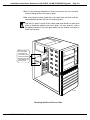
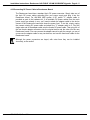
5.After all cable connections are verified, flip the Roadrunner mounting plate
up vertically so that it aligns with the three threaded holes on the corner
bracket, and the hole in the plate "handle" aligns with the single threaded
hole at the bottom of the chassis drive bay as shown in the following
illustration.
PDI-00172-60, Rev. A02
Installation Instructions: Roadrunner 040 EAGLE 100/AM-3000M/VME Upgrade Page 2-13
Though the internal routing of the inter-connecting cables is not critical, it
may be advisable to gently fold the cables to their best possible positions
while moving the Roadrunner assembly into place!
W4
W2
J9
J3
W10
J8
J2
W6
ALPHA MICROSYSTEMS
J11
W1
DISK
RUN
POWER
W8
W9
U14
J5
P1
P2
JP1
U14A
AM-987
ALPHA
MICROSYSTEMS
AM-137
J1
W1
J4
J10
J900
P1 P2
W5
U14
U28
J7
W12
U29
U15
J6
ER
Y
The mounting
plate is secured
to the corner
bracket using
three #6 phillips
head screws.
SSD
W3
The mounting
plate is secured
to the drive bay
with one #6
phillips-head
screw.
BA
TT
P3
MC1242
AM-174
After all cable connections
are made to the AM-174, flip
the mounting plate upright
and secure with four screws
as shown.
Securing the Roadrunner Mounting Plate
6.When you’re satified with the way the assembly fits, secure the
Roadrunner mounting plate with four #6 phillips-head screws where
indicated.
7.Re-install the Eagle chassis top cover.
PDI-00172-60, Rev. A02
CHAPTER 3
AM-3000M/LC Hardware Installation
3.1HARD DRIVE CONSIDERATIONS
Whether you’re installing a new pre-configured Roadrunner bootable SCSI disk drive, or
you’re going to use your existing hard drive as the main system boot drive, there are
certain considerations that must be taken into account before proceeding with the actual
hardware upgrade.
The following sub-sections highlight the various differences between a standard (not
AM-540 modified) AM-140 CPU board, and a modified(with AM-540) AM-140 CPU
board. You should read and understand the following information before attempting the
Roadrunner hardware upgrade.
Remember - before attempting any software or hardware upgrade, be sure you have a
current backup of your system, and a verified warm-boot tape!
3.1.1Roadrunner Boot PROM Routines
For a standard AM-3000M system, the boot PROM on the Roadrunner is programmed
to look first at the SASI port on the main CPU board. If a SCSI drive addressed as I.D.0
is detected on the SASI port it will be selected as the boot device. If no boot drive is
detected on the SASI port, the boot PROM will then check the Roadrunner’s SCSI port
for a device. If a SCSI drive addressed as I.D.0 is detected, then it will be selected as
the boot device.
For an AM-540 modified AM-3000M system, the boot PROM on the Roadrunner is
programmed to bypass the SASI port on the main CPU board since the EN modification
for the AM-540 upgrade effectively eliminates any communication to the SASI port. If
the Roadrunner board does not meet the minimum revision levels as listed in the
"HARDWARE COMPATIBILITY" section of this document, then the system will "hang"
indefinately waiting for a response from the SASI port... that will never come!
If your configuration includes a Tandberg tape drive or other SCSI peripheral, make
sure the bootable hard disk and the peripheral device(s) are attached to the SAME bus.
PDI-00172-60, Rev. A02
Page 3-2
AM-3000M/LC Hardware Installation
3.1.2Attaching Hard Drives to Opposite Bus Ports
On a standard AM-3000M you may attach a SCSI hard drive to the opposite SASI/SCSI
port and treat it much the same as a sub-system drive. That is, if your system is booting
on the Roadrunner’s SCSI port, you could create a disk driver using FIXLOG and
SCZDVR.DVR to access a SASI/SCSI-1 hard drive on the CPU SASI port. Or, if you’re
booting on the SASI port, you could create a disk driver using FIXLOG and SCZRR.DVR
to access a SCSI-1/ SCSI-2 hard drive on the Roadrunner’s SCSI port. Remember
however, that both drives should not be addressed as I.D.0, as the Roadrunner’s boot
routine will try to boot from the SASI port first if it sees a drive connected as I.D.0. Also,
no peripheral device other than a hard disk drive can be accessed, if it’s attached to the
opposite bus port.
On an AM-540 modified CPU board, part of the rework required to enable the AM-540
disk accelerator board affects the operation of the CPU SASI port. For this reason you
cannot attach a sub-system disk drive to the CPU SASI port unless the AM-540 rework
is "un-installed".
3.1.3Upgrading a Standard AM-3000M System
If you are installing a new pre-configured Roadrunner bootable SCSI drive along with
the Roadrunner hardware upgrade, use the following steps as a guide:
1.If your existing drive is SASI/SCSI-1 and you’re going to leave it attached
to the CPU SASI port:
A.Change its drive I.D. to 1, 2, or 3 so that the new Roadrunner boot
PROM will not attempt to boot from it.
B.After the Roadrunner upgrade is completed, create a sub-system
driver to access your original drive using the FIXLOGprogram and
the SCZDVR.DVRCPU SASI port driver.
C. VUE the new Roadrunner’s boot INI and add the sub-system device
under the DEVTBL, BITMAP, and SYSTEM statements.
2.If your existing drive is SCSI-1 or SCSI-2 and you’re going to attach it to
the Roadrunner’s SCSI port as an additional drive:
A.Change its drive I.D. to something higher than zero (usually I.D. 1)
so it won’t conflict with the new Roadrunner boot drive.
B.After the Roadrunner upgrade is completed, create a sub-system
driver to access your original drive using the FIXLOGprogram and
the SCZRR.DVRRoadrunner SCSI port driver.
C. VUE the new Roadrunner’s boot INI and add the sub-system device
under the DEVTBL, BITMAP, and SYSTEM statements.
PDI-00172-60, Rev. A02
Installation Instructions: Roadrunner 040 EAGLE 100/AM-3000M/VME Upgrade
Page 3-3
Upgrading a Standard AM-3000M System -- continued
If you intend to use your existing SASI/SCSI-1 hard drive as the main boot drive, make
sure your AMOS Operating System is version PR5/95 or later andhas been overlaid
with the current AM-987 software package! Use the following steps as a guide:
1.If your existing drive is SCSI-1 or SCSI-2 and you’re going to connect it to
the Roadrunner’s SCSI port as the system boot drive:
A. MONGEN the SCZRR.DVR into the new boot monitor.
B. VUE your boot INI and add the simple SCSI Dispatcher after the
TRMDEF statements. Add the line: SCZDSPSIMRR.SYS to enable
the dispatcher during bootup. (You can PIC code the enhanced
Roadrunner Dispatcher SCZRR.SYS, and add the write-buffering
disk driver later).
C.Power-down the system and install the Roadrunner hardware.
2.If your existing boot drive is a SASI/SCSI-1 type and it’s going to remain
connected to the AM-140 SASI port as the system boot drive:
A.All you need do is MONGEN the SCZDVR.DVRSASI port driver into
the new boot monitor.
B.Power-down the system and install the Roadrunner hardware.
C.If you later add a new SCSI drive to the Roadrunner SCSI port you
must create a sub-system disk driver using the FIXLOG program and
SCZRR.DVR. After adding the new device to your boot INI and
rebooting the system, you can access the new SCSI hard drive on
the Roadrunner’s SCSI port as a sub-system drive.
3.1.4Upgrading an AM-540 Modified AM-3000M System
If you are installing a new pre-configured Roadrunner bootable SCSI drive with the
Roadrunner hardware upgrade, you can simply change the drive I.D. on you old SCSI
drive to something higher than zero (usually I.D.1) and attach it, and the rest of your
SCSI peripherals, to the new Roadrunner SCSI port along with the new boot drive.
1.To access your original drive when attached to the Roadrunner’s SCSI
port (as an additional drive), you must use the FIXLOG program and
SCZRR.DVRto create a sub-system type driver for your original drive.
2.After enabling the sub-system drive in the new boot INI (under the
DEVTBL, BITMAP, and SYSTEM statements) and rebooting the system,
you’ll be able to access your original hard drive using the newly created
sub-system device driver.
PDI-00172-60, Rev. A02
Page 3-4
AM-3000M/LC Hardware Installation
Upgrading an AM-540 Modified AM-3000M System -- continued
If you intend to use your existing SCSI hard drive as the main boot drive you must first
make sure your AMOS Operating System is PR5/95 or later andhas been overlaid with
the current AM-987 software package. You must then install the Roadrunner disk driver
into the new boot Monitor, and change the SCSI dispatcher in your boot INI prior to
performing the Roadrunner hardware upgrade! Use the following steps as a guide:
1.On your original drive,
MONGEN the SCZRR.DVR into the new boot monitor.
2. VUE your original boot INI and re-define the SCSI Dispatcher in your boot
INI from SCZ190.SYS to the Roadrunner’s SIMRR.SYS. (You can PIC
code the enhanced Roadrunner Dispatcher SCZRR.SYS later).
3.Power-down the system and install the Roadrunner hardware.
3.2AM-3000M HARDWARE INSTALLATION
The following sections describe the steps required to perform the actual Roadrunner
upgrade hardware installation. Once again you should review each section and be
familiar with the requirements prior to disassembling your working system.
At this point you might want to double check your Roadrunner upgrade kit and ensure
you have all PC boards, cables, and mounting hardware required to complete the
upgrade installation.
If you did not order a SCSI disk drive that was pre-loaded with a Roadrunner compatible
AMOS operating system, you need to update the software on your existing drive. The
software download and configuration procedure, located in Appendix C, must be
completed before the Roadrunner hardware is installed in your computer.
The first installation step you’ll have to perform involves removing the AM-140 CPU
board from the system. The CPU board requires an etch cut and a jumper wire on the
solder-side of the board, so be sure you have an appropriate work area and the proper
tools to do the rework.
With the AC power cord unplugged and the top cover removed, the components inside
your computer are vulnerable to damage caused by static discharge. Your body and
clothing are capable of storing an electrical charge that can damage or destroy
unprotected electronic components. Prior to handling any computer hardware, be sure
you and your work area are properly protected against static discharge. There are a
number of commercially available static protection devices designed specifically to
protect your equipment from harmful static discharge.
PDI-00172-60, Rev. A02
Installation Instructions: Roadrunner 040 EAGLE 100/AM-3000M/VME Upgrade
Page 3-5
3.2.1AM-140 (AM-3000M CPU Board) Required Rework
The AM-140 requires the following rework modification to work with the AM-987
Interface board. This rework has not been previously incorporated into any formal Alpha
Micro Engineering Notice (EN) and so has no relevance to the revision level of the
AM-140 board. THE AM-987 WILL NOTFUNCTION WITHOUT THIS REWORK!
1.Refer to your AM-3000M Owner’s Manual as necessary and remove the
AM-140 CPU board from the system chassis.
2.On the
solder-side of the AM-140 CPU board, cut the etch at U45 pin-12.
3.Solder a jumper wire from U45 pin-2 to U88 pin-2.
I/O Expansion
Connectors
AM-140
Board Edge
U45
1
Cut etch between U45
pin-12 and feedthrough
DC Power
Connectors
Solder jumper wire from
U45 pin-2 to U88 pin-2
1
U88
SASI Bus
Connector
MC1230
AM-140 Solder Side
AM-140 Rework for AM-987
The rework performed on the AM-140 board will NOT affect its normal operation. If it
becomes necessary to un-install the Roadrunner upgrade, you do not need to un-install
the AM-140 rework!
PDI-00172-60, Rev. A02
Page 3-6
AM-3000M/LC Hardware Installation
3.2.2AM-3000M Hardware Installation Overview
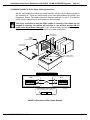
The following illustration shows an overview of how the AM-987 and AM-174 are
mounted on the AM-140 CPU board.
Note that the AM-987 has two plastic standoffs mounted on the component side near
the X-Bus connectors. These standoffs are simply used as nuts to hold the attaching
plastic screws in place. The heads of the plastic screws will act as thin spacers between
the AM-987’s solder side, and the empty memory connectors on the AM-140 CPU
board. This then allows the AM-987 to rest on the AM-140’s memory connectors and
give support and stabilization to the board when the added weight of the X-Bus cables
are installed.
Also note that the AM-987 has an additional CPU socket mounted between its
permanent header and the AM-140’s CPU socket. The additional socket is used to
provide the proper clearance over the AM-140 CPU components.
The AM-174 Roadrunner mounting bracket is installed by first removing four of the
AM-140 mounting screws (refer to AM-140 Preparation Illustration for screw locations).
The mounting bracket has four 1-inch hollow standoffs attached to it. The standoffs are
positioned over the vacated mounting holes on top of the CPU board and secured by
four 1.5 inch long screws.
Once the AM-987 and the Roadrunner mounting bracket are installed, all that remains is
to mount the AM-174 board to the mounting bracket and connect the two X-Bus cables
between the AM-987 and the AM-174 boards!
SCSI Bus
Connector
X-Bus Cables
AM-174 ROADRUNNER
Memory SIMM
Connector
MOUNTING BRACKET
AM-987 INTERFACE
AM-140 CPU BOARD
Plastic
Standoffs
System
FRONT
System
REAR
AM-140 Memory
Connectors
Additional
CPU Socket
Chassis Floor
Mounting Plate
AM-3000M Hardware Installation
SIDE VIEW
MC1225
AM-140/AM-987/AM-174 Installation Overview
PDI-00172-60, Rev. A02
Installation Instructions: Roadrunner 040 EAGLE 100/AM-3000M/VME Upgrade
Page 3-7
3.2.3Installing the AM-987 on the AM-140 CPU Board
After performing the required rework on the AM-140 CPU board, the board will have to
be re-installed in the system chassis. However, it may be advantageous to do some
of the next installation steps while the CPU board is still out of the chassis. Items
such as removing the CPU chip (or AM-540 board), and the AM-121 VPC board (if
applicable) may be more accessable while working on a flat bench! So take a moment
to scan down through the next few steps and decide for yourself before re-installing the
AM-140 CPU board.
To install the AM-987 board refer to the next illustration and complete the following
steps:
1.The memory boards plugged into your AM-140 board are not supported for
use with Roadrunner hardware. Remove any memory boards plugged into
the AM-140 board at locations J12, J13, J14, and J15.
2.The 68030 CPU chip (or the AM-540 board) must be removed from its
socket located at U144 on the AM-140 board. The CPU chip location is
shown in the AM-140 Preparation Illustration. To remove the chip or
AM-540 board, gently pry the chip or board loose from the socket using a
small flat blade screwdriver. Work around the edge lifting from corner to
corner and side to side until it pops loose from the socket. Don’t rush this
operation! If too much force is used you could break some of the pins or
the ceramic case on the CPU chip.
3.If you are currently using the AM-121 VPC board, it must be removed in
order to install the AM-987 board.
4.Leave out the (4) 6-32 phillips-head CPU mounting screws as indicated in
the illustration.
5.Do NOT remove the AM-140 board’s boot PROMs.
PDI-00172-60, Rev. A02
Page 3-8
AM-3000M/LC Hardware Installation
Remove the screws
at these locations.
1
1
J17
J16
J15
J14
J13
J12
With a small flat blade screwdriver,
gently pry out the 68030 chip or
the AM-540 board located at U144.
U144
MEMORY CONNECTORS
NOT SUPPORTED WITH
ROADRUNNER HARDWARE
Remove the memory bracket
and your old memory boards.
It is not necessary to remove
the boot PROMs located at
U97 and U130.
140-00
J10
U131
U130
U90
140-01
1
U97
W14
W13
1
AM-140
J19
J20
J18
W12
1
J8
U32
J7
W9
BATTERY
W11
W1
J3
W10
J6
W8
J5
J4
J2
J1
SW1
MC1226
AM-140 Preparation for AM-987 Board
PDI-00172-60, Rev. A02
Installation Instructions: Roadrunner 040 EAGLE 100/AM-3000M/VME Upgrade
Page 3-9
6.Refer to the next illustration and install two plastic standoffs on the AM-987
board where indicated. Remember that these standoffs are installed on the
component side of the board, with the plastic screws inserted from the
solder side. The heads of the the plastic screws will rest on top of the
empty AM-140 memory connectors to provide insulation and support of the
AM-987 board.
7.Be sure jumper W1 is set to enable the CPU header at U14. (Installed in
position toward U14).
8.A 121-pin socket was installed on the bottom of the AM-987 board prior to
shipment. This socket gives the AM-987 board added height so that it does
not come in contact with other components on the AM-140 board. During
shipment, the pins on the socket are protected with a piece of conductive
foam. Before you install the AM-987, remove the foam and make sure no
foam residue remains stuck to any of the pins.
9.At this point, your AM-987 board should be ready to install. The AM-987
board sets on top of the AM-140 board, plugging into the CPU socket at
location U144. There is a cutout on the AM-987 CPU header that makes it
easy to align the board with the CPU socket on the AM-140 board. Place
the AM-987 board into position as shown, using the cutout to align the pins
of the CPU header at U14 with the CPU socket on the AM-140 board. If
everything is lined-up just right, you will feel the board settle into position in
the socket. This is another operation where it’s best to take your time and
be sure the AM-987 and AM-140 CPU socket are properly aligned. When
you’re sure the AM-987 board is in position, gently press the AM-987
board into the socket.
10.Since the AM-987 board will be almost completely covered by the
Roadrunner mounting bracket, this would be a good time to attach the
X-bus cables to the AM-987 board. Plug one 34-pin flat cable onto each
connector at P1 and P2 on the AM-987 board. Be sure that the colored
stripe along the edge of each cable aligns with pin-1 of the connectors.
Once installed, simply lay the cables flat on the chassis floor toward the
front of the system and out of the way.
You might want to save yourself some neck cramps later on, by identifying the X-bus
cables now! Use a permanent marking pen or other such method, to label the opposite
ends of the cables that will plug into the connectors on the AM-174 Roadrunner board.
For example, the opposite end of the cable plugged onto the connector at P1 could be
labeled: P1---J2. And the opposite end of the cable plugged onto P2 could be labeled:
P2---J3. By using a positive means of identification now you will prevent cross-cabling
later, and possible damage to the AM-174 board!
PDI-00172-60, Rev. A02
Page 3-10
AM-3000M/LC Hardware Installation
1
1
J17
J16
J15
Plastic standoffs
mounted on top
of board, using
plastic screws
from the bottom.
(solder side)
ALPHA
MICROSYSTEMS
J14
AM-987
P1
J13
P3
P2
JP1
J12
U14A
Jumper W1 installed to
enable CPU header at
U14.
W1
U14
U144
140-00
J10
U131
U130
U90
140-01
1
U97
W14
W13
1
J19
AM-140
J20
J18
W12
1
J8
J7
U32
W9
BATTERY
W11
W1
J3
W10
J6
W8
J5
J4
J2
J1
SW1
MC1227
AM-140 with AM-987 Mounted
PDI-00172-60, Rev. A02
Installation Instructions: Roadrunner 040 EAGLE 100/AM-3000M/VME Upgrade Page 3-11
3.2.4Installing the Roadrunner Board
Before you install your Roadrunner, make sure the board is properly setup for your
configuration. The previous AM-174 jumper configuration illustration explains the
function of each jumper.
Refer to the next two illustrations and the following instructions to install the Roadrunner
mounting bracket and the AM-174 Roadrunner board:
1.A bracket (DWF-20748-00) designed for mounting the Roadrunner board
is included in the installation kit. To install the bracket, you must remove
the four phillips-head screws indicated in the previous illustration (if not
already done).
2.After the screws have been removed, install the DWF-20748-00 bracket as
shown in the following illustration. The bracket is held in place with four 1.5
inch #6-32 phillips-head screws (included in the installation kit).
3.Once the mounting bracket has been secured, install the Roadrunner on
the bracket making sure it’s oriented exactly as shown in the next
illustration. The Roadrunner board is held in place with four #6-32
phillips-head screws where indicated.
PDI-00172-60, Rev. A02
Page 3-12
AM-3000M/LC Hardware Installation
The Roadrunner mounting bracket is held in
place with four #6-32 x 1.5-inch long phillipshead screws, through 1-inch standoffs.
1
1
J17
J16
J15
ALPHA
MICROSYSTEMS
The AM-174 Roadrunner
J14on these four
AM-987 board mounts
P1
standoffs.
J13
P3
P2
JP1
J12
DWF-20748-00
U14A
W1
U14
U144
AM-987
140-00
J10
U131
U130
U90
140-01
1
U97
W14
W13
1
J19
AM-140
J20
J18
W12
1
J8
U32
J7
W9
BATTERY
W11
W1
J3
W10
J6
W8
J5
J4
J2
J1
SW1
MC1228
Installing the Roadrunner Mounting Bracket
PDI-00172-60, Rev. A02
Installation Instructions: Roadrunner 040 EAGLE 100/AM-3000M/VME Upgrade Page 3-13
Install a 6-32 phillips-head
screw at each of these four
locations.
1
1
ALPHA MICROSYSTEMS AM-174
040
P1
P3
DWF-20748-00
J13
P2
JP1
J12
J16
ADDRESS/DATA
J14
AM-987
J3
J15
CONTROL/STATUS
AM-174
ALPHA
MICROSYSTEMS
J2
JP9
JP15
JP14
JP17 JP16
JP10
JP12 JP11 JP13
J17
JP6
N C R
U14A
W1
J1
JP2
JP1
J4
ALPHA
MICROSYSTEMS
JP7
U14
U144
AM-987
140-00
J10
U131
U130
U90
140-01
1
U97
W14
W13
1
J19
AM-140
J20
J18
W12
1
J8
J7
U32
W9
BATTERY
W11
W1
J3
W10
J6
W8
J5
J4
J2
J1
SW1
MC1229
Installing the Roadrunner Board
PDI-00172-60, Rev. A02
Page 3-14
AM-3000M/LC Hardware Installation
3.334-PIN X-BUS CABLING PRECAUTIONS
If you’ve already connected the X-bus cables to the AM-987 connectors and labeled the
ends as previously suggested, you may skip the following message and proceed to the
next installation step!
Up to this point the upgrade installation instructions have been fairly straightforward.
However, installing the inter-connecting X-bus cables can be a bit tricky since the
connectors on the AM-987 board are completely hidden by the Roadrunner board and
mounting bracket. You must take every precaution to install the X-bus cables correctly,
as reversing the cables may cause serious damage to the AM-174 Roadrunner board!
If you can not visually verify the cable connections on the AM-987 board, you may need
to unplug it from the CPU board and move it down until the X-bus connectors are
visable. You can then safely connect the cables from the AM-987 board to the AM-174
Roadrunner. After the cables are routed correctly, you can reposition the AM-987 over
the CPU socket on the AM-140 board and carefully reinstall it.
3.3.1AM-987 to AM-174 34-Pin X-bus Cabling Instructions
To make the X-bus cable connections between the AM-987 and AM-174 boards, refer to
the next illustration and make the following connections. Be sure to observe the
correct pin-1 orientation.
1.Connect one 34-pin X-bus cable to
If not already installed!
P1 on the AM-987 board.
2.Route the cable under the Roadrunner mounting bracket toward the front
of the system.
3.Lift the cable up over the Roadrunner board and make a 90 degree fold so
that the cable connector can be plugged into J2 on the Roadrunner board.
Note that this cable will lay over the other X-bus connector at J3.
4.Connect the second 34-pin X-bus cable to
If not already installed!
P2 on the AM-987 board.
5.Again route this cable under the Roadrunner mounting bracket toward the
front of the system, then up and over the AM-174 board. This cable will lay
on top of the first X-bus cable on the AM-987, and then run under it when
wrapped over the top of the AM-174 board.
6.Make a similar 90 degree fold in the cable so that this connector can be
plugged into J3 on the AM-174 Roadrunner board. Note that this cable will
be plugged in under the first X-bus cable.
7.If you’ve unplugged the AM-987 from the AM-140 CPU board to make
these connections (as explained under "Cabling Precautions"), be sure to
carefully plug the AM-987 back into the CPU socket when done.
PDI-00172-60, Rev. A02
Installation Instructions: Roadrunner 040 EAGLE 100/AM-3000M/VME Upgrade Page 3-15
34-Pin X-Bus Cable
90 Degree Fold-Over
AM-174
J2
Pin-1
ALPHA
MICROSYSTEMS
AM-174
Mounting
Bracket
AM-987
P1
P3
P2
JP1
U14A
U14
MC1233
Connecting the First X-Bus Cable
34-Pin X-Bus Cable
90 Degree Fold-Over
AM-174
J2
J3
Pin-1
ALPHA
MICROSYSTEMS
AM-174
Mounting
Bracket
AM-987
P1
P3
P2
JP1
U14A
U14
MC1234
Connecting the Second X-Bus Cable
PDI-00172-60, Rev. A02
Page 3-16
AM-3000M/LC Hardware Installation
3.3.2Connecting the 50-Pin SCSI Interface Cable
Your computer’s existing 50-pin SASI/SCSI interface cable does not have to be
replaced. However, because the cable may not be quite long enough to reach the SCSI
port on the Roadrunner, a short extension cable (part number DWB-10313-00) has
been included in your installation kit. One end of this cable plugs into the 50-pin J1
connector on the Roadrunner board. The other end of the cable plugs onto the end of
your existing SCSI interface cable. Using the colored stripe on the cables as a
reference, make sure all cable connections are made pin-1 to pin-1.
If you’re upgrading a standard AM-3000M system and intend on using the CPU SASI
port also, you may need to obtain an additional 50-pin interface cable and bus
terminator.
3.3.3Connecting DC Power Cable to Roadrunner Board
The Roadrunner board has a standard 4-pin DC power connector. Simply take one of
the 4-pin DC power cables extending from your power supply and plug it into the
Roadrunner board. For AM-3000M and AM-3000 VME systems a DC power "Y" adapter
cable is provided as part of the hardware kit. If all available DC power cables from the
main power supply are already in use, you’ll need to attach the adapter cable to the
device closest to the Roadrunner board and share the power feed. To do this, simply
unplug the nearest existing DC power cable and attach the "Y" adapter cable to it. Plug
the single male end of the adapter cable onto the female DC power cable. Then plug
one of the two female adapter connectors into the original device and the new
Roadrunner board. If for some reason the adapter cannot be split far enough, you can of
course use the adapter cable for any two devices, and use the freed main cable for the
Roadrunner board.
Although the power connectors are keyed, with extra force they can be installed
incorrectly, so be careful!
PDI-00172-60, Rev. A02
CHAPTER 4
AM-3000 VME Hardware Installation
4.1HARD DRIVE CONSIDERATIONS
Whether you’re installing a new pre-configured Roadrunner bootable SCSI disk drive, or
you’re going to use your existing hard drive as the main system boot drive, there are
certain considerations that must be taken into account before proceeding with the actual
hardware upgrade.
The following sub-sections highlight the various hard drive configurations and how to
deal with them. You should read and understand the following information before
attempting the Roadrunner hardware upgrade.
Remember - before attempting any software or hardware upgrade, be sure you have a
current backup of your system, and a verified warm-boot tape!
4.1.1Roadrunner Boot PROM Routine
The boot PROM on the Roadrunner is programmed to look first at the SASI port on the
AM-185 or 185-50 board. If a SCSI drive addressed as I.D.0 is detected on the SASI
port, it will be selected as the boot device. If no device is detected on the SASI port,
then the boot PROM will check the Roadrunner’s SCSI port for a boot drive.
4.1.2Attaching Hard Drives to Opposite Bus Ports
On an AM-3000 VME system you may attach a SCSI hard drive to the opposite
SASI/SCSI port and treat it much the same as a sub-system drive. That is, if your
system is booting on the Roadrunner’s SCSI port, you could create a disk driver using
FIXLOG and SCZDVR.DVR to access a SASI/SCSI-1 hard drive on the CPU SASI port.
Or, if you’re booting on the SASI port, you could create a disk driver using FIXLOG and
SCZRR.DVR to access a SCSI-1/SCSI-2 hard drive on the Roadrunner’s SCSI port.
Remember however, that both drives should not be addressed as I.D.0, as the
Roadrunner’s boot routine will try to boot from the SASI port first if it sees a drive
connected as I.D.0. Also, no peripheral device other than a hard disk drive can be
accessed, if it’s attached to the opposite bus port.
PDI-00172-60, Rev. A02
Page 4-2
AM-3000 VME Hardware Installation
If your configuration includes a Tandberg tape drive or other SCSI peripheral, make
sure the bootable hard disk and the peripheral device(s) are attached to the SAME bus.
The configuration will not be functional if the peripheral devices are connected to one
port, and the bootable disk drive is attached to the other port!
4.1.3AM-3000 VME Boot Drive Guidelines
If you are installing a new pre-configured Roadrunner bootableSCSI drive along with
the Roadrunner hardware upgrade, you have the following configuration options:
1.You can leave your existing SASI/SCSI-1 drive attached to the CPU SASI
port, but you must change its drive I.D. to 1, 2, or 3 so that the new
Roadrunner boot PROM will not attempt to boot from it.
After the Roadrunner has been installed and the system rebooted, you
must then create a sub-system driver to access your original drive
connected to the CPU SASI port. The new driver must be created with the
FIXLOG program and the SCZDVR.DVR SASI type driver.
Once the SASI sub-system driver has been created (and saved) it must be
added to the new Roadrunner’s boot INI under the DEVTBL, BITMAP, and
SYSTEM statements.
After rebooting the system again, you can mount your original hard drive
using the device driver you just created, and copy any or all of your
application software to the new SCSI boot drive.
2.You can attach your existing SCSI-1/SCSI-2 hard drive (and any other
SCSI peripheral devices) to the new Roadrunner’s SCSI port, but you must
still change the drive I.D. to something higher than zero (usually I.D.1) so
that it will not conflict with the new Roadrunner boot drive. And, again after
the initial system bootup you must create a sub-system driver for the
original drive, but this time using the FIXLOG program and the
SCZRR.DVRRoadrunner SCSI port driver.
Once the new sub-system driver is added to the new
system is rebooted, you can access your original
sub-system driver you just created. Also, any other
devices attached to the Roadrunner’s SCSI port can be
are also pre-defined in the new boot INI.
boot INI and the
drive using the
SCSI peripheral
accessed, if they
Be sure to use the the /NOD switch when you copy software to the new boot
drive! If you accidentally over-write the new AMOS Operating System software
with your old O/S software, the system will NOT boot on the Roadrunner!
PDI-00172-60, Rev. A02
Installation Instructions: Roadrunner 040 EAGLE 100/AM-3000M/VME Upgrade
Page 4-3
If you intend you use your existing SASI/SCSI-1 hard drive as the main boot drive, you
must first make sure your AMOS Operating System is version PR5/95 or later and has
been overlaid with the current AM-987 software support package! Use the following
steps as a guide:
1.If your existing drive is SCSI-1 or SCSI-2 and you’re going to connect it to
the Roadrunner’s SCSI port as the system boot drive:
A. MONGEN the SCZRR.DVR into the new boot monitor.
B. VUE your boot INI and add the simple SCSI Dispatcher after the
TRMDEF statements. Add the line: SCZDSP SIMRR.SYS to enable
the dispatcher during bootup. (You can PIC code the enhanced
Roadrunner Dispatcher "SCZRR.SYS" and add the write-buffering
disk driver later).
C.Power-down the system and install the Roadrunner hardware.
2.If your existing boot drive is a SASI/SCSI-1 type and it’s going to remain
connected to the AM-185/185-50 SASI port as the system boot drive:
A.All you need do is MONGEN the new SCZDVR.DVR SASI type driver
into the new boot monitor.
B.Power-down the system and install the Roadrunner hardware.
C.If you later add a new SCSI drive to the Roadrunner SCSI port you
must create a sub-system disk driver using FIXLOG and
SCZRR.DVR. After adding the new device to your boot INI and
rebooting the system, you can access the new SCSI hard drive on
the Roadrunner’s SCSI port as a sub-system drive.
4.2AM-3000 VME HARDWARE INSTALLATION
The following sections describe the steps required to perform the actual Roadrunner
upgrade hardware installation. Once again you should review each section and be
familiar with the requirements prior to disassembling your working system.
At this point you might want to double check your Roadrunner upgrade kit and ensure
you have all PC boards, cables, and mounting hardware required to complete the
upgrade installation.
If you did not order a SCSI disk drive that was pre-loaded with a Roadrunner compatible
AMOS operating system, you need to update the software on your existing drive. The
software download and configuration procedure, located in Appendix C, must be
completed before the Roadrunner hardware is installed in your computer.
PDI-00172-60, Rev. A02
Page 4-4
AM-3000 VME Hardware Installation
4.2.1Installing the AM-987 Board
With the AC power cord unplugged and the top cover removed, the components inside
your computer are vulnerable to damage caused by static discharge. Your body and
clothing are capable of storing an electrical charge that can damage or destroy
unprotected electronic components. Prior to handling any computer hardware, be sure
you and your work area are properly protected against static discharge. There are a
number of commercially available static protection devices designed specifically to
protect your equipment from harmful static discharge.
When installing the AM-987 board, make sure all the pins are properly aligned. If you
plug the board in incorrectly, it is possible to short power to ground, resulting in possible
damage to the AM-987, AM-185 or AM-185-50 boards.
1.Though not absolutely necessary, it may be easier to do this installation by
removing the AM-185 or AM-185-50 board from the system chassis. If you
remove the CPU board be sure to note the orientation of any other cables
that may be installed, before unplugging them from the CPU board.
2.The main CPU board is held in place with two screws, but before you
remove the two screws, you should first unfasten the I/O rear panel from
the computer. It is not necessary to remove all the I/O cables connected
to the rear panel; the objective is simply to move the rear panel just
enough so that the CPU board can be unplugged and removed.
3.Remove the two screws holding the main CPU board to the rear panel,
then unplug the CPU board from the motherboard and remove it.
4.Next, the 68030 CPU chip must be removed from its socket. (AM-185-00 =
U97, AM-185-50 = U123). To remove the chip, gently pry the chip loose
using a small flat blade screw driver. Work around the chip lifting from
corner to corner and side to side until the chip pops loose from the socket.
Don’t rush this operation, if too much force is used you could break some
of the pins or the ceramic case on the CPU chip.
5.Before installing the AM-987 board on the main CPU board, you must
install two hardware items on the solder side of the AM-987 board. These
items are required for board support and stabilization when the AM-987 is
installed on the main CPU board. If the board is being mounted on an
AM-185-00 CPU board, then you’ll need to install a rubber bumper and a
plastic standoff. If the board is being installed on an AM-185-50 CPU
board, then you’ll need to install two rubber bumpers without the standoff.
Refer to the following illustrations for hardware mounting locations. Note
that the rubber bumper located near connector P1 must be cut in half
prior to the installation. This is required to prevent the conductive adhesive
on the bumper from touching any of the pins on the bottom of X-Bus
connector P1.
PDI-00172-60, Rev. A02
Installation Instructions: Roadrunner 040 EAGLE 100/AM-3000M/VME Upgrade
Rubber
Bumper
mounted on
solder-side
3/4"
1/2"
2 Rubber
Bumpers
mounted on
solder-side
Page 4-5
3/4"
ALPHA
MICROSYSTEMS
AM-987
AM-987
P1
P1
P2
P3
P3
P2
JP1
JP1
U14A
U14A
W1
W1
U14
U14
MC1237
For mounting on
an AM-185-00
Plastic
Standoff
mounted on
solder-side
For mounting on
an AM-185-50
Installing AM-987 Support Hardware
6.At this point, your AM-987 board should be ready to install. The AM-987
board sets on top of the AM-185 board, plugging into the vacated CPU
socket. (AM-185-00 = U97, AM-185-50 = U123). You will notice there is
an extra CPU socket installed on the bottom of the AM-987 board. The
socket serves two purposes: it adds extra height to the AM-987 board so it
will not make contact with components on the CPU board; it also protects
the pins on the AM-987 board. If a pin does break, you want it to be a pin
on the inexpensive socket, not one of the pins on the AM-987 board!
Refer to the following two illustrations for proper placement of the AM-987
board on the main CPU board. One Illustration shows installation an
AM-185-00, and the other shows placement on an AM-185-50. There is a
cutout on the AM-987 board that makes it easy to align the board with the
CPU socket on the main CPU board. Remove the protective foam from the
socket on the bottom of the AM-987, making sure no foam residue
remains. Place the AM-987 board into position, using the cutout to align
the pins with the socket. If everything is properly aligned, you will feel the
board settle into position in the socket. This is another operation where it
is best to take your time and be sure the AM-987 and the CPU socket are
properly aligned. When you’re sure the AM-987 board is in position, gently
press the AM-987 board into the socket.
7.Reinstall the main CPU board into the computer chassis.
PDI-00172-60, Rev. A02
Page 4-6
AM-3000 VME Hardware Installation
J2
SW1
J20
J17
J3
J18
BATTERY
AM-185-00
Rubber bumper
(1/2) mounted on
solder-side
ALPHA
MICROSYSTEMS
AM-987
P1
Set Jumper W1 in
position to select
header at U14A
P3
P2
JP1
U95
U14A
W1
U14
Plastic standoff
on solder-side
AM-987 plugs into AM-185
CPU chip socket at U97
MC1235
AM-987 Mounted on an AM-185-00 CPU Board
PDI-00172-60, Rev. A02
Installation Instructions: Roadrunner 040 EAGLE 100/AM-3000M/VME Upgrade
J2
J3
SW1
J17
J20
BATTERY
J18
AM-185-50
AM-987 plugs into AM-185
CPU chip socket at U123
J04
J03
U100
Rubber bumper
(1/2) mounted on
solder-side
U14
P2
JP1
P1
AM-987
ALPHA
MICROSYSTEMS
Rubber bumper
mounted on
solder-side
W1
Set Jumper W1 in
position to select
header at U14
U14A
P3
J02
J01
MC1236
AM-987 Mounted on an AM-185-50 CPU Board
PDI-00172-60, Rev. A02
Page 4-7
Page 4-8
AM-3000 VME Hardware Installation
4.2.2Installing the Roadrunner Board
The following instructions apply to the pedestal chassis only. Refer to Appendix E for
rack mount system instructions.
Before you install your Roadrunner, make sure it’s set up properly for your system
configuration. The AM-174 Jumper Configuration illustration explains the function of
each jumper.
Use the following instructions to install the Roadrunner:
1.The Roadrunner board installs on top of the system power supply. If you currently
have a Xebec or AM-528 board installed at this location, it must be removed.
2.The Roadrunner board must be positioned on the power supply as shown in the
following illustration. Ensure the end with the 50-pin and two 34-pin connectors is
located nearest the rear panel.
3.The board is held in place with four 6-32 phillips-head screws.
Note how the Roadrunner
board is positioned so these
connectors are located
nearest to the rear panel
#6 NYLON
WASHER
6-32 PHILLIPSHEAD SCREW
POWER SUPPLY
TOWARD
FRONT PANEL
MC1115
TOWARD
REAR PANEL
Mounting the Roadrunner Board
PDI-00172-60, Rev. A02
Installation Instructions: Roadrunner 040 EAGLE 100/AM-3000M/VME Upgrade
Page 4-9
4.2.3AM-987 to AM-174 34-Pin X-bus Cabling Instructions
AM-987 and Roadrunner boards are linked together with two 34-pin cables included in
the installation kit. These two cables make up the data path between the AM-987 and
Roadrunner boards. The cable connections must be made pin-1 to pin-1. To install the
cables, use the instructions in the illustration on the next page.
Take every precaution to plug the X-Bus cables in correctly. If the cables are not
plugged in correctly, the system will not boot or run self-test and the AM-174
board could be seriously damaged! If your computer does not boot after doing the
upgrade, turn off the power and double check your cable connections.
X-BUS CABLE
ROUTING PATH
AM-987
BOARD
(in one of two positions)
AM-185-00/-50
CPU BOARD
X-BUS CABLE
ROUTING PATH
AM-174
BOARD
AM-987 TO AM-174 34-PIN CABLE ROUTING
AM-987
AM-174
P1
P1
J3
J3
P2
P2
J2
J2
Use the embossed arrow on each 34-pin
cable connector as a pin-1 reference.
AM-987 to Roadrunner X-Bus Cable Routing
PDI-00172-60, Rev. A02
MC1238
Page 4-10
AM-3000 VME Hardware Installation
4.2.4Connecting the 50-Pin SCSI Interface Cable
The product installation kit includes a new 50-pin SCSI interface cable
(DWB-10193-04). However, if you are currently using SCSI devices, your old 50-pin
cable plugged into the SASI port on your main CPU board may work just fine. If you find
that your existing cable is long enough to allow it to be plugged into the SCSI port on the
Roadrunner board, you can use your old cable. If you use the SCSI cable included in
the product kit, it should be installed and routed as shown in the illustration below. All
cable connections must be made pin-1 to pin-1.
Your product installation kit also includes an external terminator. This terminator plugs
into the external SCSI connector on the rear panel of your computer. If you use the
external terminator, you must insure that none of your internally mounted SCSI devices
have terminators installed.
When an external SCSI terminator is used, any SCSI device
with internal SCSI termination must have its terminators removed!
Also, the AM-174 is factory set to supply termination power to
the SCSI bus. When the AM-174 is used in its factory default
configuration, all other SCSI devices must have their SCSI bus
termination power disabled (if applicable).
AM-185-00/-50
CPU BOARD
OLD SASI
PORT
ROADRUNNER
SCSI PORT
AM-174
BOARD
SCSI 50-PIN
CABLE ROUTING
50-PIN SCSI INTERFACE
CABLE (DWB-10193-04)
MC1239
EXTERNAL
TERMINATOR
(PRA-00222-00)
50-Pin SCSI Interface Cable Routing
PDI-00172-60, Rev. A02
Installation Instructions: Roadrunner 040 EAGLE 100/AM-3000M/VME Upgrade Page 4-11
4.2.5Connecting DC Power Cable to Roadrunner Board
The Roadrunner board has a standard 4-pin DC power connector. Simply take one of
the 4-pin DC power cables extending from your power supply and plug it into the
Roadrunner board. For AM-3000 VME system a DC power "Y" adapter cable is
provided as part of the hardware kit. If all available DC power cables from the main
power supply are already in use, you’ll need to attach the adapter cable to the device
closest to the Roadrunner board and share the power feed. To do this, simply unplug
the nearest existing DC power cable and attach the "Y" adapter cable to it. Plug the
single male end of the adapter cable onto the female DC power cable. Then plug one of
the two female adapter connectors into the original device and the other into the new
Roadrunner board. If for some reason the adapter cannot be split far enough, you can of
course use the adapter cable for any two devices, and use the freed main cable for the
Roadrunner board.
Although the power connectors are keyed, with extra force they can be installed
incorrectly, so be careful!
PDI-00172-60, Rev. A02
CHAPTER 5
Initial Operation and Testing
5.1BOOTING THE NEW ROADRUNNER HARDWARE
In order to perform the steps outlined in this section, your disk drive must be properly
configured with a bootable Roadrunner compatible AMOS operating system. If you are
using your existing drive, the instructions in this section assume that you have already
configured your software based on the previous compatibility guidelines and the
instructions in Appendix C, prior to installing the Roadrunner hardware.
If you installed a new SCSI disk drive that was pre-loaded with a bootable Roadrunner
compatible copy of AMOS, your computer is ready to boot. However, some recent
Quantum hard drives have shown a slightly slower spin-up time and occasionally will not
come completely ready prior to execution of the Roadrunner’s boot routine. A simple
remedy to this situation is to set the system boot select switches to alternate boot the
SCSI TAPE drive, and main boot the SCSI HARD drive. This combination of boot
selection will cause the boot routine to first look for an active tape drive with a valid
warm boot tape installed. After approximately 10 to 15 seconds, if the alternate boot
device is not valid, the boot routine will revert to the main selected boot device and the
system will boot from the hard drive as normal. This method only takes a few seconds
longer to boot, but allows plenty of time for the Quantum drive to come ready prior to
disk access. Additionally, should it ever become necessary to actually warm boot your
computer, you only need to install your warm boot tape and press the reset button!
Refer to your computer Owner’s Manual for boot switch settings.
SCSI drives factory loaded with a bootable Roadrunner compatible AMOS operating
system are configured with the simple dispatcher, SIMRR.SYS. The simple dispatcher is
intended for temporary use only. To configure the high performance SCSI dispatcher,
you must purchase the PIC for the dispatcher from Alpha Micro and configure it as
described in Appendix C.
Turn the computer’s power switch to the on position and your Roadrunner hardware will
start the boot process just as your old CPU board did. If the SCSI dispatcher was not
defined in your system initialization command file prior to turning off the computer and
removing your old CPU board, an error message similiar to the one below will be
displayed on your terminal.
?The SCSI dispatcher must be defined in order to use this driver
PDI-00172-60, Rev. A02
Page 5-2
Initial Operation and Testing
This error will be displayed each time a DEVTBL statement for a SCSI magnetic tape
drive is encountered in your system initialization command file. While this error will not
prevent the computer from booting, none of your magnetic tape devices will work until
the dispatcher is defined.
5.2INITIAL SYSTEM TESTING
After installation is complete, run the Roadrunner Self Test program to make sure each
subsystem is functional. The self test diagnostics are incorporated into the boot PROM
on the Roadrunner. Refer to the Alpha Micro Self Test User’s Guide for instructions.
Self-Test will first examine the original CPU boot PROMs to determine the system
identification. If the boot PROMs have been removed from the main CPU board, the
system may not function properly and self-test (as well as any other SYSXER
diagnostics) will probably report erroneous test results! Do not remove the old CPU boot
PROMs.
After completing a pass of self test, press reset to reboot the computer.
Use caution when booting out of Self-Test! DO NOT reboot the system while the
hard disk controller or diagnostic cylinder tests are running! Though most newer hard
drives will not have a problem handling the power interruption, data or format damage to
some hard drives could result!
After bootup, at the AMOS prompt type: SYSTAT RETURN
Check the system status information displayed by the SYSTAT program and insure all
jobs applicable to your computer are up and running—e.g., terminal, printer, task
manager, etc. Also, ensure that the correct amount of system memory is detected.
5.3MAKING A ROADRUNNER COMPATIBLE WARM-BOOT TAPE
Once your Roadrunner enhanced computer is up and running, you should create a
warm boot tape. A warm boot tape provides a convenient way of accessing your SCSI
drive should it ever fail to boot.
An example of a typical routine for generating a warm boot monitor for a Roadrunner
enhanced computer is shown on the next page. The program prompts are shown in
plain text and the user input is shown in bold type. The total size of your warm boot
monitor cannot exceed 200KB. If you exceed the 200K limit, WRMGEN will generate an
overflow error.
When prompted for the system disk driver name, enter SCZRR.DVR as the driver
name. When WRMGEN prompts you to enter the dispatcher name, enter the simple
dispatcher name, SIMRR.SYS. Also, the input monitor name, the bitmap size, the
number of logicals, and other configuration specific entries used on the next page are
shown for example purposes only! You must enter the specific information as it applies
to your configuration.
PDI-00172-60, Rev. A02
Installation Instructions: Roadrunner 040 EAGLE 100/AM-3000M/VME Upgrade
Page 5-3
LOG SYS: RETURN
WRMGEN RETURN
Warm Boot Monitor Generator X.X(XXX)
Input monitor: AMOS32.MON RETURN
System disk driver: SCZRR.DVR RETURN
Number of logical units: 10 RETURN
Bitmap size: 3969 RETURN
Language definition table name:
RETURN
<-- per your configuration
<-- per your configuration
;Pressing RETURN defaults to English
SCSI dispatcher (RETURN if none): SIMRR.SYS RETURN
System terminal interface driver: AM140.IDV RETURN
<-- per your configuration
System terminal interface port number: 0 RETURN
System terminal interface baud rate: 19200 RETURN <-- per your configuration
System terminal driver: AM62A.TDV RETURN
<-- per your configuration
Enter name of SECONDARY DEVICE(s) to be defined into system,
one per line. Enter blank to terminate loading.
Device to define: TRM RETURN
Device to define: /STR0 RETURN
Device to define: RETURN
Enter name of program(s) to be preloaded into SYSTEM MEMORY,
one per line. Enter blank to terminate loading.
Program to load: SYSMSG.USA RETURN
Program to load: STR.DVR[1,6] RETURN
Program to load: CMDLIN.SYS RETURN
Program to load: SCNWLD.SYS RETURN
Program to load: RETURN
Enter name of program(s) to be preloaded into USER PARTITION,
one per line. Enter blank to terminate loading.
Program to load: LOG.LIT RETURN
Program to load: DIR.LIT RETURN
Program to load: COPY.LIT RETURN
Program to load: DUMP.LIT RETURN
Program to load: MOUNT.LIT RETURN
Program to load: MTURES.LIT RETURN
Program to load: MTUDIR.LIT RETURN
Program to load: FMTSCZ.LIT RETURN
Program to load: FMTSCZ.OVR RETURN
Program to load: DSKANA.LIT RETURN
Program to load: DSKDDT.LIT RETURN
Program to load: SYSACT.LIT RETURN
Program to load: RETURN
;after you enter this return, your
AMOS32.WRM file will be created.
Once the warm boot monitor is created you can install a tape into your tape drive and
enter: CRT620/B RETURN . The program will then prompt you to enter the name of the warm
boot monitor you just created (i.e. AMOS32.WRM). Or, you can enter the name of the
warm boot monitor directly on the command line: CRT620 AMOS32 RETURN . Where the "/B"
is implied, and the default filename extension is ".WRM".
PDI-00172-60, Rev. A02
Page 5-4
Initial Operation and Testing
5.4ROADRUNNER LOGO
Your product installation kit includes a special Roadrunner logo. This logo, which is
shown below, should be affixed to your computer’s front panel after the Roadrunner
hardware has been installed.
040
MC1231
5.5OPERATIONAL NOTES
Under normal operating conditions, the RUN light on AM-3000M and AM-3000 VME
computers (without Roadrunner hardware installed) will remain lit at all times. With the
Roadrunner hardware installed and the system booted, you’ll notice the RUN light on
your computer’s front panel may not be lit. This is because the Roadrunner hardware
uses the RUN light as an activity light. During periods of no activity the RUN light on the
front panel will go out.
When your computer boots, a number of status codes are displayed on the computer’s
front panel. The following tables show the codes generated by the AMOS monitor, as
well as the codes generated by the boot PROMS.
For the tables on the following pages, the first digit of many status codes is shown as
"x". This digit is either 2 or 3, and identifies the device the computer is attempting to
boot from:
2 = The alternate boot device.
3 = The primary boot device.
If you have an alternate boot device selected, the first few status codes will always
begin with 2 since the computer checks the alternate device first. If there is a bootable
tape or floppy diskette in the alternate boot device, the first digit of the status codes
remains 2. If there is no bootable medium in the alternate device, the computer boots
from the primary device and the first digit of the status codes changes to 3.
PDI-00172-60, Rev. A02
Installation Instructions: Roadrunner 040 EAGLE 100/AM-3000M/VME Upgrade
Page 5-5
Table 1. Front Panel Status Codes Generated by the Monitor
CODE
MEANING
4
System is out of QUEUE blocks.
8
A/C power dropped below an acceptable level.
9
Memory parity error.
10
An interface driver (.IDV) defined in a TRMDEF statement in the
system initialization command file was not found in account [1,6]
on the boot device.
11
A terminal driver (.TDV) defined in a TRMDEF statement in the
system initialization command file was not found in account [1,6]
on the boot device.
12
System Initialization Command file was not found.
Table 2. Front Panel Status Codes Generated by the Boot PROMS
CODE
MEANING
F
System is now clearing and sizing memory.
30
Roadrunner has determined the system type and CPU board it’s
installed in.
30
The system is beginning to execute the boot PROM. An error at
this point indicates your computer has a faulty PROM. Contact
your dealer.
31
The system is transferring the instructions from the PROM into its
Random Access Memory (RAM). If an error occurs here, your
computer might have a bad PROM or bad memory.
PDI-00172-60, Rev. A02
Page 5-6
Initial Operation and Testing
Table 2 (Continued)
CODE
MEANING
22
The system is generating a checksum of the instructions in
Random Access Memory. If this calculated checksum doesn’t
match the checksum coded into the instructions themselves, you
see a "2E" error code.
x3
The system is initializing the boot device. If the boot stops at this
point, it may indicate a hardware problem with the boot device.
For disk devices, when turning power on, this code might remain
on the display for a short time while the disk drive spins up to
operating speed.
x4
The system is reading the Master File Directory (MFD) from disk.
An error at this point indicates disk problems.
x5
Searching for the User File Directory (UFD) account [1,2] on the
boot device.
x6
Searching for BADBLK.SYS. Valid only on disk drives that use a
BADBLK.SYS file.
x7
Loading BADBLK.SYS.
BADBLK.SYS file.
x8
The system is searching for account DSK0:[1,4]. An error at this
point may indicate disk problems. Try reloading the latest
version of the system software.
x9
The system is looking for the system monitor file, AMOS32.MON,
in DSK0:[1,4]. If this file is missing, reload the latest version of
the system software.
x9
If your computer is trying to boot from a tape device, this code
indicates the system is searching for a label block on the tape.
xA
The system is loading the AMOS monitor from the boot device.
This code might indicate a disk problem.
Valid only on disk drives that use a
PDI-00172-60, Rev. A02
Installation Instructions: Roadrunner 040 EAGLE 100/AM-3000M/VME Upgrade
Page 5-7
Table 2 (continued)
CODE
MEANING
xb
The system is beginning to execute the AMOS monitor program.
If an error occurs at this point, try reloading the latest version of
the system software.
xd
System bootup failed because of a time-out error. This code may
indicate faulty memory or an addressing problem.
2E
System bootup failed because of a bootstrap loader program
checksum error. This code may indicate a bad PROM or bad
memory.
xF
System bootup failed because of an invalid boot device selection.
Check the boot ID switches on the back panel of your computer.
Other status codes can appear during self test; these codes are discussed in the Alpha
Micro Self Test User’s Guide.
5.6ADDITIONAL DOCUMENTATION
For additional HARDWARE information, refer to the following:
1. Your Computer Owner’s Manual
2.Alpha Micro Self Test User’s Guide
3.Alpha Micro Installation and Planning Guide
For additional SOFTWARE information, refer to the following:
1. AMOS System Operator’s Guide
2.AMOS System Commands Reference Manual
3.The Release Notes for your version of AMOS and the corresponding Product
Support Software Kit (if applicable).
PDI-00172-60, Rev. A02
APPENDIX A
SCSI TERMINATION
A.1SCSI TERMINATION USING EXTERNAL TERMINATOR OPTION
The preferred method of terminating the SCSI bus in an AMOS based computer is the
installation of an external terminator. In early April of 1993, the external SCSI bus
terminator became standard on all AMOS based computer configurations. Using an
external terminator makes the task of installing an add-on subsystem (like a portable
CD-ROM drive) easier, eliminating the necessity of removing terminators from a SCSI
device located in the host computer.
The Roadrunner hardware is sensitive in regards to SCSI bus termination. If you are
using the external terminator and one of the SCSI devices inside your computer also
has its terminators installed, you may experience problems.
The SCSI bus must be terminated at each end of the cable. The Roadrunner terminates
the SCSI bus at one end of the 50-pin interface cable. Termination at or close to the
other end of the SCSI bus is required, either via an external terminator or via a
terminator installed on (or in) the SCSI peripheral nearest the end of the bus.
External terminators are available from Alpha Micro under part number PRA-00222-00.
To use the external terminator, you need to insure none of your SCSI peripherals inside
the computer are terminated. You will also need to follow the guidelines in the section
on providing termination power for the SCSI bus.
The external terminator is shown in the following illustration:
PDI-00172-60, Rev. A02
Page A-2
Appendix A
BAIL LOCKS
CONFIGURATION A
SI
SC
(PRA-00222-00)
EXTERNAL SCSI BUS
TERMINATOR
CONFIGURATION B
SI
SC
MAC821
#4 SCREW
AND WASHER
External Terminator Installation
The illustration shows two different types of external SCSI connectors.
1.Configuration"A" shows an extended external SCSI connector and bail locks for
holding the terminator in place. This configuration is used on several different
models of computers sold by Alpha Micro, including AM-990 and AM-1600
computers. The terminator is installed by plugging it onto the connector, and then
latching the bail locks into the side notches of the terminator.
2.Configuration"B" shows a flush mounted external SCSI connector. This is the
configuration used on pedestal style computers. In this configuration, the
terminator inserts into a cutout in the sheet metal and onto the SCSI connector.
The terminator is held in place with two #4screws and washers.
PDI-00172-60, Rev. A02
SCSI Termination
Page A-3
A.1.1Termination Procedure (Without External Terminator)
For all Alpha Micro computers without an external terminator, the last SCSI device
attached to the connector farthest down the cable away from the CPU board must have
its terminators installed. If only one SCSI device is installed, that device must be
terminated.
A.2TERMINATION POWER
In order to properly control SCSI bus termination, a termination power source must be
provided; this is especially important when using an external terminator.
Why is Termination Power so important when using an external terminator?
In order for terminators to do their job, they must have a power source. In most (but not
all) cases, a SCSI peripheral will supply termination power to its own on-board
terminators, even if the SCSI host controller or no other SCSI peripheral is supplying
termination power to the SCSI bus. However, for an external terminator to be effective
there has to be termination power supplied to the SCSI bus. If no termination power is
available, the external terminator is not going to do its job, which means your SCSI bus
is not terminated. This may result in a computer that either won’t boot or once booted
may tend to hang frequently. Because SCSI-2 devices transfer data at a higher rate,
they are more prone to display problems when improperly terminated.
The termination power source can be configured in one of two ways, depending on your
application:
AMOS based computers with SCSI-2 implementation (i.e., AM-4000 computers,
AM-540 enhanced AM-3000M computers, Eagle’s and Roadrunner enhanced
computers) should be configured to supply termination power via the host
controller. When termination power is supplied by the host controller, it is not
necessary to have one of your internally mounted SCSI peripherals configured to
supply termination power to the SCSI bus.
AMOS computers using the 50-pin SASI bus, which includes non-SCSI-2
enhanced AM-1000, AM-1200, AM-1400, AM-1600, AM-2000, AM-2000M,
AM-3000, and AM-3000M computers, require that one of the internally mounted
peripherals be configured to supply termination power to the SCSI bus.
SCSI-2 Bus Termination Power Guidelines
Use these guidelines for supplying termination power to AM-4000 computers,
Roadrunner enhanced computers, AM-540 enhanced AM-3000M computers, etc:
1.AMOS based computers with SCSI-2 implementation will be configured with the
host controller supplying termination power to the SCSI bus.
2.When the SCSI host controller is supplying termination power, you want your
internally mounted SCSI peripherals to be configured so they do not supply
termination power.
PDI-00172-60, Rev. A02
Page A-4
Appendix A
3.If a computer with one or more SCSI peripherals is cabled to a subsystem with
additional SCSI devices, the SCSI devices in the subsystem should be configured
so they do not supply termination power. Ideally, you want the SCSI host
controller in the main system to be the sole source of termination power.
The termination power guidelines described above are valid even when you are using
SCSI peripherals that do not support SCSI-2 protocol.
The SCSI host controller on AM-190 and AM-540 boards is permanently configured to
supply termination power to the SCSI bus. On Roadrunner boards, the termination
power feature can be enabled or disabled by setting a jumper. As of 07/26/94, Alpha
Micro began configuring all Roadrunner boards with termination power enabled. See the
Roadrunner installation instructions for information on how to configure the termination
power jumper.
SASI Bus Termination Power Guidelines
Use the following guidelines to determine which peripheral will be used to supply
termination power for the 50-pin SASI bus:
1.Whenever possible, only one SCSI peripheral will be configured to supply
termination power to the SASI bus.
2.If a computer has more than one SCSI peripheral and at least one of those
peripherals is a disk drive, one disk drive will be configured to supply termination
power to the bus. The other disk or tape SCSI devices will be configured so they
do not supply termination power.
3.If a computer does not have a SCSI disk drive, but does have one or more SCSI
magnetic tape or CD-ROM drives, then one of these devices will be configured to
supply termination power.
4.If a computer with one or more SCSI peripherals is cabled to a subsystem with
additional SCSI devices, one SCSI device in the host computer would normally be
configured to supply termination power for the bus.
You should avoid having a SCSI device in both the host computer and the
subsystem configured to supply termination power. Ideally, you want the source of
the termination power for the bus to be supplied by one power source.
PDI-00172-60, Rev. A02
SCSI Termination
Page A-5
For information on how to configure terminator power on SCSI hard disk and magnetic
tape peripherals, see the following documents:
Each SCSI disk drive shipped by Alpha Micro has a one page notice with jumper
configuration information, including instructions on how to configure termination
power.
AM-62X SCSI 1/4" Streaming Tape Drive Installation Instructions, PDI-00625-00,
revision A07 or later.
AM-647 DAT Tape Drive Installation Instructions, PDI-00647-00, revision A05 or
later.
PDI-00172-60, Rev. A02
APPENDIX B
READ-AHEAD AND WRITE
BUFFERING
B.1INTRODUCTION
In the past, AMOS systems achieved high levels of performance by using a "Herbie"
style disk controller (such as the AM-520) to offload a large portion of the overhead
associated with disk access. One additional benefit of this offloading, is that extra cycles
are available on the Herbie controller to perform functions such as read-ahead and write
buffering. Both of these schemes are used by the current AM-520 firmware, but cannot
be used on other non-intelligent interfaces such as the Alpha Micro SASI interface. The
main processor running AMOS has to handle control of the SASI interface, stealing
CPU cycles away from other resources such as the terminal service system and user
jobs.
In the case of the Roadrunner board, a "hybrid" Herbie style controller has been
implemented. A programmable RISC controller is used for SCSI bus communications
and for data transfer to and from the Roadrunner’s SCSI bus. The 68030 CPU is only
involved with setup before and cleanup after a SCSI command is sent to a device—the
rest of the command, including data transfer, is handled by the RISC processor.
Having the RISC processor take care of these details, allows us to implement both
read-ahead and write buffering without the need for a separate Herbie controller. Also,
higher levels of performance will be seen when using a fast SCSI-2 disk drive than with
an AM-520 using ESDI drives for the following reasons:
Physically, SCSI-2 drives are faster than most ESDI drives. They spin the platters
twice as fast (reducing latency) with much faster seek times.
Data transfer rates are higher with fast SCSI-2 drives. ESDI drives have a
maximum transfer rate of 18Mbits/s, whereas fast SCSI-2 drives transfer data at
80Mbits/s (or about 4 times faster).
The data transfer path is much faster with the RISC SCSI-2 controller. It is able to
read from or write to system memory 32 bits at a time, taking 150ns per read or
write. The AM-520 transfers data 16 bits at a time, taking 210ns per 16 bit transfer.
PDI-00172-60, Rev. A02
Page B-2
Appendix B
B.2READ AHEAD
The Roadrunner’s SCSI disk driver, SCZRR.DVR, is able to perform read-ahead directly
into AMOS disk cache. When any program attempts to read a physical block from a
disk, the SCZRR driver will also read up to an additional seven sequential blocks from
the disk drive and store these read-ahead blocks in the cache.
This read-ahead scheme works very well when jobs on the system are doing a large
number of sequential reads. For example, data base searches and programs like
REDALL execute much faster because the data they require is already in memory and
only has to be transferred from the cache into the user partition.
Programs that do significant random disk access (such as RNDRED) tend to slow down
with this read ahead scheme. Most of the slow down is caused by "thrashing" of the
cache, where cache entries that will be used again are removed from the cache due to
the allocation requirements of the read-ahead blocks (which typically are never used).
The actual data transfer overhead is very little, as most SCSI disk drives (especially fast
SCSI-2 drives) have a track cache built into the drive allowing both the target and read
ahead blocks to be transferred over the SCSI cable without delay.
B.2.1Controlling Read-Ahead
In order for read-ahead to occur on the Roadrunner, the AMOS disk cache
(DCACHE.SYS) must be installed as normal and the full SCSI dispatcher (SCZRR.SYS)
must also be installed. The number of read-ahead blocks to be transferred into cache on
every physical disk access is controlled by the FIXLOG program.
When you use FIXLOG to create a driver for the Roadrunner hardware, a new option
will appear, which is the number of read-ahead blocks. For example, type:
FIXLOG RETURN
FIXLOG.LIT Version x.x(xxx)
1. Change the number of logicals
2. Create a sub-system driver
Enter choice: 2 RETURN
Enter name of generic driver to be used: SCZRR RETURN
Enter number of logical units per physical unit: 10 RETURN
Enter SCSI id (0-6): 0 RETURN
Enter number of read-ahead blocks (0-7): 5 RETURN
Enter new driver name: MAX RETURN
New driver is now in memory.
To save the driver you have created, type:
SAVE MAX.DVR RETURN
PDI-00172-60, Rev. A02
Read-Ahead and Write Buffering
Page B-3
If you wish to disable or change the number of read-ahead blocks, simply use the
FIXLOG program to generate a new disk driver and if the disk driver is for the DSK:
device, don’t forget to use MONGEN and embed the new driver into the system monitor.
The generic Roadrunner SCSI disk driver SCZRR.DVR is set up for seven read-ahead
blocks.
B.3WRITE BUFFERING FOR SCSI-1 AND SCSI-2 DISK DRIVES
AMOS (and therefore every application written for AMOS) understands only 512 byte
disk blocks. Therefore, when a disk write request is made by a program, a single block
transfer is made to the disk drive. If the program then writes the next sequential block,
the system must wait the latency time of the drive (i.e., the time it takes the drive to
complete one revolution) before the next block can be written. Latency even on fast
SCSI-2 drives is around 7ms.
In order to speed up the write process, when write buffering is enabled, all writes to the
SCSI disk are first transferred into a buffer. If the write buffer becomes at least half full,
or around three quarters of a second passes with no reads, or if a preset "guaranteed
flush" timeout occurs, the SCZRR.DVR disk driver will begin scanning through the write
buffer, finding blocks that need to be written out to the drive. The algorithm used to flush
blocks out to the drive is able to find up to eight consecutive blocks and write them to
the disk drive as a single write command, therefore dramatically improving system
performance.
Another benefit of write buffering is it tends to eliminate duplicate disk writes, such as
bitmap updates during operations such as copying files and tape restores and prevents
head thrashing when reading through random access data files and writing a sequential
file out to the disk (as most report generation programs do).
B.3.1Potential Pitfalls
Obviously, there can be problems with write buffering, especially if either the system
crashes or is powered off while writes are pending in the write buffer. If either of these
two cases occur, all pending writes will be lost. Though this sounds like a major
problem, it can also happen if write buffering is not enabled. However, write buffering
increases the number of writes at risk.
To help reduce the possibility of data loss, certain safeguards have been put in place.
Writes are not buffered indefinitely; they are performed whenever the device is not
performing reads. Even if the drive is busy with read requests, the buffer is still
periodically flushed, based on a user definable "absolute flush time." Additionally, the
MONTST command automatically flushes the write buffer.
The primary write buffering risks are: An errant software operation, or a hardware failure
that causes a system crash.
PDI-00172-60, Rev. A02
Page B-4
Appendix B
Therefore, you must weigh the potential for data loss (which is always there) versus the
dramatic performance increase seen when using write buffering. If you are worried
about the reliability of write buffering, it may be worth keeping in mind that the AM-520
disk controller has always used write buffering on a track-by-track basis (not quite as
efficiently as the Roadrunner write buffering scheme however). The SMARTDRV
program that comes with MS-DOS 5.0 does write buffering (you may have noticed the
"Waiting for system shutdown" message when re-booting a PC with
CTRL-ALT-DELETE) and Unix based computers have always done it!
B.3.2Setting Up Write Buffering
In order to enable write buffering, you must be using the full SCSI dispatcher
(SCZRR.SYS). Write buffering is enabled by adding parameters to the SYSTEM
statement used to load the driver. All hard disk subsystem drivers for the Roadrunner
SCSI interface must be loaded into system memory. Appending "/N" followed by the
buffer-size and flush-period will enable write buffering for that device. For example:
SYSTEM DVR:devn/N buffer-size flush-period
where devn is the device to enable write buffering for (for example DSK and/or SUB).
One SYSTEM command is required for each different SCSI disk driver present in the
system. For example, if you had two 1.2GB SCSI-2 drives named as DSK0-36 and
DSK37-73 and one 540MB SCSI-2 drive named SUB0-17, you would need one
additional SYSTEM command for the DSK device (although it’s really two physical
drives) and one additional SYSTEM command for the SUB device.
When specifying write buffering for a device, two files are loaded into system memory:
.DVR and .WRC, which are the driver and cache buffer. This is true for all SCSI disk
devices except the DSK device. For the DSK device, the file DSK.DVR does not need to
be created because it is already loaded into the system monitor. Therefore, for the DSK
device, only the file DSK.WRC will be loaded into system memory.
The buffer-size is the size of the write buffer (you specify the size in Kilobytes).
Specifying a buffer size of over 100KB is unlikely to improve performance.
The flush-period is the absolute maximum number of seconds data may be left in the
write buffer without being written to the disk. For example, if you specified 30, you would
know that after 30 seconds any pending writes would be written to the disk. This is true
even if the disk is constantly busy servicing reads.
In the three drive example mentioned earlier, the added SYSTEM commands would
look similiar to this:
SYSTEM DVR:DSK/N 100K 60
SYSTEM DVR:SUB/N 100K 60
;Driver in AMOS will create DSK.WRC
;Load SUB.DVR and create SUB.WRC
PDI-00172-60, Rev. A02
Read-Ahead and Write Buffering
Page B-5
This would set up 100KB of write buffering for the DSK devices and 100KB of write
buffering for the SUB device. All three drives would have their write buffers flushed
every minute (or sooner if the drives are not busy with read requests).
B.4FINAL NOTES
Both read-ahead and write buffering schemes used on the Roadrunner hardware
dramatically improve system performance in our lab tests. Both schemes are fine tuned
for both the 68030 processor and RISC SCSI controller and do not take cycles away
from AMOS like other commercially available disk optimization software.
Although our lab tests attempt to simulate the "real world" of user applications, they
probably use the resources of the Roadrunner CPU and SCSI sub-system completely
differently than your application does, therefore we highly recommend you experiment
with both cache and write buffer sizes, read-ahead blocks and flush periods on an
installed system to find the best possible combination for that system.
B.4.1Sample AMOS32.INI File
On the next two pages, a sample system initialization command file is shown with the
key Roadrunner related statements highlighted in bold type. At the bottom of each of the
example pages, there is additional information for each of the bolded entries.
Remember, the following initialization file is included for example purposes
only! Yourinitialization file will reflect your actual system configuration and may be
quite different.
PDI-00172-60, Rev. A02
Page B-6
Appendix B
:T
;
JOBS 5
;
JOBALC JOB1,JOB2
;
Increased QUEUE block allocation
QUEUE 2000
;
LOAD LOAD.LIT
LOAD DEL.LIT
LOAD SYSMSG.USA
LOAD TRMDEF.LIT
;
TRMDEF TRM1,AM140=0:19200,ALPHA,350,350,350,EDITOR=15
TRMDEF TRM2,AM140=1:19200,ALPHA,250,250,250,EDITOR=15
;
DEL TRMDEF
;
PARITY
VER
Simple dispatcher, for temporary use only
;
;SCZDSP SIMRR
SCZDSP SCZRR
;
High-Performance dispatcher, requires PIC
LOAD DEVTBL.LIT
DEVTBL DSK1,DSK2,DSK3,DSK4,DSK5
DEVTBL TRM,RES,MEM
DEVTBL MIN0
DEVTBL FLP0
DEVTBL /STR0
;
DEL DEVTBL
;
LOAD BITMAP.LIT
BITMAP DSK
BITMAP MIN,100,0
BITMAP FLP,180,0
;
DEL BITMAP
;
MSGINI 20K
;
ERSATZ ERSATZ.NEW
MC1232
Queue Block Allocation
Roadrunner based computers require a high number of queue blocks. The example above shows the QUEUE block
statement set to 2000; your application may require more depending on the number of jobs.
SCSI Dispatcher
The definition statement for the high performance dispatcher (SCZRR.SYS) is shown above. In order for this command
to work, you need to run the SCZPIC program described earlier in this document. Remember, the simple dispatcher
(SIMRR.SYS) is for temporary use only and is not intended for normal use.
AMOS32.INI File
PDI-00172-60, Rev. A02
Read-Ahead and Write Buffering
Page B-7
AMOS32.INI File (cont.)
;
LOAD SYSTEM.LIT
SYSTEM SYSMSG.USA
Disk cache enable statement
SYSTEM DCACHE.SYS/N/M/U 300K
SYSTEM DVR:DSK/N 100K 60
Write buffering enable statement
SYSTEM CMDLIN.SYS
SYSTEM SCNWLD.SYS
SYSTEM QFLOCK.SYS
SYSTEM TRM.DVR[1,6]
SYSTEM STR.DVR[1,6]
SYSTEM MIN.DVR[1,6]
SYSTEM FLP.DVR[1,6]
SYSTEM
;
DEL SYSTEM
;
;SMEM.LIT 300K
;shared memory pool for AMOS 2.2C (or later)
;
LOG OPR:
SYSTEM SERVICE
SET SEEKOP DSK0:
;seek optimization for AMOS 2.2C (or later)
LOG SYS:
;
DET DSKERR
SET HEX
;
SETJOB JOB2,TRM2,300K,JOBSET.INI
;
LOAD MOUNT.LIT
MOUNT DSK1:
MOUNT DSK2:
MOUNT DSK3:
MOUNT DSK4:
MOUNT DSK5:
;
DEL *
;
CACHE
OFF
ON
LOCK/MFD DSK0:
LOCK/UFD DSK0:[1,4]
LOCK/FILE VUE.LIT,COPY.LIT,DIR.LIT
EXIT
;
MEMORY 0
MC1135
Disk Cache Enable
In order for read-ahead (discussed earlier in this appendix) to occur on the Roadrunner, the AMOS disk cache (DCACHE.SYS)
must be installed along with the high performance SCSI dispatcher (SCZRR.SYS).
Write Buffering Enable
To enable the write buffering feature, it must be defined as shown above. However, before you do this, read the section
in this appendix that explains the benefits and risks associated with this feature.
PDI-00172-60, Rev. A02
APPENDIX C
ROADRUNNER SOFTWARE
CONFIGURATION
C.1PREPARING FOR A ROADRUNNER UPGRADE
Before you can install the Roadrunner software, you must consider these questions:
Are all the boards in my computer compatible with the Roadrunner hardware?
Do any of my peripheral devices need to be upgraded for Roadrunner
compatibility?
Do I have a current and complete system backup?
Do I have a tape available to warm boot the computer?
The first two questions are covered earlier in this document in the section dealing with
compatibility. Make sure you read the compatibility section very carefully before
attempting the installation. The second two questions, discussed in the next few
sections, might be the most important if you encounter a problem during the installation.
C.2PROTECTING YOUR DATA
When doing a major upgrade to your computer, you want to be absolutely sure you
have a recent and complete system backup. While it is very unlikely data stored on your
hard disk drive would be corrupted when upgrading your computer—you should be
prepared for anything. Before you loosen the first screw or download any new
software, make sure all your data is copied onto some form of backup media.
Make sure you are able to read the data on your backup media; you want to be
absolutely sure the data on your backup media is both readable and restorable.
PDI-00172-60, Rev. A02
Page C-2
Appendix C
C.2.1Warm Boot Ability
A warm boot tape allows you to access the computer in situations where you are not
able to boot from the hard disk drive. When doing a Roadrunner upgrade, you’ll be
modifying the system initialization command file and using the MONGEN program to
embed a new driver in your AMOS monitor. Either of these two operations, if done
incorrectly, could result in a computer that won’t boot. If you have a warm boot tape, you
will be able to access your hard disk drive and correct the situation which prevented you
from booting. Without a warm boot tape, it will be much more difficult to access the
computer and correct the problem on the hard disk drive. See the Systems Commands
Reference Manual for information on creating a warm boot monitor and bootable tape.
C.2.2Booting from a Floppy Drive
If your computer includes a floppy drive, it can be configured as a boot device. A floppy
drive makes an excellent alternate boot device and may prove invaluable should your
hard disk drive fail to boot.
To boot from a diskette, you must reconfigure the main CPU board’s boot switch,
selecting your floppy drive as the boot device. The floppy drive can be configured as
either the main or alternate boot device. Information on how to configure the boot switch
is located in your computer Owner’s Manual. Even though the entire AMOS release will
not fit on a single diskette, you can create a bootable diskette by copying only files
essential for booting and minimal operation onto the diskette. After copying the
necessary files onto diskette, you must use MONGEN to create a bootable monitor.
AMOS contains two special drivers designed for making bootable diskettes using the
MONGEN program with an AM-214 floppy disk controller:
BMIN.DVR is used for creating a bootable diskette for computers using 5-1/4"
half-height floppy drives.
BFLP.DVR is used for creating a bootable diskette on 3-1/2" floppy drives.
To create a bootable floppy diskette on a computer with an AM-219 floppy disk
controller, you must use the FIX219 program to create the floppy disk driver.
Don’t forget that the system initialization command file on the diskette must be updated
to designate the floppy drive as the boot device.
C.3UPGRADING YOUR AMOS OPERATING SOFTWARE
The instructions in this section are based on the assumption that you are loading a
Roadrunner compatible version of AMOS on your existing disk drive. Since this
operation should be done before you install the Roadrunner hardware, the assumption
is also made that your disk drive is connected to the SASI port on your CPU board.
PDI-00172-60, Rev. A02
Roadrunner Software Configuration
Page C-3
If your disk drive is running an operating system earlier than AMOS 1.4C PR5/95 or
2.2C PR5/95, you will need to update your operating system. You must update your
operating system before you install the Roadrunner hardware. Load the new
operating system, then overlay the Product Support Software Kit designed for the
Roadrunner 040 upgrade.
C.3.1Booting from the Main CPU SASI Port
Remember, if you’re system has been modified for the AM-540 board, then you must
setup you’re system disk to boot from the new Roadrunner’s SCSI port as explained in
the next section.
To configure a SASI/SCSI-1 drive to boot from the CPU SASI port:
Use the MONGEN program to load your boot device driver into the new monitor;
SCZDVR.DVR is the driver used for a SCSI drive on the SASI port.
If you are using a DAT drive, you must log into the DVR: account and type:
COPY DAT.DVR=647DVR.DVR RETURN
If you are using an AM-625, AM-626 or AM-627 Tandberg tape drive, you must
log into the DVR: account and type:
COPY STR.DVR=625DVR.DVR RETURN
If you are using an AM-645 Exabyte tape drive, you must log into the DVR:
account and type:
COPY MTX.DVR=645DVR.DVR RETURN
Once you execute the above copy command, the AM-645 tape drive will not be
operational until you install the Roadrunner hardware. Also, unlike the previous
AM-645 driver, 645DVR.DVR is not SSD protected.
After the software has been configured, make sure your computer is fully functional.
Reboot the computer and do a complete check of all the hardware on your
computer—e.g., printers, magnetic tape drives, network hardware (if applicable), etc.
After you are satisfied all the hardware is working properly with the new operating
system, you must configure the AMOS monitor to be compatible with the Roadrunner
hardware as described in the next section.
Using SCZDVR.DVR as described above will allow your computer to boot using the
SASI port on your main CPU board. If you are going to use the high performance SCSI
port on the Roadrunner, you will need to follow the instructions in the next section,
which describe the use of SCZRR.DVR. This is the driver used by MONGEN to make a
bootable monitor for a SCSI drive connected to the Roadrunner.
PDI-00172-60, Rev. A02
Page C-4
Appendix C
C.3.2Booting from the Roadrunner SCSI Port
Before you turn off power to your computer and install the Roadrunner hardware, you
need to make a couple of adjustments for Roadrunner compatibility:
Instructions outlined in this section require that you directly modify your AMOS monitor,
as well as your AMOS system initialization command file. These files are being
modified directly to allow the computer to boot from the new Roadrunner hardware once
it is installed. This is why it is so important to have a bootable tape or some other means
of accessing your hard disk drive should a problem arise.
1.The high performance features incorporated into the Roadrunner hardware
require more queue blocks. You need to increase the queue block parameter in
the system initialization command file in order to support the Roadrunner
hardware.
Use this formula to determine your new queue block requirement:
NEW QUEUE BLOCK REQUIREMENT = OLD QUEUE BLOCKS + (13 x THE NUMBER OF JOBS)
For example, if the QUEUE statement in your system initialization command file is
currently set to 200 and the JOBS statement is set to 50, the resulting formula
would look like this:
NEW QUEUE BLOCK REQUIREMENT = 200 + (13 x 50)
For the example, the QUEUE statement would now be set to 850 to accommodate
the Roadrunner hardware.
2.If you are booting from a SCSI disk drive or have any SCSI peripheral connected
to the Roadrunner hardware, you need to define the SCSI dispatcher (described
in a previous section of this document) in your system initialization command file.
The PIC for the SCSI dispatcher must be purchased separately from Alpha Micro.
In order to enable the PIC-coded dispatcher, the command:
SCZDSP SCZRR.SYS
must be entered in the system initialization command file after the TRMDEF
statements, but before the first DEVTBL command.
PDI-00172-60, Rev. A02
Roadrunner Software Configuration
Page C-5
For example:
:T
JOBS 1
JOBALC
;
TRMDEF
VER
SCZDSP
;
DEVTBL
JOB1
TERM1,AM140=0:19200,AM62A,100,100,100,EDITOR=15
SCZRR.SYS
DSK1,DSK2
3.Once the dispatcher has been defined in your AMOS32.INI file, you must code the
SCSI dispatcher to allow it to run on your specific system.
Once you enter the product installation code (PIC), the product overlay file is
forever modified and will not accept a new PIC. This can be a problem if you
happen to enter an incorrect PIC. As a safeguard, make a copy of the dispatcher
overlay file before you do the SSD encodement. Type:
COPY SCZDSP.SAV=SCZDSP.OVR RETURN
By saving an unmodified version of the overlay file, you will be able re-enter the
PIC if necessary.
To perform the SSD encodement, enter the following commands:
LOG SYS: RETURN
SCZPIC RETURN
You will be prompted for a Product Installation Code (PIC).
This PIC is a unique identifier for your system that must be purchased and
obtained from Alpha Micro. Enter the PIC, carefully verifying you have entered it
correctly and press RETURN .
After a brief pause, you will be returned to AMOS command level and you can
proceed with the remainder of the installation. If you see the error message
?Improper SSD after you have rebooted the computer, it probably means you
have entered the PIC incorrectly.
As mentioned above, you cannot SSD encode the same overlay twice; to
re-encode the dispatcher software, do this command first:
COPY SCZDSP.OVR=SCZDSP.SAV RETURN
You will now be able to re-encode the dispatcher. If after once again rebooting the
computer you still receive the same error, check with your dealer to make sure the
correct PIC was supplied for your computer.
PDI-00172-60, Rev. A02
Page C-6
Appendix C
4.Your computer boots from a monitor called AMOS32.MON. In order for the
Roadrunner to boot, a new monitor must be created by embedding a driver called
SCZRR.DVR, which is compatible with the Roadrunner SCSI port. The boot
monitor used by the Roadrunner is also called AMOS32.MON.
The Roadrunner’s high performance SCSI port supports write buffering for SCSI
hard disk drives. If you are going to use this feature, please read the information in
Appendix B before continuing with this procedure.
Use the MONGEN program to embed the Roadrunner SCSI compatible hard disk
driver into the AMOS monitor located in account [1,4].
For Example:
LOG SYS: RETURN
MONGEN RETURN
Input monitor name: AMOS.MON RETURN
New disk driver: SCZRR.DVR RETURN
New language definition table name: ENGLSH RETURN
New monitor name: AMOS32.MON RETURN
SAVE AMOS32.MON RETURN
The monitor is now compatible with Roadrunner hardware; the computer will NOT
boot if you press reset before the Roadrunner is installed!
C.4ROADRUNNER INSTALLATION CHECKLIST
At this point in the installation, all of the following preliminary steps required to support
the Roadrunner hardware should be complete:
1.If you’re using an AM-645 Exabyte tape drive or a Tandberg AM-625, AM-626, or
AM-627 tape drive, make sure you read the information on firmware requirements
located earlier in this document.
2.A Roadrunner compatible operating system and corresponding Product Support
Software Kit tape (if applicable) should have been downloaded onto your
computer’s hard disk drive.
Once you have completed all the steps outlined in this appendix, you are ready to install
the Roadrunner hardware.
PDI-00172-60, Rev. A02
Roadrunner Software Configuration
Page C-7
C.5AM-987 SOFTWARE SUPPORT PACKAGE - MINIMUM VERSIONS
The following list of software files represent the current minimum revision levels required
for AM-987/AM-174 Roadrunner operation.
If you’ve ordered a new pre-configured AMOS 2.2C SCSI disk drive with your
Roadrunner upgrade, then the drive will contain the most current release of the AMOS
2.2C Operating System with these files over-layed on it:
AMOS.MON
TRMDEF.LIT
WRMGEN.LIT
BACKUP.LIT
BAKDIR.LIT
RESTOR.LIT
MINBAK.LIT
STRBAK.LIT
VCRBAK.LIT
FIX219.LIT
219DVR.DVR
2.2C(452)-14
2.0(153)-4
2.0(162)
1.1(119)-1
1.1(116)-1
1.1(121)-1
1.1(111)
1.1(109)
1.1(110)
1.0(104)
hash code = 322-056-346-070
If you’ve ordered a new pre-configured AMOS 1.4C SCSI disk drive with your
Roadrunner upgrade, then the drive will contain the most current release of the AMOS
1.4C Operating System with these files over-layed on it (depending on the number of
users ordered):
AMS4.MON
AMS8.MON
AMS16.MON
AMS32.MON
AMS64.MON
AMS128.MON
AMSUNL.MON
WRMGEN.LIT
FIX219.LIT
219DVR.DVR
PDI-00172-60, Rev. A02
1.4C(209)-8
1.4C(209)-8
1.4C(209)-8
1.4C(209)-8
1.4C(209)-8
1.4C(209)-8
1.4C(209)-8
2.0(162)
1.0(104)
hash code = 322-056-346-070
APPENDIX D
ROADRUNNER AM-174
PROGRAMMING INFORMATION
D.1ROADRUNNER AM-174 PROGRAMMING INFORMATION
The MC68040 processor used on the AM-174 Roadrunner board contains more internal
instruction cache (4096 bytes) than earlier MC68040-based processors. Increased
internal cache is one of the features which contributes to the improved performance of
the Roadrunner 040 board; however, if your software does not properly manage this
instruction cache, it could be adversely affected.
When the instruction cache is enabled—as it would be during normal system
operation—any memory location which is executed by the processor is loaded into the
instruction cache. This improves performance for those cases where the same location
is executed again, since the instruction will be read from cache instead of slower main
memory.
D.1.1The Problem and Why It’s A Problem
The problem arises when that same memory location, which has now been loaded into
cache, is modified. Because data operations—such as the MOV instruction—do not
update the instruction cache, when your program next executes the memory location, it
may read the old contents, which are still in the instruction cache, rather than pulling the
instruction from main memory where it was updated. This is known as self-modifying
code.
In this context, self modifying code is any code which is written to memory as data, such
as when read from disk to memory, and then executed as instructions. AMOS handles
the most common cases, such as reading data from disk or during the FETCH monitor
call, but cannot handle cases in your software where you are handling program overlays
or building instructions on the fly. Such code is often present in "trick" code like that
used to perform SSD-based software protection, although it may be present anywhere.
This issue was present on 68030 based systems, but the limited cache size on that
processor made it a much smaller problem. Tricks to flush the cache that worked on the
68030, such as forcing a context switch, will probably not work reliably on the 68040.
PDI-00172-60, Rev. A02
Page D-2
Appendix D
D.1.2What You Must Do..
The only sure way to address this issue is to flush the instruction cache after loading
instructions into memory, but before executing those instructions. Because the method
by which you flush the cache is different on the various 680x0 processors, you will need
to add code specific to the 68040.
You must be certain to handle the different processors individually. Failure to do so may
result in inadvertently disabling certain processor features. For example, trying to flush
the 68040 cache using the 68030 method will result in the 68040’s instruction cache
being disabled. This will seriously degrade system performance.
To test to see if a program is executing on a 68040, use the following code fragment:
MOV
AND
BNE
SYSTEM,D7
; get the system flags
#SY$M40,D7
; is the 040 bit set?
yes we’re on a 040! ; yes - take the branch
To simply flush the cache, use the following code fragment:
SUPVR
CINVA
LSTS
#0
; enter supervisor mode
; invalidate cache
; return to user mode
To turn off the instruction cache, as is needed in some cases, use the following code:
SUPVR
SVLOK
CLR
MOVEC
LSTS
D7
D7,CACR
#0
;
;
;
;
;
;
enter supervisor mode
ensure interrupts are off
clear the CACR
flags
return to user mode and enable
interrupts again
To turn the instruction cache back on, use the following:
SUPVR
SVLOK
CINVA
MOV
MOVEC
LSTS
#^H08000,D7
D7,CACR
#0
;
;
;
;
;
;
;
enter supervisor mode
turn off interrupts
invalidate cache
set the ICACHE
enable bit
return to user mode and enable
interrupts again
Remember to turn the instruction cache back on! If you don’t, system performance will
be seriously impaired.
PDI-00172-60, Rev. A02
Roadrunner AM-174 Programming Information
Page D-3
In versions of M68 appearing in earlier AMOS releases, the instructions
MOVECD7,CACR and CINVA were not implemented. With the release of AMOS 2.2C,
which includes M682.0(181), these instructions are now supported. Examples of their
use are shown above.
D.1.3One More Caution
The 68040 also has internal registers called Transparent Translation Registers (also
present on the 68030) that you must be sure not to modify. This is far less common
than instruction cache issues, but will cause system failure if modified.
D.1.4New Cache Control Program
Some existing third party software packages making use of self modifying code, which
worked fine with the 68030, will no longer work with the 68040 based Roadrunner. This
is due to the 68040’s large (4096 byte) instruction cache.
The ideal way to handle this problem is to have the software developer either not use
self modifying code, or to properly disable and enable the instruction cache as required.
However, you may find yourself in a position where a third party software developer is
no longer available, or is unwilling to make the necessary changes in a timely fashion.
As a solution to this problem, AMOS 2.2C and 1.4C include a new program called
COMPAT.LIT. This program works in conjunction with an ASCII file, which you create
using AlphaVUE, called COMPAT.DAT. Within COMPAT.DAT, you list programs that
can only be run with the 68040’s instruction cache disabled.
For example, the COMPAT.DAT file shown below would disable caching for the three
programs listed:
SCHDLP
INIJOB
;This is a comment
FAXUIT
Since there are no Alpha Micro programs that require the instruction cache to be
disabled, the program names used in the example are fictitious.
By using COMPAT, you can disable the instruction cache for selected programs, while
allowing other users on the system to run non-selected programs with the instruction
cache enabled.
Once you have created your COMPAT.DAT file, you can run the COMPAT program one
of two ways:
PDI-00172-60, Rev. A02
Page D-4
Appendix D
From the AMOS prompt, you can type:
COMPAT COMPAT.DAT RETURN
or you can add this same command into your system initialization command file.
If you simply enter the command:
COMPAT RETURN
you will get a display showing the list of programs that have been selected for the
special cache control. Also, you will get some statistical information in the form of the
total number of CPU context switches which are non-cached, and the percentage of the
non-cached context switches that each of the selected programs caused. A display like
the one shown below, which has a very high percentage of non-cached CPU context
switches, would indicate that system performance is hindered, because very little use of
the instruction cache it taking place.
The following programs run with internal cache disabled:
STIC
FAXUIT
(active in 88.7% of total context switches, 99.6% of non-cached)
(active in 0.2% of total context switches, 0.3% of non-cached)
A total of 89.0% of context switches were non-cached
If you are having problems getting a certain software package to run on your
Roadrunner, try adding the program to the list of programs in the COMPAT.DAT file.
You may find the program will run with the instruction cache disabled.
PDI-00172-60, Rev. A02
APPENDIX E
AM-3000 VME RACK MOUNT
INSTALLATION
E.1RACK MOUNT INSTALLATION
1.Remove existing SCSI cable, repalce with new SCSI cable and terminator. The
new SCSI cable can be routed over the mother board to the drives.
2.Install CPU interface card, onto the existing CPU board.
3.Assemble the mounting plate and the Roadrunner upgrade CPU board with (4)
screws. RR board should be approximately centered on the mounting plate, the
SCSI connector will be nearest the upturned flange.
4.Slide the RR CPU board assembly into the card cage, be sure the memory SIMM
module is installed and the mounting plate flange is near the mother board.
5.Install the two 34 pin buss cables between the Roadrunner and the CPU interface
card on the existing CPU board.
6.Connect DC power using power harness from mother board to Roadrunner board.
7.Refer to PDI-00172-45 for more detailed information.
PDI-00172-60, Rev. A02