1
Page 12
Installation Instructions: AM-65X 1/4" Streaming Tape Drive
DWF-20652-00
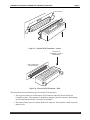
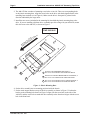
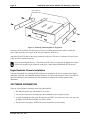
MOUNTING RAIL
Figure 8 - Attaching Mounting Rails to Peripheral
Once the rails are installed, slide the tape drive into its mounting position in the chassis. Attach the
power cable from the power supply to the four-pin connector on the drive.
Attach the Wide SCSI cable to the 68-pin connector on the drive. The drive’s connector is keyed so the
cable can only be attached correctly.
If you are attaching the drive to a 50-pin narrow SCSI cable, you must use an adapter between the
50-pin cable and the 68-pin connector on the drive. Order adapter PDB-00440-90 if necessary.
Eagle Deskside Chassis Installation
Complete instructions for installing SCSI peripherals are included in the service manual for the Eagle,
AM-6000. AM-7000, and AM-8000 deskside computers. Use these instructions to install your AM-65X
tape drive and then use the instructions in this document to complete the software portion of the
installation.
SOFTWARE INFORMATION
There are several points to remember when using the AM-65X:
• The AM-65X works only with AMOS 2.3A or later.
• You can have one or two streaming tape drives attached to your computer system.
• A single streaming tape drive must be referred to as STR0:. If you have two drives, the one with
the higher SCSI ID must be STR0:; the other is STR1:.
• The device driver program, STR.DVR, must be loaded into system memory.
PDI-00651-00, Rev. A01