1
Nitro Pro 9 - User Guide
In this User Guide
Welcome to Nitro Pro 9
How to use this guide
Quickly find the right information
To Search For Keywords:
Participate and Contribute Online
Getting started with Nitro Pro 9
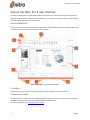
Explore the Nitro Pro 9 user interface
A Tour of Nitro Pro 9
1 File Menu
2 Quick Access Toolbar
3 Ribbon Tabs
4 Information Bar
5 Document Pane
6 Zoom Controls and Page View
7 Paging Controls
8 Find Bar
9 Lower Navigation Panes
10 Sidebar Navigation Panes
Ribbon shortcuts
To view and use shortcut keys:
Software Activation
Common terms
To purchase a Nitro Pro 9 license:
To activate Nitro Pro 9:
Automatic, or online, activation:
Manual, or offline, activation:
Compatibility with other applications
Tasks and tools
View and navigate a PDF file
Open a PDF file
Open a PDF file
The File Menu
Drag-and-drop
Double-click or right-click
Change the page view
To change the page display options:
To resize the page view:
To rotate the page view:
Adjust the zoom level
To use the Zoom tool:
To adjust the zoom level with Page Controls:
Page through the document
Step through the pages
To scroll smoothly between pages:
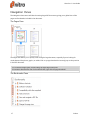
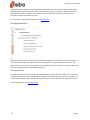
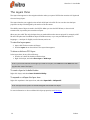
Navigation Panes
The Pages Pane
i
1
1
1
1
1
2
3
3
3
3
4
4
4
4
4
4
4
4
6
6
7
7
7
7
7
7
9
10
11
12
12
12
12
12
13
13
13
14
15
15
15
16
16
16
17
17
©Nitro