1
Nitro Pro 9 - User Guide
l
l
l
l
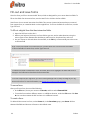
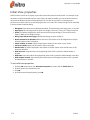
Highlight form fields: A PDF form can be difficult for people to use as it is not always visibly clear
what areas of the file must be filled in. When this preference is turned on, each time a form is
opened in Nitro Pro 9, all form fields will display using a background color
Highlight color: The color used when Highlight form fields is turned on
Required field color: The color used to indicate fields that require completion wen Highlight form
fields is turned on
Form field double click: When designing forms, there are two different ways to access key properties and appearance settings: via the Properties context ribbon (located at the top of the screen),
or via the Properties dialog (which opens as separate window). This preference allows you to
choose which method will be used when you double-click a form field to edit it
General
l
l
l
l
l
l
l
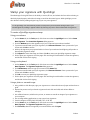
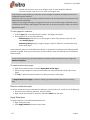
Set Default Programs: Windows will use Nitro Pro 9 as the default program to open PDF files
Save application state every:Any PDF files open at the time of unexpected termination will be
recovered based on the last saved state
Hand tool can select text and images: Allows the Hand tool to select all types of document
content
Select images before text...: if the document contains text and images that overlap, the image
gets selected first
Copy text without formatting: Copies text to the clipboard without formatting characteristics
Copy text with formatting: Retains the text formatting when copied to the clipboard
Always use last locations... Open and Save As dialogs will remember the last folder they accessed
(does not apply to Worksite and Swiftwriter)
Identity
l
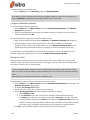
Store your personal details, which can be automatically used to populate fields like the annotation
details
Internet Access
l
l
l
l
l
l
l
l
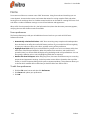
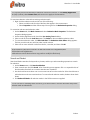
Let me specify a list of trusted sites: Grant or deny access whenever a PDF file attempts to
connect to the Internet
Allow all websites: All PDF files are granted unconditional access to the Internet
Block all websites: Internet access is denied whenever a PDF file attempts to establish a
connection
Access to the following websites...: Enter the address of a website and click Allow to grant it
unconditional web access
Edit: Select a website address in the exception list and then click Edit to modify the address
Delete: Select a website address in the exception list and then click Delete to remove it from the
Access Manager
Always ask: Permission will be required for PDF files that connect to websites not defined in the
Access Manager
Block access: PDF files are denied access when connecting to any websites not defined in the
Access Manager
JavaScript
l
241
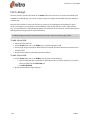
Disable JavaScript: Some PDF documents contain embedded JavaScript that can trigger security
vulnerabilities. Select the Disable JavaScript checkbox to disable JavaScript for security reasons, or
©Nitro