1
Contents
1 Introduction 1
1.1
1.2
1.3
1.4
1.5
1.6
1.7
1.8
Understanding Safety and Regulatory Information 1
Understanding Connections and Applications 3
Requesting Support 3
Checking Device Package Components 3
Understanding the Device Panels, Connections and LEDs 5
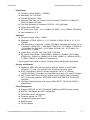
Understanding Specifications, Standards, and Firmware 7
Understanding Default Values and Logins 9
Understanding the Device Label 10
2 Installing the DDW366 12
2.1
2.2
2.3
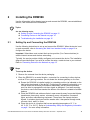
Setting Up and Connecting the DDW366 12
Connecting Devices to the Network 14
Troubleshooting the Installation 16
3 Using the Web User Interface 18
3.1
Accessing the Web User Interface Locally 18
4 Understanding the Status Menu 21
4.1
4.2
4.3
4.4
4.5
Using the Software Option 21
Using the Connection Option 22
Using the Account Option 25
Using the Diagnostics Option 25
Using the User Default Option 28
5 Understanding the Basic Menu 30
5.1
5.2
5.3
5.4
Using the Setup Option 30
Using the DHCP Option 32
Using the DDNS Option 34
Using the Backup Option 35
6 Understanding the Advanced Menu 39
6.1
6.2
6.3
6.4
6.5
6.6
6.7
6.8
Using the Options Option 39
Using the IP Filtering Option 42
Using the MAC Filtering Option 43
Using the Port Filtering Option 44
Using the Forwarding Option 46
Using the Port Triggers Option 50
Using the Pass Through Option 54
Using the DMZ Host Option 54
7 Understanding the Firewall Menu 56
7.1
7.2
Using the Basic Option 56
Using the Local Log Option 57