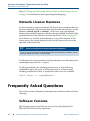
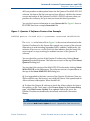
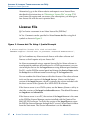
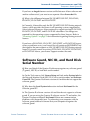
1
CHAPTER 2: LICENSING ALTERA SOFTWARE
SETTING UP THE LICENSE FILE
4.
Click Environment Variables.
5.
Select LM_LICENSE_FILE in the System Variable list, and then click
Edit. If the LM_LICENSE_FILE environment variable does not exist,
select New and type the variable LM_LICENSE_FILE.
6.
In the Variable box (Variable Value for Windows Vista) , type either
<drive>:\flexlm\license.dat or a name in the format
<port>@<host>, where <host> is the name of the server and <port> is the
port listed in the license.dat file. If there is no port listed in the
license.dat file, you can specify @<host>.
To specify more than one license location with the LM_LICENSE_FILE
environment variable, modify the existing LM_LICENSE_FILE
environment variable and separate the different paths with semicolons
(;), as shown in the following example:
C:\flexlm\license.dat;1800@myserver
7.
Click OK.
The license is now set up and you can begin using the software.
If you want the Quartus II software to use the LM_LICENSE_FILE
environment variable setting from your System Control Panel rather than
from another license file setting, make sure the Use LM_LICENSE_FILE
variable is turned on in the License Setup page of the Options dialog box in
the Quartus II software. Refer to “Specifying the License File within the
Quartus II Software” on page 45.
Setting the LM_LICENSE_FILE Environment Variable
in the Linux Workstation C Shell Resource
File (.cshrc)
To specify the license file in the C shell resource file (.cshrc) on each client
(user) workstation, make sure that you update the LM_LICENSE_FILE
environment variable that is specified in the .cshrc file located in each user’s
home directory.
1.
ALTERA CORPORATION
Set the LM_LICENSE_FILE environment variable in the .cshrc for each
user to the full directory path name of the license file. To update this
environment variable, add the following line to the .cshrc file for each
user:
ALTERA SOFTWARE INSTALLATION AND LICENSING
■
44