1
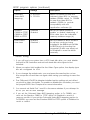
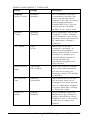
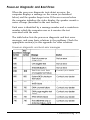
System board options (continued)
3-14
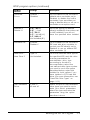
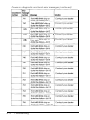
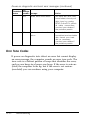
Settings
Description
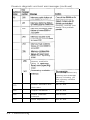
Hard Drive 1
and
Hard Drive 2
Drive Type nn
Hard Drive n Disabled*
Set to the hard disk drive type
of the specified IDE hard disk
drive or set to user-definable
drive types (2, 3, 48, or 49) and
enter parameters according
to the drive’s documentation;
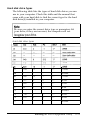
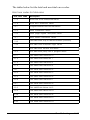
see “Hard disk drive types”
below (1)
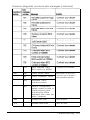
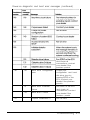
Parallel Port
Base Address 378h
Compatible*
Base Address 378h
Bi-directional
Base Address 278h
Compatible
Base Address 278h
Bidirectional
Disabled
Select one of the Compatible
options to set the port for IBM
AT compatible signals; select
one of the Bi-directional
options to set the port for IBM
PS/2 compatible bidirectional
signals; select Disabled to
prevent the port from reacting
to any signals (no resources
are allocated when Disabled)
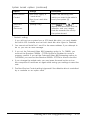
-
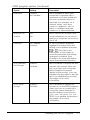
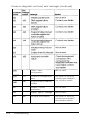
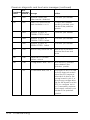
Serial Port 1
Base address 03F8h*
Base address 02F8h
Base address 03E8h
Disabled
Select the address you want
to use for serial port 1; set to
Disabled to prevent the port
from reacting to any signals
(no resources are allocated
when Disabled) (2)
Serial Port 2
Base address 02F8h *
Base address 03E8h
Base address 02E8h
Disabled
Select the address you want
to use for serial port 2; set to
Disabled to prevent the port
from reacting to any signals
(no resources are allocated
when Disabled) (2)
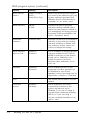
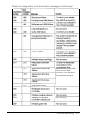
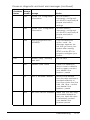
COM1
Redirection
Disabled*
1200 Baud
2400 Baud
9600 Baud
Set to Disabled to prevent
redirection of the computer’s
input and output to the serial
port assigned to COM1: set to
the speed the computer
should use to copy the
redirected input/output to the
serial port assigned to COM1
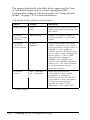
Running the EISA Configuration Utility