1
Chapter 4
Using Your Computer
This chapter describes the following operations:
Q Locking the computer’s cover
c3
Locking the front panel door
D
Disabling the keyboard and mouse
Cl
Using the password features
Ll Locking the keyboard
0
Changing the processor speed
Q Controlling the speaker
a Controlling the cache
tl Using the security features
Q Using special configurations
Ci
Operating the computer from a remote location.
locking the Computer’s Cover
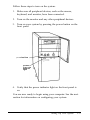
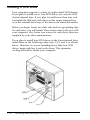
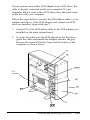
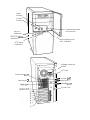
You can lock the cover onto the computer to prevent
unauthorized users from accessing its internal components. To
do this, you need a padlock that fits through the hole in the lock
block on the computer’s back panel. When the padlock is in
place, the cover on the computer cannot be removed.
Using Your Computer
4-1