1
12_USERP.fm
1 ページ
2005年11月18日 金曜日 午後5時39分
[12] USER PROGRAM
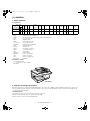
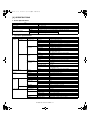
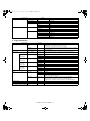
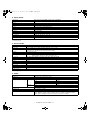
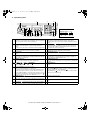
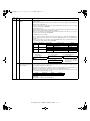
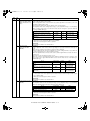
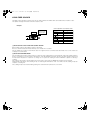
The user settings consist of the following items.
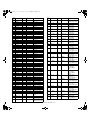
1. User programs
A. Copy mode
Program
number
Program name
Setting codes
(factory default setting
appears in bold)
Explanation
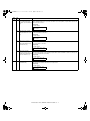
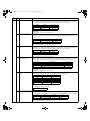
1
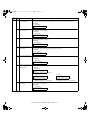
AUTO CLEAR
1: 10 SEC.
2: 30 SEC.
3: 60 SEC.
4: 90 SEC.
5: 120 SEC.
6: OFF
• Auto clear time automatically returns the copy settings to the initial settings if no
keys are pressed for a preset period of time following the end of a copy job.
• This program is used to select the period of time. Auto clear time can also be
disabled.
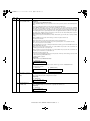
2
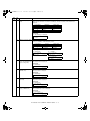
PREHEAT MODE
1: 30 SEC.
2: 1 MIN.
3: 5 MIN.
4: 30 MIN.
5: 60 MIN.
6: 120 MIN.
7: 240 MIN.
• This function automatically switches the machine to a low power consumption
state if the set duration of time elapses without the machine being used when the
power is on. The power save indicator lights up, however, the keys on the
operation panel can be used. Normal operation automatically resumes when a key
on the operation panel is pressed, an original is placed, a print job is received.
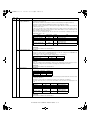
3
AUTO SHUT-OFF
1: ON
2: OFF
• Use this setting to enable or disable auto power shut-off mode.
4
AUTO SHUT-OFF
TIME
1: 5 MIN.
2: 30 MIN.
3: 60 MIN.
4: 120 MIN.
5: 240 MIN.
• This function automatically switches the machine to a state that consumes even
less power than preheat mode if the set duration of time elapses without the
machine being used when the power is on. All lights except the power save
indicator go off. To resume normal operation, press the [START] key. Normal
operation also resumes automatically when a print job is received or scanning is
begun from a computer. While in auto power shut-off mode, no keys (except the
[START] key) can be used.
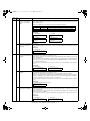
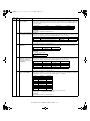
5
STREAM FEEDING
1: ON
2: OFF
• When copying using the RSPF, while "SET ORIGINALS FOR STREAM
FEEDING." appears in the display after an original has been scanned (about 5
seconds), a subsequent original can be placed and automatically fed into the
machine.
6
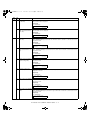
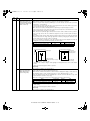
LAYOUT IN 2IN1
1: PATTERN 1
2: PATTERN 2
• Use this setting to select the layout pattern when two original pages are copied
onto a single sheet of paper.
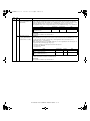
7
OFFSET
FUNCTION
1: ON
2: OFF
• When enabled, this function offsets the position in the paper output tray of sets of
copies during copy job, and print jobs when using the printer function.
8
ROTATE ORIG.
IMAGE
1: ON
2: OFF
• When two-sided copying is performed, this function rotates the image on the back
of the original. This is convenient when binding the copies at the top (tablet
binding).
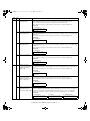
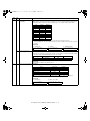
9
AE/TEXT
RESOLUTION
1: 300dpi
2: 600dpi
• This setting is used to change the copy resolution in AUTO and TEXT mode from
600 x 300 dpi to 600 x 600 dpi (high-quality mode). Scanning is slower when highquality mode is used.
10
2-SIDED COPY
MODE (AR-168L
only)
1: HI-SPEED
2: NORMAL
• If the memory fills up when two-sided copying is performed, "NORMAL" can be
selected to make copying possible. However, "NORMAL" results in a slower
copying speed. Normally "HI-SPEED" is selected to enable fast two-sided
copying.
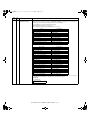
11
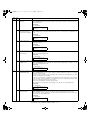
MARGIN WIDTH
1: 1/4"
2: 1/2"
3: 3/4"
4: 1"
• Use this setting to set the margin width.
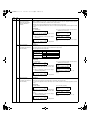
12
MEM. FOR
PRINTER
1: 30%
2: 40%
3: 50%
4: 60%
5: 70%
• Use this to change the proportion of machine memory used for printer mode.
13
AUTO KEY REPEAT
1: ON
2: OFF
• Use this setting to select whether or not holding down a key causes repeated input
of the key. For keys that normally cause a set value to increase when held down
(for example, holding down the [<] key [v] or [>] key [^]), this program can be used
to have the set value not change when the key is held down.
14
KEY PRESS TIME
1: NORMAL
2: 0.5 SEC.
3: 1.0 SEC.
4: 1.5 SEC.
5: 2.0 SEC.
• Use this setting to select how long a key must be pressed for the input to be
accepted. By selecting a longer time, you can prevent settings from being
changed by the accidental pressing of a key.
AR-168N/168L USER PROGRAM 12 - 1