1
04_EXTER.fm
2 ページ
2005年11月18日 金曜日 午後5時28分
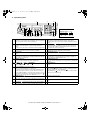
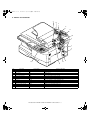
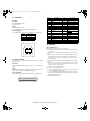
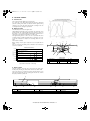
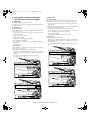
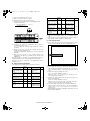
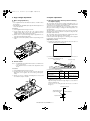
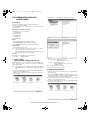
3. Operation panel
1
2
3
4
5
AR-168L
Display
READY TO COPY.
100% 8.5x11
18
6 7
1
3
8 9 10 11
12 13 14
15
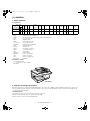
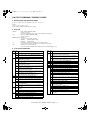
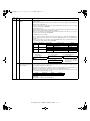
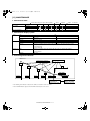
[MODE SELECT] key / Mode indicators
Press this key to select the mode. The indicator of the selected mode
lights (copy, printer, scanner, fax mode indicators).
19
0
20
21
16 17
2
Display
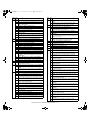
This shows messages indicating the machine status and any
problems that occur, as well as user programs and function setting
menus.
[CLEAR] key (
)
Use this to clear the set number of copies, as well as cancel a job
that is in progress. When a setting menu appears, use this key to
move back to the previous menu level.
RSPF indicator (AR-168L only)
This lights up when an original is placed in the RSPF.
[TRAY SELECT] key (
)
Use to select the paper tray that has the desired paper for copying.
Numeric keys
4
Use these to enter the number of copies and other numerical
settings.
The keys can also be used to select items in function setting menus.
5 Power save indicator
6
This lights up when the power save function is activated.
7 Error indicator
8
This lights steadily or blinks when a paper misfeed or other error
occurs.
9 Tray location indicator
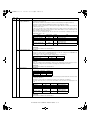
10 [MENU] key
Indicates the selected paper tray. The indicator blinks when the tray
Press this key to select the paper size for copying, to configure a
is out of paper or is not closed.
user program or to display the total count.
11 [2-SIDED COPY] key
12 [E-SORT/SP.FUN] key
Press to select the automatic two-sided copying mode.
Press to select the sort function, 2 IN 1 copy function, or margin shift
function.
13 [
] key (
), [
] key (
), [ENTER] key
14 [EXPOSURE] key
Press the [
] key (
) or [
] key (
) to select an item in a
Use to switch from auto exposure adjustment to text mode or photo
function setting menu.
mode.
Press the [ENTER] key to enter a selection.
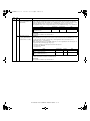
16 [START] key (
) / Ready indicator
15 [COPY RATIO] key
The ready indicator lights up when copying or scanning is possible.
Press to select an enlargement or reduction ratio.
To select a preset ratio setting, press the [COPY RATIO] key and
To begin copying, press the [START] key (
).
The [START] key (
) is also pressed to return to normal operation
select the desired preset ratio. To select a ratio that is not preset,
from auto power shut-off mode.
press the [COPY RATIO] key, select the preset ratio that is closest to
the desired ratio, and then press the [
] key (
) or [
] key (
)
to increase or decrease the ratio in increments of 1%.
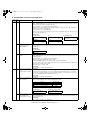
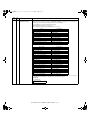
17 [CLEAR ALL] key (
)
18 Shows the current copy ratio.
This returns all functions to the default settings. When pressed in a
setting menu, this returns the settings and display to the initial state.
19 Shows the selected paper size.
20 Shows the number of copies that has been entered with the numeric
keys.
21 A checkmark " " appears when the exposure has been changed, or
when two-sided copying, sort, 2 IN 1, or margin shift is selected.
AR-168N/168L EXTERNAL VIEWS AND INTERNAL STRUCTURES 4 - 2