1
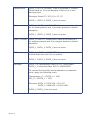
WD_CNT 40004 Wireless Device Count – Value that can be read to discover the number of registered sensors are configured to operate on the gateway. A value 0 – 100 is permitted. (READ-ONLY) Example Value: 0 (no sensors registered, factory reset condition) Example Value: 10 (10 Registered device) The following table represents the gateway’s Wireless Device List, or the current devices that the gateway is configured to communicate with. These registers can be read to discover the state of the list. If any register is written to, the device associated with that address is erased and these registers are zeroed out. The serial identifiers are formatted as a UInt32, therefore two contiguous registers must be read to extract the full value. ADDRESS FORMULA = 40101 + (2*WDL_SLOT) List entries can be as follows: Example: + _ • 0xFFFFFFFF: EMPTY • 0x00000000: ERASED, Unusable until a Network Reset • Otherwise, a real device is registered Register Name Address Register Name Address WDL [0] 40101 WD [99] 40299 Bring Sensors Online To bring your sensors online, insert the battery into the sensors. Once the battery is inserted, the wireless device does a scan to look for the network. As long as the gateway is ACTIVE, the sensor will link up to the network. PAGE 8