1
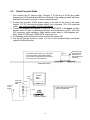
wall box or placed in an equipment rack in a surface mount wall box. A 12VDC
power supply, 25’ S-video cable and a RCA jack to BNC plug adapter are
provided for flexibility in connection to video devices (Figures 10, 11 & 12).
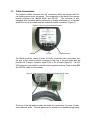
Figure 10: Power Supply Attached to Front of Wall Plate
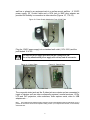
Plug the 12VDC power supply into a standard wall outlet (110V-120V) and the
jack labeled 12 V DC.
Use only the power supply provided with the Ceiling DocCam.
Use of any unauthorized power supply will void any and all warranties.
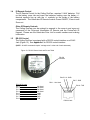
Figure 11: Front of Plate
Composite Video Jack (BNC)
Figure 12: Rear of Plate
S-Video Jack
RJ-45 Jack
The composite video jack and the S-video jack are outputs and are connected to
inputs of devices such as video conferencing systems, monitor/receivers, VCRs,
LCD and DLP projectors, video switchers, video capture cards, video to USB
adapters etc.....
Note:
The S-Video and the composite video connectors on the Ceiling DocCam plate are both always live. It is
possible to connect the camera to two separate viewing sources (i.e. a computer and monitor, or two monitors)
at the same time.
8