1
Printer Initialization
After Ethernet Card installation, the red and green status lights on
the interface flash simultaneously during printer initialization.
Network recognition and normal operation
At start up, the Ethernet Card checks all active NetWare file
servers. While the card is recognizing the network, the red and
green status lights flash alternately on and off.
After recognizing the network, the Ethernet Card is ready to send
and receive data. In this mode, only the green status light is lit.
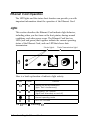
Data Transmission light
When the Ethernet Card receives a data packet, it automatically
recognizes the protocol of the packet and switches to that protocol
mode. When the card sends data, the Data Transmission light
(green) is lit.
Report printing
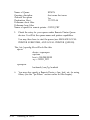
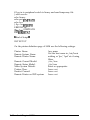
When the Status Sheet/Error Resume button is pressed, the
connected printer prints out a status sheet showing the current
card configuration.
Status Sheet/Error Resume button
Installing the Ethernet Card
1-5