1
CONTENTS
1
THE QUICK INSTALLATION GUIDE
2
INTRODUCTION
4
2.1 When the sever is up and running
4
2.2 When the server is dead
4
2.3 Features
2.4 Package contents
5
2.5 Technical specifications
6
2.6 System requirement
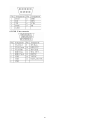
2.7 Cable diagrams
7
2.8 LED Indicators
7
3
HARDWARE INSTALLATION
3.1 Operation overview
8
3.2 Connecting DKVM-IP8 to the host system
8
3.3 Connecting DKVM-IP8 to multi-port KVM switch
4
11
CONFIGURATION
4.1 Initial Configuration
4.1.1 Initial configuration via DHCP server
4.1.2 Initial configuration via serial console
4.1.3 Keyboard, Mouse and Video configuration
12
12
13
14
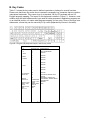
4.1.3.1 DKVM-IP8 switch keyboard settings
4.1.3.2 Remote Mouse Settings
4.1.3.3 Auto mouse speed and mouse synchronization
4.1.3.4 Host system mouse settings
4.1.3.5 Single and Double Mouse Mode
4.1.3.6 Recommended Mouse Settings
4.1.3.7 Video Modes
14
15
15
5
17
16
16
16
USAGE
5.1 Prerequisites
5.2 Login into the DKVM-IP8 switch and logout
5.2.1 Login into the DKVM-IP8 switch
5.2.2 Logout from the DKVM-IP8 switch
18
18
20
5.3 The Remote Console
20
5.4 Main Window
5.4.1 Remote Console Control Bar
5.4.2 Remote Console Status Line
6 MENU OPTIONS
21
28
1