1
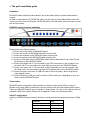
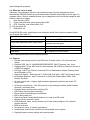
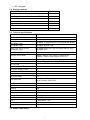
SSL encryption 2.4. Package contents DKVM-IP8 1 PC Quick Install Guide 1 PC Installation software and User Manual on CD-ROM 1 PC AC to DC Power Adapter 1 PC Rack mount Kit 1 SET Null modem cable 1 PC USB A to B 6 feet cable 1 PC 3-in-1 3 feet KVM cable 1 PC 2.5. Technical specifications Model No. DKVM-IP8 switch PC Port 8 Console Port PC Port Connector (All Female Console PortTypes) Connector (All Female Types) Daisy Chain Port Connector (All Female Types) 1 VGA HDDB 15-pin(shared with PS/2 keyboard and Mouse) Local Console: PS/2 Keyboard Mini Din 6 pin PS/2 Mouse Mini Din 6 pin VGA HDDB 15pin PS/2 Keyboard mini Din 6 pin PS/2 Mouse Mini Din 6 pin Remote Console: VGA HDDB 15pin RJ-45 8P8C Serial Port (DB9 pin Male) 1 LAN port (RJ-45 8P8C) 10BASE-T Ethernet uses Category 3/4/5/5E/6 UTP 100BASE-T Ethernet uses Category 5/5E/6 UTP Reset button 1 PC selection On Screen Display Menu, Hot Key, Push Button PC Port LED 8 Bank 7 segment LED 1 On Screen Display Control Yes Scan Intervals 5~99 Sec. Keyboard Emulation PS/2 Mouse Emulation PS/2 VGA Resolution Local Console: 1920X1440 Remote Console: 1280 X1024 Daisy Chain MAX Level 8 levels MAX PC Connection 120 Housing Metal Power Adapter DC 5V, 2.5A Operation Temperature 0 ~ 50°C Storage Temperature -20 ~ 60°C Humidity 0~80%, Non-Condensing Size 19” Rack Mount / 1RU Weight (kg) 2.0kg Dimensions (cm) 41(L) X 16.4(W) X 4.6(H) 2.6. System requirement 7