1
[ inspiring people, inspiring change ]
WT99 WIRELESS TELEPHONE HEADSET
your true wireless handsfree office solution!
Installation
Installation
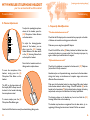
C. Setting up Handset Lifter
D. Adjusting Handset Lifter
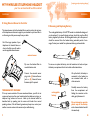
First of all, connect the Lifter Plug
(W) into the Handset Lifter Jack (16)
located on the back of the base
station.
16
!
Flip over your handset lifter, and you
will find two stickers, one vertical and
one horizontal.
Now test the lifter by wearing the headset and pressing the answer button
on the headset, if there’s no response or the headset hasn’t been charged,
please refer to the next section and come back to here afterwards.
If the handset lifts up and you can hear a dial tone, your lifter setup is
completed. But if lifter lifts up the handset but not enough for picking up the
line signal, you will need to adjust the lifting height as below:
T
S
Lift up the handset and carefully
remove the sticker seals and place the
lifter on top of the speaker area (as
shown below) of the telephone under
the handset.
Not all telephones have a large flat
surface or the speaker area may not be
directly below the handset.
If so, just find any way to fix the lifter
underneath the handset, and follow
the instructions about using an
external sensor in section E.
7
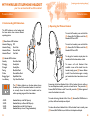
Locate the (S) Lifting Height Switch on the
front side of the lifter as illustrated. There
are 3 selection you can choose with the
top-most being the highest lifting distance.
As the weight and size of handsets vary
across telephones, you may need to use a
lower setting if the handset flies out of its
cradle due to its lightweight.
Rubber or Paper Pads.
But if even the highest setting is not
enough to lift the handset for picking a
line, try adding pads between lifter and
the telephone as shown below to
shorten the lift-distance.
The LED Indicator (T) lights up when
you press the Answer Button (2) on
your headset, indicating online status.
8