1
[ inspiring people, inspiring change ]
WT99 WIRELESS TELEPHONE HEADSET
your true wireless handsfree office solution!
Product in Action
Product in Action
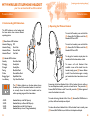
I. Understanding LED Indications.
J. Operating the Wireless Headset
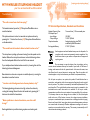
The LED Indicators on the headset and
the base station show various different
operating status.
(7) Base-Station LED Indicator
Headset Charging Off
Headset Pairing
Slow Flash
Headset Online
Normal Flash
Headset Muted
Fast Flash
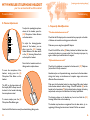
To switch off headset, press and hold the
(2) Answer/End Call Button until the (8)
Headset LED turns OFF.
8
The (9) Battery Indicator on the base station shows
the battery level of the wireless headset. In order for it
to correctly show the level, the headset must be
within operating range with the base station.
13
2
9
(8) Headset LED Indicator
Standby
Slow Blue Flash
Charging
Steady Red
Charged
Steady Blue
Pairing
Blue/Red Flash
Online
Normal Blue Flash
Ringing Signal
Rapid Blue Flash
Low Battery
Very Slow Blue Flash
4 LED:
3 LED:
2 LED:
1 LED:
To switch on headset, press and hold the
(2) Answer/End Call Button until the (8)
Headset LED turns ON.
7
Headset Battery at its Full Capacity
Headset Battery is Above Half Capacity
Headset Batter at Half of its Capacity
Headset Battery is Low, Charge Immediately
8
To charge the headset, simple place the
headset within the base station cradle.
To answer call with Handset Lifter
installed: a tone will be heard from the
headset, simply press (2) Answer Button
to talk. Press the button again or simply
put headset back into base station to end
call.
Answering call without Handset Lifter: Lift the handset from its cradle, or
for some telephone models, press the on-hook button. Then press the (2)
Answer/End Call Button to talk. To end call, press the (2) Button again and
return the handset to its cradle.
To make calls using Handset Lifter: Press (2) Answer/End Call Button to
pick line, dial from the telephone dial pad.
To make calls without Handset Lifter: Lift the handset from its cradle, press
(2) Answer/End Call Button, and dial from the telephone dial pad.
14