1
Page 9/13
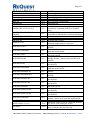
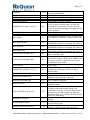
TIME-OFF
1.5.91
TIME-ON
BUTTON-MENU
DISCRETE-NAVIGATOR
DISCRETE-PLAYER
1.5.91
1.6.0
1.6.0
1.6.0
DOUBLECLICK-LINE-X (X=0-7)
1.6.0
LCD-TEXT-OFF
LCD-TEXT-ON
1.6.0
1.6.0
NAV-HOME
1.6.0
NAV-JUMP-DOWN
1.6.0
NAV-JUMP-UP
1.6.0
NAV-MOVE-LEFT
1.6.0
PLAYER-DATA-ALWAYS-OFF
1.6.0
PLAYER-DATA-ALWAYS-ON
1.6.0
PLAY-NOFLIP
1.6.0
PRESS-LINE-X-NOFLIP (X=0-7)
1.6.0
REQUEST-PLAYER-INFO
1.6.0
DISCRETE-AUTORIP-OFF
1.7.0
DISCRETE-AUTORIP-ON
1.7.0
NEXT-PLAYLIST
1.7.0
PLAY-PLAYLIST-N (N=1-10)
1.7.0
PREVIOUS-PLAYLIST
1.7.0
CLEAR-NOW-PLAYING
1.7.11
CREATE-JUKEBOX-PLAYLIST
1.7.11
Q U E S T I O N S ? Phone 1.800.236.2812
Turns the time elapsed off. Useful for
decreasing bandwidth.
Turns the time elapsed on.
Go to Menu. (Best if used in LCD mode)
Switch page on ARQ to NAVIGATOR.
Switch page on ARQ to PLAYER.
Moves the cursor to line X. If cursor is already
on line X then performs action on that line
(sends NEXT command) Good for moving
cursor around and navigating for features like
‘add to jukebox’
Turn LCD text off.
Turn LCD text on.
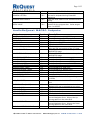
Go to Home in navigator mode. If ARQ is not
in NAVIGATOR mode this command will switch
it.
Page down in navigator mode. If ARQ is not in
NAVIGATOR mode this command will switch it.
Page up in navigator mode. If ARQ is not in
NAVIGATOR mode this command will switch it.
Move left in navigator mode. If ARQ is not in
NAVIGATOR mode this command will switch it.
Turns above feature off. Will still get player
data in PLAYER mode.
Player data will be sent in both NAVIGATOR
and PLAYER modes. NOTE: On a CMNSX-PRO
be sure to pulse the TIME-OFF line as it can
overload the serial buffer.
Play song where cursor is without flipping to
Player page.
Move cursor to a line and perform action on it
(send enter command) BUT do not flip to
PLAYER page.
Get player information from any mode.
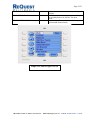
Disable AutoRip. If AutoRip is already
disabled, this command is ignored.
Enable AutoRip. If AutoRip is already enabled,
this command is ignored.
Begin playing the first song in the next
available Playlist.
Jump directly to Playlist-N without flipping. If
no Playlist with that number exists, the
command is ignored. For more detail on the
QuickPlay commands, please see ReQuest
Interface Guide #1A – General IR and RS-232
Serial Port Interfacing
Begin playing first song in the previous
Playlist.
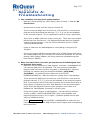
Stops any currently playing songs and empties
the Now Playing list.
Creates a playlist from songs added to the
Jukebox. Requires keyboard interface to
Email [email protected]
WWW.REQUEST.COM