1
Page 6/13
b. Processing the Serial data from AudioReQuest
Crestron processes the data coming from AudioReQuest in SIMPL+. It processes the
incoming stream of text, finds and cuts out the appropriate data, and then sends the
information to the touch panels. If you are having trouble getting text feedback
double check to make sure the SIMPL+ module is being compiled correctly.
c. Displaying the Serial data from AudioReQuest
If you are using more than 3 or 4 touchpanels, be sure to use an “Indirect Text
Broadcast” to send serial data to each touch panel. This will increase the speed that
text appears on the touch panel. This will send out serial text to all touch panels at
once, instead of to each individually.
Note 1: If you use the Indirect Text Broadcast you must delete the serial signals
from the touch panel serial joins under Network Modules.
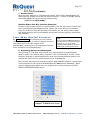
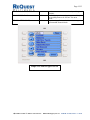
Sample CT-1000 Player Screen
Q U E S T I O N S ? Phone 1.800.236.2812
Email [email protected]
WWW.REQUEST.COM