1
www.corelogic.co.kr │
4.5. PREVIEW
4.5.1. Preview Setup
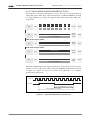
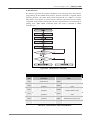
The CL765 displays images entered from Camera on LCD. For the image display,
3Mega Pixel (2048x1536) is supported in maximum. In Preview mode, the area to
display on LCD is selected on the image entered from Camera. And the target is
set as same as the Display resolution of LCD. After the above setup is completed,
the CL765 converts the area selected in the original image of Camera to Preview
Resolution to display on LCD in use of Video scalar.
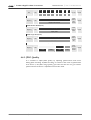
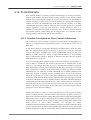
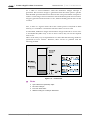
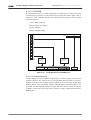
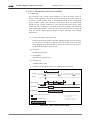
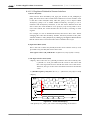
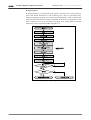
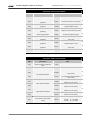
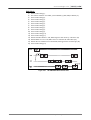
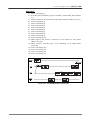
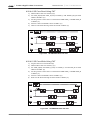
1. Select Source image by 2-pixel unit from the original image. In the register
setup of the CL765, StartX, StartY, Width and Height are selected from the
source image. The charged registers are 0x12, 0x13, and 0x9e.
2. Set the resolution of Target image as large as the display area of LCD. The
resolution unit of the target image is also 2-pixel. Set the target resolution to the
display image resolution. The charged registers are 0x15 and 0x9e.
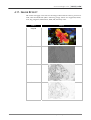
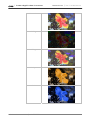
3. Set Image Effect and the selected image effect is applied to Preview.
4. Set LCD Display Area, and the position previewed on LCD is set.
5. Set Preview at 0x00 command register.
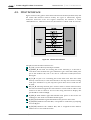
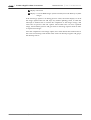
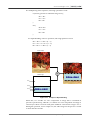
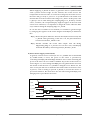
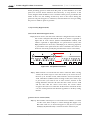
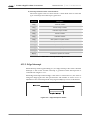
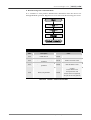
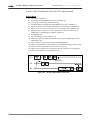
Display Width ( 0X13, Bit[7:0] ) : 0XF0
Display Taret Width
( 0X14, Bit[7:0] ) : 0X3C
Display Start Address (0X12) :
0X0028
Original
Image
(640X480)
Source
Image
(480X480)
Display
Image
(120X120) Display Taret Height
( 0X15, Bit[15:8] ) : 0X3C
Display Height(0X13 Bit[15:8] : 0XF0
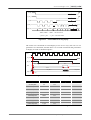
Figure 4-8. Preview Area Setup (VGA)
CORE LOGIC Proprietary and Confidential 41