1
Scan function troubleshooting
12
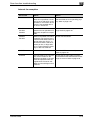
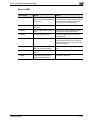
Internet fax reception
Symptom
Cause
Action
Cannot receive
The connection is incorrect.
Check the hub LED indicator and check
the connection status.
The Auto Receive Check setting is not specified.
Specify the time interval to check reception automatically. Refer to page 3-34.
Required settings for this machine have not been registered.
Specify the required network settings.
Refer to page 3-5.
The same POP3 user name is
being used by another e-mail
software and user.
Do not use the same POP3 user name
with other e-mail software.
The LAN cable is broken.
Replace the LAN cable.
Data in a format that is not
supported is attached, or an
email with no data is received.
Ask the sender to send a TIFF-F file or
text.
The received document has
not been specified to be printed.
To print the received document, specify
the received document to be printed.
Refer to page 10-15, page 10-30.
Memory exceeded
Print the saved documents, decrease
the memory usage of this machine, and
then ask the sender to send the data
again.
Other causes
Check the communication malfunction
under “Type” in the job list, and refer to
the error code. Refer to page 12-4
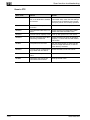
Binary code data is
received (printed).
Data is attached in a format
other than MIME, or the e-mail
is received via a server that
does not support MIME.
When data is attached in a format other
than MIME, the binary code is printed as
text. (This is not a machine malfunction.)
Ask the sender to send the data in the
MIME format.
The same document is received
many times.
Since the size of the e-mail is
too large, a connection timeout with the server occurs
while the data is being received.
From a computer, receive the data as
proxy and delete the corresponding email from the server. Ask the sender to
decrease the size of the e-mail and to
send it again.
The reception cancellation has been
specified, but it is
not canceled.
Time may be required to cancel an Internet fax reception.
Wait until the job is canceled.
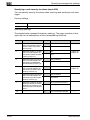
The POP3 reception malfunction
icon does not disappear.
Since the time of the Auto-RX
has not elapsed since the previous time a POP3 reception
failed, POP3 reception is not
performed.
Once the POP3 reception malfunction
icon is displayed, it does not disappear
until reception is successful. Specify the
setting to shorten time of the Auto-RX,
and check that POP3 reception is possible.
Can be received
but cannot be
printed.
200/250/350
12-9



















































































































































































![User's Guide [Advanced Scan Operations]](http://vs1.manualzilla.com/store/data/006865872_1-8b3a85e3ed58d035968500e47824ff56-150x150.png)