1
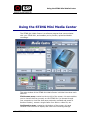
Using the STING Mini Media Center
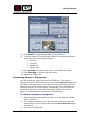
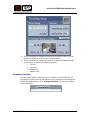
3. If you would like to change the format of the date or time, you can
toggle to a different format in the Format section.
4. If you would like to change the location of the time and date stamp,
you can click on one of the following options:
•
Top left
•
Top right
•
Bottom left
•
Bottom right
Firmware Version
You can check what Firmware version is installed on the STING Mini by
connecting the Sting via the USB cable to your computer and opening the
STING Mini Media Center. Click Firmware Version. The version number
will be displayed.
Mini-STING User Guide
17