1
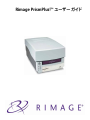
Rimage PrismPlus! User Guide
English
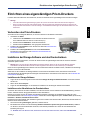
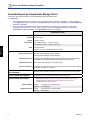
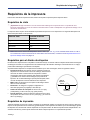
Rimage Prism Printer Specifications
This section provides product specification information for the Prism printer.
Notes:
•
The most up-to-date technical specification information is found at www.rimage.com/support. From the Support
menu, select: Printer Series > PrismPlus! > User Manuals tab.
•
For autoloader specifications, refer to the specifications document found at www.rimage.com/support. From the
Support menu, select: Product Series > Product Name > User Manuals tab.
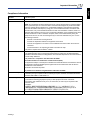
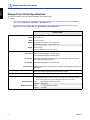
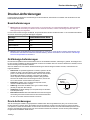
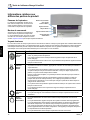
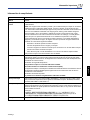
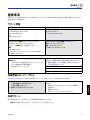
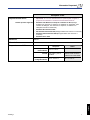
Prism Printer
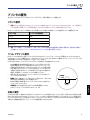
Physical size
Height
6.0 in (15.24 cm)
Width 8.5 in (21.59 cm)
Depth*
With printer tray closed: 14.0 in (35.56 cm)
With printer tray open:
21.8 in (55.3 cm)
Weight 20 lb (9.07 kg)
*Leave an additional 3.5 in (9 cm) for cabling
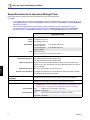
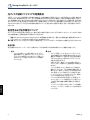
Printing
Print speed
Print modes
0.65 inches/second @ 300 x 300 dpi, typical
0.45 inches/second @ 300 x 600 dpi, typical
Single-pass (standard) and double-pass (monocolor ribbon only) for improved
print quality on some media types.
Print quality 300x300 or 300x600 dpi (11.8 dots per mm)
Print direction Images are printed from a top to bottom orientation as the media is moving out of
the machine.
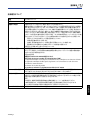
Label design requirements
Refer to the Label Design Requirements section on page 9.
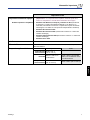
Media requirements
120 mm CD and DVD media with thermal protective layers
Ribbon requirements
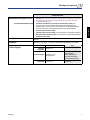
-- Important! Rimage supports only the use of Rimage brand ribbons in the
Prism printer Refer to the Ribbon Requirements section on page 9.
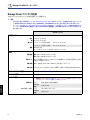
Standard ribbon Color:
Capacity:
Multi-color ribbon Color:
Capacity:
6
Black, Red, and Blue monocolor
2100 discs
3-color (CMY) panel ribbon
500 discs
110635_K