1
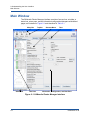
Preface This user’s guide describes the features of SANsurfer Router Manager used to configure and manage the QLogic iSR6152 Intelligent Storage Router (iSR6152). The iSR6152 management utility is a GUI consisting of menus, buttons, and options that you can use to manage iSR6152s from a workstation on Linux® and Windows® platforms. You can view and change network, port, security, and mapping configuration for one or more iSR6152s. The utility shows the most current system information. For hardware installation, configuration, and diagnostic details, see the iSR6152 Intelligent Storage Router Installation Guide. Intended Audience This guide is for users who are responsible for installing, managing, and servicing the iSR6152 router and the SAN equipment to which it is attached. What’s in this Guide This guide contains the information needed to monitor the iSR6152 router using SANsurfer Router Manager. This preface explains the typographic conventions used in this guide, lists related documents, and specifies the intended audience. The remainder of the user's guide is organized into the following chapters and appendices: Chapter 1 Getting Started provides information to help you begin using SANsurfer Router Manager. It describes how to start and exit SANsurfer Router Manager, connect to routers, use the help system, and set system security. Chapter 2 Understanding the User Interface illustrates and describes the components of the SANsurfer Router Manager’s graphical user interface (GUI), including the windows, panes, menus, toolbar buttons, and status icons. Chapter 3 Viewing Router Information describes the pages used to monitor and manage the iSR6152 router—including its ports and connected devices—by viewing and selecting components in the router tree. ISR645610-00 B ix