1
Single Package Air Conditioners
Installation Instructions
Cooling
c. Condenser fan motor -- ON
d. Circulating air blower -- ON
1. Be sure that electric power is OFF
2. Set thermostat Heat--Cool select to COOL.
5. Turn electric power OFF, check the following:
a. Contactor contacts opening.
b. Compressor -- OFF
c. Condenser fan motor -- OFF
d. Circulating blower -- OFF
3. Adjust thermostat setting to below room temperature.
4. Turn electric power ON for approximately one minute, then OFF. During power application check the
following:
a. Contactor -- Contacts closing
b. Compressor -- ON
FIGURE 7
Heating
If an Electric Heat Accessory is used, see its Installation
Manual for proper heater operation.
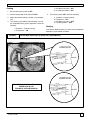
Blower Motor Speed Taps (3--Speed and 4--Speed Motors)
3-SPEED MOTOR
YELLOW
COM
BLACK
HI
MOTOR
BLACK
MED
LO
RED
4-SPEED MOTOR
BE SURE TO CHECK BLOWER MOTOR
SPEED DATA IN THE
TECHNICAL SUPPORT MANUAL.
YELLOW
COM
BLACK
HI
BLACK
MEDHI
MOTOR
MEDLO
RED
513 01 1702 00
LO
13