1
4
RASTER GRAPHICS FOR INTERACTIVE PROGRAMMING ENVIRONMENTS
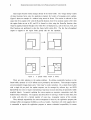
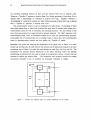
reference, we shall refer to this as the "window update" operation.
Control of type in. Part of the "window" idiom requires that typein activity appear to take place in
arbitrary windows. Because Interlisp terminal facilities are full-duplex, this is quite siInple: the
program will wait for a key to be struck, and will then display an "echo character" in the proper
window. But typists often make mistakes, and will warit to backspace over characters, words or
entire lines. As this happens, we want the display to show the current input characters, without
extraneous editing characters so often seen on teletype paper.
Control of typeout.
Characters typed with operating-system assistance by Interlisp and other
programs must be directed to an appropriate window. This requirement arises because Interlisp
allows a user to initiate "inferior executives" that invoke arbitrary Tenex programs and yet to return
to the retained Interlisp context.
The display context must likewise be untouched.
Graphical detail. The flexibility of the raster-scan frame-buffer display should be exploited to use
graphical details to provide cues to the programmer. Examples are: italic text, boldface text,
different character font styles, special iconic symbols that have mnemonic value, attention-directing
forms such as white text on black background, different texture patterns, etc.
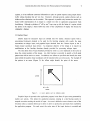
Graphical input. The user is provided with a "mouse," a coordinate input device with three
pushbuttons. The mouse rolls along a table top and is tracked by a cursor that moves on the
screen. The mouse can thus be used to point to objects already displayed on the screen, or simply
to identify a coordinate position. The three keys are remarkably versatile, provided the software for
handling them is sufficient: for example, combinations of keys can be struck as "chords"; a single
key action can be distinguished from two key depressions in rapid succession ("double clicking").
3. ADIS - The Graphics Package
The ADIS graphics package provides a collection of Interlisp functions for controlling graphical
output and input. Consistent with modern graphics system design, the facilities for output and
those for input are independent [Newman74]. This section provides an overview of the package;
more detail is presented in the appendix.
3.1 Graphical Output
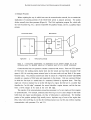
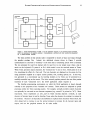
The display image is represented in a frame buffer memory that records, for each pixel on a
606 x 808 display, whether the point should be white (0) or black (1). The output functions simply
alter values in the memory in order to alter the image. The frame buffer could be edited with only
two very simple functions, one to read the value of the pixel at a particular (x,y) location, and one