1
RASTER GRAPHICS FOR INTERACTIVE PROGRAMMING ENVIRONMENTS
to write the value.
5
Such an approach would be intolerably slow, and the programmer would
immediately begin to identify common editing operations, and thereby create a larger set of
functions that perform more specialized editing operations more efficiently. Thus ADIS provides
functions for drawing lines, for adding text characters to the display, and for moving existing
portions of the display, all coded to update the frame buffer as rapidly as possible.
These are
common operations in the DLiSP application, which depends on the careful presentation of
formatted text.
Other applications might stress other graphical objects.
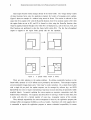
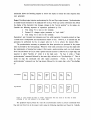
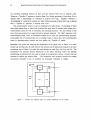
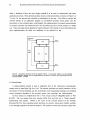
Each output operation is directed at a particular region of the screen. A region is identified
primarily by a rectangular boundary defined by left, right, bottom and top edges.
All output
requests are clipped so that modifications are made only within the region; in this respect, a region
is very similar to a viewport. For example, region limits may be set to the boundaries of a DLiSP
window, thus ensuring that text will not appear outside the window either because too many lines
are displayed or because too many characters are placed on a given line. In fact, DLiSP uses regions
to operate within windows as well: to construct the label banner, to provide "scroll bars" at a
window's left edge, etc.
A region is not just a rectangular boundary, but also contains substantial information about
how graphical objects are to be displayed within the window. A region is thus like an abstract
object in an object-oriented programming language (e.g., Simula [Birtwistle73] or Small talk
In the
[Goldberg76]) - it contains data and routines for producing output on the display.
description of output functions given below, infonnation marked with an asterisk (*) is data
associated with an instance of a region.
This data can be examined and modified by ADIS
functions.
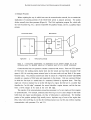
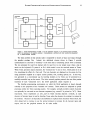
Each output function is designed to make specific changes to the frame buffer, which is the
ultimate representation of the image. Unlike graphics packages for calligraphic displays, these
functions build no intennediate "display file," and retain no data structure that contains information
about characters or lines. ADIS provides only two structures: the frame buffer, which describes the
image, and the region objects, which retain information that helps the output functions edit the
frame buffer contents (e.g., font descriptions).
Another concept used frequently in output operations is the combination junction, which
describes how previously-displayed information is to be treated.
A typical change to the frame
buffer will compute the function F(oldValue, newValue), where old Value is the binary value of the
pixel currently stored in the frame buffer, and newValue is the binary value computed by the
output function. The value of the function F (either 0 or 1) is stored into the frame buffer. Only a
few of the 16 possible binary functions arc used heavily in graphics applications.
provided are:
"Copy" new to old:
F 1(old,new) = new
"Paint" by adding black points:
The functions