1
INSTALLATION
System Options
Vx76
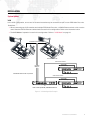
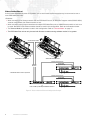
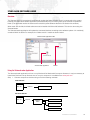
In the Vx76 configuration, one or two Vx76 control consoles may be connected to one or more PRG Node Plus units.
Guidelines:
+ When connecting two Vx76 consoles and multiple PRG Node Plus units, a 100Mb Ethernet switch or hub must be
used. Standard CAT5e Ethernet cables should be used in this configuration. Refer to the illustration below.
+ The Vx76 Mode of operation is used in this configuration. Refer to "Vx76 Mode" on page 16.
CAT5e Ethernet Cables
V676 CONSOLE "B"
V676 CONSOLE "A"
Vx76 Protocol CAT5e *
Art-Net DMX
(to S400 Rack)
100 Meter
Maximum
PRG NODE PLUS
* PRG Belden Ethernet cable or equivalent.
6x XLR DMX512 Data Cable
Vx76 Protocol CAT5e *
Art-Net DMX
(to S400 Rack)
PRG 10-PORT (FIBER) ETHERNET SWITCH
PRG NODE PLUS
or
PRG 7-PORT (COPPER) ETHERNETSWITCH
6x XLR DMX512 Data Cable
Figure 3: Vx76 Configuration Example
PRG NODE PLUS USER MANUAL
7