1
Preliminary Reference Information
PRI Name
eWON Java Toolkit User guide
Access
DIST
Since revision
5.2s0
PRI Number
PRI-0002-0
Mod date
05/06/2012
Build
75
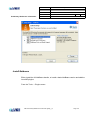
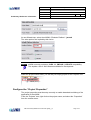
At next Wizard step, select the eWON's “Emulator Platform”: javaetk
The other options are implied by this choice.
NOTE eWON currently provides a CLDC 1.1, IMP-NG 1, JSR-075 compatibility.
This implies a set of JAVA libraries available for development.
When the project Wizard ends, you will find your empty project in the “Projects” tree.
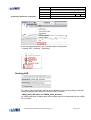
Configure the “Project Properties”
The project properties must be setup correctly to enable download and debug of the
application in the eWON.
From the “Projects” tree, right click on the project name, and select the “Properties”
from the context menu.
PRI-0002-0-EN-(eWON Java Toolkit User guide)_1_3
Page 11/31