1
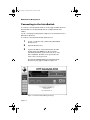
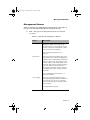
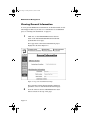
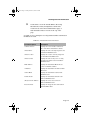
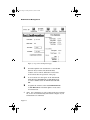
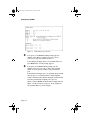
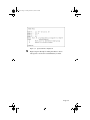
Book Page i Tuesday, March 24, 1998 8:19 PM Web Management Server Reference Guide Asanté Technologies, Inc. 821 Fox Lane San Jose, CA 95131 1.800.662.9686 www.asante.com March, 1998 Part Number 06-00440-00 Rev. A Book Page ii Tuesday, March 24, 1998 8:19 PM Copyright Notice Copyright 1998 by Asanté Technologies, Inc . All rights reserved. No part of this manual, or any associated artwork, software, product design or design concept, may be copied, reproduced or stored, in whole or in part, in any form or by any means mechanical, electronic, optical, photocopying, recording or otherwise, including translation to another language or format, without the express written consent of Asanté Technologies, Inc. Trademarks Asanté and IntraSwitch are trademarks of Asanté Technologies. All other product names are trademarks or registered trademarks of their respective companies. Book Page iii Tuesday, March 24, 1998 8:19 PM Table of Contents Introduction ................................................. 1-1 Introducing Web Management and VLAN Configuration .. Web Browser Access to IntraSwitch Parameters ......... VLAN Configuration ..................................................... Related Documentation...................................................... 1-1 1-1 1-1 1-2 Web Browser Management .......................... 2-1 Overview ............................................................................ Web Browsers Supported................................................... Connecting to the IntraSwitch ........................................... Management Buttons .......................................................... Viewing General Information ............................................. Modifying General Info Parameters .................................... Viewing Port Information................................................... 2-1 2-1 2-2 2-3 2-4 2-7 2-7 Configuring VLANs ...................................... 3-1 Overview ............................................................................ 3-1 Accessing the VLAN Configuration Menu .......................... 3-1 Moving Ports to Create or Modify VLANs........................... 3-3 Technical Support........................................ A-1 Contacting Asanté Technical Support ............................... A-1 Technical Support Hours ............................................ A-1 Page iii Book Page iv Tuesday, March 24, 1998 8:19 PM Page iv Book Page 1 Tuesday, March 24, 1998 8:19 PM 1 Introduction Introducing Web Management and VLAN Configuration This reference guide describes the use of a Web browser interface for IntraSwitch management as an alternative to local console management and Telnet remote management. Web management, like Telnet management, is in-band. This guide also covers the configuration of custom VLANs, by means of configuration screens that can be accessed via the IntraSwitch Local Management Interface. Web Browser Access to IntraSwitch Parameters The “Web Browser Management” chapter explains how to access general information, port parameters, and port statistics for your IntraSwitch. There are sections that describe connecting with your IntraSwitch via the Web, navigating through the IntraSwitch management Web pages, and viewing and modifying the configuration parameters. There is also a section on viewing port statistics. VLAN Configuration The “Configuring VLANs” chapter explains how to access a configuration screen for creating custom VLANs made up of the devices connected to your IntraSwitch. There are sections with procedures for accessing the VLAN configuration menu, and sections that describe the procedures used to add and remove ports from VLANs. Page 1-1 Book Page 2 Tuesday, March 24, 1998 8:19 PM Introduction Related Documentation For more information on the IntraSwitch parameters and features mentioned in this reference guide, see your IntraSwitch User’s Manual. Additional System requirements are also listed in the IntraSwitch User’s Manual. Page 1-2 Book Page 1 Tuesday, March 24, 1998 8:19 PM 2 Web Browser Management Overview The IntraSwitch has a built-in HTTP (HyperText Transfer Protocol) server. The HTTP server allows you to manage the IntraSwitch via any supported World Wide Web browser (see Table 2-1 for a list of supported platforms and browsers). Web Browsers Supported Table 2-1 lists the World Wide Web browsers supported by the IntraSwitch. Table 2-1 Supported Web Browsers Platform World Wide Web Browser PC (Windows™) Netscape Navigator® v. 3.0 or greater Netscape Communicator™ v. 4.0 Microsoft Internet Explorer™ v. 3.0 or 4.0 Macintosh® Netscape Navigator® v. 3.0 or greater Netscape Communicator™ v. 4.04 MIcrosoft Internet Explorer™ v. 3.0 or 4.0 Page 2-1 Book Page 2 Tuesday, March 24, 1998 8:19 PM Web Browser Management Connecting to the IntraSwitch To connect to the IntraSwitch with one of the supported Web browsers listed in Table 2-1, the IntraSwitch must be configured with an IP address. See the “Setting up for Management” chapter in your IntraSwitch User’s Manual for directions. To connect to the IntraSwitch with a Web browser: 1 Locate a computer with a functioning World Wide Web browser. 2 3 Open the Web browser. Type the IP address of the IntraSwitch at the URL prompt, then press Return. Use the user name “IntraSwitch” and the password “Asante” if no other ID is established. The Web access password is the same as the console password. The IntraSwitch Embedded Network Management Web Server page appears, similar to Figure 2-1. Figure 2-1 IntraSwitch Web Management Page Page 2-2 Book Page 3 Tuesday, March 24, 1998 8:19 PM Management Buttons Management Buttons Table 2-2 describes the enabled management buttons in the frame on left side of the IntraSwitch Web Browser Management Page. ∆ Note: The grayed out management buttons are currently not active. Table 2-2 Web Browser Management Buttons Button Description Overview Opens the IntraSwitch Embedded Network Management Web Server page (as displayed in Figure 2-1). This page allows you to click on the ports and view their configuration parameters and statistics. See “Viewing Port Information” on page 2-7. General Info Opens the General Information page. This page allows you to view the following items: software version, administrative information (name, location, and contact person for the switch), address of the switch (MAC, IP, subnet mask, and router), bootstrap information (server IP address, boot filename, boot mode, and load mode), security configuration (MAC ageout time), and password setting fields. See “Viewing General Information” on page 2-4 for details. Tech. Support Opens the Tech Support directory page. This page displays the different communication channels you can use to contact the Asanté technical support information database and staff. See Appendix A for details. Page 2-3 Book Page 4 Tuesday, March 24, 1998 8:19 PM Web Browser Management Viewing General Information To view general administration information on the IntraSwitch, use the following procedure. If you want to see information on an individual port, see “Viewing Port Information” on page 2-7. 1 Click once on the General Info button in the left frame of the IntraSwitch Embedded Network Management Web Server page. The top portion of the General Information page is displayed as shown in Figure 2-2. Figure 2-2 Top of General Information Page The top frame contains hypertext links to different parameter sections of the General Information page. 2 Page 2-4 View the Software Version and Administrative Information sections at the top of the page. Book Page 5 Tuesday, March 24, 1998 8:19 PM Viewing General Information 3 Scroll down to view the Switch Address, Bootstrap Information, Security Configuration, and Set Password sections of the General Information page, or click the links for these sections at the top of the page. See Table 2-3 for a description of each parameter. When a field can be modified, it is noted. Table 2-3 General Information Parameters Parameter Option Description Software Version Displays the version number and release date of the Asanté IntraSwitch software. Switch Name Displays the name currently assigned to the IntraSwitch. Modifiable field. Switch Location Displays the location currently assigned to the IntraSwitch. Modifiable field. Switch Contact Displays the name of the person or entity currently responsible for the IntraSwitch. Modifiable field. MAC Address Displays the IntraSwitch’s Media Access Control or hardware address. IP Address Displays the IntraSwitch’s IP address. Modifiable field. Subnet Mask Displays the IntraSwitch’s subnet mask. Modifiable field. Default Router Displays the IntraSwitch’s default router address. Modifiable field. (Boot) Server IP Address Displays the remote boot server’s IP address. Modifiable field. Boot File Name Displays the image file name and network path. Modifiable field. Page 2-5 Book Page 6 Tuesday, March 24, 1998 8:19 PM Web Browser Management Parameter Option Description Boot Mode The boot mode used for downloading a new version of software for the IntraSwitch. Pulldown menu with these choices: BootP-TFTP — sets the IntraSwitch to request an IP address from a BootP server and download the image file through TFTP. TFTP — sets the IntraSwitch to only download the image file through TFTP (does not request an IP address; the IntraSwitch must already be configured with an IP address to use this option). Boot Load Mode Displays the origin of the device boot image file (a software file required by the IntraSwitch to operate on the network). Pulldown menu with these choices: Local — indicates the IntraSwitch is set to download the image file from its internal flash memory. Remote — indicates the IntraSwitch is set to download the image file from a remote boot server on the network. Security Configuration Displays the Ageout time (connect time) for users accessing the MAC address of the IntraSwitch. Modifiable field. Set Password Displays fields that allow you to enter a new HTTP password. Modifiable fields. For further details on these parameters and settings, see the appropriate section of your IntraSwitch User’s Manual. Each of the parameters and settings can be accessed in your IntraSwitch Local Management Interface, either by means of a local console or a Telnet connection. Page 2-6 Book Page 7 Tuesday, March 24, 1998 8:19 PM Modifying General Info Parameters Modifying General Info Parameters Use the following procedure to modify the parameters on the General Information page that have editable text fields or pull-down menus. 1 Scroll to the parameter you want to change, or click the link for it at the top of the General Information page. 2 Edit the text in the text box for the parameter, or choose an option from the pull-down menu. 3 Click Apply Changes to activate the modifications you have made. If you decide you do not want to make the changes you have entered, click Restore. Viewing Port Information To view information about each port on the IntraSwitch, use the following procedure. 1 Click once on the Overview button on the IntraSwitch Embedded Network Management Web Server page. 2 Click once on a port to see its statistics. The top portion of the Port Configuration page is displayed as shown in Figure 2-3. Page 2-7 Book Page 8 Tuesday, March 24, 1998 8:19 PM Web Browser Management Figure 2-3 Top of Port Configuration page 3 Scroll through the Port Statistics list to view the RX (Receive data) counters, TX (Transmit data) counters, error counters, and frame counters that are shown in the lower portions of the page. 4 To see statistics for other ports on the IntraSwitch, click either the Previous Port or Next Port button, or enter a number in the Go to Port field and click GO. 5 To update the statistics, either click Manual Refresh or Auto Refresh. The automatic update occurs at five second intervals. ∆ Page 2-8 Note: For a description of each counter in the Port Statistics list, see the “Status Monitoring and Statistics” chapter of your IntraSwitch User’s Manual. Book Page 9 Tuesday, March 24, 1998 8:19 PM Viewing Port Information See Table 2-4 for a description of each port configuration parameter. Table 2-4 Port Configuration Parameters Parameter Option Description Link Status Displays the link status, port speed, and duplex mode of the port. If the status is Up, a network device is properly connected to the selected port and is powered on. If the status is Down, a network device is not connected to the selected port. The port speed can be either 10Mbps or 100Mbps. The mode can be Half duplex (one-way transmission at a time) or Full duplex (twoway transmission). Media Type Displays the type of connector on the port, either FL, FX, or RJ-45 connector. Port Status Allows you to enable or disable the selected port. Note: To determine if the port is disabled, check the Port Connection status parameter in the Port Configuration menu of a telnet or console session. Port Mode Allows you to select a port configuration option from a pull-down menu. To modify the Port Status or Port Mode parameters, pull down the menu and choose an option.The Disable option for port status can be helpful if you are trying to isolate a problem on one of several devices connected to the different ports of the IntraSwitch. Change the Port Mode to reflect changes of hardware. ∆ Note: For more information on the port configuration parameters, see “Configuring Port Parameters” in the “Console Management” chapter of your IntraSwitch User’s Manual. Page 2-9 Book Page 10 Tuesday, March 24, 1998 8:19 PM Web Browser Management Page 2-10 Book Page 1 Tuesday, March 24, 1998 8:19 PM 3 Configuring VLANs Overview Your IntraSwitch supports the use of a Virtual LAN on all ports. A Virtual LAN, or VLAN, is a logically separated segment of your LAN, containing a limited number of devices, whose traffic is isolated from that of the rest of the LAN.The “member” devices of each VLAN are defined by port grouping. You can use the Asanté Local Management Interface to set up a Virtual LAN and add ports to it or remove ports from it. By default, all ports on the IntraSwitch are included in a single VLAN, VLAN 0. In this configuration, there is no separation or organization of devices into groups, so all network traffic runs on all parts of the net. If you need to separate a group of users who move large files over the net, or a group of users who have special security needs, create a VLAN for them as described in this chapter. If you need to isolate a group of high-priority users from background network traffic such as that caused by broadcasts or “chatty protocol” overhead traffic, you can create a VLAN for them, also. Accessing the VLAN Configuration Menu After you have connected to the IntraSwitch Local Management Interface using either an out-of-band Console or in-band Telnet connection, use the following procedure to access the VLAN configuration menu. For information on connecting to the IntraSwitch Local Management Interface, see the “Setting Up For Management” chapter in your IntraSwitch User’s Manual. Page 3-1 Book Page 2 Tuesday, March 24, 1998 8:19 PM Configuring VLANs The IntraSwitch 5212 is used as an example in the following procedure, but you can follow the same steps no matter which specific IntraSwitch model you have. The only difference will be the number of ports. 1 In the Main Menu of the IntraSwitch Local Management Interface, type c and enter your password at the prompt. The Configuration Menu is displayed, as shown in Figure 3-1. Figure 3-1 2 Page 3-2 Configuration menu for Local Management Interface Type v to choose the Config VLAN option. The VLAN configuration menu is displayed, as shown in Figure 3-2. Book Page 3 Tuesday, March 24, 1998 8:19 PM Figure 3-2 3 ∆ VLAN configuration menu for IntraSwitch 5212 View the current configuration of VLANs. In the sample configuration of an IntraSwitch 5212 shown in Figure 3-2, there are 3 assigned VLANs. VLAN 1 has port 8 and port 9 assigned to it; VLAN 2 has port 5 and port 6, and VLAN 3 has port 11 assigned to it. Note: All ports are in VLAN 0 by default. You create custom VLANS by moving these ports to VLANs 1, 2, and 3. Moving Ports to Create or Modify VLANs Use the following procedure to create custom VLANs to meet the needs of your site. 1 2 Access the VLAN configuration menu as described in the previous section. Type m to display the VLAN and port specification prompts, as shown in Figure 3-3. Page 3-3 Book Page 4 Tuesday, March 24, 1998 8:19 PM Configuring VLANs Figure 3-3 3 4 Page 3-4 VLAN and port specification In response to the Which VLAN? prompt, type the number of the VLAN to which you want to move a port.You can type any number from 0 to 3. In the illustrated sample, VLAN 1 is specified. When you press Return, the second prompt appears. In response to the Which Port? prompt, type the number of the port you want to add to the specified VLAN. You can type the number of any IntraSwitch port. In the illustrated sample, port 3 is specified. Keep in mind that one port on your IntraSwitch is assigned permanently to VLAN 0. In the illustrated sample, an IntraSwitch 5212, the permanently assigned port is port 14. When you press Return, the VLAN menu is displayed as in Figure 3-4. The newly moved port (3, in the sample) in the specified VLAN (1, in the sample). Book Page 5 Tuesday, March 24, 1998 8:19 PM Figure 3-4 5 Updated VLAN configuration Repeat steps 2 through 4 of this procedure to move other ports to create the custom VLANs you want. Page 3-5 Book Page 6 Tuesday, March 24, 1998 8:19 PM Configuring VLANs Page 3-6 Book Page 1 Tuesday, March 24, 1998 8:19 PM A Technical Support Contacting Asanté Technical Support To contact Asanté Technical Support: Telephone (800) 622-7464 Fax (801) 566-3787 Internet Mail [email protected] World Wide Web www.asante.com Bulletin Board Service (BBS) (408) 432-1416 FTP Archive ftp.asante.com Technical Support Hours 6:00 A.M. to 5:00 P.M. Pacific Standard Time USA, Monday – Friday. Page A-1 Book Page 2 Tuesday, March 24, 1998 8:19 PM Technical Support Page A-2 Book Page i Tuesday, March 24, 1998 8:19 PM Index A N Ageout time, for Switch connect 2-6 Assistance. See Technical Support Netscape browser 2-1 B Password for Web connect 2-2 HTTP 2-6 Port grouping 3-1 mode 2-9 statistics 2-7 status 2-9 Port configuration 2-7 Port info link status 2-9 media type 2-9 mode 2-9 modifying 2-9 port status 2-9 viewing 2-7 Boot info file name 2-5 load mode 2-6 mode, for downloading new version 2-6 C Chatty protocol 3-1 Connect time 2-6 D Default router 2-5 E Error counters 2-8 F P Frame counters 2-8 R G General Info, Web 2-3, 2-4, 2-7 Requirements, system 1-2 RX counters 2-8 H S Help. See Technical Support HTTP password 2-6 server 2-1 Software version 2-4 Subnet mask 2-5 Support, Technical A-1 Switch info contact 2-5 IP address 2-5 location 2-5 MAC address 2-5 modifying 2-7 name 2-5 subnet mask 2-5 System requirements 1-2 I Internet Explorer browser 2-1 IP address 2-2, 2-5 L Link status 2-9 M MAC address 2-5 Media type, for a port 2-9 Microsoft browser 2-1 Index-i Book Page ii Tuesday, March 24, 1998 8:19 PM T Technical Support 2-3, A-1 TX counters 2-8 V Version of software 2-4 VLAN configuration accessing 3-1 menu 3-2 procedures 1-1 sample 3-3 described 3-1 W Web browsers, supported 2-1 Web management described 1-1 General Info 2-3, 2-4 page 2-2 Tech. Support 2-3 Index-ii