1
iEmcee User Guide Addendum
3.1 – Mobile Signing
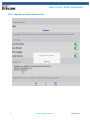
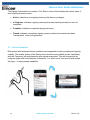
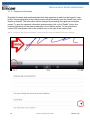
To sign a Mobile signature spot, you will sign directly on your iPad or iPhone screen. This
mode is indicated with a Red Signature Line on the ‘Sign’ page.
3.1.1 – Mobile Sign and Send
Simply sign with your finger or mobile device stylus and click ‘Done’ to transmit the signature
details to the eSign Emcee server.
NOTE: You can clear the page with the ‘Clear’ button anytime and re-sign before clicking the ‘Done’ button.
17
www.esignemcee.com
Back to Top