1
G Data ClientSecurity
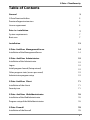
Table of Contents
General
3
G Data PremiumHotline
3
PremiumSupport extensions
3
Licence agreement
3
Prior to installation
7
System requirements
7
Boot scan
7
Installation
12
G Data AntiVirus ManagementServer
14
Installation of the ManagementServer
14
G Data AntiVirus Administrator
19
Installation of the Administrator
19
Logon
19
Initial program launch (Setup wizard)
19
Other program starts (access password)
19
Administrator program setup
19
G Data AntiVirus Client
71
Installation of the clients
71
Security icon
71
G Data AntiVirus WebAdministrator
76
Installation of the WebAdministrator
76
Program setup of the WebAdministrator
76
G Data Firewall
78
Installation of the firewall
78
1
G Data ClientSecurity
Program setup of the firewall
78
Attachment
94
Troubleshooting (FAQ)
94
2
General
General
In these days of global networking and the massive security risks this
incurs, the subject of virus protection is no longer one just for IT specialists.
Rather it has to be considered within the context of comprehensive,
company-wide risk management at the highest level of management.
Computer network downtime caused by a virus strikes a company where it is
most vulnerable. The result: Cessation of business-critical systems, loss of
success-related data, loss of important communication channels. Computer
viruses can cause damage to a company that it can never recover from!
G Data AntiVirus provides you with high-end virus protection for your entire
network. For years its leading security capabilities have been awarded terrific
scores in numerous tests. G Data AntiVirus is based on central
configuration and administration plus as much automation as is possible. All
clients, whether they are workstations, notebooks or file servers, are
controlled centrally. All client processes run invisibly in the background.
Automatic Internet updates enable extremely fast reaction times in the event
of virus attack emergency and the award-winning Client Firewall completes
its all-encompassing protection. Central control with the G Data AntiVirus
ManagementServer makes installation, settings, updates, remote control
and automatic systems possible for the entire network. This reduces the
workload on the system administrator and saves time and money.
Your G Data Security Team
G Data PremiumHotline
The PremiumHotline for your G Data AntiVirus multi-user and network
licences is available at any time for all registered business customers.
www.gdata-software.com
Your registration number is located on the back of the user manual. If you
bought the software online, you will receive your registration number in a
separate email. You can enter it via the online registration form. You will
then immediately be given a password online with which you can download
your personal Internet updates. The Online database for frequently asked
questions (FAQ) already contains answers to many questions concerning
G Data AntiVirus. Before contacting the hotline, please check your
computer/network configuration. The following information is particularly
important:
3
G Data ClientSecurity
· the version numbers for the Administrator and the ManagementServer
(you will find these in the Help menu of the Administrator software)
· the registration number or the user name for the Internet update. The
registration number is located on the back of the user manual. The user
name is sent to you during online registration .
· exact Windows version (Client/Server)
· other installed hardware and software components (Client/Server)
These details will make the call to the hotline representative faster, more
effective and more successful. If at all possible, please ensure that the
telephone is in the vicinity of a computer on which the Administrator software
for the ManagementServer has been installed.
PremiumSupport extensions
With PremiumSupport once you have carried out your Online registration
you will receive hourly updated virus data by Internet update for a year so
that your virus countermeasures are always optimised. In addition you will
receive detailed information (e.g. about upgrades to the ManagementServer
software and current virus warnings) by email. PremiumSupport can be
terminated or extended with a time limit or indefinitely. Please contact us at
www.gdata-software.com
?
Of course our Business Sales department is here to help and will be
happy to provide you with individual advice. Please understand that
technical questions about existing software can only be handled by
our ServiceCenter .
Licence agreement
The following are the contractual terms and conditions for the use of the software G Data
ClientSecurity by the end user (hereafter also called: Licencee).
1. Object of the contract: The object of the contract is the G Data software recorded on a
data medium or downloaded from the Internet and the program description. This is hereafter
referred to as Software. G Data calls attention to the fact that, due to the status of
technology, it is not possible to manufacture Software in such a way that it operates
without error in all applications and combinations.
2. Scope of use: G Data grants you, for the duration of this contract, the simple, nonexclusive and personal right (hereafter referred to as Licence) to use the Software on a
contractually agreed number of computers. The Software can be used in the form of an
4
General
installation on a physical unit (CPU), a virtual/emulated machine (such as VMWare) or an
instance of a terminal session. If this computer is a multiple user system, this usage right
applies to all users of this one system. As the Licencee you are permitted to transfer the
Software from one computer to another in physical form (i.e. stored on a data medium),
provided that it is not used on more than the contractually agreed number of computers at
any time. Use that exceeds this is not permitted.
3. Specific limitations: The Licencee is prohibited from changing the Software without the
prior written consent of G Data.
4. Ownership of rights: When purchasing the product you only receive ownership of the
physical data medium onto which the Software has been recorded and to updates agreed
in the context of support. Purchase of rights to the Software itself is not included with this.
G Data especially reserves all publication, reproduction, processing and usage rights to the
Software.
5. Reproduction: The Software and associated written materials are protected by copyright.
Creation of a backup copy is permitted, as long as this is not passed on to a third party.
6. Duration of the contract: The contract is granted for an unspecified period. This duration
does not cover the procurement of updates. The Licencee's right to use the Software
expires automatically and irrevocably if he breaches any of the terms of this contract. On
termination of the usage right it is obligatory that the original CD-ROM including any
UPDATES/UPGRADES and any written materials is destroyed.
7. Compensation for breach of contract: G Data calls attention to the fact that you are
responsible for all damages through breach of copyright that G Data incurs from breach of
the terms of this contract by you.
8. Changes and updates: Our most recent service terms and conditions shall always apply.
The service terms and conditions may be changed at any time, without notice and without
giving reasons.
9. G Data warranty and liability:
a) G Data guarantees with respect to the original Licencee that, at the time of delivery, the
data carrier (CD-ROM) onto which the Software has been recorded is error-free under
normal conditions of use and within normal maintenance conditions for material
performance.
b) If the data medium or download from the Internet is faulty, the purchaser is entitled to
demand delivery of a replacement during the warranty period of 6 months from delivery. To
do so, he must provide proof of purchase of the Software.
c) As per the reason previously stated in para. 1, G Data accepts no responsibility for the
Software not being error-free. In particular, G Data accepts no warranty for the Software
meeting the purchaser's requirements and purposes or working in conjunction with
programs selected by him. The purchaser is responsible for proper selection and
consequences of use of the Software, together with its intended or achieved results. The
same is true of written materials related to the Software. If the Software is essentially
unusable in the sense of para. 1, the purchaser has the right to revoke the contract. G Data
has the same right if manufacture of Software that may be required in the sense of para. 1
is not possible within reasonable cost limits.
d) G Data is not liable for damages unless damage is caused intentionally or by gross
negligence on the part of G Data. Liability for gross negligence does not extend to sales
persons. The maximum award for damages shall be the purchase price of the Software.
5
G Data ClientSecurity
10. Legal domicile: The exclusive legal domicile for all disputes directly or indirectly arising
from this contract is the registered head office of G Data.
11. Final provisions: If individual provisions of this Licence Agreement become invalid, the
remaining provisions stay in force. In place of the invalid provision, an effective provision
that approximates its commercial intention as closely a possible shall be considered as
agreed upon.
?
Copyright © 2009 G Data Software AG
Engine A: The Virus Scan Engine and the Spyware Scan Engines are based on
BitDefender technologies © 1997-2009 BitDefender SRL.
Engine B: © 2009 Alwil Software
OutbreakShield: © 2009 Commtouch Software Ltd.
[G Data ClientSecurity - 06.05.2009, 14:23]
6
Prior to installation
Prior to installation
In the event of an acute virus threat please first run a Boot scan on the
affected computers.
· Then install the ManagementServer on your server. Please note that the
ManagementServer can only be installed and run on a Windows Vista,
Windows XP Professional or Windows 2003 server system. When
installing the ManagementServer the Administrator is automatically
installed on the server. You can use this program to manage the
ManagementServer from the server computer. To guarantee optimal
protection, the computer should always be accessible (switched on) and
available for automatically loading virus signatures via an Internet
connection. Therefore, it is not absolutely necessary to install the
ManagementServer on your central file server.
· Now carry out the online registration. You cannot update the virus
databases via the Internet without registering online.
· When the Administrator is first started on the server, the Setup wizard.
also starts. You can use this to install the client software directly onto
the clients you want in your network without having to carry out the
installation on each computer individually.
· If problems should occur during remote installation on the clients, you
can of course also install the client software on the clients manually or
semi-automatically. To ensure that your server is also protected against
virus threats, you should of course also install the client software on your
server.
· Now you can run virus prevention and countermeasures as well as Internet
updates for G Data AntiVirus client and server software easily and
centrally via the Administrator, by, for example, using the G Data
AntiVirus monitor for continuous checking or for defining scan jobs that
your network regularly runs to detect any possible viruses.
· If you should need to solve a problem on site, you can install the
Administrator software quickly and easily on any client and also have
complete access to the ManagementServer from there.
7
G Data ClientSecurity
System requirements
The G Data AntiVirus system builds upon the TCP/IP protocol and uses this
both for communication between client and server computers among each
other as well as for the online connection to the G Data UpdateServer. The
following minimum requirements apply both to clients and or server:
· G Data AntiVirus ManagementServer: PC with Windows Vista, XP, or
Server 2003 (preferably the server versions, also x64 Edition), at least 128
MB RAM, Internet access
· G Data AntiVirus and firewall -Clients: PC with Windows Vista, XP, 2000
or Server 2003 (also x64 edition), at least 256 MB RAM
?
For Linux computers that operate as file servers and provide
Windows authorisations to different clients (via the SMB protocol),
a module can be manually installed that controls access to the
cleared areas and carries out a file scan with every access event,
so no malware can migrate from the Samba server to the Windows
clients (or vice versa).
Boot scan
The boot scan will help you fight viruses that have embedded themselves
prior to installation of the antivirus software on your computer and that may
prevent the G Data software from being installed. That is why there is a
special version of the G Data software that can be run before the start of
Windows.
?
What do I do if my computer will not boot from the CD-ROM?
If your computer will not boot from the CD/DVD-ROM, you may
need to set this option up first. This is done in the so-called BIOS, a
system that is automatically started before your Windows operating
system. To make changes in BIOS, proceed as follows:
1. Switch your computer off.
2. Restart your computer. Usually you reach the BIOS setup by
pressing the DEL button as the computer is booting up (and
sometimes the F2 or F10 button as well).
3. How to change individual settings in your BIOS setup varies from
computer to computer. Please consult your computer's
documentation. The result should be the boot sequence CD/DVD-
8
Prior to installation
ROM:, C: , meaning that the CD/DVD-ROM drive becomes the
1st boot device and the hard disk partition with your Windows
operating system on it becomes the 2nd boot device.
4. Save the changes and restart your computer. Your computer is
now ready for a boot scan.
For the boot scan itself, proceed as follows:
1a
Boot scan using the program CD: Use the G Data program CD to
boot up your computer. - Insert the G Data software CD into the
drive. In the start window that appears, click on
and
switch the computer off.
1b
Boot scan with G Data software that you have downloaded from
the Internet: Use the
option in the G Data software
program group to burn yourself a new boot CD. - Insert the boot
CD you have burnt into the drive. In the start window that appears,
click on
and switch the computer off.
After this first step the boot scan in all three scenarios will proceed
identically:
2
Restart the computer. The G Data boot scan start menu will
appear.
3
Use the arrow keys to select the
option and
confirm your choice by pressing Enter. A Linux operating system is
now started from the CD and a G Data special version for boot
scans appears.
9
G Data ClientSecurity
?
If you have problems displaying the program interface, restart the
computer and select the
option.
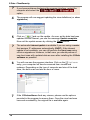
4
The program will now suggest updating the virus definitions (or virus
signatures).
5
Click on
and run the update. As soon as the data has been
updated via the Internet, you see the message Update complete.
Now exit the update screen by clicking the Close button.
?
The automatic Internet update is available if you are using a router
that assigns IP addresses automatically (DHCP). If the Internet
update is not available, you can still perform the boot scan using
old virus signatures. However, in that case, you should perform a
new boot scan with updated data as soon after installing the G Data
software as possible.
6
You will now see the program interface. Click on the
entry; your computer will now be scanned from viruses and
malware. Depending on the type of computer and size of the hard
drive, the boot scan can take an hour or more.
7
If the G Data software finds any viruses, please use the options
provided in the program to remove them. Once the virus has been
removed successfully, the original file is available again.
10
Prior to installation
8
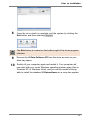
Once the virus check is complete, exit the system by clicking the
Exit button and then selecting
.
The Exit button is located on the bottom right of the Linux program
interface.
9
10
Remove the G Data Software CD from the drive as soon as your
drive tray opens.
Switch off your computer again and restart it. Your computer will
now start with your usual Windows operating system again (that is,
Windows XP or Windows Vista), and you can be certain of being
able to install the standard G Data software on a virus-free system.
11
G Data ClientSecurity
Installation
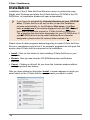
Installation of the G Data AntiVirus Windows version is particularly easy.
Simply start Windows and place the G Data AntiVirus CD-ROM in the CDROM drive. An installation window will open automatically.
?
If you have not activated the Autostart function on your CD-ROM
drive, G Data AntiVirus will not be able to start the installation
process automatically. In the Windows Start menu, click Run,
enter e:\setup.exe in the window displayed and click OK. This will
then open the welcome screen for G Data AntiVirus installation.
The e: signifies the drive letter designation for your CD-ROM drive. If
your CD-ROM drive is set up under a different drive character
designation, please enter the relevant letter instead of e:. .
Please close all other programs before beginning to install G Data AntiVirus.
Errors or cancellation could occur if, for example, programs are left open that
access data G Data AntiVirus requires for the installation.
· Install: Click on this button to start installing G Data AntiVirus on your
computer
· Browse: Here you can view the CD-ROM directories via Windows
Explorer.
· Cancel: Clicking on this will let you close the Autostart window without
having to perform any actions.
After you have clicked on the button Install, a screen appears in which you
select which of the G Data AntiVirus components you want to install.
12
Installation
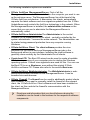
The following installation options are available:
· G Data AntiVirus ManagementServer: First of all the
ManagementServer should be installed on the computer you want to use
as the antivirus server. The ManagementServer lies at the heart of the
G Data AntiVirus architecture: It administers the clients, automatically
requests the latest software and virus signature updates from the G Data
UpdateServer and controls the AntiVirus technology in the network. When
the ManagementServer is installed, the administrator software on the
server that you can use to administer the ManagementServer is
automatically called.
· G Data AntiVirus AdministratorThe Administrator is the control
software for the ManagementServer which - centrally controlled by the
system administrator - secures the entire network. The Administrator can
be started using password protection from any computer running
Windows.
· G Data AntiVirus Client: The client software provides the virus
protection for the clients and runs ManagementServer jobs in the
background without a user interface. Installing the client software is
generally done centrally by the Administrator for all clients.
· Create boot CD: The Boot-CD wizard can be used to create a bootable
CD for basic scanning of your computer prior to starting the Windows
operating system. Current virus signatures are used for this. You can use
the Boot CD to run a Boot scan, even without the original G Data
AntiVirus software CD. Please also refer to the section Boot scan.
· G Data AntiVirus WebAdministrator: The WebAdministrator is webbased administration software for the ManagementServer. It can be
launched via a web browser.
· G Data Firewall: The firewall can be used to additionally protect clients
with a firewall. If you want to manually install the firewall on the relevant
client, the G Data AntiVirus Client software must have been installed on
the client, as this controls the firewall's communication with the
ManagementServer.
?
Directions and information that you should observe during the
installation can be found in the sections for the respective software
components.
13
G Data ClientSecurity
G Data AntiVirus ManagementServer
The ManagementServer lies at the heart of the G Data AntiVirus
architecture: It administers the clients, automatically requests the latest
software and virus signature updates from the G Data UpdateServer and
controls the virus technology within the network. For communication with the
clients, the ManagementServer runs over TCP/IP. For Clients that are offline,
the jobs are automatically collected and synchronised with the next online
session. The ManagementServer possesses a central Quarantine folder to
which you can optionally allow suspicious files to be encrypted and saved,
then subsequently deleted, disinfected or, where applicable, routed to the
Emergency AntiVirus service. The ManagementServer is controlled via the
administrator software.
?
If you close the administrator software, the ManagementServer does
not close. This continues to remain active in the background and
controls the processes that were set by you for the clients.
Installation of the ManagementServer
To install the ManagementServer you require at least Windows
Vista, a Windows XP or Windows 2003 server. Insert the G Data
AntiVirus CD-ROM and press the Install button. Then select the
G Data AntiVirus ManagementServer components by clicking on
the adjoining button.
Start screen
In the following start screen, you are informed that you are about to install
the ManagementServer on your system. Please ensure that you have now
closed all open applications in your Windows system, as otherwise they
may cause problems during the installation. Click on Next to continue with
the installation.
14
G Data AntiVirus ManagementServer
Licence agreement
Please read the Licence Agreement regarding use of the software, then
select I accept the terms of the licence agreement and click on Next if
you agree with the terms in this document.
Target folder
The next screen allows you to select the location in which the data of the
ManagementServer should be saved. If you wish to select a separate target
folder, then by clicking the button Change you can open a directory tree
view in which you can select another directory or create a new one.
Select server type
When selecting a server type you have the following options:
· Install a main server: It is essential that the G Data AntiVirus
ManagementServer is created as the main server (main MMS). The main
server represents the central configuration and administration entity of the
network-based virus protection architecture. The ManagementServer
provides the computers to be protected with the latest virus signatures and
program updates. In addition, all specific client settings are carried out
centrally on the ManagementServer.
· Install a secondary server: When using an SQL database it is possible
to run a second server (secondary MMS), which uses the same
database as the main server. If the main server is unavailable for an hour
or more, the clients connect automatically to the secondary MMS and
load signature updates from it. They switch back to the main server as
soon as it is available again. Both servers load the signature updates
independently of each other.
· Install a subnet server: With large networks, it is also useful to operate
the G Data AntiVirus ManagementServer as a subnet server. Subnet
servers serve to reduce the network traffic loading between clients and the
main MMS. They can be used in subnetworks where their task is to
manage the clients allocated to them. The subnet servers remain fully
functional, even if the main or secondary ManagementServer is
inaccessible.
15
G Data ClientSecurity
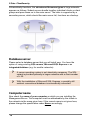
Schematically therefore, the structure of the server types in large networks
appears as follows: Subnet servers bundle together individual clients or client
groups and pass these on to the main server. The latter is supported by a
secondary server, which should the main server fail, functions as a backup.
Database server
Please select a database server that you will install now. You have the
option of using existing SQL servers, Microsoft SQL Express or an
integrated database (e.g. for smaller networks).
?
A server operating system is not absolutely necessary. The SQL
variant is provided primarily in larger networks with a client number
of > 50.
?
With the installation of Microsoft SQL Express, a possibly still
existent conventional database is automatically converted.
Computer name
Now check the name of your computer on which you are installing the
ManagementServer. This computer must be addressable by the clients in
the network via the name given here. If the correct name is not given here,
please change the specification under Name accordingly.
16
G Data AntiVirus ManagementServer
Starting the installation
The ManagementServer will now be installed. The installation starts with a
completion screen. Click on Install.
Online registration
No later than prior to carrying out Internet updates you must have registered
with the G Data UpdateServer to receive your access data. For this, you can
register directly during the installation or later by executing the function
Internet update under Start > Programs > G Data AntiVirus
ManagementServer. Use the Online registration button here. You will
then be asked for your customer data and registration number.
?
You will find your registration number on the back of the user
manual. If you bought the software online, you will receive your
registration number after the order in a separate email.
?
Please note of course that a permanent or automatic-dial Internet
connection must be available or able to be set up.
Enter the registration number as it is, without spaces or hyphens, in the
relevant 5-character entry fields. Please also ensure that all other entry fields
are correctly completed, as online registration can only be completed using
all the data requested here.
Immediately after online registration, you will receive your user name and
your password in an information box.
17
G Data ClientSecurity
?
Warning: Always keep your user name and password in a safe
place, so you still have it in the event of a possible reconfiguration of
your computer. You can proceed with the program after checking off
the checkbox with the corresponding prompt.
?
G Data AntiVirus carries out these tasks automatically in the
Internet update form. You can now run Internet updates.
?
The Internet updates can be run directly from the Administrator
interface and even automated to run at freely configurable
frequencies.
Database type configuration
This installation step only occurs if you reinstall the ManagementServer or if
an SQL database is already installed on the computer. Usually it is
sufficient to close this info box by clicking on the Close button.
Installation completion
After installation and after each computer restart the ManagementServer will
now start automatically. To carry out changes to the ManagementServer, go
to Start > (All) Programs > G Data AntiVirus ManagementServer and
select the G Data AntiVirus Administrator option. This will start the
administration tool for the ManagementServer.
18
G Data AntiVirus Administrator
G Data AntiVirus Administrator
The administrator is the control software for the ManagementServer which centrally controlled by the system administrator - secures the entire
network. The Administrator can be started from any computer running
Windows using password protection. All conceivable virus scanner services
such as automatic installations, software and virus signature updates, virus
analyses (immediate or periodic), monitor functions and changes to settings
are possible company-wide as remotely controlled jobs. You can invoke the
administrator tool for the control of the ManagementServer by clicking the
entry G Data AntiVirus Administrator in the program group Start > (All)
programs > G Data AntiVirus ManagementServer from the start menu.
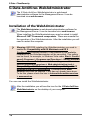
Installation of the Administrator
When installing the ManagementServer the Administrator is also
installed automatically on the same computer (i.e. the computer
you want to use as the server). Therefore you do not need to install
the Administrator separately. However the Administrator can also be
installed on every client computer (independent of its installation on
the server). Thus you can also manage the ManagementServer
remotely. To install the Administrator on a client computer, please
place the G Data AntiVirus CD-ROM in the client computer's CDROM drive and press the Install button. Then select the
component G Data AntiVirus Administrator by clicking on the
adjoining button.
In the following start screen, you are informed that you are about to install
the Administrator on your system. Please ensure that you have now closed
all open applications in your Windows system, as otherwise they may cause
problems during the installation. Click on Next to continue with the
installation and follow the installation steps with the help of the installation
wizard.
After the installation, you can use Start > (All) Programs > G Data
AntiVirus ManagementServer to select the G Data AntiVirus
Administrator entry and so start the administration tool for the
ManagementServer.
19
G Data ClientSecurity
Logon
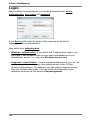
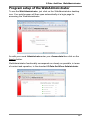
When starting the Administrator, you will be prompted for the server,
authentication, user name and password.
In the Server field, enter the name of the computer on which the
ManagementServer was installed.
Now select your authentication.
· Windows authentication: If you select this Authentication variant, you
can logon to this computer with the user name and password of your
administrator access, i.e. using the Windows user account.
· Integrated authentication: Using integrated authentication, you can, as
system administrator, also give other people access to the G Data
AntiVirus Administrator. For example, you can create a special account
that only contains read rights. You can create and administer these
additional accounts via the function User management .
20
G Data AntiVirus Administrator
Initial program launch (Setup wizard)
When the administrator is first started the Setup wizard is automatically
opened. This helps to set up the clients and takes you through all the
necessary settings. After the initial launch, the wizard can still be started at
any time via the Setup wizard command in the file menu.
Activate
All clients that are to be monitored by G Data AntiVirus must first be
activated. Select the computers in the list and then click the button Activate
. Some computers may not be included in the list (e.g. because they have
not been switched on for a long time or have not set up file or printer
sharing). To activate these clients, you can enter the name in the Computer
entry field and click the button Activate next to the entry field. The computer
will then be included in the list. Click on Next when you have activated all
clients.
Install
In the following dialogue box the checkbox for Automatically install client
software on the enabled computers is checked. If you prefer to install the
software on the client computers manually, please uncheck this box.
21
G Data ClientSecurity
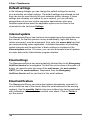
Default settings
In the following dialogue you can change the default settings for monitor,
virus protection and client settings. The default settings are selected so that
they can also be used directly for most networks without change. If these
settings are ultimately not optimal for your network, you can naturally
change these at any time via the respective administrator work area.
Detailed explanations about the adjustable options can be found in the
comments for the task area Settings.
Internet update
The ManagementServer can load new virus signatures and program files over
the Internet. So that this process occurs automatically, login and dial-up
(where necessary) must be automated. First enter the access data here that
you received during online registration. A detailed description of scheduling
update intervals and the execution of basic settings is contained in the
Internet update section. Of course, you can also automate Internet updates
at a later date via the Administrator program interface.
Email settings
The ManagementServer can send potentially infected files to the Emergency
AntiVirus service for investigation. So that this can be done at the push of a
button, you need to enter the name of the mail server, the port number (
SMTP) and the sender address. Responses from the Emergency
AntiVirus Service will be sent back to this email address.
Email notification
The ManagementServer can inform the network administrator via email if a
virus is found on one of the clients. Enter the email address for the warning
recipient. Use the quantity limit to stop your mailbox from being overloaded
with notifications in the event of a massive virus attack. Click on Finish to
exit the wizard.
22
G Data AntiVirus Administrator
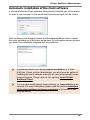
Automatic installation of the client software
If you have selected Client software automatically installed you will be asked
to enter a user account on the server that has access rights for the clients.
After confirming the dialogue entries the ManagementServer tries to install
the client software on all activated computers. An information screen informs
you about the installation progress and any problems.
?
If problems should occur during remote installation of G Data
AntiVirus Clients via the Administrator, you also have the option of
installing the client software manually or semi-automatically on the
client computers. Please refer to the sections Install G Data
AntiVirus Client.
?
You can also install special client software on Linux clients in the
network. For more information please read the section Installation
of the client software on Linux computers in the annex of this
documentation.
23
G Data ClientSecurity
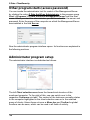
Other program starts (access password)
You can invoke the administrator tool for control of the ManagementServer
by clicking the entry G Data AntiVirus Administrator in the program group
Start > Programs > G Data AntiVirus ManagementServer from the start
menu. When you start the administrator, you will be asked for the server and
password. Enter the name of the computer on which the ManagementServer
was installed in the field Server.
Now the administrator program interface opens. Its functions are explained in
the following sections .
Administrator program setup
The administrator interface is subdivided as follows:
The left Client selection area shows the hierarchical structure of the
monitored computer. To the right of this, one can switch over to the
respective Task areas via tabs. The content of the task area normally relates
to the computer highlighted in the client selection area or to the selected
group of clients. Above these columns a Menu bar and Toolbar for global
functions can be seen, which can be used in all fields of activity.
24
G Data AntiVirus Administrator
?
When administrating Linux clients, which serve as Samba servers,
functions, which, for example are involved in handling emails are
blocked because these are not required in the context of a file
server. Functions which cannot be adjusted for Linux clients are
highlighted using a red dot in front of the corresponding function.
Menu bar
The menu bar contains global functions that can be used in all task areas.
Tasks are divided into the following areas:
· File
· Clients
· View
· Jobs (only in the Jobs task area)
· Reports (only in the Reports task area)
· Client settings (only in the Clientstask area)
· Settings
· ? (Help)
File
Basic user management and printer functions as well as the Setup wizard
are available to you in the file menu.
Setup wizard
With the Setup wizard, you can select and activate the clients from your
network in a user-supported process for which you desire a check to be run
by G Data AntiVirus. The Setup wizard is explained in detail in the section
Initial program launch (Setup wizard) .
25
G Data ClientSecurity
Display log
The log file provides a quick global overview of the last actions carried out
by your G Data AntiVirus. All relevant information is displayed here. You can
filter the log display using the following setting fields:
· Log view: specify here whether you would like to see a log of client or
server procedures.
· Computer/group: specify here whether you would like to view a log for all
clients or groups or only individual areas.
· Procedure: Here you can define whether you would like to view all
information relevant to the log or only notifications on specific topics.
· Time: Specify the from/to time here, for which log information should be
available.
The field Update is to specify that procedures which occur while the log file
view is open are also listed. By clicking Close the log file window is closed;
moreover you can print and export the log or a highlighted area of the log (in
XML format). All procedures first appear in a chronological sequence and can
be easily sorted according to specific criteria by simply clicking on the
respective column title. The column according to which current sorting is
carried out, is indicated by a small arrow symbol.
User management
As system administrator you can allocate additional user accesses for the
Administrator interface. Click on the New button, then enter the user name,
the authorisations for this user (Read / write or Read only), define the
account type (integrated login, Windows user, Windows user group)
and enter a password for this user.
Manage server
Via Manage server you can assign clients to individual subnet servers,
which then bundle the communication of these clients with the main server
and in this way optimise network use. You can install subnet servers using
this menu. By clicking the button Assign clients, you can assign the
existing clients to the defined subnet servers.
?
26
The allocation of clients to subnet servers is independent from the
grouping of clients in respect of virus checking. Clients of different
subnet servers can of course be joined together in a group for virus
checks and scan jobs.
G Data AntiVirus Administrator
Subnet server synchronisation
To enable possible changes even outside the regular communication
intervals of server and subnet server, you can also carry out the subnet
server synchronisation manually.
Print templates
Here you can undertake comprehensive settings for the printout of log and
statistical functions and save them in templates that can be used
independently of each other.
?
Depending on the selected field of activity, you have various
selection dialogues and setting options. Not every task area has
printer options available.
Page view
In this menu, you can specify which details and specifications you would like
to print out. In the selection window that appears, you can highlight the
elements to be printed and then by clicking OK go to the page view which
then displays a preview of the print-out on the screen.
?
Depending on the selected field of activity, you have various
selection dialogues and setting options. Not every task area has
printer options available.
Print
Use this function to start the print procedure for the client settings or reports.
In the selection screen that appears, you can specify which details and
areas of the client settings you would like to print.
?
Depending on the selected field of activity, you have various
selection dialogues and setting options. Not every task area has
printer options available.
27
G Data ClientSecurity
End
Terminate administrator use using this function. Naturally, the monitoring of
your network continues to run uninterrupted according to the specifications
that you transmitted to the ManagementServer when the administrator is not
open.
Clients
In the clients menu, you can carry out basic settings for the work with the
clients and groups that are to be administered.
New group
Use this command to create a group. In principle this is a folder at the
network level in which you can link and edit different clients together. When
this command is enabled a new folder icon appears beneath the folder where
the client selection area is located, where you can directly enter a new name
for this group.
?
In order to assign individual clients to this group as simply as
possible, you can just use the mouse to drag them to the group
entry. These clients then become sub-elements of the respective
group.
Edit group
Here you can open a dialogue box where there are Add and Remove
buttons you can use to group clients with one another. If you have not
selected a group in the group selection area, this function cannot be
selected.
?
28
In order to assign individual clients to this group as simply as
possible, you can just use the mouse to drag them to the group
entry. These clients then become sub-elements of the respective
group.
G Data AntiVirus Administrator
Delete
You can remove a computer from the list of clients to be monitored (disable)
by highlighting it and selecting the Delete command from the client menu.
Note that disabling a computer does not mean that the client software is
uninstalled. Groups can only be deleted if the group is empty. Therefore you
must either disable all clients in the group or move them to other groups.
You can view deleted clients again via the Display disabled clients
function.
Default settings
For the protection of the entire network or selected groups, you can create
default settings and thereby quickly issue standardised specifications for
virus protection. Thus, for example, you can simply move new clients into a
group and automatically adopt the settings of the group for these clients.
?
The default settings are only then available to you in the client
selection area if you selected a group or the entry Entire network.
New clients that are integrated into the group assume the default
settings and can be specified later if necessary.
?
What relevance the individual settings and functions have on the
default settings can be read in the section Settings
Delete default settings
The default settings of a group can be deleted via this function. In this
manner, the default settings for the entire network are automatically
transferred to the respective group.
Update view
To track changes in the network that occur during the time you are using the
administrator, you can use the Update function.
29
G Data ClientSecurity
Display disabled clients
Clients that you have not activated or have removed from the list of
activated clients via the Delete function can be made visible again
via this function. In doing so, disabled clients are shown as
translucent icons.
In contrast to this, the activated clients are defined by fully
coloured icons.
Activate client
If you select a disabled G Data AntiVirus Client (represented by a
translucent icon) and click Activate clients, it will be activated.
In other words, it will be available to you for monitoring. No virus
check is associated with it yet. You must create specifications for
this in the task area Monitor or Jobs or assign the client to a group
for which such specifications already exist. As soon as you install
the G Data AntiVirus client on the monitored client computer, the
virus protection is at your disposal.
Activate client (dialogue)
You can also Activate clients via this function without selecting them in the
client selection area. By activating this function, a dialogue box appears in
which you simply enter the name of the client that is to be activated.
Search for computer
By means of this function, you can search for computers within a defined
range of IP addresses on your network. Simply enter the Start IP address
and the End IP address. G Data AntiVirus now automatically searches
through your host IDs for connected computers. You then have the option of
activating the computers that were found. On one hand, you have the option
of activating these via your computer names or directly addressing them via
the IP address. The respective client then appears with his IP address in the
client selection area.
30
G Data AntiVirus Administrator
Create AntiVirus Client installation packet
This function can be used to enable an installation packet for the G Data
AntiVirus Client to be created. The packet is an individually executable file (
AvkClientSetupPck.exe) with which a new client can be installed on a
computer to protect it without any further user interaction being needed. The
installation packet, for example, is capable of allocating the client to all
computers in a domain via a login script.
?
The packet always contains the current client version on the server.
?
When installing the client software, you are asked if the G Data
Firewall should also be installed on the client computer. Further
information on the firewall is available in the section of the same
name in this documentation.
View
You can use this menu to define the various software selection areas. The
areas displayed are marked with a check. You can use the Update menu
item to update the program interface at any time, for example, to take
account of current view changes. You can find information on the areas in
the relevant sections of the Task areas.
Settings
In the settings menu you have access to basic program settings.
Internet update
You can run Internet updates for the virus database and G Data AntiVirus
program files from here. First go to the Login data and settings tab to enter
the login data you were given during online registration. During the Internet
update current files are loaded from the G Data UpdateServer and saved on
the ManagementServer. Distribution of the new files to the clients is
managed from the Clients task area. The Internet update ensures that you
always have the most up-to-date virus signature databases and are using the
most recent program files.
31
G Data ClientSecurity
Virus database
All clients have a copy of the virus database so that virus protection is also
guaranteed when they are offline (i.e. no connection to the
ManagementServer is available). For example, this is important for
notebooks, which are only irregularly connected to their company network.
Updating the files on the clients takes place in two steps, which, of course,
can both be automated. In the first step, the latest files from the G Data
UpdateServer are copied to a folder on the ManagementServer. In the
second step, the new files are distributed to the clients (see task area "
Clients").
· Update status: By clicking this button, you can, if necessary, update the
virus signature status display on the client, if changes in the display have
not yet been adopted.
· Start update now: By clicking the button Start update now you can
carry out an immediate update of the virus database.
· Automatic updates: As with the virus checks, you can also let the
Internet updates run automatically. To do this check the checkbox next to
Carry out periodic update and specify when and with what cycle the
update is to be carried out.
?
To enable automatic updating, your ManagementServer must of
course be connected to the Internet or enable G Data AntiVirus to
carry out an automatic dial-up. To do this, under Login data and
settings as necessary, enter the user account and proxy settings.
Program files
When the client software from G Data is updated, you can allow the
ManagementServer to carry out the update automatically. Updating of the
files on the clients takes place in two steps, which, of course, can both be
automated. In the first step, the latest files from the G Data UpdateServer
are copied to a folder on the ManagementServer. In the second step, the
new files are distributed to the clients where the client is updated (see
Clients task area).
· Update: By clicking the Update button, you can, if necessary, update the
software version status display on the client, if changes in the display have
not yet been adopted.
· Update now: By clicking the button Update now you can carry out an
immediate update of the client software.
32
G Data AntiVirus Administrator
· Automatic updates: As for the virus checks, you also let the client
software Internet updates run automatically. To do this check the
checkbox next to Carry out periodic update and specify when and with
what cycle the update is to be carried out.
?
To enable automatic updating, your ManagementServer must of
course be connected to the Internet or enable G Data AntiVirus to
carry out an automatic dial-up. To do this, under Login data and
settings as necessary, enter the user account and proxy settings.
?
Warning: To update the ManagementServer program files, please
select program group G Data AntiVirus ManagementServer then
select the entry Internet update from the start menu. The
ManagementServer may only be updated via this entry. By
contrast, G Data AntiVirus client software, can also be updated via
the administrator.
Login data and settings
With your online registration you will receive your login data for updating
your virus databases and program files directly from G Data. Please enter
the necessary data under User name and password. Via the button
Version check you can determine at the next update of the virus database
whether you are using the latest program files. In general version check
should always be switched on, because it prevents unnecessary updates.
Nevertheless, should problems occur when working with virus databases,
then please switch the field Version check off. In this way, at the next
Internet update, a current version of the virus database will be transferred to
your server. By clicking the button User account and proxy settings you
open a window in which basic login data for the Internet & Network can be
entered.
?
Warning: You should only make entries here if problems occur
when using the standard settings of G Data AntiVirus (e.g. due to
the use of a proxy server) and an Internet update is not executable.
33
G Data ClientSecurity
Internet settings
Required for the user account is the information: user name, password and
domain. For logging on to the proxy server, the port (usually 80) and - if
different from the user account - entry of the user name and password for the
proxy server are required.
?
User account is an account for the computer on which the
ManagementServer is located, i.e., for Windows Vista or Windows
XP professional, whichever is installed on it.
?
G Data AntiVirus can use the Internet Explorer connection data
(from version 4). First configure Internet Explorer and check
whether the test page of our update server is accessible: http://
ieupdate.gdata.de/test.htm. Finally switch off the option use
proxy server. Under User account enter the account for which you
have configured Internet Explorer (as the account with which you
have logged in to your computer).
Alarm notifications
If a new virus is found, the ManagementServer can automatically send alarm
notifications via email. The settings required to do this are made here.
Email settings
Enter the name of your network mail server, SMTP server and the port
(normally 25). In addition a (valid) sender address is required so mails can be
sent.
?
34
This email address will also be used for responses from the
Emergency AntiVirus service .
G Data AntiVirus Administrator
Email notification
Activate email notification by checking the Send alarm notifications by
email checkbox and entering the email address for the notification recipient
in Recipient. It is essential to define a quantity limit under Limit so the
mailbox is not filled to capacity during acute attacks.
Update rollback engine A / B
Where a false alarm or similar problems occur, it can, in rare cases, make
sense, to block the latest update of the virus signatures and use a
previous virus signature update instead. The ManagementServer saves the
last updates from each AntiVirus engine. Should the latest update for engine
A or B result in problems, the administrator can block the latest update for a
certain time interval and instead of this distribute a prior signature update to
the clients and subnet servers.
?
On clients that are not connected to the ManagementServer (e.g.
notebooks used in business travel), no rollbacks can be carried
out. Here a block transferred from the server to the client cannot be
applied retroactively.
?
The number of rollbacks to be saved can be specified in the area
Server settings .
Server settings
Here you can make the basic settings for synchronisations and automatic
delete procedures.
Settings
You will find the following options in the settings area:
· Rollbacks: Indicate here how many of the updated virus signature updates
you would like to hold as a reserve for Rollbacks. The default value here is
the last 10 signature updates for each engine.
· Automatically clean: Here you can define that: log entries, scan logs
and reports are automatically deleted after a specified period of time.
35
G Data ClientSecurity
Synchronisation
In the synchronisation area you can schedule communication between
clients, subnet servers and servers:
· Clients: Here you enter the time interval in which the clients are
synchronised with the server. If you set the check next to Notify clients
of option changes from the server, then the user receives a message
on the client computer that changes have been carried out.
· Subnet server: in this area you can define the intervals for
communication between server and subnet server. If you set the check
next to Transfer new reports to the main server immediately, the
reports will be transferred to the main server immediately, independently of
the settings made here.
Help
Here you can access information on the program and also have the option of
accessing the online help function of G Data AntiVirus. Use the online virus
encyclopaedia function to access the G Data virus encyclopaedia. This
gives you an interesting insight into the far-reaching world of viruses and
malware. As the virus encyclopaedia is constantly being updated, you can
find it on the Internet as an online encyclopaedia. Clicking on this text will
set up an Internet connection. If there is no Internet connection available, the
virus encyclopaedia cannot be displayed.
?
Viewing information in the virus encyclopaedia at www.
antiviruslab.com is of course free of charge - apart from the ISPrelated fees that you pay for your Internet connection.
Toolbar
In the toolbar you will see the most important commands from the Menu bar
displayed as clickable icons.
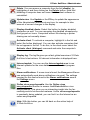
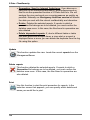
New group: The activated computers can be linked into groups.
Easily distinguishable security zones can be defined since all
settings can be made for both single clients and for entire groups.
To create a new group first highlight the superordinate group then
click on on the icon displayed.
36
G Data AntiVirus Administrator
Delete: You can remove a computer from the list (disable), by
highlighting it and then clicking on the Delete button. Note that
disabling a computer does not mean that the client software is
uninstalled.
Update view: Use Update or the F5 key to update the appearance
of the Administrator interface at any time, for example to take
account of current changes to the display.
Display disabled clients: Select this button to display disabled
computers as well. You can recognise the disabled computers by
their greyed-out icons. Computers without file sharing or printer
sharing are not normally shown.
Activate client: To activate a computer, highlight it in the list and
select the button displayed. You can also activate computers that
do not appear in the list. To do this, in the client menu select the
Activate client (dialogue) command and enter the computer's
name.
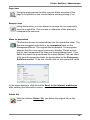
Display log: The log file gives you a fast, global overview of G Data
AntiVirus's last actions. All relevant information is displayed here.
Internet update: You can use the Internet update area to run
Internet updates for the virus databases and the client program
files.
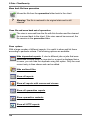
Alarm notifications: If a new virus is found, the ManagementServer
can automatically send alarm notifications via email. The settings
required for this can be found in the Alarm notifications area in
the Settings menu.
Online virus encyclopaedia: Use the Online virus
encyclopaedia function to access theG Data AntiVirus virus
encyclopaedia. This gives you an interesting insight into the farreaching world of viruses and malware. As the virus encyclopaedia
is constantly being updated, you can find it on the Internet as an
online encyclopaedia.
Help: With this button you can fall back on the online help of
G Data AntiVirus.
37
G Data ClientSecurity
Client selection area
Here you will find all clients and servers as well as defined groups in your
network listed hierarchically and subdivided. As in Windows Explorer, groups
that have subdivisions appear with a plus symbol. If you click this, the
directory structure opens up here and enables the view of the structure
behind it.
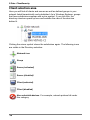
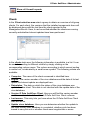
Clicking the minus symbol closes the subdivision again. The following icons
are visible in the Directory selection:
Network icon
Group
Server (activated)
Server (disabled)
Client (activated)
Client (disabled)
Non-selectable devices: For example, network printers fall under
this category
38
G Data AntiVirus Administrator
Task areas
You have the opportunity to conveniently administer the protection of your
clients in the different task areas that you can select via the respective tabs.
The settings you enter here always relate to the clients or groups that you
have highlighted or selected in the Client selection area. The different
subject fields are explained in detail in the sections below.
· Status
· Jobs
· Settings
· Reports
· Clients
· Statistics
Status
In the Statusarea of G Data AntiVirus you receive basic information about
the current state of your system. This information, consisting of text, figures
or dates, is displayed to the right of each item.
As long as your system is optimally configured for protection from
computer viruses, you will see a green traffic light icon to the left of
the listed entries.
If a component is not optimally set (e.g. switched off monitor or
obsolete virus signatures), a warning symbol will alert you.
39
G Data ClientSecurity
?
When the G Data AntiVirus program interface opens, most of the
icons will be displayed in warning mode for a short duration. This
does not mean that G Data AntiVirus is not protecting your
computer during this time; quite the opposite: an internal virus
protection status check is underway, which indicates to you that
automatic checking of the functions is underway.
By double-clicking the respective entry, you can undertake actions here
directly or change to the respective function. Once you have optimised the
settings for a component displaying a warning icon, the icon in the status
area reverts to the green traffic light icon..
Jobs
In this task area you can define jobs for virus checks on the G Data
AntiVirus Clients. There are two different job types: single scan jobs and
periodic scan jobs. Single scan jobs are performed immediately after they
are created, for the periodic jobs a Schedule is defined according to which
they are run.
?
Scan jobs or jobs are the corresponding tasks that you create in
the task area of the same name for virus checking, removal or
prevention.
In the jobs task area all jobs appear under the name given to them by you
and can be sorted according to the following criteria by simply clicking on
the respective column designation. The column according to which current
sorting is carried out, is indicated by a small arrow symbol:
· Name: The name specified by you for the scan job. You can enter a name
of any length here and thereby precisely describe your scan job in order to
maintain an overview when there are a large number of different jobs.
40
G Data AntiVirus Administrator
· Computer: You will find the name of the corresponding client here. You
can only define scan jobs for activated clients.
· Group: You can combine individual clients into groups which then use the
same scan jobs. If you assign a scan job to a group, the individual
computers do not appear in the overview list but rather the group name.
· Status: Here you obtain the status or the results of a scan job displayed
in clear text. Thus, for example, you see whether the job has just run or
has been completed, and also whether or not viruses were found.
· Last run: Via this column, you receive information as to when the
respective scan job was last run.
· Time interval: According to the Scheduling that you can define for every
scan job, this states in which cycle the job will be repeated.
· Analysis scope: Here you find out to which data media (e.g. local hard
disks) the analysis extends.
?
In the menu bar, an additional menu entry with the following
functions is available for the task area jobs:
· View: Select whether you would like to display all scan jobs,
only single scan jobs, only periodic scan jobs or only open scan
jobs or only completed scan jobs here. For scan jobs that were
defined for a group of clients, you can decide whether detailed
information about all clients or only cross-group summaries
should be displayed. Set the checkmark here next to Display
group jobs in detail.
· Run again (immediately): This enables you to run selected
scan jobs independently of any scheduled jobs.
· Cancel: You can cancel a running scan job with this function.
· Delete: Selected scan jobs can be deleted using this function.
· New: Select whether you want to create a one-time scan job
(single test) or a regular scan job (periodic test) here.
You can define as many different scan jobs as you would like. For
performance reasons, it generally makes sense that scan jobs do
not overlap.
41
G Data ClientSecurity
Update
This function updates the view. Loads the current job list from the
ManagementServer.
New scan job (single)
Use this function to set up a new job for single tests. It opens a
dialogue for entering job and scan parameters. You can enter the
settings you want here. When so doing you can change between
settings areas by simply selecting the relevant tab. These tabs are
explained in detail in the section New scan job (periodic).
?
You can use the New scan job (periodic) function to define
scheduled scan jobs for automatically checking your system at
regular intervals.
?
Double-click to change the parameters for an available job in the
list, or select the Properties command from the context menu (by
right-clicking the mouse). You can now change the scan job
settings to what you want.
New scan job (periodic)
Use this function to set up a new job for periodic scans. It opens a
dialogue for entering job and scan parameters. You can enter the
settings you want here. When so doing you can change between
settings areas by simply selecting the relevant tab:
?
42
Double-click on the entry to change the parameters for an available
job, or select the Properties command from the context menu (by
right-clicking the mouse). You can now change the scan job
settings to what you want.
G Data AntiVirus Administrator
Job
Use the job parameters to define what name the scan job should have. For
example, you can enter meaningful names here such as Archive scan or
Monthly scan to unambiguously label the desired job so that it can be found
again in the tabular overview. In addition you can also enter whether the user
can cancel the job via the client context menu. If you use the monitor to
permanently monitor your network, it is OK to let the scan job be cancelled
by the user as it may have a slight impact on his working speed. However, if
you do not use the monitor, periodic scans are absolutely indispensable and
should not be able to be switched off. You can use the Regularly transmit
scan progress to the server option to have the status of a scan process
running on a client displayed as a percentage on the Administrator. The
Shut down computer after virus check if no user is logged on function
provides another way to help reduce your administrative load.
Time / scheduling
This tab allows you to specify when the automatic update should run and
how often. You set up the default schedule under Run which you then
specify with the entries under time and weekdays.
If you select On system start the scheduling defaults naturally no longer
apply and G Data AntiVirus will run the update each time your computer is
restarted.
?
Under daily you can specify using the settings under weekdays to
specify for example that the computer should only carry out the
update on working days or even only every other day or on
weekends only, when it is not being used for work.
Scanner
In the scanner menu, you can specify how the virus check is to be carried
out by G Data AntiVirus.
As scheduled or manual analysis virus checks usually take place when the
computer is not running at full load to perform other tasks, more system
resources are usually available for virus analysis than for the Virus monitor.
· Use engines: G Data AntiVirus uses two antivirus engines; essentially
two, independently operating virus analysis units. In principle, you must
43
G Data ClientSecurity
use both engines to guarantee optimum virus prevention results. However,
using a single engine does have performance benefits – analysis can be
performed more quickly if only one engine is used. We recommend the
setting Both engines - performance optimised. In this scenario, both
virus scanners cooperate such that optimised detection accuracy is
achieved within a minimised scanning duration.
· In case of an infection: Here you can specify the action to be taken if an
infected file is detected. There are various options here that may or may
not be suitable, depending on what purposes the client is used for. The
setting Move file to quarantine is a special directory which the
ManagementServer creates and in which infected files are encrypted and
thus can be stored without having any continuing harmful effect. Files in
quarantine can be disinfected by the administrator, deleted, moved back
to their original storage location or, if required, sent to the Emergency
AntiVirus service of G Data.
· Infected archive: Specify here whether the processing of virusses found
should be carried out differently for archives. In this respect you should
bear in mind that a virus in an archive will only be harmful, when it is
unpacked from the archive.
· File types: Here you can define the file types G Data AntiVirus should
check for viruses. Generally it is not necessary to check files that do not
contain any executable program code, on top of which checking of all the
files on a computer requires a not inconsiderable amount of time. We
recommend automatic type recognition with which only those files
which could theoretically contain a virus are checked.
· Priority scanner: You can use the levels high, medium and low to
specify whether virus checking by G Data AntiVirus should have high
priority on your computer (in which case the analysis is relatively quick
and other applications may run more slowly during the analysis) or low
priority (the analysis runs relatively slowly, so that other applications can
continue to run relatively unaffected during this period). Depending on the
time you take to run the virus analysis, different settings are useful here.
· Settings: Specify the additional virus analyses you want G Data AntiVirus
to perform. The options selected here are generally recommended.
Depending on the type of application, the time gained by omitting these
checks may outweigh the slightly reduced level of security. The following
configuration options are available:
44
G Data AntiVirus Administrator
Heuristics: Heuristic analysis detects viruses not only on the basis
of constantly updated virus databases, but also based on detecting
characteristics that are typical of most viruses. The heuristics can
generate a false alarm in rare instances.
Archives: Checking of compressed data contained in archives is
very time consuming and can generally be suppressed if the G Data
AntiVirus monitor is active on the system. The monitor can detect
a previously hidden virus while the archive is being unzipped and
can automatically prevent it from spreading. Nevertheless, during
regular checks of the computer outside the actual usage times,
checking of the archives should also take place.
Email archives: Checking of compressed data contained in email
archives is very time consuming and can generally be suppressed if
the G Data AntiVirus monitor is active on the system. The monitor
can detect a previously hidden virus while the archive is being
unzipped and can automatically prevent it from spreading.
Nevertheless, during regular checks of the computer outside the
actual usage times, checking of the archives should also take
place.
System areas: The system areas of your computer boot sectors,
master boot records etc.) which form the essential foundation of
the operating system, should generally not be excluded from virus
checking.
Check for diallers / spyware / adware / riskware: With G Data
AntiVirus you can also check your system for diallers and other
malware (spyware, adware, riskware). These are e.g. programs
that establish expensive, unwanted Internet connections, of which
the potential for financial damage is no less significant than that of
the virus. They may for example secretly record your surfing habits
or even all the keyboard entries you make (including your
passwords) and forward these to third parties via the Internet at the
earliest opportunity.
Use all available processors: With this option, you can distribute
the virus checking load on systems with multiple processors (e.g.
DualCore), over all the processors with the result that the virus
checking runs considerably quicker. The disadvantage of this option
is that the system speed for other applications is considerably
reduced. Thus you should only use this option, if you are running
your scan job at times, when the system is not normally used (e.g.
overnight).
45
G Data ClientSecurity
Analysis scope
You can also limit the virus control on the client to specific directories via the
tab Analysis scope. In this way for example, you can omit folders with
archives that are seldom used or integrate them in a special scan schedule.
When so doing, the Directory selection refers to the currently selected
computer and not to the selected client.
?
Special feature for scan jobs on a Linux file server: The root
drive (/) and all authorisations will be returned with the directory
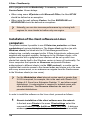
selection. Scan jobs can thus be performed in a targeted manner
based on selected authorisations or on file server directories
selected as desired.
Delete scan jobs
The function Delete scan jobs deletes all highlighted jobs.
Run scan jobs again (immediately)
Select this function, to re-run one-off scan jobs, which have already
been run or cancelled. For periodically executing scan jobs, this
function causes the job to be run independently of the schedule.
Logs
Use this function to call up the logs relating to a particular client's
jobs.
Show options
With a large number of different scan jobs, it is useful to show and list these
according to particular criteria. The following options are available:
Show all jobs
Only show single scan jobs
46
G Data AntiVirus Administrator
Only show periodic scan jobs
Only show open scan jobs
Only show completed scan jobs
Display group jobs in detail: Displays all associated entries with
group jobs. The option is only available if a group is selected in the
computer list.
Settings
Options for all clients, individual clients or a group of clients can be set in
this task area (e.g. whether updates should be performed automatically,
whether internal Internet updates via the clients are permitted, whether
exception directories are allowed to be individually defined there, etc.).
Via the selection box found above, you can decide which type of options you
would like to edit here. In the Client selection area select the desired client
for this or the group of clients that you would like to configure, then execute
the desired entries and close the procedure by clicking the Accept button.
47
G Data ClientSecurity
General
Here, you have the following setting options:
G Data AntiVirus Client
The following functions are available:
· Comment: Enter a distinctive name for the relevant client
· Symbol in the taskbar: For terminal servers and Windows XP or Vista
with fast user switchover you can select the sessions in which a client
symbol should be displayed in the taskbar: never, only in the first
session or always. For normal clients, the client symbol can optionally be
prevented from being displayed. The symbol must be displayed to allow
the user to access advanced client functions, because access to the
relevant Context menu is enabled from this via a mouse click.
· User account: The client software normally runs in a system environment
(Windows 2000 / Windows XP / Windows Vista / Windows 2003). You can
enter another account here to enable network directories to be scanned.
To do this, the account must have administrator rights for the client.
Updates
The following functions are available:
· Update virus signatures automatically: Switches on the automatic
update of the virus database. Clients periodically check whether a new
version is available on the ManagementServer and execute an automatic
update.
· Automatically update program files: Updates the program files on the
client with the files held on the ManagementServer. A client reboot may be
necessary after updating the program files. Dependent on the setting
under Restart after update the client user has the option of shifting the
data update to a later point in time.
· Restart after update: You can specify here whether the client is
automatically restarted after the program files are updated (Restart
without querying), whether the user is offered the option to carry out a
restart immediately or later (Open client display window) or whether the
update of the program files is only carried out when the client is rebooted
next (Create report).
48
G Data AntiVirus Administrator
Client functions
With the following functions, you defined the appearance, behaviour and
functional scope of the respective client. Depending on the procedure, the
user thus has extensive or only strongly limited rights with regard to virus
prevention and countermeasures.
· The user can change the firewall options: If you enable this function,
users themselves on the client computers have the option of modifying the
settings of the G Data Firewall. If the checkmark is not set, the firewall
with the specified firewall options for the user runs invisibly in the
background.
· The user can run virus checks: In an acute suspicious case, the user
can run a virus check on his computer as he would with a locally installed
antivirus solution independently from the ManagementServer. Results of
this virus check will be transmitted to the ManagementServer during the
next contact with it.
· The user can download signature updates: If you enable this function,
the respective client can download virus signatures directly from the
Internet even without connection to the company server. This significantly
increases security for notebooks used by field service staff.
· The user can change email and monitoring options: If this function is
enabled, the client user has the option, in addition to the monitor options
, of influencing the settings in a targeted way where email security for his
client is concerned.
· Display local quarantine: If you allow the display of the local quarantine
, the user can, if necessary, disinfect, delete or move back data that was
moved by the monitor into this Quarantine folder due to virus infection or
suspicion. Note that the virus would not be removed during a move back.
You should therefore only enable this option for experienced users on the
client.
· Password protection for changes to options: If the right to change the
monitor options was granted to the user on the clients, the possibility
naturally always exists that other people on this computer improperly
switch off the monitor functions. To prevent this, you can protect the
monitor option settings on the client with a password. Individually assign
the password here for the respective client or the respective group and
disclose it only to the authorised users of the client computer.
49
G Data ClientSecurity
· Update settings: Here you can specify whether the Internet update of
virus signatures should occur generally via the server, individually for every
client, or a combination of the two. It is precisely with mobile workplaces
that are only occasionally connected to the company network that a
combination of the variants is recommended. Via the Settings and
scheduling button you can additionally define individual reference settings
for the virus signatures for this client.
The following context menu is made available on the client computer to a
client activated with full user rights:
Exception directories for scan jobs
You can define client directory exceptions here that are not to be checked
during the execution of scan jobs. Archive and backup areas of a hard disk
or partition, for example, can be defined as exception directories where
applicable.
?
Exception directories can be defined for complete groups. If the
clients in a group have defined different exception directories, new
directories can be added or existing ones can be deleted. The
directories specially defined for individual clients are thereby
preserved. The same procedure is also used with the monitor
exceptions.
?
Special feature on a Linux file server
The root drive (/) and all authorisations will be returned with the
exception directories selection. In doing so, drive exceptions,
directory exceptions, and file masks can be created.
50
G Data AntiVirus Administrator
Monitor
The monitor settings in the Client selection area for the selected client can
be made here. Select a group to change the monitor settings of all clients in
the group. You can adjust individual settings in the Monitor area for every
client/group. The changed settings are only saved and set by the clients
after pressing the Accept button. Press the Reject button to load the
current settings from the ManagementServer without accepting the changes.
?
If you edit the monitor setting of a group, the individual parameters
can adopt an undefined status. In this case, the clients of the group
have different settings for the parameter. Undefined parameters are
not saved during the transfer.
First and foremost, you should never switch off the monitor on the clients
without a good reason because it significantly contributes to the data
security of your network. As soon as you have activated the monitor on a
client, it always remains active in the background automatically.
?
There can be considerable delays when using certain programs or
components (e.g. T-Online, Microsoft Office with certain HP
printers). To avoid this, you can define the INI files for these
products as exceptions. This significantly shortens the checking
process but also presents a certain security risk. This must be
weighed.
Settings
The following functions are available in the settings area:
· Monitor status: From here you can switch the monitor on and off. In
general you should leave the monitor switched on. It forms the foundation
for permanent and uninterrupted virus protection.
· Use engines: G Data AntiVirus works with two independently-operating
virus analysis units. In principle, using both engines guarantees optimum
results for preventing viruses. On the other hand, using just one engine
has certain performance advantages.
· In case of an infection: Here you can specify the action to be taken if an
infected file is detected. There are various options here that may or may
not be suitable, depending on what the respective client is used for.
51
G Data ClientSecurity
Block file access: Neither read nor write access can be granted for
an infected file.
Disinfect (if not possible: block access): An attempt is made to
remove the virus; if this is not possible, file access is blocked.
Disinfect (if not possible: place in quarantine): An attempt is
made to remove the virus; if this is not possible, the file is moved to
Quarantine .
Disinfect (if not possible: delete file): An attempt is made to
remove the virus; if this is not possible, the file is deleted.
Move file to quarantine: The infected file is moved to quarantine.
The system administrator can be used to try to manually run a
disinfection on the file.
Delete infected file: This function serves as a strict measure for
effectively containing a virus. Depending on the virus however, it can
cause considerable data loss.
· Infected archive: Define here if viruses found in archives should be
handled differently. In this respect you should bear in mind that a virus in
an archive will only be harmful, when it is unpacked from the archive.
· File types: Here you can define the file types G Data AntiVirus should
check for viruses. Generally it is not necessary to check files that do not
contain any executable program code, on top of which checking of all the
files on a computer requires a not inconsiderable amount of time. We
recommend the Automatic type recognition here with which only those
files are automatically checked which could theoretically contain a virus.
· Check when writing: Normally a virus-free system does not generate
files infected with viruses when writing files; however, in order to cover all
eventualities, particularly with systems in which a Boot scan was not run,
you can set up a scan procedure here for use when writing files. The huge
advantage of this is that even viruses which are copied from another
possibly unprotected client to an enabled directory of the client protected
by the monitor are detected and that files downloaded from the Internet are
first recognised as virus-afflicted during loading and not during first
execution.
· Check network access: Here you can specify operation of the monitor in
conjunction with network access. If your entire network is normally
monitored by G Data AntiVirus, network access verification may be
discontinued.
52
G Data AntiVirus Administrator
· Heuristics: In a heuristic analysis, viruses are not only detected using the
constantly updated virus databases but also using certain traits
characteristic of viruses. On the one hand, this method is an additional
security benefit; on the other, it can also give rise to a false alarm in rare
cases.
· Check archive: Checking compressed data in archives is a very timeconsuming process and can generally be omitted if the G Data AntiVirus
virus monitor is always enabled on your system. The monitor can detect a
previously hidden virus while the archive is being unzipped and can
automatically prevent it from spreading. To avoid decreasing performance
with unnecessary checks of large archive files that are rarely used, you
can set a size limit (number of kilobytes) for archives to be checked.
· Check email archives: This option should generally be disabled as
scanning email archives generally takes a long time and if an infected mail
is found it is impossible to read further mails. As the monitor blocks
execution of email attachments, disabling this option does not create a
security hole. When using Outlook, incoming and outgoing mails are also
scanned using an integrated plug-in.
· Check system areas on system start-up: In general, system areas (for
example boot sectors) in your computer should not be excluded from virus
checks. You can specify here whether you want to check them on system
start-up or whenever media are changed (insertion of a new CD-ROM etc).
Generally you should have at least one of these two functions activated.
· Check system areas on media exchange: In general, system areas (for
example boot sectors) in your computer should not be excluded from virus
checks. You can specify here whether these should be checked on
system start-up or whenever a media change occurs (new CD-ROM etc.).
Generally you should have at least one of these two functions activated.
· Check for diallers / spyware / adware / riskware: With G Data
AntiVirus you can also check your system for diallers and other malware
(spyware, adware, riskware). These are e.g. programs that establish
expensive, unwanted Internet connections, of which the potential for
financial damage is no less significant than that of the virus. They may for
example secretly record your surfing habits or even all the keyboard
entries you make (including your passwords) and forward these to third
parties via the Internet at the earliest opportunity.
53
G Data ClientSecurity
Exceptions
Here you can also limit client virus checking for specified directories. In this
way for example, you can omit folders with archives that are seldom used or
integrate them in a special scan schedule. Furthermore, certain files and file
types can be excluded from the virus check. The following exceptions are
possible:
· Drive: By clicking the directory button here, you select a drive (partition,
hard disk) that you do not want checked by the monitor.
· Directory: By clicking the directory button here, you select a folder (as
necessary, including any subfolder contained within it) that you do not
want checked by the monitor.
· File: Here you can enter the name of the file that you would like excluded
by the monitor check. You can also use wildcards here (e.g. the question
mark (?) for any single character or the asterisk (*) for any number of
characters).
You can repeat this procedure as many times as you wish, and you can
delete or modify the existing exceptions in the Monitor exceptions window.
?
Wildcards work as follows:
· The question mark symbol (?) represents individual characters.
· The asterisk symbol (*) represents entire character strings.
For instance, in order to protect all files with the file extension exe,
enter *.exe. For example, to protect files with different spreadsheet
formats (e.g. .xlr, .xls), simply enter *.xl?. Or to protect files of
various types that have identical initial file names, enter e.g. text*.*.
54
G Data AntiVirus Administrator
Warning messages
Specify here whether the user on a client computer is notified when a Virus
found event occurs. If the checkmark is set here, the user sees an info
window that informs him of the viruses found.
Status
Here you are shown whether the changes you have made to the monitor
have already been transferred to the client or the group or whether you have
not yet clicked the Accept button.
Email
Special virus protection can be set up on everyG Data AntiVirus client
especially for email. The protocols POP3, IMAP and SMTP are checked in
the TCP/IP layer here. Furthermore, a special plug-in is used for Microsoft
Outlook. The plug-in automatically checks all incoming mails for viruses and
prevents infected mails from being sent. By clicking the Accept button, you
accept the executed changes; by clicking Cancel, you exit the dialogue
without accepting the executed changes. You can create individual
configurations for handling mail for every client or for user groups via the
administrator. In this respect, you can select from the following options:
55
G Data ClientSecurity
Incoming mails
The following functions are available:
· In case of an infection: Here you can specify the action to be taken if an
infected file is detected. There are various options here that may or may
not be suitable, depending on what the respective client is used for.
· Check received mails for viruses: By enabling this option, all emails
that the client receives online will be checked for viruses.
· Check unread mails on program start-up (Microsoft Outlook only):
This option is used to scan emails for viruses that the client receives while
it is offline. AntiVirus will check all unread mails in your Inbox folder and
subfolders as soon as you open Outlook.
· Append report to received, infected mails: As soon as one of the
emails sent to the client contains a virus, you will receive the following
message in the body of this mail beneath the actual mail text: WARNING!
This mail contains the following virus followed by the name of the virus.
In addition, you will find the notification VIRUS before the actual subject. If
you enabled the option Delete attachment/text, you will also be notified
that the infected part of the email was deleted.
Outgoing emails
The following functions are available:
· Check emails before sending: So that you do not unintentionally send
viruses from your own network, G Data AntiVirus also offers the possibility
of checking outgoing emails for viruses before sending them. If a virus
actually does get sent, the message The mail [subject header] contains
the following virus: [virus name] appears. The mail cannot be sent, and
the corresponding email will not be sent.
· Append report to outgoing email: A certification report is displayed in
the body of each outgoing email below the actual mail text. This reads
Virus checked by G Data AntiVirus, provided that you have enabled the
option Check mails before sending. Additionally, you can specify the
version date of G Data AntiVirus (Version information) and a link to the
G Data virus encyclopaedia (Virus News) here.
56
G Data AntiVirus Administrator
Scan options
The following functions are available:
· Use engines: G Data AntiVirus uses two antivirus engines; essentially
two, independently operating, virus analysis units. In principle, you must
use both engines to guarantee optimum virus prevention results. However,
using a single engine does have performance benefits – analysis can be
performed more quickly if only one engine is used.
· OutbreakShield: OutbreakShield detects and neutralises threats from
malware in mass mailings before the relevant up-to-date virus signatures
become available. The OutbreakShield uses the Internet to monitor
increased volumes of suspicious emails, enabling it to eliminate the
window between the mass mailing outbreak and the application of
designated virus signatures to contain it, practically in real time. Under
change you can specify whether OutbreakShield uses additional
signatures to increase detection performance. Loading of the signatures
may cause automatic Internet connections to be made. In addition you
can also enter access data here for the Internet connection, which then
permits OutbreakShield to carry out an automatic signature download from
the Internet.
Warning messages
Inform user when a virus is found: You can inform the recipient of an
infected email automatically of this event. Accordingly a warning message is
displayed on his/her desktop.
Email protection
The following functions are available:
· Protect Microsoft Outlook through an integrated plug-in: Activation of
this function inserts a new function in the Outlook program of the client
under the Tools menu, called Check folder for viruses. Independent of
the administrator settings, an individual client user can scan the currently
selected email folder for viruses. In the email display window you can use
Scan mail for viruses in the Tools menu to run a virus check of the file
attachments. When the process has been completed, an information
screen appears in which the result of the virus check is summarised. Here
you can see whether the virus analysis was completed successfully, get
57
G Data ClientSecurity
information about the number of emails and attachments scanned and
about any read errors, as well as any viruses found and how they were
dealt with. You can hide both windows by clicking on the Close button.
· Monitor ports: Generally speaking, the default ports for POP3, IMAP and
SMTP are monitored. If your system's port settings are different than
these, you can customise this accordingly.
Web / IM
You can undertake the following settings here.
Internet content (HTTP)
· Process Internet content (HTTP): In the web options, you can determine
that all HTTP web content is checked for viruses whilst browsing. Infected
web content is not run at all and the corresponding pages are not
displayed. To set this option, please check Process Internet content
(HTTP).
· Avoid browser timeout: Since G Data software processes web content
before it is displayed in the Internet browser, it requires a certain amount
of time to do so depending on the data traffic. Therefore it is possible for
an error message to appear in the Internet browser because the browser
does not receive data immediately, due to the antivirus software checking
it for malicious routines. By activating the checkbox Avoid browser
timeout, you can disable this error message and as soon as all browser
data has been checked for viruses, the data will appear as normal in the
Internet browser.
· Download size limit: With this function you can interrupt the HTTP
check for web content that is too large. The contents are then monitored
by the virus monitor as soon as suspected malicious routines become
active. The advantage of the size limit is that there are no delays caused
by virus checks when surfing the web.
58
G Data AntiVirus Administrator
Instant Messaging
· Process IM content: Since viruses and other malware can also be spread
via Instant Messaging, G Data software can also prevent infected data
from being displayed and downloaded in advance. If your Instant
Messaging applications do not run using standard port numbers, please
enter the corresponding port addresses under Server port number(s).
· Instant Messaging (integration into IM application): If you use
Microsoft Messenger (version 4.7 and later) or Trillian (version 3.0 and
later), you can set the checkmark for the respective program to define a
context menu in which you can directly check suspicious files for viruses.
?
If you do not want to check the Internet content, the Virus monitor
naturally takes action if infected files are started. That means that
the system on the respective client is also protected without
checking Internet content as long as the virus monitor is active.
AntiSpam
You can undertake the following settings here.
Spam filter
If you set the checkmark next to Use spam filter client email traffic will be
checked for possible spam mails. As soon as an email is identified as spam
or falls under suspicion of being spam, you can define a warning that will be
displayed in the subject line of the email.
?
You or the user can define a rule on the client in the mail program
where, for example, mail that has [Spam] in the subject line will
automatically be moved to the recycle bin or a special folder for
spam and junk mail.
59
G Data ClientSecurity
Reports
All virus results will be displayed in this task area. The status of the report
will be displayed in the first column of the list (e.g. Virus detected or File
quarantined). If a virus is found, you can respond by selecting the entries in
the list and subsequently selecting a command from the context menu (right
mouse button) or from the toolbar. Thus, for example, infected files can be
deleted or moved in the Quarantine folder .
In the reports task area all reports appear under the name given to them and
can be sorted according to different criteria by simply clicking on the
respective column name. The column according to which current sorting is
carried out, is indicated by a small arrow symbol.
The following criteria are available:
· Status: You receive a short and concise display of the content of the
respective report here. Informative icons underscore the importance and
type of the respective report.
· Computer: The computer from which the respective report is made is
displayed here. All computers are listed individually with user groups.
· Date/time: The date on which the report is created, based either on an
acute virus result through the G Data AntiVirus monitor or on the basis of
a scan job.
· Reporter: Through this entry, you are informed whether the report arises
from the virus scanner as the result of a scan job, automatically through
the monitor, or via the G Data AntiVirus mail plug-in.
· Virus: if known, the name of the virus detected is displayed here.
· File / mail: The file in which a virus is found or in which a suspected virus
exists is listed here. For email, you will also find the email address of the
sender listed here.
60
G Data AntiVirus Administrator
· Folder: Directory information for the file concerned is important in case a
file is quarantined and is subsequently to be moved back again.
?
In the menu bar, an additional menu entry is available for the task
area reports. For functions that operate with files (delete, move
back, etc.), you must select the respective file or files in the report
overview. You can select the following functions here.
· View: Indicate whether you would like to see all reports, only
reports with viruses not removed or only quarantine reports here.
You can also view the quarantine content.
· Hide dependent reports: If, due to different jobs or jobs that
were performed multiple times, a virus alert or a report is
displayed twice or more, you can hide the duplicate using this
option. Only the most current entry is then shown and can be
edited.
· Hide archived files: Here you can hide or show messages about
reports from archive checks. If a virus is found in an archive,
G Data AntiVirus generally issues two messages in which the
first message shows that an archive is infected and the second
message shows precisely which file in THIS archive is affected. If
you use the function Hide archived files, both of these
messages are combined.
If you have set up the scan jobs on your system so that these
simply log viruses found, you can also execute the virus
countermeasures manually. To do this, select one or more logged
file(s) in the report and then run the desired operation:
· Remove virus from the file: Attempts to remove the virus from
the original file.
· Move file to quarantine: Moves the file to the quarantine
folder.
· Delete file: Deletes the original file on the client.
· Quarantine: Clean and move back: An attempt is made to
remove the virus from the file. If this succeeds, the cleaned file is
moved back to its original location on the respective client. If the
virus cannot be removed, the file is not moved back.
· Quarantine: Move back: Moves the file from the quarantine
folder back to the client. Warning: The file is restored to its
original state and is still infected.
61
G Data ClientSecurity
· Quarantine: Send to Internet Ambulance: If you discover a
new virus or an unknown phenomenon, please always send us
this file via the quarantine function of G Data AntiVirus. We will
analyse the virus and send you a countermeasure as quickly as
possible. Naturally our Emergency AntiVirus service will handle
the data you sent with the utmost confidentiality and discretion.
· Delete: Deletes the selected reports. If reports to which a
quarantine file belongs are to be deleted, you must confirm the
deletion once more. In this case, the files found in quarantine are
also deleted.
· Delete dependent reports: If, due to different tasks or tasks
that were performed multiple times, a virus alert or a report is
displayed twice or more, you can delete the duplicate from the log
file using this option.
Update
This function updates the view. Loads the current reports from the
ManagementServer.
Delete reports
This function deletes the selected reports. If reports to which a
Quarantine file belongs are to be deleted, you must confirm the
deletion once more. In this case, the files found in quarantine are
also deleted.
Print
Use this function to start the print procedure for reports. In the
selection screen that appears, you can specify which details and
areas you would like to print.
62
G Data AntiVirus Administrator
Page view
Using the page preview function you can obtain a preview of the
page to be printed on the monitor before actually printing it out.
Remove virus
Using this function you can attempt to remove the virus manually
from the original file. The success or otherwise of this attempt is
indicated in the overview.
Move to quarantine
This function moves the selected files into the quarantine folder. The
files are encrypted and saved in the quarantine folder on the
ManagementServer. The original files are deleted. The encryption
ensures that the virus cannot cause any damage. Please ensure
that for each quarantined file there is a corresponding report. If you
delete the report the quarantined file is also deleted. You can send
a file from the quarantine folder for examination by the Emergency
AntiVirus service. To do this, double-click on the quarantine report.
In the report dialogue, click the button Send to the Internet ambulance
after entering the submission reason.
Delete file
With the function Delete file, you delete the original file on the
client.
63
G Data ClientSecurity
Move back file from quarantine
Moves the file from the quarantine folder back to the client.
?
Warning: The file is restored to its original state and is still
infected.
Clean file and move back out of quarantine
The virus is removed from the file with this function and the cleaned
file is moved back to the client. If the virus cannot be removed, the
file remains in the quarantine folder.
Show options
With a large number of different reports, it is useful to show and list these
according to particular criteria. The following options are available:
Hide dependent reports: If, due to different jobs or jobs that were
performed multiple times, a virus alert or a report is displayed twice
or more, you can hide the duplicate using this option. Only the most
current entry is then shown and can be edited.
Hide archived files
Show all reports
Show all reports with unremoved viruses
Show all quarantine reports
Show quarantine contents
Show all HTTP reports
64
G Data AntiVirus Administrator
Show all firewall reports
Clients
In the Client selection area select a group to obtain an overview of all group
clients. For each client, the versions that the installed components have will
be displayed along with the last time the client reported to the
ManagementServer. Here, it can be verified whether the clients are running
correctly and whether Internet updates have been performed.
In the clients task area, the following information is available in a list. It can
be sorted according to different criteria by simply clicking on the
corresponding column name. The column according to which current sorting
is carried out, is indicated by a small arrow symbol. The following criteria are
available:
· Computer: The name of the client concerned is identified here.
· Engine: The version number of the virus database and the date of its last
update via Internet update are displayed here.
· Data status: The date on which the status of the virus database was
updated on the client. This date is not identical with the update date of the
virus database.
· Version G Data AntiVirus Client: Here you will find the version number
and the creation date of the utilised G Data AntiVirus Client software.
· Last access: This entry lets you know when the G Data AntiVirus Client
was last active.
· Update virus database: Here you can determine whether the update to
the most current virus database is completed, whether a job has been
issued to carry this out or whether there were irregularities or errors.
65
G Data ClientSecurity
· Update program files: If new updates of the client software occur, you
receive the corresponding status information here.
· Date: The date on which the status of the program files was updated on
the client.
· Exception directories: If you have created exception directories that are
not to be incorporated in the virus monitoring, the corresponding Existing
exceptions are displayed here.
?
In the menu bar, an additional menu entry named Client settings is
available with the following functions for the task area Clients:
· Install G Data AntiVirus Client: Installs the client software. The
installation is only possible if the clients meet certain
requirements.
· Uninstall G Data AntiVirus Client: Commands the G Data
AntiVirus Client to uninstall itself. For a complete removal, the
client computer must be restarted. The user is prompted to do
this by a message.
· Install G Data AntiVirus Client for Linux: You can also install
special client software on Linux clients in the network. For more
information please read the section Installation of the client
software on Linux computers in the annex of this
documentation.
· Assign G Data subnet server: While you have the option of
assigning specific subnet servers to clients with the function
Manage server, you can also select a subnet server targeted for
the respective client via the function Assign G Data subnet
server.
· Reset to default settings: For the protection of the entire
network or selected groups, you can create Default settings and
by so doing, quickly assign standardised procedures for virus
protection. In order to bring individual rules for single groups back
to the general state, you can reset the default settings to the
globally defined standard values with this function.
· Update virus database now: Updates the virus databases on
the clients with the files from the ManagementServer.
· Automatically update virus database: Switches on the
automatic update of the virus database. Clients periodically check
whether a new version is available on the ManagementServer and
execute an automatic update.
66
G Data AntiVirus Administrator
· Update program files now: Updates the program files on the
clients with the files from the ManagementServer. A client reboot
may be necessary after updating the program files.
· Automatically update program files: Switches automatic
updating of program files on. Clients periodically check whether a
new version is available on the ManagementServer and execute
an automatic update.
· Restart after update of program files: As administrator, you
can specify here what priority an update of the program files has
on the clients. Thus using Open client display window, you
can thus inform a user that he should restart his client computer
at a convenient time, via Create report using the log files in the
area Reports, or via Perform restart without querying
automatically force a restart.
Update
This function updates the view and loads the current client settings
from the ManagementServer.
Delete
You can remove a client from a group here.
Print
Use this function to start the print procedure for the client settings.
In the selection screen that appears, you can specify which details
and areas of the client settings you would like to print.
Page view
Here you can, prior to the actual print out, output a preview of the
page to be printed to the monitor.
67
G Data ClientSecurity
Install G Data AntiVirus Client
Installs the G Data AntiVirus Client software. The installation is only
possible if the clients meet certain requirements.
Clients can also be configured from the ManagementServer using the
G Data AntiVirus Client software, as long as they meet certain prerequisites.
Activating this function opens a menu in which you enter access data for the
server via which installation of the G Data AntiVirus Clients should be carried
out.
After entering the relevant data (which is saved by the program so it does not
need to be reentered every time), please confirm by clicking OK. A dialogue
box then opens in which all available clients are displayed. Select one or
more disabled clients here, then click on Install. G Data AntiVirus then
automatically installs the client software on the relevant computer. If the
software cannot be installed using the remote installation described here,
you can also install it on the client manually or semi-automatically.
?
To be able to access disabled clients, they must of course also be
displayed in the directory display. When the Install AntiVirus
Client function is being used, the program informs you of this as
necessary and enables displaying of the disabled clients.
?
You can also install special client software on Linux clients in the
network. For more information please read the section Installation
of the client software on Linux computers in the annex of this
documentation.
?
When installing the client software, you are asked if the G Data
Firewall should also be installed on the client computer. Further
information on the firewall is available in the section of the same
name in this documentation.
68
G Data AntiVirus Administrator
Uninstall G Data AntiVirus Client
Commands the G Data AntiVirus Client to uninstall itself. For
complete removal the client must be restarted. The user is
prompted to do this by a message.
Update virus database
Updates the virus database on the client with the files held on the
ManagementServer.
Automatically update virus database
Switches on the automatic update of the virus database. Clients
periodically check whether a new version is available on the
ManagementServer and execute an automatic update.
Update program files
Updates the program files on the client with the files held on the
ManagementServer. A client reboot may be necessary after
updating the program files.
Automatically update program files
Switches automatic updating of program files on. Clients
periodically check whether a new version is available on the
ManagementServer and execute an automatic update.
Process directory exceptions
You can define client directory exceptions here that are not to be
checked during the execution of scan jobs.
69
G Data ClientSecurity
Statistics
In this task area, you can permit the display of statistical information about
virus occurrences and client infections. Under Statistics, simply select
whether you would like a general overview of the clients and their interaction
with the ManagementServer (Overview of clients), an overview of viruses
against which protection was provided (Virus hit list) or a listing of the
infected clients (Infected clients hit list).
70
G Data AntiVirus Client
G Data AntiVirus Client
The client software provides the virus protection for the clients and runs
ManagementServer jobs in the background without a user interface. The
clients possess their own virus signatures and their own scheduler so that
virus analyses can also be run in offline mode (e.g. for notebooks).
Installation of the clients
The client software provides the virus protection for the clients and
runs ManagementServer jobs in the background without a user
interface. Installing the client software is generally done centrally by
the administrator for all clients. A setup wizard in the administrator
tool will help you do this.
If installation of the clients over the network should fail, you can install the
client software directly on the client computers. To install the client on a
client computer, please place the G Data AntiVirus CD-ROM in the client
computer's CD-ROM drive and press the Install button. Then select the
G Data AntiVirus Client component by clicking on the adjoining button.
During installation, enter the server name or IP address of the server on
which the ManagementServer is installed. The server name is required so
that the client can communicate with the server over the network.
Furthermore, you must enter the computer name for this computer if this is
not automatically displayed.
?
To install clients for Samba file servers, please read the following
section in the annex of this documentation: Installation of client
for Samba file server
Security icon
After the installation of the client software, an icon in the taskbar is
available to the user of the client so that he can check his system
for viruses independently of administrative specifications.
Using the right mouse button he can click the G Data AntiVirus Client
symbol to open a context menu which makes the following functionality
possible for him:
71
G Data ClientSecurity
Virus check
Via this function, the user can also carry out a targeted check using the
G Data AntiVirus Client on his computer even outside the checking period
specified by the administrator. Similarly, the user can check diskettes, CDROMs, memory and the autostart area, as well as targeted individual files or
directories (folders) here. In this manner, notebook users who only rarely
connect their computers to the company network can prevent virus
infestation in a targeted manner. In addition, he now has the possibility to
move virus-infected files to a local quarantine folder thus making them
harmless and available to the network administrator at the next opportunity
for further appraisal.
?
The user can also easily check files or directories from Explorer by
selecting the files or directories and utilising the function Check for
viruses (G Data AntiVirus) in the context menu with the right
mouse button.
During an ongoing virus check, the context menu is expanded with the
following entries:
72
G Data AntiVirus Client
· Virus check priority: The user has the option of determining the priority of
the virus check here. If High, the virus check is carried out quickly;
although it can significantly slow down work with other programs on this
computer. With the Low setting on the other hand, the virus check takes
comparatively long but other work on the client computer is not
significantly slowed.
· Stop virus check: This enables the user to interrupt the virus check and
continue it again at a later time.
· Cancel virus check: As long as the administrator has enabled the option
User can change monitor options, the client user can also cancel virus
checking on his client even if the check was manually started on the
client.
· Display scan window: With this option, the user can display the
information window in which the course and progress of the virus check is
displayed.
Disable monitor
Using this command, the G Data AntiVirus Monitor can be switched off by
the user for a specified time (from 5 minutes up to until the next computer
restart). This is only possible if the administrator has assigned the
corresponding rights. For example, the temporary switching off of the monitor
may be useful during extensive file copying procedures as this would
considerably speed the process up. Virus checking is also switched off
during this interval. This should be borne in mind.
73
G Data ClientSecurity
Options
As long as the administrator has enabled the option User may change
monitor options, the user can adjust the client options for virus checking on
his computer as well as the options for the monitor which runs in the
background to meet his own requirements.
?
Warning: Of course this way it would be possible to effectively turn
all virus control mechanisms on the client off. As an administrator
you should only make this option available to technically competent
users.
?
The security relevant settings under Options can also be passwordprotected for the client computer. Accordingly the administrator
assigns the relevant client an individual password, with which the
user can change the virus control functions on the client. This
password is granted via the work area Settings in the Administrator
under Password protection for changes to options .
The individual setting options that are available to the user in the area
Options are explained in detail in the area Administrator program setup >
Task areas > Settings in the following sections:
· Monitor
· Email
· Virus check
· Web/IM filter
· Spam filter
?
74
If you activate the option The user can run virus checks for the
user on his client, he can check his client computer for viruses
independently of the monitor's automatic virus control. The settings
that are possible here for the user on the client correspond to the
greatest possible extent to those found in the Monitor application.
G Data AntiVirus Client
Quarantine
Even computers which are not currently connected to the network monitored
by G Data AntiVirus, have a local quarantine folder available to them. This
means that users who are not in the office (e.g. during business travel) can
place suspicious files in quarantine and then have them checked at the next
available opportunity within the company network. You can disinfect infected
files in the quarantine folder, or if this is not successful, delete them and, if
necessary, move them back from the quarantine to their original location.
?
Warning: Moving back does not remove the virus. You should only
select this option if the program cannot run without the infected file
and you nevertheless need it for data recovery.
Internet update
The G Data AntiVirus Client can also be used to carry out independent
Internet virus signature updates from the client computer. This makes sense
for e.g. notebooks that occasionally do not have access to the corporate
network. This feature can be specifically enabled for individual clients by the
administrator.
?
Use the Settings and scheduling button to run scheduled virus
signature updates on the client.
Firewall
In the Firewall area, users can enter numerous settings for their client
firewall. Detailed information on the firewall's functionality can be found in the
section G Data Firewall. The firewall settings cannot be administrated
centrally.
About
Under About you can find out the version and up-to-dateness of the virus
database.
75
G Data ClientSecurity
G Data AntiVirus WebAdministrator
The G Data AntiVirus WebAdministrator is web-based
administration software for the ManagementServer. It can be
launched via a web browser.
Installation of the WebAdministrator
The WebAdministrator is web-based administration software for
the ManagementServer. It can be launched via a web browser.
When installing the WebAdministratoryou may be asked to install
Microsoft .NET Framework components. These are essential for
the operation of the WebAdministrator. After the installation you will
need to restart the computer.
?
Warning: BEFORE installing the WebAdministrator you need to
enable the Compatibility with IIS Metabasis and IIS 6
Configuration Windows function. If this function is not available,
installation of the WebAdministrator will be cancelled. This setting
can be found, for example, in Windows Vista under Start > Control
panel> Programs > Programs and Functions > Switch Windows
Functions on or off. You can switch the setting on or off here in
Internet information services > Web administration tools >
Compatibility with IIS 6 management > Compatibility with IIS
Metabasis and IIS 6 Configuration. Furthermore the www
services must also be enabled, if this has not already been done.
To do this, please check the box in Internet information services
> www services.
You can now install the WebAdministrator.
After the installation you will see the icon for the G Data AntiVirus
WebAdminstrator on the desktop of your computer.
76
G Data AntiVirus WebAdministrator
Program setup of the WebAdministrator
To use the WebAdministrator, just click on the WebAdministrator desktop
icon. Your web browser will then open automatically at a login page for
accessing the WebAdministrator.
As with your usual Administrator enter your Access data then click on the
Log in button.
WebAdministrator functionality corresponds as closely as possible, in terms
of content and operation, to the standard G Data AntiVirus Administrator.
77
G Data ClientSecurity
G Data Firewall
The firewall checks which data and programs from the Internet or network
reach a computer and which data is sent from a computer. As soon as there
is an indication that data is to be installed or downloaded without
authorisation, the firewall alarm sounds and blocks the unauthorised data
exchange. It is generally advisable to use the firewall in Autopilot mode. It
then virtually runs in the background and protects you without you having to
undertake major settings.
?
If you are using the firewall in Autopilot mode, this will remain
completely in the background and operate independently. If you are
using the firewall with user-defined settings, a dialogue window will
appear in the event of doubt in which you can gradually optimise the
firewall for your system environment. Autopilot mode is included as
standard when installing the firewall.
The firewall starts tracking your computer's network activities from
the moment it is installed. When you are working locally with your
computer, you will only be aware of the firewall from the Security
icon on the Windows taskbar. Further information on the individual
functions which can be reached via the Security icon can be found
in the section G Data AntiVirus Client.
Installation of the firewall
The G Data Firewall can be used to additionally protect clients with
a firewall. If you want to manually install the firewall on the relevant
client, the G Data AntiVirus Client software must have been
installed on the client, as this controls the firewall's communication
with the ManagementServer.
The functions of the firewall are explained in detail in the following sections.
78
G Data Firewall
Program setup of the firewall
The firewall usually operates in Autopilot mode. It is only advisable to change
the firewall settings if you have sufficient knowledge of processes involving
networks, Internet access and data transfer. If you want to customise the
firewall settings, you can use the firewall program interface to do so. Click on
the icons on the left of the firewall screen to select various tabs that will take
you to the relevant program area where you can carry out different actions,
select default settings and check connection data.
Status
In the status area of the firewall, you will find basic information about the
current status of your system and the firewall. You will find this to the right of
the relevant entry as either text or numerical data. In addition, the status of
components is also displayed graphically. By double-clicking the relevant
entry (or by selecting the entry and clicking the Edit button), you can
directly select actions here or switch to the relevant program area. As soon
as you have optimised the settings for a component with a warning icon, the
icon in the Status area will revert to the green check icon.
· Security: As you use the computer for your daily tasks, the firewall
gradually learns which programs you do or do not use for Internet access
and which programs represent a security risk. Depending on how familiar
you are with firewall technology, you can configure the firewall to provide
either highly effective basic protection without an excessive number of
inquiries or professional protection customised to your own computing
habits, but which also requires knowledge of firewalls. Double-click on
Security to call up a range of security versions:
Autopilot mode (recommended): Here the firewall works fully
autonomously and automatically keeps threats from the local PC.
This setting offers practical all-around protection and is
recommended in most cases.
Manual rule creation: If you would like to individually configure
your firewall or do not want particular applications to work together
with autopilot mode, you can adjust your firewall protection entirely
to your requirements via the manual rule creation.
· Mode: Here you are informed with which basic setting your firewall is
currently being operated. Either the manual rule creation or automatic (
autopilot) are possible here.
79
G Data ClientSecurity
· Networks: Naturally, the firewall monitors all network activities such as a
DTN (data transmission network) and a LAN connection. If one or more
networks are not protected, for example, because they were manually
excluded from firewall monitoring, a warning icon will alert you about this.
Double-clicking the respective entry opens a dialogue box via which you
can individually configure the rules and settings for the selected network.
Here, under Rule set simply select whether the respective network is
supposed to belong to the Trustworthy networks, the Untrustworthy
networks, or the Networks to be blocked.
?
The Direct Internet connection setting is, for the most part, based
on the settings that also apply to Trustworthy networks.
?
Each network can be assigned a special rule set. Whilst the
Networks area tells you which networks are available on your
computer, the Rule sets area tells you which automatically created
or user-defined rule sets are available in the firewall.
· Registered attacks: As soon as the firewall registers an attack on your
computer, it is logged here and you can obtain further information by
clicking the menu item.
· Application radar: The application radar shows you which programs are
currently being blocked by the firewall. If you still want to allow one of the
blocked applications to use the network, simply select it and then click
the Allow button.
Networks
The Networks area lists the networks (e.g. LAN, data transmission
network etc.) to which your computer is connected. Also shown here is
which rule sets (see section Rule sets) are protecting the respective
network. If you uncheck the relevant network it will no longer be protected by
the firewall. However, you should only disable this protection in specially
justified circumstances. If you use the mouse to highlight a network and
click on the Edit button, you can view and/or change the firewall settings for
this network.
80
G Data Firewall
Edit network
When editing network settings, you have a choice of using the rule wizard
or the advanced dialogue. We generally recommend using the rule wizard
since it helps the user create rules and settings.
· About network: This is where you can find information about the network
- where this is available - concerning the IP address, subnet mask,
default gateway, DNS, and WINS server.
· Firewall enabled on this network: You can use this option to disable
the firewall's network protection, but you should only do this in specially
justified circumstances.
· Internet connection sharing: If your system connects directly to the
Internet you can determine whether all computers connected via a TCP/IP
network should have access to the Internet or not. This Internet
connection sharing (ICS) can generally be activated for home networks.
· Enable automatic configuration (DHCP): When you connect your
computer to the network, a dynamic IP address (via DHCP = Dynamic
Host Configuration Protocol) is assigned. You should leave this option
checked if you are connected to the network using this default
configuration.
· Rule set: You can very quickly choose from predefined rule sets and
determine whether, in terms of firewall monitoring, you are dealing with a
network which can be e.g. trusted, not trusted, or should be blocked.
Clicking the Edit rule set button gives you the option of configuring rule
sets individually. Please also refer to the section Rule sets.
Rule sets
In this area you can create special rules for different networks. These rules
can then be grouped together to form a rule set. There are default rule sets
for a direct connection to the Internet, untrustworthy networks,
trustworthy networks, and networks to blocked. The relevant rule set is
listed with names and stealth mode status in the overview. You can change
existing rule sets or add new ones using the New, Delete, and Edit
buttons.
?
Stealth mode hidden, secret) is used for not answering requests to
the computer that verify the relevant port's accessibility. This makes
it difficult for hackers to obtain system information in this manner.
81
G Data ClientSecurity
?
The default rule sets for Direct Internet connection, Trustworthy
networks, Untrustworthy networks, and Networks to be blocked
cannot be deleted. You may, of course, delete additional rule sets
that you yourself have created at any time.
Create rule sets
You can allocate every network its own rule set (i.e. a collection of rules
specially matched to it). In this manner you can protect networks with
different levels of danger in different ways using the firewall. For example, a
home network surely requires considerably less protection (and
consequently less administrative effort) than a data transmission network
directly connected to the Internet. The firewall contains three default rule
sets for the following network types:
· Rule set for an untrustworthy network: This generally covers open
networks (e.g. data transmission networks) with Internet access.
· Rule set for a trustworthy network: Home and company networks are
generally trustworthy.
· Rule set for a network to be blocked: This setting can be used if the
computer's access to a network is to be blocked on a temporary or
permanent basis. This is advisable, for instance, when you are connected
to external networks with an indeterminate level of security (e.g. at LAN
parties, external corporate networks, public workspaces for notebooks,
etc.)
Newly established networks on your computer can be assigned an
appropriate rule set. Furthermore, you can also create individual rule sets for
networks by clicking the New button. To do this, click the New button in
the rule sets area and enter the following details in the dialogue window:
· Rule set name: Enter a meaningful name for the rule set here.
· Generate an empty rule set: This allows you to generate an empty rule
set and enter custom-defined rules.
· Generate a rule set which contains a number of meaningful rules:
This option allows you to specify if you want the new rule set to include a
few basic default rules for untrustworthy, trustworthy networks or for
networks to be blocked. You can then make individual adjustments based
on these defaults.
82
G Data Firewall
The new rule set now appears in the list in the rule sets area under the
relevant rule set name (e.g. new rule set). If you then click on Edit depending on the setting you made under Miscellaneous (see the section
with the same name) - the Rule wizard or the Advanced dialogue for
editing the individual rules of this rules set will open.
You can learn how to assign new rules in the rule sets in the sections Using
the Rule wizard and Using the advanced dialogue.
?
In addition to directly entering rules yourself, you can also create
rules via the firewall alarm info box. This learning process of the
firewall is explained in the section entitled Firewall alarm .
Using the Rule wizard
The Rule wizard allows you to define specific additional rules to the relevant
rule set or modify existing rules. We recommend that users unfamiliar with
firewall technology use the Rule wizard rather than the advanced dialogue
.
?
Using the Rule wizard you change one or more rules in the selected
rule set. Thus you always create a rule within a rule set that
contains various rules.
?
Depending on which rule set you have specified for the relevant
network, one rule set (e.g. for untrustworthy networks) may block an
application while another (e.g. for trustworthy networks) could grant
it full network access. This means you can use a strategic
combination of rules to restrict a browser in such a way that, for
example, it can access websites available within your home
network but cannot access content from the data transmission
network.
The following basic rules are available in the Rule wizard:
· Allow or deny access to a specific application: You can select an
application (a program) on your hard drive and specifically allow or deny it
access to the network defined by the rule set. Simply use the wizard to
select the required program (program path) then indicate under direction
of connection, whether the program is to be blocked for incoming
connections, outgoing connections or both incoming and outgoing
connections. This enables you, for example, to prevent your MP3 player
83
G Data ClientSecurity
software from forwarding data about your listening habits (outgoing
connections) or to ensure that program updates are not downloaded
automatically (incoming connections).
· Open or disable a specific Internet service (port): A Port is a specific
address area that automatically forwards data transferred over a network to
a specified protocol and then via this to specified software. For example,
standard websites are transferred via port 80, while email is sent via port
25 and received via port 110, etc. Without a firewall, all ports on your
computer normally remain open, although the majority of users do not
need most of these. Blocking one or more of these ports is a quick way of
eliminating vulnerabilities that could be used for attacks by hackers. The
wizard provides the option of blocking ports completely or for a particular
application only (e.g. your MP3 player software).
· Allow or deny file and printer sharing (NetBIOS): NetBIOS is a
special interface in networks that can be used, for example, to share files
or printers directly between one computer and another without using the
TCP/IP protocol, for instance. It is often advisable to deny sharing for
untrustworthy networks, as this is generally not necessary for home
networks and the NetBIOS can also be used by hackers to compromise a
computer.
· Allow or deny domain services: A domain is a type of classification
directory for computers on a network which allows the computers linked to
the network to be managed centrally. Enabling for domain services in
untrustworthy networks should generally be denied.
· Enable Internet connection sharing: If your system connects directly to
the Internet you can determine whether all computers connected via a
TCP/IP network should have access to the Internet or not. This Internet
connection sharing (ICS) can generally be activated for home networks.
· Switch to the extended edit mode (advanced dialogue): This allows
you to move from the Rule wizard to the advanced dialogue. For further
information on the advanced dialogue, see the section Using the
advanced dialogue.
?
84
If you remove the checkmark next to Always launch the Rule
wizard in the future checkbox, the firewall will automatically open
the advanced dialogue to define new rules.
G Data Firewall
Using the advanced dialogue
The advanced dialogue allows you to set highly specific rules for the relevant
network, although you will need a basic knowledge of network security for
this. You can, of course, create all the rules here that could be created using
the rule wizard, but in addition advanced settings can also be made. The
following configuration options are available here:
· Name: This allows you to change the name of the current rule set if
required. The rule set will then be displayed under this name in the list
within the Rule sets area and can be combined with networks identified by
the firewall there.
· Stealth mode: Stealth mode (meaning: hidden, secret) is used for not
answering requests to the computer that verify the relevant port's
accessibility. This makes it difficult for hackers to obtain system
information in this manner.
· Action if no rule applies: Here, you can specify if access to the network
should generally be permitted, denied, or subject to an inquiry. Should any
special rules for individual programs be defined by the firewall's learning
function, these will naturally be applied.
· Adaptive mode: Adaptive mode supports applications that use feedback
channel technology (e.g. FTP and numerous online games). These
applications connect to a remote computer and negotiate a feedback
channel with it, which the remote computer then uses to "reverse connect"
to your application. If the Adaptive mode is enabled, the firewall detects
this feedback channel and permits it without querying it separately.
· ICMP details: The Internet Control Message Protocol (ICMP) is an
Internet protocol used in networks to transmit diagnostic information for
data transfer. Of course, ICMP data can also be used to spy on a
computer. For this reason ICMP messages can be suppressed by the
firewall. To make modifications here without using the rule wizard, you
should have a basic knowledge of ICMP.
85
G Data ClientSecurity
Rules
The list of rules contains all the rules specified as existing exceptions for
this rule set. This means, for example, that selected programs can be
authorised for numerous network accesses even if the network is classified
as untrustworthy. The rules applicable here may have been created in
various ways:
· Via the Rule wizard
· Directly using the Advanced dialogue using the New button
· Via the dialogue in the info box displayed when the firewall alert is
triggered.
Of course, each rule set has its own list of rules.
?
Since the firewall rules are partly nested hierarchically, it is
sometimes important to note the ranking of each rule. For
example, a port that you have granted access may be blocked
again because a certain protocol is denied access. To modify the
rank of a rule in the sequence, highlight it with the mouse and use
the arrow buttons under Rank to move it up or down the list.
If you create a new rule using the Advanced dialogue or modify an existing
rule using the Edit dialogue, the Edit rule dialogue appears with the
following setting options:
· Name: For default and automatically generated rules, this displays the
program name to which the relevant rule applies. You can also use the
Edit button at any time to change the name or add further information.
· Rule enabled: You can disable a rule without actually deleting it by
deactivating the checkbox.
· Comment: This indicates how the rule was created. Default rule is listed
next to rules preset for the rule set; generated in response to alert is
listed next to rules that arise from the dialogue from the Firewall alarm ,
and you can insert your own comments for rules that you generate
yourself via the advanced dialogue.
· Direction of connection: With Direction, you specify if the selected rule
applies to incoming or outgoing connections, or to both incoming and
outgoing connections.
86
G Data Firewall
· Access: This specifies if access is to be permitted or denied for the
relevant program within this rule set.
· Protocol: This allows you to select the connection protocols you want
to permit or deny access. You can generally block or enable protocols or
link usage of a protocol to the use of one or more specific applications (
Match to applications). Similarly, you can use the Match to Internet
service button to specify the ports that you do or do not wish to use.
· Time window: You can also set up time-related access to network
resources to ensure, for example, that the network can only be accessed
during your normal working day and is blocked at all other times.
· IP address space: It is advisable to regulate network use by restricting
the IP address range, especially for networks with fixed IP addresses. A
clearly defined IP address range significantly reduces the risk of attack
from a hacker.
Firewall alarm
When in manual rule creation mode, the firewall will generally check
unknown programs and processes that try to connect to the network, to see
if this should be allowed or denied. An information box will open to show you
details about the relevant application. You can also allow one-off or
permanent access to the network, or deny any access. As soon as you
have allowed or denied permanent access for a program, a rule will be
created in that network's rule set for this and you will not be asked about
this again.
The following buttons are available:
87
G Data ClientSecurity
· Always permit: This button lets you create a rule for the application
mentioned above (e.g. Opera.exe or Explorer.exe or iTunes.exe) allowing
permanent access to the network and/or Internet. You will also find this
rule as Rule created by enquiry in the area called Rule sets.
· Permit this time: Via this button you can permit the relevant application
to access the network only once. The firewall will issue another alert the
next time this program attempts to access the network.
· Always block: This button lets you create a rule for the application
mentioned above (e.g. dialer.exe or spam.exe or trojan.exe) permanently
denying it access to the network or Internet on the network specified for
the application. You will also find this rule as Rule created by enquiry in
the area called Rule sets.
· Block this time: This button lets you deny the relevant application access
to the network once only. The firewall will issue another alert the next time
this program attempts to access the network.
There is further information available on the protocol, port and IP address
with which the relevant application is trying to interact.
Log
The log area logs all the connections to the network and Internet permitted or
blocked by the firewall. You can sort this list as desired using different
criteria by clicking on the relevant column header. Click the Details button
for further information on the individual connections.
Options - firewall
In the upper menu bar of the program interface, you will find comprehensive
functions and setting options by clicking the Options button.
88
G Data Firewall
Automatic
The advantage of using the default security levels is that you can adapt the
firewall to your individual requirements without too much administrative input
or specialist knowledge of network security. You can set the security level
by simply adjusting the slide control. The following security levels are
available:
· Maximum security: The firewall rules are generated using very strict
guidelines. So you should be familiar with specialised network concepts (
TCP, UDP, ports etc.). The firewall detects the slightest inconsistencies
and will issue frequent queries during the learning phase.
· High security: The firewall rules are generated using very strict guidelines.
So you should be familiar with specialised network concepts (TCP, UDP,
ports, etc.). The firewall may issue frequent queries during the learning
phase.
· Normal security: The firewall rules are generated at application level only.
Wizards keep network-specific details away from you. You will be queried
as little as possible during the learning phase.
· Low security: The firewall rules are generated at application level only.
Wizards keep network-specific details away from you. You will only be
rarely queried during the learning phase. This level of security still offers
highly effective protection against any connection requests that may
occur.
· Firewall disabled: You can disable the firewall completely if required.
This means that your computer is still connected to the Internet and any
other networks, but the firewall is no longer protecting it against attacks or
electronic espionage.
?
If you wish to make specific settings for your firewall, check Userdefined settings. Please note however that for these settings you'll
need at least a basic understanding of network security.
89
G Data ClientSecurity
Inquiry
Here you can specify whether, when and how the firewall should query users
when programs request a connection to the Internet or network.
· Define rule: If the firewall detects a connection being made to the
network, an information box appears in which you specify how to proceed
for this particular application. Specify here precisely how to proceed in
terms of allowing or forbidding network access:
per protocol/port/application. Per application, as long as at
least __ inquiries are pending: There are applications (e.g.
Microsoft Outlook) that send requests to multiple ports when
requesting network access or that use different protocols
simultaneously. This might for example cause several queries to
occur via dialogue boxes in the setting per protocol/port/application.
Therefore you can specify here that applications should receive
global permission for or denial of network use as soon as you have
allowed or blocked the user's connection.
per application: This enables you to specify general authorisation
or denial of network access by the currently selected application on
any port and using any transfer protocol (e.g. TCP or UDP).
per protocol/port/application: The application requesting network
access is only permitted to go online with the requested transfer
protocol and on the specified port. If the same application requests
an additional network connection on another port or using a different
protocol, the information box will appear again, allowing you to
create another rule for it.
· Cache: You can bundle recurring requests for connection of an
application. This way, information boxes do not keep appearing during
connection attempts for which you have not yet specified a rule, but rather
only in e.g. 20-second intervals or some other period of time defined by
you.
· Unknown server applications: Applications that are not yet managed
using a rule in the firewall may be handled in a different manner. The time
of the inquiry lies within a certain latitude. If the server application goes
to "on receipt", this means that it is waiting for a connection request as if
on standby. This connection request is made under the Connection
request setting.
90
G Data Firewall
?
In general, the checkmark next to Check for unknown server
applications on program start should be set, otherwise Trojans,
for example, that were present on the computer before the firewall
was started, could continue to remain active without being
discovered.
· Unprotected networks: Of course, a firewall can only function properly if
all the networks accessed by the computer it is protecting can also be
detected and monitored by it. You should therefore leave the checkmarks
next to Immediately report new networks if unprotected and Scan
for unprotected networks at program start set.
Attacks
Generally, you should leave the checkmark for detecting the various types of
hacker attacks on. The potential damage a successful attack could inflict
considerably outweighs the slight improvement in system performance
achieved if the firewall is not scanning for threats. The firewall will detect the
following types of attacks:
· Port scans: Here, the open TCP and UDP ports on an attacked computer
are identified. Such an attack is used to search for weaknesses in the
computer system and usually precedes more dangerous attacks.
· Ping of Death: In this attack, an ICMP packet is sent with a size
exceeding the allowable value of 64 KB. The attack can cause certain
operating systems to crash.
· Land: in this attack, a request is sent to an open port on the attacked
computer to establish a connection to itself. This causes an infinite loop
on the affected computer, resulting in a greatly increased processor load
and possibly causing the operating system to crash.
· SYN Flood: With this attack, large quantities of false connection requests
are sent to the attacked computer. The system reserves certain resources
for each of these connections, causing all of its resources to be consumed
and preventing it from responding to connection requests from other
sources.
· UDP flood: With this attack, a UDP packet is sent, which, due to its
structure, is endlessly sent back and forth between the computer under
attack and an address that the computer can access freely. This causes a
loss of resources on both computers and increases the load on the
connection channel.
91
G Data ClientSecurity
· ICMP Flood: With this attack, large quantities of ICMP packets are sent
to the computer under attack. This causes a greatly increased load on the
processor since the computer reacts to each packet.
· Helkern: With this attack, special UDP packets with executable malware
are sent to the attacked computer. The attack leads to a slowing down of
Internet functions.
· SMB Die: This attack involves an attempt to establish a connection
according to SMB protocol; if the connection is successful, a special
packet is sent to the computer which tries to overflow the buffer.
Consequently, the computer restarts.
· Lovesan: With a Lovesan attack, the program tries to detect security
holes in the DCOM RPC of Windows NT 4.0/NT 4.0 Terminal Services
Edition/2000/XP/Server (tm) 2003 operating systems. If such vulnerabilities
exist on the computer, a program with malicious functions is sent to
perform arbitrary changes on your computer.
?
If you click on the entries in the Mode column, you can specify
whether you want to be immediately alerted to hacker attacks via a
dialogue box or if these attacks should only be recorded in the log.
Miscellaneous
Further setting alternatives are available here.
· Reference testing for applications: During reference testing the firewall
calculates a checksum based on the file size and other criteria for
applications for which it has already enabled network access. If the
checksum for this program suddenly changes, it may be because the
program has been modified by a malware program. In such cases, the
firewall generates an alarm. Generally, reference testing for
applications should remain switched on. In the same way, Reference
testing for loaded modules monitors modules that the applications use
(e.g. DLLs). Since these frequently change or new modules are
downloaded, consistent checking for modified and unknown references for
modules may result in a considerable administration effort for the firewall.
Every modified module would cause a security request to be sent in its
trail to the firewall. Therefore module checking should only be used in this
way for very high security requirements.
92
G Data Firewall
· Modified references: Modified references can be automated as much as
possible in the reference testing (e.g. during a Windows update) if the
modules are checked using the G Data AntiVirus module and found to
be harmless. If the AntiVirus module is not installed, confirmation of
modified references can also be carried out manually by the user.
· Rule sets: Specify here whether, in general, you wish to create new rules
using the Rule wizard or using the Advanced dialogue. For users who
are not familiar with the subject of network security, we recommend using
the Rule wizard.
?
You can, of course, switch from the Rule wizard directly to the
Advanced dialogue and vice versa at any time. To do this, in the
Rule wizard under What do you want to do? simply select the
entry Switch to the extended edit mode or in the Advanced
dialogue click the Wizard button.
· Connection protocol: Here you can specify for how long the firewall
connection data should be saved. You can retain the data for anywhere
between an hour and 56 hours and view it in the Protocol program area.
· Autopilot: During computer games (and other full screen applications),
it can be disruptive if the firewall interrupts the flow of the game with lots of
inquiry windows or simply interferes with the picture. To ensure that you
can enjoy uninterrupted gaming without security compromises, the
autopilot is a useful setting because it suppresses the inquiries of the
firewall. If you are not using autopilot as a default setting, you can use the
Offer autopilot automatically function to ensure that it is activated
automatically if you are using a program running in full screen mode.
93
G Data ClientSecurity
Attachment
Troubleshooting (FAQ)
Here you can find answers to questions which may arise while you are
working with G Data AntiVirus.
I want to execute client installation centrally from
the server via the Administrator
The most convenient way to run the installation is via the Administrator.
However, to do this, the clients must meet certain prerequisites. Remote
installation can be completed in two ways. If the client meets the
necessary prerequisites, the files are copied directly and entries made in the
registry. With Windows XP professional, Windows Vista and Windows 2000
the G Data Client is started immediately. If the server can only access the
hard drive and not the registry, or if other system prerequisites are not met,
the entire set-up program is copied to the client and started automatically at
the next computer reboot. To install, simply access the Administrator menu
bar and choose the Clients > Install G Data AntiVirus Client function. An
input window appears in which you should enter the user name, password
and domain for the ManagementServer. After this data is entered a window
appears showing all available network computers. Activated clients are
identified by a symbol. Disabled clients are represented by a greyed-out
symbol. Select a network computer for installation and click on the Install
button. The G Data Client is then installed on this computer. If your system
does not meet the prerequisites for remote installation of the G Data
AntiVirus Client software, you of course have the option of using the G Data
Client software to install clients manually or semi-automatically.
I want to install the Administrator on a client
computer
You can of course start the Administrator from any other computer in the
network as well.
?
94
For G Data AntiVirus to run smoothly, it is not essential to install
the Administrator on the clients. Installing the Administrator on a
client computer is actually only recommended if deemed necessary
to solve a problem on site.
Attachment
We recommend that the Admin directory is shared and then invoking the
Admin.exe file from the other computer. Of course you can also copy the
file to another computer and launch it from there. Directory sharing has the
advantage that you are always launching the latest version, as the file can be
updated via Internet update. Optionally you can also place the G Data
AntiVirus CD-ROM in the CD-ROM drive on the client computer, press the
Install button and then select the G Data AntiVirus Administrator
components by clicking the corresponding button. In the following start
screen, you are informed that you are about to install the Administrator on
your system. Please ensure that you have now closed all open applications
in your Windows system, as otherwise they may cause problems during the
installation. Click on Next to continue with the installation. The next screen
allows you to select the location where the Administrator data is to be
saved. By default, the ManagementServer is stored under C: > Programs >
G Data > G Data AntiVirus Administrator. If you want to select a different
storage location, you can use the Browse button to open a directory view
where you can select or create a new directory. Next takes you to the next
installation step. Now you can select a program group. If you click on Next,
you will usually see the program in the G Data AntiVirus Administrator
program group in the Windows start menu program selection screen. The
installation ends with a completion screen. Click on End. You can now use
the Administrator. You can invoke the Administrator tool for the control of the
ManagementServer by clicking the entry G Data AntiVirus Administrator in
the program group Start > Programs > G Data AntiVirus Administrator
from the start menu.
I want to configure the clients using the G Data
AntiVirus CD-ROM with the client software
You can also install the client software directly on individual clients using the
supplied CD. Place the CD-ROM in the CD-ROM drive on the client
computer, then select the G Data AntiVirus Client component by clicking
on the button next to this. During the installation you will be asked for the
name of the computer on which the ManagementServer is installed. Enter
the corresponding name (e.g. avk_server). Click on the Next button to
complete the installation. If the Setup program asks for a computer restart
on the completion screen, please do so as the client will only become
functional after a restart.
95
G Data ClientSecurity
Some clients report that "The virus database is
corrupted.". What can be done?
In order to ensure optimal virus protection, the integrity of the virus database
is regularly checked. If an error occurs, the report The virus database is
corrupted is included. Delete the report and download the current update of
the virus database from our server. Subsequently perform an update of the
virus database on the affected clients. Please contact our telephone hotline if
the error report is included again.
The clients are to be addressed via their IP addresses,
not their names.
Installation of the ManagementServer: The server name will be requested
during the installation. The name must be replaced by the IP address. You
can also replace the server name later by the IP address if the
ManagementServer is already installed. Adjust the registry entry
HKEY_LOCAL_MACHINE\Software\G Data\G Data AntiVirus
ManagementServer\ComputerName and the file
\Programme\G Data\G Data AntiVirus
ManagementServer\AvkClientSetup\RegServer.txt for this purpose.
Activation of the clients in the administrator: In order that the connection
from the server to the clients can also be established via the IP address, the
clients must be activated in the administrator with their IP address. This can
be done either manually (activate clients/client (dialogue)) or by searching
an IP address space (search for client/computer). G Data AntiVirus client
setup from the CD: If the clients are installed directly from the CD, the
installation program asks for both the server name and the name of the
computer. Enter the appropriate IP address here.
My mailbox was moved to the quarantine.
This can happen if an infected mail is found in the mailbox. File move back:
Close the mail program on the affected client and delete any possibly newly
created archive file. Subsequently open the associated report with the
administrator and click on Move file back. Please contact our telephone
hotline if moving back fails.
96
Attachment
How can I check whether the clients have a
connection to the ManagementServer?
The column Last access in the Clients task area contains the date on which
the client last reported to the ManagementServer. Normally the clients report
to the ManagementServer every few minutes (if there are no scan jobs
currently running). The following reasons may cause a failed connection:
· The client is switched off or disconnected from the network.
· A TCP/IP connection cannot be established between the client and the
ManagementServer. Check the network settings.
· The client cannot determine the IP address of the server, i.e., the name
resolution is not functioning. The connection can be tested using the ping
command. For this purpose, enter the command ping <server name> at
the prompt, where <server name> is the name of the computer in the
network on which the ManagementServer is installed.
Some clients report that "Program files have been
changed or are corrupted". What can be done?
In order to ensure optimal virus protection, the integrity of the program files is
regularly checked. If an error occurs, the report Program files have been
changed or are corrupted is included. Delete the report and download the
current update of the program files (G Data AntiVirus client) from our server.
Subsequently perform an update of the program files on the affected clients.
Please contact our telephone hotline if the error report is included again.
After client installation, some applications run
significantly slower than before
The monitor oversees all file accesses in the background and checks the
opened and saved files for viruses. This normally leads to a delay that is
barely perceptible. If an application opens many files or opens some files
very often, a significant delay can occur. In order to circumvent this problem,
first disable the monitor temporarily in order to determine whether it is
actually the cause of the delays. If the affected computer accesses files on a
server, you must naturally also disable the monitor on the server. If the
monitor is the cause, the problem can usually be remedied by defining an
exception (= files that are not to be checked). For this purpose, the files
that are frequently accessed must be identified. You can identify this data
97
G Data ClientSecurity
with a program such as MonActivity. If necessary, contact our
ServiceCenter. Known delays:
· When using some HP printers with Microsoft Office, the files HP*.INI
should be defined as an exception.
· When using the mail software Eudora, the files EUDORA.INI and
DEUDORA.INI should be defined as exceptions.
?
Naturally you can also increase performance by not using both
engines for virus checks but rather only one engine.
Installation of the client software on Linux
computers
The product makes it possible to use G Data virus protection on Linux
workstations of various distributions. The Linux client can thus (as with
Windows clients) be linked into the G Data ManagementServer
infrastructure, centrally managed via the G Data Administrator software and
supplied with signature updates. Analogous to the Windows clients, a file
system monitor with a graphical user interface will be set up with Linux
clients that orients itself to the Windows version in terms of functionality. For
Linux computers that operate as file servers and provide Windows
authorisations to different clients (via the SMB protocol), a module can be
installed that controls access to the cleared areas and carries out a file scan
with every access event, so no malware can migrate from the Samba server
to the Windows clients (or vice versa).
?
For the Workstation client a kernel version equal or greater than
2.6.25 is required; for example, this is the case with Ubuntu 8.10,
Debian 5.0, Suse Linux Enterprise Desktop 11, and other current
distributions. A customisation is required in isolated cases with
other distributions. The file server client can be used on all
prevalent distributions.
In order to install the software on the Linux client, proceed as follows:
1
Remote installation of the client software over the network
In the task area Clients in the menu Client settings select the
command Install G Data AntiVirus client for Linux . A dialogue
window appears through which you can define the client on which
98
Attachment
the client software is to be copied. For this, the computer must be
recognised in the network.
2
Use the selection computer name if a Samba service is installed
on the client computer or if the computer is registered in the
network's name server. If the name of the computer is not
recognised, use the computer's IP address.
3
Now enter the computer's root password. A root password must be
allocated for a remote installation. By default, this is not the case
with certain distributions, for example, Ubuntu.
4
Now click on the Install button. In the Status area, you can see if
the installation of the client software was successful.
?
Manual installation of the client software
The following files can be found in a special directory on the
program CD
· installersmb.bin = Installer for Samba file server
· installerws.bin = Installer for workstation
You can copy these files to the client computer and start the
corresponding file to install the client software. In addition, you will
also find a file here with the virus signatures. The installation of this
file is optional since the software automatically obtains the latest
virus signatures from the server after the installation:
· signatures.tar = Archive with virus signatures
99
G Data ClientSecurity
Linux file server clients: No connection with
ManagementServer has been made / signatures will
not be updated
1
Check whether both processes of the G Data AntiVirus Client are running: Enter
the following via the command line
linux:~# ps ax|grep av
. You should receive the following
...
Ssl
0:07 /usr/sbin/avkserver --daemon
...
Ssl
0:05 /usr/sbin/avguard --daemon
responses. You can start the processes independently of the distribution used
with
linux:~# /etc/init.d/avkserver
start
linux:~# /etc/init.d/avclient
start
and stop them with
linux:~# /etc/init.d/avkserver
start
linux:~# /etc/init.d/avclient
start
. To do this you must be logged in as the administrator (=“root“) on the Linux
computer.
2
To view the log files see:
The log files avk.log and remote.log are stored under /var/log/avk. In the file
avk.log the scan results of the scanner avkserver are logged, while in the file
remote.log you can view the output from the avclient process, which creates
the connection to the G Data AntiVirus ManagementServer. Look at the files and
search for any error messages. If you wish to see more messages, then in the
configuration files /etc/gdata/gdav.ini und etc/gdata/avclient.cfg set the
entries for LogLevel to value 7.
Attention: A high LogLevel generates a lot of messages and causes the log
files to quickly increase in size. Under normal operating conditions, always set
the LogLevel to a low value!
3
Test the scanner.
Use the command line tool avkclient to test the functioning of the scan server
avkserver . The following commands can be executed:
linux:~$ avkclient avkversion - outputs the version and latest update date of
100
Attachment
the virus signatures
linux:~$ avkclient avkversion - outputs the version in short format
linux:~$ avkclient scan:<file> - scans the file <file> and outputs the result
4
Check the configuration file.
5
Test your authorisations.
The file etc/gdata/avclient.cfg is the configuration file for the remote client
avclient. Check whether the address of the main management server
(MainMMS) is entered correctly. If not, delete the incorrect entry and log the Linux
client via the G Data AntiVirus Administrator on again or enter the address of
the G Data AntiVirus ManagementServer directly.
Virus protection for the Samba authorisations is enabled via the entry
vfs objects = gdvfs
in the Samba configuration file /etc/samba/smb.conf. If the entry is in the
section [global], then protection is enabled for all authorisations; if the line is in
another section, then the protection is only for the corresponding authorisation.
You can comment out the line for test purposes (by entering a hash symbol "#" at
the start of the line), to determine whether access functions without virus
protection. If not, then please first search for the error in your Samba
configuration.
6
Linux workstation monitor
Check whether the monitor process avguard is running:
ps ax|grep avguard
The monitor requires the kernel module redirfs and avflt. With lsmod you can
check whether the modules are loaded: lsmod|grep redirfs and lsmod| grep
avflt....
The modules would have to be compiled for the kernel used by you.
This is taken care of by the Dynamic Kernel Module System (DKMS), which
must be installed together with the matching kernel header packages of your
distribution. If this is the case, DKMS compiles and installs the modules
automatically. You will find the log file of the monitor under/var/log/gdata/
avguard.log.
101
G Data ClientSecurity
Index
Also launch the Rule wizard in the future
83
Always block 87
A
Always permit 87
About 75
Analysis scope 40, 46
About network 81
AntiSpam 59
Access 86
Append report to outgoing email 56
Access data 22, 77
Append report to received, infected
account type 26
mails 56
Action if no rule applies 85
Application radar 79
Activate 21
Applications 92
Activate client 30, 36
Archive scan 43
Activate client (dialogue) 30, 36
Archives 43
Activate client/clients (dialogue) 96
Assign clients 26
activated 30
Assign G Data subnet server 65
activated clients 30
Asterisk symbol 54
Activation of the clients in the
Attachment 94
administrator 96
Attacks 91
Adaptive mode 85
Attention 100
Add 28
Authentication 20
Admin 94
authorisations 26
Admin.exe 94
Administrator 7, 12, 18, 19, 20, 24, 77, Automatic 89
94, 98
Automatic installation of the client
software 23
Administrator program setup 24
Automatic type recognition 43, 51
Administrator software 12, 14, 98
Automatic updates 32
Advanced dialogue 81, 82, 86, 92
Automatic updating of the virus
Advanced dialogue preferred 83
database 69
Adware 43, 51
Automatically clean 35
After client installation, some
applications run significantly slower than Automatically install client software on
the enabled computers 21
before 97
Automatically update program files 48,
Alarm notifications 34, 36
65, 69
Allow 79
Automatically update virus database
Allow or deny access to a specific
65, 69
application 83
Autopilot 92
Allow or deny domain services 83
Autopilot mode 78
Allow or deny file and printer sharing
Autopilot mode (recommended) 79
(NetBIOS) 83
102
G Data ClientSecurity
Autostart function for your CD/ROM
drive 12
avk.log 100
avk_server 95
avkclient 100
AvkClientSetupPck.exe 31
avkremote 100
avkremote packets 98
avkserver 100
avkvfs modules 98
avkvfs packet 98
Avoid browser timeout 58
Check for viruses (G Data AntiVirus) 72
Check network access 51
Check received mails for viruses 56
Check system areas on media exchange
51
Check system areas on system start-up
51
Check unread mails on program start-up
(Microsoft Outlook only) 56
Check when writing 51
Clean file and move back out of
quarantine 64
Client 12, 30, 31, 48, 55, 69, 71, 72,
75, 78, 94, 95, 97
B
Client (activated) 38
BIOS 8
Client (disabled) 38
Block this time 87
Client and server software 7
Boot scan 7, 8, 12, 51
Client for Samba file server 98
Boot scan using the program CD 8
Client functions 49
Boot scan with G Data software that you
have downloaded from the Internet 8 Client selection area 24, 38, 39, 47, 51,
65
Boot sectors 43, 51
Client settings 25, 65
Both engines - performance optimised
Client setup from the CD 96
43
client software 7, 12, 32, 65, 68, 71,
Browse 94
78, 94
Business Sales 4
client symbol 71
Client version 65
C
Cache 90
Clients 14, 23, 25, 26, 28, 31, 39, 40,
65, 68, 97
Cancel virus check 72
Clients task area 32
Carry out periodic update 32
command line 98
CentOS 98
Comment 48, 86
Check archive 51
Compatibility with IIS Metabasis and IIS 6
Check email archives 51
Configuration 76
Check emails before sending 56
Components 12
Check for diallers / spyware / adware /
Computer 21, 40, 60, 65
riskware 43, 51
Check for unknown server applications Computer games 92
on program start 90
Computer name 16, 71, 98
103
G Data ClientSecurity
Computer/group 26
Connection protocol 92
Connection protocols 86
Connection request 90
Context menu 48, 71, 72
Create AntiVirus Client installation
packet 31
Create boot CD 12
Create client installation packet 23
Create report 48, 65
Create rule sets 82
D
Daily 43
Data media 40
Data transmission network 80
Data transmission networks 82
Database 65
Database server 16
Database type configuration 18
Date/time 60
DCOM RPC 91
Debian 98
Default gateway 81
Default rule 86
Default settings 22, 29, 65
Define rule 90
Delay 97
Delete 29, 67
Delete attachment/text 56
Delete default settings 29
Delete dependent reports 60
Delete file 60, 63
Delete infected file 51
Delete reports 62
Delete scan jobs 46
Details 88
104
DEUDORA.INI 97
DHCP 8, 81
Diallers 43, 51
Direct Internet connection 79, 81
Direction 86
Direction of connection 83, 86
Directory 54
disable 29, 36
Disable monitor 73
disabled clients 30, 68
Disinfect (if not possible: delete file)
51
Display disabled clients 29, 30, 36
Display group jobs in detail 40, 46
Display local quarantine 49
Display log 26, 36
Display scan window 72
DLLs 92
DNS 81
Domains 33, 83
Download size limit 58
Drive 54
DTN network 79
Dynamic Host Configuration Protocol
81
dynamic IP address 81
E
Edit dialogue 86
Edit group 28
Edit network 81
Edit rule 86
Edit rule set 81
Email 22, 34, 55, 60, 74
Email archives 43
Email notification 22, 35
Email protection 57
G Data ClientSecurity
email security 49
Email settings 22, 34
Emergency AntiVirus service 14, 22,
34, 43, 60, 63
Enable automatic configuration (DHCP)
81
Enable Internet connection sharing 83
End 28
End IP address 30
Engine 65
Entire network 29
Eudora 97
EUDORA.INI 97
Exception 97
Exception directories 65
Exception directories for scan jobs 50
Exceptions 54
Existing exceptions 65
Explorer.exe 87
export 26
F
False alarm 51
Fedora 98
Feedback channel technology 85
File 21, 25, 54
File / mail 60
File move back 96
File moved to quarantine 60
File server 98
File server client 98
File types 43, 51
Firewall 12, 31, 49, 68, 75, 78
Firewall alarm 82, 87
Firewall disabled 89
Firewall enabled on this network 81
Firewall reports 64
Folder 54, 60
FTP 85
Full screen applications 92
Full screen mode 92
G
G Data AntiVirus 94
G Data UpdateServer 32
G Data virus protection 98
General 3, 48
Generate a rule set which contains a
number of meaningful rules 82
Generate an empty rule set 82
Generated in response to alert 86
Group 28, 38, 40, 51
Groups 36, 50
H
Hard disk 54
Helkern (Slammer) 91
Help 3, 36
Heuristics 43, 51
Hide archived files 60, 64
Hide dependent reports 60, 64
High security 89
Home and company networks 82
Host IDs 30
Hotline 3
How can I check whether the clients
have a connection to the
ManagementServer? 97
HP printer 97
HP printers 51
HP*.INI 97
HTTP reports 64
HTTP web content 58
105
G Data ClientSecurity
Installation completion 18
Installation of client for Samba file server
I accept the terms of the licence
71, 98
agreement 15
Installation of the Administrator 19
I want to configure the clients using the
Installation of the client 71
CD-ROM with the client software 95
Installation of the firewall 78
I want to execute client installation
Installation of the ManagementServer
centrally from the server via the
14, 96
Administrator 94
Installation
of the WebAdministrator 76
I want to install the Administrator on a
client computer 94
Installation via the Administrator 94
ICMP 91
Instant Messaging 59
ICMP details 85
Instant Messaging (integration into IM
application) 59
ICMP Flood 91
Integrated authentication 20
Icon in the taskbar 48, 71
integrated database 16
ICS 81, 83
integrated login 26
IMAP 55, 57
Internet 82
Immediately report new networks if
unprotected 90
Internet connection 17
Immediately transfer new reports to the Internet connection sharing 81, 83
main server 36
Internet content (HTTP) 58
In case of an infection 43, 56
Internet Control Message Protocol 85
Incoming mails 56
Internet Explorer 33
Infected archive 43, 51
Internet Explorer connection data 33
Infected clients hit list 70
Internet update 3, 8, 17, 22, 31, 32, 36,
Inform user when a virus is found 57 75
Initial program launch (Setup wizard)
IP address 81, 87, 96, 98
21, 25
IP address of the server 71
Inquiry 90
IP address range 86
Install 12, 14, 17, 21, 68, 71, 94, 98
IP addresses 30
Install a main server 15
iTunes.exe 87
Install a secondary server 15
Install a subnet server 15
J
Job 43
Install client 23, 65, 68
Install G Data AntiVirus Client for Linux Jobs 25, 30, 39, 40
98
Install G Data AntiVirus Client for Linux L
LAN 80
65
LAN connection 79
Installation 12
I
106
G Data ClientSecurity
Land 91
Last access 65, 97
Last run 40
Learning function 85
Licence agreement 4, 15
Limit 35
Linux client 98
Linux clients 24, 68
Linux computer 8
Linux computers 98
Linux workstation monitor 100
Linux workstations 98
Log 88
log entries 35
Log file 26
Log in 77
Log view 26
Login data and settings 31, 32, 33
LogLevel 100
Logon 20
Logs 46
Lovesan 91
Low security 89
Match to applications 86
Match to Internet service 86
Maximum security 89
Media exchange 51
Menu bar 24, 25, 36
Microsoft .NET Framework components
76
Microsoft Messenger (version 4.7 and
later) 59
Microsoft Office 51, 97
Microsoft Outlook 55, 90
Microsoft SQL Express 16
Miscellaneous 82, 92
Mode 79, 91
Modified references 92
Module 92
Modules 92
MonActivity 97
Monitor 7, 22, 30, 43, 51, 60, 73, 74,
100
Monitor exceptions 54
monitor options 49
Monitor ports 57
Monitor status 51
Monthly scan 43
M
Move back file from quarantine 64
Mail plug-in 60
Move file back 96
Mail server 22
Move file to quarantine 43, 51, 60
Main MMS 15
Move to quarantine 63
Main server 15, 26
Multi-user and network licences 3
Manage server 26, 65
ManagementServer 3, 7, 8, 12, 14, 15, My mailbox was moved to the
quarantine. 96
19, 32, 68, 98
ManagementServer also as subnet server
N
15
Name 16, 40, 85, 86
ManagementServers 98
Name of your computer 16
manual rule creation 79, 87
Name server 98
Master boot records 43
NetBIOS 83
107
G Data ClientSecurity
Network icon 38
Networks 79, 80
Networks to be blocked 79, 81
New group 28, 36
New rule set 82
New scan job (periodic) 42
New scan job (single) 42
Non-selectable devices 38
Normal security 89
Notebooks 32
Notify clients of option changes from
the server 36
Outgoing emails 56
Outlook 51, 56, 57
Overview of clients 70
P
Page preview 27, 63, 67
Partition 54
Password 17, 20, 26, 33
Password protection for changes to
options 49, 74
per application 90
per protocol/port/application 90
Perform restart without querying 65
periodic scan jobs 40
O
Offer autopilot automatically 92
Permit this time 87
On system start 43
ping 97
one-time scan job 40
Ping of Death 91
Online database for frequently asked
Plug-in 55
questions (FAQ) 3
POP3 55, 57
Online games 85
Port 34, 83, 87, 91
Online registration 3, 7, 17, 31, 33
Port addresses 59
online registration form 3
Port number 22
Online virus encyclopaedia 36
Port scans 91
only in the first session 48
Ports 89, 90
Only show completed scan jobs 46
PremiumHotline 3
Only show open scan jobs 46
PremiumSupport 4
Only show periodic scan jobs 46
PremiumSupport extensions 4
Only show single scan jobs 46
Print 26, 27, 62, 67
Open client display window 48, 65
Print templates 27
Open or disable a specific Internet
Prior to installation 7
service (port) 83
Priority scanner 43
openSUSE 98
Procedure 26
Opera.exe 87
Process directory exceptions 69
Options 74, 88
Process IM content 59
Options - firewall 88
Process Internet content (HTTP) 58
Other program starts (access password)
Processors 43
24
Program files 32
OutbreakShield 57
108
G Data ClientSecurity
Program files have been changed or are
corrupted 97
Program interface 39
Program name 86
Program path 83
Program setup of the firewall 79
Program setup of the WebAdministrator
77
Properties 42
Protect Microsoft Outlook through an
integrated plug-in 57
Protocol 86, 87, 92
Protocols 90
Proxy server 33
Proxy settings 32
Regularly transmit scan progress to the
server 43
Reject 51
Remote installation 7, 23, 68, 94
Remote installation of the client
software over the network 98
Remote installation of the Linux
software 98
remote.log 100
Remove 28
Remove virus 63
Remove virus from the file 60
Reporter 60
Reports 25, 35, 39, 60, 62, 65
Reset to default settings 65
Restart after update 48
Q
Restart after update of program files 65
quantity limit 22
Restart without querying 48
Quarantine 14, 43, 49, 51, 60, 62, 63,
Right mouse button 71
64, 75
Riskware 43, 51
Quarantine folder 60
Rollbacks 35
Quarantine: Clean and move back 60
Root password 98
Quarantine: Move back 60
Router 8
Quarantine: Send to Internet Ambulance
Rule 87
60
Rule enabled 86
Question mark symbol 54
Rule set 79, 80, 81, 82, 87
R
Rule set for a network to be blocked
Rank 86
82
Ranking 86
Rule set for a trustworthy network 82
Read / write 26
Rule set for an untrustworthy network
82
Read only 26
Rule
set name 82
Recipient 35
Reference testing for applications 92 Rule sets 81, 82, 85, 87, 92
Reference testing for loaded modules Rule wizard 81, 82, 83, 85, 86, 92
92
Rules 86
Registered attacks 79
Run 12, 43
Registration number 3, 17
Run again (immediately) 40
regular scan job 40
Run scan jobs again (immediately) 46
109
G Data ClientSecurity
Setup/LinuxClient/Debian 98
Setup/LinuxClient/Fedora 98
Samba server 8, 24, 98
Setup/LinuxClient/Suse 98
Samba service 98
Show all firewall reports 64
Scan email for viruses 57
Show all HTTP reports 64
Scan folder for viruses 57
Show all jobs 46
Scan for unprotected networks at
Show all quarantine reports 64
program start 90
Show all reports 64
scan jobs 40, 60
Show all reports with unremoved viruses
scan logs 35
64
Scan options 57
Show content of the quarantine folder
Scanner 43
64
Schedule 40
Show options 46, 64
Scheduling 40
Single scan jobs 40
Search for client/computer 96
SLE 98
Search for computer 30
SMB Die 91
second server 15
SMB Protocol 8, 98
Secondary MMS 15
SMTP 22, 55, 57
Security 79
SMTP server 34
Security icon 71, 78
Software CD 12
Security levels 89
Some clients report that "Program files
Select server type 15
have been changed or are corrupted".
Send alarm notifications by email 35 What can be done? 97
Some clients report that "The virus
Send to the Internet ambulance 63
database is corrupted.". What can be
Sender address 22
done? 96
Server 19, 20, 24
Spam filter 59, 74
Server (activated) 38
Special feature for scan jobs on a Linux
Server (disabled) 38
file server 46
Server application 90
Special feature on a Linux file server 50
Server names 71
Spyware 43, 51
Server settings 35
SQL database 15, 18
Server type structure 15
SQL server 16
ServiceCenter 4, 97
Standard ports 57
Settings 22, 25, 29, 31, 35, 36, 39, 43, Start IP address 30
47, 51, 74
Start menu 12
Settings and scheduling 49, 75
Start screen 14
Setup wizard 7, 21, 25
Start update now 32
S
110
G Data ClientSecurity
Starting the installation 17
Time / scheduling 43
Statistics 39, 70
Time interval 40
Status 39, 40, 55, 60, 79, 98
Time window 86
Stealth mode 81, 85
T-Online 51
Stop virus check 72
Toolbar 24, 36
Subfolders 54
Tools 57
Subnet mask 81
Trillian (version 3.0 and later) 59
Subnet server 36
Troubleshooting (FAQ) 94
Subnet server synchronisation 27
Trustworthy networks 79, 81
Subnet servers 26, 65
Turn computer off after virus scan if no
user is logged on 43
Switch to extended edit mode
(Advanced dialogue) 83
Switch to the extended edit mode 92 U
Ubuntu 98
SYN Flood 91
UDP 89, 90, 91
Synchronisation 36
UDP Flood 91
System 8
Uninstall client 65, 69
System areas 43
Unknown server applications 90
System requirements 8
Unprotected networks 90
Until the next computer restart 73
T
Target folder 15
Untrustworthy networks 79, 81
Task areas 24, 31, 39
Update 26, 29, 31, 32, 36, 42, 62, 67
TCP 89, 90, 91
Update complete 8
TCP/IP 14
Update now 32
TCP/IP layer 55
Update program files 65, 69
TCP/IP network 81, 83
Update program files now 65
TCP/IP protocol 8
Update rollback engine A / B 35
The clients are to be addressed via their Update settings 49
IP addresses, not their names. 96
Update status 32
The user can change email and
Update view 29, 36
monitoring options 49
Update virus database 65, 69
The user can change the firewall options
Update virus database now 65
49
Update virus signatures 35
The user can download signature
Update virus signatures automatically
updates 49
48
The user can run virus checks 49, 74
Updates 48
The virus database is corrupted 96
UpdateServer 8, 12, 14, 17, 31, 32
Time 26, 43, 65
111
G Data ClientSecurity
Use all available processors 43
Use engines 43, 51, 57
Use proxy server 33
Use spam filter 59
User account 32, 48
User account and proxy settings 33
User management 20, 26
User may change monitor options 72,
74
User name 3, 20, 33
User names 17
User-defined 78
User-defined settings 89
Using the advanced dialogue 82, 83,
85
Using the Rule wizard 82, 83
V
Version check 33
Version information 56
Version number 3
View 25, 31, 40, 60
Virus 60
Virus check 49, 72, 74
Virus check priority 72
Virus checked by G Data AntiVirus 56
virus checks 26
Virus database 32
Virus detected 60
Virus encyclopaedia 36, 56
Virus hit list 70
Virus monitor 43, 51, 59
Virus news 56
Virus protection 3
Virus scanner 60
Virus signatures 8, 98
112
W
Warning messages 55, 57
Web / IM 58
Web browser 76
Web/IM filter 74
WebAdministrator 12, 76, 77
Weekdays 43
What do I do if my computer will not
boot from the CD-ROM? 8
Wildcards 54
Windows authentication 20
Windows clients 98
Windows update 92
Windows user 26
Windows user account 20
Windows user group 26
Windows version 12
WINS 81
Wizard 92
Workstation client 98
www services 76