1
Before proceeding it is strongly recommended that you read and understand the precautions section of this manual.
Failure to observe the recommendations may void your warranty.
Firmware Revision
In response to customers’ requests there have been many revisions to the UMC firmware. It is important that you
ensure that you are reviewing the correct manual that corresponds with the firmware version of your device.
Indicator LED
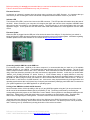
The indicator LED (LED1) can be found next to the USB connector. This LED provides information about the state of
the UMC. When connected, your computer will recognize the UMC and load the class compliant USB-MIDI class
device driver that is provided by your operating system. The LED will stay on until communication with your host
application begins. At this point the LED will flicker when MIDI traffic between the host application and the UMC
occurs.
Firmware Update
When the UMC is plugged into the USB port it first checks the state of the shift pin, if it is pulled low (your switch is
being held) then the UMC will enter bootloader mode and prepare to accept a firmware update. Information regarding
firmware updates will be made available on our website at http://www.halemicro.com
Connecting multiple UMC32’s to the USB bus.
For connecting more than 1 UMC32 to the same computer it is recommended that you install one of 8 available
firmware binaries on your UMC32. First download the latest firmware set from the Hale website. The zip file will
contain multiple firmware revisions with “.DLD” extensions. Next download and install the UMC32’s firmware update
utility, follow the directions provided by the utility and select the appropriate firmware. In this case you would select
“UMC32_v215_051809_Dev02.dld” for device number 2. Each firmware binary is slightly different in that they
contains a unique USB product ID as well as a unique Driver Name that allows the operating system to identify it on
the USB bus. When using more than one UMC32 it is also recommended that all UMC I/Os on Device 1 be set for
MIDI channel 1, and Device to for MIDI channel 2 etc. As there are many implementations by host applications and
operating system drivers this is a full-proof way of uniquely and consistently identifying each UMC that is connected to
your system regardless of your MIDI application or operating system.
Linking of two UMC32’s to obtain 64 I/O channels
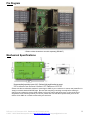
New in firmware revision 2.26 is the ability to link up to 2 (two) UMC32s together using the 5 pin aux port located at
the far end of the board between Bank2 (09-16) and Bank3 (17-24). The linking is achieved by connecting the
corresponding pins with jumpers or the “UMC linker” board. Master / Slave operation is auto-detected making the link
hassle free. Please keep in mind that slaved units are not accessible to the Configuration utility. Therefore each
UMC must be configured prior to being linked. The total current for both devices must not exceed 500mA.
*All boards that have shipped from Hale Micro before Nov 2009 may have R3 & R4 populated on the PCB. For the
linking function to work properly, both of these resistors should be removed. The removal process can be performed
with 2 soldering irons by simultaneously heating both sides of the resistors terminals.
PCB rev 1 & 2, Firmware v2.3.3, Datasheet: 03/17/2010 3:18 PM
© 2007 - 20010 Hale Microsystems LLC, http://www.halemicro.com, [email protected]
3