1
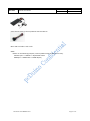
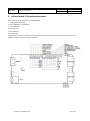
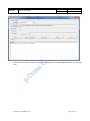
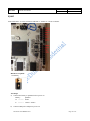
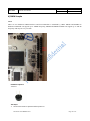
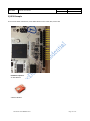
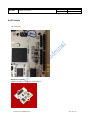
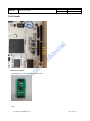
Doc Title pcDunio User Guide Number Version WMSBB121219 0.4 pcDunio User Guide Copyright © 2012 pcDuino Document No WMSBB121219 Page 1 of 35 Doc Title Number Version pcDunio User Guide WMSBB121219 0.4 HISTORY Version Date Description Author 0.1 12/07/2012 Initial specification draft Lifeng Zhao 0.2 1/28/2013 Add I/O interface description Lifeng Zhao 0.3 3/2/2013 Fix HDMI display issue Lifeng Zhao 0.4 3/8/2013 Rewrite chapter 5 for OS installation to NAND flash Lifeng Zhao Document No WMSBB121219 Page 2 of 35 Doc Title pcDunio User Guide Number Version WMSBB121219 0.4 INDEX 1. 2. 3. 4. 5. 6. 7. 8. 9. Overview ..................................................................................................................................................... 4 Required hardware for all samples in this user guide................................................................................ 7 pcDuino board I/O interface description.................................................................................................... 9 Required Software in this user guide ....................................................................................................... 10 Install Ubuntu or Android on pcDuino ..................................................................................................... 11 Use pcDuino as an mini PC platform ........................................................................................................ 19 Use pcDuino as a high performance Arduino platform ........................................................................... 20 1) Guide of individual Arduino samples ..................................................................................................... 20 2) UART ...................................................................................................................................................... 21 3) ADC ........................................................................................................................................................ 23 4) PWM Sample ......................................................................................................................................... 25 5) GPIO Sample .......................................................................................................................................... 27 6) I2C Sample ............................................................................................................................................. 30 7) SPI Sample ............................................................................................................................................. 32 HDMI Overscan adjustment ...................................................................................................................... 34 GCC ............................................................................................................................................................ 35 Document No WMSBB121219 Page 3 of 35 Doc Title Number Version pcDunio User Guide WMSBB121219 0.4 1. Overview pcDuino is a high performance, cost effective mini PC platform that runs PC like OS such as Ubuntu Linux. It outputs its screen to HDMI enabled TV or monitor via the built in HDMI interface. It is specially targeted for the fast growing demands from the open source community. The platform could run full blown PC like OS with easy to use tool chain and compatible with the popular Arduino ecosystem such as Arduino Shields and open source projects etc. The hardware specification for pcDuino is as follows: Items Details CPU AllWinner A10 SoC, 1GHz ARM Cortex A8 GPU OpenGL ES2.0, OpenVG 1.1 Mali 400 core DRAM 1GB Onboard Storage 2GB Flash Micro-SD card slot for up to 32GB Video Output HDMI OS Linux3.0 + Ubuntu12.04 Android ICS 4.0 Extension Interface Arduino Headers Network interface USB WiFi extension (not included) Ethernet 10/100Mbps Power 5V, 2A The following are top and bottom views for pcDuino. Document No WMSBB121219 Page 4 of 35 Doc Title pcDunio User Guide Number Version WMSBB121219 0.4 pcDuino targets for two markets primarily, i.e., the Raspberry Pi mini PC market and Arduino market as open-source electronics prototyping platform. With pcDuino, user could do lots of fun stuff including but not limited to the follows: Learn or teach programming Work with hardware port Use Internet browser or Office from Ubuntu Learn Ubuntu linux Create media center with XBMC Play game DIY projects Document No WMSBB121219 Page 5 of 35 Doc Title pcDunio User Guide Document No WMSBB121219 Number Version WMSBB121219 0.4 Page 6 of 35 Doc Title pcDunio User Guide Number Version WMSBB121219 0.4 2. Required hardware for all samples in this user guide PcDuino board micro-USB port power adaptor ( 5V, 2000mA) Display with HDMI port HDMI cable USB keyboard (must) USB Hub and USB mouse ( optional but strongly recommended ) Document No WMSBB121219 Page 7 of 35 Doc Title pcDunio User Guide Number Version WMSBB121219 0.4 Some Dupont Lines to connect pcDuino with test devices Micro-SD card and its card reader Note: Before run the following samples, Connect pcDuino with the devices correctly: USB host port => USB hub => keyboard & mouse HDMI port => HDMI cable => HDMI display Document No WMSBB121219 Page 8 of 35 Doc Title pcDunio User Guide Number Version WMSBB121219 0.4 3. pcDuino board I/O interface description Here is the list of I/O interfaces on pcDuino board. 1. 14 digital pins for GPIO 2. One UART RX, one UART TX 3. Two PWM pins 4. Six ADC pins 5. Four SPI pins 6. Two I2C pins It supports to connect any Arduino shield with pcDuino via any of the above I/O interfaces. It allows to use pcDuino with the same code used in Arduino. Document No WMSBB121219 Page 9 of 35 Doc Title pcDunio User Guide Number Version WMSBB121219 0.4 4. Required Software in this user guide PhonixCard: a free tool which can create the production card. You can download the tool from internet and read the user manual. Note: before using a TF card to create the production card, please backup the files on this TF card. After production, you can use PhonixCard to recover the TF card for normal use. LiveSuit: a free tool which can upgrade firmware by USB device. To use this tool, you must install two USB drivers. You can download the tool and drivers from internet and read the user manual. Note: LiveSuit is not very stable on Windows Vista or Windows 7, and it does not work well on 64 bits CPU. So this tool is not recommended. Please use PhonixCard for production and firmware upgrade as your first choice. Hyper terminal: with the hyper-terminal tool, you can type the command in the linux shell of the device when the device is connected to the PC with USB serial cable. SecureCRT is the recommend tool. iPerf: a free tool for network throughput test. iPerf linux version runs on the device and iPerf windows version will run on the PC. Document No WMSBB121219 Page 10 of 35 Doc Title pcDunio User Guide Number Version WMSBB121219 0.4 5. Install Ubuntu or Android on pcDuino Ubuntu is pre-installed in pcDuino’s internal flash at production. But you can also upgrade the pre-installed Ubuntu or install the new Android OS to pcDuino by yourselves. The installation procedure is different for Ubuntu and Android. So please follow the following instructions carefully. Steps to update the Linux Kernel and Ubuntu image with micro-SD card The complete installation of the Ubuntu OS needs install both Linux kernel and Ubuntu image. The process is separated into two steps. The first step is to update Linux kernel and the second is to install Ubuntu. Step 1: Install Linux kernel a) Download the Linux kernel and Ubuntu image files for pcDuino The download page is: http://www.pcduino.com/?page_id=14 Find the Ubuntu link in this page and download it. Unzip it and get two files like these: - a10_kernel_xxx.img - Ubuntu.zip The first file is used in kernel upgrade, and the second one is used to update Ubuntu in step 2. b) Download the Phonenix Card software The download page is: http://www.pcduino.com/?page_id=14 Find the “Phonenix Card” link under Tools in this page and download it. Unzip it to a new folder with default name PhoenixCardV306_20120302. c) Write Linux Kernel to micro-SD card i. Plug your micro-SD card to your PC, run “PhoenixCard.exe”. You will see something like this: Document No WMSBB121219 Page 11 of 35 Doc Title ii. pcDunio User Guide Number Version WMSBB121219 0.4 Choose the Linux kernel image file a10_kernel_xxx.img that you’ve downloaded and write it to micro-SD card Document No WMSBB121219 Page 12 of 35 Doc Title pcDunio User Guide Number Version WMSBB121219 0.4 After a few minutes, the TF card is ready to use to burn the kernel to the flash in pcDuino. d) Burn the OS image to internal flash from micro-SD card a) Plug the micro-SD card to the pcDuino, power on the board, and then wait for one minute b) When see the RX LED stays on, and the TX LED is blinking, the kernel is updated successfully. Eject the TF card and reset the device e) Restore the micro-SD card created in step 1, c) The micro-SD card is specially created in step 1, c) to allow it to be recognized by the ROMBOOT of the board. To avoid the unexpected update of the kernel, use the PhoenixCard to restore it to normal and clean card i. Plug your micro-SD card to your PC, run PhoenixCard.exe. ii. Select the micro-SD card in the disk scroll window, and choose “Format to Normal” to restore the card. Document No WMSBB121219 Page 13 of 35 Doc Title pcDunio User Guide Number Version WMSBB121219 0.4 Step 2: Install Ubuntu a) Unzip the Ubuntu.zip file obtained in Step 1, a) Unzip it to get three files like these: - Update.sh: shell script for Ubuntu update - Ubuntu_xxx.img: image file for Ubuntu - *.tgz (released on March 2013) or *.fex (released on Feb. 2013) file depending on the version that you are using b) Copy the three files unzipped in Step 2 , a) to micro-SD card or USB flash disk c) Burn the Ubuntu to internal flash Plug the micro-SD card or USB flash disk to pcDuino and power on the device. If the TX LED starts to blink fast and RX LED always stays on, it indicates the Ubuntu is being burned to internal flash. Wait until both TX LED and RX LED blink slowly. It indicates that the Ubuntu is burned to internal flash successfully. Otherwise, if both TX LED and RX LED blink very fast, the Ubuntu is failed to burn to flash. If so, please make sure that you have all three files unzipped in step 2, a) in your disk and redo this step. This step usually takes around 10 minutes so be patient. Document No WMSBB121219 Page 14 of 35 Doc Title pcDunio User Guide Number Version WMSBB121219 0.4 Steps to update the Android image with micro-SD card (RECOMMEND) 1. Download the Android operating system for pcDuino The download link is: http://www.pcduino.com/?page_id=14 Find the link for Android image, download it and get one file with .img extension. 2. Download the Phonenix Card software The download page is: http://www.pcduino.com/?page_id=14 Find the “Phonenix Card” link under Tools in this page and download it. Unzip it to a new folder with default name PhoenixCardV306_20120302. 3. Write pcDuino Android image to micro-SD card (a) Plug your micro-SD card to your PC, run “PhoenixCard.exe”. You will see something like this: Document No WMSBB121219 Page 15 of 35 Doc Title pcDunio User Guide Number Version WMSBB121219 0.4 (b) Choose the Android image file pcduino_Android_ xxx.img that you’ve downloaded and write it to the micro-SD card After a few minutes, the micro-SD card is ready to use. 4. Burn the OS image to internal flash from micro-SD card a) Plug the micro-SD card to the pcDuino and then power on the board. Wait for about four minutes b) Eject the micro-SD card and reset the device * We have a catch in step (a). We don't have any LED to indicate when the boot image is burned completely unless you connect the hyperterminal to pcDuino, so please wait for four minutes patiently. Moreover, please eject the TF card before resetting the device. Otherwise, it will start to burn the OS image again if the TF card is inserted. 5. Restore the micro-SD card created in step 3 The micro-SD card is specially created in step 3 to allow it to be recognized by the ROMBOOT of the board. To avoid the unexpected update of the Android OS, use the PhoenixCard to restore it to normal and clean card iii. Plug your micro-SD card to your PC, run “PhoenixCard.exe”. iv. Select the micro-SD card in the disk scroll window, and choose “Format to Normal” to restore the card. Document No WMSBB121219 Page 16 of 35 Doc Title pcDunio User Guide Document No WMSBB121219 Number Version WMSBB121219 0.4 Page 17 of 35 Doc Title pcDunio User Guide Number Version WMSBB121219 0.4 Steps to update software from USB disk Over time, we will have the bug fix or provide new features to pcDuino board. Most of the time, users do not need to update the whole operating system. Instead, we could add software patch to accomplish this. The procedure is simply like these: 1. 2. 3. 4. 5. Copy update package to USB disk (for example: update.sh, update.tgz ) Power on pcDuino board Plugin the USB disk to USB host port Open a terminal after login to Ubuntu Run commands to update the package $ cd /media/*/ $ bash ./update.sh Note: If the USB disk has more than one partition, enter the whole path which the partition including update package is mounted, for example “cd /media/Volumn”. If you don’t know which partition to choose, open “File Manager” to check it. The name of update script (update.sh) and update package (update.tgz) may be different for the individual purpose. Document No WMSBB121219 Page 18 of 35 Doc Title Number Version pcDunio User Guide WMSBB121219 0.4 6. Use pcDuino as an mini PC platform 1) pcDuino and Ubuntu pcDuino & Ubuntu support customized Ubuntu linux 12.04 that is specially optimized for running on ARM cortex platform with limited DRAM and NAND flash support. The device could be operated with the USB mouse and keyboard. The supported application list consists of the follows: Items Details Terminal Use build in “LXTerminal” application from desktop Launch terminal application, run standard linux commands or vi editor etc. File browser Launch C/C++ compile (use gcc), assembly and execution Use build in File Manager from desktop Used for typical file management Internet browser Use chromium web browser from desktop Support HTML5 Office Use Document Viewer from desktop for PDF file view Use Gnumeric from desktop for Excel file view and edit Use AbiWord from desktop for Word file view and edit Use MPlayer from desktop Could playback audio, video and image Movie player Note: The root user and password are “ubuntu”. 6.2 pcDuino and Android pcDuino board supports customized android 4.0 that is specially optimized for HD-TV output display devices. The device could be operated with the USB mouse and keyboard. The supported application list consists of but not limited the follows: Items Details File browser Use build in File Manager Used for typical file management Internet browser Use web browser from desktop or Google Search widget Support HTML5 Calendar Google Calendar Gmail Visit Gmail accounts People Google contacts apps App Store Music Use Google “play store” to download third-party apps Android built-in music player Movie player built-in Super-HD Player to play local movies Document No WMSBB121219 Page 19 of 35 Doc Title pcDunio User Guide Number Version WMSBB121219 0.4 7. Use pcDuino as a high performance Arduino platform 1) Guide of individual Arduino samples Android: Setting up the PC environment before run all the samples: a) Plugin USB-to-serial cable to PC usb port and install usb_to_serial driver (PL2303_Prolific_DriverInstaller_v110) b) Set uart tool on PC ( baud rate 115200) for example: sercureCRT Note: After android system power on, input the command “sh” from secureCRT window, and the system will print out a welcome message “root@android:/#” waiting for your commands. Ubuntu: You can run the test in the secureCRT, just like the android above. You can also run the test in the terminal shell of the ubuntu. Document No WMSBB121219 Page 20 of 35 Doc Title pcDunio User Guide Number Version WMSBB121219 0.4 2) UART Hardware required: USB to serial Cable (need 2 cables for this test, one for commands, and the other one for test). Test steps: c) Plugin USB-to-serial cable to PC usb port and install usb_to_serial driver Document No WMSBB121219 Page 21 of 35 Doc Title pcDunio User Guide Number Version WMSBB121219 0.4 d) Set uart tool on PC ( baud rate 115200) for example: sercureCRT e) Connect USB-to-serial cable to pcDuino before power on USB-to-serial pcDuino GND ---------- GND RX ---------- PIN1(TX) f) Run uart test sample with the following commands in the debug console window # cd /home/ubuntu/sample/test # ./uart_test “ubuntu uart test” Note: do not input the symbol “#”, you can replace the message “ubuntu uart test “ by your own. g) PC uart tool will receive messages sent by the test program Press “Ctrl” and “C” on keyboard to stop the test process Document No WMSBB121219 Page 22 of 35 Doc Title pcDunio User Guide Number Version WMSBB121219 0.4 3) ADC ADC0 and ADC1 are 6 bits resolution and ADC2 ~ ADC5 are 12 bits resolution. Hardware required: 1.5V Battery Test Steps: a) Connect the battery to pcDuino before power on Battery pcDuino N ---------- GND P ----------- ADC0 ~ ADC5 b) Connect USB power adaptor to power on Document No WMSBB121219 Page 23 of 35 Doc Title pcDunio User Guide Number Version WMSBB121219 0.4 c) Run adc test sample with the following commands in the debug console window # cd /home/ubuntu/sample/core # ./adc_get 0 [usage: type ./adc_get for help ] The test program will print out the raw ADC values which depend on the battery voltage. Document No WMSBB121219 Page 24 of 35 Doc Title pcDunio User Guide Number Version WMSBB121219 0.4 4) PWM Sample PWM There are two hardware PWM interfaces and four PWM that is simulated by GPIO. PWM1 and PWM2 are hardware PWM and can support up to 24MHz frequency, PWM0 and PWM3~PWM5 can support up to 100 Hz frequency and may not very accurate. Hardware required: A buzzer Test Steps: 1. Connect the buzzer to pcDuino before power on Document No WMSBB121219 Page 25 of 35 Doc Title pcDunio User Guide Number Version WMSBB121219 0.4 Buzzer pcDuino GND(N) ---------- GND VCC(P) ---------- PWM1 (any pin of PWM0-PWM5) 2. Connect USB power adaptor to power on 3. pwm_get # cd /home/ubuntu/sample/core # . /pwm_get 0 0 [Usage: type ./pwm_get for help ] The test program will get the pwm’s current level or max level 4. pwm_set # cd /home/ubuntu/sample/core # . /pwm_set 0 0 [Usage: type ./pwm_set for help ] The test program will make the buzzer generating audio signal, and you can hear the sound. Document No WMSBB121219 Page 26 of 35 Doc Title pcDunio User Guide Number Version WMSBB121219 0.4 5) GPIO Sample There are 14 GPIOs. Sometimes, some GPIO will be mux as other PIN, such as SPI Hardware required: An LED Module A Button Module Document No WMSBB121219 Page 27 of 35 Doc Title pcDunio User Guide Number Version WMSBB121219 0.4 Test Steps: 1. Connect the LED to pcDuino before power on Button pcDuino GND/- ---------- GND S ---------- GPIO1 (any pin of GPIO0-13) LED pcDuino GND/- ---------- GND S ---------- GPIO0 (any pin of GPIO0-13) 2. Connect USB power adaptor to power on 3. gpio_set # cd /home/ubuntu/sample/core # . /gpio_set 0 0 [Usage: type ./gpio_set for help ] This test will high or low the gpio pin. 4. gpio_get # cd /home/ubuntu/sample/core # . /gpio_get 0 [Usage: type ./gpio_get for help ] This test will get the gpio pin level. 5. pin_mode # cd /home/ubuntu/sample/core # . /pin_mode 0 1 [Usage: type ./pin_mode for help ] This test will set the gpio pin to input or output mode. Document No WMSBB121219 Page 28 of 35 Doc Title pcDunio User Guide Number Version WMSBB121219 0.4 6. Run gpio sample with the following commands in the terminal window $ cd /home/ubuntu/sample/test $ . /io_test 1 0 Note: Test program Usage: $./io_test BUTTON_PIN_NUM LED_PIN_NUM do not input the symbol “$”, if the Button/LED connects to another pin, replace the BUTTON_PIN_NUM/LED_PIN_NUM with the one which the button/LED connected(example: if the Button connects to GPIO5, LED connects to GPIO10, then run “./io_test 5 10” instead). Press/Release the button to turn on/off the LED. Document No WMSBB121219 Page 29 of 35 Doc Title pcDunio User Guide Number Version WMSBB121219 0.4 6) I2C Sample I2C (Two wire) Hardware required: ADXL-345 Triple-Axis Analog Accelerometer Document No WMSBB121219 Page 30 of 35 Doc Title pcDunio User Guide Number Version WMSBB121219 0.4 Test steps: a) Connect the ADXL-345 device to pcDuino before power on ADXL-345 pcDuino GND ---------- GND VCC ---------- 3.3V SDA ----------- SDA SCL ----------- SCL b) Connect usb power adaptor to power on c) The general i2c cmd is in /home/ubuntu/core You can type ./i2cdetect, or ./i2cget or ./i2cset or ./i2cdump for help. d) Run adxl345 test sample with the following commands in the terminal window $ cd /home/ubuntu/sample/test $ ./adxl345_test Note: do not input the symbol “$” e) The test program will print out the x, y, z value of adxl345, change the direction of the test device and the output value will change too x=0, y=1, z=108 x=9, y=45, z=116 x=1, y=59, z=10 x=0, y=0, z=0 x=10, y=0, z=95 x=0, y=0, z=8 x=0, y=0, z=7 x=0, y=0, z=99 x=0, y=0, z=95 Document No WMSBB121219 Page 31 of 35 Doc Title pcDunio User Guide Number Version WMSBB121219 0.4 7) SPI Sample Hardware required: An SPI flash test module ( for example: M25P16 ) Note: Document No WMSBB121219 Page 32 of 35 Doc Title pcDunio User Guide Number Version WMSBB121219 0.4 Some PINs of SPI bus also can be used as GPIO function, if Test steps: a) Connect the spi flash to pcDuino before power on SPI Flash pcDuino GND ---------- GND V3.3 ---------- 3.3V DO ---------- SPI0_MISO DI ---------- SPI0_MOSI CS ---------- SPI0_CS CLK --------- SPI0_CLK b) Connect USB power adaptor to power on c) Run SPI test sample with the following commands in the debug console window # cd /home/ubuntu/sample/test # ./spi_test Note: do not input the symbol “#” d) The test program will print out the flash chip id (for M25P16, chip id is 0xef2015): spi flash ID=0xef2015 Note: 1. Some PADs of SPI bus are sharing with GPIO function, if you have done GPIO test but not RESET before executing “./spi_test “ command, you may get invalid ID value. Document No WMSBB121219 Page 33 of 35 Doc Title pcDunio User Guide Number Version WMSBB121219 0.4 8. HDMI Overscan adjustment Please type ./setwindow for help. This command can adjust the windows on TV. Usage: setwindow percentage center x y if center=0,use x, y related to top left corner (only support positive x and y values) if center is not 0, auto-center position, don't care x,y value Example: $ sudo setwindow 95 1 0 0 Auto center the window, and the original window is 95% of original size (if over scan) The default value is ./setwindow 95 1 0 0 Document No WMSBB121219 Page 34 of 35 Doc Title pcDunio User Guide Number Version WMSBB121219 0.4 9. GCC The gcc toolchain is preloaded. The version is 4.6.3 Document No WMSBB121219 Page 35 of 35