1
Chapter 2:Hardware Installation
Static electricity can damage your equipment. Do
not remove the PMS PDI Deluxe card from the antistatic bag until you are ready to install it into a PC.
Also limit your movement since movement builds up
static electricity.
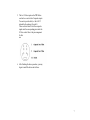
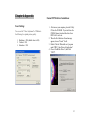
4. Set the corresponding jumper according to
your need. To use Component Input or RGsB,
set to "Sync on Y / G". To use RGBS, set to
"Separate
Sync".
Hardware Installation
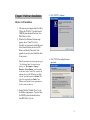
If you do not have a Realmagic Xcard, skip 2 and 3:
1. Turn off your computer FIRST. Remove the
case cover and insert this PDI Deluxe card
into your computer's PCI slot.
2. Connect the PDI Deluxe Capture Card to the
Realmagic Xcard through the 26-pin ribbon
cable shipped with the PDI Capture Card. The
red line of the ribbon cable should be at the
left as shown in the following picture.
3. Make sure the adapter card is well seated in
the slot before fasten it with screws. Finally,
replace case.
6