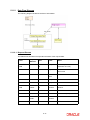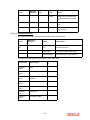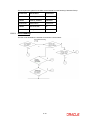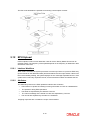
1
Interface User Guide Oracle FLEXCUBE Investor Servicing Release 12.0.4.0.0 Part Number E57474-01 September 2014 Table of Contents 1. About This Manual ................................................................................... 1-1 1.1 1.2 1.3 1.4 1.5 1.6 1.7 1.8 2. 1-1 1-1 1-1 1-1 1-2 1-2 1-2 1-2 1-2 1-3 Creating Electronic Fund Transfer Interfaces ...................................... 2-1 2.1 2.2 2.3 2.4 2.5 2.6 2.7 2.8 3. Introduction.............................................................................................................. Related Documents ................................................................................................. Audience.................................................................................................................. Organization ............................................................................................................ Conventions Used in this Manual ............................................................................ 1.5.1 General Conventions.................................................................................. 1.5.2 Keyboard Conventions ............................................................................... Glossary of Icons..................................................................................................... Abbreviations and Acronyms................................................................................... Getting Help............................................................................................................. Introduction.............................................................................................................. 2-1 Creating Transfer Instruction Files .......................................................................... 2-1 Few Basic Terms..................................................................................................... 2-1 2.3.1 Generating EFT Files ................................................................................ 2-2 2.3.2 Re-exporting Batch EFT File ...................................................................... 2-3 EFT Batch Generation Screen ................................................................................ 2-3 2.4.1 Generating EFT Batch in this Screen ......................................................... 2-3 2.4.2 Fields in EFT Setup Screen........................................................................ 2-4 2.4.3 Reports Printed on Saving EFT Batch........................................................ 2-6 EFT Batch Maintenance (Summary) Screen........................................................... 2-7 2.5.1 Retrieving Batch in EFT Setup Summary Screen ...................................... 2-7 2.5.2 Editing Record ............................................................................................ 2-8 2.5.3 Viewing Record .......................................................................................... 2-9 2.5.4 Authorizing Record ..................................................................................... 2-9 2.5.5 Amending Record....................................................................................... 2-9 2.5.6 Authorizing Amended Record................................................................... 2-10 2.5.7 Copying Attributes ................................................................................... 2-10 Marking a Batch for Re-Export .............................................................................. 2-10 Payment Clearing Screen...................................................................................... 2-11 2.7.1 Fields in Payment Clearing Screen .......................................................... 2-11 Payment Clearing Summary Screen ..................................................................... 2-12 2.8.1 Retrieving Record in Payment Clearing Summary Screens ..................... 2-13 2.8.2 Editing Transaction................................................................................... 2-13 2.8.3 Viewing Transaction ................................................................................. 2-14 2.8.4 Deleting Transaction................................................................................. 2-14 2.8.5 Authorizing Transaction............................................................................ 2-14 2.8.6 Amending Transaction.............................................................................. 2-15 2.8.7 Authorizing Amended Transactions.......................................................... 2-15 2.8.8 Copying Attributes ................................................................................... 2-15 2.8.9 To Clear or Reject Settlement .................................................................. 2-15 Processing SWIFT Messages ................................................................. 3-1 3.1 3.2 Introduction.............................................................................................................. 3-1 Transaction Workflow .............................................................................................. 3-1 3.2.1 Incoming SWIFT Bulk/Multiple Orders ....................................................... 3-1 3.3 3.4 3.5 3.6 3.7 3.8 3.9 3.10 3.11 3.12 3.13 3.14 3.15 3.16 3.2.2 Incoming SWIFT Bulk Order Cancellation .................................................. 3-1 3.2.3 Outgoing SWIFT Bulk Order Request ........................................................ 3-2 Maintenance for Processing SWIFT Messages ...................................................... 3-2 3.3.1 Fields in Swift Message Setup Maintenance Screen ................................. 3-2 Swift Message Setup Summary Screen .................................................................. 3-5 3.4.1 Retrieving Record in Swift Message Setup Summary Screens.................. 3-5 3.4.2 Editing SWIFT Records .............................................................................. 3-6 3.4.3 Viewing SWIFT Records ............................................................................ 3-6 3.4.4 Deleting SWIFT Records............................................................................ 3-7 3.4.5 Authorizing SWIFT Records ....................................................................... 3-7 3.4.6 Amending SWIFT Records......................................................................... 3-7 3.4.7 Authorizing Amended Records................................................................... 3-8 3.4.8 Copying Attributes ..................................................................................... 3-8 Setting Up UDFs for SWIFT Elements .................................................................... 3-8 3.5.1 Retrieving Record in SWIFT ELEMENT UDF Summary Screens .............. 3-9 3.5.2 Editing Record ............................................................................................ 3-9 3.5.3 Viewing Record ........................................................................................ 3-10 3.5.4 Deleting Record........................................................................................ 3-10 3.5.5 Authorizing Record ................................................................................... 3-10 3.5.6 Amending Record..................................................................................... 3-11 3.5.7 Fields in SWIFT Element UDF Screen ..................................................... 3-11 3.5.8 Authorizing Amended Records................................................................. 3-12 3.5.9 Copying Attributes of Record.................................................................... 3-12 Generating Message Manually.............................................................................. 3-12 3.6.1 Fields in Manual Message Screen ........................................................... 3-13 3.6.2 Validation of SWIFT Messages ................................................................ 3-17 3.6.3 Incoming Message Browser Summary Screen ........................................ 3-17 3.6.4 Outgoing Message Browser Summary Screen ........................................ 3-19 3.6.5 Uploading Incoming Messages ................................................................ 3-21 3.6.6 Generation of Outgoing Messages........................................................... 3-22 Subscription Bulk Order......................................................................................... 3-23 3.7.1 Tags in Message ...................................................................................... 3-23 Subscription Bulk Order Confirmation ................................................................... 3-29 3.8.1 Tags in Message ...................................................................................... 3-29 Subscription Bulk Order Cancellation Instruction .................................................. 3-32 3.9.1 Tags in Message ...................................................................................... 3-32 Subscription Multiple Order ................................................................................... 3-35 3.10.1 Tags in Message ...................................................................................... 3-35 Subscription Multiple Order Confirmation.............................................................. 3-39 3.11.1 Tags in Message ...................................................................................... 3-39 Subscription Multiple Order Cancellation Instruction............................................. 3-43 3.12.1 Tags in Message ...................................................................................... 3-44 Redemption Bulk Order ......................................................................................... 3-46 3.13.1 Tags in Message ...................................................................................... 3-46 Redemption Bulk Order Confirmation.................................................................... 3-50 3.14.1 Tags in Message ...................................................................................... 3-51 Redemption Bulk Order Cancellation Instruction................................................... 3-53 3.15.1 Tags in Message ...................................................................................... 3-54 Redemption Multiple Order.................................................................................... 3-56 3.16.1 Tags in Message ...................................................................................... 3-57 3.17 Redemption Multiple Order Confirmation .............................................................. 3-60 3.17.1 Tags in Message ...................................................................................... 3-61 3.18 Redemption Multiple Order Cancellation Instruction ............................................. 3-65 3.18.1 Tags in Message ...................................................................................... 3-65 3.19 Request for Order Status Report........................................................................... 3-67 3.19.1 Tags in Message ...................................................................................... 3-68 3.20 Order Instruction Status Report............................................................................. 3-69 3.20.1 Message Structure ................................................................................... 3-70 3.20.2 Tags in Message ...................................................................................... 3-70 3.21 Order Cancellation Status Report.......................................................................... 3-71 3.21.1 Message Structure ................................................................................... 3-71 3.21.2 Tags in Message ...................................................................................... 3-72 3.22 Switch Order.......................................................................................................... 3-73 3.22.1 Tags in Message ...................................................................................... 3-73 3.23 Switch Order Confirmation .................................................................................... 3-76 3.23.1 Tags in Message ...................................................................................... 3-77 3.24 Switch Order Cancellation Instruction ................................................................... 3-81 3.24.1 Tags in Message ...................................................................................... 3-81 3.25 Price Report........................................................................................................... 3-83 3.25.1 Tags in Message ...................................................................................... 3-84 3.26 Price Report Correction ......................................................................................... 3-86 3.26.1 Tags in Message ...................................................................................... 3-86 3.27 Price Report Cancellation...................................................................................... 3-88 3.27.1 Tags in Message ...................................................................................... 3-88 3.28 Fund Estimated Cash Forecast Report ................................................................. 3-89 3.28.1 Contents of Report ................................................................................... 3-89 3.28.2 Tags in the Message ................................................................................ 3-90 3.29 Fund Confirmed Cash Forecast Report................................................................. 3-91 3.29.1 Contents of Report ................................................................................... 3-91 3.29.2 Tags in Message ...................................................................................... 3-93 3.30 Fund Confirmed Cash Forecast Report Cancellation............................................ 3-94 3.30.1 Tags in Message ...................................................................................... 3-94 3.31 Fund Detailed Estimated Cash Forecast Report ................................................... 3-94 3.31.1 Tags in Message ...................................................................................... 3-95 3.32 Fund Detailed Confirmed Cash Forecast Report .................................................. 3-96 3.32.1 Tags in Message ...................................................................................... 3-97 3.33 Fund Detailed Confirmed Cash Forecast Report Cancellation.............................. 3-98 3.33.1 Tags in Message ...................................................................................... 3-98 3.34 Custody Statement of Holdings Report ................................................................. 3-98 3.34.1 Tags in Message ...................................................................................... 3-98 3.35 Statement of Investment Fund Transactions....................................................... 3-100 3.35.1 Tags in Message .................................................................................... 3-101 4. VESTIMA+ Processing ............................................................................ 4-1 4.1 4.2 4.3 Introduction.............................................................................................................. Maintenance for Vestima+ Processing .................................................................... 4.2.1 Fields in Entity Media Maintenance Screen ............................................... Messages Processed in Vestima+ .......................................................................... 4.3.1 Creation of New Orders.............................................................................. 4.3.2 Cancellation of Existing Orders .................................................................. 4.3.3 Confirmation of Executed Orders ............................................................... 4-1 4-2 4-2 4-3 4-3 4-4 4-4 4.3.4 4.3.5 5. Status Updates .......................................................................................... 4-4 Securities Rejection.................................................................................... 4-5 Interfaces with External Systems ........................................................... 5-1 5.1 5.2 5.3 5.4 5.5 5.6 5.7 5.8 5.9 5.10 5.11 5.12 5.13 5.14 Introduction.............................................................................................................. 5-1 Setting up and Maintaining Interfaces ..................................................................... 5-1 5.2.1 Fields in Interface Maintenance Screen ..................................................... 5-3 5.2.2 File Specifications Section.......................................................................... 5-5 5.2.3 Parameters Section .................................................................................... 5-8 5.2.4 Fund(s) Selection Section .......................................................................... 5-8 5.2.5 Specifying Column Details for Interface File............................................... 5-9 5.2.6 Column Specifications Maintenance Fields................................................ 5-9 5.2.7 Interface Maintenance Summary Screen ................................................. 5-10 Online Execution of Interfaces............................................................................... 5-13 Re-Exporting Data ................................................................................................. 5-14 Scheduler Services............................................................................................... 5-14 5.5.1 Defining Jobs............................................................................................ 5-15 5.5.2 Job Maintenance Summary Screen ......................................................... 5-19 5.5.3 Scheduling Jobs ....................................................................................... 5-21 Interface with External Asset Management Systems ............................................ 5-23 Accounting System Component Setup.................................................................. 5-23 5.7.1 Fields in Accounting System Component Setup screen........................... 5-24 Asset Management Import NAV Setup.................................................................. 5-24 5.8.1 Fields in Asset Management Import NAV Setup Screen.......................... 5-25 5.8.2 Asset Management NAV Summary Screen ............................................. 5-26 General Ledger Setup ........................................................................................... 5-26 5.9.1 Setting up General Ledger Template ....................................................... 5-26 5.9.2 Fields in General Ledger Template screen .............................................. 5-27 5.9.3 GL Template Summary screen................................................................. 5-32 5.9.4 Mapping GL template to fund – investment account type combination ...................................................................................... 5-35 5.9.5 Fields in GL Interface set up Screen ........................................................ 5-36 5.9.6 Extraction and Generation of Event based Accounting Entries................ 5-37 5.9.7 Regeneration of Extract............................................................................ 5-38 Accounting System General Ledger Setup ........................................................... 5-38 5.10.1 Fields in Accounting System General Ledger Setup Screen................... 5-39 FCIS - Finware Interface ....................................................................................... 5-39 5.11.1 GL Setup for FCIS – Finware Interface .................................................... 5-40 5.11.2 Data Flow Diagram................................................................................... 5-41 5.11.3 Error Handling .......................................................................................... 5-43 EPU Upload........................................................................................................... 5-44 5.12.1 Interface Workflow.................................................................................... 5-44 5.12.2 Attributes .................................................................................................. 5-44 5.12.3 Message Format....................................................................................... 5-45 Tax Aggregation Interface ..................................................................................... 5-45 5.13.1 Interface Workflow.................................................................................... 5-45 5.13.2 Attributes .................................................................................................. 5-45 5.13.3 Message Format....................................................................................... 5-45 Agent Reference File............................................................................................. 5-45 5.14.1 Introduction............................................................................................... 5-45 5.14.2 Interface Attributes ................................................................................... 5-45 5.14.3 Message Format....................................................................................... 5.15 Oracle Financial Interface...................................................................................... 5.15.1 Interface Attributes ................................................................................... 5.15.2 Message Format....................................................................................... 5.16 Product-Fund- Asset Code Mapping Interface ...................................................... 5.16.1 Executing Product–Fund–Asset Code Mapping Interface........................ 5.17 Global Order Placement Interface ......................................................................... 5.17.1 Batch Process for Global Order Generation ............................................. 5.17.2 Message Format....................................................................................... 6. Interface with Oracle FLEXCUBE Retail ................................................ 6-1 6.1 7. Oracle FLEXCUBE Retail Interface for CIF Accounts ............................................. 6.1.1 Interface Process........................................................................................ 6.1.2 Unitholder Accounts under CIF .................................................................. 6.1.3 Modifying CIF Account ............................................................................... 6.1.4 Closure of Customer CIF Account.............................................................. 6.1.5 Details for CIF Account in FC-IS ................................................................ 6-1 6-1 6-2 6-2 6-2 6-3 Oracle FLEXCUBE Internet Banking ...................................................... 7-1 7.1 8. 5-46 5-46 5-46 5-46 5-46 5-46 5-47 5-47 5-48 Introduction.............................................................................................................. 7-1 7.1.1 Data Hand-off from FC-IS........................................................................... 7-2 7.1.2 Logging in to Oracle FLEXCUBE INTERNET BANKING ........................... 7-2 7.1.3 Information from FC-IS to Oracle FLEXCUBE INTERNET BANKING ....... 7-2 7.1.4 Viewing Portfolio Details............................................................................. 7-4 7.1.5 IPO Transactions and Subscription Transactions (buys) ........................... 7-4 7.1.6 Redemption Transactions (Sell Transactions)............................................ 7-6 7.1.7 Switch Transactions ................................................................................... 7-7 7.1.8 Transfer Transactions................................................................................. 7-8 7.1.9 Conversion Transactions............................................................................ 7-8 7.1.10 Auto-Authorization ...................................................................................... 7-9 7.1.11 Order Status ............................................................................................... 7-9 7.1.12 Transaction Activity .................................................................................. 7-10 7.1.13 Account Statement Request..................................................................... 7-11 7.1.14 IPO Corner ............................................................................................... 7-11 7.1.15 NAV Movement ........................................................................................ 7-11 7.1.16 Update Profile........................................................................................... 7-12 7.1.17 Entering, Modifying and Deleting Bank Account Details .......................... 7-13 7.1.18 Income Distribution Profile........................................................................ 7-13 7.1.19 Standing INSTRUCTIONS ....................................................................... 7-14 7.1.20 Dividend Information Inquiry..................................................................... 7-16 7.1.21 Processing Requests Received during End of Day Process.................... 7-16 7.1.22 Search Based on AMC ............................................................................. 7-17 7.1.23 Viewing Joint Unit Holders........................................................................ 7-19 7.1.24 Viewing Dividend Details for Customers .................................................. 7-22 7.1.25 Viewing Dividend Details for Funds.......................................................... 7-26 7.1.26 Viewing Corporate Actions ....................................................................... 7-28 7.1.27 Viewing Online Balance............................................................................ 7-29 7.1.28 Viewing Multiple Funds in Transaction Activity......................................... 7-31 7.1.29 CIF Handoff for Enabling Internet Banking............................................... 7-34 Interfaces with External Systems ........................................................... 8-1 8.1 Introduction.............................................................................................................. 8-1 8.2 9. FCIS – AWD Interface ............................................................................................. 8.2.1 Maintaining Interface Specific Details......................................................... 8.2.2 Interface Attributes ..................................................................................... 8.2.3 Process Workflow....................................................................................... 8.2.4 File Format for FCIS – AWD Interface........................................................ 8-2 8-2 8-2 8-2 8-2 Function ID Glossary ............................................................................... 9-1 1. About This Manual 1.1 Introduction Welcome to Oracle FLEXCUBE Investor Servicing ™, a comprehensive mutual funds automation software from Oracle Financial Servicing Software Ltd. ©. This Oracle FLEXCUBE Investor Servicing User Manual helps you use the system to achieve optimum automation of all your mutual fund investor servicing processes. It contains guidelines for specific tasks, descriptions of various features and processes in the system and general information. 1.2 Related Documents The User Manual is organized in to various parts, each discussing a component of the Oracle FLEXCUBE Investor Servicing system. 1.3 Audience This Fund Manager User Manual is intended for the Fund Administrator users and system operators in the AMC. 1.4 Organization This volume of the Fund Manager User manual is organized under the following chapter sequence: Chapter 1 About This Manual explains the structure, audience, organization, and related documents of this manual. Chapter 2 Interface – Creating Electronic Fund Transfer explains the processes involved in using the FC-IS system to create transfer instructions EFT files and transmit them to an external clearing bureau or clearing house. Chapter 3 Interface – Processing SWIFT Messages explains the processes involved in uploading and processing SWIFT messages is explained. Chapter 4 VESTIMA+ Processing explains the explains the processes related to VESTIMA+ external system Chapter 5 Interface – Interfaces with External Systems explains setting up, maintenance, online execution of various interfaces. Chapter 6 Interface – Interface with Oracle FLEXCUBE Retail explains setting up, maintenance, online execution of interface with FLEXCUBE retail Chapter 7 Oracle FLEXCUBE Internet Banking explains interface between FCIS and Internet Banking Chapter 8 Interface – Interfaces with External Systems explains facilities to effect data exchanges and transfers with external systems 1-1 1.5 Conventions Used in this Manual Before you begin using this User Manual, it is important to understand the typographical conventions used in it. 1.5.1 1.5.2 1.6 General Conventions Convention Type of Information Italic type Functional /foreign terms Validations for fields on a screen References to related Headings/Users Manuals For emphasis Numbered Bullet Step by step procedures Keyboard Conventions Convention Type of Information Keys All keys of the keyboard are represented in capital letters. For example, <CTRL>. Shortcut keys All short cut keys are contained in brackets. For example, <ALT+SHIFT>. Glossary of Icons This User Manual may refer to all or some of the following icons. Icons Function Exit Add Row Delete Row Option List Refer the Procedures User Manual for further details about the icons. 1.7 Abbreviations and Acronyms The following acronyms and abbreviations are adhered to in this User Manual: Abbreviation/ Acronym Meaning ADMIN User Administrator AGY The Agency Branch component of the system 1-2 1.8 Abbreviation/ Acronym Meaning AMC Asset Management Company BOD Beginning of Day CDSC Contingent Deferred Sales Charge CGT Capital Gains Tax CIF Customer Information File EOD End of Day EPU Earnings per unit FC-IS Oracle FLEXCUBE Investor Servicing FMG The Fund Manager component of the system FPADMIN Oracle FLEXCUBE Administrator ID Identification IHPP Inflation Hedged Pension Plan IPO Initial Public Offering LEP Life and Endowment Products LOI Letter of Intent NAV Net Asset Value REG The Registrar component of the system ROA Rights of Accumulation ROI Return on Investment SI Standing Instructions SMS Security Management System URL Uniform Resource Locator VAT Value Added Tax WAUC Weighted Average Unit Cost Getting Help Online help is available for all tasks. You can get help for any function by clicking the help icon provided or by pressing F1. 1-3 2. Creating Electronic Fund Transfer Interfaces 2.1 Introduction Oracle FLEXCUBE Investor Servicing (FC-IS) provides the AMC with the facility of interfacing with external clearing bureaus and clearing banks. The interface is facilitated through electronic funds transfer (EFT), and specific transfer instruction data can be generated as EFT files that are sent to these clearing bureaus. In the FC-IS system, you can create transfer instructions to be sent to the clearing bank of the AMC from where transfers can be effected to the unit holder bank accounts, for the following business events: Redemption Payments: For all the payments that need to be effected through transfer to unit holder bank account due to redemption transactions on any given date, you can generate an EFT file in the system with all the relevant transfer instruction data and the amounts. This file can then be exported to the clearing bank of the AMC. Dividend Payments: For all dividend payments that must be effected through transfer to unit holder bank accounts, on a given date, an EFT file can be generated that contains all the relevant transfer instruction data and the amounts. This file can then be manually transmitted to the clearing bank of the AMC that will actually effect the transfers. Broker Commission Payments: For all payments through transfer to an agent or broker bank accounts due to commission accrual on any given date, an EFT file can be generated that contains the transfer details and the amounts. This file can be exported to the clearing bank of the AMC. You can also create transfer instructions to an external clearing bureau for the purpose of debiting the relevant unit holder accounts in the case of debit orders. A hand-off file can be generated with the transfer instruction information that can be sent to an external clearing bureau that will debit the relevant unit holder bank accounts and credit the AMC account as applicable. In case of NPI payments to a trust, you can generate a single EFT file that contains all the transfer details and the total NPI amount that must be paid to charitable trusts. This chapter describes the functions in the FC-IS system that you can use to create these transfer instructions EFT files. 2.2 Creating Transfer Instruction Files The following screens in the system facilitate the creation and generation of these transfer instructions interface files: 2.3 The EFT Setup (Detail and Summary) Screen that you can access fron the EFT Setup menu in the Browser. The Payment Clearing Screen that you can access from the Payment Clearing menu in the Browser. Few Basic Terms You must have a clear understanding of a few basic terms before you use these screens to generate the EFT files: 2-1 Batch A batch is a logical group of records that forms a single transfer instruction EFT file. Accordingly, one single batch can include transfer instructions records that could apply to any one of the four business events mentioned above – redemption payments, dividend payments, broker commission payments or debit orders, as of the date on which (the effective date) the hand-off files are to be generated. Instruction Type Each of the four business events that will result in transfer instructions being sent to the clearing bureau (for debit orders) or clearing bank (for redemption payments, dividend payments or broker commission payments), is designated within the system as an instruction type. Therefore, a single batch can contain records that pertain to a single instruction type, for a given date. Instruction Medium The instruction medium is the method using which the interfacing with the external entity is achieved. Therefore, the medium could be an automated clearing bureau, an electronic funds transfer, a SWIFT interface, and so on. Taking a typical example, if the generated transfer instruction files are exported to an external clearing bank, they may need to be exported through an electronic funds transfer. In this case, the instruction medium would be EFT or electronic funds transfer. Settlements and Link Settlement Numbers Settlement of the records in a batch involves the debiting or crediting of the applicable bank accounts. For each account that is impacted by the debit or credit entries due to the settlement, the system generates a number known as the link settlement number. This number is typically used for tracking the record in the different stages of the settlement. If more than one of the records retrieved for a batch are to be settled by crediting or debiting the same unit holder account, then the system internally deems the settlement to be a single one. It also assesses the number of such settlements, and displays the same. For example, in the case of redemption payments, let us suppose that a certain unit holder A has performed redemption transactions T1 and T2, and that these transactions have been allocated on the date 3rd – April - 2000. Let us suppose that the only bank account to be credited as a result of these transactions is AC1. When you extract redemption payment records for the date 3rd - April - 2000 in this screen, the system retrieves T1 and T2. When it finds, during the process of extraction, that both the proceeds of both transactions are to be credited to a single account AC1, it deems both the transactions as a single settlement, and assigns a single link settlement number, for both these transactions. For a single link settlement number, all the underlying transactions must be cleared or rejected together. 2.3.1 Generating EFT Files Typically, it is recommended that you perform the generation of an EFT batch file after the End of Day process at the Fund Manager has been preformed by the Operator users. You can create and generate the transfer instruction files in the system by using the following procedures, in sequence: For the date on which the hand-off instruction files are to be generated, for sending to the clearing bureau, you must extract the records that must appear in these files. You can use the EFT Batch Maintenance (Detail) screen to do this. After you have extracted and saved the batch in the EFT Batch Generation screen, authorize it using the EFT Batch Maintenance (Summary) screen. 2-2 The user that has generated the batch record in the EFT Batch Maintenance (Detail) screen cannot authorize the batch. Typically, a user belonging to the Supervisor user group can authorize the batch in the EFT Batch Maintenance (Summary) screen. After authorization, you can generate and export the actual transfer instruction interface file that contains the batch records using the interface processing functions in the system. Refer to the Interfaces chapter of this User Manual for a detailed discussion of the interface processing functions. 2.3.2 Re-exporting Batch EFT File Once a batch has been authorized, it cannot be generated again for the same instruction type, for the same date. If the transmitted EFT batch file is misplaced due to any reason, then you can re-export the same batch again. The saved batch data is exported. You can use the Mark Batch for ReExport screen to do this. The Interface processing function may be used again to re-transmit the EFT batch file. 2.4 EFT Batch Generation Screen You can use the ‘EFT Setup Detail’ screen to generate a batch for an EFT file. You can invoke this screen by typing ‘UTDEFTSD’ in the field at the top right corner of the Application tool bar and clicking on the adjoining arrow button. 2.4.1 Generating EFT Batch in this Screen To create a batch that can be used for generating and exporting an EFT file, you must Specify the following mandatory information in the applicable fields in the header or main portion of this screen: – The Instruction Type that will determine the records that must be extracted for this batch. 2-3 – The Effective Date for which the records must be extracted for this batch – The Batch Description Click the Extract button. The job is submitted and the corresponding procedure is run. The Asynchronous Process screen is opened, where the current status of the job is indicated. All the relevant transaction records pertaining to the specified Instruction Type and Effective Date are extracted, and the amounts involved are summed across all the transaction and displayed in the Instruction Information section in the lower portion of the screen. This displayed row will also contain the number of records that are tagged with a link settlement number To view the records in detail, with the actual transaction numbers, and the bank account details, click the View Details button. The records that make up the batch are displayed transaction-wise in the Instruction Details section in the lower portion of the form. Choose the Save option from the File menu or click on the Save button to save the batch. Select ‘New’ from the Actions menu in the Application tool bar or click new icon to enter the details of the EFT Setup Screen. 2.4.2 Fields in EFT Setup Screen The EFT Setup Screen depicts the following EFT information: Batch Number System Generated Information The Batch Number is a unique identifier that is assigned to each batch that is generated in this screen. When you have extracted all the records in this screen, the Batch Number is generated when you choose the Save option and the system successfully saves the batch. The Batch Number consists of a 20-character number, and is generated by the system according to the following logic: Characters 1-2 ‘BN’ Characters 3-4 The instruction type, ‘DO’ for debit orders, ‘RE’ for redemption payments, ‘BC’ for broker commission payments and ‘DI’ for dividend payments. Characters 5-12 The date stamp (as ‘yyyymmdd’ format) Characters 13-20 A running serial number prefixed with zeros Instruction Type Alphanumeric, Mandatory Select the type of business event that results in the EFT file transfer to the external bureau in the form of this batch. The records that will be extracted by the system in this screen will be filtered according to the instruction type that you specify here. Instruction Type Description When you select the instruction type, the description for the respective instruction type is displayed. The following types are available: Debit Orders 2-4 Redemption Payouts Dividend Payouts Broker Commission Payouts NPI Payments to Trust For instance, if you specify the instruction type as Redemption Payouts, the system will retrieve only records of redemption transactions that have been allocated on the specified date. The drop down list in this field contains all the instruction types that have been identified for the AMC and the interface. The instruction types are set up in the system by the implementers at installation time. Instruction Medium Display Only The instruction medium is the method using which the interfacing with the external entity is achieved. Therefore, the medium could be an automated clearing bureau, an electronic funds transfer, a SWIFT interface, and so on. Taking a typical example, if the generated transfer instruction files are exported to an external clearing bank, they may need to be exported through an electronic funds transfer. In this case, the instruction medium would be EFT or electronic funds transfer. At the time of installation of the system, the implementers set up the different instruction mediums as applicable to the AMC. Each instruction type is mapped to an instruction medium. Therefore, when you specify the instruction type, the instruction medium that is mapped to the selected instruction type is displayed here, and it cannot be altered. Instruction Medium Description When you select the Instruction medium, the description for the respective instruction medium is displayed for the EFT Setup. Entity ID The ID of the entity involved in the transaction is displayed here. Bank The code of the bank, in which the transfer account is located, from which the settlement will be done for the transaction, is displayed here. Sub Payment Mode Select the sub payment mode from the option list. Effective Date Mandatory Specify the date for which the records must be extracted for this batch. For redemption payments, the redemption transactions that have occurred on the date you specify here must have been allocated. For dividend payments, the following events must have already occurred for the date you specify here: – The fund dividend should have been declared and authorized for all funds earlier than the date you specify here. – The dividend that has been declared must already have been processed for the date you specify here. 2-5 For broker commissions, the commissions that are accruing to the broker on the date you specify here must already have been processed in the system. For debit orders, the date you specify here must be the date of generation of the standing instructions transaction. Therefore, it must always be a future date. Therefore, for redemption payments, broker commission payments and dividend payments, the date you specify here can be a past date, subject to the conditions mentioned above. Process Date The application date is displayed here. This is the date on which the batch record is saved in this screen. Agent Code Select the agent code from the option list. Unit Holder ID Select the ID of the respective unit holder from the option list. Batch Description 30 Characters Maximum, Alphanumeric, Mandatory Give a brief narrative description for the batch. Net Amount The net amount involved in the transaction is displayed here. Held Back Payments? Select ‘Yes’ or ‘No’ to specify whether any payments are held back or not. Broker Code Enter the broker code. Held From Enter from when the payment is held back. Actual Transaction Number The number of the allotted transaction in the system that has been extracted for this batch is displayed here. For dividend payments and commission payments, it is the corresponding payment number. For redemption transactions, it is the actual redemption transaction number in the system. For debit orders, it is the actual system-generated Standing Instructions transaction number that is assigned when the transaction is actually generated in the system. Mark for Re-Export Click ‘Mark For Re-Export’ button to mark the records for re-export. 2.4.3 Reports Printed on Saving EFT Batch When you save an EFT batch in this screen, the following reports are printed: The Instruction Batch Report, containing the following details: – Batch Number and Description – Instruction Description – Instruction Medium – Net Amount 2-6 2.5 – Process Date and Effective Date – Authorization Status and Batch Status – Rejection Reason, if any. The EFT Batch Details Report, containing the following details: – The Link Settlement Numbers, if any – The transaction amounts, at the settlement number level, and a sum for the entire batch – The transfer bank account details at the link settlement number level EFT Batch Maintenance (Summary) Screen After you have extracted an EFT batch, you must have another user authorize it to be effective in the system. Before the EFT batch is authorized, you can edit it as many times as necessary. You can also delete it before it is authorized. Invoke the ‘EFT Setup Summary’ screen by typing ‘UTSEFTSD’ in the field at the top right corner of the Application tool bar and clicking on the adjoining arrow button. The ‘EFT Setup Summary’ screen can be used for the following operations on EFT batches: 2.5.1 Retrieval for viewing Authorizing batches Marking a batch for re-export Retrieving Batch in EFT Setup Summary Screen You can retrieve a previously entered record in the EFT Setup Summary screen, as follows: In the browser select Transaction screen and click on Summary, specify any or all of the following details in the corresponding fields: The status of the transaction in the Authorized field. If you choose the “Blank Space” option, then all the records are retrieved. 2-7 The status of the Transaction in the Open field. If you choose the “Blank Space” option, then all the records are retrieved. The medium of instruction, in the Instruction Medium field. The type of instruction, in the Instruction Type field. The date of process, in the Process Date field. The effective date, in the Effective Date field. The code of bank, in the Bank field. The mode of sub payment for the transaction, in the Sub Payment Mode field. Batch Number After you have specified the required details, click the Query button. All transactions with the specified details are retrieved and displayed in the lower portion of the screen. Note You can also retrieve the individual record detail from the detail screen by doing query in the following manner:– Press F7. – Input the Instruction Type. – Press F8. You can perform Edit, Delete, Amend, Authorize, Reverse, Confirm operations by selecting from the Action list. You can also search the record by using combination of % and alphanumeric value. For example You can search the record for Batch Number by using the combination of % and alphanumeric value as follows:- 2.5.2 Search by A%: System will fetch all the records whose Instruction Type starts from Alphabet ‘A’. Ex: AGC17, AGVO6, AGC74 and so forth. Search by %7: System will fetch all the records whose Instruction Type ends by numeric value’ 7’. Ex: AGC17, GSD267, AGC77 and so forth. Search by %17%: System will fetch all the records whose Instruction Type contains the numeric value 17. Ex: GSD217, GSD172, AGC17 and so forth. Editing Record You can modify the details of a record that you have already entered into the system, provided it has not been subsequently authorized. You can perform this operation as follows: Invoke the EFT Setup Summary screen from the Browser. Select the status of the transaction that you want to retrieve for modification in the Authorized field. You can only modify records of transactions that are unauthorized. Accordingly, choose the unauthorized option from the drop down list. Specify any or all of the details of the records in the corresponding fields on the screen to retrieve the record that is to be modified. All unauthorized transactions with the specified details are retrieved and displayed in the lower portion of the screen. Double click the record that you want to modify in the list of displayed records. The EFT Setup Detail screen is displayed. 2-8 2.5.3 Select Unlock Operation from Action list to modify the record. Modify the necessary information Click Save to save your changes. The EFT Setup Detail screen is closed and the changes made are reflected in the EFT Setup Summary screen. Viewing Record To view a transaction that you have previously entered, you must retrieve the same in the EFT Setup Summary screen, as follows: 2.5.4 Invoke the EFT Setup Summary Screen from the Browser. Select the status of the record that you want to retrieve for viewing in the Authorization Status field. You can also view all transactions that are either unauthorized or authorized only, by choosing the Unauthorized / Authorized option. Specify any or all of the details of the record in the corresponding fields on the screen, and click ‘Search’ button. All records with the specified details are retrieved and displayed in the lower portion of the screen. Double click the record that you want to view in the list of displayed records, in the lower portion of the screen. The EFT Setup Detail screen is opened in view mode. Select Delete operation from the Action list. The system prompts you to confirm the deletion, and the record is deleted physically from the system database. Authorizing Record An unauthorized record must be authorized in the system for it to be processed. To authorize a record you must first retrieve the same in the EFT Setup Summary screen. Invoke the EFT Setup Summary screen from the Browser. Select the status of the record that you want to retrieve for authorization. Typically, choose the unauthorized option from the drop down list. Specify any or all of the details of the record in the corresponding fields on the screen. Click ‘Search’ button. All transactions with the specified details that are pending authorization are retrieved and displayed in the lower portion of the screen. Double click the record that you wish to authorize. The EFT Setup screen is opened in view mode. Select Authorize operation from Action list. Select the A option in the Auth Reject Status field. Then click the Authorize Marked Records button to complete the authorization. To mark all retrieved records for authorization, – In the retrieved list, specify the value of each transaction in the Transaction Value field. – Click the Mark All for Authorize link. – Click the Authorize Marked Records button to complete the authorization. When the checker authorizes a transaction, details of validations, if any, that were overridden by the maker of the transaction during the Save operation, are displayed. If any of these overrides results in an error, the checker must reject the transaction. 2.5.5 Amending Record After a record is authorized, it can be modified using the Unlock operation from Action list. To make changes to a record after authorization, you must invoke the Unlock operation which is termed as Amend Operation. 2-9 2.5.6 Invoke the EFT Setup Summary screen from the Browser. Select the status of the record that you wish to retrieve for amendment. You can only amend records of transactions that are authorized. Specify any or all of the details of the record in the corresponding fields on the screen. All record with the specified details are retrieved and displayed in the lower portion of the screen. Double click the record that you want to amend. The EFT Setup screen will be displayed in Amendment mode. Click the Unlock operation from the Action list to amend the record. Amend the necessary information. Click the Save button to save your changes. Authorizing Amended Record An amended record must be authorized for the amendment to be made effective in the system. Authorization of amended records can only be done from Fund Manager Module and Agency branch Module. The process of authorization is subsequently the same as that for normal transactions. 2.5.7 Copying Attributes If you want to create a new record having the same attributes of an existing record, you can copy the attributes of the existing record to the new record. To copy the attributes of an existing record to a new record: 2.6 Retrieve the record whose attributes the new record should inherit. You can retrieve the record through the Summary screen or through the F7 - F8 operation which are explained in the previous section. In the EFT Setup Detail screen, click on ‘Copy’ Action. Indicate the ID for the new record. You can however change the details of the new records if required. Marking a Batch for Re-Export Once a batch has been authorized, it cannot be generated again for the same instruction type, for the same date. If the data is lost due to any reason, or the EFT file is misplaced, then you can re-export the same batch again. The saved data is exported again. You can use the Mark EFT Batch for Re-Export option in the Operation field, in the EFT Batch Maintenance (Summary) to do this. Only batches that have been authorized and subsequently processed at least once can be marked for re-export. To mark a batch for re-export in the EFT Batch Maintenance Summary screen, Select Mark for Re-Export in the Operation field. Retrieve the batch that you must re-export. Specify the appropriate search criteria, and retrieve the batch. When you have successfully retrieved the batch, the details of the batch are displayed in the grid portion of the screen. The following details are displayed for the batch: The Batch ID and description 2-10 2.7 The Process Date and the Effective Date for the batch The count of the number of link settlements for the batch To mark a batch for re-export, check the Re-Export check box in the row corresponding to the batch in the grid. Similarly, mark as many batches as required, for Re-Export When you have finished, choose the Save option from the File menu or click the Save button to save the marked batches. Payment Clearing Screen In an exported EFT batch file, if the external clearing bureau directs that some settlements must be reconciled in the system, you can use the ‘Payment Clearing Detail’ screen to do this. You can invoke this screen by typing ‘UTDPYCLR’ in the field at the top right corner of the Application tool bar and clicking on the adjoining arrow button. Select ‘New’ from the Actions menu in the Application tool bar or click new icon to enter the details of the Payment Clearing screen. 2.7.1 Fields in Payment Clearing Screen The following are the fields in the Payment Clearing Screen: Level AMC Distributor Fund ID ISIN Code Payment Mode Specific Number Date Range From 2-11 2.7.1.1 To Payment Clearing The following are the fields under Payment clearing section: 2.8 Transaction Number Txn Dtl Payment Mode Description Payment Details Clearing Date Clearing Status Drawee Bank Name Pledgee Branch Txn Base Currency Instrument Status Remarks Sys Reference Number Check Status Clearing Level Auth Status Maker ID Maker DT Stamp Checker ID Checker DT Stamp Payment Clearing Summary Screen You can invoke the ‘Payment Clearing Summary’ screen by typing ‘UTSPYCLR’ in the field at the top right corner of the Application tool bar and clicking on the adjoining arrow button. 2-12 2.8.1 Retrieving Record in Payment Clearing Summary Screens You can retrieve a previously entered transaction in the Summary screen, as follows: In the browser, select Payment Clearing screen and click on Summary, specify any or all of the following details in the corresponding fields: – The status of the transaction in the Authorized field. If you choose the “Blank Space” option, then all transactions are retrieved. – The status of the Transaction in the Record Status field. If you choose the “Blank Space” option, then all transactions are retrieved – The number of the transaction, in the Transaction Number field. – The dates of the transaction, in the Transaction Date field. – The date of clearing, in the Clearing Date field. – The status of clearing, in the Clearing Status field. – The ID of the clearer, in the ClearerID field. After you have specified the required details, click ‘Search’ button. All transactions with the specified details are retrieved and displayed in the lower portion of the screen. Note You can also retrieve the individual record detail from the detail screen by doing query in the following manner: – Press F7. – Input the Transaction Number. – Press F8. You can perform Edit, Delete, Amend, Authorize, Reverse, Confirm operation by selecting from the Action list. You can also search the record by using combination of % and alphanumeric value. For example You can search the record for Transaction Number by using the combination of % and alphanumeric value as follows:- 2.8.2 Search by A%: The system will fetch all the records whose Transaction Number starts from Alphabet ‘A’. Ex: AGC17, AGVO6, AGC74 and so forth. Search by %7: The system will fetch all the records whose Transaction Number ends by numeric value’ 7’. Ex: AGC17, GSD267, AGC77 and so forth. Search by %17%: The system will fetch all the records whose Transaction Number contains the numeric value 17. Ex: GSD217, GSD172, AGC17 and so forth. Editing Transaction You can modify the details of a transaction that you have already entered into the system, provided it has not been subsequently authorized. You can perform this operation as follows: Invoke the Payment Clearing screen from the Browser. Select the status of the transaction that you want to retrieve for modification in the Authorization Status field. You can only modify records of transactions that are unauthorized. Accordingly, choose the unauthorized option from the drop down list. 2-13 2.8.3 Specify any or all of the details of the transaction in the corresponding fields on the screen to retrieve the transaction that is to be modified. All unauthorized transactions with the specified details are retrieved and displayed in the lower portion of the screen. Double click the record that you want to modify in the list of displayed transactions. The Payment Clearing Detail screen is displayed. Select Unlock Operation from Action list to modify the record. Modify the necessary information Click Save to save your changes. The Transaction Detail screen is closed and the changes made are reflected in the Transaction Summary screen. Viewing Transaction To view a transaction that you have previously entered, you must retrieve the same in the Payment Clearing Summary screen, as follows: 2.8.4 Invoke the Payment Clearing Summary Screen from the Browser. Select the status of the transaction that you want to retrieve for viewing in the Authorization Status field. You can also view all transactions that are either unauthorized or authorized only, by choosing the Unauthorized / Authorized option. Specify any or all of the details of the transaction in the corresponding fields on the screen, and click ‘Search’ button. All transactions with the specified details are retrieved and displayed in the lower portion of the screen. Double click the transaction that you want to view in the list of displayed transactions, in the lower portion of the screen. The Payment Clearing Detail screen is opened in view mode. Deleting Transaction You can delete only unauthorized transactions in the system. To delete a transaction that you have previously entered, you must retrieve the same in the Payment Clearing Summary screen, as follows: 2.8.5 Invoke the Payment Clearing Summary screen from the browser. Select the status of the transaction that you want to retrieve for deletion. Specify any or all of the details of the transaction in the corresponding fields on the screen, and click ‘Search’ button. All transactions with the specified details are retrieved and displayed in the lower portion of the screen. Double click the transaction that you want to delete in the list of displayed transactions, in the lower portion of the screen. The Payment Clearing Detail screen is opened in view mode. Select Delete operation from the Action list. The system prompts you to confirm the deletion, and the record is deleted physically from the system database. Authorizing Transaction An unauthorized transaction must be authorized in the system for it to be processed. To authorize a transaction, you must first retrieve the same in the Payment Clearing Summary screen. Invoke the Payment Clearing Summary screen from the Browser. Select the status of the transaction that you want to retrieve for authorization. Typically, choose the unauthorized option from the drop down list. 2-14 Specify any or all of the details of the transaction in the corresponding fields on the screen. Click ‘Search’ button. All transactions with the specified details that are pending authorization are retrieved and displayed in the lower portion of the screen. Double click the transaction that you wish to authorize. The Payment Clearing screen is opened in view mode. Select Authorize operation from Action list. When the checker authorizes a transaction, details of validations, if any, that were overridden by the maker of the transaction during the Save operation, are displayed. If any of these overrides results in an error, the checker must reject the transaction. 2.8.6 Amending Transaction After a transaction is authorized, it can be modified using the Unlock operation from Action list. To make changes to a transaction after authorization, you must invoke the Unlock operation which is termed as Amend Operation. 2.8.7 2.8.8 Invoke the Payment Clearing Summary screen from the Browser. Select the status of the transaction that you wish to retrieve for amendment. You can only amend records of transactions that are authorized. Specify any or all of the details of the transaction in the corresponding fields on the screen. All transactions with the specified details are retrieved and displayed in the lower portion of the screen. Double click the transaction that you want to amend. The Transaction screen will be displayed in Amendment mode. Click the Unlock operation from the Action list to amend the transaction. Amend the necessary information. Click the Save button to save your changes. Authorizing Amended Transactions An amended transaction must be authorized for the amendment to be made effective in the system. Authorization of amended transactions can only be done from Fund Manager Module and Agency branch Module. Copying Attributes If you want to create a new transaction having the same attributes of an existing transaction, you can copy the attributes of the existing transaction to the new transaction. To copy the attributes of an existing transaction to a new transaction: 2.8.9 Retrieve the transaction whose attributes the new transaction should inherit. You can retrieve the transaction through the Payment Clearing Summary screen or through the F7 F8 operation which are explained in the previous section. In the Payment Clearing Detail screen, click on ‘Copy’ Action. Indicate the ID for the new transaction. You can however change the details of the new transactions if required. To Clear or Reject Settlement In the Payment Clearing screen, select the Transaction option in the Level field. In the Payment Mode field, select the Link Settlement Number option. You must key in the link settlement number for the settlement that you want to clear or reject in the Specific Number field. 2-15 Click the Show button to retrieve all the transactions that are to be settled together for the specified Link Settlement Number. The system retrieves the details for these transactions and displays the same in the lower grid portion of the screen. The following details are displayed for each transaction: – The Transaction Number – The Txn Dtl – The Payment Mode Description – The Payment Details – The transfer account details (the Bank Name, Branch Name, Account Type, Account Number, Account Currency and Account Name) – The clearing instrument number You must specify the clearing date for the settlement in the Clearing Date field. In the case of link settlement numbers, all the transactions must be cleared together or rejected together. Individual transactions cannot be cleared or rejected in isolation. Therefore, you must specify the clearing dates for all the transactions together After you have specified the clearing dates for all the transactions, select the Clear All option to mark all the transactions for clearing, or the Reject All option, to mark all the transactions for rejection. Click the Save button to actually effect the clearance of the settlement. 2-16 3. Processing SWIFT Messages 3.1 Introduction The Oracle FLEXCUBE Investor Servicing (FCIS) system provides the facility of processing incoming and outgoing messages at an AMC / Distributor installation, over the SWIFT (Society for Worldwide Inter bank Financial Telecommunication) network. 3.2 Transaction Workflow The diagrams given below illustrate the transaction workflow for SWIFT messages: 3.2.1 Incoming SWIFT Bulk/Multiple Orders 3.2.2 Incoming SWIFT Bulk Order Cancellation 3-1 3.2.3 Outgoing SWIFT Bulk Order Request 3.3 Maintenance for Processing SWIFT Messages You will need to carry certain maintenances for the generation of SWIFT messages, in the ‘Swift Message Setup Maintenance Detail’ screen. This screen can be used to define parameters applicable for individual messages such as the trigger events, entities involved in the communication etc. You can invoke the ‘Swift Message Setup Maintenance Detail’ screen by typing ‘UTDSWMSG’ in the field at the top right corner of the Application tool bar and clicking on the adjoining arrow button. The following screen is invoked: Note Depending on the Message Type and Message Code that you select, certain fields will be displayed. Select ‘New’ from the Actions menu in the Application tool bar or click new icon to enter the details of the Swift message setup maintenance. 3.3.1 Fields in Swift Message Setup Maintenance Screen 3.3.1.1 Swift Details Section Swift Details displays the following fields: Message Reference Code Mandatory Enter a unique reference number for the message. 3-2 Medium Mandatory Select the option ‘In’ to indicate the message will be an incoming message. Select the option ‘Out’ to indicate the message is an outgoing message. Note Certain other fields will be displayed in this screen, depending on the option you select against the field Message Type. Message Code Mandatory Select the message code from the drop-down list. Note Certain other fields will be displayed in this screen, depending on the option you select against the field Message Code. Trigger Mandatory The trigger for generating the message may be an event, manual or both. Select the appropriate option. Event Code Mandatory if the Trigger is ‘Event’ and ‘Both’ Select the event upon which the message should be generated. Note This field will be: – Enabled only if you have selected the option ‘Event’ or ‘Both’ against the field ‘Trigger’. – Displayed only if the Message Type is ‘OUT’ To Entity Type Mandatory Select the Entity Type for which the message will be generated. Note For all Message Codes other than ‘Price Report’ messages, the option ‘AMC’ will be displayed in this field. You will not be allowed to change the same. To Entity ID Mandatory Select the entity for which the message is applicable. 3-3 Note This field will be displayed only if the Message Type is ‘OUT’. Generate Auth Transactions Optional Check this box to indicate an incoming transaction request should be created as an authorized transaction. Note This check box will be enabled only if the Message Type is ‘IN’ and the Message Code is an Order or Cancellation message. Confirm Outgoing Messages Optional Check this box to indicate the message needs to be manually confirmed. This is applicable only to FCIS initiated messages only and not messages which are in response to SWIFT requests. Note This field will be displayed only if the Message Type is ‘OUT’. Global Order Optional Global orders are orders sent from distributors to AMC to subscribe on behalf of the distributor's customers. Check the box Global Order to indicate a global order should be generated. Note This check box will be enabled only if the Message Type is ‘OUT’ and the Message Code is a multiple order message. 3.3.1.2 Ref Types Section Applicable Ref Types Mandatory For FCIS initiated orders, you can specify the Transaction Reference Types applicable to the outgoing message. The ones available for selection will be displayed in the adjoining option list. You can choose the appropriate one. Reference Type Description Upon Selection of the applicable reference type, the description of the selected reference type gets displayed. 3-4 3.3.1.3 Account Types Section Applicable Account Types Mandatory For FCIS initiated orders, you can specify the account types which are allowed. The ones available for selection will be displayed in the adjoining option list. You can choose the appropriate one. Account Type Description Upon Selection of the applicable account type, the description of the selected account type gets displayed. 3.4 Swift Message Setup Summary Screen The ‘Swift Message Setup Summary’ screen helps you locate and retrieve the message codes you want to edit, view, delete, authorize or amend, from the database. You can invoke this screen by typing ‘UTSSWMSG’ in the field at the top right corner of the Application tool bar and clicking on the adjoining arrow button. 3.4.1 Retrieving Record in Swift Message Setup Summary Screens You can retrieve a previously entered record in the Swift Message Setup Summary screen, as follows: Invoke the Swift Message Setup Summary screen and specify any or all of the following details in the corresponding fields: The status of the record in the Authorized field. If you choose the “Blank Space” option, then all the transactions are retrieved. The status of the record in the Open field. If you choose the “Blank Space” option, then all the transactions are retrieved. The code of message reference, in the Message Reference Code field. The medium, in the Medium field. The ID of the entity to whom the message is sent, in the To Entity ID field. 3-5 After you have specified the required details, click ‘Search’ button. All transactions with the specified details are retrieved and displayed in the lower portion of the screen. Note You can also retrieve the individual record detail from the detail screen by doing query in the following manner:– Press F7. – Input the Message reference Code – Press F8. You can perform Edit, Delete, Amend, Authorize, Reverse, Confirm operations by selecting from the Action list. You can also search the record by using combination of % and alphanumeric value. For example You can search the record for Message Code by using the combination of % and alphanumeric value as follows:- 3.4.2 Search by A%: System will fetch all the records whose Message Reference Code starts from Alphabet ‘A’. Ex: AGC17, AGVO6, AGC74 and so forth. Search by %7: System will fetch all the records whose Message Reference Code ends by numeric value’ 7’. Ex: AGC17, GSD267, AGC77 and so forth. Search by %17%: System will fetch all the records whose Message Reference Code contains the numeric value 17. Ex: GSD217, GSD172, AGC17 and so forth. Editing SWIFT Records You can modify the details of a record that you have already entered into the system, provided it has not been subsequently authorized. You can perform this operation as follows: 3.4.3 Invoke the Swift Message Setup Summary screen from the Browser. Select the status of the record that you want to retrieve for modification in the Authorized field. You can only modify records of transactions that are unauthorized. Accordingly, choose the unauthorized option from the drop down list. Specify any or all of the details of the recording the corresponding fields on the screen to retrieve the record that is to be modified. Click ‘Search’ button. All unauthorized transactions with the specified details are retrieved and displayed in the lower portion of the screen. Double click the record that you want to modify in the list of displayed transactions. The Swift Message Setup Detail screen is displayed. Select Unlock Operation from Action list to modify the record. Modify the necessary information Click Save to save your changes. The Swift Message Setup Detail screen is closed and the changes made are reflected in the Swift Message Setup Summary screen. Viewing SWIFT Records To view a record that you have previously entered, you must retrieve the same in the Swift Message Setup Summary screen, as follows: Invoke the Swift Message Setup Screen from the Browser. 3-6 3.4.4 Select the status of the record that you want to retrieve for viewing in the Authorized field. You can also view all transactions that are either unauthorized or authorized only, by choosing the Unauthorized / Authorized option. Specify any or all of the details of the record in the corresponding fields on the screen, and click ‘Search’ button. All transactions with the specified details are retrieved and displayed in the lower portion of the screen. Double click the record that you want to view in the list of displayed transactions, in the lower portion of the screen. The Swift Message Setup Detail screen is opened in view mode. Deleting SWIFT Records You can delete only unauthorized transactions in the system. To delete a record that you have previously entered, you must retrieve the same in the Swift Message Setup Summary screen, as follows: 3.4.5 Invoke the Swift Message Setup Summary screen from the browser. Select the status of the record that you want to retrieve for deletion. Specify any or all of the details of the record in the corresponding fields on the screen, and click ‘Search’ button. All transactions with the specified details are retrieved and displayed in the lower portion of the screen. Double click the record that you want to delete in the list of displayed transactions, in the lower portion of the screen. The Swift Message Setup Detail screen is opened in view mode. Select Delete operation from the Action list. The system prompts you to confirm the deletion and the record is deleted physically from the system database. Authorizing SWIFT Records An unauthorized record must be authorized in the system for it to be processed. To authorize a transaction, you must first retrieve the same in the Record Summary screen. Invoke the Swift Message Setup Summary screen from the Browser. Select the status of the record that you want to retrieve for authorization. Typically, choose the unauthorized option from the drop down list. Specify any or all of the details of the record in the corresponding fields on the screen. Click ‘Search’ button. All transactions with the specified details that are pending authorization are retrieved and displayed in the lower portion of the screen. Double click the record that you wish to authorize. The Swift Message Setup screen is opened in view mode. Select Authorize operation from Action list. When the checker authorizes a record, details of validations, if any, that were overridden by the maker of the record during the Save operation, are displayed. If any of these overrides results in an error, the checker must reject the record. 3.4.6 Amending SWIFT Records After a record is authorized, it can be modified using the Unlock operation from Action list. To make changes to a record after authorization, you must invoke the Unlock operation which is termed as Amend Operation. Invoke the Swift Message Setup Summary screen from the Browser. 3-7 3.4.7 Select the status of the record that you wish to retrieve for amendment. You can only amend records of transactions that are authorized. Specify any or all of the details of the record in the corresponding fields on the screen. Click ‘Search’ button. All transactions with the specified details are retrieved and displayed in the lower portion of the screen. Double click the record that you want to amend. The Record screen will be displayed in Amendment mode. Click the Unlock operation from the Action list to amend the transaction. Amend the necessary information. Click the Save button to save your changes. Authorizing Amended Records An amended record must be authorized for the amendment to be made effective in the system. Authorization of amended transactions can only be done from Fund Manager Module and Agency branch Module. 3.4.8 Copying Attributes If you want to create a new record having the same attributes of an existing record, you can copy the attributes of the existing record to the new record. To copy the attributes of an existing record to a new record: 3.5 Retrieve the record whose attributes the new record should inherit. You can retrieve the record through the Swift Message Setup Summary screen or through the F7- F8 operation which are explained in the previous section. In the Swift Message Setup Detail screen, click on ‘Copy’ Action. Indicate the ID for the new record. You can however change the details of the new record if required. Setting Up UDFs for SWIFT Elements User elements are pre-shipped. However, you do have the option of changing a few. The ‘Swift Element UDF Summary’ screen allows you to do the same. You can invoke this screen by typing ‘UTSSWUDF’ in the field at the top right corner of the Application tool bar and clicking on the adjoining arrow button. 3-8 3.5.1 Retrieving Record in SWIFT ELEMENT UDF Summary Screens You can retrieve a previously entered transaction in the SWIFT ELEMENT UDF screen, as follows: Invoke the summary screen and specify any or all of the following details in the corresponding fields: – The status of the record in the Authorized field. If you choose the “Blank Space” option, then all the records are retrieved. – The status of the record in the Open field. If you choose the “Blank Space” option, then all the records are retrieved. – The code of message for the record, in the Message Code field. After you have specified the required details, click ‘Search’ button. All records with the specified details are retrieved and displayed in the lower portion of the screen. Note You can also retrieve the individual record detail from the SWIFT ELEMENT UDF detail screen by doing query in the following manner:– Press F7. – Input the Message Code – Medium – Press F8. You can perform Edit, Delete, Amend, Authorize, Reverse, Confirm operations by selecting from the Action list. You can also search the record by using combination of % and alphanumeric value. For example You can search the record for Message Code by using the combination of % and alphanumeric value as follows:- 3.5.2 Search by A%: The system will fetch all the records whose Message Code starts from Alphabet ‘A’. Ex: AGC17, AGVO6, AGC74 and so forth. Search by %7: The system will fetch all the records whose Message Code ends by numeric value’ 7’. Ex: AGC17, GSD267, AGC77 and so forth. Search by %17%: The system will fetch all the records whose Message Code contains the numeric value 17. Ex: GSD217, GSD172, AGC17 and so forth. Editing Record You can modify the details of a record that you have already entered into the system, provided it has not been subsequently authorized. You can perform this operation as follows: Invoke the SWIFT ELEMENT UDF Summary screen from the Browser. Select the status of the record that you want to retrieve for modification in the Authorization Status field. You can only modify records of records that are unauthorized. Accordingly, choose the Unauthorized option from the drop down list. Specify any or all of the details of the record in the corresponding fields on the screen to retrieve the record that is to be modified. All unauthorized records with the specified details are retrieved and displayed in the lower portion of the screen. 3-9 3.5.3 Double click the record that you want to modify in the list of displayed records. The SWIFT ELEMENT UDF Detail screen is displayed. Select Unlock Operation from Action list to modify the record. Modify the necessary information Click Save to save your changes. The SWIFT ELEMENT UDF Detail screen is closed and the changes made are reflected in the SWIFT ELEMENT UDF Summary screen. Viewing Record To view a record that you have previously entered, you must retrieve the same in the SWIFT ELEMENT UDF Summary screen, as follows: 3.5.4 Invoke the SWIFT ELEMENT UDF Summary Screen from the Browser. Select the status of the record that you want to retrieve for viewing in the Authorization Status field. You can also view all records that are either unauthorized or authorized only, by choosing the Unauthorized / Authorized option. Specify any or all of the details of the record in the corresponding fields on the screen, and click ‘Search’ button. All records with the specified details are retrieved and displayed in the lower portion of the screen. Double click the record that you want to view in the list of displayed records, in the lower portion of the screen. The SWIFT ELEMENT UDF Detail screen is opened in view mode. Deleting Record You can delete only unauthorized records in the system. To delete a record that you have previously entered, you must retrieve the same in the SWIFT ELEMENT UDF Summary screen, as follows: 3.5.5 Invoke the SWIFT ELEMENT UDF Summary screen from the browser. Select the status of the record that you want to retrieve for deletion. Specify any or all of the details of the record in the corresponding fields on the screen, and click ‘Search’ button. All records with the specified details are retrieved and displayed in the lower portion of the screen. Double click the record that you want to delete in the list of displayed records, in the lower portion of the screen. The SWIFT ELEMENT UDF Detail screen is opened in view mode. Select Delete operation from the Action list. The system prompts you to confirm the deletion, and the record is deleted physically from the system database. Authorizing Record An unauthorized record must be authorized in the system for it to be processed. To authorize a record, you must first retrieve the same in the SWIFT ELEMENT UDF Summary screen. Invoke the SWIFT ELEMENT UDF Summary screen from the Browser. Select the status of the record that you want to retrieve for authorization. Typically, choose the unauthorized option from the drop down list. Specify any or all of the details of the record in the corresponding fields on the screen. Click ‘Search’ button. All records with the specified details that are pending authorization are retrieved and displayed in the lower portion of the screen. 3-10 Double click the record that you wish to authorize. The SWIFT ELEMENT UDF screen is opened in view mode. Select Authorize operation from Action list. When the checker authorizes a record, details of validations, if any, that were overridden by the maker of the record during the Save operation, are displayed. If any of these overrides results in an error, the checker must reject the record. 3.5.6 Amending Record After a record is authorized, it can be modified using the Unlock operation from Action list. To make changes to a record after authorization, you must invoke the Unlock operation which is termed as Amend Operation. Invoke the SWIFT ELEMENT UDF Summary screen from the Browser. You can invoke this screen by typing ‘UTDSWUDF’ in the field at the top right corner of the Application tool bar and clicking on the adjoining arrow button. Select the status of the record that you wish to retrieve for amendment. You can only amend records of records that are authorized. Specify any or all of the details of the record in the corresponding fields on the screen. All records with the specified details are retrieved and displayed in the lower portion of the screen. Double click the record that you want to amend. The ‘Swift Element UDF Detail’ screen will be displayed in Amendment mode. Click the Unlock operation from the Action list to amend the record. Amend the necessary information. Click the Save button to save your changes. Select ‘New’ from the Actions menu in the Application tool bar or click new icon to enter the details of the Swift Element UDF screen. 3.5.7 Fields in SWIFT Element UDF Screen The following fields will be displayed: 3-11 Element Description Display The elements of the message code will be displayed here. Element Group ID Mandatory Enter the Element Group ID. Group Description Display The group description for the element will be displayed here. FCIS Field Map Mandatory if you have checked the box ‘Client Support’ If you have checked the box ‘Client Support’ for an element, select the FCIS UDF that you want to map to the message element. User Map Allowed Display If this box is checked, it means a user will be allowed to specify the UDF mapping for the elements of a message. If this box is not checked, the user will not be allowed to specify a UDF mapping. 3.5.8 Authorizing Amended Records An amended record must be authorized for the amendment to be made effective in the system. Authorization of amended records can only be done from Fund Manager Module and Agency branch Module. 3.5.9 Copying Attributes of Record If you want to create a new record having the same attributes of an existing record, you can copy the attributes of the existing record to the new record. To copy the attributes of an existing record to a new record: 3.6 Retrieve the record whose attributes the new record should inherit. You can retrieve the record through the SWIFT ELEMENT UDF Summary screen or through the F7 F8 operation which are explained in the previous section. In the SWIFT ELEMENT UDF Detail screen, click on ‘Copy’ Action. Indicate the ID for the new record. You can however change the details of the new records if required. Generating Message Manually The Manual Message Generation screen helps you locate and retrieve the messages you want to manually generate, from the database. Specify any or all of the details corresponding to the message you want to retrieve; the system uses your specifications to as search criteria to query the database and retrieve the record that you are looking for. You can generate an outgoing message manually, through the ‘Manual Message Detail’ screen. You can invoke this screen by typing ‘UTDSWIFT’ in the field at the top right corner of the Application tool bar and clicking on the adjoining arrow button. 3-12 Select ‘New’ from the Actions menu in the Application tool bar or click new icon to enter the details of the Manual Message screen. 3.6.1 Fields in Manual Message Screen Message Code Mandatory Select the message code from the drop-down list. Message Reference Code Mandatory Enter a unique reference number for the message. Effective Date Mandatory Enter the Effective Date for the message. 3-13 CIF Number Enter the CIF number from the LOV. To Entity Type Mandatory Select the Entity Type for which the message will be generated. To Entity ID Mandatory Select the entity for which the message is applicable.From Date Enter the ‘From date’ that marks the beginning of the period for which the Manual Message generates. To Date Mandatory Enter the ‘To date’ that marks the end of the period for which the Manual Message generates. It is mandatory that you specify the Message Code as a search criterion. Once you specify the same, you have the option of entering the Message Reference Code of the message you want to manually generate. Swift Message Code Details Once you specify the search criteria, click ‘Ok’ button. The records matching your search criteria will be displayed. Check the option ‘Select’ along a message record to indicate the message should be manually generated. The following swift message code details will be displayed: Message Reference Code Message Name To Entity Type To Entity ID 3-14 Swift Report Log Check the option ‘Select’ along a message record to indicate the message should be manually generated. The following swift report details will be displayed: Original Reference number From Entity Type From Entity ID To Entity Type To Entity ID Report Details Button Click on this button to invoke the Report Details screen: In the Report Details screen, you can view the following details screen: Fund ID Effective Date Declared NAV/Lot 3-15 Swift Txn Log Check the option ‘Select’ along a message record to indicate the message should be manually generated. In the Swift Txn Log grid, you can view the following details: Original Reference number Message Description Date Generated From Entity Type From Entity ID To Entity Type To Entity ID All Txns Ind Txns Button Click on the Ind Txns button to invoke the Individual Orders screen: Check the option ‘Select’ along a message record to indicate the message should be manually generated. In the individual Orders screen, you can view the following details: Individual Order Reference Transaction Number 3-16 3.6.2 Validation of SWIFT Messages The XML format of SWIFT Messages can be validated. To maintain validation parameters for the XML format, use the ‘Parameter Setup Detail’ screen. You can invoke this screen by typing ‘UTDPARAM’ in the field at the top right corner of the Application tool bar and clicking on the adjoining arrow button. When you open the screen, choose the language for which you want to view the maintained codes, in the Language field. Then select the Parameter Code ‘SWIFTFORMAT’ and click add icon to add the parameters. The following screen will be displayed: In this screen: Enter the date format for the Param Value SWIFTDATEFORMAT as YYYY-MM-DD Enter the value ‘1’ along the Param Value VALIDATE, if validation should happen. Enter the value ‘0’ is validation should not happen. If you have entered the value ‘1’ along ‘VALIDATE’, specify the path of the XSD along the Param Value XSDREPOSITORY. Note For further information on the System Parameter Codes Maintenance screen, refer to the chapter Maintaining System Parameters in Volume I of the Fund Manager User Manual. 3.6.3 Incoming Message Browser Summary Screen You can use the incoming message browser to perform the following functions with respect to an incoming SWIFT message: Process (that is, upload) an unprocessed message Suppress an unprocessed message Edit an unprocessed message Delete an unprocessed message 3-17 Authorize an edited message View all (or selected) unprocessed, processed, suppressed or repaired messages In order to perform any of these functions, you must first retrieve the ‘In’ message and display it in the ‘Incoming Msg Browser Summary’ screen. You can invoke this screen by typing ‘UTDMSGIN’ in the field at the top right corner of the Application tool bar and clicking on the adjoining arrow button. The following screen is invoked: Select ‘New’ from the Actions menu in the Application tool bar or click new icon to enter the details of the Incoming Msg Browser. To display the message, you can specify any or all of the following details: Swift msg type (Subscription Bulk Order etc,) Specify the Swift Message type to display the message. For example, Subscription Bulk Order, Redemption Bulk Order etc. Message Status (unprocessed, processed, repair, suppressed or all) Specify the status of the message that has to be displayed. The status could be unprocessed, processed, repair, suppressed or all. Sender Indicate the sender of the message. Auth stat Select the authorization status of the messages that you wish to view. From Date Specify the date from which the system has to retrieve the messages. To Date Specify the date till which the system has to retrieve the messages. 3-18 All messages matching your criteria are displayed in the grid portion of the screen. Click on the message that you wish to operate on, in the DCN field. The Incoming Message Browser screen, with the details of the message displayed. All messages matching your criteria are displayed in the grid portion of the screen. Click ‘Message Details’ button that you wish to operate on, in the DCN field. A horizontal array of icons is available for you to perform operations on the message. You can view the following details: 3.6.3.1 3.6.4 DCN Reference No Message status Name Address Line1 Address Line 2 Address Line 3 Address Line 4 Message Sender Swift Msg Type Receiver Location Reject Reason Performing Operations on Message View Click this button to view the contents of a message. The contents of the message will be displayed the Message section of the screen. Delete Click this button to delete an unprocessed message. Authorize Click this button to authorize an unauthorized unprocessed message that has been edited; an unauthorized processed message that has been repaired, or an unauthorized suppressed message Outgoing Message Browser Summary Screen You can use the outgoing message browser to perform the following functions with respect to an outgoing SWIFT message: Generate the outgoing message in respect of an un generated message Edit an ungenerated message Authorize a repaired or edited message View all (or selected) outgoing ungenerated, generated, handed off, or repaired messages In order to perform any of these functions, you must first retrieve the message in and display it in the ‘Outgoing Msg Browser Summary’ screen. You can invoke this screen by typing 3-19 ‘UTDMSGOT’ in the field at the top right corner of the Application tool bar and clicking on the adjoining arrow button. Select ‘New’ from the Actions menu in the Application tool bar or click new icon to enter the details of the Outgoing Msg Browser. To display the message, you can specify any or all of the following details: Swift msg type Mandatory To display the message, specify the swift message type. Select All for the system to display all the SWIFT message types. Message Status (ungenerated, generated, edited, handed off, or all) To display the message, specify the message status (ungenerated, generated, edited, handed off, or all). Receiver Specify the receiver of the message to display the message. Auth Stat Specify the authorization status of the message which you want to view. From Date Specify the date from which the system has to retrieve the outgoing SWIFT message. To Date Specify the date till which the system has to retrieve the outgoing SWIFT message. All messages matching your criteria are displayed in the grid portion of the screen. Click ‘Detail’ button that you wish to operate on, in the DCN field. The Outgoing Message Browser screen, with the details of the message displayed. A horizontal array of icons is available for you to perform operations on the message. Outgoing Message Info All messages matching your criteria are displayed in this portion of the screen. In the outgoing message info grid, you can view the following details: DCN 3-20 Reference No Receiver Swift Msg Type Message status SI No Name Address Address Line 2 Address Line 3 Address Line 4 Location Exception Message Authorize button Click on the authorize button to authorize the message. Performing Operations on Message View Click this button to view the contents of a message. The contents of the message will be displayed the Message section of the screen. Authorize Click this button to authorize an unauthorized ungenerated message that has been edited or an unauthorized generated message that has been repaired. Generate Click this button to generate the outgoing message in respect of an ungenerated message; or a generated message that has been repaired and then authorized. When you click this button, the status of the message is marked as ‘generated’. If any errors are encountered by the system during outgoing message generation, the message is marked to the ‘repair’ queue and must be repaired before being authorized and uploaded again for outgoing message generation. 3.6.5 Uploading Incoming Messages To upload incoming messages, you can use the ‘Process Incoming Swift Messages’ screen. You can invoke this screen by typing ‘UTDPSWIN’ in the field at the top right corner of the Application tool bar and clicking on the adjoining arrow button. 3-21 Select the Operation as 'Start' to trigger the upload process. Triggering the upload process in this screen will move all unprocessed messages collected by the message system from the SWIFT terminal delivery channel, to the ‘processed’ status. 3.6.6 Generation of Outgoing Messages To generate outgoing messages, use the ‘Process Outgoing Swift Messages’ screen. You can invoke this screen by typing ‘UTDPSWOU’ in the field at the top right corner of the Application tool bar and clicking on the adjoining arrow button. Click the Start button to trigger the generation process. Triggering the generation process in this screen will move all ungenerated messages, to the ‘generated’ status; and the outgoing messages are generated and moved to the outgoing queue of the appropriate SWIFT terminal delivery channel. 3-22 3.7 Subscription Bulk Order This message is sent by an intermediary to an executing party or to another intermediary party. This message is used to instruct the executing party to subscribe to a specified amount/ quantity of a specified financial instrument. The Subscription Bulk Order message is used to bulk several individual orders into one bulk order. The individual orders come from different instructing parties, but are related to the same financial instrument. The Subscription Bulk Order message can result in one single bulk cash settlement or several individual cash settlements. This message cannot be used for a single order (a message containing one order for one instrument and for one investment account). The Subscription Multiple Order message, not the Subscription Bulk Order message, must be used for a single order. 3.7.1 Tags in Message 3.7.1.1 Message Identification Optional This is a Reference to a set of orders. Even though this block is optional, FCIS will need this to relate to subsequent messages. Reference Mandatory Incoming: This number is used for storage and reference. 3.7.1.2 Outgoing: This will be generated by the system and will be unique for group of transactions in a fund. Pool Reference Optional This is a collective reference to identify set of messages. Reference Mandatory Incoming: This number is used for storage. 3.7.1.3 Outgoing: If a set of orders is to be broken, system will assign a common reference number to multiple messages. Bulk Order Details FinancialInstrumentDetails Mandatory This tag provides details to identify a fund. Identification Mandatory The fund can be identified based on the ISIN, Alternate Identification, RIC, Ticker Symbol, Bloomberg, CTA or Common. Incoming: FCIS supports identification based on the ISIN or Ticker Symbol. For other options, it will use the UDF mapping relevant for this tag. Outgoing: FCIS sends out the fund ISIN. 3-23 IndividualOrderDetails (Mandatory / Repetitive) OrderReference Mandatory This is a unique identifier for an order, as assigned by the instructing party. Incoming: This will be stored as part of SWIFT transaction log with corresponding FCIS transaction number. Outgoing: This will be the Transaction Number generated by FCIS. Cash Settlement Date Optional Incoming/Outgoing – Both, the Incoming and Outgoing indicators, will be the Transaction Settlement Date. InvestmentAccountDetails Account Identification Proprietary Identification Mandatory This tag is to identify an investor’s account. However, incase of a service provider installation, priority would be given to BeneficiaryDetails tag to get the identification type and identification number. Incoming – The system uses the relevant UDF mapping for this tag. Outgoing - The system uses the relevant UDF mapping for this tag. BeneficiaryDetails Optional Other Identification Identification Mandatory Incoming – This would map to the Identification Number of the Unit holder. Other Identification Identification Type/ExtendedIdentificationType Structured Mandatory This is a choice between Identification Type and Extended Identification Type. Incoming – FCIS uses data mapping to find the Unit holder account type. Only PASS (passport) and NRIN (the National Registration Number, which is NRIC for Singapore) are supported as Identification Types. Other Identification Identification Type Additional Information Optional If structured type is OTHR, the description of identification would be provided. For example, ‘Birth Certificate’. Choice for Units / NetAmount Mandatory Incoming: The system determines the Transaction Mode and Value depending on the element available. If the field ‘NetAmt’ is provided, the mode of transaction will be ‘Net’. The value here would be in the currency provided as an attribute of the tag. FCIS will give priority to the tag ‘GrossAmount’ while processing the message. If the same is available, the transaction will be considered ‘Gross’. 3-24 Outgoing: Values of the outgoing message will depend on the transaction mode. Net Amount transactions in FCIS, will be reported in the field ‘NetAmt’. The transaction currency will be passed as tag attribute. However, if the transaction is ‘Gross’, the same will be reported under the optional tag ‘GrossAmount’ as well as the tag ‘NetAmt’, as this is mandatory. GrossAmount Optional Incoming: If a value is provided in this field the transaction will be considered as a gross amount transaction. The transaction currency would be defaulted to the currency code provided in the attribute. Outgoing: If the tag ‘GrossOrNet’ carries the value ‘G’, the amount will be passed under this tag. The transaction currency will be passed as a tag attribute. ForeignExchangeDetails Optional This is information related to currency exchange or conversion. Incoming: If the Transaction Currency is different from the Fund Base currency, FCIS will use the information provided to override the exchange rate. The Exchange Rate Source will be defaulted from the Bulk Transaction Maintenance for the bulk client ‘SWIFT’. Outgoing: If the transaction is a cross currency transaction, the exchange rate details will be provided in the message. The following sub tags are mandatory: Unit Currency: This will be the transaction currency Quoted Currency: This will be the fund base currency Exchange Rate : This will be the exchange rate for the transactions PhysicalDeliveryIndicator Mandatory This tag indicates whether or not the financial instrument is to be physically delivered. Outgoing: This indicator will depend on whether or not fund is scrip based. CashSettlementDetails Optional Payment Instrument Optional The payment instruments can be cheque, credit transfer, direct debit, investment account or payment card. FCIS would not support cheque, payment card as mode of payment in the current release for outgoing orders. However, for incoming orders FCIS would support these payment modes and ignore the fields that are not currently supported. If payment instrument details are not provided, FCIS would use default bulk transaction setup for “SWIFT”. PaymentCardDetails (Mandatory / Choice) Type 3-25 Mandatory This indicates the type of card. CRDT – Credit Card DBIT – Debit Card Incoming: FCIS will set the Payment Mode to ‘R’ for payments by card, and Sub Payment Mode, depending on the value of the tag ‘Type’. The Sub Payment Mode will be set to ‘R’ for CRDT and ‘DR’ for DBIT. Outgoing: The indicator will be either CRDT or DBIT, based on Payment Mode and Sub Payment mode. Payment Mode Sub Payment Mode Type R R CRDT R DR DBIT Number Mandatory Incoming/Outgoing – This will be the 16-digit Card Number. Card Issuer Identification Optional This is the party that issues the card. FCIS supports identification based on the following tags: BICOrBEI Proprietary Identification Incoming: If BIC Or BEI is provided, the system will get the relevant bank information, if available. If Proprietary Identification is provided, the UDF mapping for the field would be used to determine the bank. This will be a set of other information fields applicable for entity type ‘Bank’. Outgoing: As FCIS is capable of supporting both, the BIC Or BEI and Proprietary Identification, SWIFT UDF mapping will be used to determine the element that client would want to send. ChequeDetails (Mandatory / Choice) Number Mandatory Incoming/Outgoing – This will be the Transaction Cheque Number. Drawee Identification Optional This is to identify the bank details. FCIS supports BIC and Proprietary Identification. Incoming: If BIC is provided, system the will get the relevant bank information, if available. If Proprietary Identification is provided, the UDF mapping for the field would be used to determine the bank. This would be a set of other information fields applicable for entity type ‘Bank’. 3-26 Outgoing: As FCIS is capable of supporting both, the BIC and Proprietary Identification, SWIFT UDF mapping will be used to determine the element that client would want to send. Credit Transfer Details (Mandatory / Choice) Reference Optional Incoming/Outgoing: This will be the Transaction Reference Number. Debtor Details Identification Mandatory FCIS supports Domestic Account based identification. Incoming: The details available for Domestic Account will be used in conjunction with the element details of the tag First Agent to determine the Unit Holder bank details available in FCIS. FCIS will check if the account number mentioned is valid for the transaction currency. If not, these account details will be considered as third party payment details. Outgoing: If the transaction payment mode is money transfer, the account details will be provided for the transaction. Money transfer direct debit will not be applicable for this tag. Debtor Account Name Optional This is the name of the account. It provides additional means of identification. Outgoing - This will be the Transfer Account Holder Name of the transaction. Debtor Agent Mandatory This is the financial institution that receives the payment transaction from the account owner. FCIS supports BIC and Proprietary Identification based identification. Incoming: If BIC is provided, the system will get the relevant bank information, if available. FCIS will use the Bank Code, Account Number and Transaction Currency to get the banking details for the Unit Holder. If ProprietaryIdentification is provided, the UDF mapping for the field will be used to determine the bank. This will be a set of other information fields applicable for entity type ‘Bank’. If these bank account details do not match with unit holders banking details, the transaction will be captured as the third party payment details, provided the bank entity information is setup in FCIS. Outgoing: As FCIS is capable of supporting the elements BIC and ProprietaryIdentification, the SWIFT UDF mapping will be used to determine the element that client would want to send. DirectDebitDetails (Mandatory / Choice) These are the details of the bank where the client has given a mandate to debit the account. 3-27 DebtorAccount Mandatory This tag will be used to identity the bank account of the investor. FCIS supports DomesticAccount based identification. Incoming: The details available for DomesticAccount will be used in conjunction with the element details of the tag Debtor Agent to determine the Unit Holder bank details available in FCIS. FCIS will check if the account number mentioned is valid for the transaction currency. If not, these account details will be considered as third party payment details. Outgoing: If the transaction payment mode is money transfer, the account details will be provided for the transaction. Money transfer direct debit will not be applicable for this tag. Debtor Identification Mandatory This tag will be used to identity the bank account of the investor. FCIS supports DomesticAccount based identification. Debtor Agent Mandatory This is used to identify the bank of the investor. FCIS supports BIC and Proprietary Identification based identification. Incoming: If BIC is provided, the system will get the relevant bank information, if available. FCIS will use the Bank Code, Account Number and Transaction Currency to get the banking details for the Unit Holder. If ProprietaryIdentification is provided, the UDF mapping for the field will be used to determine the bank. This will be a set of other information fields applicable for entity type ‘Bank’. If these bank account details do not match with unit holders banking details, the transaction will be captured as the third party payment details, provided the bank entity information is setup in FCIS. Outgoing: As FCIS is capable of supporting the elements BIC and ProprietaryIdentification, the SWIFT UDF mapping will be used to determine the element that client would want to send. Cash AccountDetails (Mandatory / Choice) AccountIdentification Proprietary Identification (Mandatory) Incoming: This will be the bank account number of the unit holder. This number will be used in conjunction with the element Type Structured i.e., the bank account type, to get the bank details of unit holder. Outgoing: If the bank details selected for the transaction is a CPF accounts (CPFOA, CPFSA, ASPFOA, ASPFSA or SRS), the system will provide the structured account type information under this element. Type Structured 3-28 Mandatory The following are the SWIFT supported codes for structured types along with the FCIS mapping: 3.8 Structured codes FCIS Map CASH No mapping CPFO CPFOA CPFS CPFSA OTHR ASPFOA / ASPFSA SRSA SRS Subscription Bulk Order Confirmation This message is sent by an executing party to an intermediary party. This message is used to confirm the details of the execution of a Subscription Bulk Order message. The Subscription Bulk Order Confirmation message is sent, after the price has been determined, to confirm the execution of all individual orders. There is usually one bulk confirmation message for one bulk order message. For all incoming messages, FCIS will set the status of transactions based on individual ‘Order Reference’ number. For outgoing message, FCIS will generate the confirmation message only after allocation. FCIS will allow generation of this message in an automated way (based on certain events triggered in the system, which have to be set for the message), or manually. 3.8.1 Tags in Message 3.8.1.1 Message Identification Mandatory Incoming: This number is used for storage and reference. Outgoing: This will be generated by the system and will be unique for group of transactions in a fund. 3.8.1.2 PoolReference Optional This is a collective reference to identify set of messages. Reference Mandatory Incoming: This number is used for storage. Outgoing: If a set of orders is to be broken, system will assign a common reference number to multiple messages. 3-29 3.8.1.3 RelatedReference Mandatory This is the Reference Number to a linked message that was previously received. Reference Mandatory Incoming: This reference number should be the Message Identification of the original message sent. This would be the link between confirmation message and original bulk order message. Confirmation messages will be generated against each MessageIdentification/message. Outgoing : FCIS will send the original ‘Message Identification’ number for the external system to establish the relation between original bulk order message and confirmation message. 3.8.1.4 Bulk Execution Details Mandatory This is general information related to the execution of investment orders. Financial Instrument Details Mandatory This tag provides details to identify a fund. Identification Mandatory Outgoing - FCIS sends out the fund ISIN. Individual Execution Details (Mandatory / Repetitive) This is the individual execution of a subscription order. OrderReference Mandatory Incoming: As this would be the Transaction Number handed off in the original message, FCIS will set the Order Status to ‘Confirmed’ depending on the Order Reference number communicated. Outgoing: This will be mapped to the incoming ‘OrderReference’ corresponding to the transaction number that was allotted successfully by FCIS. DealReference Mandatory This is a unique number assigned by the confirming party. Incoming: This number is used for storage. Outgoing: This would map to the Transaction Number generated by the system corresponding to the Order Reference number. Settlement Amount Optional Oracle FLEXCUBE would pass settlement amount of the transaction in this tag. 3-30 Investment Account Details Mandatory AccountIdentification Proprietary Identification Outgoing - The system uses the relevant UDF mapping for this tag. Beneficiary Details Optional OtherIdentification Identification Mandatory Outgoing: This would map to the Identification Number of the Unit holder. OtherIdentification IdentificationType Mandatory Outgoing: FCIS supports the Passport Number and NRIC as Identification Types. If the Unit Holder is identified differently, the value ‘OTHR’ would be passed, with the description in the tag AdditionalInformation. OtherIdentification ExtendedIdentificationType Optional If structured type is OTHR, the description of identification would be provided. For example, ‘Birth Certificate’. Identification other than NRIC and Passport would be passed in extended type with code as Identification Type description Units Number Mandatory Unit Mandatory Outgoing: The allocated units for the transaction. Net Amount Mandatory This is the net amount invested in a specific financial instrument by an investor, expressed in the currency requested by the investor. Outgoing: The system will compute the net amount in transaction currency for transaction getting confirmed. Gross Amount Optional Outgoing: This will be the settlement amount in the transaction currency available in the transaction data store. Transaction Date Time Mandatory This is a choice between Date and DateTime. Outgoing : Depending on the UDF mapping, the Transaction Date / Transaction Time will be passed. DealingPriceDetails Mandatory This is the price at which order was executed. 3-31 ExtendedType Mandatory Outgoing : FCIS will support the code ‘OTHR’ only. Value Amount Mandatory Outgoing:This will be the allocation price for the transaction. Partially Executed Indicator Mandatory This indicates whether the order has been partially executed. Outgoing: This will be defaulted to ‘NO’. Cum Dividend Indicator Mandatory This indicates whether the dividend (cum dividend) is included in the executed price. When the dividend is not included, the price will be ex-dividend. Outgoing: This will be defaulted to ‘NO’. Physical Delivery Indicator Mandatory This tag indicates whether or not the financial instrument is to be physically delivered. Outgoing : This indicator will depend on whether or not fund is script based. 3.9 Subscription Bulk Order Cancellation Instruction This message is sent by an intermediary party to an executing party or to another intermediary party. The Subscription Bulk Order Cancellation Instruction message is used to cancel a previously sent Subscription Bulk Order message or a set of individual orders that it contains. There is no amendment, but a cancellation and re-instruct policy. For all incoming bulk order cancellations, FCIS will process the reversals based on either the Previous Reference or individual Order Reference. For outgoing cancellation messages, FCIS will communicate the details of original transaction and not the newly reversed transaction, provided the original transaction was handed off to SWIFT. If a transaction is reversed before, neither transaction will be included in the SWIFT message. For outgoing messages, FCIS will always provide the reference of the original message and group cancellations, if multiple transactions of the same batch have been reversed. FCIS will allow the generation of this message in an automated way (based on a certain event that is triggered in the system, which can be set for the message), or manually. 3.9.1 Tags in Message 3.9.1.1 MessageIdentification Mandatory This is a Reference to a set of orders. Even though this block is optional, FCIS will need this to relate to subsequent messages. 3-32 Reference Mandatory Incoming: This number is used for storage and reference. Outgoing: This will be generated by the system and will be unique for group of transactions in a fund. Creation Date Time Optional Applicable for incoming and outgoing message. This is the message generation date time. 3.9.1.2 PoolReference Optional This is a collective reference to identify set of messages. Reference Mandatory Incoming: This number is used for storage. Outgoing: If a set of orders is to be broken, system will assign a common reference number to multiple messages. 3.9.1.3 Previous Reference Optional This is the reference to a linked message previously sent. Reference Mandatory Incoming: If FCIS is receives this message, this reference number should be the Message Identification of the original message sent. This will be the link between cancellation message and the bulk order message. If the tag ‘Order To Be Cancelled is not provided in the message, the system will identify the transactions to be reversed based on this link, as FCIS would have logged the bulk orders against the Message Identification. Outgoing: FCIS will hand off only those reversals for which SWIFT bulk order was sent earlier. 3.9.1.4 Order to be Cancelled This is common information related to all the orders to be cancelled. Bulk Order Details Mandatory Financial Instrument Details Mandatory This tag provides details to identify a fund. Outgoing : FCIS sends out the fund ISIN. 3-33 Individual Order Details (Mandatory / Repetitive) OrderReference Mandatory Incoming: The system will internally trigger a transaction reversal based on the transaction number logged earlier, corresponding to this order reference. Outgoing: This will be the Transaction Number of original transaction, corresponding to the newly reversed transaction. Investment Account Details Mandatory AccountIdentification Proprietary Identification Outgoing: The system uses the relevant UDF mapping for this tag. Beneficiary Details Optional Other Identification Identification Mandatory Outgoing: This would map to the Identification Number of the Unit holder. Other Identification Identification Type Mandatory Outgoing: FCIS supports the Passport Number and NRIC as Identification Types. If the Unit Holder is identified differently, the value ‘OTHR’ would be passed, with the description in the tag Additional Information. Other Identification Extended Identification Type Optional If structured type is OTHR, the description of identification would be provided. For example, ‘Birth Certificate’. Choice for Units / NetAmount Mandatory Outgoing: Irrespective of the ‘GrossOrNet’ indicator, amount transactions in FCIS, will be reported in the field ‘NetAmt’. However, if the transaction is ‘Gross’, the same will be additionally reported under the tag ‘GrossAmount’. Unit based transactions will be passed under the tag Units. Gross Amount Optional This is the gross amount invested in the fund. Outgoing: This will map to transaction gross amount in the fund base currency, if available. Foreign Exchange Details Optional This is information related to currency exchange or conversion. 3-34 Outgoing: If the transaction is a cross currency transaction, the exchange rate details will be provided in the message. The following sub tags are mandatory: Unit Currency : This will be the transaction currency Quoted Currency :This will be the fund base currency Exchange Rate :This will be the exchange rate for the transactions Physical Delivery Indicator Mandatory This tag indicates whether or not the financial instrument is to be physically delivered. Outgoing - This indicator will depend on whether or not fund is scrip based. Cash Settlement Date Optional Incoming/Outgoing: Both, the Incoming and Outgoing indicators, will be the Transaction Settlement Date. 3.10 Subscription Multiple Order This message is sent by an instructing party to an executing party. There may be one or more intermediary parties between the instructing party and the executing party. The Subscription Multiple Order message is used to subscribe to different financial instruments for the same investment account. It can result in one single bulk cash settlement or several individual cash settlements. This message can also be used for single orders, i.e., a message containing one order for one financial instrument and related to one investment account. The Subscription Multiple Order message, and not the Subscription Bulk Order message, must be used for a single order. FCIS will allow generation of this message in an automated way (based on an event triggered) or manually. The grouping of multiple orders is driven by investment account and not the fund, as in the Subscription Bulk Order message. 3.10.1 Tags in Message 3.10.1.1 Message Identification Mandatory This is a Reference to a set of orders. Even though this block is optional, FCIS will need this to relate to subsequent messages. Reference Mandatory Incoming - This number is used for storage and reference. Outgoing - This will be generated by the system and will be unique for group of transactions in a fund. 3-35 3.10.1.2 Pool Reference Optional This is a collective reference to identify set of messages. Reference Mandatory Incoming: This number is used for storage. Outgoing: If a set of orders is to be broken, system will assign a common reference number to multiple messages. 3.10.1.3 Multiple Order Details Investment Account Details Mandatory This is the account impacted by an investment fund order. Identification Proprietary Identification Mandatory This tag is to identify an investor’s account. However, incase of a service provider installation, priority would be given to Owner Details tag to get the identification type and identification number. Incoming – The system uses the relevant UDF mapping for this tag. Outgoing - The system uses the relevant UDF mapping for this tag. Owner Identification Optional BICOrBEI Proprietary Identification Incoming: If BICOrBEI is provided, the system will get the relevant bank information, if available. If Proprietary Identification is provided, the UDF mapping for the field would be used to determine the bank. This will be a set of other information fields applicable for entity type ‘Bank’. Outgoing: As FCIS is capable of supporting both, the BICOrBEI and Proprietary Identification, SWIFT UDF mapping will be used to determine the element that client would want to send. Individual Order Details OrderReference Mandatory This is a unique identifier for an order, as assigned by the instructing party. Incoming: This will be stored as part of SWIFT transaction log with corresponding FCIS transaction number. Outgoing: This will be the Transaction Number generated by FCIS. 3-36 Financial Instrument Details This tag provides details to identify a fund. Identification Mandatory The fund can be identified based on the ISIN, Alternate Identification, RIC, Ticker Symbol, Bloomberg, CTA or Common. Incoming: FCIS supports identification based on the ISIN or Ticker Symbol. For other options, it will use the UDF mapping relevant for this tag. Outgoing: FCIS sends out the fund ISIN. Choice for Units Number / Amount Mandatory Incoming: The system determines the Transaction Mode and Value depending on the element available. If the field ‘Amt’ is provided, the mode of transaction will be ‘Net’. The value here would be in the currency provided as an attribute of the tag. FCIS will give priority to the tag ‘GrossAmountIndicator’ while processing the message. If the same is available, the transaction will be considered ‘Gross’. Outgoing: Values of the outgoing message will depend on the transaction mode. Net Amount transactions in FCIS, will be reported in the field ‘Amt’. The transaction currency will be passed as tag attribute. However, if the transaction is ‘Gross’, the same will be reported under the optional tag ‘GrossAmountIndicator’ as well as the tag ‘Amt’, as this is mandatory. Gross Amount Indicator Optional Incoming: If the value in this field is true, the transaction will be considered as a gross amount transaction. The transaction currency would be defaulted to the currency code provided in the attribute. Outgoing: If the tag ‘GrossOrNet’ carries the value ‘G’, the amount will be passed under this tag. The transaction currency will be passed as a tag attribute. Commission Details Optional This indicates the load corresponding to the commission that is being overridden. The Load in the system can be identified using the Load Id or the Recipient information. Type Extended Type Mandatory Incoming: This will map to the Load Id. If BIC code, the system will find whether the entity is an agent, AMC, broker or distributor. System will select a load with the corresponding ‘To Entity Type’. Choice for Amount/Rate Mandatory Incoming: If the ‘Amt’ is provided and the Load concerned is amount load, then this indicates the overridden value. However, if the field is ‘Rate’ is provided and the load concerned is percent load then this indicates the overridden value. 3-37 Waiving Details Optional This tag represents the override percentage that the system will apply. The value provided in this field will be ignored if ‘Amount’ or ‘Rate’ tags are provided since the values provided for those tags represent the final value. Instruction Basis Mandatory This tag can have the value WICA. However the system will not use this value for any processing and hence will be ignored. Waived Rate Optional This field provides the discount percentage. This is applicable only for percentage based loads. The override is by discount. Physical Delivery Indicator Mandatory This tag indicates whether or not the financial instrument is to be physically delivered. Outgoing - This indicator will depend on whether or not fund is scrip based. Cash Settlement Date Optional Incoming/Outgoing: Both, the Incoming and Outgoing indicators, will be the Transaction Settlement Date. Payment Instrument Choice Optional The payment instruments can be cheque, credit transfer, direct debit, investment account or payment card. FCIS would not support cheque, payment card as mode of payment in the current release for outgoing orders. However, for incoming orders FCIS would support these payment modes and ignore the fields that are not currently supported. If payment instrument details are not provided, FCIS would use default bulk transaction setup for “SWIFT”. Related Party Details This is information related to an intermediary. Identification Mandatory FCIS supports identification based on the following tags: BICOrBEI ProprietaryIdentification If BIC is provided, the system will get either the Broker BIC or the Entity BIC based on the client country parameter ‘TXNBROKERS’. If ProprietaryIdentification is provided, the value provided in this field should be a valid Entity Id or Broker Id in the system based on the client country parameter ‘TXNBROKERS’. 3-38 Extended Role Optional In case of entity, the values provided in this field can be ‘AGENT’, AGENCY BRANCH’, ‘IFA’ or ‘AO’. If none of the above values are specified, system will throw exception saying ‘Invalid ExtendedRole’. 3.11 Subscription Multiple Order Confirmation This message is sent by an executing party to an instructing party. There may be one or more intermediary parties between the executing party and the instructing party. The Subscription Multiple Order Confirmation message is sent, after the price has been determined, to confirm the execution of the individual orders. A Subscription Multiple Order can generate more than one Subscription Multiple Order Confirmation message, as the valuation cycle of the financial instruments of each individual order may be different. When the executing party sends several confirmations, there is no specific indication in the message that it is an incomplete confirmation. Reconciliation must be based on the references. A Subscription Multiple Order must in be answered by the Subscription Multiple Order Confirmation message(s) and in no circumstances by the Subscription Bulk Order Confirmation message(s). For all incoming messages, FCIS will be able to set the status of transactions based on the individual ‘Order Reference’ number. For outgoing messages, the system will be able to generate the confirmation message only after allocation. Transactions will be grouped based on the original Multiple Order Message. FCIS will allow generation of this message in an automated way (based on a certain event that is triggered in the system) or manually. 3.11.1 Tags in Message 3.11.1.1 Message Identification Optional This is a Reference to a set of orders. Even though this block is optional, FCIS will need this to relate to subsequent messages. Reference Mandatory Incoming: This number is used for storage and reference. Outgoing: This will be generated by the system and will be unique for group of transactions in a fund. 3.11.1.2 Pool Reference Optional This is a collective reference to identify set of messages. Reference Mandatory Incoming: This number is used for storage. 3-39 Outgoing: If a set of orders is to be broken, system will assign a common reference number to multiple messages. 3.11.1.3 Related Reference Mandatory This is the Reference Number to a linked message that was previously received. Reference Mandatory Incoming: This reference number should be the Message Identification of the original message sent. This would be the link between confirmation message and original bulk order message. The confirmation messages will be generated against each MessageIdentification/ message. Outgoing: FCIS will send the original ‘Message Identification’ number for the external system to establish the relation between original bulk order message and confirmation message. 3.11.1.4 Multiple Execution Details Mandatory OrderDateTime Optional Outgoing: This will be mapped to the transaction save time. Investment Account Details Identification Proprietary Identification Outgoing: The system uses the relevant UDF mapping for this tag. Settlement Amount Optional ORACLE FLEXCUBE would pass settlement amount of the transaction in this tag. Individual Execution Details This is the individual execution of a subscription order. OrderReference Mandatory Incoming: As this would be the Transaction Number handed off in the original message, FCIS will set the Order Status to ‘Confirmed’ depending on the Order Reference number communicated. Outgoing: This will be mapped to the incoming ‘OrderReference’ corresponding to the transaction number that was allotted successfully by FCIS. Deal Reference Mandatory This is a unique number assigned by the confirming party. Incoming: This number is used for storage. 3-40 Outgoing: This would map to the Transaction Number generated by the system corresponding to the Order Reference number. Financial Instrument Details This tag provides details to identify a fund. Identification Mandatory Outgoing: FCIS sends out the fund ISIN. Units Number Mandatory UnitsNumber Mandatory Outgoing: The allocated units for the transaction. Amount Mandatory This is the net amount invested in a specific financial instrument by an investor, expressed in the currency requested by the investor. Outgoing: The system will compute the net amount in transaction currency for transaction getting confirmed. Gross Amount Indicator Optional Outgoing: This will be the settlement amount in the transaction currency available in the transaction data store. Transaction Date Time Mandatory This tag provides the transaction date Outgoing: Depending on the UDF mapping, the Transaction Date will be passed. Price Details Mandatory This is the price at which order was executed. Value Amount Mandatory Outgoing: This will be the allocation price for the transaction. Partially Executed Indicator Mandatory This indicates whether the order has been partially executed. Outgoing: This will be defaulted to ‘NO’. 3-41 Cum Dividend Indicator Mandatory This indicates whether the dividend (cum dividend) is included in the executed price. When the dividend is not included, the price will be ex-dividend. Outgoing: This will be defaulted to ‘NO’. Foreign Exchange Details Optional This is information related to currency exchange or conversion. Outgoing: If the transaction is a cross currency transaction, the exchange rate details will be provided in the message. The following sub tags are mandatory: Unit Currency: This will be the transaction currency Quoted Currency: This will be the fund base currency ExchangeRate: This will be the exchange rate for the transactions Commission General Details Optional This indicates the load corresponding to the ‘From Entity Type’ ‘U’ and ‘To Entity Type’ ‘F’. TotalAmountofCommissions Optional Outgoing – FCIS sends out the value of the load where the ‘From Entity Type’ is ‘U’and ‘To Entity Type’ is ‘F’. CommissionDetails Type Extended Type Mandatory Outgoing: This would map to the Identification Number of the Load. If BIC is provided, this would map to the corresponding entity’s BIC. Amount Mandatory Outgoing: This tag corresponds to the individual Loads under the main U-F load viz. F-M and F-A loads. Rate Optional This tag corresponds to the rates of individual Loads under the main U-F load viz. F-M and FA loads. ChargeGeneralDetails Optional This tag corresponds to the sum of all the loads other than the load mentioned in the ‘CommissionGeneralDetails’ tag. 3-42 TotalAmountofCharges Optional Outgoing: FCIS sends out the sum f all the loads other than the load mentioned in the ‘CommissionGeneralDetails’ tag. ChargeDetails Type Unstructured or RecipientIdentification BICOrBEI Mandatory Outgoing: This would map to the Identification Number of the Load. If BIC is provided, this would map to the corresponding entity’s BIC. Amount Mandatory Outgoing: The load amount in terms of the fund base currency. PhysicalDeliveryIndicator Mandatory This tag indicates whether or not the financial instrument is to be physically delivered. Outgoing - This indicator will depend on whether or not fund is scrip based. RelatedPartyDetails Optional This is information related to an intermediary. Identification Proprietary Identification Mandatory Outgoing - Identification of the agent, agency branch, AO or IFA as maintained in FCIS. ExtendedRole Optional In case of entity, the values provided in this field can be ‘AGENT’, AGENCY BRANCH’, ‘IFA’, ‘BROKER’ or ‘AO’. 3.12 Subscription Multiple Order Cancellation Instruction This message is sent by an instructing party to an executing party. There may be one or more intermediary parties between the instructing party and the executing party. The SubscriptionMultipleOrderCancellationInstruction message is used to cancel the entire previously sent order message and all the individual orders that it contained. There is no amendment, but a cancellation and re-instruct policy. A cancellation instruction must always be of the same family of message, i.e., switch, redemption or subscription and bulk or multiple, as the original order to be cancelled. For all incoming multiple order cancellations, FCIS will be able to process the reversals based on either the PreviousReference or individual OrderReference. For outgoing cancellation messages, FCIS will communicate the details of original transaction, and not the newly reversed transaction, provided the original transaction was handed off to SWIFT. If a transaction has been reversed, neither of the transactions will be included in the SWIFT message. 3-43 For outgoing messages, FCIS will always provide the reference of the original message and group cancellations, if multiple transactions of the same batch have been reversed. FCIS will allow the generation of this message in an automated way (based on a certain event that is triggered in the system), or manually. 3.12.1 Tags in Message 3.12.1.1 Message Identification Mandatory This is a Reference to a set of orders. Even though this block is optional, FCIS will need this to relate to subsequent messages. Reference Mandatory Incoming: This number is used for storage and reference. Outgoing: This will be generated by the system and will be unique for group of transactions in a fund. 3.12.1.2 PoolReference Optional This is a collective reference to identify set of messages. Reference Mandatory Incoming: This number is used for storage. Outgoing: If a set of orders is to be broken, system will assign a common reference number to multiple messages. 3.12.1.3 Previous Reference Optional This is the reference to a linked message previously sent. Reference Mandatory Incoming: If FCIS is receives this message, this reference number should be the Message Identification of the original message sent. This will be the link between cancellation message and the bulk order message. If the tag ‘Order To Be Cancelled is not provided in the message, the system will identify the transactions to be reversed based on this link, as FCIS would have logged the bulk orders against the Message Identification. Outgoing: FCIS will hand off only those reversals for which SWIFT bulk order was sent earlier. 3.12.1.4 Order to be Cancelled This is common information related to all the orders to be cancelled. 3-44 MultipleOrderDetails Mandatory InvestmentAccountDetails Mandatory AccountIdentification Proprietary Identification Outgoing - The system uses the relevant UDF mapping for this tag. BeneficiaryDetails Optional OtherIdentification Identification Mandatory Outgoing - This would map to the Identification Number of the Unit holder. OtherIdentification IdentificationType Mandatory Outgoing - FCIS supports the Passport Number and NRIC as Identification Types. If the Unit Holder is identified differently, the value ‘OTHR’ would be passed, with the description in the tag AdditionalInformation. OtherIdentification ExtendedIdentificationType Optional If structured type is OTHR, the description of identification would be provided. For example, ‘Birth Certificate’. Identification other than NRIC and Passport would be passed in extended type with code as Identification Type description. IndividualOrderDetails (Mandatory / Repetitive) OrderReference Mandatory Incoming – The system will internally trigger a transaction reversal based on the transaction number logged earlier, corresponding to this order reference. Outgoing - This will be the Transaction Number of original transaction, corresponding to the newly reversed transaction. FinancialInstrumentDetails Mandatory Identification Mandatory This tag provides details to identify a fund. Outgoing - FCIS sends out the fund ISIN. Choice for Units / NetAmount Mandatory Outgoing : Irrespective of the ‘GrossOrNet’ indicator, amount transactions in FCIS, will be reported in the field ‘NetAmt’. However, if the transaction is ‘Gross’, the same will be additionally reported under the tag ‘GrossAmount’. Unit based transactions will be passed under the tag Units. GrossAmount Optional Outgoing: This will map to transaction gross amount in the fund base currency, if available. 3-45 ForeignExchangeDetails Optional This is information related to currency exchange or conversion. Outgoing – If the transaction is a cross currency transaction, the exchange rate details will be provided in the message. The following sub tags are mandatory: UnitCurrency: This will be the transaction currency QuotedCurrency: This will be the fund base currency ExchangeRate : This will be the exchange rate for the transactions PhysicalDeliveryIndicator Mandatory This tag indicates whether or not the financial instrument is to be physically delivered. Outgoing:This indicator will depend on whether or not fund is scrip based. CashSettlementDate Optional Outgoing: This will be the Transaction Settlement Date. 3.13 Redemption Bulk Order This message is sent by an intermediary party to an executing party or to another intermediary party. The RedemptionBulkOrder message is used to bulk several individual orders into one bulk order. The individual orders come from different instructing parties, i.e., account owners, but are related to the same financial instrument. The RedemptionBulkOrder can result in one single bulk cash settlement or several individual cash settlements. This message will typically be used by a party collecting order, to bulk those individual orders into one bulk order before sending it to another party. This message cannot be used for a single order, i.e., a message containing one order for one financial instrument and for one investment account. The RedemptionMultipleOrder message, and not the RedemptionBulkOrder message, must be used for a single order. FCIS will allow the generation of this message in an automated way (based on certain event that is triggered in the system) or manually. 3.13.1 Tags in Message 3.13.1.1 MessageIdentification Optional This is a Reference to a set of orders. Even though this block is optional, FCIS will need this to relate to subsequent messages. Reference Mandatory Incoming: This number is used for storage and reference. 3-46 Outgoing: This will be generated by the system and will be unique for group of transactions in a fund. Creation Date Time Optional This is applicable for incoming and outgoing message. This is the message generation date time. 3.13.1.2 PoolReference Optional This is a collective reference to identify set of messages. Reference Mandatory Incoming: This number is used for storage. Outgoing: If a set of orders is to be broken, system will assign a common reference number to multiple messages. 3.13.1.3 Bulk Order Details Mandatory FinancialInstrumentDetails Mandatory This tag provides details to identify a fund. Identification Mandatory The fund can be identified based on the ISIN, Alternate Identification, RIC, Ticker Symbol, Bloomberg, CTA or Common. Incoming: FCIS supports identification based on the ISIN or Ticker Symbol. For other options, it will use the UDF mapping relevant for this tag. Outgoing: FCIS sends out the fund ISIN. IndividualOrderDetails (Mandatory / Repetitive) OrderReference Mandatory This is a unique identifier for an order, as assigned by the instructing party. Incoming: This will be stored as part of SWIFT transaction log with corresponding FCIS transaction number. Outgoing: This will be the Transaction Number generated by FCIS. InvestmentAccountDetails Mandatory AccountIdentification Proprietary Identification 3-47 Mandatory This tag is to identify an investor’s account. However, incase of a service provider installation, priority would be given to OwnerDetails tag to get the identification type and identification number. Incoming: The system uses the relevant UDF mapping for this tag. Outgoing: The system uses the relevant UDF mapping for this tag. BeneficiaryDetails Optional OtherIdentification Identification Mandatory Incoming: This would map to the Identification Number of the Unit holder. OtherIdentification IdentificationType Mandatory Incoming : FCIS uses data mapping to find the Unit holder account type. Choice for Units / NetAmount/Holdings Redemption Rate Mandatory Incoming: The system determines the Transaction Mode and Value depending on the element available. If the field ‘NetAmt’ is provided, the mode of transaction will be ‘Net’. The value here would be in the currency provided as an attribute of the tag. FCIS will give priority to the tag ‘GrossAmount’ while processing the message. If the same is available, the transaction will be considered ‘Gross’. Outgoing : Values of the outgoing message will depend on the transaction mode. Net Amount transactions in FCIS, will be reported in the field ‘NetAmt’. The transaction currency will be passed as tag attribute. However, if the transaction is ‘Gross’, the same will be reported under the optional tag ‘GrossAmount’ as well as the tag ‘NetAmt’, as this is mandatory. GrossAmount Optional Incoming: If a value is provided in this field the transaction will be considered as a gross amount transaction. The transaction currency would be defaulted to the currency code provided in the attribute. Outgoing: If the tag ‘GrossOrNet’ carries the value ‘G’, the amount will be passed under this tag. The transaction currency will be passed as a tag attribute. ForeignExchangeDetails Optional This is information related to currency exchange or conversion. Incoming: If the Transaction Currency is different from the Fund Base currency, FCIS will use the information provided to override the exchange rate. The Exchange Rate Source will be defaulted from the Bulk Transaction Maintenance for the bulk client ‘SWIFT’. Outgoing : If the transaction is a cross currency transaction, the exchange rate details will be provided in the message. The following sub tags are mandatory: UnitCurrency – This will be the transaction currency QuotedCurrency – This will be the fund base currency 3-48 ExchangeRate – This will be the exchange rate for the transactions PhysicalDeliveryIndicator Mandatory This tag indicates whether or not the financial instrument is to be physically delivered. Outgoing: This indicator will depend on whether or not fund is scrip based. CashSettlementDate Optional Incoming/Outgoing: Both, the Incoming and Outgoing indicators, will be the Transaction Settlement Date. PaymentInstrument Optional The payment instruments can be cheque, credit transfer, direct debit, investment account or payment card. FCIS would not support cheque, payment card as mode of payment in the current release for outgoing orders. However, for incoming orders FCIS would support these payment modes and ignore the fields that are not currently supported. If payment instrument details are not provided, FCIS would use default bulk transaction setup for “SWIFT”. CreditTransferDetails (Mandatory / Choice) Reference Optional Incoming/Outgoing: This will be the TransactionReferenceNumber. CreditorDetails AccountIdentification Identification Mandatory FCIS supports DomesticAccount based identification. Incoming: The details available for DomesticAccount will be used in conjunction with the element details of the tag FirstAgent to determine the Unit Holder bank details available in FCIS. FCIS will check if the account number mentioned is valid for the transaction currency. If not, these account details will be considered as third party payment details. Outgoing: If the transaction payment mode is money transfer, the account details will be provided for the transaction. Money transfer direct debit will not be applicable for this tag. CreditorDetails AccountIdentification Name Optional This is the name of the account. It provides additional means of identification. Outgoing: This will be the TransferAccountHolderName of the transaction. CreditorDetails FinalAgent Mandatory FCIS supports BIC and Proprietary Identification based identification. 3-49 Incoming: If BIC is provided, the system will get the relevant bank information, if available. FCIS will use the Bank Code, Account Number and Transaction Currency to get the banking details for the Unit Holder. If ProprietaryIdentification is provided, the UDF mapping for the field will be used to determine the bank. This will be a set of other information fields applicable for entity type ‘Bank’. If these bank account details do not match with unit holders banking details, the transaction will be captured as the third party payment details, provided the bank entity information is setup in FCIS. Outgoing: As FCIS is capable of supporting the elements BIC and ProprietaryIdentification, the SWIFT UDF mapping will be used to determine the element that client would want to send. ChequeDetails (Mandatory / Choice) Outgoing: This tag will be passed for transactions with payment mode as ‘Cheque’. FCIS will support PayeeIdentification (BIC / ProprietaryIdentiification) to identify the unit holder receiving the payment proceeds. SWIFT UDF mapping will be provided. AccountDetails (Mandatory / Choice) AccountIdentification Proprietary Identification (Mandatory) Incoming : This will be the bank account number of the unit holder. This number will be used in conjunction with the element Type Structured i.e., the bank account type, to get the bank details of unit holder. Outgoing : If the bank details selected for the transaction is a CPF accounts (CPFOA, CPFSA, ASPFOA, ASPFSA or SRS), the system will provide the structured account type information under this element. Type Structured Mandatory The following are the SWIFT supported codes for structured types along with the FCIS mapping: Structured codes FCIS Map CASH No mapping CPFO CPFOA CPFS CPFSA OTHR ASPFOA / ASPFSA SRSA SRS 3.14 Redemption Bulk Order Confirmation This message is sent by an executing party to a intermediary party or to another intermediary party. The RedemptionBulkOrderConfirmation message is sent, after the price has been determined, to confirm the execution of all individual orders. There is usually one bulk confirmation message for one bulk order message. 3-50 For all incoming messages, FCIS will be able to set the status of transactions based on the individual ‘OrderReference’ number. For outgoing messages, the system will be able to generate the confirmation message only after allocation. FCIS will allow the generation of this message in an automated way (based on certain event that is triggered in the system), or manually. 3.14.1 Tags in Message 3.14.1.1 MessageIdentification Mandatory Incoming: This number is used for storage and reference. Outgoing: This will be generated by the system and will be unique for group of transactions in a fund. 3.14.1.2 PoolReference Optional This is a collective reference to identify set of messages. Reference Mandatory Incoming: This number is used for storage. Outgoing: If a set of orders is to be broken, system will assign a common reference number to multiple messages. Creation Date Time Optional Applicable for incoming and outgoing message. This is the message generation date time. 3.14.1.3 RelatedReference Mandatory This is the Reference Number to a linked message that was previously received. Reference Mandatory Incoming: This reference number should be the Message Identification of the original message sent. This would be the link between confirmation message and original bulk order message. The confirmation messages will be generated against each MessageIdentification/ message. Outgoing : FCIS will send the original ‘Message Identification’ number for the external system to establish the relation between original bulk order message and confirmation message. 3.14.1.4 BulkExecutionDetails Mandatory This is general information related to the execution of investment orders. 3-51 FinancialInstrumentDetails Mandatory This tag provides details to identify a fund. Identification Mandatory Outgoing - FCIS sends out the fund ISIN. IndividualExecutionDetails (Mandatory / Repetitive) This is the individual execution of a subscription order. OrderReference Mandatory Incoming - As this would be the Transaction Number handed off in the original message, FCIS will set the Order Status to ‘Confirmed’ depending on the Order Reference number communicated. Outgoing - This will be mapped to the incoming ‘OrderReference’ corresponding to the transaction number that was allotted successfully by FCIS. DealReference Mandatory This is a unique number assigned by the confirming party. Incoming - This number is used for storage. Outgoing – This would map to the Transaction Number generated by the system corresponding to the Order Reference number. InvestmentAccountDetails Mandatory AccountIdentification Proprietary Identification Outgoing: The system uses the relevant UDF mapping for this tag. BeneficiaryDetails Optional UnitsNumber Mandatory Unit Mandatory Outgoing – The allocated units for the transaction. NetAmount Mandatory This is the net amount invested in a specific financial instrument by an investor, expressed in the currency requested by the investor. Outgoing: This would be settlement amount of redemption transaction available in transaction currency. 3-52 GrossAmount Optional Outgoing: This will be the settlement amount in the transaction currency available in the transaction data store. TransactionDateTime Mandatory This is a choice between Date and DateTime. Outgoing: Depending on the UDF mapping, the Transaction Date / Transaction Time will be passed. DealingPriceDetails Mandatory This is the price at which order was executed. ExtendedType Mandatory Outgoing: FCIS will support the code ‘OTHR’ only. Value Amount Mandatory Outgoing: This will be the allocation price for the transaction. PartiallyExecutedIndicator Mandatory This indicates whether the order has been partially executed. Outgoing: This will be defaulted to ‘NO’. CumDividendIndicator Mandatory This indicates whether the dividend (cum dividend) is included in the executed price. When the dividend is not included, the price will be ex-dividend. Outgoing: This will be defaulted to ‘NO’. PhysicalDeliveryIndicator Mandatory This tag indicates whether or not the financial instrument is to be physically delivered. Outgoing: This indicator will depend on whether or not fund is scrip based. 3.15 Redemption Bulk Order Cancellation Instruction This message is sent by an intermediary party to an executing party or to another intermediary party. The RedemptionBulkOrderCancellationInstruction message is used to cancel the entire previously sent order message and all of the individual orders that it contained. There is no amendment, but a cancellation and re-instruct policy. A cancellation instruction must always be of the same family of message, i.e., switch, redemption or subscription and bulk or multiple, as the original order to be cancelled. 3-53 For all incoming bulk order cancellations, FCIS will be able to process the reversals based on either the PreviousReference or the individual OrderReference. For outgoing cancellation messages, FCIS will communicate the details of original transaction and not the newly reversed transaction, provided the original transaction has been handed off to SWIFT. If a transaction is reversed before neither of the transactions will be included in the SWIFT message. For outgoing messages, FCIS will always provide the reference of the original message and group cancellations, if multiple transactions of the same batch have been reversed. FCIS will allow the generation of this message in an automated way (based on certain event that is triggered in the system) or manually. 3.15.1 Tags in Message 3.15.1.1 MessageIdentification Mandatory This is a Reference to a set of orders. Even though this block is optional, FCIS will need this to relate to subsequent messages. Reference Mandatory Incoming: This number is used for storage and reference. Outgoing: This will be generated by the system and will be unique for group of transactions in a fund. Creation Date Time Optional Applicable for incoming and outgoing message. This is the message generation date time. 3.15.1.2 PoolReference Optional This is a collective reference to identify set of messages. Reference Mandatory Incoming: This number is used for storage. Outgoing: If a set of orders is to be broken, system will assign a common reference number to multiple messages. 3.15.1.3 Previous Reference Optional This is the reference to a linked message previously sent. Reference Mandatory Incoming: If FCIS is receives this message, this reference number should be the Message Identification of the original message sent. This will be the link between cancellation message and the bulk order message. 3-54 If the tag ‘Order To Be Cancelled is not provided in the message, the system will identify the transactions to be reversed based on this link, as FCIS would have logged the bulk orders against the Message Identification. Outgoing: FCIS will hand off only those reversals for which SWIFT bulk order was sent earlier. 3.15.1.4 Order to be Cancelled This is common information related to all the orders to be cancelled. FinancialInstrumentDetails Mandatory This tag provides details to identify a fund. Identification Mandatory Outgoing - FCIS sends out the fund ISIN. IndividualOrderDetails (Mandatory / Repetitive) OrderReference Mandatory Incoming: The system will internally trigger a transaction reversal based on the transaction number logged earlier, corresponding to this order reference. Outgoing : This will be the Transaction Number of original transaction, corresponding to the newly reversed transaction. InvestmentAccountDetails Mandatory AccountIdentification Proprietary Identification Outgoing - The system uses the relevant UDF mapping for this tag. BeneficiaryDetails Optional OtherIdentification Identification Mandatory Outgoing: This would map to the Identification Number of the Unit holder. OtherIdentification IdentificationType Mandatory Outgoing - FCIS supports the Passport Number and NRIC as Identification Types. If the Unit Holder is identified differently, the value ‘OTHR’ would be passed, with the description in the tag AdditionalInformation. OtherIdentification ExtendedIdentificationType Optional If structured type is OTHR, the description of identification would be provided. For example, ‘Birth Certificate’. Identification other than NRIC and Passport would be passed in extended type with code as Identification Type description. 3-55 Choice for Units / NetAmount/HoldingsRedemptionRate Mandatory Outgoing – Irrespective of the ‘GrossOrNet’ indicator, amount transactions in FCIS, will be reported in the field ‘NetAmt’. However, if the transaction is ‘Gross’, the same will be additionally reported under the tag ‘GrossAmount’. Unit based transactions will be passed under the tag Units. Percentage based transactions will be passed under the tag HoldingsRedemptionRate. GrossAmount Optional This is the gross amount invested in the fund. Outgoing: This will map to transaction gross amount in the fund base currency, if available. ForeignExchangeDetails Optional This is information related to currency exchange or conversion. Outgoing: If the transaction is a cross currency transaction, the exchange rate details will be provided in the message. The following sub tags are mandatory: UnitCurrency: This will be the transaction currency QuotedCurrency : This will be the fund base currency ExchangeRate: This will be the exchange rate for the transactions PhysicalDeliveryIndicator Mandatory This tag indicates whether or not the financial instrument is to be physically delivered. Outgoing: This indicator will depend on whether or not fund is scrip based. CashSettlementDate Optional Incoming/Outgoing: Both, the Incoming and Outgoing indicators, will be the Transaction Settlement Date. 3.16 Redemption Multiple Order This message is sent by an instructing party to an executing party. There may be one or more intermediary parties between the instructing party and the executing party. The RedemptionMultipleOrder message is used to redeem different financial instruments from the same investment account. It can result in one single bulk cash settlement or several individual cash settlements. This message can also be used for single orders, i.e., a message containing one order for one financial instrument and related to one investment account. The RedemptionMultipleOrder message, and not the RedemptionBulkOrder message, must be used for a single order. FCIS would allow generation of this message in an automated way (based on an event) or manually. The grouping of multiple orders is driven by the investment account and not the fund as in a bulk order message. 3-56 3.16.1 Tags in Message 3.16.1.1 Master Identification Mandatory This is a Reference to a set of orders. Even though this block is optional, FCIS will need this to relate to subsequent messages. Reference Mandatory Incoming: This number is used for storage and reference. Outgoing: This will be generated by the system and will be unique for group of transactions in a fund. 3.16.1.2 PoolReference Optional This is a collective reference to identify set of messages. Reference Mandatory Incoming: This number is used for storage. Outgoing: If a set of orders is to be broken, system will assign a common reference number to multiple messages. 3.16.1.3 Multiple Order Details Mandatory InvestmentAccountDetails Mandatory This is the account impacted by an investment fund order. Identification Proprietary Identification Mandatory This tag is to identify an investor’s account. However, incase of a service provider installation, priority would be given to OwnerIdentification tag to get the identification type and identification number. Incoming: The system uses the relevant UDF mapping for this tag. Outgoing: The system uses the relevant UDF mapping for this tag. IndividualOrderDetails (Mandatory / Repetitive) OrderReference Mandatory This is a unique identifier for an order, as assigned by the instructing party. Incoming: This will be stored as part of SWIFT transaction log with corresponding FCIS transaction number. Outgoing: This will be the Transaction Number generated by FCIS. 3-57 FinancialInstrumentDetails Mandatory This tag provides details to identify a fund. Identification Mandatory The fund can be identified based on the ISIN, Alternate Identification, RIC, Ticker Symbol, Bloomberg, CTA or Common. Incoming: FCIS supports identification based on the ISIN or Ticker Symbol. For other options, it will use the UDF mapping relevant for this tag. Outgoing: FCIS sends out the fund ISIN. Choice for UnitsNumber / Amount/HoldingsRedemptionRate Mandatory Incoming: The system determines the Transaction Mode and Value depending on the element available. If the field ‘Amt’ is provided, the mode of transaction will be ‘Net’. The value here would be in the currency provided as an attribute of the tag. FCIS will give priority to the tag ‘GrossAmountIndicator’ while processing the message. If the same is available, the transaction will be considered ‘Gross’. Outgoing: Values of the outgoing message will depend on the transaction mode. Net Amount transactions in FCIS, will be reported in the field ‘Amt’. The transaction currency will be passed as tag attribute. However, if the transaction is ‘Gross’, the same will be reported under the optional tag ‘GrossAmountIndicator’ as well as the tag ‘Amt’, as this is mandatory. GrossAmountIndicator Optional Incoming: If a value is provided in this field the transaction will be considered as a gross amount transaction. The transaction currency would be defaulted to the currency code provided in the attribute. Outgoing : If the tag ‘GrossOrNet’ carries the value ‘G’, the amount will be passed under this tag. The transaction currency will be passed as a tag attribute. CommissionDetails Optional This indicates the load corresponding to the commission that is being overridden. The Load in the system can be identified using the Load Id or the Recipient information. Type Extended Mandatory Incoming – This will map to the Load Id. Choice for Amount/Rate Mandatory Incoming - If the ‘Amt’ is provided and the Load concerned is amount load, then this indicates the overridden value. However, if the field is ‘Rate’ is provided and the load concerned is percent load then this indicates the overridden value. RecipientIdentification Optional If a value is provided in this field, FCIS supports identification based on the following tags: BICOrBEI 3-58 ProprietaryIdentification If BIC code, the system will find whether the entity is an agent, AMC, broker or distributor. System will select a load with the corresponding ‘To Entity Type’. Waiving Details Optional This tag represents the override percentage that the system will apply. Waive details have higher precedence over ‘Rate’ hence ‘Rate’ will be ignored if ‘Waiving details’ are provided. InstructionBasis Mandatory This tag can have the value WICA. However the system will not use this value for any processing and hence will be ignored. WaivedRate Optional This field provides the discount percentage. This is applicable only for percentage based loads. The override is by discount. ForeignExchangeRate Optional This is information related to currency exchange or conversion. Incoming: If the Transaction Currency is different from the Fund Base currency, FCIS will use the information provided to override the exchange rate. The Exchange Rate Source will be defaulted from the Bulk Transaction Maintenance for the bulk client ‘SWIFT’. Outgoing: If the transaction is a cross currency transaction, the exchange rate details will be provided in the message. The following sub tags are mandatory: UnitCurrency: This will be the transaction currency QuotedCurrency: This will be the fund base currency ExchangeRate: This will be the exchange rate for the transactions PhysicalDeliveryIndicator Mandatory This tag indicates whether or not the financial instrument is to be physically delivered. Outgoing: This indicator will depend on whether or not fund is scrip based. PaymentInstrumentChoice Optional The payment instruments can be cheque, credit transfer, direct debit, and investment account or payment card. FCIS would not support cheque, payment card as mode of payment in the current release for outgoing orders. However, for incoming orders FCIS would support these payment modes and ignore the fields that are not currently supported. If payment instrument details are not provided, FCIS would use default bulk transaction setup for “SWIFT”. 3-59 CashSettlementDate Optional Incoming/Outgoing – Both, the Incoming and Outgoing indicators, will be the Transaction Settlement Date. RelatedPartyDetails Optional This is information related to an intermediary. Identification Mandatory FCIS supports identification based on the following tags: BICOrBEI ProprietaryIdentification If BIC is provided, the system will get either the Broker BIC or the Entity BIC based on the client country parameter ‘TXNBROKERS’. If ProprietaryIdentification is provided, the value provided in this field should be a valid Entity Id or Broker Id in the system based on the client country parameter ‘TXNBROKERS’. ExtendedRole Optional In case of entity, the values provided in this field can be ‘AGENT’, AGENCY BRANCH’, ‘IFA’ or ‘AO’. If ExtendedRole is not one of the mentioned ones, system will throw error. 3.17 Redemption Multiple Order Confirmation This message is sent by an executing party to an instructing party. There may be one or more intermediary parties between the executing party and the instructing party. The RedemptionMultipleOrderConfirmation message is sent, after the price has been determined, to confirm the execution of all individual orders. RedemptionMultipleOrder can be generated by more than one RedemptionMultipleOrderConfirmation, as the valuation cycle of the financial instruments of each individual order may be different. When the executing party sends several confirmations, there is no specific indication in the message that it is an incomplete confirmation. Reconciliation must be based on the references. A RedemptionMultipleOrder response should be the RedemptionMultipleOrderConfirmation message(s) and in no circumstances by the RedemptionBulkOrderConfirmation message(s). For all incoming messages, FCIS will be able to set the status of transactions based on the individual ‘OrderReference’ number. For outgoing messages, the system will be able to generate the confirmation message only after allocation. Transactions will be grouped based on the original Multiple Order Message. FCIS will allow generation of this message in an automated way (based on certain event that is triggered in the system) or manually. 3-60 3.17.1 Tags in Message 3.17.1.1 MessageIdentification Optional This is a Reference to a set of orders. Even though this block is optional, FCIS will need this to relate to subsequent messages. Reference Mandatory Incoming: This number is used for storage and reference. Outgoing: This will be generated by the system and will be unique for group of transactions in a fund. Creation Date Time Optional This is applicable for incoming and outgoing message. This is the message generation date time. 3.17.1.2 PoolReference Optional This is a collective reference to identify set of messages. Reference Mandatory Incoming: This number is used for storage. Outgoing: If a set of orders is to be broken, system will assign a common reference number to multiple messages. 3.17.1.3 RelatedReference Mandatory This is the Reference Number to a linked message that was previously received. Reference Mandatory Incoming: This reference number should be the Message Identification of the original message sent. This would be the link between confirmation message and original bulk order message. The confirmation messages will be generated against each Masterreference/ message. Outgoing: FCIS will send the original ‘Message Identification’ number for the external system to establish the relation between original bulk order message and confirmation message. 3.17.1.4 MultipleExecutionDetails Mandatory OrderDateTime Optional Outgoing – This will be mapped to the transaction save time. 3-61 InvestmentAccountDetails Mandatory AccountIdentification Proprietary Identification Outgoing - The system uses the relevant UDF mapping for this tag. IndividualExecutionDetails (Mandatory / Repetitive) This is the individual execution of a subscription order. OrderReference Mandatory Incoming - As this would be the Transaction Number handed off in the original message, FCIS will set the Order Status to ‘Confirmed’ depending on the Order Reference number communicated. Outgoing - This will be mapped to the incoming ‘OrderReference’ corresponding to the transaction number that was allotted successfully by FCIS. DealReference Mandatory This is a unique number assigned by the confirming party. Incoming: This number is used for storage. Outgoing: This would map to the Transaction Number generated by the system corresponding to the Order Reference number. SettlementAmount Optional ORACLE FLEXCUBE would pass settlement amount of the transaction in this tag. FinancialInstrumentDetails Mandatory This tag provides details to identify a fund. Identification Mandatory Outgoing - FCIS sends out the fund ISIN. UnitsNumber Mandatory UnitsNumber Mandatory Outgoing: The allocated units for the transaction. Amount Mandatory This is the net amount invested in a specific financial instrument by an investor, expressed in the currency requested by the investor. Outgoing: This is be settlement amount of the redemption transaction available in the transaction currency. 3-62 GrossAmountIndicator Optional Outgoing: This will be ‘true’ is the amount is ‘Net’ else ‘false’. TransactionDateTime Mandatory This tag provides the transaction date Outgoing: Depending on the UDF mapping, the Transaction Date will be passed. Value Amount Mandatory Outgoing: This will be the allocation price for the transaction. PartiallyExecutedIndicator Mandatory This indicates whether the order has been partially executed. Outgoing: This will be defaulted to ‘NO’. CumDividendIndicator Mandatory This indicates whether the dividend (cum dividend) is included in the executed price. When the dividend is not included, the price will be ex-dividend. Outgoing: This will be defaulted to ‘NO’. ForeignExchangeDetails Optional This is information related to currency exchange or conversion. Outgoing: If the transaction is a cross currency transaction, the exchange rate details will be provided in the message. The following sub tags are mandatory: UnitCurrency: This will be the transaction currency QuotedCurrency: This will be the fund base currency ExchangeRate: This will be the exchange rate for the transactions CommissionGeneralDetails Optional This indicates the load corresponding to the ‘From Entity Type’ ‘U’ and ‘To Entity Type’ ‘F’. TotalAmountofCommissions Optional Outgoing – FCIS sends out the value of the load where the ‘From Entity Type’ is ‘U’and ‘To Entity Type’ is ‘F’. CommissionDetails Type Unstructured or RecipientIdentification BICOrBEI Mandatory Outgoing – This would map to the Identification Number of the Load. If BIC is provided, this would map to the corresponding entity’s BIC. 3-63 Amount Mandatory Outgoing – This tag corresponds to the individual Loads under the main U-F load viz. F-M and F-A loads. Rate Optional This tag corresponds to the rates of individual Loads under the main U-F load viz. F-M and FA loads. ChargeGeneralDetails Optional This tag corresponds to the sum of all the loads other than the load mentioned in the ‘CommissionGeneralDetails’ tag. TotalAmountofCharges Optional Outgoing: FCIS sends out the sum f all the loads other than the load mentioned in the ‘CommissionGeneralDetails’ tag. ChargeDetails Type Unstructured or RecipientIdentification BICOrBEI Mandatory Outgoing: This would map to the Identification Number of the Load. If BIC is provided, this would map to the corresponding entity’s BIC. Amount Mandatory Outgoing: The load amount in terms of the fund base currency. PhysicalDeliveryIndicator Mandatory This tag indicates whether or not the financial instrument is to be physically delivered. Outgoing: This indicator will depend on whether or not fund is scrip based. RelatedPartyDetails Optional This is information related to an intermediary. Identification Proprietary Identification Mandatory Outgoing: Identification of the agent, agency branch, AO or IFA as maintained in FCIS. ExtendedRole Optional In case of entity, the values provided in this field can be ‘AGENT’, AGENCY BRANCH’, ‘IFA’ ‘BROKER’ or ‘AO’. If none of these values are specified, then system will look for the specified entity. An error will be thrown if more than one entity type has the same name. 3-64 3.18 Redemption Multiple Order Cancellation Instruction This message is sent by an instructing party to an executing party. There may be one or more intermediary parties between the instructing party and the executing party. The RedemptionMultipleOrderCancellationInstruction message is used to cancel the entire previously sent order message and all of the individual orders that it contained. There is no amendment, but a cancellation and re-instruct policy. A cancellation instruction must always be of the same family of message, i.e., switch, redemption or subscription and bulk or multiple, as the original order to be cancelled. For all incoming multiple order cancellations, FCIS will be able to process the reversals based on either the PreviousReference or the individual OrderReference. For outgoing cancellation messages, FCIS will communicate the details of original transaction and not the newly reversed transaction provided the original transaction was handed off to SWIFT. If a transaction has been reversed before, neither of the transactions will be included in the SWIFT message. For outgoing messages, FCIS will always provide the reference of the original message and group cancellations, if multiple transactions of the same batch have been reversed. FCIS will allow generation of this message in an automated way (based on certain event that is triggered in the system) or manually. 3.18.1 Tags in Message 3.18.1.1 MessageIdentification Mandatory This is a Reference to a set of orders. Even though this block is optional, FCIS will need this to relate to subsequent messages. Reference Mandatory Incoming: This number is used for storage and reference. Outgoing: This will be generated by the system and will be unique for group of transactions in a fund. Creation Date Time Optional This is applicable for incoming and outgoing message. This is the message generation date time. 3.18.1.2 PoolReference Optional This is a collective reference to identify set of messages. Reference Mandatory Incoming: This number is used for storage. Outgoing: If a set of orders is to be broken, system will assign a common reference number to multiple messages. 3-65 3.18.1.3 Previous Reference Optional This is the reference to a linked message previously sent. Reference Mandatory Incoming: If FCIS is receives this message, this reference number should be the Message Identification of the original message sent. This will be the link between cancellation message and the bulk order message. If the tag ‘Order To Be Cancelled is not provided in the message, the system will identify the transactions to be reversed based on this link, as FCIS would have logged the bulk orders against the Message Identification. Outgoing: FCIS will hand off only those reversals for which SWIFT bulk order was sent earlier. 3.18.1.4 Order to be Cancelled This is common information related to all the orders to be cancelled. MultipleOrderDetails Mandatory InvestmentAccountDetails Mandatory AccountIdentification Proprietary Identification Outgoing: The system uses the relevant UDF mapping for this tag. BeneficiaryDetails Optional OtherIdentification Identification Mandatory Outgoing: This would map to the Identification Number of the Unit holder. OtherIdentification IdentificationType Mandatory Outgoing: FCIS supports the Passport Number and NRIC as Identification Types. If the Unit Holder is identified differently, the value ‘OTHR’ would be passed, with the description in the tag AdditionalInformation. OtherIdentification ExtendedIdentificationType Optional If structured type is OTHR, the description of identification would be provided. E Example, ‘Birth Certificate’. Identification other than NRIC and Passport would be passed in extended type with code as Identification Type description. IndividualOrderDetails (Mandatory / Repetitive) OrderReference Mandatory Incoming: The system will internally trigger a transaction reversal based on the transaction number logged earlier, corresponding to this order reference. 3-66 Outgoing: This will be the Transaction Number of original transaction, corresponding to the newly reversed transaction. FinancialInstrumentDetails Mandatory Identification Mandatory This tag provides details to identify a fund. Outgoing: FCIS sends out the fund ISIN. Choice for Units / NetAmount/HoldingsRedemptionRate Mandatory Outgoing: Irrespective of the ‘GrossOrNet’ indicator, amount transactions in FCIS, will be reported in the field ‘NetAmt’. However, if the transaction is ‘Gross’, the same will be additionally reported under the tag ‘GrossAmount’. Unit based transactions will be passed under the tag Units. Percentage based transactions will be passed under the HoldingsRedemptionRate tag. GrossAmount Optional Outgoing:This will map to transaction gross amount in the fund base currency, if available. ForeignExchangeDetails Optional Outgoing: If the transaction is a cross currency transaction, the exchange rate details will be provided in the message. The following sub tags are mandatory: UnitCurrency: This will be the transaction currency QuotedCurrency: This will be the fund base currency ExchangeRate: This will be the exchange rate for the transactions PhysicalDeliveryIndicator Mandatory This tag indicates whether or not the financial instrument is to be physically delivered. Outgoing: This indicator will depend on whether or not fund is scrip based. CashSettlementDate Optional Incoming/Outgoing: This will be the Transaction Settlement Date. 3.19 Request for Order Status Report The RequestForOrderStatusReport is sent by an instructing party to the executing party. There may be one or more intermediary parties between the instructing party and the executing party. The RequestForStatusReport message is used to request the status of One or several order messages 3-67 One or several cancellation messages One or several individual orders within a order message If the RequestForOrderStatusReport message is used to request the status of several messages, then the instructing party will receive several reply messages from the executing party, i.e., several OrderInstructionStatusReport messages and/or OrderCancellationStatusReport messages. The number of reply messages will match the number of references stated in the RequestForOrderStatusReport message. The RequestForStatusReport message may not be used to request the status of an investment account, a transfer or the status of a financial instrument. FCIS allows a manual trigger for the RequestForOrderStatusReport. The user has the flexibility to select the references to the previously sent messages of various types, i.e., subscription, redemption, switch and cancellations and individual transactions within the same, if required. FCIS will generate the RequestForOrderStatusReport message for every reference number selected by the user. A request for the status for the following is possible: Subscription Bulk Order / Multiple Order / Cancellation instructions Redemption Bulk Order/ Multiple Order/ Cancellation instructions Switch Order / Cancellation instructions If FCIS is the receiving party of this message, the ‘OrderInstructionStatusReport’ or ‘OrderCancellationStatusReport’, or both, will be generated, depending upon the individual ‘PreviousReference Reference’. 3.19.1 Tags in Message 3.19.1.1 RequestDetails Mandatory/Repetitive This is to identify the order(s) for which the status is requested. Choice (OtherReference/PreviousReference) Mandatory Incoming/Outgoing - FCIS will support the tag ‘PreviousReference’ for incoming and outgoing messages. PreviousReference Reference Mandatory Incoming: If the tag ‘IndividualOrderReference’ is not provided, the system will use this reference to identify the transactions for which status message is requested. This will be the MessageIdentification number of the original bulk / multiple / cancellation order request. Outgoing: This will be the individual MessageIdentification number selected by the user from the online option. IndividualOrderReference Optional/Repetitive Incoming: If the individual order references are provided, the system will generate the reply message corresponding to the transaction number for this order reference. 3-68 Outgoing: This will be the OrderReference numbers corresponding to the transactions selected by the user for status request. 3.20 Order Instruction Status Report The OrderInstructionStatusReport is sent by an executing party to an instructing party. There may be one or more intermediary parties between the executing party and the instructing party. The OrderInstructionStatusReport message is sent by an executing party to the instructing party to report on the status of a subscription, redemption or a switch order. The message can be used to report one of the following: Status of the order instruction (using a code). For example, ‘Accepted’, ‘Already Executed’ Cancelled status Conditionally accepted status Rejected status Suspended status In repair status (individual orders only) Repaired conditions (individual orders only) Further information about the repair, unmatched, rejected or pending settlement statuses must be specified using either codes or unstructured information. For subscription and redemption orders, this message covers both bulk and multiple categories of orders, and this message may provide the status either at the bulk or at the individual level. For a switch order, however, the message provides the status of the whole order. It is not possible to accept one leg and to reject the other leg. The entire switch order has to be rejected. In order to identify which leg within the switch is causing a problem, the switch order leg identification is used. FCIS will receive the ‘Order Instruction Status Report’ in response to ‘Request For Order Status’ message generated. This information will be used to set the status of individual orders. FCIS will generate the ‘Order Instruction Status Report’ in response to the ‘Request For Order Status’ message received, provided the MessageIdentification number communicated to FCIS in the tag PreviousReference relates to bulk / multiple or switch order, as cancellation is reported through a different message. For Switch order responses, FCIS will reply with the status under the OrderDetailsReport section as it is not possible to accept one leg of the switch and reject another leg. For other orders, FCIS will reply with the status under IndividualOrderDetailsReport section. However, if the original message has been suppressed or has not been processed, FCIS will report the failure under the section OrderDetailsReport Suspended. 3-69 3.20.1 Message Structure The following is the structure of the message: 3.20.2 Tags in Message 3.20.2.1 Choice (OtherReference/PreviousReference) Mandatory Reference Mandatory Incoming: FCIS will support the tag ‘PreviousReference Reference’ communicated in the message ‘Request For Order Status’. This number will be used to set the status of underlying transactions if the individual order details are not reported. Outgoing : FCIS will support the tag ‘PreviousReference Reference’ communicated in the message ‘Request For Order Status’. This will be the ‘MessageIdentification’ number of the original order. 3.20.2.2 MessageIdentification Optional Reference Mandatory Incoming: This number is used for storage and reference. Outgoing: This will be generated by the system and will be unique for group of transactions in a fund. Creation Date Time Optional Applicable for incoming and outgoing message. This is the message generation date time. 3-70 3.20.2.3 Choice (OrderDetailsReport - Mandatory / IndividualOrderDetailsReport - Mandatory / Repetitive) If the OrderDetailsReport section is provided in the message, FCIS will use the status reported in this section in conjunction with the RelatedReference to set the status of underlying transactions. On the other hand, if the section IndividualOrderDetailsReport is provided, FCIS will use the OrderReference to track the order status. Incoming: Only status tracking will happen. FCIS will not track the reason for rejection, if any. Outgoing: FCIS supports the reporting of the following statuses under IndividualOrderDetailsReport: Status : COSE (Transaction is allocated in the system) Status : PACK (Transaction is generated in the system but not allocated) Cancelled : DataSourceScheme (Transaction allocation failed and failure reason) Rejected : DataSourceScheme (Transaction generation failed and failure reason) Suspended : NoReason (NORE) OrderReference Mandatory Incoming: FCIS will track the status for the transaction number generated corresponding to this order reference. Outgoing: This is the Order Reference number corresponding to the transaction number for which status is getting reported. 3.21 Order Cancellation Status Report The OrderCancellationStatusReport is sent by an executing party to the instructing party. There may be one or more intermediary parties between the executing party and the instructing party. The OrderCancellationStatusReport message is used to report the status of an order cancellation instruction message that was previously sent by the instructing party. The message can be used to report that the cancellation has either been acted upon or has been rejected. Incoming: FCIS will receive the ‘Order Cancellation Status Report’ in response to the ‘Request For Order Status’ if the PreviousReference tag has reference to the order cancellation message. This information would be used to set the status of individual orders. Outgoing: FCIS will generate the ‘Order Cancellation Status Report’ in response to the ‘Request For Order Status’ message received, provided the MessageIdentification number communicated to FCIS in the PreviousReference tag relates to bulk / multiple or switch order cancellation. Note FCIS will generate one cancellation status message for every transaction that has been cancelled as a result of the cancellation instruction. 3.21.1 Message Structure The following is the structure of the message: 3-71 3.21.2 Tags in Message 3.21.2.1 Choice (OtherReference/RelatedReference) FCIS supports both, repetitive tags to pass the related reference, and the order reference. Reference - Iteration 1 Mandatory Incoming - FCIS will support the tag ‘PreviousReference Reference’ communicated in the message ‘Request For Order Status’. This number will be used to set the status of underlying transactions if the individual order details are not reported. Outgoing - FCIS will support the tag ‘PreviousReference Reference’ communicated in the message ‘Request For Order Status’. This will be the ‘MessageIdentification’ number of the original cancellation order. Reference - Iteration 2 Mandatory Incoming – The status of individual order references is communicated to FCIS in the second iteration. The status will be tracked for the transaction generated by the system corresponding to this reference number. Outgoing – This is the Order Reference number corresponding to the transaction number, for which the status is getting reported. 3.21.2.2 CancellationStatusReport (Status / Rejected) Mandatory Incoming: Only status tracking will happen. FCIS will not track reasons for rejections, if any. Outgoing: Following are the cases possible for reversal a transaction: Transaction is reversed and allocated: Will be reported under Status with code ‘CAND’ Transaction is reversed and not allocated: Will be reported under Status with code ‘CANP’ 3-72 Transaction reversal failed: The FCIS error code will be reported under Rejected DataSourceScheme Identification 3.22 Switch Order The SwitchOrder message is sent by an instructing party to an executing party. There may be one or more intermediary parties between the instructing party and the executing party. The SwitchOrder message is used when the instructing party, i.e., an investor, wants to change its investments within the same fund family according to the terms of the prospectus. FCIS supports one to one switch transactions for incoming requests. The ‘To Fund’ information will be taken from SubscriptionLegDetails. For outgoing messages, switch transactions will be communicated in separate legs for redemption and subscription. FCIS will allow the generation of this message in an automated way (based on a certain event that is triggered in the system) or manually. If the AMC of the ‘From Fund’ and ‘To Fund’ are different; system will generate a pseudo switch transaction. In other cases system will generate a normal switch transaction. 3.22.1 Tags in Message 3.22.1.1 MessageIdentification Optional This is a Reference to a set of orders. Even though this block is optional, FCIS will need this to relate to subsequent messages. Reference Mandatory Incoming: This number is used for storage and reference. Outgoing: This will be generated by the system and will be unique for group of transactions in a fund. Creation Date Time Optional Applicable for incoming and outgoing message. This is the message generation date time. 3.22.1.2 PoolReference Optional This is a collective reference to identify set of messages. Reference Mandatory Incoming: This number is used for storage. Outgoing: If a set of orders is to be broken, system will assign a common reference number to multiple messages. 3-73 3.22.1.3 Switch Order Details Mandatory This is information related to the switch order. OrderReference Mandatory This is a unique identifier for an order, as assigned by the instructing party. Incoming: This will be stored as part of SWIFT transaction log with corresponding FCIS transaction number. Outgoing: This will be the Transaction Number generated by FCIS. InvestmentAccountDetails Mandatory Identification Proprietary Identification Mandatory This tag is to identify an investor’s account. However, incase of a service provider installation, priority would be given to OwnerDetails tag to get the identification type and identification number. Incoming: The system uses the relevant UDF mapping for this tag. Outgoing:The system uses the relevant UDF mapping for this tag. Redemption Leg Details Mandatory FinancialInstrumentDetails Mandatory This tag provides details to identify the ‘Switch From’ fund. Identification Mandatory The fund can be identified based on the ISIN, Alternate Identification, RIC, Ticker Symbol, Bloomberg, CTA or Common. Incoming: FCIS supports identification based on the ISIN or Ticker Symbol. For other options, it will use the UDF mapping relevant for this tag. Outgoing: FCIS sends out the fund ISIN. FinancialInstrumentQuantityChoice Mandatory This is to identify the quantity represented in amount / units to switch from a fund. FCIS would support the following elements: Units Number Unit NetAmount HoldingsRedemptionRate 3-74 PhysicalDeliveryIndicator Mandatory This tag indicates whether or not the financial instrument is to be physically delivered. Outgoing - This indicator will depend on whether or not fund is scrip based. Subscription Leg Details Mandatory FinancialInstrumentDetails Mandatory This tag provides details to identify the ‘Switch To’ fund. Identification Mandatory The fund can be identified based on the ISIN, Alternate Identification, RIC, Ticker Symbol, Bloomberg, CTA or Common. Incoming: FCIS supports identification based on the ISIN or Ticker Symbol. For other options, it will use the UDF mapping relevant for this tag. Outgoing: FCIS sends out the fund ISIN. FinancialInstrumentQuantityChoice Mandatory This is to identify the quantity represented in amount / units to switch into a fund. Outgoing: FCIS will pass the value ‘0’ under the relevant redemption leg tag. CommissionDetails Type Unstructured or RecipientIdentification BICOrBEI Mandatory This indicates the load corresponding to the commission that is being overridden. The Load in the system can be identified using the Load Id or the Recipient information. Choice for Amount/Rate Mandatory Incoming - If the ‘Amt’ is provided and the Load concerned is amount load, then this indicates the overridden value. However, if the field is ‘Rate’ is provided and the load concerned is percent load then this indicates the overridden value. Waiving Details Optional This tag represents the override percentage that the system will apply. The value provided in this field will be ignored if ‘Amount’ or ‘Rate’ tags are provided since the values provided for those tags represent the final value. InstructionBasis Mandatory This tag can have the value WICA. However the system will not use this value for any processing and hence will be ignored. 3-75 WaivedRate Optional This field provides the discount percentage. This is applicable only for percentage based loads. The override is by discount. PhysicalDeliveryIndicator Mandatory This tag indicates whether or not the financial instrument is to be physically delivered. Outgoing - This indicator will depend on whether or not fund is scrip based. ForeignExchangeDetails Optional This is information related to currency exchange or conversion. Incoming: If the Transaction Currency is different from the Fund Base currency, FCIS will use the information provided to override the exchange rate. The Exchange Rate Source will be defaulted from the Bulk Transaction Maintenance for the bulk client ‘SWIFT’. Outgoing: If the transaction is a cross currency transaction, the exchange rate details will be provided in the message. The following sub tags are mandatory: UnitCurrency : This will be the transaction currency QuotedCurrency: This will be the fund base currency ExchangeRate : This will be the exchange rate for the transactions RelatedPartyDetails Optional This is information related to an intermediary. Identification Mandatory FCIS supports identification based on the following tags: BICOrBEI ProprietaryIdentification If BIC is provided, the system will get either the Broker BIC or the Entity BIC based on the client country parameter ‘TXNBROKERS’. If ProprietaryIdentification is provided, the value provided in this field should be a valid Entity Id or Broker Id in the system based on the client country parameter ‘TXNBROKERS’. ExtendedRole Optional In case of entity, the values provided in this field can be ‘AGENT’, AGENCY BRANCH’, ‘IFA’ ‘BROKER’ or ‘AO’. If none of these values are specified, then system will look for the specified entity. An error will be thrown if more than one entity type has the same name. 3.23 Switch Order Confirmation The Switch Order Confirmation message is sent by an executing party to an instructing party. There may be one or more intermediary parties between the executing party and the 3-76 instructing party. The SwitchOrderConfirmation message is sent only once to confirm that all the legs of the switch have been executed. For all incoming messages, FCIS will be able to set the status of transactions based on the individual ‘OrderReference’ number. For an outgoing message, the system will be able to generate the confirmation message only after allocation. FCIS will allow generation of this message in an automated way (based on a certain event that is triggered in the system) or manually. If the AMC of the ‘From Fund’ and ‘To Fund’ are different; system will generate a pseudo switch transaction. In other cases system will generate a normal switch transaction. 3.23.1 Tags in Message 3.23.1.1 MessageIdentification Optional This is a Reference to a set of orders. Even though this block is optional, FCIS will need this to relate to subsequent messages. Reference Mandatory Incoming: This number is used for storage and reference. Outgoing: This will be generated by the system and will be unique for group of transactions in a fund. Creation Date Time Applicable for incoming and outgoing message. This is the message generation date time. 3.23.1.2 PoolReference Optional This is a collective reference to identify set of messages. Reference Mandatory Incoming - This number is used for storage. Outgoing - If a set of orders is to be broken, system will assign a common reference number to multiple messages. 3.23.1.3 RelatedReference Mandatory This is the Reference Number to a linked message that was previously received. Reference Mandatory Incoming: This reference number should be the Message Identification of the original message sent. This would be the link between confirmation message and original bulk order message. Outgoing: FCIS will send the original ‘Message Identification’ number for the external system to establish the relation between original bulk order message and confirmation message. 3-77 3.23.1.4 SwitchExecutionDetails Mandatory This is general information related to the execution of a switch transaction. DealReference Mandatory This is a unique number assigned by the confirming party. Incoming: This number is used for storage. Outgoing: This would map to the Transaction Number generated by the system corresponding to the Order Reference number. OrderReference Mandatory Incoming: As this would be the Transaction Number handed off in the original message, FCIS will set the Order Status to ‘Confirmed’ depending on the Order Reference number communicated. Outgoing: This will be mapped to the incoming ‘OrderReference’ corresponding to the transaction number that was allotted successfully by FCIS. InvestmentAccountDetails Mandatory Identification Proprietary Identification Outgoing: The system uses the relevant UDF mapping for this tag. ResultingCashOut The value will be 0 since the system does not support difference in sub amount and red amount in switch. Redemption Leg Details Mandatory FinancialInstrumentDetails Mandatory This tag provides details to identify the ‘Switch From’ fund. Identification Mandatory Outgoing - FCIS sends out the ‘Switch From’ fund ISIN. UnitsNumber Unit Mandatory Outgoing – The allocated units for the switch out leg of the transaction. Amount Mandatory This is the net amount of the switch out transaction in the currency requested by the investor. Outgoing : The system will compute the net amount in transaction currency for transaction getting confirmed. 3-78 TradeDateTime Mandatory This is a choice between Date and DateTime. Outgoing: Depending on the UDF mapping, the Transaction Date / Transaction Time will be passed. PriceDetails Mandatory This is the price at which order was executed. Value Amount Mandatory Outgoing – This will be the allocation price of the ‘Switch From’ fund. CumDividendIndicator Mandatory This indicates whether the dividend (cum dividend) is included in the executed price. When the dividend is not included, the price will be ex-dividend. Outgoing: This will be defaulted to ‘NO’. PhysicalDeliveryIndicator Mandatory This tag indicates whether or not the financial instrument is to be physically delivered. Outgoing : This indicator will depend on whether or not fund is scrip based. Subscription Leg Details Mandatory FinancialInstrumentDetails Mandatory This tag provides details to identify the ‘Switch To’ fund. Identification Mandatory Outgoing - FCIS sends out the fund ISIN for the ‘Switch To’ fund. UnitsNumber Unit Mandatory Outgoing – The allocated units for the switch out leg of the transaction. Amount Mandatory This is the net amount of the switch out transaction in the currency requested by the investor. Outgoing: The system will compute the net amount in transaction currency for transaction getting confirmed. TradeDateTime Mandatory This is a choice between Date and DateTime. 3-79 Outgoing: Depending on the UDF mapping, the Transaction Date / Transaction Time will be passed. DealingPriceDetails Mandatory This is the price at which order was executed. PriceDetails ExtendedType Mandatory Outgoing – FCIS will support the code ‘OTHR’ only. Value Amount Mandatory Outgoing – This will be the allocation price of the ‘Switch From’ fund. CumDividendIndicator Mandatory This indicates whether the dividend (cum dividend) is included in the executed price. When the dividend is not included, the price will be ex-dividend. Outgoing: This will be defaulted to ‘NO’. CommissionDetails Type Unstructured or RecipientIdentification BICOrBEI Mandatory This indicates the load corresponding to the commission that is being overridden. The Load in the system can be identified using the Load Id or the Recipient information. Choice for Amount/Rate Mandatory Incoming - If the ‘Amt’ is provided and the Load concerned is amount load, then this indicates the overridden value. However, if the field is ‘Rate’ is provided and the load concerned is percent load then this indicates the overridden value. Waiving Details Optional This tag represents the override percentage that the system will apply. The value provided in this field will be ignored if ‘Amount’ or ‘Rate’ tags are provided since the values provided for those tags represent the final value. InstructionBasis Mandatory This tag can have the value WICA. However the system will not use this value for any processing and hence will be ignored. WaivedRate Optional This field provides the discount percentage. This is applicable only for percentage based loads. The override is by discount. PhysicalDeliveryIndicator Mandatory This tag indicates whether or not the financial instrument is to be physically delivered. Outgoing - This indicator will depend on whether or not fund is scrip based. 3-80 RelatedPartyDetails Optional This is information related to an intermediary. Identification Mandatory FCIS supports identification based on the following tags: BICOrBEI ProprietaryIdentification If BIC is provided, the system will get either the Broker BIC or the Entity BIC based on the client country parameter ‘TXNBROKERS’. If ProprietaryIdentification is provided, the value provided in this field should be a valid Entity Id or Broker Id in the system based on the client country parameter ‘TXNBROKERS’. ExtendedRole Optional In case of entity, the values provided in this field can be ‘AGENT’, AGENCY BRANCH’, ‘IFA’ ‘BROKER’or ‘AO’. If none of these values are specified, then system will look for the specified entity. An error will be thrown if more than one entity type has the same name. 3.24 Switch Order Cancellation Instruction The SwitchOrderCancellationInstruction message is sent by an instructing party to an executing party. There may be one or more intermediary parties between the instructing party and the executing party. The SwitchOrderCancellationInstruction message is used to cancel the entire previously sent order message and all the individual legs that it contained. There is no amendment, but a cancellation and re-instruct policy. For incoming Switch order cancellations, FCIS will process the reversals based on the tags PreviousReference or CancellationByOrderDetails SwitchOrderDetails OrderReference. For outgoing cancellation messages, FCIS will communicate the details of original transaction and not the newly reversed transaction provided the original transaction was handed off to SWIFT. If a transaction has been reversed before, neither of the transactions will be included in the SWIFT message. FCIS will allow generation of this message in an automated way (based on a certain event that is triggered in the system) or manually. 3.24.1 Tags in Message 3.24.1.1 MessageIdentification Optional This is a Reference to a set of orders. Even though this block is optional, FCIS will need this to relate to subsequent messages. Reference Mandatory Incoming: This number is used for storage and reference. 3-81 Outgoing: This will be generated by the system and will be unique for group of transactions in a fund. Creation Date Time Optional Applicable for incoming and utgoing message. This is the message generation date time. 3.24.1.2 PoolReference Optional This is a collective reference to identify set of messages. Reference Mandatory Incoming: This number is used for storage. Outgoing: If a set of orders is to be broken, system will assign a common reference number to multiple messages. 3.24.1.3 PreviousReference Mandatory This is the Reference Number to a linked message that was previously received. Reference Mandatory Incoming - This reference number should be the Message Identification of the original message sent. This would be the link between confirmation message and original bulk order message. FCIS will always communicate cancellations through CancellationByOrderDetails SwitchOrderDetails OrderReference. 3.24.1.4 Order to be Cancelled This is common information related to all the orders to be cancelled. SwitchOrderDetails Mandatory OrderReference Mandatory Incoming: The system will internally trigger a transaction reversal based on the transaction number logged earlier, corresponding to this order reference. Outgoing: This will be the Transaction Number of original transaction, corresponding to the newly reversed transaction. InvestmentAccountDetails Mandatory AccountIdentification Proprietary Identification Outgoing - The system uses the relevant UDF mapping for this tag. 3-82 Redemption Leg Details Mandatory FinancialInstrumentDetails Mandatory This tag provides details to identify the fund. Identification Mandatory Outgoing: FCIS sends out the ‘Switch From’ fund ISIN. PhysicalDeliveryIndicator Mandatory This tag indicates whether or not the financial instrument is to be physically delivered. Outgoing: This indicator will depend on whether or not fund is scrip based. Subscription Leg Details Mandatory FinancialInstrumentDetails Mandatory This tag provides details to identify the ‘Switch To’ fund. Identification Mandatory Outgoing: FCIS sends out the fund ISIN for the ‘Switch To’ fund. PhysicalDeliveryIndicator Mandatory This tag indicates whether or not the financial instrument is to be physically delivered. Outgoing: This indicator will depend on whether or not fund is scrip based. 3.25 Price Report The PriceReport message is sent by a report provider to a report user. This message can be used for different purposes: To report prices for one or several different financial instruments for one or several different trade dates To report statistical information about the valuation of a financial instrument To inform another party that the quotation of a financial instrument is suspended To report prices that are used for other purposes than the execution of investment funds orders. If a fund is based on price components, the individual component details will be provided in PriceValuationDetails PriceDetails (repetitive tag). FCIS will also provide the prices for each transaction type under PriceValuationDetails PriceDetails (repetitive tag). This report could be taken out of the system in automated way based on a particular event or manually. 3-83 User would have the option to key in the Effective Date for which the Price Report should be generated. If the price is not provided, the latest price would be picked up. FCIS will provide the latest NAV details, if auto generated, for the funds, through this report. 3.25.1 Tags in Message 3.25.1.1 PoolReference Optional This is a collective reference to identify set of messages. Reference Mandatory Incoming - This number is used for storage. Outgoing - If a set of orders is to be broken, system will assign a common reference number to multiple messages. 3.25.1.2 PriceValuationDetails Mandatory/Repetitive This is information related to the price valuation of a financial instrument. Identification Mandatory Outgoing: Unique number generated by FCIS for every instance of Fund Price getting reported. ValuationDateTime Optional This is the date and time of the price valuation for the investment fund / fund class. Outgoing: This will be the effective date of the fund price and will be passed under the tag ValuationDateTime Date. TradeDateTime Optional This is the date and time at which price is applied, according to the terms stated in the prospects. Outgoing: This will be the effective date of the fund price and will be passed under the tag TradeDateTime Date. FinancialInstrumentDetails Mandatory This tag provides details to identify the fund. Identification Mandatory Outgoing: FCIS sends out the fund ISIN. TotalNAV Optional/Repetitive This is the value of all the holdings, minus the fund’s liabilities. 3-84 Outgoing: This will be Funds Holdings * Declared NAV for the Effective Date, (TradeDateTime). TotalUnitsNumber Optional This is the total number of investment fund class units that have been issued. Unit Mandatory Outgoing - This would map to the tag ‘Outstanding Units’ in fund data store for the fund. PreviousValuationDateTime Optional This is the date and time of the previous valuation for the investment fund / fund class. Outgoing - This will be the effective date of the fund price prior to the date provided under the tag TradeDateTime. This information will be provided under the tag PreviousValuationDateTime Date. ValuationCycle Mandatory This specifies how the price valuation timing is done based on the timeline defined in the prospectus. FCIS will always communicate the value USUA (Usual) as the code to indicate that price valuation is done within the timeframe specified in the prospectus. SuspendedIndicator Mandatory Indicates whether the valuation of the investment fund class is suspended. FCIS will always the pass the value ‘NO’. PriceDetails Mandatory FCIS will use this tag to provide the Fund Price components, if applicable, for the fund, and Fund Price details at a transaction type level. Type Mandatory Structured (Mandatory) - FCIS will pass NAVL, OTHR as the structured codes. While passing the Declared NAV for fund, FCIS will use the code as NAVL. For other details such as transaction type level or component level price details, OTHR will be used. AdditionalInformation (Optional) - If the structured code is OTHR, this information is mandatory. FCIS will pass the respective Transaction Type Code and Component ID as additional information. ValueInInvestmentCurrency (Mandatory / Repetitive) This tag will be used to pass the Declared NAV, Component Value for Component ID and Transaction Base Price for Transaction Type. 3-85 ForExecutionIndicator Mandatory This indicates whether the price information can be used for the execution of a transaction. This indicator would be ‘Yes’ for fund price details and ‘No’ for component details. CumDividendIndicator Mandatory The value will always be ‘NO’. 3.26 Price Report Correction The PriceReportCorrection message is sent by a report provider to a report user. The PriceReportCorrection message is used to correct information in a PriceReport message that was previously sent by the fund accountant. If an entire PriceReport message must be corrected, say for example, for an incorrect trade date, it is recommended that a PriceReportCancellation message be used to cancel the entire PriceReport message and a new PriceReport message be sent. FCIS will check for if NAV correction is done for any of the funds on a particular date. This date would be the Application Date, if invoked automatically, or the Effective Price Date, if invoked through the screen. The following cases are possible: 3.26.1 No Funds NAV correction - No message would be generated Case: NAV correction available for fund - FCIS will group the funds based on previous message reference of the price report and generate that many Price Correction Reports. The system will be able to track the previous reference based on the fund and effective date of price which was communicated earlier. Those funds for which NAV correction was done in FCIS but which were not communicated in the Price Report message earlier will be skipped. This report can be generated manually or automatically. Tags in Message 3.26.1.1 PoolReference Optional This is a collective reference to identify set of messages. Outgoing: This will be a unique reference number generated by FCIS. 3.26.1.2 PreviousReference Mandatory This is the Reference Number to a linked message that was previously received. Reference Mandatory Outgoing - This will be the PoolReference of the original price report that was communicated for the NAV corrected fund. 3-86 3.26.1.3 PriceCorrectionDetails Mandatory/Repetitive This is information related to the correction of a price of a financial instrument. FCIS will communicate the previous and current price details only for the funds for which NAV correction has happened. PreviouslySentPriceDetails Mandatory These would be the price details before NAV correction. FCIS tracks the history of price changes which would be used to pass this information using Fund ID and Effective Price Date combination. Identification Mandatory Outgoing: This will be the original identification. ValuationDateTime Optional This is the date and time of the price valuation for the investment fund / fund class. Outgoing: This will be the effective date of the fund price and will be passed under the tag ValuationDateTime Date. TradeDateTime Optional This is the date and time at which price is applied, according to the terms stated in the prospects. Outgoing: This will be the effective date of the fund price and will be passed under the tag TradeDateTime Date. FinancialInstrumentDetails Mandatory This tag provides details to identify the fund. Identification Mandatory Outgoing: FCIS sends out the fund ISIN. ValuationCycle Mandatory This specifies how the price valuation timing is done based on the timeline defined in the prospectus. FCIS will always communicate the value USUA (Usual) as the code to indicate that price valuation is done within the timeframe specified in the prospectus. SuspendedIndicator Mandatory This indicates whether the valuation of the investment fund class is suspended. FCIS will always the pass the value ‘NO’. 3-87 PriceDetails Mandatory FCIS will use this tag to provide the Fund Price components, if applicable, for the fund, and Fund Price details at a transaction type level. Type Mandatory Structured (Mandatory): FCIS will pass NAVL, OTHR as the structured codes. While passing the Declared NAV for fund, FCIS will use the code as NAVL. For other details such as transaction type level or component level price details, OTHR will be used. Additional Information (Optional): If the structured code is OTHR, this information is mandatory. FCIS will pass the respective Transaction Type Code and Component ID as additional information. ValueInInvestmentCurrency (Mandatory / Repetitive) This tag will be used to pass the Declared NAV, Component Value for Component ID and Transaction Base Price for Transaction Type. ForExecutionIndicator Mandatory This indicates whether the price information can be used for the execution of a transaction. This indicator would be ‘Yes’ for fund price details and ‘No’ for component details. CorrectedPriceDetails Original/Repetitive These are the corrected price details. The information provided here is the latest corrected NAV details. 3.27 Price Report Cancellation The PriceReportCancellation message is sent by a report provider to a report user. This message is used to cancel an entire PriceReport message that was previously sent by the fund accountant. If only a part of the information has to be cancelled and replaced, the PriceReportCorrection message must be used. This report has to be generated manually. FCIS communicates the original PoolReference of the price report. 3.27.1 Tags in Message 3.27.1.1 PoolReference Optional This is a collective reference to identify set of messages. Outgoing: This will be a unique reference number generated by FCIS. 3.27.1.2 PreviousReference Mandatory This is the Reference Number to a linked message that was previously received. 3-88 Reference Mandatory Outgoing: This will be the PoolReference of the original price report that was communicated. 3.28 Fund Estimated Cash Forecast Report The FundEstimatedCashForecastReport message is sent by a report provider to a report user. This message is used to provide an estimate of the cash incomings and outgoings per investment fund. This message can be used to report on several investment funds. The cash incomings and outgoings result from, for example, redemption, subscription, switch transactions or dividends. The recipient of this message is an AMC. FCIS will generate an estimated inflow and outflow report of the funds belonging to the AMC selected for the message for a particular date which is user input, if manual or the Application Date if the report is generated automatically. 3.28.1 Contents of Report The following are the contents of this report: 3.28.1.1 Transactions All unalloted transactions that are newly captured or reversed and where the maker date of the original transaction is not the same as maker date of the reversed transaction and original transaction is allocated, will be picked up. IPO / Subscription Sum IPO by Amount Sum Subscriptions by Amount Sum IPO by Units * Latest NAV Sum Subscriptions by Units * Latest NAV Redemptions Sum Redemptions by Amount Sum Redemptions by Units * Latest NAV Switch In Sum Switch transactions by Amount where fund passed is the Switch In fund and convert this amount to FBC of the Switch In fund. Sum Switch transactions by Units where fund passed is the Switch In fund * Latest NAV of the Switch Out fund converted to FBC of the Switch In fund Switch Out Sum Switch transactions by Amount where fund passed is the Switch Out fund. Sum Switch transactions by Units * Latest NAV of the Switch Out fund IPO / Subscription – Reversal Sum Gross Amount In FBC of the original transaction Redemption – Reversal Sum Net Amount in FBC of the original transaction 3-89 Switch In – Reversal Sum Switched In Amount of the original transaction where fund passed is the Switch In fund Switch Out – Reversal Sum Net Amount in FBC of the original transaction where fund passed is the Switch Out fund 3.28.1.2 Dividends Dividend payout Criteria for dividend record consideration: Amendment / Reversal not happened Freeze Holdings done EPU is available Dividend is not processed Date passed is the Dividend Declare Date Dividend Amount = Sum of Freeze Holdings Units * EPU Dividend Amendments (Outflow) Criterion for dividend record consideration: Original dividend is processed and amendment is not processed Dividend Amount = Sum of Freeze Holdings Units * New EPU Dividend Amendments (Inflow) Criterion for dividend record consideration: Original dividend is processed and amendment is not processed Dividend Amount = Sum of Freeze Holdings Units * Old EPU Estimated Cash In = A + C + F+ H + K Estimated Cash Out = B + D + E + G + I + J This report will be generated for all funds in an AMC as maintained in the message maintenance. The trigger could be based on an event or manual. 3.28.2 Tags in the Message 3.28.2.1 PoolReference Optional This is a collective reference to identify set of messages. Outgoing: This will be a unique reference number generated by FCIS. 3.28.2.2 EstimatedFundCashForecastDetails Mandatory/Optional TradeDateTime Optional Outgoing - This will be the date for which the report is being generated. 3-90 FinancialInstrumentDetails Mandatory This tag provides details to identify the fund. Identification Mandatory Outgoing: FCIS sends out the fund ISIN. ExceptionalNetCashFlowIndicator Mandatory FCIS will always the pass the value ‘NO’. EstimatedCashInForecastDetails Original/Repetitive SettlementDate Mandatory This is the date for which report is generated. SubTotalAmount Optional This will be the ‘Estimated Cash In’. EstimatedCashOutForecastDetails Original/Repetitive SettlementDate Mandatory This is the date for which report is generated. SubTotalAmount Optional This will be the ‘Estimated Cash Out’. 3.29 Fund Confirmed Cash Forecast Report The FundConfirmedCashForecastReport message is sent by a report provider to a report user. This message is used to provide a confirmed report of the cash incomings and outgoings per investment fund. This message can be used to report on several investment funds. The cash incomings and outgoings result from, for example, redemption, subscription, switch transactions or dividends. 3.29.1 Contents of Report The following are the contents of this report: 3.29.1.1 Transactions All allotted IPO / Subscription / Redemption / Switch which are not reversed All allotted IPO / Subscription / Redemption / Switch which are reversed. The date of the original transaction should not be the same as the date of reversal transaction. IPO / Subscription Sum Gross Amount in FBC 3-91 Redemptions Sum Net Amount in FBC Switch In Sum Switch To Amount (post allocation) where fund passed is the switch in fund. Switch Out Sum Net Amount in FBC where fund passed is the switch out fund. IPO / Subscription – Reversal Sum Gross Amount In FBC of the original transaction Redemption – Reversal Sum Net Amount in FBC of the original transaction Switch In – Reversal Sum Switched In Amount of the original transaction where fund passed is the Switch In fund Switch Out – Reversal Sum Net Amount in FBC of the original transaction where fund passed is the Switch Out fund 3.29.1.2 Dividends Dividend payout Criteria for dividend record consideration: Amendment / Reversal not happened Dividend is processed Date passed is the Dividend Payment Date Dividend: Sum Total Amount Paid to the investor for the fund and dividend payment date. Dividend reversal Criteria for dividend record consideration: Dividend status is reversed and authorized Date passed is the authorization date of reversal Dividend = Sum original Total Amount Paid to investor Dividend Amendments (Outflow) Criteria for dividend record consideration: Dividend status is amended Date passed is the Dividend Payment Date Amended dividend is processed Dividend = Sum Total Amount Paid for the amended dividend Dividend Amendments (Inflow) Criteria for dividend record consideration: Dividend status is amended Date passed is the Dividend Payment Date Amended dividend is processed 3-92 Dividend = Sum Original Total Amount Paid Confirmed Cash In = A + C + F+ H + J + L Confirmed Cash Out = B + D + E + G + I + K 3.29.2 Tags in Message 3.29.2.1 PoolReference Optional This is a collective reference to identify set of messages. Outgoing – This will be a unique reference number generated by FCIS. 3.29.2.2 FundCashForecastDetails Mandatory/Optional TradeDateTime Optional Outgoing - This will be the date for which the report is being generated. FinancialInstrumentDetails Mandatory This tag provides details to identify the fund. Identification Mandatory Outgoing - FCIS sends out the fund ISIN. ExceptionalNetCashFlowIndicator Mandatory FCIS will always the pass the value ‘NO’. CashInForecastDetails Mandatory SettlementDate Mandatory This is the date for which report is generated. SubTotalAmount Optional This will be the ‘Estimated Cash In’. CashOutForecastDetails Original/Repetitive SettlementDate Mandatory This is the date for which report is generated. SubTotalAmount Optional This will be the ‘Estimated Cash Out’. 3-93 3.30 Fund Confirmed Cash Forecast Report Cancellation The FundConfirmedCashForecastReportCancellation message is sent by a report provider to a report user. This message is used to cancel a previously sent FundConfirmedCashForecastReport message. The FundConfirmedCashForecastReportCancellation message must contain the reference of the message to be cancelled. This message may also contain details of the message to be cancelled, but this is not recommended. 3.30.1 Tags in Message 3.30.1.1 PoolReference Optional This is a collective reference to identify set of messages. Outgoing: This will be a unique reference number generated by FCIS. 3.30.1.2 PreviousReference Mandatory This is the Reference Number to a linked message that was previously received. Reference Mandatory Outgoing: This will be selected by the user. 3.31 Fund Detailed Estimated Cash Forecast Report The FundDetailedEstimatedCashForecastReport message is sent by a report provider to a report user. This message is used to provide an estimate of the cash incoming and outgoing flows per investment fund, sorted by country, institution or the criteria defined by the user. The message can be used to report on several investment funds. These cash incoming and outgoing flows result from, for example, redemption, subscription switch transactions or dividends. The details provided here are similar to the Fund Estimated Cash Forecast Report with the breakup based on one of the following: Party Country Currency UserDefined FCIS supports SortingCriteriaType Unstructured and ForecastBreakdownDetails ReportParameter UserDefined indicating break up of inflows and outflows for the following: IPO Subscription Subscription Redemption Switch In Switch Out 3-94 3.31.1 IPO Subscription Reversal Subscription Reversal Redemption Reversal Switch In Reversal Switch Out Reversal Dividend Dividend Amendment – Inflow Dividend Amendment - Outflow Tags in Message 3.31.1.1 PoolReference Optional This is a collective reference to identify set of messages. Outgoing: This will be a unique reference number generated by FCIS. 3.31.1.2 EstimatedFundCashForecastDetails Mandatory/Repetitive TradeDateTime Optional Outgoing: This will be the date for which the report is being generated. FinancialInstrumentDetails Mandatory This tag provides details to identify the fund. Identification Mandatory Outgoing: FCIS sends out the fund ISIN. ExceptionalNetCashFlowIndicator Mandatory FCIS will always the pass the value ‘NO’. SortingCriteriaDetails Mandatory/Repetitive SortingCriterionType Unstructured Outgoing - FCIS will pass “TXNDIVIDENDBASED” as unstructured code. ForecastBreakdownDetails Mandatory/Repetitive ReportParameter UserDefined Unstructured Outgoing - FCIS will pass “TXNDIVIDENDBASED” as unstructured code. EstimatedCashInForecastDetails Original/Repetitive SettlementDate Mandatory This is the date for which report is generated. 3-95 SubTotalAmount Optional This will be the ‘Estimated Cash In’ breakup details for the various components. EstimatedCashOutForecastDetails Original/Repetitive SettlementDate Mandatory This is the date for which report is generated. SubTotalAmount Optional This will be the ‘Estimated Cash Out’ breakup for various components. 3.32 Fund Detailed Confirmed Cash Forecast Report The FundDetailedConfirmedCashForecastReport message is sent by a report provider to a report user. This message is used to provide a confirmed report of the cash incoming and outgoing flows per investment fund, sorted by country, institution or criteria defined by the user. The message can be used to report on several investment funds. The cash incoming and outgoing flows result from, for example, redemption, subscription, switch transactions or dividends. The details provided here are similar to Fund Confirmed Cash Forecast Report with the breakup based on one of the following: Party Country Currency UserDefined FCIS supports the tags SortingCriteriaType Unstructured and ForecastBreakdownDetails ReportParameter UserDefined, indicating the break up of inflows and outflows for the following: IPO Subscription Subscription Redemption Switch In Switch Out IPO Subscription Reversal Subscription Reversal Redemption Reversal Switch In Reversal Switch Out Reversal Dividend Dividend Amendment – Inflow Dividend Amendment – Outflow 3-96 3.32.1 Tags in Message 3.32.1.1 PoolReference Optional This is a collective reference to identify set of messages. Outgoing: This will be a unique reference number generated by FCIS. 3.32.1.2 FundCashForecastDetails Mandatory/Repetitive TradeDateTime Optional Outgoing - This will be the date for which the report is being generated. FinancialInstrumentDetails Mandatory This tag provides details to identify the fund. Identification Mandatory Outgoing: FCIS sends out the fund ISIN. ExceptionalNetCashFlowIndicator Mandatory FCIS will always the pass the value ‘NO’. SortingCriteriaDetails Mandatory/Repetitive SortingCriterionType Unstructured Outgoing - FCIS will pass “TXNDIVIDENDBASED” as unstructured code. ForecastBreakdownDetails Mandatory/Repetitive ReportParameter UserDefined Unstructured Outgoing - FCIS will pass “TXNDIVIDENDBASED” as unstructured code. CashInForecastDetails Mandatory SettlementDate Mandatory This is the date for which report is generated. SubTotalAmount Optional This will be the ‘Confirmed Cash In’ breakup for components. CashOutForecastDetails Original/Repetitive SettlementDate Mandatory This is the date for which report is generated. 3-97 SubTotalAmount Optional This will be the ‘Confirmed Cash Out’ breakup for components. 3.33 Fund Detailed Confirmed Cash Forecast Report Cancellation The FundDetailedConfirmedCashForecastReportCancellation message is sent by a report provider to a report user. This report will be manually generated. This message is to cancel a previously sent FundDetailedConfirmedCashForecastReport message. The FundDetailedConfirmedCashForecastReportCancellation message must contain the reference of the message to be cancelled. This message may also contain details of the message to be cancelled, but this is not recommended. 3.33.1 Tags in Message 3.33.1.1 PoolReference Optional This is a collective reference to identify set of messages. Outgoing: This will be a unique reference number generated by FCIS. 3.33.1.2 PreviousReference Mandatory This is the Reference Number to a linked message that was previously received. Reference Mandatory Outgoing: This will be selected by the user. 3.34 Custody Statement of Holdings Report The CustodyStatementOfHoldings message is sent by an account servicer to an account owner or its designated agent. The account servicer may be a local agent acting on behalf of its global custodian customer, a custodian acting on behalf of an investment management institution or a broker/dealer, a fund administrator or fund intermediary, trustee or registrar, etc. This message reports, at a specified moment in time, the quantity and identification of financial instruments that the account servicer maintains for the account owner. The CustodyStatementOfHoldings message is sent at the beginning of a month for reporting the month end balance of investor. User requests a holding report by portfolio as of the last date of the previous month. 3.34.1 Tags in Message MessagePagination This tag indicates the pagination of the message. PageNumber Mandatory This indicates the page number. 3-98 LastPageIndicator Mandatory This tag indicates the last page of the report. This will be true for the last unit holder report and false for the others. StatementGeneralDetails Mandatory This tag provides general information related to the custody statement of holdings. Reference Mandatory This is the Reference Number generated by the system. StatementDateTime Mandatory This indicator is the effective date as of which the report is generated. ActivityIndicator Mandatory This indicator would be ‘Yes’ is there is any activity reported in the statement. Else, it will be ‘No’. AccountDetails Mandatory Identification SimpleIdentification Proprietary Identification Mandatory This tag is to identify the investor’s CIF ID in FCIS. FungibleIndicator Mandatory This tag would be set to ‘Yes’. IntermediaryInformation Identification Proprietary Mandatory This tag provides the intermediary details attached with the Unitholder account. BalanceForAccount details This contains the CIF level account balance details as on date requested. SubAccountDetails Optional Identification SimpleIdentification Proprietary Identification Mandatory This would map to the Identification Number of the Unit holder. FungibleIndicator Mandatory This tag would be set to ‘Yes’. 3-99 ActivityIndicator Mandatory This indicator would be set to ‘Yes’. BalanceForSubAccount Optional AggregateQuantity Quantity Mandatory This tag indicates the balance in the fund. FinancialInstrumentDetails Mandatory This tag provides details to identify a fund. Identification Mandatory The fund can be identified based on the ISIN, Alternate Identification, RIC, Ticker Symbol, Bloomberg, CTA or Common. Outgoing : FCIS supports identification based on the ISIN or Ticker Symbol. For other options, it will use the UDF mapping relevant for this tag. PriceDetails Mandatory This is the price at which order was executed. Value Amount Mandatory Outgoing – This is the fund base currency code followed by the price as of the effective date of the report. Type Mandatory This has the value ‘NAVL’. QuotationDate Date Optional This indicates the maximum price date for which price is available as of the effective date of the report. 3.35 Statement of Investment Fund Transactions The StatementOfInvestmentFundTransactions is sent by an account servicer to an account owner or its designated agent. The account servicer may be a fund administrator or fund intermediary, trustee or registrar. This message provides the details of increases and decreases of holdings which occurred during a specified period. This message can also be used for information purposes, eg, tax information. This report provides the statement of transactions for a customer and a customer’s accounts for a given period. 3-100 3.35.1 Tags in Message MessagePagination This tag indicates the pagination of the message. PageNumber Mandatory This indicates the page number. LastPageIndicator Mandatory This tag indicates the last page of the report. This will be true for the last unit holder report and false for the others. StatementGeneralDetails Mandatory This tag provides general information related to the investment reports. Reference Mandatory This is the Reference Number generated by the system. StatementPeriod FromDate Mandatory This indicator is the ‘From date’ that marks the beginning of the period for which the statement is being generated. StatementPeriod ToDate Mandatory This indicator is the ‘To date’ that marks the end of the period for which the statement is being generated. UpdateType Mandatory This tag will have the value ‘COMP’ to indicate that the report is complete. ActivityIndicator Mandatory This indicator would be ‘Yes’ is there is any activity reported in the statement. Else, it will be ‘No’. InvestmentAccountDetails Mandatory Identification Proprietary Identification Mandatory This tag is to identify the investor’s CIF ID in FCIS. IntermediaryInformation Identification Proprietary Mandatory This tag provides the intermediary details attached with the Unitholder account. 3-101 SubAccountDetails Optional Identification SimpleIdentification Proprietary Identification Mandatory This would map to the Identification Number of the Unit holder. FungibleIndicator Mandatory This tag would be set to ‘Yes’. ActivityIndicator Mandatory This indicator would be set to ‘Yes’. TransactionOnSubAccount Optional Identification This tag provides details to identify a fund. Identification Mandatory The fund can be identified based on the ISIN, Alternate Identification, RIC, Ticker Symbol, Bloomberg, CTA or Common. Outgoing: FCIS sends out the fund ISIN based on the UDF set up and not ISIN always. TransactionDetails Mandatory TransactionType Mandatory This tag indicates the type of transaction. DealReference Optional This is a unique number assigned to the transaction by FCIS. SettledTransactionIndicator Mandatory This indicates whether the transaction is settled. This indicator would be ‘Yes’ if the transaction is settled. Else, it would be ‘No’. RegisteredTransactionIndicator Mandatory This tag would be set to ‘No’. UnitsQuantity Unit Mandatory The allocated units for the transaction. 3-102 CreditDebit Mandatory This tag indicates the direction of the transaction. This would be ‘CRDT’ for inflow transactions and ‘DBIT’ for outflow transactions. Reversal Optional This tag indicates reversal of transactions. This would be ‘CRDT’ for inflow transactions and ‘DBIT’ for outflow transactions. GrossSettlementAmount Optional This will be the gross settlement amount in the settlement currency. TradeDateTime Date Mandatory This will be the Transaction Date. DateTime Mandatory This will be the save time of the Transaction. CumDividendIndicator Mandatory This indicates whether the dividend (cum dividend) is included in the executed price. When the dividend is not included, the price will be ex-dividend. This will be defaulted to ‘NO’. PartiallyExecutedIndicator Mandatory This indicates whether the order has been partially executed. This will be defaulted to ‘NO’. PriceDetails Mandatory This is the price at which order was executed. Value Amount Mandatory Outgoing – This is the fund base currency code followed by the price as of the effective date of the report. Type Mandatory This is defaulted to ‘OTHR’. 3-103 4. VESTIMA+ Processing 4.1 Introduction Vestima+ is an automated external system that facilitates the routing and execution of fund orders between Oracle FLEXCUBE Investor Services and outside parties. These orders can be placed either through the Vestima+ web browser or SWIFT. The party placing the fund order is the Order Issuer (OI) and the party executing the orders is the Order Handling Agent (OHA). The fund order, which can be a subscription, redemption or switch transaction, is initiated by the OI and sent to Vestima+. Based on the data available within the Vestima+ system, the order is enriched and passed to the appropriate OHA. If the OHA sends an optional status message to indicate the receipt of the order to Vestima+, it will be forwarded by Vestima+ to the OI. After the OHA executes the order, it sends a confirmation message (depending on the type of order) to Vestima+ which is enriched and passed on to the OI. The following diagram illustrates the flow of messages between FCIS and Vestima+ The ISO 20022 messages that are supported by the Vestima+ system are: RedemptionMultipleOrderV03 - setr.004.001.03 (RedOrdr) RedemptionMultipleOrderCancellationInstructionV03 - setr.005.001.03 (RedOrdrCxlReq) RedemptionMultipleOrderConfirmationV03 - setr.006.001.03 (RedOrdrConf) SubscriptionMultipleOrderV03 - setr.010.001.03 (SbcptOrdr) SubscriptionMultipleOrderCancellationInstructionV02 - setr.011.001.03 (SbcptOrdrCxlReq) SubscriptionMultipleOrderConfirmationV03 - setr.012.001.03 (SbcptOrdrConf) OrderInstructionStatusReportV03 - setr.016.001.03 (OrdrInstrStsRpt) OrderCancellationStatusReportV03 - setr.017.001.03 (OrdrCxlStsRpt) SecuritiesMessageRejection - semt.001.001.03 (SctiesMsgRjctn) 4-1 4.2 Maintenance for Vestima+ Processing You are required to link entities eligible to send and receive messages to each other through Vestima+. You can do this in the ‘Entity Media Maintenance’ screen. To invoke this screen, type ‘UTDVEST’ in the field at the top right corner of the Application tool bar and click the adjoining arrow button. You can perform the following operations in this screen: 4.2.1 Create a new record Modify an existing record Delete an unauthorized record Authorize an unauthorized record Fields in Entity Media Maintenance Screen You can enter the following details in this screen: From Entity Type Alphanumeric; Mandatory Specify the entity type for the entity that will send fund orders for execution. You can also select the entity type from the adjoining option list. The list contains all the valid entity types maintained in the system. From Entity Alphanumeric; Mandatory Specify the entity ID. You can also select the required ID from the adjoining option list. The list contains all the valid entity IDs maintained in the system. 4-2 To Entity Type Alphanumeric; Mandatory Specify the entity type which will receive and execute orders.You can also select the entity type from the adjoining option list. The list contains all the valid entity types maintained in the system. To Entity Alphanumeric; Mandatory Specify the entity ID. You can also select the required ID from the adjoining option list. The list contains all the valid entity IDs maintained in the system. Vestima Enabled Optional Check this option to indicate that Vestima processing is supported for transactions between the ‘From Entity’ and ‘To Entity’ mapped above. 4.3 Messages Processed in Vestima+ Various messages are sent through Vestima+ while processing an order. Typically the messages sent by OIs to Vestima+ are forwarded by Vestima+ to the appropriate OHAs. Similarly, messages received by Vestima+ from the OHAs are forwarded by Vestima+ to the OIs. The different events for which messages are generated are: Creation of new orders Cancellation of existing orders Confirmation of orders executed Status updates Securities rejection The messages are detailed below: 4.3.1 Creation of New Orders The following messages are used by the OIs for creation of new orders. These are sent to Vestima+ and in turn, Vestima+ forwards these to the appropriate OHAs through SWIFT. Message Message Name Purpose FCIS Code RedOrdr setr.004.001.03 RedemptionMultipleOrderV03 New Redemption Order RMO SbcptOrdr setr.010.001.03 SubscriptionMultipleOrderV03 New Subscription Order SMO SwtchOrdr setr.013.001.03 SwitchOrderV03 New Switch Order SWC 4-3 4.3.2 Cancellation of Existing Orders The following messages are used by the OIs for to request cancellation of orders previously issued. These are sent to Vestima+ and in turn, Vestima+ forwards these to the appropriate OHAs through SWIFT. 4.3.3 FCI S Cod e Message Message Name Purpose RedOrdrCxlReq Setr.005.001.03 RedemptionMultipleOrderCancellationInstructionV03 Cancellation of a Redemption Order RM C SbcptOrdrCxlReq Setr.011.001.03 SubscriptionMultipleOrderCancellationInstructionV03 Cancellation of Subscription Order SM C SwtchOrdrCxlReq setr.014.001.03 SwitchOrderCancellationRequestV03 Cancellation of Switch Order SCA Confirmation of Executed Orders The following messages are sent by OHAs to Vestima+ to confirm the orders received. These are forwarded by Vestima+ to the OIs. 4.3.4 Message Message Name Purpose FCIS Code RedOrdrConf setr.006.001.03 RedemptionMultipleOrderConfirmationV03 Confirmation of Redemption Order RCO SbcptOrdrConf setr.012.001.03 SubscriptionMultipleOrderConfirmationV03 Confirmation of Subscription Order SCO SwtchOrdrConf setr.015.001.03 SwitchOrderConfirmationV03 Confirmation of Switch Order SCM Status Updates Status messages are used by Vestima+ as a means of validating the inbound message process and to provide the status of an order or cancellation order. Message Message Name Purpose FCIS Code OrdrInstrStsRpt setr.016.001.03 OrderInstructionStatusReportV03 Order Instruction Status Report OIS 4-4 Message Message Name Purpose FCIS Code OrdrCxlStsRpt setr.017.001.03 OrderCancellationStatusReportV03 Order Cancellation Status Report OCS Note The status message is optional in case of positive validations for the inbound message. 4.3.5 Securities Rejection If no action is possible on a message received by Vestima+, for instance if the originator of the message is unknown or a reference not recognized by Vestima+ has been received in the message, then Vestima+ issues the semt.001.001.03 SecuritiesMessageRejectionV03 which is the Securities Rejection message. 4-5 5. Interfaces with External Systems 5.1 Introduction Oracle FLEXCUBE Investor Servicing (FCIS) provides a facility to effect data exchanges and transfers with external systems. You can import exchange rates or NAV from an external system, or export transaction and dividend information to any external accounting system. The external system may be a file system or an application. The data exchange can be effected through an interface with the external system. This interface consists of the following components: An interface definition that will capture all the information that is needed for processing and effecting the data exchange. You can designate all the procedures that need to be called, the internal tables that will be inserted into or read from, the database objects that will be used, the file formats and so on. The interface processing module that will actually process the interface, effect the data exchange, and create a log of these activities. The file access services that will be utilized by the interface processing module for the purpose of effecting the data exchange. You can process an interface in one of the following ways: As part of the End of Day Procedures, you can trigger the processes specified for the interface through a simple dialog screen. The system performs the data exchange and flashes a message upon successful completion of the activities. You can schedule the interface through the Scheduler Services in FCIS by specifying the Interface ID as a parameter for a task, and then schedule the task to be executed as desired, as a job, as follows: – Define an interface definition from FCIS to the external system or vice versa. The interface definition will be associated with a unique Interface ID. – Define a task (through the Task Maintenance screen) and indicate the Interface ID as a parameter to the task. – Schedule the task by associating it with a time-based or event-based frequency and define it as a job, through the Job Maintenance screen. – Activate the scheduler, and it will call the Interface Processing module at the time specified, and pass the Interface ID as a parameter to the module. – The Interface Processing module will then execute the defined interface and log any errors that will result. You can access the interface processing screens from the following menu categories in the Fund Manager component: 5.2 The Interface Maintenance (Detail) screen from the Maintenance menu category The Interface Maintenance Summary Screen The Online Execution of Interfaces screen from the Batch menu category Setting up and Maintaining Interfaces To set up an interface definition, use the ‘FCIS Interface Maintenance Detail’ screen. You can invoke this screen by typing ‘UTDIFAC’ in the field at the top right corner of the Application tool bar and clicking on the adjoining arrow button. 5-1 Select ‘New’ from the Actions menu in the Application tool bar or click new icon to enter the details of the interface that you wish to maintain. In this screen, you can: Define new interfaces Enable or disable an interface definition Interface definitions for exporting the following information will be factory shipped: Holiday CIF Currency Broker Unit Holder Fund Transactions Allocation Product Policy Policy Transactions Dividend/Corporate Actions Periodic Load System parameters Entity Details 5-2 5.2.1 Fields in Interface Maintenance Screen Interface ID Display Only Every interface that you define is assigned a unique identification by the system, known as the Interface ID. This ID is generated by the system when you save a new definition, after you have specified all the information that is mandatory for the interface, in this screen. When you retrieve an existing interface definition using the Find Screen, the ID of the retrieved interface is displayed in this field. Description 255 Characters Maximum, Alphanumeric, Mandatory Describe the interface in a few words, in this field. Import-Export Type Alphanumeric, Mandatory You can define an interface to either import or export data. Choose the desired type from the drop down list. Number of Files (Import-Export) Numeric, Mandatory Specify the number of files that must be imported or exported. For procedure based or table based interfaces, if the number of files is greater than zero, then the names of all the tables that will be impacted by the procedure or SQL string are displayed in the File Specifications Tab grid, in the lower portion of the screen. Import-Export Basis Alphanumeric, Mandatory You can export data from any of the following database object types: Table: You can export the data in all fields from a table, or part of the fields Procedure: You can execute a procedure that will return the data that must be exported. This procedure will populate a table or multiple tables with the data results. You can also execute a procedure on the basis of data populated into the tables. SQL: You can execute a SQL string with an SQL statement that is associated with manipulation of data. You can import data into any of the following database object types: Table: You can import data from an external specified file into an internal table. Procedure: You can import the data from an external file to a temporary internal table, and run a procedure to validate the imported data and populate it into the required internal table. You can choose the required option from the drop down list, according to the type of interface. Interface Code Alphanumeric, Mandatory The interface code identifies the two components or applications that are on either end of any interface definition. Any interface has a sending system that exports data and a receiving system that receives the exported data as an import. Specify the interface code that identifies the sending and receiving systems for the interface, using the options in the drop down list. The interface code is captured for information purposes only. 5-3 The following table displays the different codes and the sending and receiving systems identified for each: Interface Code Sending System Receiving System I2F FLEXCUBE-Investor Services Operating System C2I FLEXCUBE-Securities FLEXCUBE-Investor Services I2C FLEXCUBE-Investor Services FLEXCUBE-Securities F2I Operating System FLEXCUBE-Investor Services I2I FLEXCUBE -Investor Services FLEXCUBE-Investor Services SQL String/Command Line 2000 Characters Maximum, Alphanumeric, Mandatory when the Import-Export Basis is SQL If you are defining a SQL-string or SQL Statement based interface, specify the SQL string or command line that is to be executed. This field is enabled only if you specify the Import-Export Basis as SQL. File Specification Required? Mandatory Choose ‘Yes’ if you wish to indicate that file specifications are required. Else choose ‘No’. Split Column This captures details of multiple files that are created for unique set of information and can uniquely identify the files. This option is available only if the Segmentation box is unchecked. Auto Number? Select the option to indicate whether the system should automatically generate sequence number for bulk import. The sequence number is automatically generated if you select ‘YES’. Segmentation? In cases where the information is spread over several files, check this option to upload all the files. Enabled? Check this box to enable the interface. An interface that is not enabled cannot be processed, and all jobs and tasks that are associated with the interface are not executed. By default, when you define a new interface and save the definition in this screen, the interface is created as an enabled interface. When you are editing the record of an interface in this screen, the only editing that is possible is enabling or disabling it, by checking or un-checking this box. All other fields in the screen are locked in Edit Mode. Process per file? Select the option to indicate whether the bulk upload file needs to be processed in a sequential manner. You can select either ‘Yes’ or ‘No’. Auto Import Keystring? All import and export tables have a key string column. The interface system imports the files into these tables with a specific key string. The import wrapper will pick up the records with the same key string and process them. This improves the multi user capability of interface 5-4 system and also allows us to reuse the same header and trailer tables for most of the imports and exports. Subroutine Name Specify the name of the back-end procedure to be called by the system during interface execution. It is applicable only if import / export basis is procedure. Export Data First? Select the option to indicate whether the data needs to be exported first. You can select either ‘Yes’ or ‘No’. 5.2.2 File Specifications Section Every interface involves a data exchange that could be of any of the following types: One which involves file exports or imports One which does not involve file exports or imports (i.e from an external table to an internal table) For a data exchange that involves no file exports or imports, the Number of Files will be zero, and the file specification tab is not applicable for such exchanges. For exchanges that are procedure-based or SQL-based, and involve file exports or imports, the Number of Files is more than zero, and all tables in the FCIS system that are associated with the specified procedure or SQL string are displayed in the File Specifications screen, with each file having a serial File Number. You can edit any details (except the File Number) or add new tables. Invoke the File Specifications Screen by clicking ‘File Specification’ button in the main Interface Detail screen. File Number Display Only The serial number for the file that is involved in the data exchange is displayed here and it cannot be altered. When you add a new file or table name, it is given a new sequential file number. No of segments This represents no of segments to be uploaded. 5-5 Segment identifier This indicates the value associated with the segment identifier to be uploaded. Field Occurrence This identifies the field corresponding to the segment identifier to be uploaded. Field length This indicates the length of the field to be uploaded. Field Type Select the type of the field from the drop-down list. The options available are ‘String’ or ‘Number’. Segment Delimiter Select the delimiter to be used for the different segments. The values possible are ‘comma’, ‘tilde’ or ‘dot’. Table Name Alphanumeric, Mandatory The name of the table associated with the specified procedure that will receive imported data or contain the data that is to be exported is displayed here. You can edit this name, but it must correspond to a valid database table. You can use the drop down list to specify a new table name. Criteria Alphanumeric, Mandatory Specify a clause that filters the data that is being exported or imported. For example, you can specify an SQL statement such as a Where clause here. The clause will look for and pick up all data that satisfies the Where clause, in the data that is being exported or imported. File Name Alphanumeric, Mandatory Specify the name of the file that will be involved in the data exchange. File Path Alphanumeric, Mandatory Specify the path in which the specified file will be found. Click the button alongside this field to browse to the desired location. Archive Directory Alphanumeric, Mandatory Specify a location where the specified file may be stored or archived for future reference, after the data is either exported or imported. If you do not specify an archive directory, the file is deleted from the specified File Path once the interface is processed and the data exchange is done. Unique File Name Optional Choose ‘Yes’ to indicate that when a data import takes place, only files that exactly correspond with the specified file name will be imported. If you choose ‘No’, all files that resemble the specified file name will be picked up. For example, if the specified file name is nav.xls, and this box is checked, only the file nav.xls will be picked up. If not, all files that bear the name nav*.* will be picked up during import. During export of the file, a unique time-stamp is given to the file if you check this box. 5-6 File Type Alphanumeric, Mandatory Select the type of file that is being exported or imported. ASCII File Format Alphanumeric, Mandatory for ASCII file types Specify the format for ASCII files, either Fixed or Delimited. Four Digit Year Optional Check this box to indicate that the year format in the date must be four digits. Date Time Option Alphanumeric, Mandatory Select the date-time format that is applicable in the data that is being imported or exported. Column Header on first line Optional Check this box to indicate that column headings must also be picked up in the export or import file, typically in an MS Excel Worksheet. The Column Specifications button Click the Column Specifications button in the File Specifications screen to specify the column details for the interface file. The Column Specifications Maintenance screen is opened in New Mode. You can also indicate any or all of the following format specifications for the file in the File Specifications grid: Field and String Delimiters Date Format Decimal Symbol Digit Grouping Symbol Date and Time Delimiters The default values for these specifications are given below: Format Specification Allowable Default Field Delimiter Comma, colon, semi-colon, space, tab, null Space String Delimiter Single and double quotation marks; null Null Date Format DMONY; DMY; MDY; YMD; Registry Setting Registry Setting Date Delimiter Hyphen, comma, space, forward slash, Registry Setting Registry Setting Decimal Symbol Comma, space, null, period, Registry Setting Registry Setting Digit Grouping Symbol Comma, period, space, null, Registry Setting Registry Setting Time Delimiter Colon, semi-colon, space, null, Registry Setting Registry Setting 5-7 5.2.3 Parameters Section Procedure-based interfaces will need certain parameters that you must specify for their execution. You can specify the same in the ‘Interface Details’ screen, which you can invoke by clicking ‘Parameters’ button in the main Interface Maintenance Detail screen. Parameter Name Alphanumeric, Mandatory Select the name of the parameter that is required for the procedure, from the drop down list. You can specify as many parameters as are necessary. Standard Optional Check this box if the parameter you have selected is specific to the FCIS application. You need not specify a value for standard parameters. Parameter Value Alphanumeric, Mandatory If you have selected a non-standard parameter, specify the value for the same in this field. 5.2.4 Fund(s) Selection Section You may have defined some interfaces that require specific Fund IDs and fund families. You may indicate these funds or fund families in this tab. Fund ID Alphanumeric, Mandatory Select the ID of the required fund for which this interface has been defined from the drop down list. ISIN Code 12 Characters Maximum; Alphanumeric; Mandatory Select the ISIN Code of the fund for which this interface has been defined, from the options provided. If you specify the ISIN Code of a fund, the ID of the fund is displayed in the Fund field. 5-8 Family ID Alphanumeric, Optional If the selected fund is an umbrella fund, select the fund family that the selected fund belongs to from the drop down list. 5.2.5 Specifying Column Details for Interface File You can specify the actual columns or fields in the file that will be exported or imported or in the specified table, in the Column Specifications Maintenance screen. You can also define a sequence in which the data must be ordered. You can invoke this screen from the ‘File Specifications’ screen. You must specify the column details for the interface file before you can save an interface definition. 5.2.6 Column Specifications Maintenance Fields Column Name Display Only The name of the column or field that is present in the table is displayed here. Field Type Display Only The type of data that the field or column contains is displayed here. File Number Display Only The sequential number for the selected file from the File Specifications Tab grid in the Interface Maintenance screen is displayed here. It represents the file for which you are specifying the column details in this screen. All the columns that are found in the specified table are displayed in the grid in this screen, with their details. Making changes to any of these details will result in a corresponding change in the output data. If you delete a particular row in the grid, then that column will not appear in the output data. Field Length Alphanumeric, Mandatory The number of allowable characters that the field or column can contain is displayed here. You can alter this length. 5-9 Column Heading The heading of the column or field in the table is displayed here. You can alter the heading. Column Sequence Mandatory The Interface system allows you to maintain the sequence of fields in the export and import tables. This lets you reuse common tables for header and trailers. The import or export file need not be in the same sequence as the fields of the tables created for them Select Mandatory Select Yes or No from the drop down list. 5.2.7 Interface Maintenance Summary Screen You can perform the following operations in the Interface Maintenance Summary screen: 5.2.7.1 Retrieving Record in Interface Maintenance Summary Screen You can retrieve a previously entered record in the Summary Screen, as follows: Invoke the ‘FCIS Interface Maintenance Summary’ screen by typing ‘UTSIFAC’ in the field at the top right corner of the Application tool bar and clicking on the adjoining arrow button and specify any or all of the following details in the corresponding fields: The status of the record in the Authorized field. If you choose the ‘Blank Space’ option, then all the records are retrieved. The status of the record in the Open field. If you choose the ‘Blank Space’ option, then all records are retrieved Interface ID Interface Code Import Export Type Click ‘Search’ button to view the records. All the records with the specified details are retrieved and displayed in the lower portion of the screen. Note You can also retrieve the individual record detail from the detail screen by querying in the following manner: – Press F7 – Input the Interface ID – Press F8 5-10 You can perform Edit, Delete, Amend, Authorize, Reverse, Confirm operations by selecting the operation from the Action list. You can also search a record by using a combination of % and alphanumeric value. 5.2.7.2 Editing Interface Maintenance Record You can modify the details of Interface Maintenance record that you have already entered into the system, provided it has not been subsequently authorized. You can perform this operation as follows: 5.2.7.3 Invoke the Interface Maintenance Summary screen from the Browser. Select the status of the record that you want to retrieve for modification in the Authorized field. You can only modify records that are unauthorized. Accordingly, choose the unauthorized option. Specify any or all of the details in the corresponding fields to retrieve the record that is to be modified. Click ‘Search’ button. All unauthorized records with the specified details are retrieved and displayed in the lower portion of the screen. Double click the record that you want to modify in the list of displayed records. The Interface Maintenance Detail screen is displayed. Select Unlock Operation from the Action list to modify the record. Modify the necessary information. Click Save to save your changes. The Interface Maintenance Detail screen is closed and the changes made are reflected in the Interface Maintenance Summary screen. Viewing Interface Maintenance Record To view a record that you have previously input, you must retrieve the same in the Interface Maintenance Summary screen as follows: Invoke the Interface Maintenance Summary screen from the Browser. Select the status of the record that you want to retrieve for viewing in the Authorization Status field. You can also view all records that are either unauthorized or authorized only, by choosing the Unauthorized/ Authorized option. Specify any or all of the details of the record in the corresponding fields on the screen. Click ‘Search’ button. All records with the specified fields are retrieved and displayed in the lower portion of the screen. 5-11 5.2.7.4 Double click the record that you want to view in the list of displayed records. The Interface Maintenance Detail screen is displayed in View mode. Deleting Interface Maintenance Record You can delete only unauthorized records in the system. To delete a record that you have previously entered: 5.2.7.5 Invoke the Interface Maintenance Summary screen from the Browser. Select the status of the record that you want to retrieve for deletion. Specify any or all of the details in the corresponding fields on the screen. Click ‘Search’ button. All records with the specified fields are retrieved and displayed in the lower portion of the screen. Double click the record that you want to delete in the list of displayed records. . The Interface Maintenance Detail screen is displayed. Select Delete Operation from the Action list. The system prompts you to confirm the deletion and the record is physically deleted from the system database. Authorizing Interface Maintenance An unauthorized Interface Maintenance record must be authorized in the system for it to be processed. To authorize a record: Invoke the Interface Maintenance Summary screen from the Browser. Select the status of the record that you want to retrieve for authorization. Typically, choose the unauthorized option. Specify any or all of the details in the corresponding fields on the screen. Click ‘Search’ button. All records with the specified details that are pending authorization are retrieved and displayed in the lower portion of the screen. Double click the record that you wish to authorize. The Interface Maintenance Detail screen is displayed. Select Authorize operation from the Action List. When a checker authorizes a record, details of validation, if any, that were overridden by the maker of the record during the Save operation are displayed. If any of these overrides results in an error, the checker must reject the record. 5.2.7.6 Amending Interface Maintenance After a Interface Maintenance record is authorized, it can be modified using the Unlock operation from the Action List. To make changes to a record after authorization: Invoke the Interface Maintenance Summary screen from the Browser. Select the status of the record that you want to retrieve for authorization. You can only amend authorized records. Specify any or all of the details in the corresponding fields on the screen. Click ‘Search’ button. All records with the specified details that are pending authorization are retrieved and displayed in the lower portion of the screen. Double click the record that you wish to authorize. The Interface Maintenance Detail screen is displayed in amendment mode. Select Unlock operation from the Action List to amend the record. Amend the necessary information and click on Save to save the changes. 5-12 5.2.7.7 Authorizing Amended Interface Maintenance record An amended Interface Maintenance must be authorized for the amendment to be made effective in the system. The authorization of amended records can be done only from Fund Manager Module and Agency Branch module. The subsequent process of authorization is the same as that for normal transactions. 5.2.7.8 Copying Attributes If you want to create a new Interface Maintenance with the same attributes of an existing maintenance, you can copy the attributes of an existing Interface Maintenance to a new one. To copy the attributes: 5.3 Retrieve the record whose attributes the new Interface Maintenance should inherit. You can retrieve the record through the Summary screen or through the F7-F8 operation explained in the previous sections of this chapter. Click on Copy. Indicate the ID for the new Interface Maintenance. You can, however, change the details of the new maintenance. Online Execution of Interfaces To execute or process an interface maintenance definition, use the ‘Online Interface Execution’ screen. You can invoke this screen by typing ‘UTSONLIN’ in the field at the top right corner of the Application tool bar and clicking on the adjoining arrow button. All the interface definitions available for processing are displayed in the Available Interface Definitions box. You can select any or all of these to be executed by highlighting them in the Available box and using the arrow buttons to move them to the Selected Interface Definitions box. After you have made the desired selections, click the Execute button. You must indicate that you want to continue with the processing. The selected interfaces are processed, and the system displays a message to indicate successful completion of the processing. If any errors result, you can view the same using the View Interface Error Log menu item in the Data Entry menu of the Fund Manager component. 5-13 To exit the screen without processing any selected interface definitions, click the Close button. 5.4 Re-Exporting Data If you want to re-export data that has already been handed-off to an external system, you will have to use the ‘Re-Export’ screen. You can invoke this screen by typing ‘UTDREEX’ in the field at the top right corner of the Application tool bar and clicking on the adjoining arrow button. You can search for a record that has been exported. Enter one of the following search criteria: Export Type Select Export Type created earlier. AMC / Distributor ID Select a distributor ID from the list. Export From Date and Export To Date (DD/MM/YYYY) Specify the period in which the file was exported. Process ID Enter the Execution ID of the export which has to be re-exported. When you click ‘Search’ button, the export files that match the search criteria that you have entered, will be displayed. 5.5 Scheduler Services Oracle FLEXCUBE Investor Servicing provides you with the facility of scheduling internal activities and having them executed as pre-programmed proceedings by the system. In the system, the Scheduler component facilitates such proceedings. Typically, you can schedule any activity through the Scheduler Services. Some of these activities may be frequently occurring or recurrent activities, some activities may need to be initiated on demand, and some may be one-time activities. 5-14 To schedule activities using this Scheduler Service, you must Designate each activity, process or programmed executable unit that must be run as a task in the system. Define the objects that are to be run for the task to be completed, and also specify the required parameters for the object to be run. Schedule each defined task to be run at a desired frequency, either a time-based frequency or an event-based frequency. Authorize the job. You may schedule jobs at a time-based frequency (simple or cron), or you may require them to be executed every time a business event occurs in the system. Accordingly, an event is an occurrence of a business proceeding in the system, such as allocation, or dividend declaration, or the End of Day procedures. All business proceedings in the system that must be designated as events are pre-defined, according to the requirements at each installation, by the implementers. No new definitions of events are possible after this. At the Security Management component, you can access all the Scheduler Services from the following menu categories: 5.5.1 The Job Maintenance (Detail and Summary) screens from the Maintenance menu category The Jobs (Summary) screens from the Maintenance menu category Defining Jobs A job is a business activity which the system performs repeatedly on timely basis. Oracle FLEXCUBE enables you to define a job and schedule it using ‘Job Maintenance’ screen. You can invoke this screen by typing ‘UTDJOB’ in the field at the top right corner of the Application tool bar and clicking on the adjoining arrow button. You can specify the following fields in this screen. 5-15 Job Code Alphanumeric; Mandatory Specify the unique code to identify the Job. Job Description Alphanumeric; Optional Specify a brief description of what the job is supposed to do. Job Group Alphanumeric; Optional Specify the job group name to represent the same group of jobs for identification. Job Type Alphanumeric; Optional Select the type of job from the drop-down list. The following options are available for selection: PL/SQL JAVA Max Number Instances Numeric; Mandatory Specify the maximum number of instances that needs to be queued up. If you maintain the max number instances as ‘0’,no instances are queued or parallel processed till the current running instance is completed. Scheduler Alphanumeric; Optional Specify the name of the scheduler. The system defaults the name to ‘SchedulerFactory’. However, you can modify this name. This signifies the scheduler name which is configured as part of infra. Trigger Type Alphanumeric; Optional Select the type of the trigger from the drop-down list. The following options are available: Simple - Interval based jobs.(i.e., every one hour) Cron - Time based jobs.(i.e., Friday 4:30PM) Scheduler Type Display The system displays ‘Quartz’ as the scheduler type. Priority Alphanumeric; Optional Select the priority on which the system should execute the jobs in the scheduler from the dropdown list. The following options are available. Normal High If two jobs with different priorities fire at the same time, then system gives preference to the job with higher priority. 5-16 Message Queue Alphanumeric; Conditional Specify the default JMS queue to which a job needs to send message. You can specify this only if the job has to send messages to JMS. Cron Expression Alphanumeric; Mandatory Specify the corresponding Cron expression for a job with trigger type as ‘Cron’. You need to do this to determine the time and interval of job firing. Class or Procedure Alphanumeric; Conditional Specify the Java class file name if job type is ‘Java’ or the PL/SQL procedure name if the job type is ‘PL/SQL’. This denotes which java class or pl/sql procedure the system should call when a job fires. Number of Submissions Alphanumeric; Conditional Specify the number of times a job can fire before it is unscheduled from scheduler. This applies only to trigger types maintained as ‘Simple’. Interval Alphanumeric; Conditional Specify the time interval between jobs. This applies only to trigger types maintained as ‘Simple’. Trigger Listener Alphanumeric; Optional Specify a java class as a trigger listener which will be notified of events such as before job fired, after job completed, misfired jobs. Active Alphanumeric; Optional Check this box to set the job as active. The scheduler does not pick the inactive jobs for scheduling. Ds Name Alphanumeric; Optional Specify the name of the database schema to which the job has to connect. This attribute is used in case of multi instance deployment of Oracle FLEXCUBE application. Logging Required Alphanumeric; Optional Check this box to indicate that system should log each firing of job. This helps in logging the firing time of job and key log info as part of that firing. This also enables tracking of each job’s firing times and helps in identifying miss-fired jobs. Startup Mode Alphanumeric; Optional Specify start up mode of the job from the drop-down list. The following options are available: Auto - The job starts automatically when Oracle FLEXCUBE application starts Manual - You should start the job manually in job controller by resuming the job. 5-17 Parameter Details You can specify the job specific parameters, which are passed to job class or procedure at runtime. The following details are captured here: Parameter Name Alphanumeric; Optional Specify the name of the job parameter. The parameter name you specify here is passed to job class or procedure at run time. Data Type Alphanumeric; Optional Specify the data type of the parameter. Parameter Value Alphanumeric; Optional Specify the value of the parameter. 5.5.2 Job Maintenance Summary Screen You can perform the following operations in the Job Maintenance Summary screen: 5.5.2.1 Retrieving Record in Job Maintenance Summary Screen You can retrieve a previously entered record in the Summary Screen, as follows: Invoke the ‘Job Maintenance Summary’ screen by typing ‘UTSJOB’ in the field at the top right corner of the Application tool bar and clicking on the adjoining arrow button and specify any or all of the following details in the corresponding fields: 5-18 The status of the record in the Authorized field. If you choose the ‘Blank Space’ option, then all the records are retrieved. The status of the record in the Open field. If you choose the ‘Blank Space’ option, then all records are retrieved Job Code Job Description Job Group Job Type Trigger Type Scheduler Type Click ‘Search’ button to view the records. All the records with the specified details are retrieved and displayed in the lower portion of the screen. 5.5.2.2 Editing Record in Job Maintenance Summary Screen You can modify the details of a record in Job Maintenance record that you have already entered into the system, provided it has not been subsequently authorized. You can perform this operation as follows: 5.5.2.3 Invoke the Job Maintenance Summary screen from the Browser. Select the status of the record that you want to retrieve for modification in the Authorized field. You can only modify records that are unauthorized. Accordingly, choose the unauthorized option. Specify any or all of the details in the corresponding fields to retrieve the record that is to be modified. Click ‘Search’ button. All unauthorized records with the specified details are retrieved and displayed in the lower portion of the screen. Double click the record that you want to modify in the list of displayed records. The Job Maintenance Detail screen is displayed. Select Unlock Operation from the Action list to modify the record. Modify the necessary information. Click Save to save your changes. The Job Maintenance Detail screen is closed and the changes made are reflected in the Job Maintenance Summary screen. Viewing Job Maintenance Record To view a record that you have previously input, you must retrieve the same in the Job Maintenance Summary screen as follows: Invoke the Job Maintenance Summary screen from the Browser. Select the status of the record that you want to retrieve for modification in the Authorized field. Specify any or all of the details in the corresponding fields to retrieve the record that is to be modified. Click ‘Search’ button. All records with the specified details are retrieved and displayed in the lower portion of the screen. Double click the record that you want to modify in the list of displayed records. The Job Maintenance Detail screen is displayed. 5-19 5.5.2.4 Deleting Job Maintenance Record You can delete only unauthorized records in the system. To delete a record that you have previously entered: 5.5.2.5 Invoke the Job Maintenance Summary screen from the Browser. Select the status of the record that you want to retrieve for modification in the Authorized field. Specify any or all of the details in the corresponding fields to retrieve the record that is to be modified. Click ‘Search’ button. All records with the specified details are retrieved and displayed in the lower portion of the screen. Double click the record that you want to modify in the list of displayed records. The Job Maintenance Detail screen is displayed. Select Delete Operation from the Action list. The system prompts you to confirm the deletion and the record is physically deleted from the system database. Authorizing Job Maintenance Record An unauthorized Job Maintenance record must be authorized in the system for it to be processed. To authorize a record: Invoke the Job Maintenance Summary screen from the Browser. Select the status of the record that you want to retrieve for modification in the Authorized field. You can only authorize unauthorized records. Accordingly, choose the unauthorized option. Specify any or all of the details in the corresponding fields to retrieve the record that is to be modified. Click ‘Search’ button. All unauthorized records with the specified details are retrieved and displayed in the lower portion of the screen. Double click the record that you want to modify in the list of displayed records. The Job Maintenance Detail screen is displayed. Select Authorize operation from the Action List. When a checker authorizes a record, details of validation, if any, that were overridden by the maker of the record during the Save operation are displayed. If any of these overrides results in an error, the checker must reject the record. 5.5.2.6 Amending Job Maintenance Record After a Job Maintenance record is authorized, it can be modified using the Unlock operation from the Action List. To make changes to a record after authorization: Invoke the Job Maintenance Summary screen from the Browser. Select the status of the record that you want to retrieve for authorization. You can only amend authorized records. Specify any or all of the details in the corresponding fields on the screen. Click ‘Search’ button. All records with the specified details that are pending authorization are retrieved and displayed in the lower portion of the screen. Double click the record that you wish to authorize. The Job Maintenance Detail screen is displayed in amendment mode. Select Unlock operation from the Action List to amend the record. Amend the necessary information and click on Save to save the changes. 5-20 5.5.2.7 Authorizing Amended Job Maintenance record An amended Job Maintenance must be authorized for the amendment to be made effective in the system. The authorization of amended records can be done only from Fund Manager Module and Agency Branch module. The subsequent process of authorization is the same as that for normal transactions.. 5.5.3 Scheduling Jobs All jobs for scheduling are stored in a static data store and each job is associated with a name indicating where the job has to execute. Jobs are created in the Application Server and are scheduled based on this data. Note The job name should be unique across the schedulers available in the system. When the application server starts, the job details from static data store will get cached. These cached jobs will then be scheduled using either the quartz or flux scheduler. For example, the notification process can be handled by the job schedulers as follows: 5.5.3.1 When a contract is created in Oracle FLEXCUBE, a database level trigger acting on the contract main table inserts details like base table name, primary key fields, primary key values and branch code into a notification log table and sets the process status of the inserted record as ‘U’ (unprocessed). The scheduled job polls the notification log table for unprocessed records and validates whether notification is required. If notification is not required, then the process status is set to ‘N’ (not required) in notification log table. If notification is required then notifications are sent to the respective destination and the process status of the record is changed to ‘P’ (Processed) in notification log table. Controlling Jobs The details of jobs that are scheduled can be viewed using the ‘Job Details’ screen. In this screen you can pause or resume a job that has been scheduled. You can invoke the ‘Job 5-21 Details’ screen by typing ‘SMSJOBBR’ in the field at the top right corner of the Application tool bar and clicking the adjoining arrow button. You can a search for a scheduled job by specifying any of the following: Job Name Alphanumeric; Optional Select the name of the job that you want to search for from the option list provided. State Alphanumeric; Optional Select the state of the job you want to search for from the option list provided. The following options are possible for Quartz schedulers: Acquired Waiting Blocked Paused Scheduler Alphanumeric; Optional Select the scheduler to which the job you want to search for has been assigned. Job Group Alphanumeric; Optional Select the group to which the job you want to search for belongs, from the option list provided. Next Fire Time Alphanumeric; Optional Select the time when the job is scheduled to be run next. Click ‘Search’ button to view the details related to the job. You can pause a job by selecting it and clicking the ‘Pause’ button. You can resume a paused job by clicking ‘Resume’ button and the job is scheduled for its next fire time. 5-22 A job can take any of the following states. 5.6 COMPLETE - This indicates that the trigger does not have remaining fire-times in its schedule. NORMAL - This indicates that the trigger is in the "normal" state. BLOCKED - A job trigger arrives at the blocked state when the job that it is associated with is a ‘Stateful’ job and it is currently executing. PAUSED - This indicates that the job is manually paused from executing. ERROR - A job trigger arrives at the error state when the scheduler attempts to fire it, but cannot due to an error creating and executing its related job. Also, a job arrives at ERROR state when the associated class for the job is not present in class path. Interface with External Asset Management Systems Oracle FLEXCUBE Investor Servicing provides a facility that enables you to effect data exchanges with an external accounting system. You can export transaction and dividend information to this accounting system and import the NAV or the NAV per unit from this external system. Typically, the accounting system is FLEXCUBE Securities. You must perform the following in order to configure the system to effect the export or import of accounting system information: Map the internal FCIS codes with their corresponding codes in the FLEXCUBE Securities system. These codes could be accounting system codes, or load component codes. Set up the import options for NAV, for each fund. To configure the system for the interface with FLEXCUBE Securities or any external accounting system, use the following screens available in the Browser: 5.7 Asset Management NAV Import Setup Accounting System General Ledger Setup Accounting System Component Setup Accounting System Component Setup You can use this screen in the Fund Manager Browser. Map the codes in the FCIS system to the corresponding accounting system codes in the FLEXCUBE Securities system Edit existing mappings Delete mappings Add new mappings 5-23 You can invoke the ‘Accounting System Component Setup Detail’ screen by typing ‘UTDACSYC’ in the field at the top right corner of the Application tool bar and clicking on the adjoining arrow button. 5.7.1 Fields in Accounting System Component Setup screen When you open this screen, all the codes that have already been mapped are displayed. FCIS Code Alphanumeric, Mandatory Select the FCIS code that must be mapped to an accounting system code in FLEXCUBE Securities from the drop down list. Transaction Type Alphanumeric, Optional Select the transaction type pertaining to the selected FCIS code, from the drop down list. If you do not select a transaction type in this field, then it is reckoned that the mapping will apply to all transaction types. Description Alphanumeric, Optional Describe the accounting system code in a few words. 5.8 Asset Management Import NAV Setup You can use this screen in the Administration menu category of the Fund Manager component to Set up the options that will govern the import of NAV from FLEXCUBE Securities, for any given fund. Edit the options that have been set up already for a fund Delete the options Before you import the NAV for a fund, you must specify these import options in this screen. 5-24 You can invoke Asset Management NAV Detail screen by typing ‘UTDAMNAV’ in the field at the top right corner of the Application tool bar and click the adjoining arrow. The screen is displayed below: 5.8.1 Fields in Asset Management Import NAV Setup Screen Fund ID Alphanumeric, Mandatory Select the fund for which you are specifying the NAV import options in this record. Import Authorized NAV Alphanumeric, Mandatory Specify whether the NAV is to be imported as authorized information or not. If you specify an import that that is unauthorized, the same will have to be authorized normally as part of the authorization of fund prices in the system. By default, NAV is imported as authorized information. Import NAV Alphanumeric, Mandatory Specify whether the NAV must be imported or the NAV per unit. Floor Variation 11 Characters Maximum including eight decimal places, Numeric, Optional Specify the applicable floor variation (as a percentage) for the imported NAV. Ceiling Variation 11 Characters Maximum including eight decimal places, Numeric, Optional Specify the applicable ceiling variation (as a percentage) for the imported NAV. If you do not specify the applicable floor and ceiling variations in this screen, these values are reckoned by the system from the specifications in the Fund Price screen record for the same fund. 5-25 5.8.2 Asset Management NAV Summary Screen You can invoke ‘Asset Management NAV Summary’ screen by typing ‘UTSAMNAV’ in the field at the top right corner of the Application tool bar and click the adjoining arrow. The screen is displayed below: In this screen, specify the search criteria and click ‘Search’ button to retrieve the records. 5.9 General Ledger Setup Oracle FLEXCUBE Investor Servicing provides the facility to set up a General Ledger for the purpose of generating accounting entries that would be passed at each event in the life cycle of a transaction. The events at which the accounting entries could be required for a transaction are as follows: Unitization Authorization Settlement Also, a set of theoretical entries could be required at initiation of the transaction. For these accounting entries, the relevant reporting heads are to be mapped to each transaction. According to the components mapped and the setup in the system, the appropriate accounting entries / theoretical entries are passed at either the Distributor or AMC installation, for the funds for which the setup has been maintained. You can set up the General Ledger by setting up an accounting template for each transaction type and transaction event, and then mapping the template for a fund-investment account type combination, so that the template comes into effect for transactions in the fundinvestment type combination. 5.9.1 Setting up General Ledger Template You can set up a General Ledger Template for each event in the life cycle of a transaction of a certain type, in the ‘GL Template Detail’ screen. You can invoke this screen by typing 5-26 ‘UTDGLTMP’ in the field at the top right corner of the Application tool bar and clicking on the adjoining arrow button. 5.9.2 Fields in General Ledger Template screen 5.9.2.1 Details Section Template Id Mandatory Enter a unique id for the template that you are setting up. Template Description Mandatory Enter a description for the template. Business Event Mandatory Select the type of transaction/process for which the template is being defined. Trigger Event Mandatory Select the event on which GL Extraction will be initiated. The Trigger Event could be Unitization, Authorization or Settlement. 5-27 Theoretical Entries Mandatory Select one of the options from the drop-down to indicate if there are entries that will be used for reporting only. Yes No GL Currency Mandatory Select the GL Currency from the option list provided. Product Level Apply Indicate if the template is applicable at the product level or not from the drop-down list. Note You can maintain a GL Setup for more than one currency. This is done by choosing the option ‘All Currency’ against the field GL Currency. This allows you to maintain one GL for transactions carried out by the customer in different currencies. There will be a currency wise posting in the GL. Component Account Details Component Id Mandatory Select the component ids of the components that must appear as entries in the general ledger sub-accounts of the selected funds, for the selected business event. All the loads that have been defined in the system will be included in the drop-down list. You can also select the option ‘VAT’. Component Description Mandatory The description of the component id that you have selected will be displayed. Debit/Credit Mandatory Indicate whether the entries arising due to the selected business event are to be deemed as positive (debit) entries or negative (credit) entries in the general ledger. Primary Account Details GL SetUp For Mandatory The GL set up may be defined for Payment, General Ledger, CASA or SAP. Indicate the same in this field. Different fields are displayed, enabled or disabled depending on what option you choose. The same is explained below: 5-28 CASA Entity Mandatory Select the primary initiating entity. It could be Unit Holder, Distributor, AMC or Fund. Accounting Currency Mandatory Select the accounting currency for the primary entity from the option list provided. It could be the Fund Base Currency or the Transaction Currency. Bank Branch Mandatory Select the bank branch from the option list provided. Account Number Mandatory Select the bank account number from the option list provided. Transaction Currency Mandatory This field will be disabled if you choose the option Fund Base Currency in the field Accounting Currency. If you choose the option Transaction Currency, you can choose the Transaction Currency. Direct Debit This field will be disabled for the option CASA. GL Entity Mandatory Select the primary initiating entity. It could be Unit Holder, Distributor, AMC or Fund. Accounting Currency Mandatory Select the accounting currency for the primary entity from the option list provided. It could be the Fund Base Currency or the Transaction Currency. Account Number Mandatory Enter the bank account number. Transaction Currency Mandatory This field will be disabled if you choose the option Fund Base Currency in the field Accounting Currency. If you choose the option Transaction Currency, you can choose the Transaction Currency. SAP Entity Mandatory Select the primary initiating entity. It could be Unit Holder, Distributor, AMC or Fund. 5-29 Accounting Currency Mandatory Select the accounting currency for the primary entity from the option list provided. It could be the Fund Base Currency or the Transaction Currency. Account Number Mandatory Enter the bank account number. Transaction Currency Mandatory This field will be disabled if you choose the option Fund Base Currency in the field Accounting Currency. If you choose the option Transaction Currency, you can choose the Transaction Currency. Payment Entity Mandatory Select the primary initiating entity. It could be Unit Holder, Distributor, AMC or Fund. Accounting Currency Mandatory Select the accounting currency for the primary entity from the option list provided. It could be the Fund Base Currency or the Transaction Currency. Bank Branch Mandatory Select the bank branch from the option list provided. Account Number Mandatory Select the bank account number from the option list provided. Transaction Currency Mandatory This field will be disabled if you choose the option Fund Base Currency in the field Accounting Currency. If you choose the option Transaction Currency, you can choose the transaction currency. Direct Debit Applicable This field will be disabled for the option Payment. Contra Account Details GL SetUp For Mandatory The GL set up may be defined for Payment, General Ledger, CASA or SAP. Indicate the same in this field. Different fields are displayed, enabled or disabled depending on what option you choose. The same is explained below: CASA GL 5-30 SAP Payment Depending on what you choose, certain fields will be displayed. The same is explained below: CASA Contra Entity, Mandatory Select the counterparty initiating entity. It could be Unit Holder, Distributor, AMC, Fund or Product. Contra Accounting Currency Mandatory Select the accounting currency for the counterparty entity from the option list provided. It could be the Fund Base Currency ,the Transaction Currency or the Product Base Currency.. Contra Bank Branch Select the bank branch from the option list provided. Contra Account Number Mandatory Enter the bank account number. Contra Transaction Currency Mandatory This field will be disabled if you choose the option Fund Base Currency in the field Accounting Currency. If you choose the option Transaction Currency, you can choose the Transaction Currency. Direct Debit Applicable This field will be disabled for the option CASA. GL Contra Entity Mandatory Select the counterparty initiating entity. It could be Unit Holder, Distributor, AMC, Fund or Product. Contra Accounting Currency Mandatory Select the accounting currency for the counterparty entity from the option list provided. It could be the Fund Base Currency, the Transaction Currency or the Product Base Currency.. Contra Account Number Mandatory Enter the bank account number. SAP Contra Entity Mandatory Select the counterparty initiating entity. It could be Unit Holder, Distributor, AMC, Fund or Product. 5-31 Contra Accounting Currency Mandatory Select the accounting currency for the counterparty entity from the option list provided. It could be the Fund Base Currency, the Transaction Currency or the Product Base Currency.. Contra Account Number Mandatory Enter the bank account number. Payment Contra Entity Mandatory Select the counterparty initiating entity. It could be Unit Holder, Distributor, AMC, Fund or Product. Contra Accounting Currency Mandatory Select the accounting currency for the counterparty entity from the option list provided. It could be the Fund Base Currency, the Transaction Currency or the Product Base Currency.. Contra Bank Branch Select the bank branch from the option list provided. Contra Account Number Mandatory Enter the bank account number. Transaction Currency Mandatory This field will be disabled if you choose the option Fund Base Currency in the field Accounting Currency. If you choose the option Transaction Currency, you can choose the Transaction Currency. Direct Debit Applicable This field will be disabled for the option Payment. 5-32 5.9.3 GL Template Summary screen Invoke the ‘GL Template Summary’ screen by typing ‘UTSGLTMP’ in the field at the top right corner of the Application tool bar and clicking on the adjoining arrow button. You can perform the following operations in the GL Template Summary screen: 5.9.3.1 Retrieving Record in GL Template Summary screen You can retrieve a previously entered record in the Summary Screen, as follows: Invoke the summary screen and specify any or all of the following details in the corresponding fields: The status of the record in the Authorizaed field. If you choose the ‘Blank Space’ option, then all the records are retrieved. The status of the record in the Open field. If you choose the ‘Blank Space’ option, then all records are retrieved Template ID Business Event Trigger Event Theoretical Entries Click ‘Search’ button to view the records. All the records with the specified details are retrieved and displayed in the lower portion of the screen. Note You can also retrieve the individual record detail from the detail screen by querying in the following manner: – Press F7 – Input the Template ID – Press F8 5-33 You can perform Edit, Delete, Amend, Authorize operations by selecting the operation from the Action list. You can also search a record by using a combination of % and alphanumeric value. For example: You can search the record for Template ID by using the combination of % and alphanumeric value as follows:- 5.9.3.2 Search by G%:- System will fetch all the records whose Template ID starts from Alphabet ‘G’. For example: GLTEMP etc. Search by %1:- System will fetch all the records whose Template ID ends with the by numeric value’ 1’. For example: GL1 etc. Editing GL Template You can modify the details of a GL Template that you have already entered into the system, provided it has not been subsequently authorized. You can perform this operation as follows: 5.9.3.3 Invoke the GL Template Summary screen from the Browser. Select the status of the record that you want to retrieve for modification in the Authorized field. You can only modify records that are unauthorized. Accordingly, choose the unauthorized option. Specify any or all of the details in the corresponding fields to retrieve the record that is to be modified. Click ‘Search’ button. All unauthorized records with the specified details are retrieved and displayed in the lower portion of the screen. Double click the record that you want to modify in the list of displayed records. The GL Template Detail screen is displayed. Select Unlock Operation from the Action list to modify the record. Modify the necessary information. Click Save to save your changes. The GL Template Detail screen is closed and the changes made are reflected in the GL Template Summary screen. Viewing GL Template To view a record that you have previously input, you must retrieve the same in the GL Template Summary screen as follows: 5.9.3.4 Invoke the GL Template Summary screen from the Browser. Select the status of the record that you want to retrieve for viewing in the Authorization Status field. You can also view all records that are either unauthorized or authorized only, by choosing the Unauthorized/ Authorized option. Specify any or all of the details of the record in the corresponding fields on the screen. Click ‘Search’ button. All records with the specified fields are retrieved and displayed in the lower portion of the screen. Double click the record that you want to view in the list of displayed records. The GL Template Detail screen is displayed in View mode. Deleting GL Template You can delete only unauthorized records in the system. To delete a record that you have previously entered: Invoke the GL Template Summary screen from the Browser. Select the status of the record that you want to retrieve for deletion. 5-34 5.9.3.5 Specify any or all of the details in the corresponding fields on the screen. Click ‘Search’ button. All records with the specified fields are retrieved and displayed in the lower portion of the screen. Double click the record that you want to delete in the list of displayed records. The GL Template Detail screen is displayed. Select Delete Operation from the Action list. The system prompts you to confirm the deletion and the record is physically deleted from the system database. Authorizing GL Template An unauthorized GL Template must be authorized in the system for it to be processed. To authorize a record: Invoke the GL Template Summary screen from the Browser. Select the status of the record that you want to retrieve for authorization. Typically, choose the unauthorized option. Specify any or all of the details in the corresponding fields on the screen. Click ‘Search’ button. All records with the specified details that are pending authorization are retrieved and displayed in the lower portion of the screen. Double click the record that you wish to authorize. The GL Template Detail screen is displayed. Select Authorize operation from the Action List. When a checker authorizes a record, details of validation, if any, that were overridden by the maker of the record during the Save operation are displayed. If any of these overrides results in an error, the checker must reject the record. 5.9.3.6 Amending GL Template After a GL Template is authorized, it can be modified using the Unlock operation from the Action List. To make changes to a record after authorization: 5.9.3.7 Invoke the GL Template Summary screen from the Browser. Select the status of the record that you want to retrieve for authorization. You can only amend authorized records. Specify any or all of the details in the corresponding fields on the screen. Click ‘Search’ button. All records with the specified details that are pending authorization are retrieved and displayed in the lower portion of the screen. Double click the record that you wish to amend. The GL Template Detail screen is displayed in amendment mode. Select Unlock operation from the Action List to amend the record. Amend the necessary information and click on Save to save the changes. Authorizing Amended GL Template An amended GL Template must be authorized for the amendment to be made effective in the system. The authorization of amended records can be done only from Fund Manager Module. The subsequent process of authorization is the same as that for normal transactions. 5.9.3.8 Copying Attributes If you want to create a new GL Template with the same attributes of an existing maintenance, you can copy the attributes of an existing GL Template to a new one. To copy the attributes: 5-35 5.9.4 Retrieve the record whose attributes the new GL Template should inherit. You can retrieve the record through the Summary screen or through the F7-F8 operation explained in the previous sections of this chapter. Click on Copy Indicate the ID for the new GL Template. You can, however, change the details of the new template. Mapping GL template to fund – investment account type combination After authorized templates have been created, you can map the relevant template to a fundinvestment account type combination, in the ‘GL Interface Set-Up Detail’ screen. You can invoke this screen by typing ‘UTDGLISD’ in the field at the top right corner of the Application tool bar and clicking on the adjoining arrow button. 5.9.5 Fields in GL Interface set up Screen 5.9.5.1 Fund Details Section GL Reference Number Specify a reference number for the GL. The field GL Reference Number allows you the flexibility of creating several GL templates with a common Fund Id, Template Id, Component and Account Type. You can distinguish between them by entering a unique GL Reference Number for each. Product ID Select the Product to which the template is being mapped, from the option list provided. 5-36 Fund Id Select the fund to which the template is being mapped from the option list provided. ISIN Code The ISIN Code of the fund that you choose will be updated in this field. You could, alternatively, select the ISIN Code of the fund and the Fund Id will be updated. Template Id Select the template that you desire to map to the fund-investment account combination to. Note When you choose the Template Id, the following sections are displayed in the screen: – Template Details Section – Component Details Section – Restricted Reference Type Section These have been explained in detail in the section ‘Setting Up a General Ledger Template’ in this chapter. Please refer to the same for more information. Template Description The description of the template is displayed when you select the Template Id. Account Type Select the investment account type for which the template is being mapped. GL Currency Select the GL Currency from the option list provided. Note – As mentioned above, the field GL Reference Number allows you the flexibility of creating several GL templates with a common Fund Id, Template Id, Component and Account Type. You can distinguish between them by entering a unique GL Reference Number for each. – You can maintain a GL Setup for more than one account type. This is done by choosing the option ‘All Account Types’ against the field Account Type. For example, if you want to define a GL setup for a fund FUND1 for two account types CPFOA and Cash Direct, you can choose the option ‘All Account Types’ instead defining two different GL templates for each of the account types. You can maintain a GL Setup for more than one currency. This is done by choosing the option ‘All Currency’ against the field GL Currency. This allows you to maintain one GL for transactions carried out by the customer in different currencies. There will be a currency wise posting in the GL. 5.9.6 Extraction and Generation of Event based Accounting Entries A batch process extracts the relevant accounting entries according to the GL setup for the fund, and generates the accounting entries that would be passed, automatically at EOD. 5-37 For cash nominee accounts, no theoretical entries are generated at the AMC when the GL extract is generated, since these accounts are of the Distributor. The System checks whether the transaction date is a holiday in any of the calendars. The settlement date (Contractual Settlement Date) is derived based on the mode of payment, payment lag maintained for the fund. As of the unitization or allocation date, the theoretical (cash flow indicator) entries, if indicated in the GL maintenance, are generated. At the Distributor, the accounting entries generated for the underlying transaction reflect the movement of funds to Distributor, unit holder and fund accounts. At the AMC, the accounting entries generated for the underlying transaction reflect the credit or debit to fund investment, fund manager, Distributor, rounding and transaction charge account. The payment date for the underlying transaction is also arrived at according to the transaction payment mode. The settlement process is initiated on the date on which payment clearing is performed, which is tracked as the Actual Settlement Date. At the Distributor, the accounting entries generated reflect the movement of funds between the fund receivable account and the Distributor. At the AMC, the accounting entries generated reflect the movement of funds between the fund account and unit holder pooled investment account. For cash based transactions, the unitization and payment date are the same and both theoretical and actual entries are passed as on this date. 5.9.7 Regeneration of Extract Once the accounting data passed due to a GL setup has been extract, you can re-extract and regenerate the data, if required. To re-extract the data, you must provide the ID of the fund and the unit holder for which you wish to re-extract the data and the date range between which the data was extracted. If you do not provide a fund or unit holder ID, the data is re-extracted for entries generated within the date range specified. After re-extraction, you can either regenerate the entries or generating a report containing the entries. 5.10 Accounting System General Ledger Setup You can use this screen in the Administration menu category of the Fund Manager component to Map the load component codes in FCIS to their corresponding charge codes in the external system. Edit existing mappings Delete existing mappings When you map each load component code (GL Account Code) to its corresponding charge code that is defined for the load in the external system, the load information in the exported transaction data is recognized and assimilated in the external system. 5-38 Invoke the ‘Accounting System GL Setup Detail’ screen by typing ‘UTDGLACM’ in the field at the top right corner of the Application tool bar and clicking on the adjoining arrow button. 5.10.1 Fields in Accounting System General Ledger Setup Screen When you open this screen, all the codes that have already been mapped are displayed. GL Account Code Alphanumeric, Mandatory Select the account code in the FCIS system that must be mapped to its corresponding charge code in the external system. This is the GL Account Code that has been assigned to this load component in the Fund Load Setup record. External Code Alphanumeric, Mandatory Specify the account code in the external system that corresponds to the selected FCIS system code. 5.11 FCIS - Finware Interface This interface supports the online settlement for the following: Subscriptions captured through FCIS Bulk Upload Subscriptions (Except Transactions sent from RTA to FCIS) Subscription Reversal Bulk Upload Subscription Reversal (Except Transactions sent from RTA to FCIS) IPO and IPO Reversal When a customer makes an investment and the transaction is captured through FCIS, the CASA account in FINWARE will be debited with the gross amount of the subscription and will be credited to AMC Pool account. This activity will be trigged as an ‘Authorization’ event. The settlement will take place just before the transaction is saved and if a successful response is received from Finware, the transaction will be successfully saved in FCIS. 5-39 FCIS will post the Debit/Credit request to FC@Connect, which will then send the actual request to Finware, build the response as expected by FCIS and send the response. Note 5.11.1 – Online settlement happens for transactions on the system date even if they are placed after the fund cut off time – After the cut off time, transactions cannot be reversed or cancelled till the Transaction Date and System Date are equal – Online settlement happens only for gross, unalloted, payment not cleared transactions (subscription, subscription reversal, IPO, IPO reversal transactions), with Payment Mode as 'Transfer'. Accounting details should have been maintained for the Unit Holder – Bulk uploads from FCIS get settled online if the transactions (subscription, subscription reversal, IPO, IPO reversal) are gross transactions with Payment Mode as 'Transfer'. GL Setup for FCIS – Finware Interface You will have to setup a GL for the entries to be passed to FINWARE during authorization of subscription transactions in FCIS. The following section lists the steps involved in setting up a GL for the FCIS – Finware interface: Set up a GL Template for the business event ‘Subscription’ through the General Ledger Template Setup screen. Enter Debit/Credit leg details of the GL through the Debit/Credit Details screen. The debit account should be the Customer CASA Account and the credit leg should be the AMC CASA Account. Specify that the trigger event should be ‘Authorization for new and reversal transactions for all events. Save the details entered in the General Ledger Template Setup screen and authorize the same. Create a GL Setup from the template created. You will also have to setup a GL for the entries to be passed to FINWARE during authorization of subscription cancellations in FCIS. To do this, follow the procedure as explained above. The only difference here will be that the debit account will be the AMC CASA Account and the credit account will be the Customer CASA Account. Each of the screens mentioned above has been explained in the section General Ledger Setup in this chapter. Refer to the same for further information. 5-40 5.11.2 Data Flow Diagram The following diagram illustrates the flow of information: 5.11.2.1 Request Element The table below describes the important elements of the request XML. Level TRANSACTION TRANSACTION Request Element Header txndata >debit DTD Field Value RRFAA51.x sd idrequest RRFAA51(Maintained as parameter in FCIS) datpost FCIS Date in RRRR-MMDD Format referenceno FCIS Transaction Number extsystem IS flgrepeat N draccountno Customer Bank Account Number drnarrative Customer Account Debit custid Customer ID(CID) craccountno AMC Bank Account Number crnarrative AMC Account Credit RRFAA51.x sd txndata > credit 5-41 Level Request Element DTD txndata Field Value custid AMC Cust ID maintained in Finware and Entity Add Info 1 txnamount Gross Amount of Subscription txncurrcod Currency Code for Transaction Currency 5.11.2.2 Response Element The table below describes the important elements of the response XML. Level Transaction Response Element status Field Description returncodestatus Return Status of Finware Procedure. Errorcode 0 means Success. Error Code Errormessage Error Message in case of Error. 0 means success. The table below lists the various parameters to be maintained: ParamTex t ParamCode ParamValue FINCONNECT URL FINCONNECT PROXY_SERVER FINCONNECT NO_PROXY_DOMAINS FINCONNECT HTTP_VERSION HTTP/1.0 FINCONNECT CONTENT_TYPE text/xml FINCONNECT TIMEOUT FINCONNECT CONTENT_REQ 5-42 The id request,exts ystem for the XML will be fetched from the following Parameter Setup: 5.11.3 ParamCode ParamValue ParamText FINXML IDREQ_NEWSUB RRFAA51 FINXML IDREQ_SUBREV RRFAA51 ParamCode ParamValue ParamText FINXML EXTSYSTEM IS FINXML XSD_PATH Error Handling The flow chart illustrates the possible errors during a subscription: 5-43 The flow chart illustrates the possible errors during a subscription reversal: 5.12 EPU Upload In EPU Upload, FCIS receives distribution rates for all non Money Market Funds from an external system. The frequency of the upload depends on the frequency of distribution rates declared for each fund. 5.12.1 Interface Workflow When a file is received, the system processes a record only if there is no previous EPU entry (for the fund as on the distribution date) and the dividend record is unprocessed. If there is an EPU record already existing, the system displays an error message ‘Duplicate Record’. If the system does not find any duplicate records, it stores the data in tables and deletes the file. 5.12.2 Attributes The attributes present in the EPU upload file interface are as follows: The interface is capable of handling incoming information to FCIS as a delimited file. The upload is during EOD operations. The fields are separated by the delimiter ‘Comma’. The column headings of the header row are also separated by ‘Comma’. The records are separated by the New Line Character. Outgoing responses are not within the scope of this interface. 5-44 5.12.3 Message Format Refer the chapter ‘Appendix B - Upload file formats – B’, Volume IV of Upload Format User Manual. 5.13 Tax Aggregation Interface The Tax Aggregation Interface facilitates the export and subsequent import of all tax information relating to Annuity Income. The dispatch and receipt of the information is done on a monthly basis. 5.13.1 Interface Workflow FCIS collates tax information across all lines of business every month only for clients with Annuity income. This is sent across to an application which checks if the tax payable by the client has been accurately calculated. The application then sends the accurate values of tax which will be updated in the designated tables in FCIS. There will be no processing of the data imported. 5.13.2 Attributes The attributes present in the Tax Aggregation File interface are as follows: The interface handles outgoing information from FCIS as a delimited file. The upload is manual. There is no header row. The trailer row is the Control Records The field separator is a comma. The records are separated by the New Line Character. The incoming information into FCIS is handled the same manner as the outgoing information. 5.13.3 Message Format Refer to the chapter ‘Appendix B - Upload file formats – B’ of Upload Format User Manual. 5.14 Agent Reference File 5.14.1 Introduction The Agent Reference File is an import interface. The broker details like Broker Name, Broker Type, etc are updated in the FCIS using this interface. . The repository of OMIPAY, i.e., SAP, will send a file to the system which includes the broker details. These records are compared with the records present in the system. If there is any mismatch in the OMIPAY data, the system will be updated accordingly. Note This interface does not create new brokers; instead the existing broker details will be updated. 5.14.2 Interface Attributes The attributes present in the Agent Reference File interface are as follows: 5-45 5.14.3 The upload is triggered during End of Day process. The transport of data occurs through File System. The file type is delimited. The header row consists of column headings separated by commas. The Record separator is New Line Character. The Field separator is a comma. Message Format Refer to the chapter ‘Appendix B - Upload file formats – B’ of Upload Format User Manual for details on Message format. 5.15 Oracle Financial Interface Oracle Financial Interface is an export interface that will be done daily. The GL entries posted through out the day will be sent to the external system. The Oracle Financial Accounting System interface consolidates the journal postings and produces the accounts. All transactions and fees will be recorded in Oracle Financials General Ledger. This is an automated process that will run during EOD. 5.15.1 Interface Attributes The attributes present in the Oracle Financial interface are as follows: 5.15.2 The upload is triggered during End Of Day process. The transport of data occurs through File System. The file type is delimited. There is no header row. The Record separator is New Line Character. The Field separator is a comma. Message Format Refer to the chapter ‘Appendix B - Upload file formats – B’ of Upload Format User Manual for details on Message format. 5.16 Product-Fund- Asset Code Mapping Interface For every Product – Fund ID combination, the system creates an Asset Code. For every valid Product and Fund ID available as part of Product Portfolio mapping combination, the system will generate an Asset Code. The system picks up the Asset Code for reporting purpose for the Global Order Placement Interface/Report. The Global Placement Interface has been explained in detail in the section ‘Global Order Placement Interface’ of this chapter. 5.16.1 Executing Product–Fund–Asset Code Mapping Interface The Product Fund Asset Code Upload supports the Product Fund Asset Code Mapping and is a file based upload. You can execute the Product Fund Asset Code Mapping through the ‘Online Execution of Interfaces’ screen. 5-46 Refer the section ‘Online Execution of Interfaces’ in this chapter for details on executing the interface maintenance definitions. 5.17 Global Order Placement Interface The Global Order Placement is an export interface. This interface will extract policy transaction information like Investment amount (minus Initial Admin and Initial Broker fees), Disinvestment Amount etc. from FCIS and creates a text file which will be handed over to the different AMC. This interface is manually triggered. You can also report the net value of the Initial admin and Broker Fee to the AMC/ UT along with the UT initial fee return value using Global Order Placement. Hence the exported files will contain both the net amount (Policy amount – Fees) and UT fee return value. You can group the transactions based on the following: Fund Transaction Date Transaction Type Subscription includes Pseudo Switch-in Redemption includes Pseudo Switch-out, True Switches, and Transfers Product UT Fee Return value Note System will consider Internal Switches (switch in and switch out) as separate transaction types. 5.17.1 Batch Process for Global Order Generation The Global Order or Manco Instructions is generated using the batch process. The system will check for all the transactions in this batch process, i.e., if there are fees attached to the policy transaction, the system will forecast the Initial Admin fees and Initial Broker fees using the Project Allocation procedure. Project Allocation projects the allocation which contains the allotted units based on the price available from the global order. The forecasted fee values are received through the project allocation package. You can calculate the investment amount using the following formula: Investment Amount = (Policy Transaction Amount) – (Initial Admin Fee) – (Initial Broker Fee). Investments and Disinvestment Adjustments (Reversals), i.e., Buying and reversal of Selling, will be consolidated into a single value per day’s transactions. Similarly, Disinvestments and Investment Adjustments (Reversals), i.e., Selling and reversal of Buying will be consolidated into a single value per day’s transactions. Note Netting of Investments and Disinvestments is not allowed. 5-47 You can report the separate records for the transactions such as Investment Amounts, Disinvestment Amounts, Disinvestment Units, Switches In and Switches Out, for the same Manco Fund per day. Following points can be used as reference: 5.17.2 Disinvestment Amount = Amount with a Negative Sign Investment Amount = Amount with a Positive Sign Reversal of Investment Amount = Amount with a Negative Sign Reversal of Disinvestment Amount = Amount with a Positive Sign Disinvestment Units = Units with a Negative Sign Message Format Refer to the chapter ‘Appendix B - Upload file formats – B’ of Upload Format User Manual for details on Message format. 5-48 6. Interface with Oracle FLEXCUBE Retail 6.1 Oracle FLEXCUBE Retail Interface for CIF Accounts Oracle FLEXCUBE Investor Servicing (FC-IS) interfaces with the Oracle FLEXCUBE Retail (FCR) system at Oracle FLEXCUBE installation. The interface enables the propagation of CIF (Customer Information File) into the FC-IS database for customers that have CIF accounts in the FCR system database, as well as the creation of a single, initial unit holder account for the CIF account. 6.1.1 Interface Process The interface between FC-IS and FCR is triggered as follows: When a CIF is created for a customer of the bank by a user in the FCR system, all mandatory details needed for the creation of the CIF are specified, and the record is saved. It is subsequently authorized. The CIF account now resides in the FCR system database. If a mutual fund CIF or unit holder account needs to be created for the CIF customer in the FC-IS database, a mutual fund profile must be created for the CIF customer account. This profile must be created by a user in the FCR system. The mutual fund profile is automatically authorized upon creation in FCR. When this happens, the interface process is triggered and the details of the CIF customer account as well as the mutual fund profile are propagated from the FCR database to the FC-IS system database. Refer the sections ‘The basic profile for the CIF customer’ and ‘The mutual fund (or FC-IS) profile for the CIF customer’ later on in this chapter for details propagated into the FC-IS database. A CIF account is created for the CIF customer in the FC-IS database, along with an initial, single unit holder account for the CIF account. This account is created either as an unauthorized or authorized account, depending upon the specification maintained for the FCR bulk client in the Bulk Clients Defaults Maintenance. You can alter any details for the initial unit holder account as follows: If the initial account is unauthorized, edit the account through the Unit Holder New Account Summary screen You can access both these screens through the respective menu items in the Browser. Note When FCR is not available at the installation, CIF accounts are created in the FC-IS system through the ‘Customer Maintenance’ menu item in the Maintenance menu category of the Agency Branch. Upon authorization of the CIF account in FC-IS, a single, initial unit holder account is also created for the CIF account in FC-IS. For a fuller understanding of how CIF accounts are created and managed in the FC-IS system, refer the chapters ‘Maintaining Customer Information and Managing Investor Accounts’ When both FC-IS and FCR systems co-exist at a FLEXCUBE installation, the ‘Customer Maintenance’ menu item in the ‘Maintenance’ menu category of the Agency Branch is not 6-1 available. In such an event, the CIF account is created in the FCR system. When investment details are also captured for the CIF account in FCR and authorized, the interface process is triggered as described above. The CIF and investment details are propagated to FC-IS by the interface, and a single, initial unit holder ID is created in FC-IS for the CIF account. 6.1.2 Unitholder Accounts under CIF After the single, initial unit holder account is created for a CIF account by the interface, you can create as many different unit holder accounts under the same CIF account in the FC-IS system, through the Unit Holder New Account menu item in the Maintenance menu category of the Agency Branch main menu. When you create a new unit holder account for a CIF account, the details for the account are defaulted by the system from the CIF account profile. These details are the personal details, broker details, identification details, tax details and bank details. You can edit or perform an information change on any unit holders in a CIF account using the ‘Unit Holder New Account Summary’ screen (for edit) and the ‘Unit Holder Information Change Detail’ screen (for information change). You can access both these screens from the corresponding menu items in the Maintenance menu category of the Agency Branch main menu. 6.1.3 Modifying CIF Account Whenever a CIF account is amended (i.e., altered after authorization) in FCR, the changes could be made: In the basic CIF account details In the mutual fund (or FC-IS) profile details If the basic CIF account details are amended, the changes will be propagated to FC-IS by the interface process, upon authorization of the same in FCR. If the mutual fund profile is amended, the changes are automatically authorized in FCR and the interface process is triggered, propagating the changes to FC-IS. Applying a change to all unit holder accounts under a CIF account in FC-IS A change made to a CIF account in FCR can be reflected in all unit holder accounts under the CIF in FC-IS, when it is propagated to the FC-IS system by the interface process. At the time when the system is installed, the implementers set up a list of information fields in the CIF profile and the investment details profile which, when changed in FCR, will be reflected in all unit holder accounts under the CIF in FC-IS, when the change is propagated by the interface process. 6.1.4 Closure of Customer CIF Account A Customer Profile cannot be closed in FCR. However, the CIF account for the profile can be closed. If more than one unit holder account is associated with the Customer CIF account in the FCIS database, each of these accounts must be closed individually (or deleted, if unauthorized in FC-IS) before the Customer CIF account can be closed in the FCR system. A user in FCR can close a bank account provided the account is not being used by one or more unit holder accounts in FC-IS. If the bank account is in use, a message is displayed indicating this. If the closure is confirmed, then the account is closed. 6-2 6.1.5 Details for CIF Account in FC-IS The basic profile for the CIF customer When the interface propagates CIF account information from FCR into FC-IS, the FC-IS system interprets and records the following basic profile details that were specified in FCR for the CIF account: First, middle and last names for individual investors or company name for a corporate customer The title to be used for the individual customer’s name The gender (sex) of the customer The date of birth of the customer The marital status of the customer Contact Address – The primary address of contact for the CIF customer Correspond At – Whether the primary address of contact can be used for correspondence Primary City – The city of the contact address. Primary State – The state of the contact address Zip Code - The zip code of the primary contact address The home, office telephone numbers and fax numbers of the customer Any email ID used by the customer. Secondary Address – Any secondary contact address at which the customer may be reached Secondary City - The city of the secondary contact address Secondary State - The state of the secondary contact address Secondary Zip Code - The zip code of the secondary contact address Dealing Type – Whether the customer deals directly (as self) or through an authorized representative Whether the customer is a minor. By default, the customer is not deemed to be a minor in the CIF account details. Minimum Number of Corporate Signatory – The number of authorized signatories for corporate customers. By default, the number of authorized signatories is deemed to be 1. First, Second and Third Authorized Signatories – The authorized signatories for a corporate or bank customer Account Opening Date – The date on which the CIF unit holder account is created in the FC-IS database. By default, this date is deemed to be the application date. Account Operation Type – Whether the account is to be operated singly or jointly. By default, the account operation type is deemed to be ‘single’. Whether the customer is an initial investor UH Category – The unit holder category corresponding to the customer Whether a Year To Date account statement is required by the customer Acknowledgement Printed – Whether an acknowledgement is to be printed on creation or modification of the account details. By default, an acknowledgement is deemed as necessary to be printed. Agent Code – The code of the agent where the unit holder account is created. By default, this is the code of the FCR bank where the CIF was created. Branch Code - The code of the agent where the unit holder account is created. By default, this is the code of the FCR branch where the CIF was created. 6-3 The interface process defaults some of the parameters for the creation of the single, initial unit holder account, as follows: The unit holder is deemed to be a major. The number of authorized signatories for corporate customers to 1. The account opening date as the application date The account operation type as ‘single’ An acknowledgement is printed for the new account The agent and branch code of the FCR bank and branch For a fuller discussion of each of the above details, refer the chapter ‘Managing Investor Accounts’.. The mutual fund (or FC-IS) profile for the CIF customer When a mutual fund profile (or FC-IS profile) is created for a CIF customer in FCR, the following details must be captured as mandatory information: Account Statement Currency - The preferred currency for account statements desired by the customer. Identification Type – The type of identification documents furnished by the customer Identification Number – The number of any such identification documents Identification Issue Date – The date of issue of any such identification documents Identification Expiry Date – The date of expiry of any such identification documents Introducer Broker Code – The code (in the FC-IS system) of designated intermediary that is to be deemed as the introducer broker for the customer Investor Type – Whether the customer is an individual or a corporate (or bank) customer Nationality – The nationality of the customer Preferred Currency – The preferred currency in which the customer prefers to transact Preferred Language – The default language that the customer prefers to use for the purpose of communication. Redemption Payment Default – The default mode by which the customer prefers to redeem any holdings in any of the funds of the AMC. Resident Status – Whether the customer is a resident or foreign customer Tax Circle – The tax circle, if any, corresponding to the customer Tax deducted at source – Whether tax is deemed as deducted at source, for the customer Tax ID - The tax ID, if any, for the customer Allow ROA at CIF level – Whether the Rights of Accumulation facility is to be made available for all unit holders under the CIF account for the customer. Fee category – The fee category, if any, under which the customer is placed Fee sub-category - The fee sub-category, if any, under which the customer is placed Module ID – The default module in which the customer may operate, in the FC-IS system. The following information is not mandatory, but may also be specified if necessary: Account Statement Frequency – The frequency at which account statements are required to be given to the customer Corporation Type – For corporate or bank customers, the type of corporation. Contact Person – For corporate or bank customers, the contact person Country Of Domicile – The country in which the customer is domiciled 6-4 Father / Spouse Name – For individual customers, the name of the father or spouse, as applicable. Occupation – The occupation of the customer For a fuller discussion of each of the above details, refer the chapter ‘Managing Investor Accounts’.. Defaulting information If any details are not found in the CIF information that is propagated by the FC-IS FCR interface, they are reckoned by default from the Bulk Clients Defaults Maintenance record maintained in the FC-IS system for the FCR bulk client code. 6-5 7. Oracle FLEXCUBE Internet Banking 7.1 Introduction Oracle FLEXCUBE Investor Servicing interfaces with the Oracle FLEXCUBE INTERNET BANKING application, whenever both systems are installed at a FLEXCUBE installation location. Oracle FLEXCUBE INTERNET BANKING is a web-enabled application through which customers and investors of the bank or AMC may login at a remote web location and send requests for data or initiate transactions. Through this interface, an investor that has a unit holder account mapped to a CIF account in the FC-IS system can perform the following operations by logging in to the Oracle FLEXCUBE INTERNET BANKING system at a remote web location: Note The information interchange between the two systems is formatted in XML. – Download information about the unit holder account, fund rules, processing rules for transactions, bank account details and daily NAV. – Initiate new transactions for the unit holder account. The investor can therefore initiate buy transactions (IPO and subscription), sell transactions (redemption) as well as switch (exchange) transactions. – Make changes to the unit holder account profile, through an edit operation. This is possible only if the account is unauthorized. – Changes to an authorized unit holder account record are only possible through an amendment, and the amended record is saved as an unauthorized record, which must be authorized subsequently. – Specify any bank details for the unit holder account. The investor can also edit or delete any existing bank details. – Initiate standing instructions for buy, sell and switch transactions. The investor can also edit or delete any previously initiated, unauthorized standing instructions, and request for information on the same. – Make changes to any income distribution setup options for the unit holder account that are unauthorized. – Again, changes to an authorized IDS record are only possible through an amendment, and the amended record is saved as an unauthorized record, which must be authorized subsequently. – Request for the generation of account statements In addition to specifying new information or editing existing information, the investor can also request for information on the unit holder account, pertaining to any of the following: The status of any previously initiated transactions. The portfolio of investments The transaction activity of the unit holder account NAV movements Dividend information 7-1 7.1.1 Data Hand-off from FC-IS The FC-IS system updates the Oracle FLEXCUBE INTERNET BANKING system online, whenever the following are authorized in FC-IS: New data created in FC-IS in the course of day-to-day operations Changes (amendments) made to data in FC-IS in the course of day-to-day operations The creation or amendment of data could occur in any or all of the following cases: Fund rules Reference information such as banks, branches and entities such as custodians or clearing agents Exchange rates Fund prices Unit holder accounts Transactions or standing instructions Whenever data is authorized relating to any of these, a hand-off is triggered from the FC-IS database to the local Oracle FLEXCUBE INTERNET BANKING database. When a request is made by a logged-in user in Oracle FLEXCUBE INTERNET BANKING, the requested information is made available from the refreshed local Oracle FLEXCUBE INTERNET BANKING database. 7.1.2 Logging in to Oracle FLEXCUBE INTERNET BANKING To log in to the Oracle FLEXCUBE INTERNET BANKING application at a remote web location, the investor must specify the User ID and password assigned to the investor in the Oracle FLEXCUBE INTERNET BANKING application. Note The User ID used by the investor to log in to Oracle FLEXCUBE INTERNET BANKING is typically different from the unit holder ID or CIF account number of the investor in FC-IS. It is assigned to the investor at the time of registration at Oracle FLEXCUBE INTERNET BANKING. When the investor logs in to the Oracle FLEXCUBE INTERNET BANKING system and then proceeds to specify the unit holder or CIF account number, the following information is supplied by FC-IS to Oracle FLEXCUBE INTERNET BANKING through the interface between the two applications: 7.1.3 A list of all unit holder accounts under the CIF account. The holdings position for all unit holders under the CIF account, at fund and portfolio levels The details of bank accounts specified for the unit holder accounts under the CIF account Information from FC-IS to Oracle FLEXCUBE INTERNET BANKING When an investor logs in to Oracle FLEXCUBE INTERNET BANKING, the following information is available from FC-IS, facilitated by the data hand-off between the two applications: 7-2 Note Any static data from FC-IS is made available through a Bulk Table Upload, and the user in FC@ does not have the choice of selecting the information to be viewed. Unit holder account information Unit Holder ID Account Statement Frequency and Account Statement Currency E-mail ID Unit holder bank account information Bank Code Branch Name Account Number Account Type Account Holder Name Account Currency Default Bank Account Applicability of direct debit on the account Delivery options and delivery account details Fund rules information Fund Master details, including fund identification information such as ID and ISIN Code Details of any fund rule The allowable currencies for transactions in a fund The types of transactions allowable for a fund The fund price The NAV for a fund Limits for standing instruction transactions in a fund. Settlement cycle for the fund Restricted customers and customer categories for a fund Delivery instructions for the fund Limit order options for the fund Product ID information Product ID Product Description Fund ID (A fund id will have mapped product Ids also – see section on transactions to get details on this) Funds into which switch transactions are allowed. The funds into which switch transactions are allowed are displayed. Transaction Processing Rules information For a fund and transaction type, Allow Gross for Amount (Y/N) Allow Net for Amount (Y/N) 7-3 7.1.4 Allow Gross for Units (Y/N) Allow Net for Units (Y/N) Viewing Portfolio Details When investors that have unit holder accounts or CIF accounts log in to Oracle FLEXCUBE INTERNET BANKING, they can request to view details of their portfolio of investment (at a CIF level), with details such as the fund-wise holdings positions and the consolidated market value. The market value is the value of the current holdings, in terms of the current NAV, and displayed in the preferred transaction currency of the unit holder. The following portfolio details are propagated from FC-IS for such requests, for each unit holder ID and fund: 7.1.5 The name of the fund and the fund code (ISIN Code) Investment Philosophy The holdings as on the current date. This includes the total holdings of the investor against each fund, including provisional and blocked units. The NAV for the fund as on the current date. The value of the holdings in fund base currency The value of the holdings in the preferred currency of the unit holder. The units that have been blocked in respect of the unit holder account The units that have been unblocked in respect of the unit holder account The units resulting from provisional allocations For holdings in a scrip-based fund, the portion of the unit holdings for which certificates have been issued (i.e., the issued balance) For holdings in a scrip-based fund, the redeemable Balance (Unissued Balance – applicable for scrip based funds only) Block Amount and currency (Across all funds for a UHID – supplied only if applicable) IPO Transactions and Subscription Transactions (buys) Transaction information The unit holder or CIF account holder can initiate a subscription transaction or a buy transaction into a fund that is in the IPO period, after logging in to Oracle FLEXCUBE INTERNET BANKING, by specifying the following information: The unit holder ID under the CIF account, for which the transaction is being put through: The ID and ISIN Code of the fund in which the transaction is being requested The ID of the product mapped to the selected fund in which the transaction is being requested (only if applicable) The mode of the transaction (amount or units), the value of the transaction and the currency for the transaction The processing mode for the transaction, either gross or net For certificate option funds in which the unit holder has requested for certificates, the applicability of single certificates For Letter of Intent (LOI) unit holders, the applicability of the transaction for Letter of Intent amount The mode of payment and sub-payment Delivery options, as follows: – If physical delivery, the delivery type, physical address and certificate denominations (lot sizes) 7-4 – If delivery account or delivery to custodian, the delivery account details and clearing agent / custodian bank, as applicable For limit order transactions, the limit order options. For payments through account transfer, the following information must be specified as mandatory information: The account number for the transfer payment. This could be any of the accounts maintained in the system for the unit holder, or it could be any other accounts Bank name Branch name Account type Account number Account currency Account holder name (this information is required only if an account other than any that are maintained in the system is to be used) Payment reference number For payments through credit card, the following information must be specified as mandatory information: Card Number Card Type (Master/Visa) Issuer Name/Bank Name Expiry Date The transaction in FC-IS The FLEXCUBE Investor Services system only accepts requests for new transactions from the Oracle FLEXCUBE INTERNET BANKING system. Editing or deletion of a previously entered transaction is not accepted. FC-IS processes the transaction on receiving the Buy Order request from Oracle FLEXCUBE INTERNET BANKING. The processing is done as follows: Validations for transaction processing Payment mode details for all payment modes are validated. The designated brokers for the transaction will be picked up by default from the Intermediary Details specified for the selected unit holder account. FCIS validates the online units balance for redemption and switch transactions. After the initial purchase, transactions will be blocked until the folio number has been received for the unit holder at the AMC. This number comes to the FC-IS data store from RTA. The FLEXCUBE@ system date is reckoned as the transaction date for net basis transactions. If the date is a holiday in the fund or system calendar, the transaction is processed as follows: For pre-priced funds, FC-IS displays a warning that the transaction will be processed the next working day, and the price will also be deemed as the prevalent price on the next working day. If this is not confirmed from the FLEXCUBE@ system, the transaction is not saved. If confirmed, the transaction is saved. For allocating transactions in pre-priced funds, the prevalent price during the Beginning of Day process on the day of the transaction is considered, and the accruals until such time are included. 7-5 For post-priced funds, the transaction is accepted, but the transaction date will be saved as the immediate next working day in the FC-IS system. The transaction is authorized and allocated on the immediate next working day, using the prevalent price as on that day. If any errors occur during the processing, the error messages are written into a queue corresponding with the details for the transaction obtained from FLEXCUBE@. If all validations are successful, the transaction is saved and authorized and the transaction number is inserted with a success message into a queue, corresponding with the details for the transaction obtained from FLEXCUBE@. While processing the transaction, FC-IS also inserts the following as default information (along with the details from Oracle FLEXCUBE INTERNET BANKING) that is necessary for saving the transaction request: 7.1.6 Values for the information heads that are not specified by the logged in user in Oracle FLEXCUBE INTERNET BANKING. The value date is deemed by default to be the application date of FC-IS. If the transaction request is received during the run of the End of Day, the default date is treated as the next working date. Based on the transaction currency, the unit holder bank account is defaulted. The default bank account maintained for the transaction currency is considered. All default information that is necessary for validating IPO or subscription transactions. The latest available exchange rate for the transaction. The calculation of the clearing date for the transaction, based on the options for the fund. If the transaction details are successfully validated, it is saved as an authorized transaction pending allocation. A valid transaction number. Redemption Transactions (Sell Transactions) Transaction information The unit holder or CIF account holder can initiate a redemption transaction (or a sell transaction) after logging in to Oracle FLEXCUBE INTERNET BANKING, by specifying the following information: Note Redemption transactions are accepted for only scrip-less funds for which the ageing policy specified in the fund rules is FIFO (First In First Out) or certificate option fund having the scrip-less characteristic. The unit holder ID under the CIF account, for which the transaction is being put through: The ID and ISIN Code of the fund in which the transaction is being requested The ID of the product mapped to the selected fund in which the transaction is being requested (only if applicable) The mode of the transaction (amount, units or percentage), the value of the transaction in the selected mode, and the currency for the transaction The processing mode for the transaction, either gross or net. This is picked up from the Transaction Processing Rules for the selected fund. The mode of payment and sub-payment (This could be either cheque or transfer) 7-6 If payment is to be made by a self-check, payment details are optional. If payment is to be made through a third party check, the following details are to be specified as mandatory information: Payment reference Payment remarks The following information is optional for third party check payments: Third party address Zip code US State For payments through account transfer, the following information must be specified as mandatory: The account number for the transfer payment. This could be any of the accounts maintained in the system for the unit holder, or it could be any other accounts Bank name Branch name Account type Account number Account currency Account holder name (this information is required only if an account other than any that are maintained in the system is to be used) Delivery options, as follows: – If physical delivery, the delivery type, physical address and certificate denominations (lot sizes) – If delivery account or delivery to custodian, the delivery account details and clearing agent / custodian bank, as applicable For limit order transactions, the limit order options. The transaction in FC-IS The transaction is processed in the FC-IS system along the same lines as that described for the IPO and subscription transactions, except that all the validations are made as for a redemption transaction. 7.1.7 Switch Transactions Transaction information The unit holder or CIF account holder can initiate a switch transaction after logging in to Oracle FLEXCUBE INTERNET BANKING, by specifying the following information: The unit holder ID under the CIF account, for which the transaction is being put through The ID and ISIN Code of the fund in which the transaction is being requested. This is the fund from which the investment is requested to be switched. The ID and ISIN Code of the fund into which the investment is to be switched. The mode of the transaction (amount, units or percentage), the value of the transaction in the selected mode, and the currency for the transaction Delivery options, as follows: – If physical delivery, the delivery type, physical address and certificate denominations (lot sizes) 7-7 – If delivery account or delivery to custodian, the delivery account details and clearing agent / custodian bank, as applicable The transaction in FC-IS The transaction is processed in the FC-IS system along the same lines as that described for the IPO, subscription or redemption transactions, except that all the validations are made as for a switch transaction. 7.1.8 Transfer Transactions Transaction information The unit holder or CIF account holder can initiate a transfer transaction after logging in to Oracle FLEXCUBE INTERNET BANKING, by specifying the following information: The unit holder ID under the CIF account of the transferor unit holder. The unit holder ID under the CIF account of the transferee unit holder. The ID and ISIN Code of the fund in which the transaction is being requested The mode of the transaction (amount, units or percentage), the value of the transaction in the selected mode, and the currency for the transaction For certificate option funds in which the unit holder has requested for certificates, the applicability of single certificates For Letter of Intent (LOI) unit holders, the applicability of the transaction for Letter of Intent amount The transaction in FC-IS The transaction is processed in the FC-IS system along the same lines as that described for the IPO, subscription or redemption transactions, except that all the validations are made as for a transfer transaction. 7.1.9 Conversion Transactions Transaction information The unit holder or CIF account holder can initiate a conversion transaction, after logging in to Oracle FLEXCUBE INTERNET BANKING, by specifying the following information: The unit holder ID under the CIF account, for which the transaction is being put through The ID and ISIN Code of the fund in which the transaction is being requested The transaction value, i.e., the number of units to be converted Both From and To Delivery options, as follows: – If physical delivery, the delivery type, physical address and certificate denominations (lot sizes), as well as the Certificate Message – If delivery account or delivery to custodian, the delivery account details and clearing agent / custodian bank, as applicable The transaction in FC-IS The FLEXCUBE Investor Services system only accepts requests for new transactions from the Oracle FLEXCUBE INTERNET BANKING system. Editing or deletion of a previously entered transaction is not accepted. The transaction is processed in the FC-IS system along the same lines as that described for the IPO, subscription or redemption transactions, except that all the validations are made as for a conversion transaction. 7-8 7.1.10 Auto-Authorization Any transaction entered through the Oracle FLEXCUBE INTERNET BANKING system will normally undergo auto-authorisation check after all validations are successful and the transaction has been successfully saved. As a result of the check, if auto authorization is allowable, based on the User ID and transaction type, based on the auto authorization set up in FC-IS, the transaction will be authorized immediately. If not, it is saved as an unauthorized transaction. 7.1.11 Order Status After logging in to Oracle FLEXCUBE INTERNET BANKING, the unit holder or CIF account holder can view the status of any transaction requests, that were previously entered between a given time period, through the Order Status screen. The system will display the status for all transaction requests – those entered through the Oracle FLEXCUBE INTERNET BANKING system as well as those entered directly through agency branches. The status of the following transaction types will be displayed, as applicable: IPO Subscription Redemption Switch For switch transactions, both the legs of the transaction are displayed. In the ‘Order Status’ screen, any or all of the following information must be specified as inquiry parameters by the unit holder: The CIF account number (the details for all unit holders under the CIF are displayed) The range of dates between which the status of orders placed is required (If not specified, the date range is taken by default to be the period between the beginning of the current month, up to the current date) The transaction number. On receiving an Order Status request from Oracle FLEXCUBE INTERNET BANKING, FC-IS relays back the following information regarding the transaction: The Unit Holder ID Transaction Date Transaction Type Fund ID and ISIN Code Fund Name Transaction Number Reference Number Transaction Mode Transaction Value Transaction Currency Transaction Status The authorization status of the transaction, that is, whether Authorized or Unauthorised, is indicated. In addition, for buy and sell transactions, the following information is also sent: Status 7-9 Base Price Used Exchange Rate Used In case of transactions by gross basis, the amount in Fund Currency Loads VAT Component Net Amount Units Allocated The status could be one of the following: Authorized, Unauthorized, Rejected (with reason for rejection) Unallotted, Allotted, Provisionally Allotted, Partially Allotted For incomplete transactions (i.e., transactions for which the payment details or the exchange rate details are not available) a message is displayed indicating that the information is incomplete as there are transactions pending processing. If the query is unsuccessful for some reasons, FC-IS also relays the description of the error with its associated error code. 7.1.12 Transaction Activity After logging in to Oracle FLEXCUBE INTERNET BANKING, the unit holder or CIF account holder can view the activity of any transaction requests, that were previously entered between a given time period. In addition to this, the unit holder can view fund – wise opening balance of all funds applicable to the request criteria. The unit holder must specify any or all of the following information as inquiry parameters to view the transaction activity: The unit holder number (if the unit holder number is not specified, the details for all unit holders under the CIF are displayed) The range of dates between which the status of orders placed is required (If not specified, the date range is taken by default to be the period between the beginning of the current month, up to the current date). Alternatively, the unit holder can also specify the transaction number. Funds pertaining to a particular AMC. On selecting the AMC, information related to all the funds offered by the AMC is displayed. If the AMC is not specified, funds of all AMCs are displayed. If AMC is specified but the fund is not specified, transaction details of all funds under the given AMC are displayed along with the fund – wise opening balance for that unit holder. For request and response elements details and sample XML for search based on AMC, refer the section titled ‘Search Based on AMC’ in this chapter. On receiving a Transaction Activity request from Oracle FLEXCUBE INTERNET BANKING, FC-IS processes the request and relays back the following information regarding the transaction: The opening balance is computed and displayed as on the start date of the specified date range. In addition to transactions entered in the given period, FC-IS also sends the details of the opening balance and the number of transactions entered into. 7-10 Note In this option, the opening balance as of the start date of the request is displayed. The closing balance as on the requested end date, after summing up the same, is computed by Oracle FLEXCUBE INTERNET BANKING and displayed. For incomplete transactions (i.e., transactions for which the payment details or the exchange rate details are not available) a message is displayed indicating that the information is incomplete as there are transactions pending processing. 7.1.13 Account Statement Request After logging in to Oracle FLEXCUBE INTERNET BANKING, the unit holder or CIF account holder can request for account statements. This statement request after being received by FC-IS and generated, is mailed to the unit holder in paper form. When FC-IS receives the account statement request from Oracle FLEXCUBE INTERNET BANKING, the required statements are manually generated in FC-IS through the Browser component menu. If the unit holder ID is not specified as part of the request, the statement is generated for all unit holders under the selected CIF account. The Inward Query Logging and Action Tracking screens in FC-IS can be used to log these requests. 7.1.14 IPO Corner After logging in to Oracle FLEXCUBE INTERNET BANKING, the unit holder or CIF account holder can view all the open IPO’s by the AMC. The following information (as part of fund rules download) is displayed against each fund offered as IPO: Fund ID and ISIN Code Fund Name Investment Philosophy Fund Currency Par Value Open Date Close Date A drill down facility is also available to enable the viewing of fund information by clicking on the fund name. The Fund Information is provided by the AMC in the form of an HTML document. The AMC creates its own fund page for IPO’s. The publishing architecture of Oracle FLEXCUBE INTERNET BANKING is used to present this information to the customer. 7.1.15 NAV Movement After logging in to Oracle FLEXCUBE INTERNET BANKING, the unit holder or CIF account holder can view the NAV movement for all the funds offered by the AMC. To view the NAV movement, the following information must be specified as inquiry parameters: The ID and ISIN Code of the fund 7-11 The date range within which the NAV movement is required to be viewed. The following information is displayed: 7.1.16 Date of NAV (Sent by FC-IS, upon receiving the request) NAV (Sent by FC-IS, upon receiving the request) Percentage Change (Computed by Oracle FLEXCUBE INTERNET BANKING) Previous NAV date Update Profile After logging in to Oracle FLEXCUBE INTERNET BANKING, the unit holder or CIF account holder can effect changes to the following details of the unit holder profile: Correspondence or Alternate address: – Permanent Address – Address (Street, House no etc) – City – State – Country – Postal Code – Phone Number – Fax Number – Mailing Address – Address (Street, House no etc) – City – State – Country – Postal Code – Phone Number – E-Mail ID SWIFT Address Preferred Account statement Currency On receiving the profile change request with the changed information, FC-IS updates the address details for the specified unit holder ID, and saves the account record as an unauthorized one, with the changed information. The changed record must be manually authorized. Note If the change is effected at a CIF level, the change request is sent to the FCC or FCR systems, as applicable. If it is at unit holder ID level, the change request is sent to FC-IS. If there are any errors that occur during the process, an appropriate error message is inserted into queue, along with the original details sent from FLEXCUBE@. If not, i.e., in case of a successful change, an appropriate message is inserted along with original details. 7-12 7.1.17 Entering, Modifying and Deleting Bank Account Details After logging in to Oracle FLEXCUBE INTERNET BANKING, the unit holder or CIF account holder can enter bank details for the account, or effect changes to any previously entered bank details of the unit holder profile: The Unit Holder ID Bank Name Branch Name Account Type Account Number Account Currency Account Holder Name Applicability of direct debit on the account On receiving new bank details, modified bank details or a request for deletion of bank details, FC-IS performs an amendment (information change) to the bank details of the unit holder profile, based on the operation type (either New, Modify or Delete). This change is saved as an unauthorized change. If there are any errors that occur during the process, an appropriate error message is inserted into queue, along with the original details sent from FLEXCUBE@. If not, i.e., in case of a successful addition or change, an appropriate message is inserted along with original details. 7.1.18 Income Distribution Profile After logging in to Oracle FLEXCUBE INTERNET BANKING, the unit holder or CIF account holder can enter income distribution options for the account, or effect changes to any previously entered income distribution options of the unit holder profile. The following information must be specified for a new income distribution option set up, or the modification of an existing set up for a unit holder account for a fund: Distribution mode (Full Payment/Full reinvestment/Both) Payment percentage Reinvestment percentage Payment details – Payment mode (Transfer / Check) – Check - all mandatory information as in transactions – Transfer - all mandatory information as in transactions Reinvestment details – Reinvestment Unit Holder ID – Reinvestment Fund ID – Percentage of investment into this fund Note Deletion of an existing income distribution set up for a unit holder account is not possible. To inquire about the income distribution options for a fund and for a unit holder, the inquiry parameters to be specified in Oracle FLEXCUBE INTERNET BANKING are CIF Number, Unit Holder ID and Fund ID. 7-13 On receiving the income distribution request from Oracle FLEXCUBE INTERNET BANKING, FC-IS will save the set up details (whether new or modified) as unauthorized information for the account. The changed record must be manually authorized. On inquiry, all income distribution details for the selected CIF account will be sent for viewing. If there are any errors that occur during the process, an appropriate error message is inserted into queue, along with the original details sent from FLEXCUBE@. If not, i.e., in case of a successful addition or change, an appropriate message is inserted along with original details. 7.1.19 Standing INSTRUCTIONS After logging in to Oracle FLEXCUBE INTERNET BANKING, the unit holder or CIF account holder can enter standing instructions for the account, or effect changes to any previously entered standing instructions for the unit holder profile. Standing instructions may be set up for subscription, redemption and switch transactions. New standing instructions The following information must be specified for a new standing instruction in a fund for a unit holder ID: SI Type (Transaction type) SI description SI start date – should not be past date SI end date SI frequency SI escalation start date Details specific to transaction types Details specific to transaction types are as follows: Subscription Transaction mode (Units/Amount) Transaction value (Amount or Units) Transaction Currency (for amount) Gross/Net (Net basis is applicable only for Units transaction mode. Gross basis is applicable to both Amount and Units transaction modes) Certificate Required (Applicable only for certificate-option funds) Single Certificate (Applicable only for certificate-option funds in which the unit holder has requested for certificates) Escalation Type (amount/units/percentage) Escalation Value Escalation frequency Escalation Date Payment mode (transfer/credit card) The information required for the payment mode are same as required for subscription transactions. Redemption Transaction mode (Units/Amount/percentage) Transaction value (Amount or Units) 7-14 Transaction Currency (for amount) Gross/Net (Net basis is applicable only for Units transaction mode. Gross basis is applicable to both Amount and Units transaction modes) Payment mode (Transfer/Check) The information required for the payment mode are same as required by redemption transactions. Switch Transaction mode (Units/Amount/percentage) Transaction value (Amount or Units) Transaction Currency (for Amount) From Fund To Fund Information required for the payment mode are same as required for switch transactions. Modification of existing standing instructions The following information in an existing standing instruction can be modified for a unit holder account for a fund: SI description SI start date (Should not be a past date) SI end date SI frequency Transaction specific details Deletion of existing standing instructions Any existing unauthorized standing instructions for a unit holder account can be deleted through a request from Oracle FLEXCUBE INTERNET BANKING, by specifying the required Standing Instructions Number. Authorized standing instructions cannot be deleted through this function, but the status can be changed from ACTIVE to CANCELLED using the CANCEL option. Inquiry on existing standing instructions Any existing standing instructions for a CIF account can be viewed through a request from Oracle FLEXCUBE INTERNET BANKING, by specifying the required CIF account. On receiving the standing instructions request (whether a new addition, modification, or inquiry), FCIS will process the instruction. If there are any errors that occur during the process, an appropriate error message is inserted into queue, along with the original details sent from FLEXCUBE@. If not, i.e., in case of a successful addition or change, the transaction is saved as an unauthorized transaction and the transaction number is inserted with an appropriate message along with original details. 7-15 Defaulting of information While processing the standing instructions transaction, FC-IS also inserts the following as default information (along with the details from Oracle FLEXCUBE INTERNET BANKING) that is necessary for saving the standing instructions transaction request: Values for the information heads that are not specified by the logged in user in Oracle FLEXCUBE INTERNET BANKING. All default information that is necessary for validating transactions of the specified type. If the transaction details are successfully validated, it is saved as an unauthorized transaction pending allocation. A valid transaction number is generated. Standing instruction requests (whether additions, changes, or inquiry) are accepted on holidays. In such an event, the start date is changed to the next working day. 7.1.20 Dividend Information Inquiry After logging in to Oracle FLEXCUBE INTERNET BANKING, the unit holder or CIF account holder can enter enquiries regarding the dividend information for the account. The account number must be specified as the inquiry parameter. On receiving the dividend information request from Oracle FLEXCUBE INTERNET BANKING, FC-IS relays the following information for all unit holder accounts under the CIF: Unit Holder ID Fund ID and ISIN Code Dividend start date Dividend end date EPU Units held Unit Price Dividend currency Dividend amount Tax deducted Net Dividend Paid Reinvestment amount To Fund ID Mode of payment (Check/Transfer) - Details based on payment mode are same as for transactions Payment Amount (in transfer currency) If the request is for dividend information for a single unit holder ID, the above information is provided for the specified unit holder ID. 7.1.21 Processing Requests Received during End of Day Process Any requests for information or relaying of information from Oracle FLEXCUBE INTERNET BANKING are accepted in the Oracle FLEXCUBE INTERNET BANKING system even if they are entered during the End of Day cycle in FC-IS. 7-16 In such an event, if the End of Day cycle is in progress, Oracle FLEXCUBE INTERNET BANKING notifies the investor that the requests will be processed only next working day. The information details specified are accepted in XML format and written into Queue. Therefore, FC-IS will accept inquiry requests irrespective of End of Day / Beginning of Day statuses. Transactions are accepted when an AMC is up for operations, as well as during the FC-IS End of Day cycle (i.e., FC-IS is offline). During the End of Day, then transactions are accepted, but a message indicating the End of Day cycle is displayed. After the FC-IS system completes its End of Day process, the queue for any transaction / update requests from Oracle FLEXCUBE INTERNET BANKING is read and the requests are processed one by one. 7.1.22 Search Based on AMC When investors log in to Oracle FLEXCUBE INTERNET BANKING, they can request to view details of funds pertaining to a particular AMC. On selecting an AMC information related to all the funds offered by the AMC is displayed. Order status, Customer dividend information, fund NAV, fund dividend information, holding statement, etc are some of the parameters that can be queried based on AMC. 7.1.22.1 Request Element The table below describes the important elements of the request XML. Level Request Element DTD Field Value Unitholders QUERY_UH FCISUH.DTD SCODE Identifies the external system that is sending the request. For example, HDFC. XREF Running Serial No QUERYTYPE 7-17 REQUESTDATE RRRRMMDD CID CIF Number UNITHOLDERID Unit holder ID (Optional) FUNDID Fund ID (Optional) CORPORATEACTIONTYPE Corp Action Type(Optional) Level Transactions Request Element QUERY_TXN DTD FCISTXN.DT D Field Value AMCID ID of the selected AMC (Optional) JOINTORNOMINEE If ‘N’ then ‘Nominee’ only, if ‘J’ then ‘Joint UH’. If NULL, then both. SCODE Identifies the external system that is sending the request. For example, HDFC. XREF Running Serial No QUERYTYPE 7-18 REQUESTDATE RRRRMMDD CID CIF Number UNITHOLDERID Unit holder ID (Optional) FUNDID Fund ID (Optional) NUMBEROFTXNS Number of Transactions to be displayed STARTDATE Start Date of Search (Optional) ENDDATE End Date of Search (Optional) TXNNUMBER Transaction Number to Search (Optional) Level Unitholders 7.1.23 Request Element QUERY_FUND DTD FCISFUND.DTD Field Value TXNTYPE Could be any of the following values: 02Buy, 03-Sell, 04-Switch, 05Transfer (Optional) AMCID ID of the selected AMC (Optional) SCODE Identifies the external system that is sending the request. For example, HDFC. XREF Running Serial No QUERYTYPE The Request Type RECORDID Fund ID, if Selected AMCID ID of the selected AMC FROMDATE From Date of Filter TODATE To Date of Filter Viewing Joint Unit Holders If more than one unit holder is associated with the customer account, the joint unit holder details can be viewed in the welcome screen in addition to the primary account holder and mutual fund balance. Details of the nominees can also be viewed upon request. 7-19 7.1.23.1 Request Element The table below describes the important elements of the request XML. Level Request Element DTD Field Value Unitholders QUERY_UH FCISUH.DT D SCODE Identifies the external system that is sending the request. For example, HDFC. XREF Running Serial No QUERYTYPE GETUHBENEFICIARY REQUESTDATE RRRRMMDD CID CIF Number UNITHOLDERID Unit holder ID (Optional) JOINTORNOMINEE If “N” then “Nominee” only, if “J” then “Joint UH”. If NULL then both. 7.1.23.2 Response Element The table below describes the important elements of the response XML. Level Response Element DTD Field Value Unitholders REPLY_UH FCISUH.DTD ERRCODE Error Code ERRDESC Error Description UNITHOLDERID Unit holder ID BENEFICIARYID The Beneficiary ID BENEFICIARYTYPE J1 and J2 for first and second Joint unit holders, N1, N2 for first and second Nominees respectively. BENEFICIARYNAME Name of the beneficiary BENEFICIARYDOB Date of Birth of the beneficiary BENEFICIARYADDRESS Address of the beneficiary HANDOFF_UH> UHBENEFICIARY FCISUH.DTD 7-20 Level Response Element DTD Field Value BENEFICIARYRELATION Relation to Primary Holder BENEFICIARYPANNO Pan Number of the beneficiary BENEFICIARYFORM60 ‘1’ if Form 60 is available else it should be ‘0’. BENEFICIARYUIN In case of Corporate the UIN. Transaction Cancellation Customer/Unit holder can cancel transactions through Oracle FLEXCUBE INTERNET BANKING. Transaction cancellation is not allowed after the cut off time. 7.1.23.3 Request Element The table below describes the important elements of the request XML. Level Request Element DTD Field Value Transaction REVERSE_TX N FCISTX N SCODE Identifies the external system that is sending the request. For example, HDFC. XREF Running Serial Number REQUESTDATE RRRRMMDD CID CIF Number FUNDID TXNTYPE TXNNUMBER The Transaction number which is to be reversed. 7.1.23.4 Response Element The table below describes the important elements of the response XML. Level Response Element DTD Field Value Transaction REPLY_TXN FCISTXN TXNNUMBER Reversed Transaction Number 7-21 Level 7.1.24 Response Element DTD Field Value TXNREFNUMBER Running Serial Number SETTLEMENTDATE RRRRMMDD ERRCODE The FCIS Error Code ERRDESC Error Description Viewing Dividend Details for Customers The following dividend details are displayed for a customer: Date of Dividend Units as on dividend date Dividend per unit Amount of Dividend 7.1.24.1 Request Element The table below describes the important elements of the request XML. Level Unitholders Request Element QUERY_UH DTD Field Value FCISUH.DTD SCODE Identifies the external system that is sending the request. For example, HDFC. XREF Running Serial No QUERYTYPE GETDIV REQUESTDATE RRRRMMDD CID CIF Number UNITHOLDERID Unit holder ID (Optional) AMCID If AMC ID is given then only records of funds in that AMC will be shown. 7-22 7.1.24.2 Response Element The table below describes the important elements of the response XML. Level Response Element DTD Field Value Unitholders REPLY_UH FCISUH.DTD ERRCODE Error Code ERRDESC Error Description CID CIF Number UNITHOLDERID Unit holder ID UNITHOLDERNAME Customer Name FUNDID ID of the fund ISINCODE ISIN DIVIDENDNUMBER Dividend Number PAYMENTNUMBER Payment Number for this dividend FROMDATE The Start Period of this distribution. TODATE The End Period of this distribution. DIVIDENDDECLAREDATE The date of Dividend Declaration DIVIDENDPAYMENTDATE The date Dividend is Processed. DIVIDENDVALUEDATE Value Date COUPONNUMBER Coupon number, if any. EPU Earning Per Unit UNITBALANCE Balance on which Dividend is given. Unitholders HANDOFF_DIV> DIVIDEND FCISUH.DTD 7-23 Level Response Element DTD 7-24 Field Value DIV_CCY Dividend Currency DIV_AMT Total Dividend Amount TAXDEDUCTED Total Tax Deducted NETPAID Net paid after Tax REINV_AMT Total Amount Reinvested in Fund MOP Mode of Payment if Payout (T – Transfer, Q – Cheque) BANKNAME Bank Name of Transfer BRANCHNA ME Branch Name of Transfer BRANCHBICCODE BIC Code for SWIFT ACCOUNTNUMBER Account Number for Transfer ACCOUNTCURRENCY Currency of Account CHEQUENUMBER Cheque number if mode of payment is cheque CHEQUEAMOUNT Cheque Amount CHEQUECURRENCY Cheque Currency TRANSFERAMOUNT Total Amount Transferred TRANSFEREXCHANGERATE Exchange Rate Used for Transfer CHEQUEEXCHANGERATE Exchange Rate Used for Cheque Level Unitholders Level Response Element DTD HANDOFF_DIV> REINVESTMENT Request Element DTD Field Value CORPORATEACTIONTYPE Type of Dividend C-Cash , S- Stock SD_PARENTRATIO Stock Dividend – Parent Ratio SD_RESULTANTRATIO Stock Dividend Resultant ratio REINVESTMENTUNITS Units Reinvested CID CIF Number Field Value UNITHOLDERID Unit holder ID FUNDID Id of the fund PAYMENTNUMBER Payment Number for this dividend TOUNITHOLDERID Reinvestment Unit holder ID TOFUNDID Reinvestment Fund ID TOFUNDCURRENCY Reinvestment Fund ID Currency REINVESTMENTEXCHANGERATE Exchange rate used REINV_AMT_TO_FUND Reinvested Amount in the Reinvestment Fund 7-25 Level Unitholders 7.1.25 Request Element DTD HANDOFF_DIV> TAXCOMPONENT Field Value UNITSALLOTED Units Allotted for Reinvestment Transaction UNITPRICE Unit Price for Reinvestment Allocation REINV_AMT Amount of Reinvestment CORPORATEACTIONTYPE Type of Dividend could be either C-Cash or S- Stock CID CIF Number UNITHOLDERID Unit holder ID FUNDID Id of the fund DIVIDENDNUMBER Dividend Number TAXCOMPONENTTEXT Description TAXCURRENCY Currency of Tax TAXDEDUCTEDINFUNDCCY Tax in Fund Based Currency TAXDEDUCTEDINTAXCCY Tax in Tax Base Currency PAYMENTNUMBER Payment Number for this dividend Viewing Dividend Details for Funds Dividend information for the various funds/schemes available in the system can be viewed. Search may be based on AMC, Scheme Name, From Date and To Date. 7.1.25.1 Request Element The table below describes the important elements of the request XML. Level Unitholders Request Element QUERY_FUND DTD Field Value FCISFUND.DTD SCODE Identifies the external system that is sending the request. For example, HDFC. 7-26 Level Request Element DTD Field Value XREF Running Serial No QUERYTYPE GETFUNDDIV RECORDID Fund ID, if Selected AMCID AMC ID of the AMC Selected FROMDATE From Date of Dividend Info TODATE To Date of Dividend Info 7.1.25.2 Response Element The table below describes the important elements of the response XML. Level Unitholders Unitholders Response Element DTD Field Value REPLY_FUND FCISFUND.DTD ERRCODE Error Code ERRDESC Error Description HANDOFF_DIV> FUNDDIV FCISFUND.DTD FUNDID DIVIDENDNUMBER 7-27 DIVIDENDTYPE Could be either R-Regular or I-Interim FROMDATE Dividend Period Start TODATE Dividend Period End FREEZEHOLDINGDATE Date of Freeze Holding of Units DIVIDENDDECLAREDATE Date of Dividend EPU Earnings Per Unit CORPORATEACTIONTYPE Type of Dividend Distribution. Could be either CCash or S-Stock SD_PARENTRATIO Stock Dividend Parent ratio Response Element Level 7.1.26 DTD Field Value SD_RESULTANTRATIO Stock Dividend Resultant ratio STATUS Could be either P-Processed or U-Unprocessed, Viewing Corporate Actions Oracle FLEXCUBE INTERNET BANKING allows you to view investment options. This gives you information about the fund distribution mode. In case a fund does not have this data it indicates if a plan is ‘Growth Plan’ or ‘Dividend Plan’. The Default Distribution Mode will be picked up. In case it is ‘Rl’ then Investment Option is ‘Reinvestment’ else it is ‘P’ for ‘Payout’. 7.1.26.1 Request Element The table below describes the important elements of the request XML. Level Fund Request Element DTD Field Value QUERY_FUND FCISFUND SCODE Identifies the external system that is sending the request. For example, HDFC. XREF Running Serial Number QUERYTYPE GETFUNDIDR RECORDID Not Required when fetching for all Funds, else FCIS Fund ID 7.1.26.2 Response Element The table below describes the important elements of the response XML. Level Response Element Unitholders REPLY_FUND Fund HANDOFF_FUND> FUNDIDR DTD Field Value FCISFUND.DTD ERRCODE Error Code ERRDESC Error Description FCISFUND FUNDID DIVDECLAREFREQ 7-28 Could be any of the following values: D – Daily, M-Monthly, HHalf Yearly, Y-Yearly, Q-Quarterly Level Response Element DTD Field Value DIVPYMTFREQ Could be any of the vales in the following list: D –Daily, MMonthly, H-Half Yearly, Y-Yearly, QQuarterly LASTDIVNO Last Dividend Number LASTPYMTNO Last Payment Number DEFAULTDISTMODE Distribution Mode. Could be any of the following: P-Payout, R- Reinvestment RESTRICTIDS CORPORATEACTIONTYPE 7.1.27 Could be either CCash Dividend or SStock Dividend Viewing Online Balance Total Unit Balance minus the under-process units is referred as Online Balance. This Balance is displayed on the Redemption and Switch Screens. 7.1.27.1 Request Element The table below describes the important elements of the request XML. Level Unitholders Request Element QUERY_UH DTD Field Value FCISUH.DTD SCODE Identifies the external system that is sending the request. For example, HDFC. XREF Running Serial No QUERYTYPE GETUHDETAILS REQUESTDATE RRRRMMDD CID CIF Number 7-29 7.1.27.2 Response Element The table below describes the important elements of the response XML. Level Response Element DTD Field Value Unitholders REPLY_UH FCISUH.DTD ERRCODE Error Code ERRDESC Error Description UNITHOLDERID Unit holder ID CID CIF Number FUNDID Fund FUNDNAME Name of Fund FUNDOBJECTIVE Objective of Fund CURRENTNAV Current NAV FUNDCCY Fund Base Currency VALUEINFUNDCCY Value of Holding in Fund based Currency VALUEINUHCCY Value of Holding in Unit holder Base Currency CURRENTHOLDING_UNITS Total Allotted Balance in the Fund SELLABLEUNITS Total Balance that can be liquidated or sold. PROVISIONALUNITS Balance that cannot be sold and is not Blocked. BLOCKEDUNITS Total balance that is Blocked for Collateral. ISSUEDBAL Total Units for which Certificate has been issued-if Certificate Fund. HANDOFF_UH> UHFUNDBALANCE FCISUH.DTD 7-30 Level 7.1.28 Response Element DTD Field Value UNISSUEDBAL Total Units for which Certificate has not been issued-if Certificate Fund. REDEEMBAL Total Approximate Amount that is Redeemable. UHPREFERREDCCY Unit holder Base Currency PRODUCTID Product of Balance AMCID AMC of Fund AMCNAME Name of the AMC PRODUCTNAME Name of the Product CIDNAME Name of Customer ONLINEBAL The Total Balance – In Process Balance ONLIBALINFBCCY The above Balance * NAV in FBCCY ONLIBALINFBCCY The above Balance * NAV in UHCCY Viewing Multiple Funds in Transaction Activity During transaction activity, if the customer requests for a particular AMC, then activity will be shown for all funds in that AMC. 7.1.28.1 Request Element The table below describes the important elements of the request XML. Level Request Element Fund QUERY_TXN DTD Field Value FCISTXN.DT D SCODE Identifies the external system that is sending the request. For example, HDFC. XREF Running Serial Number QUERYTYPE TXN_ACTIVITY REQUESTDATE System date 7-31 Level Request Element DTD Field Value CID CIF Number UNITHOLDERID Unit holder ID FUNDID Id of the fund NUMBEROFTXNS Number of Transactions to display STARTDATE Start date of Transaction ENDDATE End date of Transaction TXNNUMBER Transaction Number TXNTYPE Transaction Type AMCID AMC Code 7.1.28.2 Response Element The table below describes the important elements of the response XML. Level Transactions Response Element HANDOFF_TXN> FUND_TXN DTD Field Value FCISTX N.DTD CID CIF Number UNITHOLDERID Unit holder ID SERIALNO Running Serial Number TXNNUMBER Transaction Number TXNDATE Transaction Date TXNTYPE Transaction Type FUNDID ID of the fund TXNMODE Transaction Mode TXN_CCY_AMT Transaction Currency Amount TXN_CCY Transaction Currency UNITPRICE Unit Price 7-32 Level Response Element DTD 7-33 Field Value UNITSAFFECTED Units RUNNINGTOTAL Current Running Total of Units ISSUEDBAL Issued bal LOIAPPLICABLE LOI Applicable LOAD Fee/Tax Amount VATAMT Vat Amount PAYMENTMODE Mode of Payment (T Transfer/C-Cash-Q Cheque, D-Demand Draft) SUBPAYMENTMODE Sub Mode of Payment (T Transfer/C-Cash-Q Cheque, D-Demand Draft) CHEQUENUMBER If paid by Cheque the ChequeNumber CHEQUEDATE If paid by Cheque the ChequeDate CLEARINGDATE Payment Clearing Date of Transaction DRAWEEBANKCODE If paid by Transfer Bank Code TRANSFERBRANCHCODE If paid by Transfer Branch Code TRANSFERACCOUNTTYPE If paid by Transfer Account Type TRANSFERACCOUNTNUMBER If paid by Transfer Account Number TRANSFERACCOUNTCURRENCY If paid by Transfer Account Currency PAYMENTTYPE S-Self T –Third Party Level Response Element HANDOFF_TXN> OPENINGBAL 7.1.29 DTD FCISTX N.DTD Field Value THIRDPARTYPAYMENTREFEREN CE Third Party Reference number THIRDPARTYADDRESS1 Third Party Address Line 1 THIRDPARTYADDRESS2 Third Party Address Line 2 THIRDPARTYADDRESS3 Third Party Address Line 3 THIRDPARTYSTATE Third Party State THIRDPARTYZIPCODE Third party Zipcode THIRDPARTYUSSTATE Third Party US state THIRDPARTYCOUNTRY Third party Country THIRDPARTYBICCODE Third Party BIC Code for Swift TRANSFERREFERENCENUMBER Reference Number TRANSFERACCOUNTH OLDERNAME Account Holder Name REFTYPE Reftype CID Cif Number FUNDID Fund OPENINGBALANCE Opening Balance in this Fund for the criteria in Request. CIF Handoff for Enabling Internet Banking Customer numbers (CIF) are sent across as an offline Handoff so that FLEXCUBE@ shows Mutual Fund Menu only to those Customers who have an Account in FCIS. 7-34 7.1.29.1 Request Element The table below describes the important elements of the request XML. Level Request Element DTD Field Value Unitholders QUERY_UH FCISUH.DTD SCODE Identifies the external system that is sending the request. For example, HDFC. XREF Keystring with Time Stamp QUERYTYPE GETCIF REQUESTDATE RRRRMMDD CID Cif Number 7.1.29.2 Response Element The table below describes the important elements of the response XML. Level Unitholders Response Element REPLY_UH HANDOFF_UH> CIFDTLS DTD Field Value FCISUH.DT D ERRCODE Error Code ERRDESC Error Description CID CIF Number STATUS Status. Could be either O-Open or C-Closed FCISUH.DT D 7-35 8. Interfaces with External Systems 8.1 Introduction Oracle FLEXCUBE Investor Servicing provides a facility to effect data exchanges and transfers with external systems. You can import exchange rates or NAV from an external system, or export transaction and dividend information to any external accounting system. The external system may be a file system or an application. The data exchange can be affected through an interface with the external system. This interface consists of the following components: An interface definition that will capture all the information that is needed for processing and affecting the data exchange. You can designate all the procedures that need to be called, the internal tables that will be inserted into or read from, the database objects that will be used, the file formats and so on. The interface processing modules that will actually process the interface, affect the data exchange, and create a log of these activities. The file access services that will be utilized by the interface processing module for the purpose of affecting the data exchange. You can process an interface in one of the following ways: As part of the End of Day Procedures, you can trigger the processes specified for the interface through a simple dialog screen. The system performs the data exchange and flashes a message upon successful completion of the activities. You can schedule the interface through the Scheduler Services in FCIS by specifying the Interface ID as a parameter for a task, and then schedule the task to be executed as desired, as a job, as follows: 1. Define an interface definition from FCIS to the external system or vice versa. The interface definition will be associated with a unique Interface ID. 2. Define a task (through the Task Maintenance screen) and indicate the Interface ID as a parameter to the task. 3. Schedule the task by associating it with a time-based or event-based frequency and define it as a job, through the Job Maintenance screen. 4. Activate the scheduler, and it will call the Interface Processing module at the time specified, and pass the Interface ID as a parameter to the module. 5. The Interface Processing module will then execute the defined interface and log any errors that will result. You can access the interface processing screens from the following menu categories in the Fund Manager component: The ‘Interface Maintenance’ screen from the Interfaces menu category in the browser. The ‘Interface Maintenance Find Options (Summary)’ screen The ‘Online Interfaces Execution’ screen under the Batch menu in the browser. Refer to the chapter ‘Interfaces with External Systems’ in Volume Four for further details on setting up and maintaining interfaces. 8-1 8.2 FCIS – AWD Interface At the end of a day’s batch processing, Oracle FLEXCUBE Investor Servicing will produce a file which contains all the transactions that have failed validation criteria. The FCIS – AWD Interface will assign a unique error code for each of the failed transactions and pass the file to another external system. This external system will translate the error codes into AWD Worktype and produces an AWD/RIP control file for AWD/RIP. 8.2.1 Maintaining Interface Specific Details You need to maintain the external system AWD in the FCIS Data Mapping Maintenance screen with the code description as ERROR CODE. Consequently, the file that will be sent to AWD by FLEXCUBE Investor Services will have the header ‘AWD’. Refer to the section ‘Maintaining Data Mapping’ in the chapter ‘Maintaining System Parameters’ for further details. 8.2.2 Interface Attributes The FCIS – AWD Interface has the following attributes: 8.2.3 Trigger EOD Activity Transport Type File System File Type Delimited Header Row No Record Separator New Line Character Field Separator Comma Process Workflow The FCIS - AWD interface will fetch all the allocation errors that have occurred on transactions after all the validations. The interface will then transfer a file with the details in the required format. The interface will also provide the subscriptions, redemptions and income distributions for which the bank details are unverified. 8.2.4 File Format for FCIS – AWD Interface The file which contains the errors that have occurred on transactions will be in the following format: Field Name Data Type Details Error Code Number The FCIS error code will be translated as per the data mapping maintenance. Account Number Character The unit holder ID of the transaction. Fund id Character The fund ID of the transaction. Account Group No Character Product ID of the transaction. The value will be ‘UT’ if it is a unit trust transaction. 8-2 Field Name Data Type Details Account Group Type Character The product type of the product maintained in FCIS. Surname Character The Last Name of the unit holder involved in the transaction Date of birth Number(8) Unit holder’s Date of birth in YYYYMMDD format Account Reference Number Character The transaction number. Date Number(8) Transaction date in YYYYMMDD format 8-3 9. Function ID Glossary S SMSJOBBR .......................5-22 U UTDACSYC .......................5-24 UTDAMNAV .......................5-25 UTDEFTSD ..........................2-3 UTDGLACM .......................5-39 UTDGLISD .........................5-36 UTDGLTMP .......................5-27 UTDIFAC .............................5-1 UTDJOB .............................5-15 UTDMSGIN ........................3-18 UTDMSGOT ......................3-20 UTDPARAM .......................3-17 UTDPSWIN ........................3-21 UTDPSWOU ......................3-22 UTDPYCLR ........................2-11 UTDREEX ..........................5-14 UTDSWIFT ........................3-12 UTDSWUDF ......................3-11 UTDVEST ............................4-2 UTSAMNAV .......................5-26 UTSEFTSD ..........................2-7 UTSGLTMP .......................5-33 UTSIFAC ............................5-10 UTSJOB .............................5-18 UTSONLIN .........................5-13 UTSPYCLR ........................2-12 UTSSWMSG ........................3-5 UTSSWUDF .........................3-8 9-1 Interface User Guide September 2014 Oracle Financial Services Software Limited Oracle Park Off Western Express Highway Goregaon (East) Mumbai, Maharashtra 400 063 India Worldwide Inquiries: Phone: +91 22 6718 3000 Fax:+91 22 6718 3001 www.oracle.com/financialservices/ Copyright © 2007, 2014, Oracle and/or its affiliates. All rights reserved. Oracle and Java are registered trademarks of Oracle and/or its affiliates. Other names may be trademarks of their respective owners. U.S. GOVERNMENT END USERS: Oracle programs, including any operating system, integrated software, any programs installed on the hardware, and/or documentation, delivered to U.S. Government end users are "commercial computer software" pursuant to the applicable Federal Acquisition Regulation and agency-specific supplemental regulations. As such, use, duplication, disclosure, modification, and adaptation of the programs, including any operating system, integrated software, any programs installed on the hardware, and/or documentation, shall be subject to license terms and license restrictions applicable to the programs. No other rights are granted to the U.S. Government. This software or hardware is developed for general use in a variety of information management applications. It is not developed or intended for use in any inherently dangerous applications, including applications that may create a risk of personal injury. If you use this software or hardware in dangerous applications, then you shall be responsible to take all appropriate failsafe, backup, redundancy, and other measures to ensure its safe use. Oracle Corporation and its affiliates disclaim any liability for any damages caused by use of this software or hardware in dangerous applications. This software and related documentation are provided under a license agreement containing restrictions on use and disclosure and are protected by intellectual property laws. Except as expressly permitted in your license agreement or allowed by law, you may not use, copy, reproduce, translate, broadcast, modify, license, transmit, distribute, exhibit, perform, publish or display any part, in any form, or by any means. Reverse engineering, disassembly, or decompilation of this software, unless required by law for interoperability, is prohibited. The information contained herein is subject to change without notice and is not warranted to be error-free. If you find any errors, please report them to us in writing. This software or hardware and documentation may provide access to or information on content, products and services from third parties. Oracle Corporation and its affiliates are not responsible for and expressly disclaim all warranties of any kind with respect to third-party content, products, and services. Oracle Corporation and its affiliates will not be responsible for any loss, costs, or damages incurred due to your access to or use of third-party content, products, or services. 1-2