1
2
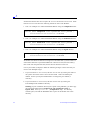
Node-locked license files do not require the SERVER line and the DAEMON line. Nodelocked FEATURE lines have the following format for each of the daemons:
1. This is an example of a node-locked FEATURE line using the exemplard daemon:
FEATURE feature exemplard version expiration date # users password \
HOSTID=FLEXID=8-5E70000E100F ck=checksum
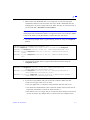
2. This is an example of a node-locked FEATURE line using the modeltech daemon:
FEATURE feature modeltech version expiration date # users password \
HOSTID=FLEXID=8-5E70000E100F ck=checksum
3. This is an example of a node-locked FEATURE line using the mgcld daemon:
FEATURE feature mgcld version expiration date # users password \
HOSTID=FLEXID=8-5E70000E100F ck=checksum
All feature lines must be entered on a single line. The back slash (\) can be used as a
continuation character to split FEATURE lines if desired. If used, the back slash (\)
must come after the password field, and be the last character on the line.
Use any text editor (Notepad)to make the following changes to the license file you
receive from Exemplar Logic:
1. If your license has a SERVER line, edit the SERVER line by entering the name of
the system used as the license server and the hostid. 1700 is the default port
number. Contact your System Administrator to change the port number, if
necessary.
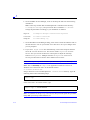
2. If your license has a DAEMON line, edit the DAEMON line by entering the
LeonardoSpectrum installation directory.
Warning: If your installation directory has spaces in the pathname, you must copy
the appropriate daemon files(modeltech.exe, exemplard.exe, or
mgcld.exe) and lmgr325a.dll (exemplard.exe only) to a directory
without spaces, and edit the DAEMON line to point to the daemon file in this
directory.
2-6
LeonardoSpectrum Installation