1
High End Systems 2105 Gracy Farms Ln. Austin, TX 78
Artwork, FPS 2007
Wholehog Control System
User Manual
Version 2.2.2-EN
Date:
File Format:
4/5/2007
Adobe Illustrator 10.0
Contact:
Tom Cavness 512-836-2242 x1522
Flying Pig Systems
1
Wholehog Control System: User Manual
Flying Pig Systems
by Nick Hunt and Matt Haskins
Copyright
© High End Systems, Inc. 2002-2007, All Rights Reserved.
Changes
Information and specifications in this document are subject to change without notice. High End Systems, Inc.
assumes no responsibility or liability for any errors or inaccuracies that may appear in this manual.
Trademarks
High End Systems, the Flying Pig Systems logo, the Wholehog, Wholehog II, and Wholehog III logos are registered trademarks of High End Systems, Inc., or High End Systems, Europe Ltd. Flying Pig Systems, Effects
Engine and Hog are registered trade marks of Flying Pig Systems.
All other brand names and product names used in this book are trademarks, registered trademarks, or trade
names of their respective holders.
FCC Information
This equipment has been tested and found to comply with the limits for a Class A digital device, pursuant to
part 15 of the FCC rules. These limits are designed to provide reasonable protection against harmful interference
when the equipment is operated in a commercial environment. This equipment generates, uses, and can radiate
radio frequency energy and, if not installed and used in accordance with the instruction manual, may cause
harmful interference to radio communications. Operation of this equipment in a residential area is likely to
cause harmful interference, in which case the user will be required to correct the interference at his own expense.
Product Modification Warning
High End Systems products are designed and manufactured to meet the requirements of United States and
International safety regulations. Modifications to the product could affect safety and render the product noncompliant to relevant safety standards.
Mise En Garde Contre La Modification Du Produit
Les produits High End Systems sont conçus et fabriqués conformément aux exigences des règlements internationaux de sécurité. Toute modification du produit peut entraîner sa non conformité aux normes de sécurité
en vigueur.
Produktmodifikationswarnung
Design und Herstellung von High End Systems entsprechen den Anforderungen der U.S. Amerikanischen
und internationalen Sicherheitsvorschriften. Abänderungen dieses Produktes können dessen Sicherheit beeinträchtigen und unter Umständen gegen die diesbezüglichen Sicherheitsnormen verstoßen.
Avvertenza Sulla Modifica Del Prodotto
I prodotti di High End Systems sono stati progettati e fabbricati per soddisfare i requisiti delle normative di
sicurezza statunitensi ed internazionali. Qualsiasi modifica al prodotto potrebbe pregiudicare la sicurezza e
rendere il prodotto non conforme agli standard di sicurezza pertinenti.
Advertencia De Modificación Del Producto
Los productos de High End Systems están diseñados y fabricados para cumplir los requisitos de las reglamentaciones de seguridad de los Estados Unidos e internacionales. Las modificaciones al producto podrían afectar
la seguridad y dejar al producto fuera de conformidad con las normas de seguridad relevantes.
2
Flying Pig Systems
製品変更に対する警告
High End Systems 製品はアメリカ合衆国及び、国際安全基準の必要条件を満たすよう設計及び製造されてい
ます。この為、製品に対する変更は安全に対して影響を及ぼす場合及び、関連安全基準に満たない状態にす
る場合があります。
Important Safety Information
Instructions pertaining to continued protection against fire, electric shock, and injury to persons are found in
Safety Information (p.401).
Please read all instructions prior to assembling, mounting, and operating this equipment.
Important: Informations De Sécurité
Les instructions se rapportant à la protection permanente contre les incendies, l'électrocution et aux blessures
corporelles se trouvent dans Informations Importantes Sur La Sécurité (p.402).
Veuillez lire toutes les instructions avant d'assembler, de monter ou d'utiliser cet équipement.
Wichtige Sicherheitshinweise
Sicherheitsanleitungen zum Schutz gegen Feuer, elektrischen Schlag und Verletzung von Personen finden Sie
in Wichtige Hinweise Für Ihre Sicherheit (p.402).
Vor der Montage, dem Zusammenbau und der Inbetriebnahme dieses Geräts alle Anleitungen sorgfältig
durchlesen.
Informazioni Importanti Di Sicurezza
Le istruzioni sulla protezione da incendi, folgorazione e infortuni sono contenute nell Sezione 41.5, «Importanti
Informazioni Di Sicurezza».
Si prega di leggere tutte le istruzioni prima di assemblare, montare e azionare l'apparecchiatura.
Informacion Importante De Seguridad
En el Información Importante De Seguridad (p.403) se encuentran instrucciones sobre protección continua contra
incendios, descarga eléctrica y lesiones personales.
Lea, por favor, todas las instrucciones antes del ensamblaje, montaje y operación de este equipo.
重要な安全に関する情報
継続した火災、感電、及び、人の負傷からの保護に関する指示は、安全に関する情報 (p.405) を参照して下さ
い。
この装置を組み立て、設置、操作等を行う前に全ての指示を読んで下さい。
Warranty Information
Limited Warranty: Unless otherwise stated, your product is covered by a one year parts and labour limited
warranty. It is the owner's responsibility to furnish receipts or invoices for verification of purchase, date, and
dealer or distributor. If purchase date cannot be provided, date of manufacture will be used to determine
warranty period.
Returning an Item Under Warranty for Repair: It is necessary to obtain a Return Material Authorization
(RMA) number from your dealer or point of purchase BEFORE any units are returned for repair. The manufacturer will make the final determination as to whether or not the unit is covered by warranty.
Any Product unit or parts returned to High End Systems must be packaged in a suitable manner to ensure the
protection of such Product unit or parts, and such package shall be clearly and prominently marked to indicate
that the package contains returned Product units or parts and with an RMA number. Accompany all returned
Flying Pig Systems
3
Product units or parts with a written explanation of the alleged problem or malfunction. Ship returned Product
units or parts to: 2105 Gracy Farms Lane, Austin, Texas 7875, USA.
Note: Freight Damage Claims are invalid for products shipped in non-factory boxes and packing materials.
Freight: All shipping will be paid by the purchaser. Under no circumstances will freight collect shipments be
accepted.
REPAIR OR REPLACEMENT AS PROVIDED FOR UNDER THIS WARRANTY IS THE EXCLUSIVE REMEDY
OF THE CONSUMER. HIGH END SYSTEMS, INC. MAKES NO WARRANTIES, EXPRESS OR IMPLIED,
WITH RESPECT TO ANY PRODUCT, AND HIGH END SPECIFICALLY DISCLAIMS ANY WARRANTY OF
MERCHANTABILITY OR FITNESS FOR A PARTICULAR PURPOSE. HIGH END SHALL NOT BE LIABLE
FOR ANY INDIRECT, INCIDENTAL OR CONSEQUENTIAL DAMAGE, INCLUDING LOST PROFITS,
SUSTAINED OR INCURRED IN CONNECTION WITH ANY PRODUCT OR CAUSED BY PRODUCT DEFECTS
OR THE PARTIAL OR TOTAL FAILURE OF ANY PRODUCT REGARDLESS OF THE FORM OF ACTION,
WHETHER IN CONTRACT, TORT (INCLUDING NEGLIGENCE), STRICT LIABILITY OR OTHERWISE,
AND WHETHER OR NOT SUCH DAMAGE WAS FORESEEN OR UNFORESEEN.
Warranty is void if the product is misused, damaged, modified in any way, or for unauthorized repairs or
parts. This warranty gives you specific legal rights, and you may also have other rights specific to your locality.
4
Flying Pig Systems
Declaration of Conformity
According to ISO/IEC Guide 22 and EN45104
Manufacturer's name: High End Systems, Inc.
Distributor's name: High End Systems, Inc.
Distributor's address: 2105 Gracy Farms Lane, Austin, Texas, 78758
Declaration of Conformity
According to ISO/IEC Guide 22 and EN45104
Declares that the product:
ProductManufacturer's
Name: Hog iPC name:
All Product
Number:name:
ALL
Distributor's
All Product Options: ALL
Distributor's address:
High End Systems
High End Systems
2105 Gracy Farms Lane, Austin TX 78758, USA
Conforms to the following EEC directives:
Declares
that theasproduct:
73/23/EEC,
amended by 93/68/EEC
89/336/EEC, as amended by 92/31/EEC and 93/68/EEC
Product
Name:
Wholehog
III
Equipment
referred
to in this declaration
of conformity
was first manufactured in compliance with the
following
standards
in
2005:
Product Number:
All
Safety:
EN60950:2000
Product
Options:
All
EMC: EN55022: 1998: Class A ITE
Conforms toEN61000-3-2
the following EEC directives:
EN61000-3-3
73/23/EEC,
as amended by 93/68/EEC
EN55024:1998
EN61000-4-2:
Levelby3,92/31/EEC
Class 2 and 93/68/EEC
89/336/EEC,
as amended
EN61000-4-3: 1995 Level 2 (3V/m)
EN61000-4-4:
1995
Level 2 (1/.5kV)
Equipment referred
to in this
declaration
of conformity was first manufactured in
EN61000-4-5:
1995
Level 3 (2/1kV)
compliance with
the following
standards
in 2002:
EN61000-4-6: 1965 Level 2 (3Vrms)
Safety:EN61000-4-11:1994
EN60950:2000
EMC:
EN55103-1:1996 (E2)
I, the undersigned,
hereby declare
that the equipment
EN55103-2:1996
(E2) specified above conforms to the above Directives and
Standards.
I, the undersigned, hereby declare that the equipment specified above conforms to the
above Directives and Standards.
USA, Thursday, June 16, 2005
Kenneth
Stuart
Hansen,
Compliance
Engineer
Kenneth Stuart
Hansen,
Compliance
Engineer
30 May 2002
Flying Pig Systems
i
Table of Contents
I: Introduction .......................................................................................... 1
1: Getting Started ............................................................................. 3
1.1 The Wholehog Range of Consoles ......................................... 3
1.2 Where to Start ..................................................................... 3
1.3 Key .................................................................................... 4
2: Users New to Moving Light Consoles ............................................... 7
2.1 The User Interface ................................................................ 7
2.2 Referring to Fixtures ............................................................. 7
2.3 Palettes .............................................................................. 8
2.4 Tracking ............................................................................. 8
2.4.1 Tracking Through Changes ......................................... 9
2.4.2 Simultaneous Cues .................................................. 10
2.4.3 Maintain State ........................................................ 10
2.5 Multiple Playbacks and Cuelists .......................................... 11
2.6 HTP and LTP ....................................................................... 11
2.7 Individual Times for Each Parameter .................................... 12
3: Wholehog II Users ........................................................................ 13
3.1 Networking ....................................................................... 13
3.1.1 Multiple Consoles on the Same Show ......................... 13
3.1.2 Multiple Shows on the Network ................................. 13
3.2 The Front Panel .................................................................. 14
3.2.1 Faders .................................................................... 14
3.2.2 Trackball ................................................................ 14
3.2.3 Vertical Wheels ....................................................... 14
3.2.4 New Keys ............................................................... 14
3.2.5 Touch Screens ........................................................ 14
3.3 New Playback Features ..................................................... 15
3.4 The Effects Engine ............................................................. 15
3.5 Abstraction ....................................................................... 15
3.5.1 Real World Units ...................................................... 16
3.5.2 Parameters ............................................................. 16
3.5.3 Interchangeable Fixtures ......................................... 16
3.6 Colour Matching ............................................................... 16
3.6.1 Colour Models ........................................................ 17
3.6.2 The Colour Matching System .................................... 18
3.7 New and Streamlined Functions .......................................... 19
T: Tutorial ............................................................................................... 21
4: Quick & Dirty - A Show in Ten Steps ............................................... 23
4.1 Step 1: Connecting the Mains ............................................. 23
4.2 Step 2: Connecting the DMX Processor ................................ 23
4.3 Step 3: Starting the Console ................................................ 23
4.4 Step 4: Starting a New Show ............................................... 23
4.5 Step 5: Adding the Fixtures ................................................. 24
4.6 Step 6: Patching the Fixtures ............................................... 24
4.7 Step 7: Assigning Values to Parameters ................................ 25
4.8 Step 8: Recording the Cue ................................................. 25
4.9 Step 9: Playing Back the Cue .............................................. 26
4.10 Step 10: Changing the Cue Time ....................................... 26
Flying Pig Systems
iii
Wholehog Control System
5: Tutorial Overview ........................................................................
5.1 Introduction ......................................................................
5.2 Using Visualisation Software ................................................
6: Setting Up the Console ................................................................
6.1 Connecting and Turning On the System ...............................
6.2 Calibrating Screens and Setting Up Peripherals .....................
6.2.1 Touchscreens ..........................................................
6.2.2 External Displays .....................................................
6.2.3 External Keyboard ...................................................
6.3 Launching A New Show .....................................................
6.4 Find Out More ...................................................................
6.5 If You Get Stuck .................................................................
7: Setting Up the Show .....................................................................
7.1 Adding the Fixtures .............................................................
7.2 Patching the Fixtures ..........................................................
7.3 Assigning User Numbers ......................................................
7.4 Automatically creating Palettes and Groups ........................
7.5 Find Out More ...................................................................
8: Programming Fixtures ..................................................................
8.1 Selecting Fixtures ...............................................................
8.1.1 Selecting Individual Fixtures .......................................
8.1.2 Selecting Multiple Fixtures .........................................
8.1.3 Deselecting and Removing Fixtures from Programmer ...............................................................................
8.2 Creating and Using Groups ................................................
8.3 Assigning Values to Parameters ...........................................
8.3.1 Assigning Intensity ...................................................
8.3.2 Assigning Position ....................................................
8.3.3 Assigning Colour and Beam .....................................
8.3.4 Fanning Parameters ................................................
8.4 Creating and Using Palettes ...............................................
8.5 Find Out More ...................................................................
9: Recording Cues and Times ...........................................................
9.1 Building the Look ...............................................................
9.2 Recording a Cue ...............................................................
9.3 Assigning Timings ...............................................................
9.4 Find Out More ...................................................................
10: Playback ..................................................................................
10.1 Playing Back Cues ............................................................
10.2 Understanding Feedback .................................................
10.3 Find Out More .................................................................
11: Saving and Shutting Down ..........................................................
11.1 Saving the Show ...............................................................
11.1.1 Saving to CD-ROM ..................................................
11.1.2 Saving to Zip Disk ....................................................
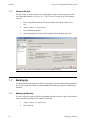
11.2 Backing Up ......................................................................
11.2.1 Backing Up Manually ..............................................
11.2.2 Auto Backup .........................................................
11.3 Shutting Down ..................................................................
11.4 Find Out More ..................................................................
iv
27
27
27
29
29
30
30
31
32
32
34
34
35
35
36
37
39
40
41
41
41
42
43
43
44
44
45
45
47
47
48
51
51
51
52
52
53
53
54
55
57
57
57
58
58
58
59
59
60
Flying Pig Systems
Wholehog Control System
R: Reference ..........................................................................................
12: Setting Up the System .................................................................
12.1 Setting Up the Console .....................................................
12.1.1 Power ...................................................................
12.1.2 Touch Screens .......................................................
12.1.3 External Displays ....................................................
12.1.4 Desklights ..............................................................
12.1.5 Trackball and Wheels .............................................
12.1.6 Keys and Buttons ....................................................
12.1.7 Keyboards .............................................................
12.1.8 Date and Time .......................................................
12.1.9 Printers ..................................................................
12.2 Setting Up the Network .....................................................
12.2.1 Connecting Directly to a DMX Processor ..................
12.2.2 Connecting One Console to Several DMX Processors ..........................................................................
12.2.3 Connecting Multiple Consoles ................................
12.2.4 Configuring Hog iPC ..............................................
12.2.5 Configuring Hog 3PC .............................................
12.2.6 Advanced Network Setups .....................................
12.2.7 More than One Show on the Network ......................
12.2.8 Connecting to an Existing Network ..........................
12.3 Working with Network Processors .......................................
12.3.1 Using the network processor's Front Panel Controls ...............................................................................
12.3.2 Network Settings ....................................................
12.3.3 Options and Defaults .............................................
12.3.4 Resetting the DMX Processor ..................................
12.3.5 Checking a DMX Processor's Status .........................
12.4 Adding Playback Wings ....................................................
12.4.1 Removing Playback Wings ......................................
12.5 Expansion Wings ..............................................................
12.5.1 Configuring Expansion Wings ..................................
12.5.2 Using the Expansion Wing .......................................
13: Using the Console ......................................................................
13.1 Basic Concepts ................................................................
13.1.1 The Graphical User Interface ...................................
13.1.2 Using the Touch Screens .........................................
13.1.3 Modifier Keys .........................................................
13.1.4 Undo and Redo .....................................................
13.2 Working with Windows ......................................................
13.2.1 Opening Windows .................................................
13.2.2 Closing Windows ...................................................
13.2.3 Fronting, Resizing and Moving Windows ...................
13.2.4 Scrolling Window Contents .....................................
13.2.5 Desktop Views .......................................................
13.3 Working with Spreadsheets ...............................................
13.3.1 Compact Mode ....................................................
13.3.2 Aggregation .........................................................
13.3.3 Cut, Copy and Paste .............................................
Flying Pig Systems
61
63
63
64
64
65
66
66
69
69
70
71
73
73
74
74
74
76
77
77
77
78
78
79
80
81
82
82
83
84
85
85
87
87
87
87
88
88
89
89
90
90
91
92
94
95
96
98
v
Wholehog Control System
13.4 Working with Directories .................................................... 98
13.4.1 Automatic Naming of Directory Items .................... 100
13.5 Working with Editors ........................................................ 102
13.5.1 Editor Window Controls ......................................... 102
13.5.2 Changing Parameter Values in the Editor ............... 103
13.6 Using the Command Line ................................................ 104
13.6.1 Command Line Syntax ......................................... 104
13.6.2 The Status Bar ...................................................... 106
13.7 Starting Up and Shutting Down ........................................ 107
13.7.1 Starting Up ........................................................... 107
13.7.2 Automatically Launching a Show .......................... 109
13.7.3 Launch Macros .................................................... 109
13.7.4 Restarting and Shutting Down ............................... 110
13.8 Managing Show Data ..................................................... 110
13.8.1 Starting a New Show and Changing the Current
Show ........................................................................... 111
13.8.2 Working With Show Files ........................................ 111
13.8.3 Backing Up ......................................................... 113
13.8.4 Copying Files to a CD-ROM ................................... 114
13.8.5 Saving and Loading Your Preferences .................... 115
13.9 Merging Shows ............................................................... 115
13.9.1 Merging Fixture Types ............................................ 117
13.9.2 Merging Fixtures ................................................... 118
13.9.3 Merging Programming ......................................... 119
13.9.4 Dependencies .................................................... 120
13.9.5 Using Merging ..................................................... 120
14: Adding and Configuring Fixtures ............................................... 121
14.1 Adding and Removing Fixtures ......................................... 121
14.1.1 Adding a Fixture to the Show ................................. 121
14.1.2 Replicating Fixtures ............................................... 122
14.1.3 Changing the Fixture Type ..................................... 123
14.1.4 Removing a Fixture from the Show ......................... 124
14.1.5 Creating Palettes and Groups Automatically .......... 124
14.2 Patching Fixtures ............................................................ 126
14.2.1 Adding DMX Processors ........................................ 126
14.2.2 Selecting the DMX Processor, Universe and Patch
Point ............................................................................ 126
14.2.3 Fixtures with Multiple Patch Points .......................... 129
14.2.4 Cloning Patching of Universes ............................... 131
14.2.5 Unpatching Fixtures .............................................. 132
14.3 Configuring Fixtures ........................................................ 133
14.3.1 Fixture Configuration ............................................ 133
14.3.2 Parameter Configuration ...................................... 137
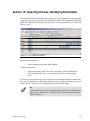
15: Selecting Fixtures, Modifying Parameters .................................... 141
15.1 Selecting Fixtures ............................................................ 142
15.1.1 Selecting Individual Fixtures ................................... 142
15.1.2 Selecting Multiple Fixtures ...................................... 143
15.1.3 Select All ............................................................. 143
15.1.4 Inverting the Selection .......................................... 144
15.1.5 Sub Selections ...................................................... 144
vi
Flying Pig Systems
Wholehog Control System
15.1.6 Deselecting Fixtures ..............................................
15.1.7 Reselecting Fixtures ..............................................
15.2 The Selection Order ........................................................
15.2.1 Reverse, Shuffle and Reorder ................................
15.3 Modifying Parameters .....................................................
15.3.1 Intensity ...............................................................
15.3.2 Position ...............................................................
15.3.3 Continuous Parameters: Colour and Beam .............
15.3.4 Slotted Parameters: Colour and Beam ...................
15.3.5 Working with Colour .............................................
15.3.6 Fine Control .........................................................
15.3.7 Touching Parameters ............................................
15.3.8 Copying Parameter Settings ..................................
15.4 Fanning .........................................................................
15.4.1 Using the Fan Key .................................................
15.4.2 In the Programmer Window ..................................
15.4.3 With the Command Line ......................................
15.4.4 Fanning Options ..................................................
15.4.5 Multipart Fanning .................................................
15.4.6 Fanning with Groupings ........................................
15.5 Removing Values ...........................................................
15.5.1 Removing Entire Fixtures from an Editor ...................
15.5.2 Removing Specific Parameter Types from an Editor ................................................................................
15.5.3 Removing Individual Parameters from an Editor ................................................................................
15.6 Separating Parameters ...................................................
16: Working with Groups ................................................................
16.1 Recording a Group .........................................................
16.1.1 Naming a Group ..................................................
16.2 Using Groups in Programming ..........................................
16.3 Editing Group Contents ...................................................
16.3.1 Removing Fixtures from Groups ..............................
16.4 Deleting Groups .............................................................
16.5 Copying and Moving Groups ..........................................
16.6 Insert, Merge and Replace ..............................................
17: Working with Palettes ................................................................
17.1 Recording a Palette ........................................................
17.1.1 Naming a Palette ..................................................
17.2 Using Palettes in Programming .........................................
17.3 Editing Palette Contents ..................................................
17.3.1 Updating Palettes with Different Parameter
Types ...........................................................................
17.4 Deleting Palettes .............................................................
17.5 Copying and Moving Palettes ..........................................
17.6 Record Options ..............................................................
17.6.1 Palette Contents: Global, Per Fixture Type, and Per
Fixture ..........................................................................
17.6.2 Recording with Specified Masking .........................
17.6.3 Palette Timing ......................................................
Flying Pig Systems
145
145
145
146
146
147
148
149
150
151
155
155
157
159
159
160
160
160
161
162
163
164
164
164
164
167
167
168
168
169
169
169
170
170
173
174
174
175
175
176
177
177
178
178
180
182
vii
Wholehog Control System
17.6.4 Reference Palettes ...............................................
17.6.5 Direct Palettes ......................................................
17.7 Insert, Merge and Replace ..............................................
18: Advanced Programming ..........................................................
18.1 Selecting from What is Onstage .......................................
18.2 Bringing Parameter Values Into the Programmer ................
18.2.1 Suck ...................................................................
18.2.2 Using Live and Touch ............................................
18.2.3 Using Copy to Bring Values into an Editor ................
18.3 Highlight and Lowlight ....................................................
18.3.1 Customising Highlight ...........................................
18.3.2 Lowlight ..............................................................
18.4 Auto Update ..................................................................
18.5 Editing Discreetly ............................................................
18.5.1 Fade Changes .....................................................
18.5.2 Blind ...................................................................
18.6 Parking ..........................................................................
18.6.1 Viewing and Editing What is Parked .......................
19: Working with Cues ...................................................................
19.1 Recording a Cue ............................................................
19.1.1 Recording to a Cuelist on a Master ........................
19.1.2 The Contents of the Programmer after Recording a
Cue .............................................................................
19.1.3 Insert, Merge and Replace ....................................
19.1.4 Numbering Cues ..................................................
19.1.5 Naming Cues .......................................................
19.2 Record Options ..............................................................
19.2.1 Recording Selected Fixtures Only ...........................
19.2.2 Removing Fixtures and Parameter Values from
Cues ...........................................................................
19.3 Deleting Cues ................................................................
19.4 Copying and Moving Cues .............................................
19.4.1 Copying Cues ......................................................
19.4.2 Moving Cues .......................................................
19.5 Renumbering Cues within a Cuelist ..................................
19.6 Editing Cue Contents ......................................................
19.6.1 Viewing Different Cues in the Editor .......................
19.7 Working with Tracking .....................................................
19.7.1 Tracking Values Backwards When Recording ...........
19.7.2 Stopping Values from Tracking Forward ..................
19.7.3 Stopping Changes from Tracking Forward when
Deleting a Cue .............................................................
19.7.4 Blocking Cues ......................................................
19.7.5 Unblocking ..........................................................
20: Working with Cue Timing and Ordering ......................................
20.1 Working with Fade Timings ...............................................
20.1.1 Fade Time ...........................................................
20.1.2 Delay Time ..........................................................
20.1.3 Paths ..................................................................
20.1.4 Assigning Cue Timings in the Cuelist Window ...........
viii
182
183
184
185
185
185
185
187
188
189
190
190
190
192
192
192
193
193
197
197
197
198
198
198
199
199
199
199
200
200
201
201
201
202
203
204
204
205
206
207
208
211
212
212
213
214
214
Flying Pig Systems
Wholehog Control System
20.2 Individual Parameter Timings ...........................................
20.2.1 Assigning Parameter Timings with the Parameter
Wheels ........................................................................
20.2.2 Assigning Parameter Timings with the Command
Line .............................................................................
20.2.3 Assigning Parameter Timings in an Editor Window ............................................................................
20.2.4 Fanned Timings ...................................................
20.3 Working with Cue Triggers ...............................................
20.3.1 Learn Timing ........................................................
20.4 Working with Loops and Links ..........................................
20.4.1 Creating a Link ....................................................
20.4.2 Creating a Loop ..................................................
20.4.3 Tracking Through Loops ........................................
21: Working with Cuelists ................................................................
21.1 Creating Cuelists .............................................................
21.2 Naming Cuelists .............................................................
21.3 Deleting Cuelists .............................................................
21.4 Copying and Moving Cuelists ..........................................
21.4.1 Copying Cuelists ..................................................
21.4.2 Moving Cuelists ....................................................
21.4.3 Insert, Merge and Replace ...................................
22: Working with Scenes ................................................................
22.1 Recording a Scene .........................................................
22.1.1 Recording to the Scene Directory ..........................
22.1.2 Recording to a Physical Master ..............................
22.1.3 Naming a Scene ..................................................
22.2 Deleting Scenes .............................................................
22.3 Copying and Moving Scenes ..........................................
22.4 Editing Scene Contents ...................................................
22.5 Scene Timing .................................................................
22.6 Insert, Merge and Replace .............................................
23: Working with Effects .................................................................
23.1 Types of Effect ................................................................
23.1.1 Effect Tables ........................................................
23.1.2 Effect Attributes ...................................................
23.2 Applying Predefined Effect Palettes .................................
23.2.1 Adjusting Predefined Effects .................................
23.3 Applying and Editing an Effect ........................................
23.3.1 Applying Effects with the Effects Engine .................
23.3.2 Applying and Editing Effects in the Programmer or
Editor ...........................................................................
23.3.3 Tracking Effects ...................................................
23.4 Cue Timing and Effects ...................................................
23.5 Recording an Effect Palette ............................................
23.5.1 Naming an Effect Palette .....................................
23.6 Using Effect Palettes in Programming ................................
23.7 Editing Effect Palettes .....................................................
23.8 Deleting Effect Palettes ...................................................
23.9 Copying and Moving Effect Palettes ................................
Flying Pig Systems
216
217
218
219
221
222
223
224
224
224
226
227
228
228
228
229
229
229
230
231
231
231
232
232
232
233
233
234
234
235
235
235
236
238
239
239
239
241
242
242
244
244
245
245
246
246
ix
Wholehog Control System
24: Cuelist Playback .....................................................................
24.1 Playing Back from a Physical Master .................................
24.1.1 Attaching Cuelists to Masters .................................
24.1.2 Controlling Cuelist Playback ..................................
24.1.3 Releasing a Cuelist on a Master .............................
24.1.4 Cuelist Options .....................................................
24.2 Running Multiple Cuelists .................................................
24.2.1 Using HTP and LTP .................................................
24.2.2 Asserting One Cuelist Over the Others ...................
24.2.3 Changing a Cuelist's Priority ..................................
24.2.4 Multiple Cuelists with Effects ..................................
24.3 Playback with a Virtual Master ........................................
24.3.1 Running Virtual Masters from the Cuelist Directory
Window .......................................................................
24.3.2 Running Virtual Masters from the Cuelist Window ............................................................................
24.3.3 Running Virtual Masters from the Command
Line .............................................................................
24.4 Understanding Feedback for Cuelists ...............................
24.4.1 Control and Playback Toolbar Feedback ...............
24.4.2 Cuelist Feedback ................................................
24.4.3 The Output Window .............................................
24.4.4 The Levels View Window .......................................
24.5 Advanced Cuelist Playback ............................................
24.5.1 Overriding Cuelist Rate During Playback ................
24.5.2 Overriding Cuelist Effect Rate During Playback .......
24.5.3 Manual Crossfading .............................................
24.5.4 Using a Cuelist as a Chase ....................................
24.5.5 Cuelists and Tracking ...........................................
24.5.6 Triggering Automatic Tasks When a Cue Runs .........
25: Scene Playback ......................................................................
25.1 Playback Attached to a Physical Master ...........................
25.1.1 Attaching a Scene to a Master ..............................
25.1.2 Playing Back the Scene ........................................
25.1.3 Releasing a Scene on a Master .............................
25.2 Running Multiple Scenes .................................................
25.2.1 Using HTP and LTP .................................................
25.2.2 Asserting One Scene Over the Others ....................
25.2.3 Changing a Scene's Priority ..................................
25.2.4 Multiple Scenes with Effects ..................................
25.3 Playback with a Virtual Master ........................................
25.3.1 Running Virtual Masters from the Scene Directory
Window .......................................................................
25.3.2 Running Virtual Masters from the Scene Window ............................................................................
25.3.3 Running Scene Virtual Masters from the Command
Line .............................................................................
25.4 Understanding Feedback for Scenes ...............................
25.5 Advanced Scene Playback ............................................
25.5.1 Overriding Rate During Playback ...........................
x
247
247
247
248
250
253
256
257
257
258
260
260
260
261
261
262
262
264
265
266
266
266
267
267
268
270
270
273
273
273
274
275
276
277
277
278
280
280
280
281
281
282
283
283
Flying Pig Systems
Wholehog Control System
25.5.2 IPCB Fader Mode ................................................
26: Working with Pages ..................................................................
26.1 Creating a New Page .....................................................
26.2 Changing Page .............................................................
26.2.1 Options When Changing Page .............................
26.2.2 Matching Levels When Changing Page .................
26.2.3 Restoring Activity When Changing Pages ...............
26.3 Modifying Pages ............................................................
26.3.1 Copying Cuelists, Scenes and Inhibitive Masters to
a Page ........................................................................
26.3.2 Moving Cuelists, Scenes and Inhibitive Masters to a
Page ...........................................................................
26.3.3 Removing Cuelists, Scenes and Inhibitive Masters
from a Page .................................................................
26.3.4 Clearing Cuelists, Scenes and Inhibitive Masters from
a Page ........................................................................
26.4 Copying and Moving Pages ............................................
26.5 Deleting Pages ..............................................................
26.6 The Template Page ........................................................
27: Working with Playback Controls ................................................
27.1 Grand Master .................................................................
27.1.1 Matching the Grand Master Level ..........................
27.1.2 The Blackout Key ..................................................
27.2 Inhibitive Masters ............................................................
27.3 Configuring Playback Controls .........................................
27.3.1 Configuring Master Controls ..................................
27.3.2 Configuring the Main Controls ...............................
28: Working with Audio, MIDI and Timecode ....................................
28.1 Working with Sound ........................................................
28.1.1 Playing Sound from the CD-ROM Drive ...................
28.2 Working With MIDI Show Control ......................................
28.2.1 Bringing MSC into a Wholehog Console .................
28.2.2 Sending MSC from a Wholehog Console ................
28.2.3 Using MIDI Show Control .......................................
28.2.4 Tracking Backup Using MIDI Show Control ..............
28.3 Working with MIDI Syntax ................................................
28.4 Bringing Timecode into the Console .................................
28.4.1 Connecting a Timecode Input ..............................
28.4.2 Timecode Input Options .......................................
28.5 Triggering Cues from Timecode .......................................
28.5.1 Editing Timecode Values .......................................
28.6 Viewing Timecode .........................................................
28.7 Simulating Timecode ......................................................
29: Automating the Console Using Macros ......................................
29.1 Macro Commands .........................................................
29.2 Entering Macro Commands ............................................
29.3 Additional Macro Syntax .................................................
30: The Hog 3PC Software ..............................................................
30.1 Installation .....................................................................
30.1.1 Unpacking ...........................................................
Flying Pig Systems
283
285
285
286
286
287
288
289
289
290
290
290
291
291
292
293
293
293
293
294
295
296
298
299
299
300
301
301
301
302
303
303
304
304
306
307
308
309
309
311
311
313
314
315
315
315
xi
Wholehog Control System
30.1.2 System Requirements ............................................
30.1.3 Installing the Hog 3PC Application .........................
30.1.4 Software Removal ................................................
30.1.5 Hardware Installation ............................................
30.1.6 Troubleshooting Hardware Installation ....................
30.1.7 Computer Configuration .......................................
30.2 Operation .....................................................................
30.2.1 Starting the Hog 3PC Application ..........................
30.2.2 Quitting the Hog 3PC Application .........................
30.2.3 Working with Hog 3PC Show Files ...........................
30.2.4 Using the Hog 3PC Interface .................................
30.3 Configuration ................................................................
30.3.1 USB DMX Widgets and Super Widgets ....................
30.3.2 USB Playback and Expansion Wings .......................
30.3.3 USB Programmer Wing ..........................................
30.3.4 Virtual Faders ......................................................
30.3.5 MIDI Configuration ...............................................
30.4 Visualiser Support ...........................................................
30.5 Upgrading USB DMX Widgets ...........................................
31: The Hog iPC Console ................................................................
31.1 Differences Between Hog iPC and Other Wholehog Consoles ....................................................................................
31.1.1 Patching ..............................................................
31.1.2 Trackball Preferences ............................................
31.2 Working with Show Files ...................................................
31.2.1 Show File Location ................................................
31.2.2 Transfering Show Files ............................................
31.2.3 Backing Up ..........................................................
31.3 Configuring External USB DMX Widgets .............................
31.4 MIDI and Linear Timecode ...............................................
31.4.1 Timecode Input ....................................................
31.4.2 MIDI ....................................................................
31.5 Networking with Wholehog Shows ....................................
32: The Road Hog Console .............................................................
32.1 Differences Between Road Hog and Other Wholehog
Consoles ..............................................................................
32.1.1 Patching .............................................................
32.1.2 Trackball Preferences ............................................
32.1.3 Lights ..................................................................
32.2 Starting the Console .......................................................
32.3 Working with Show Files ...................................................
32.3.1 Show File Location ...............................................
32.3.2 Transfering Show Files ...........................................
32.3.3 Backing Up .........................................................
32.4 MIDI and Linear Timecode ..............................................
32.5 Restoring the Road Hog System Files ................................
32.5.1 System Restore from the Internal Drive ....................
32.5.2 System Restore from a USB Drive ............................
32.5.3 Creating a Bootable USB Flash Drive ......................
A: Appendices .....................................................................................
xii
315
316
318
318
319
320
321
321
323
324
325
327
327
329
329
329
330
330
331
333
333
333
333
333
333
334
334
335
336
336
336
337
339
339
339
339
339
340
341
341
341
342
343
343
343
344
345
347
Flying Pig Systems
Wholehog Control System
33: Visualiser Connectivity .............................................................
33.1 Installing the Connectivity Application .............................
33.2 Connecting to ESP Vision, MSD, and Capture ....................
33.2.1 Configuring Visualisers ..........................................
33.2.2 Configuring the Network Connection ....................
33.2.3 Configuring the Visualiser Universes .......................
33.2.4 Using the Connectivity with ESP Vision, MSD, or
Capture .......................................................................
33.3 Connecting to WYSIWYG ................................................
33.3.1 Configuring the Network Connection ....................
33.3.2 Configuring WYSIWYG ..........................................
33.3.3 Additional Steps for WYSIWYG Console Edition ........
33.3.4 Using the Connectivity with WYSIWYG ....................
33.4 Troubleshooting .............................................................
33.5 Visualiser Support Contacts .............................................
34: The Fixture Builder ....................................................................
34.1 Working With the Fixture Builder ........................................
34.1.1 Adding User Created Libraries to a Show ................
34.1.2 Creating, Editing and Deleting Fixture Libraries ........
34.1.3 Building the Fixture ...............................................
34.2 Fixture Builder Tutorial ......................................................
34.2.1 Step 1: Create the New Fixture ..............................
34.2.2 Step 2: Enter Fixture Details ....................................
34.2.3 Step 3: Configure Channel Functions and Features ............................................................................
34.2.4 Step 4: Build the Fixture .........................................
34.2.5 Step 5: Add the Fixture in the Fixture Schedule ........
34.2.6 Step 6: Edit Fixture to Define Default Values ............
34.2.7 Step 7: Programming Your Custom Fixture ...............
35: Keyboard Shortcuts ..................................................................
36: Pig Key Commands .................................................................
37: Upgrading and Care of the Console ..........................................
37.1 Updating Software ..........................................................
37.1.1 Updating the Console Software .............................
37.1.2 Clean Install .........................................................
37.1.3 Updating the DMX Processor Software ....................
37.2 Care of Touch Screens on Wholehog Consoles ..................
37.3 Front Panel Care .............................................................
38: Getting Help ............................................................................
38.1 Troubleshooting ..............................................................
38.1.1 The console appears to have crashed or
frozen ..........................................................................
38.1.2 The console isn't talking to the DMX Processors ........
38.1.3 The console doesn't start, or shuts down shortly after
switching it on ..............................................................
38.1.4 The playback controls don't behave as expected ..............................................................................
38.2 Reporting Problems ........................................................
38.2.1 Reporting Problems with the Console .....................
38.2.2 Reporting Problems with Hog 3PC .........................
Flying Pig Systems
349
349
352
352
352
353
354
354
354
355
357
357
358
359
361
361
361
362
364
367
368
368
370
375
376
376
377
379
381
383
383
383
383
384
385
385
387
387
387
387
388
388
389
389
390
xiii
Wholehog Control System
38.2.3 Reporting Problems with the User Manual ..............
38.2.4 About Software Version Numbering .......................
38.2.5 About Beta Software ............................................
39: Servicing ................................................................................
39.1 Replacing Wholehog III Touch Screens .............................
39.2 Replacing Faders ...........................................................
39.3 Cleaning Faders ............................................................
39.4 Replacing the Trackball ..................................................
40: Technical Specifications ...........................................................
40.1 Wholehog III Console ......................................................
40.1.1 Input and Output Connections ..............................
40.1.2 Power, Weight and Dimensions ..............................
40.2 DMX Processor ...............................................................
40.2.1 Input and Output Connections .............................
40.2.2 Power, Weight and Dimensions .............................
40.3 MIDI/Timecode Processor ...............................................
40.3.1 Input and Output Connections .............................
40.3.2 Power, Weight and Dimensions .............................
40.4 Rackmount Control Unit ..................................................
40.4.1 Input and Output Connections .............................
40.4.2 Power, Weight and Dimensions .............................
40.5 Touchscreen Monitor ......................................................
40.5.1 Input and Output Connections .............................
40.5.2 Power, Weight and Dimensions .............................
40.5.3 Performance .......................................................
41: Safety Information ....................................................................
41.1 Safety Information ...........................................................
41.1.1 Warning: For Continued Protection Against Fire ........
41.1.2 Warning: For Continued Protection Against Electric
Shock ..........................................................................
41.2 Informations Importantes Sur La Sécurité ...........................
41.2.1 Mise En Garde: Pour Une Protection Permanente
Contre Les Incendies .....................................................
41.2.2 Mise En Garde: Pour Une Protection Permanente
Contre Les Chocs Électriques .........................................
41.3 Wichtige Hinweise Für Ihre Sicherheit ................................
41.3.1 Warnung: Zum Schutz Vor Brandgefahr ...................
41.3.2 Warnung: Zum Schutz Gegen Gefährliche Körperströme .........................................................................
41.4 Información Importante De Seguridad .............................
41.4.1 Advertencia: Para Protección Continua Contra Incendios .......................................................................
41.4.2 Advertencia: Para La Protección Continua Contra
Electrocuciones ............................................................
41.5 Importanti Informazioni Di Sicurezza ..................................
41.5.1 Avvertenza: Per Prevenire Incendi ..........................
41.5.2 Avvertenza: Per Prevenire Le Scosse Elettriche .........
41.6 Vigtig Sikkerhedsinformation ............................................
41.7 安全に関する情報 .............................................................
41.7.1 警告: 火災からの継続的な保護の為に .........................
xiv
390
391
391
393
393
394
394
395
397
397
397
397
398
398
398
398
398
399
399
399
399
399
399
400
400
401
401
401
401
402
402
402
402
402
402
403
403
403
404
404
404
404
405
405
Flying Pig Systems
Wholehog Control System
41.7.2 警告: 感電に対する継続的な保護の為に ......................
42: Front Panel Diagrams ...............................................................
Glossary ..............................................................................................
Index ...................................................................................................
Flying Pig Systems
405
407
409
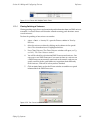
423
xv
List of Figures
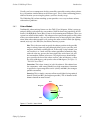
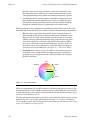
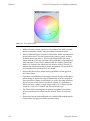
3.1 The HSI Colour Wheel ......................................................................... 17
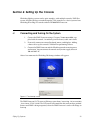
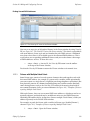
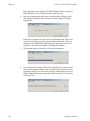
6.1 The Startup Screen ............................................................................. 29
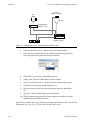
6.2 DMX Processor Screens ...................................................................... 30
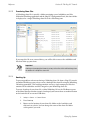
6.3 The Start Window .............................................................................. 30
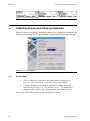
6.4 The Calibration Screen ....................................................................... 31
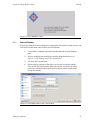
6.5 The Displays Pane of the Control Panel ................................................ 31
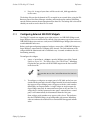
6.6 The Keyboard Pane of the Control Panel ............................................. 32
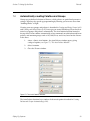
7.1 The Fixture Patch Window ................................................................... 37
7.2 The Fixture Window, showing patching ................................................. 38
7.3 The Auto Palettes Window .................................................................. 39
8.1 The Programmer Window ................................................................... 41
8.2 The Command Line ........................................................................... 42
8.3 The Fixture Types Toolbar .................................................................... 42
8.4 The Group Directory .......................................................................... 44
8.5 The Slot Toolbar for a Studio Color 575 .................................................. 45
8.6 The Slot Toolbar for a Studio Spot 575 ................................................... 45
8.7 The Fixture Control Toolbar for a Studio Spot 575 ................................... 46
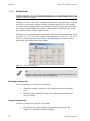
10.1 Playback Controls ............................................................................ 53
11.1 The CD Burning pane of the Show Manager window ........................... 57
11.2 The Current Show pane of the Show Manager window ........................ 58
11.3 The Show Manager Window .............................................................. 59
11.4 The Shut Down Dialog ....................................................................... 60
12.1 Pane lists for the Control Panel and User Preferences windows .............. 63
12.2 The Calibration Screen ..................................................................... 64
12.3 The Track Ball pane of the User Preferences window ............................ 67
12.4 The On-screen Keyboard .................................................................. 70
12.5 The Printers Pane of the Control Panel ................................................ 71
12.6 A Typical Network with Several DMX Processors ................................... 74
12.7 The Network pane of the Control Panel for a Hog iPC .......................... 75
12.8 The Network pane of the Control Panel for a Hog 3PC ......................... 76
12.9 The Network pane of the Control Panel .............................................. 77
12.10 The Network window ....................................................................... 78
12.11 The LEDs on a DMX Processor ........................................................... 82
12.12 Docking Playback Bars with wings and external displays ..................... 83
12.13 The Wings pane of the Control Panel ................................................ 84
12.14 The Virtual Faders pane of the User Preferences window .................... 84
13.1 The Window Control Toolbar .............................................................. 90
13.2 The View Toolbar .............................................................................. 92
13.3 The Views Directory .......................................................................... 92
13.4 The Views Directory in Spreadsheet View ............................................ 94
13.5 A spreadsheet with and without Compact Mode ............................... 96
13.6 A Spreadsheet with Aggregation Turned On ....................................... 97
13.7 An Aggregated Spreadsheet With Collapsed Rows ............................. 97
13.8 The Jump Toolbar ............................................................................ 98
13.9 A Typical Directory ........................................................................... 99
13.10 A Typical Directory in Spreadsheet View .......................................... 100
13.11 The Default Naming pane of the User Preferences window ................ 101
13.12 A Typical Editor ............................................................................. 102
Flying Pig Systems
xvii
Wholehog Control System
13.13 The Command Line .......................................................................
13.14 The Status Bar ...............................................................................
13.15 The Start window ..........................................................................
13.16 The Auto Launch pane of the Control Panel ....................................
13.17 The Auto Launch window ...............................................................
13.18 The Shut Down Dialog ...................................................................
13.19 The Show Manager Window ...........................................................
13.20 The Auto Backup pane of the Show Manager window .....................
13.21 The CD Burning pane of the Show Manager window ........................
13.22 The Source Location page of the Merge Show window ....................
13.23 The Type Merge page of the Merge Show window ..........................
13.24 The Fixture Merge page of the Merge Show window ........................
13.25 The Group Merge page of the Merge Show window ........................
14.1 The Fixture window .........................................................................
14.2 The Fixture Schedule window ...........................................................
14.3 A Studio Color 575 in the Fixture window, before and after replicating ......................................................................................................
14.4 Changed Fixture Type .....................................................................
14.5 The Auto Palettes window ...............................................................
14.6 The Fixture Patch window ................................................................
14.7 The View by DP view of the Fixture window .......................................
14.8 Examples of Fixtures requiring Multiple Patch Points ............................
14.9 A Fixture with Multiple Patch Points ...................................................
14.10 The Clone Universe window ...........................................................
14.11 The Fixture window ........................................................................
14.12 The Edit Fixtures window .................................................................
14.13 The Edit Fixtures window sorted by Function .....................................
15.1 The Programmer window .................................................................
15.2 The Select Toolbar ..........................................................................
15.3 The Wheels Toolbar for the Beam Parameters of a Studio Spot 575 .......
15.4 The Wheelsets Toolbar for a Studio Spot 575 ......................................
15.5 The Slot Toolbar for a Studio Spot 575 ................................................
15.6 The Colour Slots Toolbar for a Studio Spot 575 ....................................
15.7 The Colour Wheel ...........................................................................
15.8 The Colour Picker ...........................................................................
15.9 The Gel Picker ................................................................................
15.10 The Fanning Toolbar ......................................................................
15.11 The Grouping Toolbar ....................................................................
15.12 The Programming pane of the User Preferences window ...................
16.1 The Group Directory ........................................................................
17.1 The Colour Directory ........................................................................
17.2 Example of Parameters set to reference a Palette ..............................
17.3 The Palette Editor window ................................................................
17.4 A Palette with Global Parameter Values ............................................
17.5 A Palette with Per Fixture Type Values ................................................
17.6 A Palette with Per Fixture Values .......................................................
17.7 The More... Section of the Record Options Toolbar .............................
17.8 Example of Palettes containing different parameter types ..................
17.9 The Record Options Toolbar .............................................................
18.1 The Auto Update window ................................................................
xviii
104
106
107
109
109
110
111
114
115
116
117
118
119
121
122
123
124
125
127
129
130
131
131
134
137
138
141
143
150
150
151
151
152
154
155
161
163
165
167
173
175
175
179
179
180
180
181
181
191
Flying Pig Systems
Wholehog Control System
18.2 The Update Toolbar ........................................................................
18.3 The Parked column of the Fixture window .........................................
18.4 The Parked Output window .............................................................
19.1 The Cue Editor window ...................................................................
20.1 Cue timings ...................................................................................
20.2 Path Types .....................................................................................
20.3 Selecting a Path in a Cuelist Window ...............................................
20.4 The Wheels Toolbar showing Timing ..................................................
20.5 Selecting Parameter Types from the Wheels Toolbar ..........................
20.6 The Slot Toolbar showing Paths .........................................................
20.7 The Paths Toolbar ...........................................................................
20.8 The Cue Editor window with Fade selected ......................................
20.9 Selecting a Path in an Editor ............................................................
20.10 The Trigger Toolbar ........................................................................
20.11 A Cuelist with a Loop .....................................................................
21.1 The Cuelist Directory window ...........................................................
21.2 The Cuelist window .........................................................................
22.1 The Scene Directory window ...........................................................
23.1 Effect Tables ..................................................................................
23.2 The Effect Directory ........................................................................
23.3 The Wheels Toolbar showing Effect Attributes ....................................
23.4 The Effects Engine ..........................................................................
23.5 Controlling Effect Transitions with Timing ...........................................
24.1 The Master Controls ........................................................................
24.2 The Main Playback Controls ............................................................
24.3 The Cuelist Pane of the Playback Options Window ............................
24.4 The Playback Bar ...........................................................................
24.5 The Cuelist Window with a Cue Running ...........................................
24.6 The Output Window .......................................................................
24.7 The Levels View Window .................................................................
25.1 The Playback Bar ............................................................................
26.1 The Misc pane of the User Preferences window .................................
26.2 Matching Levels when Changing Page ............................................
26.3 The Playback Bar with Master 10 loaded from the Template Page ......
26.4 The Playback Bar with the Template Page loaded ............................
27.1 The display of Inhibitive Masters on the Playback Bar ..........................
27.2 The Master pane of the Cuelist Options window ................................
27.3 The Main Controls pane of the Cuelist Options window ......................
28.1 The Sound panel of the Control Panel ..............................................
28.2 The CD Control Toolbar ...................................................................
28.3 The MIDI pane of the Console Settings window .................................
28.4 The Timecode pane of the Console Settings window .........................
28.5 The Timecode Toolbar ....................................................................
30.1 The Displays pane of the Control Panel .............................................
30.2 The Widgets pane of the Control Panel ............................................
30.3 The Virtual Faders pane of the User Preferences window ....................
31.1 The Widgets pane of the Control Panel .............................................
32.1 The Start window ............................................................................
34.1 The Create New Custom Type window .............................................
34.2 The Create New Custom Type window .............................................
Flying Pig Systems
192
194
195
203
212
215
216
217
218
218
218
220
221
222
225
227
228
231
236
239
239
240
243
248
249
253
262
264
265
266
282
287
288
292
292
295
296
296
299
300
302
305
309
327
329
330
336
341
363
364
xix
Wholehog Control System
34.3 The Fixture Builder window ..............................................................
35.1 Keyboard Status in the Command Line Toolbar .................................
38.1 The Launched Processes window .....................................................
40.1 Rear panel of the console ...............................................................
42.1 Programmer section of the front panel .............................................
42.2 Playback section of the front panel .................................................
xx
365
379
388
397
407
408
Flying Pig Systems
Part I. Introduction
Flying Pig Systems
1
Section 1: Getting Started
Wholehog consoles have been designed to be as easy to use as possible. However, they
are also designed to control big, complex lighting rigs (as well as small, simple ones)
and so at times operating your console is going to get complex too.
This manual has been written to help you become a proficient Wholehog programmer,
wherever you are starting from and whatever kind of lighting you do.
Tip
You can open your console's built in User Manual at any time by pressing
the Help button on the Window Control Toolbar, at the top of the right-hand
screen.
1.1
The Wholehog Range of Consoles
There are four consoles in the Wholehog range: the Wholehog III, the Hog iPC, the Road
Hog and the PC software Hog 3PC; all four run the Wholehog Operating Software, abbreviated to Wholehog OS. This manual describes the Wholehog OS, and generally assumes that you are running it on a Wholehog III console. If you are using another console,
almost all of the manual will still apply to you, and you can find information specific
to your console here:
The Hog 3PC Software (p.315)
The Hog iPC Console (p.333)
The Road Hog Console (p.339)
1.2
Where to Start
If you want to get going straight away, go to Quick & Dirty - A Show in Ten Steps (p.23).
Otherwise, read one of the two sections designed to help you make the transition to
Wholehog OS, according to your previous experience with consoles:
Users New to Moving Light Consoles (p.7)
Wholehog II Users (p.13)
If you haven't used a Wholehog console before but are experienced with other moving
light consoles, you may still find the section Users New to Moving Light Consoles (p.7)
useful.
Flying Pig Systems
3
Introduction
Section 1: Getting Started
After that, you can either follow the Tutorial (p.21) or simply start using the console and
use the Reference (p.61) as needed.
1.3
Key
The following conventions are used in the text of the manual:
Position (p.148)
A cross reference to another part of the manual. In electronic versions
of the manual (HTML and PDF) these references are clickable hyperlinks.
fixture
A reference to a term in the Glossary. In electronic versions of the
manual (HTML and PDF) these references are clickable hyperlinks.
Enter
A name of an interface element such as a button, key or window.
[Studio Color]
A button that has a label that is specific to the show, created by the
console or the user. The brackets indicate a label that will vary depending on your particular show.
10 + 12
Text or other information that you should enter using the numeric
keypad or the on-screen or external keyboard.
[password]
A description of information that you should enter that is not the literal text.
Record, Enter
Buttons or keys separated by commas show that the keystrokes are
sequential. In this case, press the Record key, then the Enter key.
Open + Fixture
Buttons or keys followed by + are held down while the second key
is pressed. In this example, hold down the Open key and press the
Fixture key.
Setup → Patch →
Fixture Schedule
A series of operations that navigate through windows and toolbars.
In the manual the word ‘key’ is used to indicate a hardware button on the front panel
of a Wholehog console. For example: ‘press the Enter key’. The word ‘button’ refers to
‘virtual’ buttons that can be pressed on the touch screens or clicked on with the trackball
or mouse.
You will also find important or useful information highlighted:
!
4
Caution
A caution, which has information about hazards to equipment or personnel.
Flying Pig Systems
Section 1: Getting Started
»
Introduction
Important
An important note, usually alerting you to situations that require special attention.
Tip
A tip, to help you be more productive in your programming.
Flying Pig Systems
5
Section 2: Users New to Moving Light Consoles
If your previous experience with lighting consoles has been mainly with ‘theatre’ desks
(Strand, ETC, etc.) then this section will introduce you to some fundamental differences
that you will find with the Wholehog Operating Software.
When you have finished this section, you may also find the sections on Abstraction (p.15)
and Colour Matching (p.16) useful.
2.1
The User Interface
Most ‘theatre’ desks use a command line to control them. This means that you enter
instructions using a keypad, in the form channel 36 at 50. Information shown on displays
is limited to pure text, and only one screen layout can be displayed on one monitor at
a time.
Wholehog OS is rather different. It has been designed on the principle that you should
be able to see any information about your programmed show at any time, and that you
should be able to change that information directly if you wish to. In addition to a conventional command line, Wholehog OS uses a graphical user interface similar to those
found on personal computers. Combined with the touch screens, this interface gives a
very powerful alternative way of working. You can arrange multiple windows as you
want them on the screens, in order to display whatever information you need. You do
not have to write down (or remember) as much, because the window that shows you,
say, groups that you have programmed also allows you to select those groups simply
by touching them. Any object, such as a cue, a group or a fixture, can be named as you
wish for easy identification.
The advantages of a graphical user interface are far-reaching, and will become fully
apparent as you get more familiar with Wholehog OS. For more information, see The
Graphical User Interface (p.87) and Working with Windows (p.89).
2.2
Referring to Fixtures
Lighting consoles that have been primarily designed to work with ‘conventional’ fixtures
that have only one parameter (intensity) generally refer to fixtures by number. These
‘channel’ numbers usually run consecutively in a single sequence, say from 1 to 200,
and each one related to a single DMX address, and so to a single dimmer. With fixtures
such as moving lights that have more than one parameter (intensity, position, colour,
etc.), each channel refers to a single parameter of the fixture, rather than the whole fixture.
If you have a mixed rig of conventional and moving lights, this system can become very
confusing.
Flying Pig Systems
7
Introduction
Section 2: Users New to Moving Light Consoles
Wholehog OS treats a fixture as a single entity, no matter how many or few parameters
it has. By default, each type of fixture has its own numbering range, so that you would
refer to ‘Studio Spot 6’ and ‘Cyberlight 12’. Fixtures can be numbered in any way that
you prefer, however. For more information, see Modifying the User Number (p.134).
Wholehog OS treats conventional lights, consisting of a luminaire controlled by a dimmer,
as a special kind of fixture known as a ‘desk channel’. A desk channel has only one
parameter: intensity.
2.3
Palettes
The complexity of modern lighting rigs, especially with the widespread use of moving
lights, means that programming can be very time consuming. Palettes help to simplify
the process by allowing pre-defined lighting ‘elements’ to be created and then used as
required. Once you have created a palette, such as a particular set of position settings
with moving lights, you can recall those settings instantly, and record them into cues.
A great advantage of palettes over the equivalent ‘group’ features found on many consoles is that when you record a cue using the palette, the cue contains a reference to the
palette, rather than the parameter values that the palette contains. If, later, you change
the palette then all cues that have been recorded using the palette are also changed. This
is especially useful if, for example, the position of a piece of set on stage is moved, and
moving lights have been programmed to light it. The palette can be updated once to
accommodate the change, rather than in every cue. For more information, see Working
with Palettes (p.173).
2.4
Tracking
Tracking is quite a difficult concept at first, but it is a very important one. When a sequence of cues is programmed, the lighting console can store the information in one of
two ways: either it records the settings for all the parameters of all the fixtures in the
show, or it only records the values that have changed since the previous cue. The second
method is called tracking. The following example shows the intensities of four fixtures
in three cues:
Fixture:
1
2
3
4
Cue 1
100
Cue 2
50
0
50
50
0
100
Cue 3
50
50
100
100
50
With a non-tracking console, the cues would be recorded with the channel levels as
shown above. With a tracking console, however, the recorded information would be:
8
Flying Pig Systems
Section 2: Users New to Moving Light Consoles
Introduction
Fixture:
1
2
3
4
Cue 1
100
0
50
50
Cue 2
50
100
Cue 3
100
If the intensity has not changed from the previous cue, then no value is recorded for
that parameter. During playback, parameters remain at their last assigned level; for
example, fixture 1 remains at 50% intensity when cue 3 is played, because no change
was recorded.
So, during playback there are two types of fixture parameter value output:
• Hard Values: values programmed into the current cue. Hard values are
sometimes known as touched values.
• Tracked Values: those values assigned in previous cues but that have
not yet been changed again or removed from the output. These values
are said to have ‘tracked through’ from a previous cue in which they
were Hard Values.
2.4.1
Tracking Through Changes
One advantage of tracking is that changes can be ‘tracked through’ a series of cues. In
the example given above, if you changed the intensity of fixture 2 in cue 1 to 60%, this
value would track through into cue 2, since cue 2 has no information for fixture 2 recorded. The value will still change to 100% in cue 3, since there is a hard value recorded
there.
Tracking can be very useful when you want to make the same change to a series of cues:
for example, you might have a series of cues that include a fixture that lights a part of
the set in the same way throughout. If you later want to change the intensity of that
light, you can change it in the first cue that it appears, and the change will track trough
to all the cues until the next hard value. This saves you from having to reprogramme
the change in every cue in the series.
While tracking can help speed up the modification of cues, you may not always want
changes to track through. For example, in a theatre show, you probably wouldn't want
changes to track through from one scene to the next, and in a music concert, you wouldn't
want changes to track through from one song to the next. To prevent changes tracking
through, you can record a blocking cue which contains hard values for all parameters
that have values at that point in the cuelist, regardless of whether the values have tracked
through from previous cues. In the example given above, a new cue, cue 4, would act
as a blocking cue:
Fixture:
1
2
Cue 1
100
Cue 2
50
Cue 3
100
Cue 4
50
100
100
50
Flying Pig Systems
3
4
0
50
50
100
9
Introduction
Section 2: Users New to Moving Light Consoles
The new cue 4 acts as an end-stop, preventing any future changes to cues 1-3 from
tracking through to subsequent cues. For more on working with blocking cues, see
Blocking Cues (p.207).
2.4.2
Simultaneous Cues
Another advantage of tracking is that multiple cues can be run simultaneously. Imagine
a play where the sun sets outside the window, and characters turn on various lights in
the room as the natural light fades. You might create this as an initial sunset cue over
20 minutes, followed by a series of snap cues for the room lights being turned on during
the sunset. With a non-tracking console this would cause problems: what would you
programme in the cues that turn the room lights on? If you recorded the full state, you
wouldn't know what level to assign the sunset fixtures to, as during playback they will
have faded down to some indeterminate level during the action of the scene. The cue
to turn the room light on is a snap cue, and the result would be a snap change in the
sunset as well - not very realistic!
A tracking console allows you to programme just the room lights into a cue, so that the
cue won't interfere with the cue for the sunset fixtures, which will proceed with their
long fade undisturbed.
Similarly, tracking allows multiple chases to be run at the same time without them
conflicting. For example, you could plot a simple colour chase, with fixtures alternating
between red and blue, and an intensity chase in which fixtures step through 0%, 50%
and 100% before looping back to 0%. With tracking, these two chases can be run on the
same fixtures without the chases interfering with each other. This is possible because
only the colour parameters of the fixture are recorded in the colour chase, and only the
intensity parameters in the intensity chase.
2.4.3
Maintain State
Sometimes you will need to play back cues out of sequence. Typically this will happen
during rehearsals when you want to go back over a section of the show, but it can happen
during performance if the performers make a mistake and miss out a part of the show,
for example.
With some tracking consoles, the look on stage that you get after playing back cues out
of sequence is incorrect. Using our example above, going from cue 1 to cue 3, missing
out cue 2, would result in fixture 1 being at 100% instead of the correct 50%, and fixture
3 being at 50% instead of the correct 100%. This is because the values from cue 1 track
through, without the values in cue 2 being applied.
Wholehog OS avoids this problem by Maintaining State. This means that whenever you
run a cue, the console ensures that what you get on stage is what you would have got
if you had run through the cuelist up to that point, regardless of where you have actually
come from within the cue list. Again, using our example above, with Wholehog OS if
you jump from cue 1 to cue 3 the console will calculate the state of cue 3 as if you had
played cue 2 first.
10
Flying Pig Systems
Section 2: Users New to Moving Light Consoles
2.5
Introduction
Multiple Playbacks and Cuelists
Most ‘theatre’ consoles only use a single cuelist. Wholehog OS allows multiple cuelists,
each with their own numbering sequence. You can have several cuelists active at the
same time, each on its own playback.
On Wholehog consoles, there are ten playbacks (‘masters’), each with a fader, Go,
Halt/Back and Flash keys; you can add further hardware wings and use virtual masters
to provide an unlimited number of simultaneous playbacks. For more information, see
Cuelist Playback (p.247).
Pages allow you to load preset arrangements of cuelists onto the masters; see Working
with Pages (p.285).
2.6
HTP and LTP
Generally, theatre desks that are not designed to handle moving lights work on a Highest
Takes Precedence (HTP) basis. This means that if a fixture's intensity is being controlled
by two different parts of the console, such as a playback and a submaster, the intensity
will be at the highest of the two levels. For example, if in the playback fixture 1 is at
50%, and in the submaster it is at 100%, then the level seen on stage will be 100%. If the
submaster is reduced to 40%, then the on-stage level will be 50%, because the level in
the playback is higher and will take precedence.
This system generally works well for non-moving light consoles, but moving lights introduce a problem. Parameters other than intensity don't have ‘higher’ and ‘lower’
values: a colour of red is not higher or lower than green, and a pan of 50% is not higher
or lower than one of 20%. Working with moving lights needs a new way to decide the
precedence, called Latest Takes Precedence (LTP).
With this system, the fixture parameters are at the value they have been most recently
assigned. In our example, moving the submaster to 40% would result in a level of 40%,
because this is the latest instruction and will take precedence. The submaster would
effectively ‘grab’ control of the parameter from the playback. Of course, running another
cue in the playback might grab it back again.
Many moving light consoles use HTP for intensity and LTP for all other parameters. By
default, Wholehog OS uses LTP for all parameters, but you can assign individual cuelists
to use HTP for intensities (all other parameters are still LTP); see Using HTP and LTP
(p.257).
Flying Pig Systems
11
Introduction
2.7
Section 2: Users New to Moving Light Consoles
Individual Times for Each Parameter
With Wholehog OS you can assign individual crossfade timings for each parameter of
each fixture, giving you complete control of how each parameter changes during a cue.
Because of this, there are no cue parts as found on some other consoles. Wholehog OS
gives you easy ways to assign timings for the whole cue, for individual fixtures and by
parameter type (intensity, position, colour, beam, and so on) as well as for each parameter. For more information, see Individual Parameter Timings (p.216) and Working with
Fade Timings (p.212).
12
Flying Pig Systems
Section 3: Wholehog II Users
If you are an experienced Wholehog II user, you will find the transition to a console
running the Wholehog Operating Software very straightforward. This section lists the
major changes and additions with brief descriptions, while full information on each
topic can be found in the Reference (p.61) part of this handbook.
3.1
Networking
Unlike Wholehog II, the Wholehog III console does not produce a DMX output directly.
Instead, the console is designed to work as part of a network, linked to other devices
that serve a variety of functions including generating DMX for connection to dimmers
and fixtures. At its simplest, the network is a Wholehog III console connected to a DMX
Processor, which produces DMX.
The Hog iPC and Road Hog consoles have four universes of DMX output built-in to
the console, and the Hog iPC and Hog 3PC can use DMX Processors networked to them.
A Wholehog system can consist of a more complex network with several Wholehog
consoles, personal computers running Hog 3PC, DMX Processors, and MIDI/Timecode
Processors. For more information on networks, see Setting Up the Network (p.73).
3.1.1
Multiple Consoles on the Same Show
With networking, it is possible to have several programmers, each with a Wholehog
console, working on the same show file. Since both programmers are working on the
same show, it is a simple matter for a single operator to take over the running of the
show once programming is complete. For more information on using multiple consoles,
see Connecting Multiple Consoles (p.74).
3.1.2
Multiple Shows on the Network
Similarly, networking allows several shows to be run on the same network. A theme
park, for example, might have several rides, stages and other lighting areas, which need
to be run as separate shows. Each show could have an operator with a console, while
a ‘master’ operator controls all shows, perhaps in order to make changes to the programming. For more information on using multiple shows on one network, see More than
One Show on the Network (p.77).
Flying Pig Systems
13
Introduction
3.2
Section 3: Wholehog II Users
The Front Panel
The front panel of the Wholehog III looks relatively unchanged from the Wholehog II,
but it incorporates many improvements. The rear part of the panel with the touch screens
can be tilted up to present the screens at a more convenient angle, while in response to
user feedback the wrist rest has been made softer and more comfortable.
3.2.1
Faders
The number of masters has been increased from eight to ten, while the Grand Master
and Cross Fade Master have been removed. Any master can now act as a Grand Master.
For more detailed information, see Working with Playback Controls (p.293).
3.2.2
Trackball
The Trackball has been added to give easy control over pan and tilt, and to control the
on-screen cursor. This is especially useful with the Wholehog III's enhanced spreadsheetstyle features.
3.2.3
Vertical Wheels
In addition to the parameter wheels used by the Wholehog II, the Wholehog III features
two vertically mounted wheels. The one on the right-hand side of the console is the IWheel and is used for controlling the intensity of fixtures. The Rate Wheel on the lefthand end is sprung, and is typically used for overriding the crossfade speed of a cue,
or the rate of an effect or chase.
3.2.4
New Keys
Some functions that on Wholehog II required a combination of key presses have been
given their own dedicated buttons, such as Fan, Merge, Fixture, Intensity and Back. See
New and Streamlined Functions (p.19).
Additional buttons have also been provided along the top and bottom edges of the
touch screens. These Soft Keys replicate the on-screen toolbar buttons located immediately above or below the Soft Keys.
3.2.5
Touch Screens
The two touch screens are larger, are in colour, and have better brightness and contrast
characteristics. For more information, see Using the Touch Screens (p.87).
14
Flying Pig Systems
Section 3: Wholehog II Users
3.3
Introduction
New Playback Features
The new playback features include:
• Ten Fully Customisable Playbacks: Any of the ten masters can also be
assigned to be the Grand Master. The functions of all associated keys
can be customised.
• Scene Masters: Scenes, which are single cues that are not associated
with a cuelist, can be loaded onto any of the masters and controlled by
the fader and keys.
• Inhibitive Masters: Groups can be loaded onto masters, and their
maximum intensity controlled by the fader.
3.4
The Effects Engine
The new features of the Effects Engine include:
• Palettes: Effects can be recorded into embeddable palettes, so that they
update throughout the show when the original palette is modified.
• Effects Morphing: Effects can morph from one to the next. For example,
with a circle at one speed in cue 1 and a circle at another speed in cue
2, on the crossfade the circle will speed up, rather than the first circle
stopping and the next one fading in.
• Effect Length: You can now specify over what proportion of the effect
period the effect occurs.
3.5
Abstraction
A key philosophy behind Wholehog OS is that as a user you shouldn't have to worry
about the technicalities of the way that a particular manufacturer implements a particular feature on a fixture. As far as you are concerned the fixture has common parameters
such as intensity, position, colour and beam, and it is these parameters that you control
with the console. You no longer have to think in terms of DMX addresses and values.
This is called the ‘abstraction layer’ because the software acts as a layer between you
the user and the lighting hardware, converting ‘abstract’ ideas of intensity, colour, and
so on into the specific instructions that the fixtures need, defined by their DMX protocol.
Flying Pig Systems
15
Introduction
3.5.1
Section 3: Wholehog II Users
Real World Units
Fixture parameters are described as far as possible in real world units such as degrees
for rotation and beats per minute for the speed of a chase. Colour can be described in
terms of a single colour model for all fixtures (cyan-magenta-yellow or hue-and-saturation, for example) irrespective of the technical details of how the fixture creates a particular colour; see Colour Matching (p.16). This speeds up programming and allows fixtures
of different types to be selected and adjusted at the same time: for example, you can
assign several fixtures of different types to all strobe at 10 Hz without having to worry
about the different DMX values required by each fixture to achieve this. Wholehog OS
will give you the best possible match between fixtures; the only limitations are those of
the fixtures themselves.
3.5.2
Parameters
Some fixtures put more than one parameter onto a single DMX address. For example,
a fixture might use DMX values in the range 0-127 for intensity, 128-250 for strobe, and
251-255 for fixture reset. With the Wholehog II, the three functions of intensity, strobe
and reset would all be controlled as a single parameter, and you would have to remember
that if you accidentally turned the parameter wheel too far when adjusting the strobe
speed, you could give the parameter a value above 250 and send the fixture into reset.
Wholehog OS separates such functions into independent parameters, so that you do
not need to remember the detailed workings of a particular fixture; in the example
given above, the intensity, strobe and reset functions all appear as separate parameters,
so there is no possibility of going from strobe into reset. With parameters that share a
DMX address, changing the value of one will override the value of all the others, since
there can only be one DMX value. In the case of our example, assigning a strobe speed
will override any intensity value; the console will show a ~ in place of the intensity
value to indicate that this has happened.
3.5.3
Interchangeable Fixtures
You can replace a fixture already programmed into a show by one of a different type,
and Wholehog OS will as far as possible convert the programmed data to apply to the
new fixture type. If the new fixture has more limited capabilities than the old one, this
is handled as gracefully as possible. For more on replacing fixtures, see Changing the
Fixture Type (p.123).
3.6
Colour Matching
Fixtures of different types use different methods to perform colour mixing. Sending the
same parameter values to fixtures of different types might produce a different colour
on each type. For example, sending C=50%, M=50%, Y=0% will always produce a shade
of blue, but it'll be a different blue with different fixture types.
16
Flying Pig Systems
Section 3: Wholehog II Users
Introduction
Usually, you have to compensate for this yourself by manually creating colour palettes
by eye to produce similar colours on all fixture types. This is a time consuming process,
and later restricts you to using the palettes you have already set up.
The Wholehog OS's colour matching system provides a new way to choose colours,
without these problems.
3.6.1
Colour Models
Traditionally, colour mixing fixtures use the CMY (Cyan, Magenta, Yellow) system to
uniquely define each colour they can produce. With the increasing popularity of LED
fixtures, the RGB (Red, Green, Blue) system is also becoming more common. These two
systems are called ‘colour models’. Any colour can be represented equally well by either
of these two colour models - they are just different ways of conveying the same information. Many other colour models exist, perhaps the most useful of which (for lighting
control, anyway) is the HSI (Hue, Saturation, Intensity) system:
Hue: This is the term used to specify the colours position in the possible
range a colours, from red, going through yellow, green, cyan, blue and
magenta, and finally returning to red. As the range ‘wraps around’, you
can visualise it as a circle with the colours positioned around the edge,
with red at the top, green at the lower right, blue at the lower left, and
the intermediate colours in between. The angle between 0 and 360 degrees specifies the hue of the colour: red has a hue of 0 degrees, yellow
has a hue of 60 degrees, and cyan has a hue of 180 degrees; see Figure 3.1,
“The HSI Colour Wheel”.
Saturation: This is how ‘strong’ or ‘pale’ the colour is. Pale colours have
low saturations, while strong colours have high saturations. Saturation
is specified as a percentage between 0% (white) and 100% (the strongest
possible saturation).
Intensity: This is simply a measure of how much light is being emitted,
from 0% (black) to 100% (the brightest possible). This is identical to the
dimmer control on most fixtures.
Red
Magenta
Yellow
saturation
hue
Green
Blue
Cyan
Figure 3.1. The HSI Colour Wheel
Flying Pig Systems
17
Introduction
Section 3: Wholehog II Users
With these three pieces of information (hue, saturation and intensity), every possible
colour can be represented. As most fixtures already feature a dimmer to control the intensity, it is only necessary to specify the Hue and Saturation to uniquely represent any
colour.
The Hue and Saturation of White Light
White is defined as the colour with 0% saturation; the hue doesn't matter. However,
while tungsten and arc lamps both produce ‘white’ light, when you compare them side
to side their colours are considerably different. The tungsten lamp has a ‘warmer’ colour
with a higher red and yellow content, while arc lamps usually have a ‘cooler’ light with
more blue in it. One version of white is not more ‘correct’ than the other, so either may
be chosen to be the reference point depending on the situation. In a theatrical environment where tungsten sources are more common tungsten white is likely to be most
appropriate base. In other environments predominantly using arc sources, it will be
more convenient to use arc white; for information on changing the white point, see Using
Colour Matching (p.153).
3.6.2
The Colour Matching System
The Wholehog OS's colour matching system is based on a fixture library that contains
colour calibration data for the fixture types in use. This calibration ensures that fixtures
of different types can easily be assigned to the same colour, including to a chosen
definition of ‘white’. It can also be used for fixtures that have not been calibrated, but
the colours that will be produced may not match the colours from fixtures that do have
calibration data.
You can choose colours using the parameter wheels to assign cyan, magenta and yellow
values or hue and saturation values, or you can use the on-screen visual colour picker;
see The Colour Picker (p.153).
It is preferable to program using Hue and Saturation whenever possible. The advantages
are:
• Selecting colours using Hue and Saturation or the colour picker will
produce the same visual colour output on all calibrated fixture types.
• You can use fanning and effects on Hue and Saturation to produce attractive looks quickly.
• When you use Hue and Saturation to pick a colour, Wholehog OS will
automatically use the best possible DMX value settings for each fixture
type to achieve maximum light output from each fixture.
• You can crossfade from a saturated red to a saturated green without the
saturation changing. The crossfade will work through all the saturated
colours between red and green, rather than taking an unexpected path
to get there, as can happen when using CMY programming.
• Crossfades between colours recorded using Hue and Saturation will
remain matched on all fixtures through the progress of the crossfade.
This produces a better, more even-looking colour crossfade.
18
Flying Pig Systems
Section 3: Wholehog II Users
Introduction
Tip
It is strongly recommended that you do not change between the HSI and
CMY systems within a show.
3.7
New and Streamlined Functions
Wholehog OS simplifies, clarifies and streamlines some Wholehog II functions. This
table shows the main changes:
Wholehog II Function
Wholehog OS Function
Load
Use Open to open an object (cue, palette, etc.) and edit it
directly.
Clone
Use Copy to copy settings between fixtures, as well as copying
whole objects.
Extract
Use Copy to copy settings into the Programmer.
Active
Use Live to make selections based on the look on stage.
Use Touch to assign hard values corresponding to what is currently on stage.
Use Suck to capture the look that is currently on stage.
Flying Pig Systems
19
Part T. Tutorial
The Tutorial guides you through the main operations of setting up the console, and
programming and running a show. If you want a detailed description of how to work
with particular functions, use the Reference (p.61).
The Tutorial is in two parts: the Quick & Dirty tutorial shows you how to create a very
simple show in Ten steps, while the main tutorial gives you a more detailed introduction
to the Wholehog III.
Flying Pig Systems
21
Section 4: Quick & Dirty - A Show in Ten Steps
OK, you've got your hands on a console or PC running Wholehog OS, and you want to
see it working right now. You need the Quick and Dirty tutorial.
4.1
Step 1: Connecting the Mains
Use the IEC cables supplied to connect the console and the DMX Processor to any voltage
between 100 and 240V AC.
4.2
Step 2: Connecting the DMX Processor
Connect the DMX Processor directly to your console with a standard Category 5 Ethernet
cross-over cable (supplied).
4.3
Step 3: Starting the Console
Switch on the power to the console and the DMX Processor. Once the console has started
up, the Start window will appear.
4.4
Step 4: Starting a New Show
Select Launch New Show. You will be prompted for:
• A Storage Location. Choose the location that the console suggests.
• A name for your show. Press the Set key to bring up an on-screen keyboard to enter text.
• A Fixture Library. This contains fixture personality information. Choose
the one the console suggests and select Finish.
Wholehog OS will launch a new show.
Flying Pig Systems
23
Tutorial
4.5
Section 4: Quick & Dirty - A Show in Ten Steps
Step 5: Adding the Fixtures
Choose the fixtures you want in your show. To add Fixtures:
4.6
1.
Setup → Patch → Fixture Schedule : open the Fixture Schedule window.
2.
Choose a manufacturer, and click on the
and see individual fixture types.
3.
Select the fixture's Quantity cell and press Set.
4.
Enter the number of fixtures, and press Enter.
5.
Repeat for all the fixture types you want.
6.
When you have finished, click OK to apply changes and close the window.
button to expand the list
Step 6: Patching the Fixtures
For each fixture:
•
Fixture, [Fixture Type from Toolbar], [Fixture Number] @ [Patch
Address], Enter
For Example:
•
Fixture, [Studio Color 575], 1 @ 1, Enter : after pressing Fixture, the Fixture
Types Toolbar appears, from which you can choose the required fixture
type.
When patching, the Fixture Patch window will appear. Use this to determine the next
free DMX address, and to see how full the DMX universes are.
To Patch to a universe greater than 1:
•
Fixture, [Fixture Type from Toolbar], [Fixture Number] @ [Universe
Number]/ [Patch Address], Enter
For Example:
•
Fixture, [Studio Color 575], 1 @ 2/ 1, Enter
Repeat as necessary, when all fixtures are patched close the Fixture window.
24
Flying Pig Systems
Section 4: Quick & Dirty - A Show in Ten Steps
4.7
Tutorial
Step 7: Assigning Values to Parameters
Fixtures and their parameters are assigned values in the Programmer, opened by
pressing Programmer in the Main Toolbar.
First, assign the intensity of your fixture. For example:
•
Fixture [Studio Color 575] 1 @ 60, Enter : assigns the intensity of Studio
Color 1 to 60%.
When you press the Fixture key, the Fixture Types Toolbar will appear. Use this to select
Studio Color 575 in this example.
You can also adjust the intensity with the I-Wheel on the right of the console:
•
Fixture [Studio Color 575] 1, Enter : select the fixture, then move the I-
Wheel.
Now assign the other parameters:
Pan and Tilt: With the fixture still selected, change the Trackball to pan and tilt mode
by pressing the top right Trackball button. The Trackball will glow blue, and you can
use it to assign the pan and tilt of the fixture. When you have finished, press the top
right button again to change the Trackball back to controlling the on-screen pointer.
Colour: Press the Colour key, and you adjust the fixture's hue and saturation with the
parameter wheels. Press Colour again to mix using cyan, magenta, and yellow. You can
also choose specific colour slots from the Slot Toolbar on the touch screen.
Beam: Press the Beam key. You can now assign beam focus, frost and so on using the
parameter wheels. You can select beam slots such as gobos from the Slot Toolbar.
4.8
Step 8: Recording the Cue
Once you have assigned values to some fixtures, record a cue to a specific master for
playback:
•
Press Record, then the Choose key above one of the masters.
The first time you record a cue onto a master, Wholehog OS will create a new Cuelist
on that master, and record the cue as Cue 1. If you record more cues into the same
cuelist, Wholehog OS will give each the next free cue number.
Tip
By default, the Grand Master is on Master 1, so it is best to use a different
master for your cuelist. If you accidentally load a cuelist onto Master 1, you
Flying Pig Systems
25
Tutorial
Section 4: Quick & Dirty - A Show in Ten Steps
can recover the Grand Master by moving the cuelist to another master; see
Moving Cuelists, Scenes and Inhibitive Masters to a Page (p.290).
4.9
Step 9: Playing Back the Cue
1.
Check that the Fader of the Grand Master (by default it is on Master 1)
and the master that you put your cuelist on are at full.
2.
Clear the Programmer to ensure its output does not interfere with your
look on stage by pressing Clear.
3.
Press Go on the master you recorded your cues on:
Go key
4.10
Step 10: Changing the Cue Time
Wholehog OS gives cues a default time of 2 seconds when they are first recorded. To
change the cue time:
•
Cue 1 Time 6, Enter
You can now carry on to the full tutorial in the next section, or just start using the console and
use the Reference (p.61) to answer your questions as you go.
26
Flying Pig Systems
Section 5: Tutorial Overview
5.1
Introduction
The following sections introduce you to the basic functions of Wholehog OS by worked
example, introducing its layout; showing you how to create new shows; connect fixtures,
create groups and palettes; then programme cues, chases and effects. Experienced
Wholehog II users may bypass this section, firstly referring to Wholehog II Users (p.13)
and then to Reference (p.61) when needed.
The Tutorial rig consists of:
1 x Wholehog III or Hog iPC or console. The tutorial also mostly applies
to the Road Hog and Hog 3PC consoles, but some aspects will be different.
1 x DP2000 DMX Processor directly connected to the console (2048
Channels)
5 x Studio Spot 575 on the back truss
10 x Studio Color 575M on the front truss
8 x Technobeam Iris on the back truss
16 x Desk Channels, with 8 x Source 4 Parnels on each circular truss
screen
5.2
Using Visualisation Software
You can use visualisation software such as ESP Vision, WYSIWYG, MSD, and Capture
to work through the examples in the tutorial. The software allows you to directly see
the effects of your actions without hanging any fixtures. In fact you don't need to hang
any virtual fixtures, since visualiser files with the rig used in all training and examples
in this section can be downloaded from the Flying Pig Systems website at www.flyingpig.com. For information on configuring Wholehog OS to work with visualisers, see
Visualiser Connectivity (p.349).
Flying Pig Systems
27
Section 6: Setting Up the Console
Wholehog lighting systems can be quite complex, with multiple consoles, DMX Processors and other devices networked together. This tutorial uses a basic system of one
Wholehog III or Hog iPC console and one DP2000 DMX Processor.
6.1
Connecting and Turning On the System
1.
Connect the DMX Processor using a Category 5 cross-over cable, supplied with the console. An ordinary (non-crossover) cable won't work.
2.
If you wish, connect an external keyboard, mouse, and displays. Adding
a mouse frees up the console's Trackball for positioning fixtures.
3.
Connect the DMX Processor and the Wholehog console to mains power,
and turn on. You can connect the console to any mains supply between
100 and 240V AC.
After a few moments the Wholehog OS Startup window will appear:
Figure 6.1. The Startup Screen
The DMX Processor's LCD screen will change status from Connecting - No Server to Idle
- Show Server: 127.0.0.1@6600. The LCD screen will remain like this until you have patched
fixtures and DMX is being outputted, when the DMX Processor's status will change to
Running.
Flying Pig Systems
29
Tutorial
Section 6: Setting Up the Console
Figure 6.2. DMX Processor Screens
6.2
Calibrating Screens and Setting Up Peripherals
When you first use the console, or reload its software it is a good idea to recalibrate the
touch screens ensuring that on-screen buttons can precisely selected using fingertips.
Figure 6.3. The Start Window
6.2.1
Touchscreens
1.
Once the console is switched on, the Start window will appear (see
Figure 6.3, “The Start Window”). Press the Touchscreens button.
2.
A target will appear sequentially in each corner, which you should
touch in turn; see Figure 6.4, “The Calibration Screen”. The calibration is
complete when you have done all four corners, press Enter to finish.
You can press the Set key to start the process again if necessary.
30
Flying Pig Systems
Section 6: Setting Up the Console
Tutorial
Figure 6.4. The Calibration Screen
6.2.2
External Displays
If you have connected external displays to supplement the console's touch screens, you
will need to enable them and set their screen resolution:
1.
Control Panel → Displays : open the Control Panel and select the Displays
pane.
2.
Select a resolution for the displays from the drop-down menu; see
Figure 6.5, “The Displays Pane of the Control Panel”.
3.
OK : close the Control Panel.
4.
For the display settings to take effect, you need to restart the console.
Press Quit in the Start window. When the console says that it is safe to
turn it off, switch off and back on again using the power switch on the
rear of the console.
Figure 6.5. The Displays Pane of the Control Panel
Flying Pig Systems
31
Tutorial
6.2.3
Section 6: Setting Up the Console
External Keyboard
Finally, if you have connected an external keyboard, you may need to configure it:
1.
Control Panel → Keyboard : open the Control Panel and select the
Keyboard pane.
2.
Choose a keyboard model and layout in the Keyboard pane; see Figure 6.6, “The Keyboard Pane of the Control Panel”.
3.
Click or press on OK.
Figure 6.6. The Keyboard Pane of the Control Panel
6.3
Launching A New Show
The Wholehog OS Start window (see Figure 6.3, “The Start Window”) gives you the option
to Launch New Show, as well as launch existing shows or join one currently running
over a network.
For now, create and launch a new show, following the on-screen instructions as the
console guides you through the process:
1.
32
Select the Launch New Show option. The Show Location screen will allow you to name your new show and select a location for the show:
Flying Pig Systems
Section 6: Setting Up the Console
Tutorial
2.
Select a library to use for your show. You can use the standard library
in the Libraries/System/ folder or choose a library from an existing
show:
3.
Select Finish. The console will launch a new show.
Flying Pig Systems
33
Tutorial
6.4
Section 6: Setting Up the Console
Find Out More
For more information, see the Reference (p.61) section of the manual:
For: Power, peripherals and hardware set-up
See: Setting Up the Console (p.63)
For: Networking
See: Setting Up the Network (p.73)
For: DMX Processors
See: Working with Network Processors (p.78)
For: Launching the show
See: Starting Up (p.107)
6.5
If You Get Stuck
1.
The DMX Processor and the console don't appear to be communicating.
See The console isn't talking to the DMX Processors (p.387).
Tip
More troubleshooting advice, and information on getting help from Flying
Pig Systems, can be found in Getting Help (p.387).
34
Flying Pig Systems
Section 7: Setting Up the Show
7.1
Adding the Fixtures
Before starting programming you need to choose the fixtures you wish to use in the
show and patch them within the Fixture window:
To open the Fixture window:
•
Setup → Patch : press the Setup key on the console to show the Setup
Toolbar, then press Patch.
To add new fixtures, open the Fixture Schedule window by pressing the Fixture Schedule
button in the top left-hand corner of the Fixture window:
Flying Pig Systems
35
Tutorial
Section 7: Setting Up the Show
Use the trackball, mouse or cursor keys (below the trackball) to navigate the list of
manufactures. With the cursor keys, use up and down to scroll, and right and left to
toggle open and closed each manufacture's list.
1.
Scroll to High End, and toggle the list open by clicking on the
or using the right cursor key.
2.
Select Studio Color 575, press Set, type 10 and Enter.
3.
Repeat for 5 Studio Spot 575s.
4.
Repeat for 8 Technobeam Iris.
icon,
Tip
If you have an external keyboard attached to the console, you can press
H to jump to High End, and so on.
To add the Desk Channels:
1.
Scroll to the Generic list and toggle open.
2.
Select Desk Channel. Press Set, type 16 and Enter.
3.
When you have finished, select OK to apply and close the window.
Tip
Desk channels are conventional intensity-only fixtures such as parcans.
7.2
Patching the Fixtures
You now need to assign a DMX address to each fixture that you entered into the
schedule. The following patch uses the same DMX addresses as the visualiser tutorial
show files obtainable from the Flying Pig Systems website. All the fixtures in the tutorial
rig can be connected to a single DMX universe.
To patch fixtures, make sure that the Fixture window is open (Setup → Patch). First,
patch the Studio Color 575s:
1.
Fixture, [Studio Color 575], 1 Thru 10 : select the fixtures to patch. The
Fixture key is on the console, and the fixture types are on the Fixture
Types Toolbar on the right hand touch screen.
2.
Patch@ : the Fixture Patch window will open. The Patch@ button is at
the top of the Fixture window.
3.
36
In the Fixture Patch window, check that DMX Processor 1 is highlighted,
and its first Universe is selected; Figure 7.1, “The Fixture Patch Window”.
Flying Pig Systems
Section 7: Setting Up the Show
Tutorial
Figure 7.1. The Fixture Patch Window
4.
1, Enter : patches Studio Colors 1 through 10 to DMX addresses 1 to
160 consecutively.
Tip
You can use the @ key on the console as a short-cut for the Patch@ button
in the Fixture window.
Patch the remaining fixtures in the same way:
1.
Fixture, [Technobeam Iris] 1 Thru 8 @ 161, Enter : patches Technobeams
1 through 8 to DMX addresses 161 to 304 consecutively.
2.
Fixture, [Studio Spot 575] 1 Thru 5 @ 305, Enter : patches Studio Spots 1
through 5 to DMX addresses 305 to 424 consecutively.
3.
Fixture, [Desk Channel] 1 Thru 16 @ 425, Enter : patches Desk Channels
1 thru 16 to DMX addresses 425 to 441 consecutively.
Once you have patched all the fixtures, press Apply Patch or close the Fixture window
to send the patch information to the DMX Processor. Figure 7.2, “The Fixture Window,
showing patching” shows the completed patch.
7.3
Assigning User Numbers
A User Number is a number you use to select a particular fixture when programming.
By default, Wholehog OS gives each fixture type its own range of numbers, so there
may be several fixtures numbered 1, distinguished by selecting the fixture type before
entering a number when selecting fixtures. You can speed up programming by renumbering the User Numbers into a non-repetitive single series, so that you don't have to
keep re-selecting fixture types.
To Change the User Number:
Flying Pig Systems
37
Tutorial
Section 7: Setting Up the Show
Figure 7.2. The Fixture Window, showing patching
1.
Setup → Patch : open the Fixture window.
2.
Select the fixture's Num cell (short for User Number) by clicking on it
with the trackball or mouse.
3.
Press Set, type in the new number, and press Enter.
To change several User Numbers at once:
1.
Setup → Patch
2.
Select a range of Num cells by clicking and dragging.
3.
Press Set, type in the new number, and press Enter : the fixtures' User
Numbers will be assigned starting from the number you entered.
If you wish to use user numbers for the tutorial they should be assigned as follows:
Fixtures
Studio Colors 1-10
User Numbers
1-10
Studio Spots 1-5
11-15
Technobeams 1-8
21-28
Desk Channels 1-16
31-46
Note that throughout this manual, it is assumed that you have assigned user numbers
so that they are unique, so you don't have to specify the fixture type.
38
Flying Pig Systems
Section 7: Setting Up the Show
7.4
Tutorial
Automatically creating Palettes and Groups
Groups are predefined selections of fixtures, while palettes are predefined parameter
settings. Together, they speed up programming by allowing you to create states from
“building blocks” of light.
Creating your own groups and palettes is described in Creating and Using Groups (p.43)
and Creating and Using Palettes (p.47), but to get you started Wholehog OS can create an
initial set of groups and palettes automatically. The Auto Palettes function located at
the top of the Fixture window automatically creates commonly needed colour and beam
palettes, and common groups such as All, Odd, Even, and so on, based on the fixtures
in the show:
1.
Setup → Patch, Auto Palettes : the Auto Palettes window opens, giving
a range of options; see Figure 7.3, “The Auto Palettes Window”.
2.
Select Generate.
3.
Close the Fixture window.
Figure 7.3. The Auto Palettes Window
The Auto Palettes function has a number of advanced options described in Creating
Palettes and Groups Automatically (p.124).
Flying Pig Systems
39
Tutorial
7.5
Section 7: Setting Up the Show
Find Out More
For more information, see the Reference (p.61) section of the manual:
For: Adding and Patching Fixtures
See: Adding a Fixture to the Show (p.121), Patching Fixtures (p.126)
For: Configuring Fixtures
See: Configuring Fixtures (p.133)
For: User Numbers
See: Modifying the User Number (p.134)
For: Groups
See: Working with Groups (p.167)
For: Palettes
See: Working with Palettes (p.173)
40
Flying Pig Systems
Section 8: Programming Fixtures
Once you have patched the fixtures, you can start building your show. Despite the ease
with which you can programme on Wholehog OS, it is advisable to plan your show
beforehand, creating building blocks to speed the actual recording of cues. Remember
that there are many more parameters to process than just lamp intensity when tackling
a moving light rig. Careful creation of palettes and groups will give your plot structure
and enable you build up complex layers and looks not otherwise possible.
All fixture manipulation takes place in editor windows, see Working with Editors (p.102).
There are editors for cues, palettes, and so on, but you will do your initial programming
in the Programmer; see Figure 8.1, “The Programmer Window”.
Open the Programmer window by selecting Programmer from the Main Toolbar.
The console allows you to have several editors open at once, for example to edit a cue
that you recorded previously while also working in the Programmer. To ensure that
your commands go to the correct editor, select Edit in the top of the editor window you
want to work in.
Figure 8.1. The Programmer Window
8.1
Selecting Fixtures
The process of selecting fixtures is used in creating all groups, palettes, cues and scenes.
There are several ways to select fixtures; the main ones are described here.
8.1.1
Selecting Individual Fixtures
You can select a fixture using a command line:
•
Flying Pig Systems
Fixture [Studio Color 575] 1, Enter
41
Tutorial
Section 8: Programming Fixtures
The Command Line Toolbar is shown in Figure 8.2, “The Command Line”.
Figure 8.2. The Command Line
When you press the Fixture key, the Fixture Types Toolbar will appear with all the fixture
types in the show for you to select from; Studio Color in the example above. See Figure 8.3, “The Fixture Types Toolbar”.
Figure 8.3. The Fixture Types Toolbar
Alternatively, you can cycle through the fixture types by repeatedly pressing the Fixture
key.
The Programmer will remember the last fixture type that you selected, which means
you only need to press Fixture and choose a type when you wish to use a different fixture
type. So:
•
2, Enter : selects Studio Color 575 2 within the Programmer.
With User Numbers
If you have assigned your user numbers as a non-repetitive single sequence, simply
type the fixture's user number irrespective of type:
8.1.2
•
1, Enter : selects Studio Color 1 within the Programmer.
•
21, Enter : selects Technobeam 1 within the Programmer.
Selecting Multiple Fixtures
First clear the previous selection by pressing the Clear key.
You can select more than one fixture using the +, – and Thru keys:
•
Fixture 1 + 5, Enter : selects Fixtures 1 and 5.
•
Fixture 1 Thru 5, Enter : selects Fixtures 1 through 5.
•
Fixture 1 Thru 5 – 3, Enter : selects Fixtures 1 through 5 except 3.
You can also select more than one fixture type at once. If you haven't assigned unique
user numbers, you will need to specify the fixture type:
•
Fixture [Studio Color 575] 1 Fixture [Studio Spot 575] 2, Enter.
Or, with unique user numbers:
42
Flying Pig Systems
Section 8: Programming Fixtures
•
8.1.3
Tutorial
Fixture 1 + 12, Enter : selects Studio Color 575 1 and Studio Spot 575 2.
Deselecting and Removing Fixtures from Programmer
Once you make a new selection, previously selected fixtures will remain in the Programmer and are indicated by changing the text colour to pale blue. To make further changes,
re-select them, or click on the fixture's number in the Num column of the Programmer
window.
You can clear specific fixtures by knocking them out of the Programmer:
•
[Studio Color] 1 Thru 10 Knockout
You can clear all fixtures in the Programmer by pressing the Clear key. Note that
knocking out fixtures or clearing the Programmer will clear any parameter values that
you have assigned. Pressing the Undo key will restore the cleared values, however.
8.2
Creating and Using Groups
Groups are shortcuts for selecting several fixtures at once. They can be recalled from
the Group Directory (see Figure 8.4, “The Group Directory”) that you open by pressing
Open + Group. Whilst the Autopalettes function will create groups such as All Studio
Color 575, Odd Technobeam Iris and Even Studio Spot 575, it can be helpful to create
show-specific ones. For the tutorial show, you should make groups for:
• All Technobeams and Studio Spots on Rear Truss
• Technobeams 1-3 Keyboards Specials Group
• Technobeams 4-5 Drum Riser Specials Group
• Technobeams 6-8 Guitar Specials Group
• Studio Spots 1+5 Vocals Specials Group
• Inner Studio Colors 3-8
• Outer Studio Colors 1+2+9+10
• All Screen desk channels
To record a group:
1.
Fixture 1 Thru 3 : select the desired fixtures in the Programmer.
2.
Record, Group : the Group Directory window opens.
3.
Select a location in the Group Directory window by pressing the onscreen button; see Figure 8.4, “The Group Directory”.
Alternatively, enter a number for the group on the keypad and press
Enter.
Flying Pig Systems
43
Tutorial
Section 8: Programming Fixtures
Figure 8.4. The Group Directory
Tip
You can name your group by pressing Set directly after recording it, or later
by pressing Set together with the group you wish to name in the Group Directory window.
To use groups to select fixtures during programming, use the Group key on the console
or the buttons in the Group directory window:
•
Group 1 Enter : selects group 1 into the Programmer.
•
[All Studio Color 575] Enter : selects the group All Studio Color 575 into
Or:
the Programmer.
8.3
Assigning Values to Parameters
Fixture parameters are accessed through the parameter type keys: Intensity, Position,
Colour and Beam. When you select a fixture, its intensity can be directly assigned by
using the I-Wheel on the right of the console, and position (pan and tilt) can be assigned
by using the Trackball (when in position mode).
8.3.1
Assigning Intensity
As well as using the I-Wheel, you can assign intensity with the @ key and numeric
keypad:
44
•
Fixture 1 @ 5, Enter : assigns Fixture 1 to 50%.
•
Fixture 1 @ 70, Enter : assigns Fixture 1 to 70%.
•
Fixture 1 @ 05, Enter : assigns Fixture 1 to 5%.
Flying Pig Systems
Section 8: Programming Fixtures
Tutorial
There are also quick ways to assign fixtures to full or zero:
•
Fixture 1 Full : assigns Fixture 1 to full.
•
Fixture 1 Out : assigns Fixture 1 to zero. The Out button is on the Main
Toolbar at the bottom of the right-hand screen.
8.3.2
Assigning Position
Position can be assigned using the Trackball in position mode, or by using the parameter
wheels. To put the Trackball into position mode, toggle the adjacent top right trackball
key; the Trackball will glow blue. Alternatively, press the Position key and you can
control the pan and tilt movements of the fixture on the parameter wheels. This can be
useful for adjusting pan and tilt separately.
Tip
Pressing the bottom right trackball key puts the Trackball into Ortho mode.
Pan and tilt will be adjusted independently as you move the Trackball to
give fine control of one without disturbing the other.
8.3.3
Assigning Colour and Beam
There are two ways to assign colour and beam parameters depending on the fixture
type. Some continuous parameters, such as colour mixing, are controlled by the parameter wheels. Some parameters, such as gobo and fixed colour wheels, are in discrete
steps (known as ‘slotted’). These are controlled by the Slot Toolbar on the right-hand
touch screen. The functions available on the Slot Toolbar will vary according to the selected fixtures; see Figure 8.5, “The Slot Toolbar for a Studio Color 575” and Figure 8.6, “The
Slot Toolbar for a Studio Spot 575”.
Figure 8.5. The Slot Toolbar for a Studio Color 575
Figure 8.6. The Slot Toolbar for a Studio Spot 575
Assigning Continuous Colour and Beam Parameters
To assign continuous colour or beam parameters:
1.
Select the required fixtures.
2.
Select either colour or beam using the parameter type keys located below the parameter wheels. Legends will appear above the parameter
wheels. If there are more parameters than parameter wheels, you can
page through these by pressing the parameter type key again.
Flying Pig Systems
45
Tutorial
Section 8: Programming Fixtures
3.
Assign the parameters using the parameter wheel. Some parameters
of some fixtures have several modes; for example, the gobo wheels of
the Studio Spot 575 can be in Slots, Spin or Random mode. The modes
are shown next to the parameter wheel legend, and you can select the
mode by pressing the legend:
Assigning Slotted Colour and Beam Parameters
To assign slotted colour or beam parameters:
1.
Fixture 1 Beam : select the required fixtures and parameter type.
2.
[Gobo] → [Stars] : Click on one of the parameter functions on the Slot
Toolbar. A submenu of slot positions will appear from which you can
select the desired slot:
Controlling Fixture Functions
You can control fixture-specific functions such as Lamp On, Lamp Off and Reset from
the Fixture Control Toolbar. The available functions will depend on the currently selected
fixture.
To use the Fixture Control Toolbar, select a fixture or group, then select Control on the
right of the Slot Toolbar and select the fixture function you require. Make sure that you
restore the setting to Fixture Idle afterwards, noting that some fixtures require control
commands to be sent for a few seconds before restoring idle.
Figure 8.7. The Fixture Control Toolbar for a Studio Spot 575
»
46
Important
Fixture function commands can be placed in the Programmer and recorded
into cues. While this is a very powerful feature, it must be used with care to
ensure that you don't include fixture reset commands into cues by accident,
for example. You should also check the fixture's manual, as some require
shutters or dimmers to be closed before sending control commands.
Flying Pig Systems
Section 8: Programming Fixtures
8.3.4
Tutorial
Fanning Parameters
Sometimes you may wish to assign parameters with an offset across consecutive fixtures,
so that the value for a particular parameter differs by a fixed step from one fixture to
the next. This is known as ‘fanning’. For example you could:
• Fan the positions of the Studio Spots across the stage from corner to
corner.
• Fan the intensities of the desk channels (100%, 80%, 60%, 40%).
To fan a parameter:
1.
Fixture 1 Thru 7 @ 50 : select the fixtures and bring their intensity to
50%.
2.
Press and hold the Fan key, whilst moving the I-Wheel.
To fan other parameters, press and hold the Fan, whilst moving the desired parameter
wheels.
When fanning, the fixtures at either end of the range take the higher and lower values,
with those in between evenly spread across the intervening range. The value change
when fanning is always relative to the starting value; if there is no starting value the
parameter will fan from 0.
8.4
Creating and Using Palettes
Palettes are the visual building blocks of each specific look on stage, and they are categorised into the four parameter types: intensity, position, colour and beam. Palettes
can be used to apply these building blocks across large numbers of fixtures, so for example you do not have to remix a particular colour each time it is used in a show.
When you record a cue or scene after assigning fixture parameter values using palettes,
Wholehog OS keeps a reference to the palette, rather than a numerical value. Only when
you play back the cue or scene does the console looks up the numerical value in the
palette. This means that if, for example, you change your mind about a specific position
(perhaps because the drum riser is moved downstage), updating the palette will in effect
automatically update every cue that that palette was used to build. This is a very
powerful feature, as you can easily make changes that are global across your whole
show.
Examples of possible palettes for the tutorial rig are:
• Position palette: All Technobeams on Keyboards
• Position palette: All Technobeams on Drums
• Position palette: All Technobeams on Vocals
• Position palette: All Technobeams on Guitar
Flying Pig Systems
47
Tutorial
Section 8: Programming Fixtures
• Colour palette: All Studio Colors at Magenta
Palettes are stored in palette directory windows, which can be opened by pressing Open
and the associated parameter type key: Intensity, Position, Colour, Beam.
To record, for example, a position palette:
1.
Position the Technobeams on the drum riser, accessing each one at a
time and moving it into position.
2.
Record Position : the Position Directory opens.
3.
[Palette 2] : choose a location in the directory by pressing the on-screen
button.
Or, using the command line:
•
Record Position 2, Enter
If you leave out the palette location:
•
Record Position, Enter
The palette will be recorded in the next available location.
Tip
You can name your palette by pressing Set directly after recording, or later
pressing Set together with the palette you wish to name in the palette directory.
To use a palette, select it from its directory window. The palette will directly affect the
currently selected fixtures, as long as the palette contains parameter information for the
selected fixtures. A palette that puts all Studio Colors in the rig to deep red will therefore
apply this immediately to any Studio Colors that are in the current selection.
For example:
8.5
1.
Open + Colour : open the Colour Directory window.
2.
[Studio Color 575] 3 Thru 5 : select the fixtures.
3.
[Palette 2] : select the palette from the Colour Directory window.
Find Out More
For more information, see the Reference (p.61) section of the manual:
For: The Programmer
See: Selecting Fixtures, Modifying Parameters (p.141)
For: Editors
See: Working with Editors (p.102)
48
Flying Pig Systems
Section 8: Programming Fixtures
Tutorial
For: Selecting Fixtures
See: Selecting Fixtures (p.142)
For: Groups
See: Working with Groups (p.167)
For: Setting parameters
See: Modifying Parameters (p.146)
For: Palettes
See: Working with Palettes (p.173)
For: Fanning
See: Fanning (p.159)
Flying Pig Systems
49
Section 9: Recording Cues and Times
9.1
Building the Look
Once you have created the ‘building blocks’ for your show, you can start building cues
by mixing selections of groups, palettes and individual fixture parameters. For example:
•
[Technobeams Drums] Full, Position [Drums], Colour [Blue], Enter
This sets the Technobeams Drums group to full intensity, to the Drums position palette
setting, and applies the Blue colour palette to them. Note that the parts of this command
that are shown in [brackets] are user-defined labels; in this case group and palette names.
9.2
Recording a Cue
Now that you have fixtures selected and intensity, position, colour and beam assigned,
you can record your first cue. For simple programming, the console allows you to record
cues quickly to one of the playback masters, ready for immediate playback:
•
Record, Choose : press the Choose key for the master of your choice:
The Choose keys
This will create a new cue in a new cuelist on the selected master. You can make further
states in the Programmer and record new cues in the same way; the console will automatically increment the cue number and store to the chosen cuelist. If you wish to start
a new cuelist simply choose another master.
Note that when you record a cue, the values remain in the Programmer, but the background colour changes from blue to grey. This indicates that the contents of the Programmer are available for recording to another cuelist, but not to the same cuelist. You
can keep the values in the Programmer to act as the basis for the next cue on the same
list, but because of tracking, only the changed parameter values will be recorded. For
an overview of tracking, see Tracking (p.8).
Flying Pig Systems
51
Tutorial
Section 9: Recording Cues and Times
Tip
You can clear fixtures and their values from the Programmer between recording each cue by pressing the Clear key.
9.3
Assigning Timings
When you record a cue, it is given the default crossfade times. You can change the default
times in the Default Timing pane in the User Preferences window.
The In Time is the duration over which fixture parameters will change when the fixture's
intensity is increasing. The Out Time is the duration over which fixture parameters will
change when the fixture's intensity is decreasing. A cue with different In and Out times
is said to have a split fade.
To change the timings of a cue:
1.
Press the Choose key of the master that the cue is in.
2.
Cue 1 Time 10, Enter : sets the In and Out time of Cue 1 on the selected
master to 10 seconds.
To create a split fade, with different in and out times:
1.
Press the Choose key of the master that the cue is in.
2.
Cue 1 Time 10 / 20, Enter : sets the In time to 10 seconds and the Out
time to 20 seconds, on Cue 1 on the selected master.
9.4
Find Out More
For more information, see the Reference (p.61) section of the manual:
For: Cues
See: Working with Cues (p.197)
For: Cue timings
See: Working with Cue Timing and Ordering (p.211)
For: Cuelists
See: Working with Cuelists (p.227)
For: Effects
See: Working with Effects (p.235)
52
Flying Pig Systems
Section 10: Playback
10.1
Playing Back Cues
When you recorded your cues, the console automatically created a new cuelist on the
chosen master, so you can now run your cues directly from that master. The playback
controls for each master are shown in Figure 10.1, “Playback Controls”.
Choose key
Go key
Halt/Back key
Fader
Flash key
Figure 10.1. Playback Controls
The playback controls work as follows:
• Go: if the master is inactive pressing this key will output the current cue
in its cuelist to the stage. If already active then pressing Go advances to
the next cue in the cuelist, unless there is a paused crossfade, in which
case the crossfade will be restarted (see Halt/Back below).
• Halt/Back: pauses any running crossfades. If there are no running
crossfades then it will start a fade back to the previous cue.
• Fader: controls the intensity of fixtures under the control of this master.
• Flash: momentarily puts the intensity of fixtures under the control of
this master to the full programmed value, as if the fader had been put
to maximum.
You can also control the running of the cuelist using the main controls, located to the
right of the ten masters. The main controls operate whichever master is chosen with its
Flying Pig Systems
53
Tutorial
Section 10: Playback
Choose key located above it. The Choose key will light up blue to show the chosen
master.
You can increase or decrease the rate of a running cue by pressing and holding the
master's Choose key and adjusting the left-hand parameter wheel. Alternatively, you
can use the sprung Rate Wheel on the left of the console to momentarily override the
rate of the cue.
Once the cuelist reaches the end it will loop back to the first cue in the list.
Tip
The Programmer will have priority over fixture parameter values outputted
by the masters. Press Clear to remove the contents of the Programmer to
insure that the output on stage is not effected by the current Programmer
contents.
10.2
Understanding Feedback
There are several ways in which the console shows you the status of the running cues.
The playback control key LEDs display feedback information:
• Go key (Green): When solidly lit, this indicates that a crossfade is in
progress. When flashing it indicates that a crossfade has been paused.
• Halt/Back key (Red): When solidly lit, this indicates that this master is
controlling parameters other than intensity. When flashing it indicates
that its control of those parameters has been overridden by other masters.
• Flash key (Red): When solidly lit, this indicates that this master is controlling fixture intensities. When flashing it indicates that its control of
intensity has been overridden by cues on other masters.
The Playback Bar located on the display immediately above the masters shows the details
of the running cuelist on each master:
The main information shown on the Playback Bar is:
• If the master is empty, its number is shown.
• The number and name of the cuelist.
• The current cue and its overall time. When the cue is running, it is displayed in green text and the time counts down.
54
Flying Pig Systems
Section 10: Playback
Tutorial
• The next few cues and their times. If you want to see more cues, click
and drag the top of the Playback Bar upwards to increase its size.
• The master level as a percentage. If the master is below 100%, then a red
bar appears indicating the level.
For more information on the Playback Bar, see Control and Playback Toolbar Feedback
(p.262).
10.3
Find Out More
For more information, see the Reference (p.61) section of the manual:
For: Cuelist Playback
See: Cuelist Playback (p.247)
For: Rate Overrides
See: Overriding Cuelist Rate During Playback (p.266)
Flying Pig Systems
55
Section 11: Saving and Shutting Down
11.1
Saving the Show
Your show data is stored on the Wholehog console's internal hard disk in a location
that you select when creating the show. The console saves changes to the disk as they
are made, and in the event of a power failure, the battery backup will ensure that all
saves are completed before the console shuts down.
11.1.1
Saving to CD-ROM
To store a copy of your current show to a CD-ROM use the File Browser pane of the Show
Manager window; see Figure 11.2, “The Current Show pane of the Show Manager window”:
1.
Setup → Shows → CD Burning
2.
Navigate to the Folder that contains the show you wish to burn using
the left-hand file list. Select it and press Add to CD. Alternatively drag
it into the right-hand CD Master list.
3.
Repeat for all the shows you wish to copy to CD.
4.
Insert a blank disk and select Burn.
To stop files being burnt, or to make new selection for another CD-ROM, select Clear
CD Master.
Figure 11.1. The CD Burning pane of the Show Manager window
Flying Pig Systems
57
Tutorial
11.1.2
Section 11: Saving and Shutting Down
Saving to Zip Disk
To store a copy of your current show to a Zip disk use the Current Show pane of the
Show Manager window; see Figure 11.2, “The Current Show pane of the Show Manager
window”:
1.
Insert a Zip disk into the drive located under the console's front wrist
rest.
2.
Setup → Shows → Current Show
3.
Press the Backup button.
4.
Select a location, file name and description for the backup show file.
Figure 11.2. The Current Show pane of the Show Manager window
11.2
Backing Up
It is good practice to backup your show data regularly. You can make backups manually,
or you can assign the console to automatically make backups using the Auto Backup
function.
11.2.1
Backing Up Manually
Use the Current Show pane of the Show Manager window to store a copy of your current
show to another location on the console's hard disk:
58
1.
Setup → Shows → Current Show
2.
Press Backup.
Flying Pig Systems
Section 11: Saving and Shutting Down
3.
11.2.2
Tutorial
Select a location. A copy of your show will be saved with ‘_bck’ appended to its file name.
Auto Backup
The console's Auto Backup function will make an automatic backup at specified intervals;
the default setting is every twenty minutes. You can specify a location and name for
your back-ups, as well as specifying how many the console should keep, the default
being the last three. To enable Auto Backup:
1.
Setup → Shows → Auto Backup : open the Auto Backup pane of the
Shows window; see Figure 11.3, “The Show Manager Window”.
2.
Press Enable Auto Backup.
3.
Browse to desired backup location.
4.
Select OK to apply and close.
Figure 11.3. The Show Manager Window
11.3
Shutting Down
To shut down the console:
•
Setup → Quit : the Quit button is on the right hand end of the Setup
Toolbar.
The Shut Down dialog will open (see Figure 11.4, “The Shut Down Dialog”), with the
following options:
Flying Pig Systems
59
Tutorial
Section 11: Saving and Shutting Down
• Shut Down: shutting down will turn the Wholehog console off completely.
• Restart Console: restarting is like shutting the console down and turning
it on again, and will take you to the Start window.
• Log Off: logging off will close your current desktop, Programmer and
output screens, as well as closing the current show file. The console is
left powered up and running, ready for you or another user to log on.
• Cancel: cancels the quit command.
In all cases except cancel, your show data is automatically saved to disk.
Figure 11.4. The Shut Down Dialog
11.4
Find Out More
For more information, see the Reference (p.61) section of the manual:
For: Saving the Show
See: Managing Show Data (p.110)
For: Shutting Down
See: Restarting and Shutting Down (p.110)
60
Flying Pig Systems
Part R. Reference
The Reference part of the manual describes in detail how to work with the Wholehog
OS. While it is possible to work through the Reference in order, it is designed to be used
to look up how particular features of the console work, as and when you need them. If
you want to be guided through the main operations of setting up the console, and programming and running a show, use the Tutorial (p.21).
Flying Pig Systems
61
Section 12: Setting Up the System
12.1
Setting Up the Console
Many aspects of the Wholehog Operating Software are configured in the Control Panel
and the User Preferences window. Settings in the Control Panel apply to the console
hardware, while those in the User Preferences window are specific to the current show.
To open these windows, press Setup and then either Control Panel or Preferences from
the toolbar at the bottom of the right-hand touch screen.
Both the Control Panel window and the User Preferences window have several panes,
grouping their contents according to function. Select the desired pane by selecting from
the list on the left hand side of the window, see Figure 12.1, “Pane lists for the Control
Panel and User Preferences windows”.
Figure 12.1. Pane lists for the Control Panel and User Preferences windows
Tip
User preference settings are stored as part of the show file. You can also independently save your preference settings and load them into another
console or show; see Saving and Loading Your Preferences (p.115). Control
Panel settings are unique to the console and must be configured on each
console.
Flying Pig Systems
63
Reference
12.1.1
Section 12: Setting Up the System
Power
You can connect Wholehog consoles to any mains supply between 100 and 240V AC.
In the event of power failure, the Wholehog III uses its battery backup supply to save
the show data to its hard disk, and shut down the console.
12.1.2
Touch Screens
The two large screens are touch-sensitive, so you can access buttons and data directly
by touching them. For information on maintenance of the touch screens, see Care of
Touch Screens on Wholehog Consoles (p.385).
Calibration
The touch screens may occasionally need to be calibrated to ensure that where you are
pressing is aligned with the screen's display. To recalibrate on start-up, select Touchscreens in the Start window. A target will appear sequentially in each corner, which you
should touch in turn; see Figure 12.2, “The Calibration Screen”. The calibration is complete
when you have done all four corners; press Enter when finished. You can press the Set
key to start the process again if necessary.
You can also calibrate the touch screens at any time by pressing the Calibrate Touch
Screens button in the Displays pane of the Control Panel.
Figure 12.2. The Calibration Screen
Brightness
You can adjust the brightness of the touch screens by holding down the Setup key and
adjusting the parameter wheels labelled Left Backlight or Right Backlight.
Tip
If you find the graphics on the screens are too bright, you can change the
console's colour scheme to a darker one in Setup → Preferences → Appearance.
64
Flying Pig Systems
Section 12: Setting Up the System
Reference
Backlight Off Time
The backlights that illuminate the touch screens switch off automatically after a time if
the console is idle, to maximise their life. You can adjust the amount of time the backlights
wait before switching off in the Appearance pane of the User Preferences window:
1.
Setup → Preferences → Appearance
2.
Adjust the Backlight Off time located at the bottom of the pane, either
by pressing the arrows to increment or decrement the value, or by
clicking on the value, pressing Set and typing in a new value.
3.
Select OK to apply and close.
Tip
Once the Wholehog III displays are asleep you can wake them up by
pressing any key. It is a good idea to use the Pig key as this will prevent you
from accidentally changing any data within the show.
Disabling Touch Screens
You can disable the touch-sensitive action of the screens, or turn them off all together,
in the Displays pane of the Control Panel:
12.1.3
1.
Setup → Control Panel → Displays
2.
Press the buttons for the LCD and Touchscreen functions to toggle
them on or off.
3.
Select OK to apply and close
External Displays
You can attach two external displays to the Wholehog III using standard VGA connectors.
The screen resolutions supported are:
• 800x600
• 1024x768
• 1280x1024
To use external displays, you must enable them and set the screen resolution in the
Displays pane of the Control Panel:
•
Setup → Control Panel → Displays
You will need to restart the console to enable the external monitors; see Restarting and
Shutting Down (p.110).
Flying Pig Systems
65
Reference
Section 12: Setting Up the System
External Touch Screens
You can use external touch screens with the Wholehog III, connected using one of the
console's USB ports. The Wholehog III supports several Elo brand models as shown in
the following table. A 12" and a 17" touchscreen is available from High End Systems
(part numbers #7408002 and #61040021). You can find more information about them at
www.highend.com/products/controllers/touchscreenmonitor.asp.
Size
ELO Model
Description
17"
ET1725L-7CWF-1-G
AccuTouch 2216 series
17"
ET1725L-7UWF-1
Accutouch 3000 series
17"
ET1739L-8CWA-3-G
IntelliTouch 2700 series
12"
ET1229L-7UWA-1
Accutouch 3000 series
12"
ET1215L-7CWA-1-G
AccuTouch 1000 Series
12"
ET1229L-8UWA-1
IntelliTouch 2500 Series
12"
ET1229L-7CWA-1-ZBD-G
AccuTouch 2216 series
As with any external display, you need to enable external touch screens in the Control
Panel; see External Displays (p.65). The display will be automatically detected by the
console, and should be calibrated in the same way as the console's built-in touch screens;
see Calibration (p.64). If you have two external touch screens, the pointer may initially
appear on the other screen to the one you have pressed. If this happens, press the Control
key during calibration to swap the touch screens.
12.1.4
Desklights
You can adjust the brightness of the desklights by holding down the Setup key and adjusting the third parameter wheel. You can also use the fourth (right hand) parameter
wheel to adjust the brightness of the LEDs in the keys on the front panel.
By default, the desklights are white while the console is being used and turn blue after
a period of inactivity; the period is determined by the Backlight Off Time (p.65). If you
prefer the desklights always to be blue, you can select Use Blue Desklights in the Appearance pane of the User Preferences window.
12.1.5
Trackball and Wheels
The Wholehog III has a number of controls that allow continuous input of data rather
than discrete values: the Trackball, the I-Wheel, the Rate Wheel, and the four Parameter
Wheels.
The Trackball has two modes:
• Pointer Mode: controls the on-screen pointer, like a mouse on a personal
computer.
• Position Mode: controls the position (pan and tilt) of fixtures. The
Trackball lights up blue in this mode.
66
Flying Pig Systems
Section 12: Setting Up the System
Reference
You can switch between the two modes by pressing the top right Trackball key. You
can also lock the Trackball to one mode or another in the Track Ball pane of the User
Preferences window:
1.
Setup → Preferences → Trackball
2.
Select Pointer or Position from the drop down menu to lock the Trackball
in that mode. Select Toggles to restore the ability to change modes with
the top right Trackball key.
3.
Select OK to apply and close.
Tip
Make sure you have an external mouse connected if you lock the Trackball
in position mode, and you don't want to control the on screen pointer only
by pressing the touchscreens.
Trackball Keys
You can configure the function of the four keys above and below the Trackball, according
to the current mode (pointer or position); this is known as ‘mapping’. For example, in
pointer mode you could have Right Click, Left Click, Flip and Ball Mode mapped, in
position mode you could have Flip, Next, Ortho Toggle and Ball Mode mapped.
Trackball key mapping can be assigned in the Track Ball pane of the User Preferences
window; see Figure 12.3, “The Track Ball pane of the User Preferences window”.
Figure 12.3. The Track Ball pane of the User Preferences window
The following navigation functions are available:
Flying Pig Systems
67
Reference
Section 12: Setting Up the System
• Ball Mode: switches the Trackball between position and pointer modes.
• Ortho Toggle: switches the Trackball between Ortho and Normal. When
in position mode, with ortho on, the Trackball will only control pan or
tilt, not both at the same time. This can be useful for accurately setting
fixtures.
• Right Click: the same as a right-click with the mouse. This is usually
used to bring up a contextual menu with commands such as copy and
paste.
• Left Click: the same as left-click with the mouse.
• Shuffle: shuffles the pointer across windows, bringing that window to
the front (unlike shuffle on the Window Control Toolbar which shuffles
the screen view).
• Swap to Screen: moves the pointer between screens (useful for when
external displays are connected to quickly move between screens).
• Set: the same as the Set key, but closer to the Trackball for quick cell
editing.
In addition, the following fixture functions are available:
• Next: sub-selects the next fixture in the current selection. See Sub Selections (p.144).
• Back: sub-selects the previous fixture in the current selection. See Sub
Selections (p.144).
• Select All: selects all the fixtures currently in the Programmer. See Select
All (p.143).
• Flip: changes the pan and tilt of a moving head fixture to point at the
same position on the stage, but from the other end of its movement
range. See Flip (p.149).
The default settings for the Trackball keys are:
Trackball Key
Pointer Mode
Position Mode
top left
flip
flip
top right
ball mode
ball mode
bottom left
left click
next
bottom right
right click
ortho toggle
Trackball, Parameter Wheel and I-Wheel Sensitivity
The sensitivity of the Trackball when in position mode, the I-Wheel and the Parameter
Wheels can be adjusted in the Sensitivity pane of the User Preferences window.
The sensitivity determines how much the value being controlled changes for a given
movement of the control. For example, setting the sensitivity of the parameter wheels
68
Flying Pig Systems
Section 12: Setting Up the System
Reference
to Slow will mean that you have to turn the wheel a lot to change the controlled value
by a given amount. A High sensitivity will mean that you have to move the wheel only
a little to get the same change of value.
Using an External Mouse
You can also use an external mouse or trackball to supplement the built-in Trackball.
This will always control the on screen pointer, irrespective of the Trackball mode.
The external mouse is connected by a standard PS2 5 pin mini-DIN connector, and you
can adjust its sensitivity in the Sensitivity pane of the User Preferences window. The
double click speed for the mouse and Trackball can be assigned in the Key Timings pane
of the User Preferences window.
12.1.6
Keys and Buttons
In the manual the word ‘key’ is used to indicate a hardware button on the Wholehog
III's front panel. For example: ‘press the Enter key’. The word ‘button’ refers to ‘virtual’
buttons that can be pressed on the touch screens or clicked on with the Trackball or
mouse.
You can adjust various key timings in the Key Timings pane of the User Preferences window:
Setting
Function
Key repeat delay
When you hold down a key, this is the delay before it starts to
repeat.
Key repeat period
When you hold down a key, this is the time between repeats.
Key double press time
When you press a key twice within this time, the Wholehog III
interprets this as a double-press.
Note that these timings only apply to the physical keys on the console's front panel, not
to on-screen buttons.
Tip
Double-pressing a key is often a shortcut way of opening the window associated with the key; for example, double pressing the Beam key will open
the Bean directory window. If you prefer not to use the double-press shortcuts,
then assign the double-press time to zero to disable it.
12.1.7
Keyboards
Using an External Keyboard
You can connect an external keyboard to the Wholehog III via the console's standard
PS2 5 pin mini-DIN port or one of the console's USB ports. Choose a keyboard model,
Flying Pig Systems
69
Reference
Section 12: Setting Up the System
and assign the keyboard layout according to the language of the keyboard you have
connected, in the Keyboard pane of the Control Panel.
You can adjust the timings for Repeat Delay, Repeat Period, and Double Press in the
Key Timings pane of the User Preferences window.
Tip
You can use an external keyboard to control many of the Wholehog III's
functions, as well as entering numbers and text; see Keyboard Shortcuts
(p.379). This is particularly useful if you are using the Rack Mount Unit version
of the console.
Using the On-screen Keyboard
You can use the on-screen keyboard to enter text when an external keyboard is not
present; see Figure 12.4, “The On-screen Keyboard”. When prompted to insert text, press
the Set key to launch a touch-screen keyboard. You can use the Pig key as a 'shift' for
uppercase characters. Press the Enter key when you have finished typing.
To close the on-screen keyboard without making any changes, press Set instead of Enter.
Figure 12.4. The On-screen Keyboard
12.1.8
Date and Time
The console has a built in clock. Assign the date, time and time zone in the Time and
Date pane of the Control Panel. You can also assign the format that the date and time is
displayed in.
You will have to restart the Wholehog OS and its currently running show for changes
to date and time to take effect; see Restarting and Shutting Down (p.110).
70
Flying Pig Systems
Section 12: Setting Up the System
12.1.9
Reference
Printers
Figure 12.5. The Printers Pane of the Control Panel
Adding a Printer
You can connect a printer directly to a Wholehog III console's USB port, or to the network
using a hub or switch. Network printers can be used by all consoles on the network.
If you are not sure if your printer is supported by the Wholehog III, follow the steps
below until Page 5, and check the list of available printer manufacturers and models.
Once you are sure your printer is supported, connect it to the USB port or network and
set it up:
1.
Setup → Control Panel → Printers : open the Printers pane (see Figure 12.5,
“The Printers Pane of the Control Panel”).
2.
Click on Add. You will be guided through the setup procedure.
3.
Page 1: Enter a printer name, location and description. The name is
used when you choose a printer to print with. Location and description
are for users' information only, and are optional.
4.
Page 2: Select the type of connection; either network or USB.
5.
Page 3 (network printers only): Choose the type of network connection
you use to connect to your network printer. If the printer is connected
to a Microsoft Windows computer and is shared over a network, choose
the SMB option. If your printer is HP JetDirect or AppSocket compatible,
choose that option. If your printer has IPP support, you may use IPP.
If both IPP and AppSocket/HP JetDirect are available, try the
AppSocket/HP JetDirect option first.
6.
Page 4 (network printers only): Enter the network address of your
printer. For shared Windows printers, you may need to enter a user-
Flying Pig Systems
71
Reference
Section 12: Setting Up the System
name and password, in the form: user:[email protected].
7.
Page 5: Select the manufacturer and model of your printer.
8.
Page 6: Check that all the information displayed is correct. If it is, press
Finish to add your new printer.
On return to the configuration panel, you should see your new printer displayed in the
printer list. If it is not there, click on the Update List button. If it still doesn't show, try
installing the printer again, ensuring you enter the printer's network address correctly.
Tip
Any printer which works under Linux should work with the Wholehog III. You
can check www.linuxprinting.org for any compatibility issues.
Setting Printer Defaults
You can assign printer defaults from the Control Panel:
•
Setup → Control Panel → Printers : open the Printers pane; see Figure 12.5,
“The Printers Pane of the Control Panel”.
To assign a printer as the default printer, so that it is automatically selected when
printing, select it in the list of printers, and click on Set Default.
To choose default settings (paper size, paper source, and so on) for a printer, select it
in the list and click on Configure to open the Printer Properties window. The available
options will depend on the printer model; see the printer's documentation for more
details. Once you have set the options, click OK.
Modifying a Printer
You can modify a printer from the Control Panel:
1.
Setup → Control Panel → Printers : open the Printers pane; see Figure 12.5,
“The Printers Pane of the Control Panel”.
2.
Select the printer you want to modify from the list.
3.
Click on Modify. You will be guided through options, which are the
same as for Adding a Printer (p.71) except that you cannot change the
printer's name.
Removing a Printer
To remove a printer from the console:
1.
Setup → Control Panel → Printers : open the Printers pane; see Figure 12.5,
“The Printers Pane of the Control Panel”.
2.
72
Select the printer you want to remove from the list.
Flying Pig Systems
Section 12: Setting Up the System
»
3.
12.2
Reference
Click on Delete.
Important
You cannot undo removing a printer.
Setting Up the Network
The Wholehog III uses 100 Base-T Ethernet to connect the various components of a
system together. The simplest system consists of a console and a DMX Processor that
generates four universes of DMX to connect to the lighting rig. Only slightly more
complex is the case of a system with a single console and several DMX Processors,
connected together with an Ethernet switch. Large systems can have several consoles,
Hog 3PC systems, DMX Processors, MIDI/Timecode Processors, and other network
devices, controlling large lighting rigs.
By default, a Wholehog III console behaves as a server and network devices such as
DMX Processors, MIDI/Timecode Processors, and other consoles are clients and nodes.
All devices must operate on the same network port and use unique device numbers.
You can configure these settings for the console from the Start window that appears on
startup:
1.
Press Settings to open the Settings window.
2.
Set the console number, port number and run server option as required.
For a single console system, the console number should be set to 1. The
port number used should be the same for all devices to be used with
this console. You must have Run Server selected for the console to operate as a server and load a show.
For details on setting the port number of other devices, see Network Settings (p.79).
12.2.1
Connecting Directly to a DMX Processor
If you have a single console and DMX Processor, you should join them using a Category
5 cross-over cable. Note that an ordinary, non-crossover cable won't work (all other
network arrangements that use a switch or hub use non-crossover cables throughout).
You should use only certified Category 5 cables.
Flying Pig Systems
73
Reference
Section 12: Setting Up the System
Ensure that both devices are set to the same port number; see Network Settings (p.79).
No further network configuration is required as the Wholehog III and DMX Processor
configure themselves automatically.
12.2.2
Connecting One Console to Several DMX Processors
If you have a single console and several DMX Processors, you should link them all to
an Ethernet switch using certified Category 5 non-crossover cables; see Figure 12.6, “A
Typical Network with Several DMX Processors”.
Ensure that both devices are set to the same port number; see Network Settings (p.79).
No further network configuration is required as the Wholehog III and DMX Processor
configure themselves automatically.
4 DMX universes
DMX Processor 1
Wholehog III console
Ethernet switch
4 DMX universes
DMX Processor 2
Figure 12.6. A Typical Network with Several DMX Processors
12.2.3
Connecting Multiple Consoles
If you have multiple console systems (Wholehog III console, Hog iPC console, Road
Hog console, and/or Hog 3PC computer) you can run one console as a server and any
number of console systems as clients. Client consoles log onto the show that is running
on the server console and can access all network devices connected to the running show.
All console systems must be running on the same port number and have unique console
numbers.
You should link all consoles and network devices to an Ethernet switch using certified
Category 5 non-crossover cables. For information on connecting to a network show; see
Connect to Show (p.108).
12.2.4
Configuring Hog iPC
The Hog iPC console uses two different network adapters. One is used when no external
networking is desired and the other for external network connections. When no valid
74
Flying Pig Systems
Section 12: Setting Up the System
Reference
external network connection is found, the Hog iPC console will automatically revert
back to the Hog iPC Loopback adapter.
To select the network adaptor:
1.
Setup → Control Panel → Network : open the Network pane of the
Control Panel; see Figure 12.7, “The Network pane of the Control Panel for
a Hog iPC”.
2.
Select a network adapter from the drop down menu:
• Hog iPC Loopback Adapter: refers to the internal
connection. This connection is used when no external
network devices are to be used with the console. This
adapter is automatically configured and can not be
altered.
• PRO/100 VE Network Connection: refers to a network
connection with the external Ethernet port. This connection is used when external network devices are to be
used with the console. This adapter can be configured
for complex networking situations. In most cases the
‘obtain an IP address using DHCP’ option works best.
3.
After selecting and configuring an adapter, ensure that the Use This
Adaptor for Show button is pressed to select the active network adapter.
Figure 12.7. The Network pane of the Control Panel for a Hog iPC
Flying Pig Systems
75
Reference
12.2.5
Section 12: Setting Up the System
Configuring Hog 3PC
A computer running Hog 3PC software may use several network adapters. You can
configure the settings for each, and select one to use with Hog 3PC:
1.
Setup → Control Panel → Network : open the Network pane of the
Control Panel; see Figure 12.8, “The Network pane of the Control Panel for
a Hog 3PC”.
2.
Select a network adapter from the drop down menu. Adapter types
and descriptions will vary based on your computer's configuration,
however the most common selections include:
• 10/100 integrated controller: refers to an Ethernet connection within your computer. This connection is used
when a network cable is plugged into the computer.
• WLAN: usually refers to a connection to a wireless card
or device. This connection is used when connecting to
a wireless network.
• Loopback Adapter: refers to an internal connection.
This connection is used when no wired or wireless
network is available.
3.
After selecting and configuring an adapter, ensure that the Use This
Adaptor for Show button is pressed to select the active network adapter.
Figure 12.8. The Network pane of the Control Panel for a Hog 3PC
76
Flying Pig Systems
Section 12: Setting Up the System
Reference
Tip
The first time Hog 3PC is run after installation, it will automatically select a
network adapter. If this adaptor is already in use with another system, a
socket error will occur. To solve this problem, select a different network adapter within the control panel.
12.2.6
Advanced Network Setups
While it is most common to use the automatic configuration of your Wholehog III networking with a running DHCP server, you can manually configure the network settings.
You will find basic guidance here, but if you are planning a complex network please
contact Flying Pig Systems for further advice and assistance.
By default, consoles act as DHCP servers, giving IP addresses to DMX Processors, console
systems, and other network devices. If desired, a network device can be configured to
have its IP address assigned by the user (known as a ‘static’ address). You can configure
custom IP settings and DHCP ranges in the Network pane of the Control Panel; see
Figure 12.9, “The Network pane of the Control Panel”. When assigning custom IP addresses,
you must assign a unique address to each device within the system.
Figure 12.9. The Network pane of the Control Panel
12.2.7
More than One Show on the Network
If you want to run more than one show on the same network, you need to choose a port
number for each show. The default port number is 6600, so the second show could be
on 6601, the third on 6602, and so on. You need to assign the port number of each console
system and network device according to the show it is used with.
12.2.8
Connecting to an Existing Network
You can connect the console to an existing ethernet network if desired. Contact the administrator of the network to obtain the correct network settings.
Flying Pig Systems
77
Reference
Section 12: Setting Up the System
»
12.3
Important
You should disable the DHCP server of the console before connecting to an
existing computer network, otherwise it may interfere with the correct operation of the network.
Working with Network Processors
There are two types of network processor: the DMX Processor provides four DMX
outputs, while the MIDI/Timecode Processor provides timecode inputs and outputs;
see Working with Audio, MIDI and Timecode (p.299). A network processor needs mains
power at any voltage between 100 and 240V AC.
You can control the network processor's functions either directly from its front panel,
or remotely from a console:
1.
Setup → Network : open the Network window.
2.
In the Network window, you can assign the Network Number for any
network processor connected to the network.
3.
To set other functions, select the network processor in the left-hand
column, and click on the Settings button.
Figure 12.10. The Network window
12.3.1
Using the network processor's Front Panel Controls
For the remainder of this section, the manual assumes that you are using the network
processor's front panel controls. To navigate through the screens:
Move the cursor through the options backwards.
Select the option currently highlighted by the cursor.
Move the cursor through the options forwards.
The menus use the following conventions:
78
Flying Pig Systems
Section 12: Setting Up the System
OK
Reference
Confirm changes and return to the previous screen.
Cancel Abandon changes and return to the previous screen.
Close
Return to the previous screen.
To assign a numerical value:
12.3.2
1.
Move the cursor to the value you want to change.
2.
Press the
3.
Use the
key to change the value, and the
a different digit of the number.
4.
When you have finished, press
until no digits are selected. You can
then use
and
to select options in the usual way.
key, and the first digit of the number will be highlighted.
and
keys to select
Network Settings
A simple network of just a console and an DMX Processor will configure itself automatically. If you have a more complex network, you may need to change some of the network
settings. See Setting Up the Network (p.73).
Checking and Setting the Net Number
The Net Number is displayed on the main screen of the DMX Processor in the top righthand corner. To assign the Net Number:
1.
Main → Network : navigate to the Network Configuration screen.
2.
Assign the Net Number to any value between 01 and 99.
3.
OK : return to the Main screen.
Setting the Port Number
To assign the Port Number:
1.
Main → Network : navigate to the Network Configuration screen.
2.
Assign the Port Number as required.
3.
OK : return to the Main screen.
Checking and Setting the IP Addresses
By default, DMX Processors are set to use DHCP to get an IP address automatically
from a Wholehog console. You can turn this off in the IP Config screen:
1.
Main → Network → IP Status → IP Config : navigate to the IP Config
screen.
2.
Flying Pig Systems
Set DHCP On or Off.
79
Reference
Section 12: Setting Up the System
3.
OK : return to the IP Status screen.
4.
Close : return to the Network Configuration screen.
5.
OK : return to the Main screen.
6.
Main → Control Panel : navigate to the Control Panel.
7.
Hard Reset : the DMX Processor needs a hard reset for changes to take
effect.
You may want to assign a fixed or ‘static’ IP address, perhaps if the Wholehog system
is sharing a network with non-lighting devices such as personal computers. You should
contact your system administrator to determine the optimum settings for your network.
To assign a static IP address:
1.
Main → Network → IP Status → IP Config : navigate to the IP Config
screen.
2.
Set DHCP Off.
3.
Set the IP Address and Subnet Mask as required.
4.
OK : return to the IP Status screen.
5.
Close : return to the Network Configuration screen.
6.
OK : return to the Main screen.
7.
Main → Control Panel : navigate to the Control Panel.
8.
Hard Reset : the DMX Processor needs a hard reset for changes to take
effect.
12.3.3
Options and Defaults
The DMX Processor has various options and controls, assigned in the Control Panel
screen:
•
Main → Control Panel
You can revert all settings to their default values by selecting Set to Defaults.
Tip
The Locked Status, Pin Number, Backlight Off Time and Watchdog settings
described below are all held by the DMX Processor, not by the show.
Changing show will have no effect on these settings.
Locking the DMX Processor Controls
You can use the Lock function to lock the DMX Processor's controls. The default PIN is
1234; a new PIN can be assigned from a Wholehog console via Setup → Network on the
Setup Toolbar. Select the required DMX Processor in the network window and click
Settings. Change PIN and OK to apply and close the window.
80
Flying Pig Systems
Section 12: Setting Up the System
Reference
To lock the DMX Processor locally:
•
In the Control Panel, select Lock : the Enter PIN to Unlock screen will
appear.
To unlock the DMX Processor locally:
•
Enter your chosen 4-digit code number, and cursor right to confirm.
The code number will be the default 1234 if you have not changed it
to your own.
You can lock and unlock remotely from a console via the DMX Processor Settings window for each specific DMX Processor:
1.
Setup → Network : the Network button can be found on the Setup Toolbar.
2.
Select the required DMX Processor in the Network window and click
Settings to open the DMX Processor Settings window.
3.
Lock or unlock the DMX Processor and OK to apply and close the
window.
»
Important
Make sure that you keep a record of your lock code close to hand if your
DMX Processor is located away from the console. The DMX Processor cannot
be unlocked without it or a console operator.
Backlight Off Time
Selecting Backlight in the Control Panel opens a screen where you can assign the delay
time before the backlight goes off. The Permanent setting keeps the light on continually.
Watchdog
The Watchdog feature automatically restarts the DMX Processor if its software stops
running for some reason. Watchdog is on by default, and generally it is best to leave it
switched on. However, if you suspect that an DMX Processor is not working correctly,
you may want to turn Watchdog off so that you can see any error messages before restarting it:
12.3.4
1.
In the Control Panel, select Watchdog.
2.
Deselect the Watchdog checkbox, and select OK.
Resetting the DMX Processor
There are two types of reset: soft and hard. Soft Reset resets the DMX Processor so that
it re-initialises communication with the network. Hard Reset is equivalent to turning off
and on the DMX Processor's mains power. You can do both types of reset from the
Flying Pig Systems
81
Reference
Section 12: Setting Up the System
Control Panel. In addition, you can reset a DMX Processor by right clicking on its entry
in the Network window of the console (Setup → Network) and selecting Reset Node.
12.3.5
Checking a DMX Processor's Status
The indicator lights on the front of the DMX Processor display its status on the network
(see Figure 12.11, “The LEDs on a DMX Processor”):
• 100base-T: The established link is 100Mbps (fast ethernet).
• 10base-T: The established link is only 10Mbps, because the link partner
(usually a switch or hub) does not support fast ethernet. A fast ethernet
link is recommended.
• Full Duplex: The established link is full duplex: both link partners can
talk at once. This will only occur when the link partner is a console, PC
or ethernet switch/router. Full duplex cannot be established with a
lowly hub/repeater.
• Collision: A collision has been detected: this will occur once in a while
and is perfectly normal. However excessive collision indication might
mean a network congestion or reliability problem, or an incompatible
link partner.
• Transmit: The DMX Processor is transmitting data.
• Receive: The DMX Processor is receiving data.
• Link: A link has been established. Note that this is a link at the hardware
level; it doesn't necessarily indicate that the console is successfully
communicating with the DMX Processor.
Figure 12.11. The LEDs on a DMX Processor
12.4
Adding Playback Wings
You can increase the number of physical masters by adding Playback and/or Expansion
Wings to the console. Playback Bars can be displayed whether a wing is connected or
not and can dock at the bottom of the nearest external display to aid identification
during playback; see Figure 12.12, “Docking Playback Bars with wings and external displays”.
To attach a Playback or Expansion Wing:
1.
Connect the wing to the console via a free USB port.
2.
Setup → Control Panel → Wings : open the Wings pane of the Control
Panel window (see Figure 12.13, “The Wings pane of the Control Panel”).
82
Flying Pig Systems
Section 12: Setting Up the System
External display
Reference
Playback bar 1 for
Masters 11-20
Console playback
bar for Masters 1-10
Playback wing
(Masters 11-20)
Wholehog III console
(Masters 1-10)
Figure 12.12. Docking Playback Bars with wings and external displays
12.4.1
3.
Attach the wing to one of the playback bars by selecting the wing's
unique ID number in the drop down menu for that playback bar.
4.
If you have more than one wing, you can identify which is which by
pressing the Beacon button for the appropriate playback bar. The LEDs
on the wing will flash.
5.
Ensure that the playback bar is visible by selecting its Display button.
Removing Playback Wings
To remove a wing, simply unplug its USB connection. The Playback Bar will continue
to be displayed until you hide it (by deselecting its Display button in the Wings pane of
the Control Panel); this allows you to continue to program without the wings attached.
If you remove a playback wing while cuelists, scenes or groups are loaded onto the
masters, then the console will treat them as if their fader was at full. If you wish to bring
the fader level to zero without reconnecting the playback wing, you can do this using
the Virtual Faders pane of the User Preferences window (see Figure 12.14, “The Virtual
Faders pane of the User Preferences window”):
•
Flying Pig Systems
Setup → Preferences → Virtual Faders
83
Reference
Section 12: Setting Up the System
Figure 12.13. The Wings pane of the Control Panel
Figure 12.14. The Virtual Faders pane of the User Preferences window
12.5
Expansion Wings
The Wholehog full sized Expansion Wing is a USB device with 40 masters (20 with
faders and 20 faderless). LCD screens display Playback Bar information for assigned
cuelists, scenes, and groups. The Expansion Wing connects in the same manner as any
playback wing; see Adding Playback Wings (p.82).
84
Flying Pig Systems
Section 12: Setting Up the System
12.5.1
Reference
Configuring Expansion Wings
The Wholehog Expansion Wing's LCD contrast, backlight, desklight, and LED settings
can be adjusted directly on the wing through the Expansion Wing Configuration menu.
You can display the Configuration Menu directly using the front panel of the Expansion
Wing:
1.
Press and hold Pig + Enable on the Expansion Wing. The bottom left
LCD will display the Configuration Menu and all the LEDs on the
console will illuminate.
2.
Adjust the faders below each item to configure the setting.
3.
Release Pig + Enable to exit the Configuration Menu.
All Expansion Wing Configuration settings will be retained with the Expansion Wing
until they are adjusted again.
12.5.2
Using the Expansion Wing
The center section of the Expansion Wing has most of the same keys as the central controls on the console. The top key of this section is labeled Enable. This key will turn on
and off the central playback controls and Choose keys for the Expansion Wing. This
functionality allows use of the individual master Go, Halt/Back, and Flash keys without
worry about accidentally overriding the chosen master. The Enable key will illuminate
its LED in green when the keys are enabled and red when disabled.
The rest of the keys and faders on the Expansion Wing behave the same as masters on
the console. You can configure the virtual fader level of the 20 faderless masters on the
top of the Expansion Wing in the Virtual Faders pane of the User Preferences window:
•
Setup → Preferences → Virtual Faders
See Figure 12.14, “The Virtual Faders pane of the User Preferences window”.
Flying Pig Systems
85
Section 13: Using the Console
13.1
Basic Concepts
The Wholehog Operating Software has two methods for entering information into the
console: the command line and the graphical user interface (GUI) on the touch screens.
Many of the most common operations on the console can be done in more than one
way, and as you become familiar with the Wholehog III you will develop your own
preferred methods.
13.1.1
The Graphical User Interface
The Wholehog OS graphical user interface is generally similar to that found on Windows
and Macintosh personal computers, with each section of the console (Programmer,
Output display and so on) displayed in a window which can be placed anywhere on
the touch screens or external displays. The key features of the GUI are:
• You can work with on-screen controls and windows using the touch
screen or through a pointer controlled by the built in Trackball, or an
external mouse. Left-clicking the mouse is the same as touching the
screen and is used for selecting or activating controls, while right-clicking
brings up a context-sensitive range of menu options.
• The Soft Keys adjacent to the touch screens provide another method of
accessing functions, changing to match whichever toolbar is docked
along that edge of the screen.
• The graphical environment is highly customisable, giving you complete
control of the console and individual window layout. For example, you
can rearrange column headers in list windows (e.g. the Cuelist and Programmer windows) to prioritise information that is most pertinent to a
specific show or user. Information displayed can also be sorted or filtered.
When a user logs out these preferences and settings are stored, and retrieved again on logging in.
13.1.2
Using the Touch Screens
You can use your finger on the touch screens in the same way that you use a mouse;
pressing the touch screen is equivalent to a mouse click. You can also use an erasertipped pencil or a PDA stylus, which can feel more precise than a finger.
If the touch screens are sluggish or make inaccurate selections, you can fine tune them
by adjusting the Calibration (p.64).
Flying Pig Systems
87
Reference
Section 13: Using the Console
Tip
You can keep your eraser-tipped pencil, and other useful knick-knacks, under
the arm rest at the front of the console.
13.1.3
Modifier Keys
Modifier keys may be depressed simultaneously with other keys on the console to extend
their functions; they work in a similar way to a Shift or Control key on a personal computer. The Open, Delete, Backspace, Set, Cue and Move keys are sometimes used as
modifiers, while the Pig key is always a modifier key; see below.
In the User Manual, the use of modifiers is show by:
•
Open + Fixture : hold down the Open key and press the Fixture key.
The Pig Key
Most of the Wholehog OS modifier keys have functions that relate to particular tasks,
but the Pig key is a general-purpose modifier, which is context-sensitive. It usually
provides more advanced functions such as fine control with the parameter wheels, or
a visual cut and paste with the Delete and Copy keys. For example:
1.
Pig + I-Wheel : Changes wheel to proportional intensity mode.
2.
Pig + Record : Pastes information into the selected location.
Pig Key Commands (p.381) has a full list of commands that use the Pig key.
13.1.4
Undo and Redo
The Undo button is on the Main Toolbar at the bottom of the right touchscreen. Similar
to the undo command found in computer applications, the undo function works back
through the last commands entered by the user, undoing them, each time the button is
pressed. Its application is global, working back through operations in chronological
order, and you can go back all the way to the point at which you logged on to the console
(generally, this is when you started the console up).
Pressing the Pig button, together with the Undo button, will redo the last undone action.
Again, if you have gone back through several undos, you can redo repeatedly until you
get back to the most recent action.
88
Flying Pig Systems
Section 13: Using the Console
Reference
What You Can and Can't Undo
The undo and redo feature works on your show data, but generally not on other things.
Undo is not available for:
• Changes to the fixture selection in the Programmer. However, the selection may change as a side effect of an undo action.
• Changes to Control Panel settings, and other things not directly related
to your programmed show.
• Changes to window positions and views, and the like.
If undo is not available, you will always be asked to confirm important changes before
they take place.
13.2
Working with Windows
13.2.1
Opening Windows
Windows can be opened in four ways:
• From a Toolbar: Some windows may have a dedicated button that can
be pressed; the Programmer, for example.
• With the Open Key: To open a window using console keys, hold down
Open and press the window's associated key or button. For example:
•
Open + Position : opens the Position Directory window.
•
Open + List : opens the Cuelist Directory window.
•
Open + Choose : opens the Cuelist window for the
chosen master.
You can also hold down the Open key to gain access the second level
of the main toolbar with buttons for many of the console's windows,
such as the Output and Parked windows.
• From the Command Line: You can specify the window to be opened
using the command line, and then press the Open key. For example:
•
Position 5 Open : opens the editor window for Position
Palette 5.
•
Cue 4 / 8 Open : opens the editor window for Cue 8 in
the cuelist on Master 4.
Flying Pig Systems
89
Reference
Section 13: Using the Console
• Double Pressing Keys: You can also open some windows by doublepressing the appropriate key:
•
Position, Position : opens the Position Directory window.
Tip
If you prefer not to use the double-press shortcut to open windows, then
assign the double-press time to zero to disable it: see Keys and Buttons (p.69).
13.2.2
Closing Windows
Windows can be closed using the window's Close button (marked with a cross, at the
right hand end of its title bar), by pressing Open + Backspace, or with the Close button
on the Window Control Toolbar.
13.2.3
Fronting, Resizing and Moving Windows
You can open as many windows as you wish, but you can only work in one at a time.
To work in a window make it the frontmost by clicking or pressing the touch-screen
within it, or use the Focus button on the Window Control Toolbar. The window's title
bar will become bright blue to show that the window is frontmost; otherwise it is dark
blue.
Windows and toolbars can be placed any where within the console's internal touchscreens, or on the (optional) external displays.
You can move and resize windows using keys and buttons, or by using the mouse or
trackball.
Using Keys and Buttons
The Window Control Toolbar sits at the top of the right-hand touch screen, and provides
a quick and easy way to manipulate windows; see Figure 13.1, “The Window Control
Toolbar”. Its functions are also available as key shortcuts.
Figure 13.1. The Window Control Toolbar
90
Flying Pig Systems
Section 13: Using the Console
Button Function
Reference
Shortcut
Page Up, Page Down, Page Left and Page Right scroll Open + [cursor key]
the currently selected window. The cursor isn't moved.
Split creates a copy of the selected window. This is
Open + [slash]
helpful when you need to view two parts of the same
window at once.
Size rotates through a range of set positions and sizes Open + [plus] or [minus]
for the selected window within its current screen. The
options are full screen, and top, bottom, left and right
half and quarter screens. Holding down the Pig key
while pressing Size rotates through the options in the
reverse order.
Move Screen moves the selected window between
touch-screens and external displays.
Open + @
Maximise toggles the size of the currently selected
window between full screen and its previous size.
Open + Full
Focus switches between windows in turn, bringing each Open + Thru
to the front.
Lock stops the positions and sizes of all windows being Open + .
changed by the Trackball or mouse (but not the toolbar
buttons). Press again to unlock.
Close closes the frontmost window.
Open + Backspace
Using the Mouse or Trackball
To move a window, click and hold on the window's top status bar whilst dragging it
to its new position. To move a toolbar click and hold its left-hand edge and drag to its
new position.
Windows can be resized by clicking and holding on corners until the resize arrow appears. You can then drag the corner to make the window bigger or smaller.
Note that you can only use the mouse or Trackball to move and resize windows if you
have unlocked them with the Lock button on the Window Control Toolbar. Keeping
the windows locked is useful when using the touch screens, so that you do not accidentally drag or resize windows with their title bars or borders. You can still move and
resize windows with the buttons on the toolbar.
13.2.4
Scrolling Window Contents
When a window's contents is too great to fit inside the window, scroll bars appear along
the right and bottom edges of the window. You can scroll by pressing or clicking and
then dragging on the scroll bar's slider, or by pressing or clicking on the arrows at the
ends of the scroll bar.
In addition, you can scroll window contents by holding down the Open key and using
the Trackball, I-Wheel or parameter wheels to scroll.
Flying Pig Systems
91
Reference
13.2.5
Section 13: Using the Console
Desktop Views
Figure 13.2. The View Toolbar
Desktop views allow you to store arrangements of windows for quick access so you do
not have to re-open and re-arrange windows to perform specific tasks. For example,
you could create a programming view that shows the group, palette and effects directories along with the Programmer window. A playback view could display the cuelist
and scene directories, and the Output window.
Desktop views are managed by the View Toolbar at the top of the left-hand touch screen
(see Figure 13.2, “The View Toolbar”) and the Views Directory (see Figure 13.3, “The Views
Directory”). You can open the Views Directory by holding down the Open key and
pressing the View button on the View Toolbar.
Figure 13.3. The Views Directory
Tip
When you create a new show, it automatically contains desktop views for
palettes, cuelists, output and the Programmer.
Recording a Desktop View
To record a desktop view using the View Toolbar:
1.
Arrange the console's windows as you want them stored in the desktop
view.
2.
Hold down the Record key and press one of the numbered buttons on
the View Toolbar.
Naming a Desktop View
To name a desktop view using the View Toolbar:
1.
92
Press the Set key together with the appropriate button on the View
Toolbar. The Quickname window will open.
Flying Pig Systems
Section 13: Using the Console
2.
Reference
Enter a name, and click on OK.
To name a desktop view using the Views Directory:
1.
Open + View : opens the Views Directory.
2.
Select the button for the view you want to name. Make sure that the
Guard button is depressed, otherwise you will activate the view instead
of just selecting it.
3.
Press the Set key. The Quickname window will open.
4.
Enter a name, and click on OK.
Tip
You can also assign view names, and add comments to them, in the
spreadsheet view of the Views Directory. See Desktop View Options (p.93).
Recalling a Desktop View
You can recall desktop views in two ways:
• With the View Toolbar : located at the top of the left hand screen. The
views each have their own button, and are loaded in pages of ten onto
the toolbar. You can load the next page by pressing the Next button at
the right hand end of the toolbar, while Pig + Next loads the previous
page.
• With the Views Directory window: press the view's button in the Views
Directory window. Make sure that the Guard button is not depressed,
otherwise you will only select the view, rather than activating it.
Desktop View Options
By default, when you recall one desktop view it replaces the previous one, so that all
windows not part of the new view are closed. However, you can set views so that they
are additive instead:
1.
Open + View : opens the Views Directory.
2.
Select the directory's spreadsheet view; see Working with Directories
(p.98).
3.
Select the view's cell in the Additive column.
4.
Press the Set key to toggle between Yes and No.
Flying Pig Systems
93
Reference
Section 13: Using the Console
Figure 13.4. The Views Directory in Spreadsheet View
Deleting a Desktop View
To delete a desktop view using the View Toolbar:
1.
Hold down the Delete key and press the appropriate button on the
View Toolbar.
2.
Press OK to confirm.
To delete a view using the Views Directory:
1.
Open + View : opens the Views Directory.
2.
Check that the directory's Guard button is depressed, so that you can
select buttons within the directory without activating them.
3.
Press the appropriate directory button and then the Delete key.
4.
Click OK to confirm the delete.
Tip
If you prefer not to be asked to confirm the delete action, select Don't Ask
Me Again in the confirmation window. You can reenable the confirmation
by going to Setup → Preferences → Programming and selecting Confirm
before deleting directory items.
13.3
Working with Spreadsheets
Many windows on Wholehog OS show information such as parameter values, timings,
and so on in a spreadsheet-style display. These all work in the same way:
• To resize a column: Place the cursor over the right-hand edge of the
column header. The cursor will change to a double-ended arrow. Click
and drag to resize the column.
94
Flying Pig Systems
Section 13: Using the Console
Reference
column header
• To move a column: Click and drag on the column header.
• To hide a column: Right-click on the column header, and choose Hide.
• To show a hidden column: Right-click on a column header, and choose
the name of the column from the menu.
• To sort the spreadsheet: Right-click on a column header and select Sort
to sort the spreadsheet by the values in that column. Select Sort again to
the reverse the direction of the sort. You can also right-click on a column
header and select Sub-sort to assign a second level of sorting. For example,
if you sort the Fixture window by fixture type, and sub-sort by Patch,
then all the Desk Channels will be shown grouped together, in the order
of their patch address.
• To select all the cells in a column: Double-click on the column header
at the top of the spreadsheet.
• To select a cell: Click or press in the cell. You can use the cursor keys
below the Trackball to change which cell is selected. If the cell is editable,
it will have a red border.
• To select a range of cells: You can click or press and then drag across
a range of cells to select them all. Alternatively, you can click in the first
cell, press and hold Thru, and click in the last cell; this is useful if you
want to select a large range and need to scroll the window.
• To edit the contents of cells: Click or press in the cell and press the Set
key, or double-click in the cell. Type in the new value, and press Enter.
This works for both a single selected cell and a range. Cells that are editable have a red border when selected.
13.3.1
Compact Mode
In editor windows such as the Programmer, you can use compact mode to save space
and get more information onto the screen without having to scroll; see Figure 13.5, “A
spreadsheet with and without Compact Mode”. In compact mode, fixtures only have columns
for the actual parameters that they have, rather than for all the parameters of any fixture
in the editor. The console uses the display space more efficiently by having multiple
columns for fixture types with few parameters, such as desk channels.
Flying Pig Systems
95
Reference
Section 13: Using the Console
You can toggle compact mode on and off with the Compact button in the window's
toolbar.
Figure 13.5. A spreadsheet with and without Compact Mode
Note that you cannot sort a spreadsheet that is in compact mode.
13.3.2
Aggregation
In windows such as the Programmer, it is often useful to keep fixtures of the same type
together; this is known as ‘aggregation’. The spreadsheet effectively becomes a list of
fixtures in fixture type order, with headings in the list separating each fixture type; see
Figure 13.6, “A Spreadsheet with Aggregation Turned On”.
To use aggregation:
1.
Make sure the spreadsheet is sorted by Fixture Type: right click on the
Type column and select Sort. If the Type column isn't visible, right click
on any column heading and select Type.
2.
Press
3.
Select Enable Aggregation.
4.
Click on OK.
to open the Configuration window.
Note that aggregation is always on if the spreadsheet is in compact mode; see Compact
Mode (p.95).
Tip
Aggregation is turned on by default in all editors, such as the Programmer.
96
Flying Pig Systems
Section 13: Using the Console
Reference
Aggregation
headings
Figure 13.6. A Spreadsheet with Aggregation Turned On
Collapsing Aggregated Sections
You can collapse aggregated sections to hide all the rows in that section; see Figure 13.7,
“An Aggregated Spreadsheet With Collapsed Rows”. To collapse an aggregate section, right
click the black heading bar and select Collapse.
To expand the aggregation section again, right click the section's black heading bar and
select Expand.
Collapsed
rows
Figure 13.7. An Aggregated Spreadsheet With Collapsed Rows
Priority of Aggregated Sections
You can change the position of an aggregation section in the list by altering its priority.
Raising a section's priority will make it appear nearer the top of the spreadsheet.
To move an aggregate row up or down in priority, right click the section's black header
bar and then select Raise Priority or Lower Priority.
Flying Pig Systems
97
Reference
Section 13: Using the Console
Jumping Between Aggregated Sections
You can quickly bring aggregated sections into view using the Jump Toolbar located
on the upper right of a spreadsheet window, see Figure 13.8, “The Jump Toolbar”. This
has a button for each aggregation section; clicking a button will scroll the list to bring
the section into view.
Figure 13.8. The Jump Toolbar
To enable the jump toolbar:
1.
Press
2.
Select Enable Jump Toolbar.
3.
Click on Apply.
to open the Configuration window.
Tip
The jump toolbar is turned on by default in all editors, such as the Programmer.
13.3.3
Cut, Copy and Paste
You can copy and paste the contents of selected cells:
•
Right-click, and select Copy or Paste from the contextual menu.
•
Pig + Copy : copy.
•
Pig + Record : paste.
Or:
13.4
Working with Directories
Directory windows give you quick access to groups, palettes, scenes, cuelists and so on,
and they all work in essentially the same way.
98
Flying Pig Systems
Section 13: Using the Console
Reference
Figure 13.9. A Typical Directory
Figure 13.9, “A Typical Directory” shows a typical directory. The main part of the window
is filled with large buttons, used to access the group, palette, scene, cuelist or page, as
well as displaying their names and some other key information:
Display
..C.
Applies To
Description
Palettes
Shows the parameter types recorded in the palette. I = intensity,
P = position, C = colour, B = beam, E = effect, T = time. See
Recording with Specified Masking (p.180).
Palettes
The palette is a direct palette. See Direct Palettes (p.183).
Palettes
The palette contains references to other palettes. See
Reference Palettes (p.182).
Palettes
The palette is the Highlight Palette. See
Customising Highlight (p.190).
Palettes
The palette is the Lowlight Palette. See
Customising Highlight (p.190).
Cuelists
The cuelist is a chase. See Using a Cuelist as a Chase (p.268).
Cuelists
The cuelist has timecode active. See
Working with Audio, MIDI and Timecode (p.299).
Pages
The page is the template page. See The Template Page (p.292).
Pages
The page has a Restore Activity macro defined. See
Restoring Activity When Changing Pages (p.288).
You can rename the selected button (with the red border) by pressing the Set key. You
can also hold Set and press any button to rename it.
At the top of the window there are four buttons common to all directories:
Switches to a spreadsheet view, allowing you to edit attributes of the items
in the directory such as their names. See Working with Spreadsheets (p.94)
and Figure 13.10, “A Typical Directory in Spreadsheet View”.
Reports. This allows you to print the contents of the window.
Configure. This allows you to control various aspects of how the directory
window displays information.
Guard
Flying Pig Systems
When this is depressed, pressing the directory's buttons does not activate
them. Instead it selects the item and inserts it in the command line.
99
Reference
Section 13: Using the Console
Figure 13.10. A Typical Directory in Spreadsheet View
Tip
You can override the effect of the Guard button by holding down the Pig
key while pressing a directory button.
13.4.1
Automatic Naming of Directory Items
When you create or copy a directory item, the console automatically generates a name
for the new item. For example, if you have two position palettes and them create a third,
the new one will be recorded into location 3 in the directory and named ‘Position 3’. If
you then copy this position palette, the copy will be recorded into location 4 in the directory and named ‘Copy of Position 3’.
You can customise how the console automatically generates these names in the Default
Naming pane of the User Preferences window; see Figure 13.11, “The Default Naming
pane of the User Preferences window”. To open the Default Naming pane:
•
Setup → Preferences → Default Naming
To customise the generated labels:
1.
Click or press on the text box for the required type of directory (group,
intensity, position, and so on). Labels for when the new directory item
is created by recording or by copying are handled in separate text boxes.
2.
Set, [new label text], Enter : type in the label you want.
3.
Alternatively, click or press on the arrow at the right hand end of the
text box to get a list of useful labels. Click on the one you want.
You can use special tags to have the console insert text into the name for you, according
to the directory name and the location in the directory:
• &d: the directory name
• &D: the directory name (dynamic)
• &n: the directory number
• &N: the directory number (dynamic)
100
Flying Pig Systems
Section 13: Using the Console
Reference
Figure 13.11. The Default Naming pane of the User Preferences window
• &o: the original text. This is used when a directory item is copied; the
original text is the name of the item that has been copied.
Lowercase tags are resolved once only, when the name is applied, while uppercase tags
remain unresolved until the name is displayed (known as ‘dynamic’). So, pressing Set
and entering the name of colour palette 3 as ‘&d &n’ will assign the name to be ‘Colour
3’. If you assign the name to be ‘&D &N’, the name will also be assigned to ‘Colour 3’.
The difference is that moving this palette to position 4 will automatically correct the
name to ‘Colour 4’.
Flying Pig Systems
101
Reference
13.5
Section 13: Using the Console
Working with Editors
Figure 13.12. A Typical Editor
Editors are windows where you can view and assign the parameter values of fixtures.
There are editors for cues, scenes and palettes, and the Programmer is also an editor.
Editing parameter values works in essentially the same way for all of them; see Selecting
Fixtures, Modifying Parameters (p.141).
You can open an editor window for any cue, scene or palette by holding down the Open
key and selecting it from its directory window. Alternatively, you can use the command
line:
•
13.5.1
Cue 1 Open : opens an editor for Cue 1 and makes it editable.
Editor Window Controls
The main part of an editor window shows the fixture parameter values in a spreadsheet
view, with each row representing a single fixture; see Working with Spreadsheets (p.94).
At the top of the window there are three toolbars with buttons: the Editor Values Toolbar
toolbar, the Editor Toolbar, and the Jump Toolbar. The following sections describe the
buttons that are common across all editors; some editors have additional buttons that
are specific to that type of editor, and these are described in the relevant part of the
manual.
The Editor Values Toolbar
The Editor Values Toolbar has buttons for: Value, Fade, Delay, Path, Size, Rate, Offset,
Length, Table, and N Shot. Use these buttons to display the different kinds of information
associated with the fixture's parameters; see Working with Fade Timings (p.212).
102
Flying Pig Systems
Section 13: Using the Console
Reference
The Editor Toolbar
The Editor Toolbar has the following buttons:
Button
Purpose
Edit
Press this to make the contents of the editor editable, rather than just to
view it. Instructions given to the command line, or using the parameter
wheels and I-Wheel, are directed to the editable editor.
Show State
In cue editors, press this to see all the parameters that will appear on
stage, including those that have tracked through from earlier cues in the
cuelist. With Show State deselected, only the hard values actually recorded in the cue are displayed.
Show Palettes
Press Show Palettes to see the palette name, rather than the parameter
value; see Working with Palettes (p.173).
Fade Changes Press this to have parameter values changed in this editor fade rather
than snap onto stage; see Fade Changes (p.192).
Compact
Press this to toggle compact mode on and off. Compact mode fits more
information into the editor without having to scroll. However, the column
for a particular parameter won't necessarily be aligned across different
fixture types, so sorting is not possible.
Reports. This allows you to print the contents of the window.
Configure. This allows you to control various aspects of how the editor
window displays information.
The Jump Toolbar
The Jump Toolbar has a button for each type of fixture currently in the editor, allowing
you to quickly jumpt to the parameter values for that type of fixture. The Jump Toolbar
only appears if aggregation is turned on; see Aggregation (p.96).
13.5.2
Changing Parameter Values in the Editor
To make changes to the contents of an editor, you need to have its Edit button selected.
You can have up to eight editors open, but only one can be editable at a time, and the
parameter wheels, I-Wheel and command line all operate on the contents of the currently
editable editor. If you have several editors open at once, you can use the Edit button to
determine which one you are controlling (even if it is not the frontmost window) or to
‘lock’ the editor to prevent accidental changes.
Tip
When you open an editor, all the fixtures within the editor are automatically
selected. This aids quick editing of cues or palettes.
After you have finished editing a cue, scene or palette, press the Update key to apply
changes. Until you do this, changes won't show up if you run the cue or scene, or use
the palette. The exception to this is when you are working in the Programmer, when
the Update key will perform the Auto Update function; see Auto Update (p.190).
Flying Pig Systems
103
Reference
Section 13: Using the Console
If you hold down the Update key, the Update Toolbar will appear. This allows you to
select which parameter types are recorded, whether changes should track forwards,
and whether references should be allowed when recording palettes. See Stopping Values
from Tracking Forward (p.205) and Reference Palettes (p.182).
If you close the editor without updating, you will be asked whether you want to save
or discard the changes, or cancel the closing of the editor.
Tip
The name of the current editable editor is shown in the Command Line
Toolbar; see Figure 13.13, “The Command Line”. By default, it is the Programmer. The name of the item being edited appears in the title bar of the editor
window.
13.6
Using the Command Line
Wholehog OS has two fundamental approaches to programming: one uses an on-screen,
graphical approach, while the other uses a command line. The graphical approach is
easy to learn because you can see the available options on screen, but tends to be slower.
The command line is harder to learn because you have to learn the commands, but it is
faster once you know it and it allows you to do complex operations in a single action.
Often, you can combine elements of the two approaches.
Figure 13.13. The Command Line
The commands that you enter appear in the Command Line Toolbar at the bottom of the
right-hand touch-screen; see Figure 13.13, “The Command Line”. You build up a command
as a series of keystrokes, and the command is acted on when you press Enter. You can
use the Backspace key to delete each part of the command in turn if you make a mistake
typing it in. A double-press of the Backspace key will clear the whole command line.
The command is sent to the currently editable editor; press Edit in an editor window to
make it the editable editor.
13.6.1
Command Line Syntax
The commands for editing show data all use a common syntax structure. The key to
mastering the command line is realising that the syntax is the same for different commands, and different types of show data.
The basic structure is: Source, Mask, Command, Options, Destination.
• Source: The source is the object within the show that you want to take
data from. It might be a palette, scene, cue, or the editable editor. With
most commands the source object is not modified.
104
Flying Pig Systems
Section 13: Using the Console
Reference
• Mask: The Mask is a filter for when you only want some of the data
from that object. There are two types of mask: a fixture mask specifies
only data for certain fixtures (for example Cyberlight 1); a kind mask
specifies only data for certain kinds (for example Colour, Beam). If no
mask is specified then the default mask for the command and destination
is used; this will often be the entire object.
• Command: The Command is the operation you want to perform. Commands include Copy, Record, Delete, Move, Merge, Knockout. Some of
these only need a source to be specified, others only need a destination,
but they all have the same syntactical form.
• Options: The behaviour of some commands (for example Record) can
be altered with options. These usually appear on a popup toolbar once
the command key is pressed.
• Destination: The destination is the object that will be affected by the
command. Again it might be a palette, cue, scene or the editable editor.
If the destination already exists, and the action to take is unclear, then
you will be asked what the console should do.
Some examples of the command line syntax are shown below. Note that the final press
of the Enter key required to tell the console to implement the command has been omitted
for clarity.
Flying Pig Systems
105
Reference
Section 13: Using the Console
Source
Mask
Command Options
Destination Comments
Record
Position 1
Records a position palette
to location 1 in the position
palette directory. No
source is given, so the content of the current editor is
assumed.
Position 1
The Replace option (on the
Record Options Toolbar)
ensures that the new
palette replaces the previously recorded palette.
Position 2
The Copy command takes
the Position 1 palette as its
source.
Position 2
This example combines using a source and a record
option.
Position 3
Here Group 2 acts as a
mask for the record command, so that only fixtures
in Group 2 are recorded
into the Position 3 palette.
Cue 5
Here the parameter values
of fixtures in Group 3 are
copied from Cue 1 to Cue
5. The Position option applied to the copy command means that only position parameters are included.
Record
Position 1
Copy
Position 1
Move
Cue 1
Group 2
Record
Group 3
Copy
Replace
Replace
Position
The important thing to understand is that the command line follows a standard syntax,
with the various parts in a particular order. Knowing this, you will be able to extend
the many examples of command line syntax in this manual to do anything that you
want.
Tip
The text of the command line turns red if your syntax is not valid.
13.6.2
The Status Bar
To the right of the command line is the Status Bar; see Figure 13.14, “The Status Bar”.
Figure 13.14. The Status Bar
106
Flying Pig Systems
Section 13: Using the Console
Reference
The Status Bar gives you the following information about the status of the console, from
left to right:
Description
Example
The Trackball mode
--- (pointer)
POS (position)
POS, ortho (ortho mode)
The name of the current page
Page 1
The current editor
Programmer
Cue 3
The currently chosen master
Master 4
The network status
The network is working normally.
There is a problem with the network.
The current time in hours and minutes.
16:28
13.7
Starting Up and Shutting Down
13.7.1
Starting Up
Figure 13.15. The Start window
When you turn the console on the Start window will appear; see Figure 13.15, “The Start
window”. You can choose to Launch New Show, Launch Existing Show, or Connect to
Show.
Flying Pig Systems
107
Reference
Section 13: Using the Console
Launch New Show
Selecting this will launch a new show screen and you will be asked to enter the following
information:
• A storage location: Choose the location on the console's hard drive
where you would like to store the show. You cannot choose the Zip
drive or the CD-ROM as a storage location.
• The show name: This can be as long as you like. If you do not have a
keyboard attached, press Set to open an on-screen keyboard.
• A fixture library: Choose the library to use as the fixture library. The
library contains information about different types of fixtures that
Wholehog OS needs. Several library versions are available for compatibility reasons - it is best always to select the newest library when starting
a new show.
Launch Existing Show
Use the drop down menu to choose from a list of recently used shows and then press
Launch Existing Show. Alternatively, use the Browse button to select from all available
shows, including those stored on Zip or CD-ROM.
Connect to Show
To connect to a show already running on the network select it in the Connect to Show
section.
If no show is displayed, and you are sure that a show is running on the network, this
could be because:
• your console is on the wrong network port. Click on the Settings button
and adjust the port number.
• your console has the wrong network settings. Press the Control Panel
button on the Startup Toolbar at the bottom of the screen, and adjust the
settings in the Network pane; see Setting Up the Network (p.73).
When multiple consoles are working together on a show then you can identify each
console with a separate number. This can also be assigned in the Settings section of the
Start window.
Tip
What is the difference between launching or starting a new show, and
connecting to a running one? Normally your console will start a ‘show server’.
When you connect to a running show, no server is started; instead you use
the server of the remote console.
108
Flying Pig Systems
Section 13: Using the Console
13.7.2
Reference
Automatically Launching a Show
You can assign Wholehog OS to automatically launch a show at startup:
1.
Setup → Control Panel → Auto Launch : see Figure 13.16, “The Auto
Launch pane of the Control Panel”.
2.
Select Enable Auto Launch.
3.
Choose a show file to launch.
4.
Assign a delay time before the chosen show is automatically launched.
Figure 13.16. The Auto Launch pane of the Control Panel
At startup, a window will tell you that the show will be launched automatically after
the assigned delay; see Figure 13.17, “The Auto Launch window”. Click Launch Now to
ignore the remaining delay and launch the show immediately. Click Cancel to return
to the Start window. If you specified a delay of 0 seconds, the delay window will not
be displayed.
Figure 13.17. The Auto Launch window
13.7.3
Launch Macros
You can assign a macro that is executed once the show has been launched. You can use
this to automate a variety of tasks such as recalling a view, changing pages, starting
cuelist playback on masters, and so on. The launch macro is assigned in the Misc pane
of the User Preferences window:
Flying Pig Systems
109
Reference
Section 13: Using the Console
•
Setup → Preferences → Misc
For details of the macro syntax, see Automating the Console Using Macros (p.311).
13.7.4
Restarting and Shutting Down
To shut down, select Setup → Quit. The Quit button is on the right hand end of the Setup
Toolbar. The Shut Down dialog will open (see Figure 13.18, “The Shut Down Dialog”),
with the following options:
• Shut Down: shutting down will turn Wholehog consoles off completely.
• Restart Console: restarting is like shutting the console down and turning
it on again, and will take you to the Start window.
• Log Off: logging off will close your current desktop, Programmer and
output screens, as well as closing the current show file. The console is
left powered up and running, and returns to the Start window.
• Cancel: cancels the quit command.
In all cases your show data is automatically saved to disk.
Figure 13.18. The Shut Down Dialog
13.8
Managing Show Data
Your show data is stored on the internal hard disk in the location that you chose when
creating the show. Show files and folders are located in the Shows folder, and libraries
in the Libraries folder.
The console saves changes to the disk as they are made, and in the event of a power
failure, the battery backup will ensure that all saves are completed before shut down.
110
Flying Pig Systems
Section 13: Using the Console
Reference
You can use the Show Manager window (see Figure 13.19, “The Show Manager Window”)
to see the details of the shows in the console and backup, move, copy and delete them.
To open the Show Manager:
•
Setup → Shows
Figure 13.19. The Show Manager Window
13.8.1
Starting a New Show and Changing the Current Show
To change the current show or start a new one, log out and log in again:
13.8.2
1.
Setup → Quit
2.
Select Log Off.
3.
In the Start window, either launch a new show or browse to launch an
existing one; see Starting Up and Shutting Down (p.107).
Working With Show Files
Browsing Files
You can browse and organise show files and libraries in the File Browser pane of the
Show Manager window; see Figure 13.19, “The Show Manager Window”. On the left is a
list of the main console folders and the console's Zip and CD drives. Clicking on one of
these will display its contents in the right hand list.
The browser shows the name, description, and creation date and time of the file, as well
as the version number of the library used to create the show in parentheses. If the show
is marked as modified, then the library has been altered through a library merge.
Moving, Copying, Deleting and Renaming Shows
To move, copy or delete shows, use the File Browser pane of the Show Manager window.
Flying Pig Systems
111
Reference
Section 13: Using the Console
To move a show file:
•
Drag and drop files to destinations in the left hand folder list. Generally,
you will find dragging with the mouse or Trackball much easier than
using the touchscreen.
To copy a show file:
•
Drag and drop files while holding down the Pig key (or the Control
key on an external keyboard).
To delete a show file:
•
Right-click on the show file and select Delete from the contextual menu.
You will be asked to confirm the action.
To rename a show file:
•
Right-click on the show file and select Rename from the contextual
menu. Type in the new name and press Enter.
Tip
You can also copy and paste files by right-clicking on them and selecting
Copy or Paste from the contextual menu.
Creating New Folders
You can create sub-folders in the Shows and Libraries folders to help organise your
work:
1.
2.
3.
Click on the folder you want to make a new folder in.
Click on the
button.
Enter a name for the folder and press Enter.
Note that you cannot create folders on a CD-ROM.
Tip
You can also create a new folder inside an existing one by right clicking on
it and using the contextual menu.
Ejecting Disks
You cannot eject a disk in the console's Zip and CD-ROM drives if they are in use. Before
ejecting, make sure that you don't have the disks folder selected in the File Browser. If
a disk will not eject, check that you are not browsing its contents elsewhere, and that
the console is not currently accessing it.
112
Flying Pig Systems
Section 13: Using the Console
13.8.3
Reference
Backing Up
It is good practice to backup your show regularly. You can do this manually, saving a
backup copy of your show on the console's hard disk, or on a CD-ROM or Zip disk.
Alternatively, you can assign Wholehog OS to make backup show files and save them
to hard disk automatically at defined intervals.
Wholehog OS backup files are in a different format to normal show files. A show file
actually consists of many folders and files, although usually you will not be aware of
this as the console makes it appear as a single file. A backup file is a single compressed
file that contains all the files and folders that make up the show data, and you should
always use a backup file to transfer shows from one console to another. The console's
backup function creates this type of single compressed file.
Tip
You should backup your show to external media (Zip or CD) regularly, as
well as to the console's internal hard drive, so that not all of your backups
are in the same place.
Making a Manual Backup
Use the Current Show pane of the Show Manager window to store a copy of your current
show to another location on the hard disk:
1.
Setup → Shows → Current Show
2.
Press Backup.
3.
Select a location. A copy of your show will be saved with ‘_bck’ appended to its file name.
To back up to Zip disk, select the Zip disk as the location to save the file to. To back up
to CD-ROM, save the backup file to the console's hard disk first, and then copy it to the
CD; see Copying Files to a CD-ROM (p.114).
Using Auto Backup
You can set the console to make backups automatically using the Auto Backup function.
This will make an automatic backup at specified intervals, assigned to twenty minutes
by default. To use Auto Backup:
1.
Setup → Shows → Auto Backup : see Figure 13.20, “The Auto Backup pane
of the Show Manager window”.
2.
Press Enable Auto Backup.
3.
Choose the number of copies to keep. The console will automatically
delete older backups as new ones are made, to maintain the assigned
number of most recent backups.
4.
Choose the time between backups, the backup location, and the file
name for backups.
Flying Pig Systems
113
Reference
Section 13: Using the Console
5.
Select Apply to commence Auto Backup.
The status of the automatic backup is shown at the bottom of the Auto Backup pane,
with a time to the next backup, and the progress of the backup when it is being made.
Figure 13.20. The Auto Backup pane of the Show Manager window
13.8.4
Copying Files to a CD-ROM
To copy shows onto a recordable CD as an archive or for transfer to another console:
1.
Setup → Shows → CD Burning : see Figure 13.21, “The CD Burning pane
of the Show Manager window”.
2.
Select a file to be copied in the left-hand list, and click the Add to CD
button to move it to the right-hand list. You may be asked to back up
the show before adding it to the list; click OK to agree to this.
3.
Repeat for all the files you want to copy to the CD.
4.
Insert a recordable CD into the CD-ROM drive, located under the
console's front wrist rest.
5.
Press the Burn button, and then the Start Burn button in the CD Burning
window. The window will show the progress of the writing operation.
Tip
You can use drag and drop to move files to the CD Master list. Note that
files will always be copied, not moved.
114
Flying Pig Systems
Section 13: Using the Console
Reference
Figure 13.21. The CD Burning pane of the Show Manager window
13.8.5
Saving and Loading Your Preferences
Your settings within the User Preferences window are stored as part of the show file.
This means that the settings are applied whenever the show file is launched, even if it
on another console.
You can save your preference settings as a separate file, so that you can later load them
into any show that you work on. To save your preferences:
1.
Setup → Preferences : open the User Preferences window.
2.
Click on the Export button, and select a location to save the preferences
file to. You can save directly to the console's hard disk or to a Zip disk,
or save to the console's hard disk for later copying to CD-ROM; see
Copying Files to a CD-ROM (p.114).
To load your preferences into the current show:
13.9
1.
Setup → Preferences : open the User Preferences window.
2.
Click on the Import button, browse to the location of your preferences
files, and select a preferences file to import.
Merging Shows
Show merging allows you to take fixture types, fixtures, and the programming associated
with fixtures, from another show and merge them into your show. The show currently
loaded into the console is known as the current show, and the show you are taking data
from is called the source show.
Flying Pig Systems
115
Reference
Section 13: Using the Console
You can also merge a fixture library into the current show; this is useful if you want to
use an updated fixture library to take advantage of enhanced or more recent fixture
definitions. If you do this, you will only be able to merge fixture types, since there are
no fixtures or programming in a library file.
»
Important
You cannot merge information between libraries, or shows created with
libraries, with different library version numbers. For example, a show created
with a v2 library cannot be merged with a show created with a v3 or v4 library.
To select a show or fixture to merge:
1.
Setup → Shows → Current Show : open the Current Show pane of the
Show Manager.
2.
Press Merge to be guided through the merge process. The Merge Show
window will open; see Figure 13.22, “The Source Location page of the
Merge Show window”.
3.
Choose a source show file or library. Note that if you have chosen a
backup (.bck) file, it may take a few moments for the console to recognise it, as it has to uncompress the file to read its contents.
4.
Once you have chosen a show or library, you will be offered the possible
merge options: Merging Fixture Types, Merging Fixtures, and Merging
Programming.
Figure 13.22. The Source Location page of the Merge Show window
116
Flying Pig Systems
Section 13: Using the Console
Reference
Tip
If you want the latest fixture types, you can download a library file from the
Flying Pig Systems website (www.flyingpig.com) and put it on a recordable
CD or zip disk to load into the console.
13.9.1
Merging Fixture Types
Once you have selected a show or library, Wholehog OS compares the libraries and
creates a list of types which have changed; see Figure 13.23, “The Type Merge page of the
Merge Show window”.
Figure 13.23. The Type Merge page of the Merge Show window
An expanding tree shows those types, and their differences:
• Newer: the fixture type in the source library is a newer revision.
• Older: the type in the source library is an older revision.
• Not In Show: the type is in the source library, but not the current library.
If you want to see all fixture types, rather than just the ones that have changed, press
Show Same Revision.
Select the fixture types to merge by clicking on their check boxes, or by using the Select
All, Select All Newer or Select All Missing buttons. The Deselect All button allows you to
clear the current selection and start again. If you are merging a library, press Merge to
start the merge. Otherwise, press Next to continue to merging the show data.
Flying Pig Systems
117
Reference
13.9.2
Section 13: Using the Console
Merging Fixtures
After choosing to merge fixture types, you can merge the fixtures used in the two shows;
see Figure 13.24, “The Fixture Merge page of the Merge Show window”. If you choose not
to merge fixtures, you will not be able to merge any programming.
Figure 13.24. The Fixture Merge page of the Merge Show window
There are two options for merging fixtures:
Append: appending fixtures will add a copy of all of the fixtures from the source show
into the current show. Any programming that is merged from the source show will use
the appended fixtures and all programming in the current show will continue to use
the same fixtures as before.
Replace: replacing fixtures will match fixtures from the source show with fixtures in
the current show if they have the same type and user number. If a match is made, the
fixture in the current show is replaced with the one in the source show and all programming in the source and current show that used that fixture will use the merged fixture.
If no match is made, the source fixture is appended to the current show as above.
»
118
Important
If you merge fixtures and then merge programming, because both the
source show and the current show are using the same fixture, any programming from the source show using that fixture will overwrite the programming
in the current show.
Flying Pig Systems
Section 13: Using the Console
13.9.3
Reference
Merging Programming
After merging fixtures, you can merge the programming (groups, palettes, cuelists and
cues, scenes, pages and views) from the source show; see Figure 13.25, “The Group Merge
page of the Merge Show window”.
Figure 13.25. The Group Merge page of the Merge Show window
When merging groups, palettes, cuelists and cues, scenes and views the following options
are available:
• Append: adds all of the programming from the source show to the
current show.
• Append Different: if programming with the same name cannot by found
in the current show, the programming from the source show is appended.
• Merge By Name: if programming with the same name is found in the
current show, merge the source programming into the current show. If
there are any clashes, the source programming will overwrite the current
programming. This option is not available when merging views.
• Merge By Number: is the same as Merge By Name, but the matching
is done by number. This option is not available when merging views.
• Replace: if programming with the same number is found in the current
show, it is overwritten with programming from the source show. If no
match is found, the source programming is appended to the current
show.
Flying Pig Systems
119
Reference
Section 13: Using the Console
Tip
You cannot replace palettes in the current show because you could replace
a palette with one that doesn't contain programming for fixture parameters
that other programming expects it to have.
13.9.4
Dependencies
In order to merge certain parts of a show, you must have chosen to merge other parts:
• To merge groups, you must have merged fixtures.
• To merge palettes, you must have merged fixtures.
• To merge cuelists and cues, you must have merged palettes.
• To merge scenes, you must have merged palettes.
• To merge pages, you must have merged cuelists and scenes.
13.9.5
Using Merging
Example 1: You have programmed your show on two separate consoles (perhaps one
controlling moving fixtures and one controlling conventionals) and you want to merge
the shows for playback on one console. Each show file contains identical palette and
cuelist structures, but they just control their own fixtures.
In this case, Append fixtures and Merge By Name for all programming.
Example 2: You have two shows programmed using the same rig, which you now want
to merge. Each show contains exactly the same fixtures.
In this case, Replace fixtures, and Append Different all of the programming (assuming
all of the programming has unique names).
Example 3: You need to add a fixture that is not in the current library.
In this case, obtain a new library file from Flying Pig Systems and merge the new fixture.
120
Flying Pig Systems
Section 14: Adding and Configuring Fixtures
14.1
Adding and Removing Fixtures
You Add, remove, duplicate and change the type of fixtures from the Fixture window;
see Figure 14.1, “The Fixture window”. To open the Fixture window:
•
Setup → Patch
•
Open + Fixture
Or:
Figure 14.1. The Fixture window
14.1.1
Adding a Fixture to the Show
You add fixtures using the Fixture Schedule dialog within the Fixture window; see Figure 14.2, “The Fixture Schedule window”. The Number column shows the number of fixtures
of that type currently in the show. Any mode options are shown when you select the
fixture type.
To add a fixture:
1.
Setup → Patch → Fixture : open the Fixture window.
2.
Press the Fixture Schedule button in the top left hand corner of the Fixture window. The Fixture Schedule window will open with a list of
fixture personalities in the current Fixture Library; see Figure 14.2, “The
Fixture Schedule window”. Each fixture is listed under its manufacturer,
Flying Pig Systems
121
Reference
Section 14: Adding and Configuring Fixtures
while Desk Channels (conventional intensity-only fixtures such as
parcans) and Scroller-Dimmers are listed under Generic.
3.
Use the four Cursor keys (below the Trackball) to navigate to the fixture
type that you want to add. The Up and Down keys scroll through the
list, while the Left and Right keys open and close sub-lists.
4.
Set, [number of fixtures required], Enter : assign the quantity
of that fixture type in the show.
5.
Repeat for all fixture types required. You can add more later.
6.
When you have finished select OK.
Figure 14.2. The Fixture Schedule window
Tip
If the fixture type that you want doesn't appear in the list, check that you
have the latest fixture library from Flying Pig Systems (www.flyingpig.com);
see Merging Shows (p.115).
14.1.2
Replicating Fixtures
You can expand your show to accommodate a larger rig using the Replicate Fixture
function. This will create copies of fixtures, including all their programming. To replicate
fixtures:
122
1.
Setup → Patch : open the Fixture window.
2.
Select one or more fixtures in the Fixture window by clicking on its
numbered button in the left hand column.
3.
Press Replicate Fixture, located in the toolbar at the top of the Fixture
window.
Flying Pig Systems
Section 14: Adding and Configuring Fixtures
Reference
Figure 14.3, “A Studio Color 575 in the Fixture window, before and after replicating” shows
the contents of the Fixture window before and after replicating fixtures.
The new fixtures are an exact copy of the originals, and will be added to every palette,
cue and scene that contains programming for the original fixture. The comment cell
shows you which fixture it is a copy of. New fixtures are given User Numbers that follow
on sequentially from the original fixtures' numbers, but they are not patched or added
to any groups. An asterisk will appear next to User Numbers that may now conflict
with existing ones.
Figure 14.3. A Studio Color 575 in the Fixture window, before and after replicating
14.1.3
Changing the Fixture Type
It is sometimes useful to change the type of a fixture, for example because of production
changes where one fixture of one type is replaced by another of a different type, or because the rig has been changed, perhaps by adding a scroller to a desk channel fixture
such as a Par.
To change the fixture type:
1.
Setup → Patch
2.
Select the fixtures you want to change by clicking on the numbered
button in the left-hand column.
3.
Press the Change Type button and select the new fixture type from the
list.
4.
Wholehog OS cannot change a fixture's type while it is patched. You
will be asked if you want to unpatch any patched fixtures; don't forget
to repatch them afterwards.
Figure 14.4, “Changed Fixture Type” shows the contents of the Fixture window before
and after changing the fixture type.
»
Flying Pig Systems
Important
Changing a fixture's type may cause ambiguities in any programming that
has already taken place. Whilst Wholehog OS translates all real world figure
data, including colour and beam, between fixture functions, it cannot match
the performance of a higher specification unit with a greater number of
functions to that of a lower specification unit.
123
Reference
Section 14: Adding and Configuring Fixtures
Figure 14.4. Changed Fixture Type
14.1.4
Removing a Fixture from the Show
To remove a fixture:
1.
Setup → Patch : open the Fixture window.
2.
Fixture 1 Remove : Select the fixture(s) you want to remove, and press
Remove.
»
3.
14.1.5
You will be asked to confirm. Select OK.
Important
If you remove a fixture, all of its associated programming in groups, palettes,
cues and so on will be removed from the show. To disable a fixture while
retaining its programming, unpatch it; see Unpatching Fixtures (p.132).
Creating Palettes and Groups Automatically
Wholehog OS can create groups and palettes automatically, based on the fixtures in
your show. This rapidly gives you a set of ‘building blocks’ to start programming with.
To use the Auto Palettes function:
124
1.
Setup → Patch : open the Fixture window.
2.
Click on the Auto Palettes button (located in the toolbar at the top of
the Fixture window) and select from the options in the Auto Palettes
window; see Figure 14.5, “The Auto Palettes window”.
3.
Click on Generate.
Flying Pig Systems
Section 14: Adding and Configuring Fixtures
Reference
Figure 14.5. The Auto Palettes window
You can choose to have the console automatically make:
• Groups: If the Make Groups button is depressed, the console will make
groups for each fixture type. You can specify the repeat multiple for the
groups to be created. For example, with a value of 3 Group 1 will contain
fixtures 1, 4, 7, 10…, Group 2 fixtures 2, 5, 8, 11…, Group 3 fixtures 3, 6,
9, 12…
• Intensity Palettes: If the Make Intensity Palettes button is depressed,
the console will make intensity palettes.
• Position Palettes: If the Make Position Palettes button is depressed, the
console will make position palettes.
• Colour Palettes: If the Make Colour Palettes button is depressed, the
console will make colour palettes. If you press the adjacent Separate by
Wheel button, the console will create separate colour palettes for each
colour wheel in fixtures that have more than one. This ensures that you
can use the palettes to programme looks that use both wheels simultaneously, without the palettes conflicting with each other.
• Beam Palettes: If the Make Beam Palettes button is depressed, the console
will make beam palettes. If you press the adjacent Separate by Wheel
button, the console will create separate beam palettes for each beam effect
wheel in fixtures that have more than one. This ensures that you can
use the palettes to programme looks that use both wheels simultaneously,
without the palettes conflicting with each other.
Flying Pig Systems
125
Reference
Section 14: Adding and Configuring Fixtures
The Auto Palettes window also allows you to choose the alignment spacing of the
palette's directory window. The alignment spacing controls how many palettes are
displayed across the directory window; for example 6 for a half screen window, 12 for
a full screen window.
For more information on groups and palettes, see Working with Groups (p.167) and
Working with Palettes (p.173).
14.2
Patching Fixtures
Once fixtures have been added to the show, they need to be patched to the appropriate
DMX address. On previous consoles such as Wholehog II this was a case of selecting
one of several DMX universes and assigning a start address between 1 and 512. Because
of the network capability of Wholehog OS, fixtures are assigned to a DMX Processor as
well as a DMX universe and an address.
14.2.1
Adding DMX Processors
Wholehog OS automatically detects and makes available any connected DMX Processors,
so you don't have to add them manually. If you want to patch fixtures to DMX Processors
that are not currently connected to the console, you can add the DMX Processors to the
show without them being physically connected:
1.
Setup → Patch → Patch@ : open the Fixture Patch window. The Patch@
button is on the toolbar at the top of the Fixture window.
14.2.2
2.
Click on Add DP in the list of DMX Processors, and press Set.
3.
[DMX Processor number], Enter : type in the Net Number of the
DMX Processor.
4.
OK : close the Fixture Patch window.
Selecting the DMX Processor, Universe and Patch Point
Many fixtures, such as moving lights, use several DMX channels to control their various
parameters. Generally, these DMX channels are in a continuous numerical range, and
it is the first of these channels (known as the ‘start address’) that is the DMX address
that you assign during the patching process. Wholehog OS uses the information about
the fixture contained in the Fixture Library to calculate how many DMX channels are
used by the fixture, and assigns them accordingly, starting at the Start Address you
have given.
To patch a fixture:
1.
126
Setup → Patch : open the Fixture window.
Flying Pig Systems
Section 14: Adding and Configuring Fixtures
Reference
2.
Select the fixture by clicking on it, then select Patch@ to open the Fixture
Patch window. See Figure 14.6, “The Fixture Patch window”.
3.
Select a DMX Processor in the list on the left-hand side of the window.
If there are no DMX Processors shown, or you want to patch to one
that isn't listed shown in the list, you need to add it. See Adding DMX
Processors (p.126).
4.
Click or press one of the four DMX universes shown to select a universe
to patch to. The display gives a graphical indication of which addresses
are already occupied. Type in a number for the fixture's DMX start
address; the next free address is shown below each universe.
5.
Click on OK or press Enter.
6.
If you have finished patching, click on Apply Patch or close the Fixture
window to send the new patch information to the DMX Processors.
Figure 14.6. The Fixture Patch window
You can also use the keypad to patch fixtures. For example, to patch Studio Color 1 to
DMX Processor 2, Universe 4, at address 17:
•
Fixture 1 @ 2/4/17 Enter
To patch further fixtures to the same DMX Processor and universe, you can use the
shorthand:
•
Fixture 2 @ 33 Enter
To patch a fixture at the next available address on the same DMX Processor and universe:
•
Fixture 3 @ Enter
Again, if you have finished patching click on Apply Patch or close the Fixture window
to send the new patch information to the DMX Processors.
Patching Several Fixtures at Once
If you select several fixtures and patch them, Wholehog OS will allocate them to a continuous range of DMX addresses, assigning each fixture's patch address so that it follows
on from the last.
Flying Pig Systems
127
Reference
Section 14: Adding and Configuring Fixtures
For example, to patch 5 Studio Colors, starting at DMX address 1:
1.
Open + Fixture : open the Fixture window
2.
Fixture 1 Thru 5 Patch@ 1, Enter : You can use the @ key as an alternative
to the Patch@ button.
Studio Colors 1 to 5 will now have the incremental patch addresses of 1:1, 1:17, 1:33,
1:49, and 1:65. Note that the fixtures selected do not have to be from a contiguous range,
and they can be of different types.
Tip
When you patch a range of fixtures, Wholehog OS takes the selection order
into account, so that Fixture 1 Thru 10 @ 1 patches the fixtures starting with
Fixture 1 and going up in numerical order, while Fixture 10 Thru 1 @ 1 patches
the fixtures starting with Fixture 10 and going down in reverse numerical order.
Patching Fixtures to Multiple Addresses
You can patch one fixture to multiple different DMX addresses; this can be useful with
desk channels, where you want one desk channel to control several dimmer channels.
This is sometimes known as ‘soft patching’.
To patch a fixture to a second DMX address, select the fixture again and patch it as before.
Alternatively, using the command line:
•
Fixture [Desk Channel] 1 @ 2/1/1 + 4/2/5, Enter : patches the desk
channel to DMX Processor 2, universe 1, address 1, and to DMX Processor 4, universe 2, address 5.
Similarly, you can patch a fixture multiple times so as to fill a specified range of DMX
addresses. This can be useful if you want to soft patch a desk channel to a continuous
series of dimmer DMX addresses.
•
Fixture [Desk Channel] 1 @ 1 Thru 10, Enter : patches the desk channel
to each address between 1 and 10.
Tip
You don't have to patch fixtures before you start programming. Once the
fixtures have been added they can be programmed. However, without a
patch, you will not be able to output DMX.
128
Flying Pig Systems
Section 14: Adding and Configuring Fixtures
Reference
Finding Unused DMX Addresses
Figure 14.7. The View by DP view of the Fixture window
You can see an overview of all patched fixtures in the Fixture window by using View by
DP; see Figure 14.7, “The View by DP view of the Fixture window”. This shows a spreadsheet
with start address, fixture type and user number for each DMX universe. Additional
rows show where there is an available space in the allocated DMX addresses. This is
useful when you are patching additional fixtures and you need to know what ranges
of DMX addresses are free. To show this view:
•
Setup → Patch → View by DP : the View by DP button is on the toolbar
at the top of the Fixture window.
Deselect the View by DP button to return the Fixture window to its normal view.
14.2.3
Fixtures with Multiple Patch Points
Some fixture types consist of several separate elements that work together, each with
their own DMX address. An example is a parcan with a scroller, which operationally
you want to treat as a single fixture (‘a light that can change brightness and colour’) but
that physically consists of a dimmer-controlled lamp and a colour scroller. Similarly,
some moving fixtures such as the Vari*Lite VL5 consist of the moving head with its
own control electronics, fed by an external dimmer. See Figure 14.8, “Examples of Fixtures
requiring Multiple Patch Points”.
With such fixtures, there are two or more DMX start addresses, which may not be numerically adjacent, and indeed may be on different universes and DMX Processors.
Wholehog OS handles this by giving these fixtures multiple ’Patch Points‘, which you
address separately in the Fixture Patch window.
For example, to patch the fixture with a scroller (of fixture type ‘Scroller Dimmer’)
shown in Figure 14.8, “Examples of Fixtures requiring Multiple Patch Points”:
1.
Flying Pig Systems
Setup → Patch : Open the Fixture window.
129
Reference
Section 14: Adding and Configuring Fixtures
Scroller
[address 1/2/501]
VL5
Parcan
Smart Repeater
[address 1/1/1]
Dimmer
[address 1/4/1]
DMX Processor 1
Figure 14.8. Examples of Fixtures requiring Multiple Patch Points
2.
Fixture [Scroller Dimmer] 1 @ : Opens the Fixture Patch window.
3.
Select the Fixture Patch Point (for the scroller) from the drop down list
in the top right corner of the Fixture Patch window:
4.
Click DMX 2 to select the second DMX universe.
5.
[501] Enter : Enter the DMX address for the scroller.
6.
Fixture [Scroller Dimmer] 1 @ : Opens the Fixture Patch window again.
7.
Click DMX 4 to select the fourth DMX universe.
8.
Select the Intensity Patch Point (for the dimmer) from the drop down
list.
9.
[2] Enter : Enter the DMX address for the dimmer.
10. Click on Apply Patch or close the Fixture window to send the new patch
information to the DMX Processors.
In the Fixture window, these types of fixture will span more than one row - one for each
Patch point; see Figure 14.9, “A Fixture with Multiple Patch Points”.
130
Flying Pig Systems
Section 14: Adding and Configuring Fixtures
Reference
Figure 14.9. A Fixture with Multiple Patch Points
14.2.4
Cloning Patching of Universes
Cloning patching copies fixture and associated patch information from one DMX universe
to another. A selected fixture will therefore control recurring patch locations across
several universes.
To clone the patching of one universe to another:
1.
Setup → Patch → View by DP : open the Fixture window in View by
DP view.
2.
Select the universe to clone by clicking on the column in the spreadsheet. The selected universe is highlighted in blue.
3.
Press Clone Universe. The Clone Universe window will open; see Figure 14.10, “The Clone Universe window”.
4.
You will be asked for a destination DMX Processor and universe. You
can create a new DMX Processor if you want to clone to a universe on
a DMX Processor not currently connected to the console, and you can
specify an offset for the patch addresses to position them differently
in the universe. Click on OK when you have finished.
5.
Click on Apply Patch or close the Fixture window to send the new patch
information to the DMX Processors.
Figure 14.10. The Clone Universe window
Flying Pig Systems
131
Reference
Section 14: Adding and Configuring Fixtures
If cloning will overwrite patch information in the destination, you will be asked for
confirmation. The console will only unpatch previous fixtures that are in the way of
new ones; the rest of the destination universe will be untouched.
Tip
You can also move patching from one universe to another by cloning the
patch to the new universe, and then unpatching the old universe; see Unpatching Fixtures (p.132).
14.2.5
Unpatching Fixtures
You can unpatch a fixture in order to repatch it with a different start address, or to stop
DMX output being sent to it. Unpatching does not erase any programming for the fixture
in groups, palettes, cues and so on.
There are two ways to unpatch. Unpatching by fixture removes all patching information
for that fixture, even if it has been patched to several start addresses or has multiple
patch points. Unpatching by start address only unpatches a specific start address,
leaving other start addresses associated with the fixture intact.
Unpatching by Fixture
To unpatch all patch information associated with a fixture:
1.
Setup → Patch : open the Fixture window.
2.
Select the fixture by clicking on it, then press Unpatch at the top of the
Fixture window. This unpatches the fixture, but leaves all programming
for the fixture intact.
3.
Click on Apply Patch or close the Fixture window to send the new patch
information to the DMX Processors.
Or, using the command line:
1.
Setup → Patch : open the Fixture window.
2.
Fixture 1 Pig + @, Enter
3.
Click on Apply Patch or close the Fixture window to send the new patch
information to the DMX Processors.
Unpatching by DMX Address
To unpatch a specific DMX start address you need to change the Fixture window to
View by DP.:
132
1.
Setup → Patch : open the Fixture window.
2.
View by DP : change the Fixture window to View by DP.
Flying Pig Systems
Section 14: Adding and Configuring Fixtures
Reference
When View by DP is selected, the UnpatchAtbutton is available on the top toolbar of
the Fixture window. To unpatch start address 200 in the currently selected DMX universe
(highlighted in blue):
•
UnpatchAt 200
To unpatch several start addresses:
•
UnpatchAt 1/2/200 + 2/3/300
To unpatch a range of start addresses:
•
UnpatchAt 200 Thru 300 : unpatches all start addresses between 200
and 300.
To unpatch an entire universe:
1.
Click or press on the universe to unpatch, so that it is highlighted in
blue.
2.
Press Unpatch Universe at the top of the Fixture window.
Click on Apply Patch or close the Fixture window to send the new patch information
to the DMX Processors.
14.3
Configuring Fixtures
Each fixture has a variety of settings that control how Wholehog OS handles it. Settings
that control how the fixture as a whole behaves are configured in the Fixture window,
while settings that are specific to individual parameters are configured in the Edit Fixtures
window.
14.3.1
Fixture Configuration
To open the Fixture window (Figure 14.11, “The Fixture window”):
•
Setup → Patch
•
Open + Fixture
Or:
In the Fixture window, you can view, but not alter, the fixture type and communications
protocol for each fixture. To show these columns, right-click on any column header,
and select either Type or Protocol.
Flying Pig Systems
133
Reference
Section 14: Adding and Configuring Fixtures
Figure 14.11. The Fixture window
Modifying the User Number
The User Number is the number that you use to select a particular fixture when programming. By default, Wholehog OS gives each fixture type its own range of user
numbers, so that there might be several fixtures numbered 1, of different types. If this
is the case, the fixture number has an asterisk next to it in the Fixture window:
To change the User Number:
1.
Open + Fixture
2.
Select the fixture's Num cell (short for User Number).
3.
Set, [new number], Enter
To change several User Numbers at once:
134
1.
Open + Fixture
2.
Select a range of User Number cells by pressing or clicking, and then
dragging.
Flying Pig Systems
Section 14: Adding and Configuring Fixtures
3.
Reference
Set, [new number], Enter : allocates a range of User Numbers starting
with the number that you enter.
Tip
You can renumber the fixtures in your show so that each one has a unique
number irrespective of its type. By doing this you never have to specify the
type when selecting fixtures, which can speed up programming. See Selecting Fixtures (p.142).
Notes
Notes can be used to attach a comment to a fixture, such as its location or intended use.
To add a note:
1.
Open + Fixture
2.
Select the fixture's Note cell.
3.
Set [text of note] Enter : Type in the note text.
Tip
Fixture notes can be displayed in editors such as the Programmer, but this
is turned off by default. To display notes, right click on any column header
in the editor, and select Note.
Patch Notes
Patch Notes can be used to attach a comment to a fixture regarding its patching.
To add a Patch Note:
1.
Open + Fixture
2.
Select the fixture's Patch Note cell.
3.
Set [text of note] Enter : Type in the note text.
Inverting and Swapping Pan and Tilt Axes
Depending on a fixture's orientation in the rig, you may want to invert or swap its pan
and tilt axes. For example, inverting the pan can ensure that when moving the Trackball
left, a fixture rigged facing the operator moves to the operator's left, not the fixture's
left.
Similarly, if units are rigged facing across the stage rather than facing up or down stage,
then swapping the axes keeps the Trackball movement and the fixture movement the
same. This also ensures that fixtures selected in groups all move in the same direction
as the Trackball is moved.
Flying Pig Systems
135
Reference
Section 14: Adding and Configuring Fixtures
Fixtures that are rigged in other positions, for example on the stage floor as opposed to
hanging, then combinations of swap and invert (either pan, tilt or both) may be required.
To invert axes:
1.
Open + Fixture
2.
Scroll to the desired fixture, and select either its Pan Invert or Tilt Invert
cell.
3.
Press Set, and choose Yes to invert the axis.
To swap axes:
1.
Open + Fixture
2.
Scroll to the desired fixture, and select its SwpAxes cell.
3.
Press Set, and choose Swap to swap axes.
Proportional Patch
You can use proportional patching to change the intensity value output by the console
to a fixture, relative to the intensity value that has been programmed. All intensity values
for the fixture are reduced in proportion, so that with a proportional patch of 80%, a
programmed intensity of 100% would be output as an intensity of 80%, and one of 50%
would be output as 40%. You can use this to limit the maximum intensity of a fixture
so that it never goes above 80%, for example, by assigning the proportional patch to
80%.
To assign a fixture's proportional patch:
1.
Open + Fixture
2.
Select the Intensity % cell for the fixture required.
3.
Set, [percentage], Enter : enter a percentage.
4.
To return the proportional patch to normal, assign the value to 100%.
You can assign a proportional patch value of above 100%. For example, if you patch at
200%, the intensity value that the console outputs will be twice that programmed. A
programmed value of 25% will give 50% output, and 50% will give 100%. Programmed
levels above 50% will not, regrettably, give fixture intensities above 100%.
Note that if you proportionally patch a fixture, its intensity will still be displayed on
the console in the range 0 to 100%, even though the output value will be varying over
the range defined by the proportional patch value.
Colour Calibration
The Fixture window has a column labeled Col Cal, which shows whether the fixture
has colour calibration data in the fixture library. You cannot edit this column, but it is
136
Flying Pig Systems
Section 14: Adding and Configuring Fixtures
Reference
useful to be able to check if the fixture is colour calibrated when working with the Colour
Picker; see Working with Colour (p.151).
14.3.2
Parameter Configuration
You can configure settings that are specific to individual parameters in the Edit Fixtures
window (Figure 14.12, “The Edit Fixtures window”):
•
Setup → Patch → Edit Fixtures
Figure 14.12. The Edit Fixtures window
You can select a fixture type from the list on the left hand side of the window. The main
part of the window then shows the configurable settings for each fixture of that type.
The numbered buttons in the Jump Toolbar at the top of the window take you quickly
to a particular fixture of that type.
Pressing the Sort by Function button in the top left of the window changes the view, so
that the main list groups each parameter together for all the fixtures of the type selected
in the list. This is often the easiest way to work in the window, as you can easily click
or press and then drag to select a range of cells to edit. For example, you could assign
in one action the default value for the pan parameter of all the Studio Color 575 fixtures
in the show; see Figure 14.13, “The Edit Fixtures window sorted by Function”.
Assigning Minimums and Maximums for Parameters
When fixtures are placed close to obstacles, such as trussing or set pieces, it may be
important to limit movement to prevent accidental damage, especially when the fixture
is out of view of the operator. However, other functions can also be limited, for example
to implement a house or event policy on the use of strobe lighting.
Note that limits can only be assigned for continuous parameters, not slotted ones.
To assign limits:
Flying Pig Systems
137
Reference
Section 14: Adding and Configuring Fixtures
Figure 14.13. The Edit Fixtures window sorted by Function
1.
Setup → Patch → Edit Fixtures
2.
Select the Minimum cell of the parameter you wish to limit.
3.
Set, [new value], Enter : Enter a value as a real world unit. In the
case of pan and tilt, it will be a plus or minus number of degrees from
the fixture's default position.
4.
Repeat to assign the Maximum value.
Assigning a Custom Default
The default value is the value that the parameter will take when no playbacks or editors
are controlling it. Fixtures also go to their default setting when the console starts up.
To assign a custom default:
1.
Setup → Patch → Edit Fixtures
2.
Select the Default cell of the desired parameter.
3.
Set, [new value], Enter : Enter a value as a real world unit.
Assign a Parameter Offset
This setting allows you to offset the range of values over which a parameter varies. For
instance if one fixture is hung at an angle to the bar, so that it has a different pan centrepoint from all the others on that bar, then you could assign an offset so that the fixture
appeared to line up from a programming and operating point of view.
To assign a parameter offset:
138
1.
Setup → Patch → Edit Fixtures
2.
Select the Offset cell of the desired parameter.
Flying Pig Systems
Section 14: Adding and Configuring Fixtures
»
3.
Reference
Set, [new value], Enter : Enter a value as a real world unit.
Important
Applying an offset to a parameter after you have programmed values for
it into your show will mean that those values will also be offset.
Naming Slots
Some fixture parameters are continuously variable, for example CMY colour mixing.
On the other hand some parameters, for example gobo or colour wheels, work in discrete
increments or ‘slots’.
The Fixture Library loaded into Wholehog OS defines the fixture's default slots, displayed
on the Slot Toolbar, in palettes and the Programmer. When custom gobos or colours are
used, you can customise the show file to display a suitable name for each gobo or colour
slot, chosen from those in the fixture library.
To name a slot parameter:
1.
Setup → Patch → Edit Fixtures
2.
For the desired fixture, scroll right and select the Slot cell for the parameter required.
3.
Press Set, select the desired slot name from the list, and press Enter.
Releasable Parameters
Fixture parameters move to their default values when they are released. You can prevent
specific fixture parameters from returning to their default values, so that they hold their
current value until they are assigned to a new programmed value:
1.
Setup → Patch → Edit Fixtures : open the Edit Fixtures window.
2.
Click on the Releasable cell for the required fixture parameter.
3.
Press the Set key to assign the fixture parameter to be releasable or not
as required.
Flying Pig Systems
139
Section 15: Selecting Fixtures, Modifying Parameters
You can select Fixtures and modify their parameters in the Programmer. Once recorded
in palettes, cues and scenes they can be adjusted in editors. The Programmer and other
editors all work in essentially the same way; for an overview of editors see Working with
Editors (p.102).
Figure 15.1. The Programmer window
To open the Programmer:
•
Select Programmer from the Main Toolbar.
To open other editors:
•
Select the desired palette, cue or scene and Open. Press the Edit button
in the editor window if you want to change, not just view, parameter
values.
If you have several editors open, only one will receive commands from the command
line; use the Edit button in each editor window to select which one. When you open an
editor with the Open key, it is automatically made the editable editor.
Tip
To have editors open without automatically becoming the editable editor,
go to Setup → Preferences → Programming → Preview Editors and select
Open As Inactive.
Flying Pig Systems
141
Reference
15.1
Section 15: Selecting Fixtures, Modifying Parameters
Selecting Fixtures
On Wholehog OS, you select fixtures and desk channels using the command line with
the numeric keypad, or visually in the editor. For an overview of the command line,
see Using the Command Line (p.104).
15.1.1
Selecting Individual Fixtures
To select a fixture visually in the editor window, click on its number in the Num column
of the spreadsheet.
To select a fixture using the command line, you need to select the fixture type followed
by the fixture's number. For example, to select Studio Color number 1:
•
Fixture, [Studio Color 575], 1 : when you press the Fixture key, types of
available fixtures will appear at the bottom of the right hand touch
screen, where you can select [Studio Color 575]:
Wholehog OS maintains the type of the last fixture selected. If, for example, Studio
Colors are selected then all fixture numbers entered into the command line will refer
to Studio Colors until a new fixture type is selected.
Tip
Repeated pressing of the Fixture key will cycle through the available fixture
types.
If you have assigned your user numbers as a non-repetitive single sequence, simply
type the fixture's user number irrespective of type. For example, using the tutorial show
fixtures and user numbers:
•
1, Enter : selects the first Studio Color.
•
21, Enter : selects the first Technobeam.
To assign user numbers, see Modifying the User Number (p.134).
Note that throughout this manual, the examples generally assume that you have assigned
user numbers so that they are unique. The syntax shown does not include selecting a
fixture type.
142
Flying Pig Systems
Section 15: Selecting Fixtures, Modifying Parameters
15.1.2
Reference
Selecting Multiple Fixtures
You can select more than one fixture of the selected type using the +, – and Thru key. For
example:
•
Fixture 1 + 5, Enter : selects fixtures 1 and 5.
•
Fixture 1 Thru 5, Enter : selects fixtures 1 to 5.
•
1 Thru 5 – 4 : selects fixtures 1 to 5, but not 4.
•
1 Thru 5 + 7 : selects 1 to 5 and also 7.
•
5 Thru Enter : selects from fixture 5 of the current type through to the
last fixture of the current type.
•
Thru Enter : selects all fixtures of the current type.
You can also select more than one fixture from a range of fixture types, for example
Studio Spot 1 and Studio Color 6:
•
Fixture [Studio Spot 575] 1 Fixture [Studio Color 575] 6, Enter
Note that selections are cumulative, building the total selection, until the selection is
used to perform an action on the selected fixtures. After that, subsequent selections start
from nothing, unless you use + or – to add or subtract from the previous selection.
Tip
To select all fixtures of a particular type, press the Fixture key then Pig + [Fixture
type] from the toolbar at the bottom of the right-hand touch screen.
15.1.3
Select All
You can select all the fixtures in the Programmer using the All button on the Select
Toolbar. For example:
1.
Studio Colors 1 to 5 are in the Programmer, but not selected.
2.
Main Toolbar → Select : open the Select Toolbar; see Figure 15.2, “The
Select Toolbar”.
3.
All : the selection is now Studio Colors 1 to 5.
Or with a key shortcut:
•
Next + Back : hold down Next and press Back.
Figure 15.2. The Select Toolbar
Flying Pig Systems
143
Reference
15.1.4
Section 15: Selecting Fixtures, Modifying Parameters
Inverting the Selection
You can invert the current selection, so that the fixtures in the editor that were previously
not selected become the new selection. For example:
1.
Studio Colors 1 to 5 are in the Programmer.
2.
Fixture 1 + 3 + 5 : select Studio Colors 1, 3 and 5:
3.
Main Toolbar → Select : open the Select Toolbar; see Figure 15.2, “The
Select Toolbar”.
4.
15.1.5
Invert : the selection is now Studio Colors 2 and 4:
Sub Selections
You can make sub selections from within the current selection, using the Next and Back
keys, and the Odd, Even and Random buttons on the Select Toolbar:
•
Main Toolbar → Select
Random: The Random button selects a single fixture at random from the current active
selection in the Programmer.
Even and Odd: The Even and Odd buttons on the Select Toolbar select the even and
odd fixtures from the current selection, according to the The Selection Order (p.145). Note
that the selection order is not related to fixture user numbers, so the sub selection produced by Odd might contain even-numbered fixtures.
Next and Back: The Next and Back keys on the console select a single fixture from
within the current selection. Repeatedly pressing Next or Back steps forwards or backwards through the current selection, with the order determined by the The Selection
Order (p.145).
144
Flying Pig Systems
Section 15: Selecting Fixtures, Modifying Parameters
Reference
To select even or odd fixtures from the current selection based upon fixture user numbers,
use Pig + Even or Pig + Odd.
Tip
When the Trackball is in position mode, the bottom left Trackball key also
acts as a Next key. This can make it very fast to work through a selection of
fixtures assigning their position.
15.1.6
Deselecting Fixtures
To deselect all selected fixtures, press the Backspace key when the command line is
empty. You can also use the following command line syntax:
•
Fixture 0 Enter : deselects all fixtures.
To deselect specific fixtures, use the – key:
•
– Fixture 1 : deselects Fixture 1.
Alternatively, you can deselect a fixture visually in the Programmer or editor window
by clicking on its number in the Num column.
15.1.7
Reselecting Fixtures
You can recall the last sub selection made before deselecting fixtures by pressing Previous
on the Select Toolbar.
15.2
The Selection Order
The order in which you select fixtures is significant in controlling how fanning and effects
are applied to them; see Fanning (p.159) and Working with Effects (p.235). For example, applying a fan or effect after selecting fixtures 1-5 can appear different than if you selected
fixtures 1 + 3 + 2 + 4 + 5.
The selection order is relevant during programming, and is recorded as part of groups,
but it is not recorded in palettes, cues or scenes.
Tip
Because the console records the selection order as part of groups, you can
select the group and use the Next and Back keys to subselect each fixture
in a particular order. By controlling the selection order when you record the
group, you can then work through a series of fixtures in the order they are
physically positioned in the rig, instead of in numerical order.
Flying Pig Systems
145
Reference
15.2.1
Section 15: Selecting Fixtures, Modifying Parameters
Reverse, Shuffle and Reorder
You can change the selection order of fixtures in predefined ways. The Reverse, Shuffle,
and Reorder buttons are on the Select Toolbar and Fanning Toolbar:
•
Main Toolbar → Select : open the Select Toolbar.
Reverse: reverses the selection sequence, so that the last is first and the first is last. For
example, the fixture selection 1-5 becomes 5-1.
Shuffle: randomises the selection order of the current selection. For example, the fixture
selection 1-5 becomes 3 + 5 + 2 + 1 + 4.
Reorder: sorts the selection order to match the User Number order. For example, the
fixture selection 3 + 5 + 2 + 1 + 4 becomes 1-5.
Tip
The Reverse, Shuffle, and Reorder buttons can also be found on the Fanning
Toolbar, which you can open by pressing and holding the Fan key. See
Fanning (p.159).
15.3
Modifying Parameters
Once fixtures are selected within an editor, you can modify their parameters. Wholehog
OS classifies parameters into four parameter types: intensity, position, colour and beam.
There are also three special types: effect, time and control.
Wholehog consoles provide several ways to adjust the different parameter types:
• Command Line: Use for intensity and selecting palettes.
• I-Wheel: Use for intensity.
• Trackball: Use for position (pan and tilt). Use the top-right Trackball
key to switch the Trackball between controlling the on-screen pointer
and the position of selected fixtures.
• Parameter Wheels: Use for intensity, position, colour, beam, effects,
time and control. To change the parameter type currently controlled by
the parameter wheels, select one of the parameter type keys on the front
panel: Intensity, Position, Colour, Beam, Effect, Time and Control.
If the fixture has more parameters of a particular type than there are
parameter wheels you can press the parameter type keys to page through
the parameters.
• Slot Toolbar: Use for parameters that have discrete rather than continuous values (known as ‘slotted’), such as the positions of a colour wheel.
This gives you button-press control of the possible values.
146
Flying Pig Systems
Section 15: Selecting Fixtures, Modifying Parameters
Reference
The Slot Toolbar also has buttons to access the control functions: Enable,
Mode and Control.
• Spreadsheet: You can directly edit a parameter's value in an editor's
spreadsheet view. Click on the cell, press Set, type in a value and press
Enter.
• Colour Picker: You can assign hue and saturation values for a fixture's
colour using the Colour Picker. See The Colour Picker (p.153).
• Gel Picker: You can assign the colour of fixtures to match a colour filter
from various manufacturers' ranges using the Gel Picker. See The Gel
Picker (p.155).
15.3.1
Intensity
Fixture intensities can either be assigned from the keypad or using the I-Wheel, as well
as the parameter wheels and by editing directly in the editor spreadsheet.
With the @ Key
To assign intensities using the @ key and the numeric keypad:
•
Fixture 4 @ 70, Enter : Assigns Fixture 4 to 70%.
•
Fixture 4 @ 5, Enter : Assigns Fixture 4 to 50% (not 5%).
•
Fixture 4 @ 05, Enter : Assigns Fixture 4 to 5%.
To assign fixtures to full or zero:
•
Fixture 4 Full : Assigns Fixture 4 to full.
•
Fixture 4 Out : Assigns Fixture 4 to zero. The Out button is on the Main
Toolbar.
The intensity of a fixture can be changed relative to its current level, for example:
•
Fixture 4 @ + 5, Enter : increases the intensity of Fixture 4 by 50%.
•
Fixture 4 @ – 10, Enter : reduces the intensity of Fixture 4 by 10%.
The intensity of a fixture can be scaled proportionally, for example:
•
Fixture 4 @ / 70, Enter : scales the intensity of Fixture 4 to 70% of its
original value.
•
Fixture 4 @ / 120, Enter : scales the intensity of Fixture 4 to 120% of its
original value.
Flying Pig Systems
147
Reference
Section 15: Selecting Fixtures, Modifying Parameters
With the I-Wheel
Moving the I-Wheel changes the level of the selected fixtures. When selecting several
fixtures and adjusting levels, the wheel will maintain relative differences between them,
so that all intensities change by the same amount. For example, if fixture 1 is at 10%, 2
at 50% and the wheel is increased by 10%, then fixture 1 will move to 20% and 2 will
move to 60%.
By holding the Pig key whilst using the wheel, intensities will be increased or decreased
in proportion to their individual level. For example, if fixture 1 is at 10%, 2 at 50% and
the wheel is increased by 10%, then fixture 1 will move to 11% and 2 will move to 55%.
The Nudge Up and Nudge Down keys above and below the I-Wheel can be used to increase
and decrease the intensity by a preset amount. The size of the increment is 10% by default, but you can change it in the Programming pane of the User Preferences window.
Remainder Dim
The Rem Dim button on the Main Toolbar takes to zero the intensity of any unselected
fixtures in the current editor that currently have above-zero intensity. You can use the
Undo button to reverse the Rem Dim command.
15.3.2
Position
Using the Trackball
To switch the Trackball from controlling the cursor to controlling fixture position, press
the top right selection key adjacent to the Trackball. When controlling fixture position
the Trackball will glow blue, and can be used in two modes. To change mode press the
top right Trackball selection key.
• Position Mode: In the default mode, the pan and tilt of the fixture follows
the movement of the Trackball.
• Ortho Mode: Ortho mode helps the accurate positioning of fixtures by
constraining pan while changing tilt, or vice versa.
The Status Bar at the right hand end of the Command Line Toolbar shows when the
Trackball is in Position Mode with the legend ‘POS’, and when it is in Ortho Mode with
the legend ‘POS, ortho’.
You can assign the way that fixtures move in relation to the Trackball. See Inverting and
Swapping Pan and Tilt Axes (p.135).
Tip
An external mouse will always control the graphical pointer, so you can
keep the Trackball in position mode to save having to change modes as
you programme.
148
Flying Pig Systems
Section 15: Selecting Fixtures, Modifying Parameters
Reference
Using the Parameter Wheels
The pan and tilt parameters also appear on the parameter wheels after the Position key
is depressed, and can be used as an alternative to the Trackball.
Flip
With some moving lights, there is more than one combination of pan and tilt that results
in the beam hitting the same point on the stage. You may sometimes want to change
the pan and tilt combination being used, for example to ensure that the fixture takes
the most direct route during a position change.
The Flip function cycles the selected fixtures through the possible combinations in turn.
To do this, select the fixture or fixtures and press Flip on the Main Toolbar.
Holding the Pig key down while pressing Flip cycles through the combinations the other
way.
Tip
When the Trackball is in position mode, the top left Trackball key also acts
as a Flip key, for quick access while positioning fixtures.
15.3.3
Continuous Parameters: Colour and Beam
Colour and beam parameters can be either discrete (known as ‘slotted’) or continuous.
An example of a slotted parameter is the gobo and colour wheels in a moving light,
which can be assigned to values such as Gobo 1 and Colour 3. Examples of continuous
parameters are the colour mixing controls on some moving lights, irises, and variablespeed strobes; these can be assigned to a percentage or real-world value. It is sometimes
useful to treat slotted parameters as continuous; for example, you might want to assign
a gobo or colour wheel part way between two positions to achieve a particular effect.
Wholehog OS allows you to treat such parameters as either slotted or continuous when
assigning values to them.
To control continuous colour and beam parameters:
1.
Press the appropriate parameter type key : Colour or Beam. The Wheels
Toolbar shows the available parameters and their current value; see
Figure 15.3, “The Wheels Toolbar for the Beam Parameters of a Studio Spot
575”.
2.
If the selected fixture has more parameters of the selected type than
there are wheels, the Wheelsets Toolbar will open; see Figure 15.4, “The
Wheelsets Toolbar for a Studio Spot 575”. Page through the available
parameters by pressing the parameter type key again, or select a button
on the toolbar.
3.
Adjust the parameter value using the parameter wheels.
Flying Pig Systems
149
Reference
Section 15: Selecting Fixtures, Modifying Parameters
Figure 15.3. The Wheels Toolbar for the Beam Parameters of a Studio Spot 575
Figure 15.4. The Wheelsets Toolbar for a Studio Spot 575
Some parameters that appear on the parameter wheels have more than one mode. These
modes are shown as a list on the Wheels Toolbar, and you can select the modes by
clicking on the wheel's button on the toolbar.
Snapping to a Single Value
When you have several fixtures selected, you can make all the values of a parameter
the same as that of the first fixture:
•
Press and hold the / key while turning the appropriate parameter wheel.
Jumping to Endstop Values
You can assign a parameter to its endstop values:
•
Press and hold the + key and adjust the appropriate parameter wheel
clockwise to assign the parameter to its maximum value, and anticlockwise to assign the parameter to its minimum value.
Inverting Parameter Values
Some parameters have values either side of zero; for example, gobo rotation speed. You
can invert such parameters so that they have the same value but the other side of zero.
In the case of gobo rotation, this reverses the direction whilst maintaining the current
speed. To invert a parameter:
•
15.3.4
Press and hold the – key and adjust the appropriate parameter wheel.
Slotted Parameters: Colour and Beam
To control slotted colour and beam parameters such as gobo and colour wheels:
150
1.
Press the appropriate parameter type key : Colour or Beam. The Slot
Toolbar shows the available parameters; see Figure 15.5, “The Slot Toolbar
for a Studio Spot 575”.
2.
Click on the required parameter, and an additional toolbar will open
showing the available slot positions; see Figure 15.6, “The Colour Slots
Toolbar for a Studio Spot 575”.
Flying Pig Systems
Section 15: Selecting Fixtures, Modifying Parameters
3.
Reference
Select a slot from the available slot positions.
Figure 15.5. The Slot Toolbar for a Studio Spot 575
Figure 15.6. The Colour Slots Toolbar for a Studio Spot 575
15.3.5
Working with Colour
Fixtures that have continuously variable colour mixing create colour in different ways.
The two main systems are:
• CMY: this system is used by most moving lights that have continuous
colour mixing; the colour is controlled by three parameters: Cyan (C),
Magenta (M) and Yellow (Y). Fixtures that use the CMY system start by
producing white light, and then filter out the unwanted colours to leave
the desired colour; higher parameter values produce a greater filtering
effect, so that setting them all to 100% produces black. To avoid wasting
the light intensity of the fixture, you should always keep at least one of
the CMY parameters at 0%, setting the other two at higher values to get
more saturated colours. For example, values of 0%C, 0%M, 20%Y will
produce a pale yellow tint, while 0%C, 100%M, 0%Y will produce a fully
saturated magenta. Mixing two of the colours will produce further
shades, so 50%C, 0%M, 50%Y will produce a middle-saturation green.
• RGB: this system is used mainly by fixtures based on LEDs. The colour
is controlled by three parameters: Red (R), Green (G) and Blue (B); with
the three parameters at 0% the fixture produces no light output, and the
higher than value of these parameters, the greater the fixture's total light
output. If the three parameters have equal values, then the light output
will be white (within the limits of the technologies used); use one or two
of the parameters to get the colour you want, and then add the other(s)
to de-saturate it (‘dilute’ it towards white). For example, values of 0%R,
0%G, 100%B will produce a bright, saturated blue, while 80%R, 80%G,
100%B will produce a bright, blue tint. 50%R, 100%G, 100%B will produce
a middle-saturation cyan.
While Wholehog OS allows you to control the CMY or RGB parameters of fixtures directly, this method has several disadvantages:
• With both the RGB and CMY systems, it is difficult to remember what
combination of settings will achieve the colour you want.
• With both systems, colour and fixture intensity are linked. Under the
CMY system, giving all three parameters values above 0% unnecessarily
reduces the light output; with the RGB system, fixtures often don't
Flying Pig Systems
151
Reference
Section 15: Selecting Fixtures, Modifying Parameters
provide a separate intensity parameter so you have to control it with
the colour parameters. However, it is usually much more convenient
when programming to keep colour and intensity completely separate.
• The different colour systems, together with different lamp types used,
make it difficult to match colours between fixtures of different types.
Furthermore, during crossfades colours tend not to remain matched
through the duration of the cue, producing uneven colour fades.
Wholehog OS solves these problems by introducing a third colour system: Hue and
Saturation (HS). Under the HS system, a fixture's colour is determined by two parameters:
• Hue: the colour's position in the possible range of colours, from red,
going through yellow, green, cyan, blue and magenta, and finally returning to red. As the range ‘wraps around’, you can visualise it as a circle
with the colours positioned around the edge, with red at the top, green
at the lower right, blue at the lower left, and the intermediate colours
in between. The angle between 0 and 360 degrees specifies the hue of
the colour: red has a hue of 0 degrees, yellow has a hue of 60 degrees,
and cyan has a hue of 180 degrees. See Figure 15.7, “The Colour Wheel”.
• Saturation: how ‘strong’ or ‘pale’ the colour is. Pale colours have low
saturations, while strong colours have high saturations. Saturation is
specified as a percentage between 0% (white) and 100% (the strongest
possible saturation).
Red
Magenta
Yellow
saturation
hue
Green
Blue
Cyan
Figure 15.7. The Colour Wheel
When you programme with the HS parameters, Wholehog OS stores all values as HS,
and converts them to CMY or RGB as required when sending DMX data to the fixtures.
As part of this process, the console is able to match the colours of different fixture types;
see Using Colour Matching (p.153).
The Hue and Saturation parameters of fixtures with continuous colour mixing are controlled in the same way as other continuous parameters; see Continuous Parameters:
Colour and Beam (p.149). You can also use the Colour Picker and Gel Picker; see The Colour
Picker (p.153) and The Gel Picker (p.155).
152
Flying Pig Systems
Section 15: Selecting Fixtures, Modifying Parameters
Reference
Using Colour Matching
One of the advantages of the Wholehog OS's HS colour system is its ability to match
colours across different fixture types. Assigning the Hue and Saturation parameters of
two different types of fixtures will set them to the same visual colour (within the limitations of the fixtures), but it might send different DMX values to each. Furthermore,
they will maintain that match through a crossfade, ensuring even colour fades.
For colour matching to work, the fixtures need to have a colour calibration in the fixture
library; you can check this in the Fixture window:
•
Setup → Patch
If the fixture has Yes in the Col Cal column, then it has a colour calibration. Fixtures
that are not calibrated will use a standard DMX mapping to determine hue and saturation.
Different types of fixture have different colours for ‘white’, because of the different
types of lamp used. Tungsten lamps have a ‘warmer’ colour with a higher red and yellow
content, while arc lamps usually have a ‘cooler’ light with more blue in it. One version
of white is not more ‘correct’ than the other, but there needs to be a single agreed ‘white
point’ for all fixtures to match when the Saturation parameter is assigned to 0%.
Wholehog OS allows you to assign the White Point to Tungsten or Arc:
1.
Setup → Preferences → Misc
2.
Choose between Arc and Tungsten.
In a theatrical environment where tungsten sources are more common tungsten white
is likely to be most appropriate base. In other environments predominantly using arc
sources, it will be more convenient to use arc white.
»
Important
Before assigning the colour of fixtures using Hue and Saturation, make sure
that you have selected your preferred white point. Changing it after you
have started programming will change the appearance of previously programmed colours.
The Colour Picker
You can use the Colour Picker to graphically select Hue and Saturation values. To open
the Colour Picker:
•
Hold down the Open key and select HS Picker.
•
Pig + Open + Colour
Or:
There is also a button to open the Colour Picker in the Colour Directory window.
The Colour Picker will change its display according to the fixture selection:
Flying Pig Systems
153
Reference
Section 15: Selecting Fixtures, Modifying Parameters
Figure 15.8. The Colour Picker
• With no fixtures selected, you just see the colour wheel with saturated
colours around the outside, and paler colours towards the centre.
• When a calibrated fixture is selected, a dashed line will be superimposed
on the colour wheel. This line represents the fixture's gamut, or range
of colours that it can achieve. To select any colour within this range,
simply click on it. The new selection will be marked by a superimposed
cross and circle. If you select a colour outside the fixture's gamut, one
marker (‘X’) indicates the colour that was chosen, while a second (‘O’)
indicates the closest colour that the fixture can produce. The two markers
are joined by a line to indicate they are related.
• Fixtures that do not have colour mixing capabilities do not appear in
the Colour Picker.
• If you have several different fixture types selected, the lines on the colour
picker change to display the range of colours that all of the selected fixtures can achieve (shown as a dotted line), as well as the range of colours
that at least one of the fixtures can achieve (shown as a dashed line).
When you select a colour, a single target marker (‘X’) is displayed, connected to a series of ‘O’ markers, one for each fixture type.
• The Colour Picker also displays the gamuts and markers for fixtures
that are currently in the editor, but not selected. These are shown in
grey.
• Fixtures that are not color calibrated use a standard HS method and the
Colour Picker will appear without any dashed lines.
154
Flying Pig Systems
Section 15: Selecting Fixtures, Modifying Parameters
Reference
The Gel Picker
You can use the Gel Picker to select colours matched to traditional gels. Clicking on a
button in the Gel Picker sets the Hue and Saturation parameters of the selected fixtures
to values that match the selected colour as closely as possible.
You can select colours from the Lee, Rosco E-Colour, Rosco Supergel and GamColor
ranges, using the buttons in the toolbar at the top of the window. You can also select
whether to match to the gel as it would appear in a Par 64 or similar conventional
tungsten source, or in a Source 4, which has a slightly bluer light output.
There is a button to open the Gel Picker in the Colour Directory window.
Figure 15.9. The Gel Picker
Note that the Gel Picker colours are not palettes, and will not be embedded in programming; they are simply shortcuts to the appropriate HS values. Gel Picker colours are a
closer match when applied to colour calibrated fixtures than non calibrated ones.
15.3.6
Fine Control
Holding the Pig key and moving the encoder wheel allows fine adjustment of the currently selected parameter, so that each turn of the wheel will change the parameter
value by a smaller amount. This is useful for making exact adjustments to values.
15.3.7
Touching Parameters
When you start to record your programming as cues you will find that only the parameters that you have assigned values to are stored; these are known as ‘Hard Values’.
This is important because in cuelists values track through until they are changed, and
this allows different playbacks to interact to create a single onstage look. For a complete
explanation of tracking, see Tracking (p.8).
However you will sometimes want to ensure that a value is stored at its current value
in a cue or palette. To do this you can Touch it:
Flying Pig Systems
155
Reference
Section 15: Selecting Fixtures, Modifying Parameters
• To touch all parameters of the current selection simply press the Touch
key on the Main Toolbar.
• To touch only the parameters of a particular kind, press the appropriate
parameter type key followed by Touch. For example:
•
Position Touch : touches all position parameters of the
selected fixtures.
• To touch a single parameter you can hold the Touch button while moving
that parameter's wheel slightly. The current value will be touched
without modification from the parameter wheel.
Untouched values appear in the editor with a white backgound. Once you have touched
parameter values they are available for recording in the same way as any value that
you have assigned. They are shown with a blue background, indicating that they have
been modified:
Using Pig + Touch
You can bring parameter values into an editor without touching them using Pig + Touch.
As the parameters haven't been touched, they won't be recorded as part of the contents
of the editor. This can be useful if you want to have the parameter values in the editor
in order to copy them to other fixtures.
For example, to copy parameter values from fixtures 1-5 that are on stage to fixtures 610 in the current editor:
156
1.
1 Thru 5 Pig + Touch : select the fixtures 1-5, and bring their onstage
values into the editor without touching them:
2.
Copy 6 Thru 10, Enter : copy the parameter values to fixtures 6-10:
Flying Pig Systems
Section 15: Selecting Fixtures, Modifying Parameters
3.
Reference
Record : the contents of the editor is recorded with only fixtures 6-10,
not 1-5.
If the above example had used Touch instead of Pig + Touch, then you would have to
untouch or knockout 1-5 before recording.
Tip
Values with a dark or light blue background in the Programmer or editor are
recordable, while those with a white or gray background are not recordable.
15.3.8
Copying Parameter Settings
You can copy the parameter values of one fixture to another. This was known as cloning
on the Wholehog II.
»
Important
If you copy parameter settings between fixtures of different types, only those
parameters that the fixtures have in common will be copied.
Using the Command Line
To copy from the current selection:
•
Copy 8 Enter : copies the parameters of the current selection to fixture
8.
To copy from specified fixtures:
•
Fixture 1 Thru 4 Copy 8 Thru 11, Enter : copies the parameter settings of
Fixtures 1-4 to 8-11.
To copy parameter values from the fixtures of one group to the fixtures of another group
within an editor:
•
Group 1 Copy Fixture Group 2 Enter : copies the parameter values of
the fixtures in group 1 to the fixtures in group 2.
Flying Pig Systems
157
Reference
Section 15: Selecting Fixtures, Modifying Parameters
You can add parameter, location and destination masks to any copy command:
•
1 Thru 4 Intensity Copy List 3 Cue 1 Fixture 8 Thru 11, Enter : copies the
intensities of fixtures 1 to 4 in the current selection to fixtures 8 to 11
in cue 1 of cuelist 3.
You can use Copy to reverse the order of values. For example, if fixture 1 is at 10%, fixture
2 at 20%, and fixture 3 is at 30%:
•
1 Thru 3 Copy 3 Thru 1 Enter : the fixtures will now be at 30%, 20% and
10% respectively.
Tip
When you press the Copy key, the words ‘Copy to’ appear on the command
line. This is a useful reminder of the syntax of the copy command.
In the Programmer or Editor Window
You can copy fixture data by using the Copy and Paste commands: click the right-hand
mouse or Trackball button on the desired cell(s) in the editor window and select Copy
or Paste from the menu.
Alternatively, use the Pig key to copy and paste selected cells:
•
Pig + Copy : copy
•
Pig + Record : paste
Copy Options
By default, when you copy parameter values from one fixture to another, the console
will copy exactly the data from one fixture to another, including any palette references.
You can optionally have the hard values from within the referenced palette copied to
the destination instead of the palette references:
1.
Fixture 1 : select the fixture you want to copy.
2.
Copy → More : press the more button on the Copy toolbar.
3.
Allow Refs : deselect the Allow Refs button.
4.
8 : select the fixture to copy to.
5.
Enter : copies the parameters of Fixture 1 to Fixture 8, converting any
palette references to hard values.
Tip
You can copy a fixture to itself with Allow Refs deselected to convert palette
references to hard values.
158
Flying Pig Systems
Section 15: Selecting Fixtures, Modifying Parameters
15.4
Reference
Fanning
Fanning allows you to assign a parameter across several fixtures, so that the parameter
values are equally spaced. For example, if you have five fixtures all at 50% intensity,
you can use fanning easily to assign intensities of 30, 40, 50, 60 and 70% across five fixtures. Note that in this example, the middle value of the five stays the same, and the
end values change the most, while the other values change proportionally.
You can fan any values including parameters and timings. For example, you can use
fanning with position: suppose that you have seven moving lights on an upstage position,
all pointing downstage towards the audience. You could fan the Pan parameters so that
the centre fixture still points downstage, and the others turn progressively out to stage
left and right.
The fixture selection order is significant when fanning; see The Selection Order (p.145).
The value change when fanning is always relative to its current value; if there is no
current value the parameter will fan from its default value.
Tip
Choosing the initial, or ‘base’, value is important when fanning, as the
parameter values cannot go below 0% or above 100%. Make sure that you
leave enough of the value range for the value to fan into.
15.4.1
Using the Fan Key
To fan a parameter:
1.
1 Thru 5 @ 30, Enter : select the fixtures and assign the intensities to 30%:
2.
Press and hold the Fan key, whilst slowly moving the I-Wheel. The fixtures at either end of the range take the values 10% and 50%, with those
in between evenly spread across the intervening range:
Flying Pig Systems
159
Reference
15.4.2
Section 15: Selecting Fixtures, Modifying Parameters
In the Programmer Window
To fan a parameter:
1.
Select a range of cells, for example the intensity cells of Studio Colors
1 to 5.
2.
Set 10 Thru 50, Enter : The fixtures at either end of the range take the
values 10% and 50%, with those in between evenly spread across the
intervening range.
You can also fan backwards; continuing the above example:
•
Set 50 Thru 10, Enter : Studio Color 1 has an intensity of 50% and Studio
Color 5 an intensity of 10%.
You can also fan several columns at once, fanning both Pan and Tilt for example.
15.4.3
With the Command Line
To fan intensities from the command line:
•
1 Thru 5 @ 10 Thru 50, Enter : The fixtures at either end of the range take
the values 10% and 50%, with those in between evenly spread across
the intervening range.
You can also fan backwards:
•
15.4.4
1 Thru 5 @ 50 Thru 10, Enter : fixture 1 has an intensity of 50% and fixture
5 an intensity of 10%.
Fanning Options
By default, fanning adjusts parameter values proportionally from the centre of the fixture
selection. You can have fanning work in other ways:
• Fan Normal: As described above, the middle fixture remains unchanged,
while the first and last fixtures' values change the most, in opposite
directions. For example:
160
Flying Pig Systems
Section 15: Selecting Fixtures, Modifying Parameters
Reference
Before fanning:
30
30
30
30
30
After fanning:
10
20
30
40
50
• Fan From Start: The first fixture in the selection order remains unchanged, while the last one's value changes the most. For example:
Before fanning:
30
30
30
30
30
After fanning:
30
40
50
60
70
• Fan From End: The last fixture in the selection order remains unchanged,
while the first one's value changes the most. For example:
Before fanning:
30
30
30
30
30
After fanning:
70
60
50
40
30
• Fan To Centre: the middle fixture remains unchanged, while the first
and last fixtures' values change the most, in the same direction. For example:
Before fanning:
30
30
30
30
30
After fanning:
50
40
30
40
50
You can set the fanning mode from the Fanning Toolbar:
•
Press and hold the Fan key to display the Fanning Toolbar; see Figure 15.10, “The Fanning Toolbar”.
All subsequent fans will follow the currently selected fanning mode, until the editor is
cleared.
Figure 15.10. The Fanning Toolbar
15.4.5
Multipart Fanning
With the command line, you can enter multipart fanning:
•
1 Thru 9 @ 10 Thru 50 Thru 10 : The fixtures at either end of the range
take the value of 10%, that in the middle 50%, and the others spread
between:
10
Flying Pig Systems
20
30
40
50
40
30
20
10
161
Reference
Section 15: Selecting Fixtures, Modifying Parameters
You can fan in as many parts as you want, separating values with the Thru key. Note
that multipart fanning only works with the command line, not when editing values in
the spreadsheet.
15.4.6
Fanning with Groupings
Grouping allows you to control the way that parameters are fanned to make complex
patterns. You can group fixtures in two ways:
• Repeat: The repeat is the number of fixtures that are fanned before the
fan is repeated. For example, fanning a selection of twelve fixtures with
a repeat of three would result in four identical fan patterns (or ‘parts’),
each with three fixtures in:
• Buddying: The buddying number puts the fixtures into ‘gangs’ that all
take the same value. For example, fanning a selection of twelve fixtures
with a buddying value of three would result in fixtures 1 to 3 having
the same parameter value, fixtures 4 to 6 having the same value, and so
on:
162
Flying Pig Systems
Section 15: Selecting Fixtures, Modifying Parameters
Reference
You can combine repeats and buddying to create complex patterns very simply. Repeats
and buddying are selected from the Grouping Toolbar: press Grouping on the Main
Toolbar. The toolbar will remain open to allow you to combine Grouping and Buddying;
press Enter or click on the toolbar's Close button when you have made your selection.
Figure 15.11. The Grouping Toolbar
The toolbar displays the current repeat and buddying size, and has buttons to increase
and decrease the repeat and the buddying. There are also shortcuts for repeats of 0, 2,
3, 4 and 8, and No Buddying.
Note that grouping and buddying are only used during fanning; the grouping and
buddying information is not recorded into cues and palettes, but the resulting parameter
values are recorded.
Tip
By default grouping and buddying options are retained even after pressing
the Clear key. To reset grouping and buddying options when Clear is pressed,
enable the option in Setup → Preferences → Programming.
15.5
Removing Values
As well as assigning values for parameters, you will sometimes want to remove parameter values from editors. For example:
• You no longer want to use a particular fixture in a cue, scene or palette.
• You decide to have the colour of several fixtures controlled by a different
cuelist on another playback. To do this, you need to remove colour
parameter values, so that they don't take over control of the colour
parameters under the LTP rule. See HTP and LTP (p.11).
Flying Pig Systems
163
Reference
Section 15: Selecting Fixtures, Modifying Parameters
Tip
If you want to clear the entire contents of an editor, use the Clear key.
15.5.1
Removing Entire Fixtures from an Editor
To remove selected fixtures from an editor (known as ‘knocking out’), press the
Knockout button on the Main Toolbar. For example:
15.5.2
•
Fixture 1 Thru 5 Knockout : removes Fixtures 1 to 5 from the editor.
•
Group 2 Knockout : removes all fixtures in Group 2 from the editor.
Removing Specific Parameter Types from an Editor
You can remove specific parameter types from the selected fixtures in an editor:
•
15.5.3
Colour, Knockout : Select the parameter type and press Knockout
Removing Individual Parameters from an Editor
You can remove individual parameters from the selected fixtures in an editor:
•
Hold Knockout and move the relevant parameter wheel, or press the
relevant button on the Slot Toolbar.
•
Hold Backspace and move the relevant parameter wheel.
•
Backspace + Colour : hold Backspace press the relevant parameter
type key; this gives single-handed operation.
•
15.6
You can remove the values from the currently highlighted cells in the
Programmer by pressing Pig + Backspace.
Separating Parameters
When recording a cue, scene or palette, Wholehog OS only records parameters that
have been changed or touched since the last cue was recorded. See Tracking (p.8) and
Working with Tracking (p.204).
However, some parameter types are treated as a single fixture ‘attribute’, so for example
when you touch one of the three colour parameters of a colour mixing fixture (cyan,
magenta or yellow), the other two are automatically touched at either their current value
from playback, or at their default values.
164
Flying Pig Systems
Section 15: Selecting Fixtures, Modifying Parameters
Reference
For most purposes this provides the results that you would expect but there may be
situations where you want to separate the linked parameters, for example to run separate
chases with the cyan, magenta and yellow parameters.
By default, Wholehog OS links all position parameters together, and all colour parameters
together. You can separate linked parameter types in the Programming pane of the User
Preferences window:
1.
Setup → Preferences → Programming
2.
Toggle separating parameters on and off by pressing the parameter
type buttons; see Figure 15.12, “The Programming pane of the User Preferences window”.
Figure 15.12. The Programming pane of the User Preferences window
Flying Pig Systems
165
Section 16: Working with Groups
Groups are pre-recorded fixture selections, complete with selection order information.
They are stored in the Group Directory; for general information on working with directories, see Working with Directories (p.98). Groups allow the quick selection of multiple
fixtures, and, like ordinary fixture selections, groups can be combined and manipulated
in a variety of ways.
Note that group information is only used for making fixture selections in editors, and
is not recorded into palettes, cues or scenes.
To Open the Group Directory:
•
Open + Group
•
Group, Group
Or:
Figure 16.1. The Group Directory
Tip
Wholehog OS can automatically generate a useful set of groups based on
the fixtures in your show: see Creating Palettes and Groups Automatically
(p.124).
16.1
Recording a Group
When recording a group, only the active fixture selection is recorded, not all the fixtures
currently in the editor. To record a group:
1.
Flying Pig Systems
Select the desired fixtures in the Programmer or editor.
167
Reference
Section 16: Working with Groups
2.
Record, Group : the Group Directory window opens.
3.
Select the destination location in the Group Directory window.
4.
Alternatively, enter a number on the keypad and press Enter.
5.
If the destination location is already used, you will be asked to choose
an option: Insert, Merge and Replace (p.170).
When you record a group the selection order is also saved. This controls how fanning
and effects are applied to the fixtures in the group, and is significant when using the
Next and Back buttons; see The Selection Order (p.145), Fanning (p.159) and Working with
Effects (p.235).
16.1.1
Naming a Group
You can give a group a name that will be displayed in the Group Directory window:
1.
Open + Group : opens the Group Directory window.
2.
Select the group to be named.
3.
Set [name] Enter : type in the name.
Tip
You can name a group, cue, scene or palette immediately after recording
it by pressing the Set key. The Quickname window will open, and you can
enter the name and select OK.
16.2
Using Groups in Programming
You use groups in the same way that you would use fixture selections, for example:
•
Group 1, Enter : selects all the fixtures in Group 1.
•
Group 1 @ 50, Enter : selects all the fixtures in Group 1 and sets their
intensity to 50%.
•
Group 1 + Fixture 3 @ 50, Enter : you can mix fixture and group selec-
tions.
One particularly useful syntax to use with groups is the / key:
•
168
Group 1 / Group 3 : selects only fixtures that are in both groups.
Flying Pig Systems
Section 16: Working with Groups
16.3
Reference
Editing Group Contents
To edit a group's contents, select the group within the Programmer or editor, make
changes to the selection and re-record the group. Wholehog OS will ask you to choose
from Insert, Merge and Replace (p.170). Select Replace to update the group with the new
selection.
16.3.1
Removing Fixtures from Groups
You can remove the fixtures that are currently selected in the Programmer or editor
from a previously recorded group. If you have a fixture selected in the Programmer or
editor that is not in the group, that fixture is ignored.
For example, if you have a group containing fixtures 1-5, and you want to remove Fixture
2:
1.
Fixture 2, Enter : select the fixture you want to remove.
2.
Record, Remove : the Remove button is on the Record Options Toolbar
at the bottom of the right-hand screen.
3.
16.4
Group 5, Enter : removes Fixture 2 from Group 5.
Deleting Groups
To delete a group:
1.
Group 1 Delete : deletes group 1.
2.
Click OK to confirm the delete.
Or from the group directory:
1.
Press and hold Delete whilst selecting the group to be deleted from
directory.
2.
Release the Delete key. A dialog will appear asking you to confirm the
delete.
3.
Click OK.
You can also delete several groups at once:
1.
Group 1 Thru 5 Delete : deletes groups 1 through 5.
2.
Click OK to confirm the delete.
Or from the group directory:
Flying Pig Systems
169
Reference
Section 16: Working with Groups
1.
Press and hold Delete whilst selecting all the groups to be deleted from
directory.
2.
Release the Delete key. A dialog will appear asking you to confirm the
delete.
3.
Click OK.
Tip
If you prefer not to be asked to confirm the delete action, select Don't Ask
Me Again in the confirmation window. You can reenable the confirmation
by going to Setup → Preferences → Programming and selecting Confirm
before deleting directory items.
16.5
Copying and Moving Groups
To make a copy of a group:
•
Group 1 Copy Group 2 Enter : copies the contents of Group 1 to Group
2.
Similarly, to move a group to a new location:
•
Group 1 Move Group 2 Enter : moves Group 1 to Group 2.
If the destination group already exists, you will be asked to choose an option: Insert,
Merge and Replace (p.170).
To copy parameter values from the fixtures of one group to the fixtures of another group
within an editor:
•
Group 1 Copy Fixture Group 2 Enter : copies the parameter values of
the fixtures in group 1 to the fixtures in group 2.
Similarly with masking options:
•
Group 1 Intensity Copy Fixture Group 2 Enter : copies the intensity values
of the fixtures in group 1 to the fixtures in group 2.
16.6
Insert, Merge and Replace
When recording or copying a group, if the destination location already has a group recorded in it, you will be prompted with record options of Insert, Merge or Replace.
If you are moving a group, only the Insert option is available.
170
Flying Pig Systems
Section 16: Working with Groups
Reference
• Insert: creates a new destination group. The new group will be assigned
a free location just before the one chosen, using a point number if necessary.
• Merge: Incorporates the new information into the destination group.
• Replace: Overwrites the group information in that destination.
Tip
If you know that you are about to record, copy or move a group to an existing destination, you can pre-select Insert, Merge or Replace from the Record Options Toolbar. This appears after you press the Record, Copy or Move
keys.
Flying Pig Systems
171
Section 17: Working with Palettes
Palettes allow intensity, position, colour and beam parameters to be recorded as easily
accessible ‘building blocks’ to be used when programming. Palettes are stored in a directory accessed by holding the Open key and a parameter type key:
•
Open + Colour : opens the Colour Directory.
Alternatively:
•
Colour, Colour
For general information on working with directories, see Working with Directories (p.98).
Figure 17.1. The Colour Directory
When you use a palette to assign parameter values in the Programmer, and then record
the contents of the Programmer as a scene or cue, Wholehog OS records a reference to
the palette rather than numerical values for the parameters. During playback, the console
refers to the parameter values stored within the palette when outputting cue data to
the stage. Because of this referencing, when you modify a palette's content, the cues and
scenes that were programmed using it will, in effect, be automatically updated with the
new values. The palette is said to be ‘referenced’ in the cue. This is a very powerful
feature that allows you to make global changes to the show very simply and quickly,
rather than having to re-programme every cue individually.
If you wish to make a palette that is just a programming tool, where later changes to
the palette will not cause cues, scenes and other palettes recorded with it to be updated,
then you can use direct palettes. With direct palettes, actual parameter values are placed
into cues, rather than references. See Direct Palettes (p.183).
Tip
Wholehog OS can automatically generate a useful set of palettes based
on the fixtures in your show: see Creating Palettes and Groups Automatically
(p.124).
Flying Pig Systems
173
Reference
17.1
Section 17: Working with Palettes
Recording a Palette
By default, Wholehog OS records only parameters of a single type (intensity, position,
colour, beam) into a palette. Palettes of each type are held in the relevant directory. You
can optionally record more than one parameter type in a palette; see Recording with
Specified Masking (p.180).
Also by default, Wholehog OS records the appropriate parameter values of all fixtures
in the Programmer or editor, not just those of the selected fixtures. To only record from
selected fixtures, see Recording Only Selected Fixtures (p.182).
To record, for example, a position palette:
1.
In the Programmer or editor, assign the position parameters of the desired fixtures as you want them in the palette.
2.
Record Position : the Position Directory opens.
3.
[Palette 2] : choose a location in the directory.
Or, using the command line:
•
Record Position 2 Enter
If you leave out the palette location:
•
Record Position, Enter
the palette will be recorded in the next available location.
If the destination palette already exists, you will be asked to choose an option: Insert,
Merge and Replace (p.184).
17.1.1
Naming a Palette
You can give a palette a name that will be displayed in the Palette Directory:
1.
Open + Position : opens the Position Directory.
2.
Check that the Guard button is selected, so that you don't accidentally
activate a palette when pressing its button in the directory.
3.
Select the palette to be named by pressing its button in the directory.
4.
Set [name] Enter : type in the name.
Tip
To name a palette immediately after recording it, pressing the Set key will
open a Quickname window. Enter the palette name and select OK.
174
Flying Pig Systems
Section 17: Working with Palettes
17.2
Reference
Using Palettes in Programming
In the Programmer or editor, you can apply a palette by selecting it from its directory
window. The palette will be applied to the current fixture selection, as long as the palette
contains parameter information for the selected fixtures. Doing so assigns the parameter
value to be a reference to the palette. A palette that puts all Studio Colors in the rig to
deep red will therefore apply this immediately to any Studio Colors that are in the
current selection; see Figure 17.2, “Example of Parameters set to reference a Palette”.
For example:
1.
Open + Colour : open the Colour Directory window.
2.
3 Thru 5 : select the fixtures.
3.
[Colour 2] : select the palette from the Colour Directory window.
Or, using the command line:
•
3 Thru 5 Colour 2 Enter
Figure 17.2. Example of Parameters set to reference a Palette
17.3
Editing Palette Contents
Figure 17.3. The Palette Editor window
Flying Pig Systems
175
Reference
Section 17: Working with Palettes
You can change the parameter values that are applied when a palette is referenced
during playback by editing the palette's contents in an editor window, see Figure 17.3,
“The Palette Editor window”. For example, to open Colour Palette 2 for editing:
1.
Open + Colour : opens the Colour Directory.
2.
Open + [Colour 2] : opens the palette editor for Colour Palette 2.
3.
Alternatively using the command line : Colour 2 Open
4.
Press the Edit button in the editor window to select this as your current
editor.
Within the editor, you can assign fixture parameters and timing in the same way as in
the Programmer; see Individual Parameter Timings (p.216). Press Update after editing to
save the changes to the palette. For more information on working with editors, see
Working with Editors (p.102).
Tip
When you open a palette for editing, you may only appear to see one fixture
when you recorded several. This is due to the way palettes can be ‘global’,
with a single set of parameter values that can be applied to any fixture; see
Palette Contents: Global, Per Fixture Type, and Per Fixture (p.178).
17.3.1
Updating Palettes with Different Parameter Types
Palettes contain one or more parameter types. If you edit a palette and add values for
parameters of a type that was not previously in the palette, and then update the palette,
these values will not be stored. If you want to change the parameter types that a palette
contains, you need to select the type from the Palette Masking Toolbar:
The Palette Masking Toolbar
For example, suppose that you wanted to add a gobo (a beam parameter) to the existing
Colour Palette 2:
176
1.
Open + Colour : opens the Colour Directory.
2.
Open + [Colour 2] : opens the palette editor for Colour Palette 2.
3.
Press the Edit button in the editor window to select this as your current
editor.
4.
Select the B (Beam) button on the Palette Masking Toolbar.
5.
Edit the fixture parameter values to assign the required gobo.
6.
Press Update to save the changes.
Flying Pig Systems
Section 17: Working with Palettes
Reference
Tip
You can also use the Palette Masking Toolbar to quickly remove all values
of a particular parameter type from a palette by deselecting the appropriate
button before updating.
17.4
Deleting Palettes
»
Important
Deleting a palette will remove all references to the palette that have been
recorded in cues, scenes and other palettes, and replace the references
with numerical parameter values. Creating a new palette in the same location will not replace the references, which are removed once the palette is
deleted.
To delete a palette using the command line:
1.
Colour 1 Delete : deletes Colour Palette 1.
2.
Click OK to confirm the delete.
Or, from the palette directory:
1.
Press and hold Delete whilst selecting the palette to be deleted from
directory.
2.
Release the Delete key. A dialog will appear asking you to confirm the
delete.
3.
Click OK.
Tip
If you prefer not to be asked to confirm the delete action, select Don't Ask
Me Again in the confirmation window. You can reenable the confirmation
by going to Setup → Preferences → Programming and selecting Confirm
before deleting directory items.
17.5
Copying and Moving Palettes
To make a copy of a palette in a new location:
1.
Open + Colour : open the Colour directory.
2.
Make sure that the Guard button is pressed, so that you do not accidentally apply palettes when trying to select them.
Flying Pig Systems
177
Reference
Section 17: Working with Palettes
3.
Select the palette that you want to copy by pressing its button in the
directory.
4.
Press and hold the Copy key.
5.
Press the button of the location in the directory you want to copy the
palette to.
Or, using the command line:
•
Colour 2 Copy Colour 3 Enter : copies the contents of Colour Palette 2
to Colour Palette 3.
•
Colour 2 Group 5 Copy Colour 3 Enter : copies fixtures that are in Colour
Palette 2 and Group 5 into Colour Palette 3.
Similarly, to move a palette to a new location:
•
Colour 2 Move Colour 3 Enter : moves the contents of Colour Palette 2
to Colour Palette 3, leaving 2 empty.
If the destination palette already exists, you will be asked to choose an option: Insert,
Merge and Replace (p.184).
Tip
References to palettes refer to the palette, not its location in the directory.
If you move a palette from location 3 to location 4, references to the palette
still refer to it in its new location, not to another palette you put in location
3.
17.6
Record Options
17.6.1
Palette Contents: Global, Per Fixture Type, and Per Fixture
When you record a palette, parameter values can be recorded as global, per fixture type,
or per fixture. The three kinds work in different ways when you apply the palette to
fixtures during programming:
• Global: the palette's parameter values are applied to all selected fixtures
that have that parameter. For example, a colour palette containing hue
and saturation parameters is applied to all selected fixtures that have
hue and saturation.
• Per Fixture Type: the palette's parameter values are applied to all fixtures
of that type. For example, a palette containing parameter values for
Studio Color 575s will only be applied to selected Studio Color 575s.
178
Flying Pig Systems
Section 17: Working with Palettes
Reference
• Per Fixture: the palette's parameter values are applied only to those
specific fixtures that are both in the palette and selected in the editor.
For example, a palette containing parameter values for Studio Color 575
1 will only be applied to that fixture (and only then if it is selected).
By default, the following rules determine how the palette is recorded:
1.
Position palettes are always recorded Per Fixture.
2.
If all the fixtures to be recorded have exactly the same parameter values,
then the palette is recorded as Global.
3.
Otherwise the palette is recorded Per Fixture.
In the palette's editor, the parameter values in a Global palette will appear as All Types.
Similarly, a palette with Per Fixture Type values will show them grouped by fixture
type; see Figure 17.4, “A Palette with Global Parameter Values”, Figure 17.5, “A Palette with
Per Fixture Type Values” and Figure 17.6, “A Palette with Per Fixture Values”. Make sure
that you have aggregation turned on; see Aggregation (p.96).
Figure 17.4. A Palette with Global Parameter Values
Figure 17.5. A Palette with Per Fixture Type Values
Flying Pig Systems
179
Reference
Section 17: Working with Palettes
Figure 17.6. A Palette with Per Fixture Values
You can override the default settings using the Record Options Toolbar; for example to
record a single fixture's parameter values as per fixture:
1.
Assign the parameters of the fixture as required.
2.
Press Record.
3.
The Record Options Toolbar will appear on the bottom of the right-hand
touch screen. Select More, then Per Fixture; see Figure 17.7, “The More...
Section of the Record Options Toolbar”.
4.
Press the key to choose the palette type, for example Colour. The Palette
Directory will open.
5.
Select the palette location by pressing it in the Palette Directory window.
Figure 17.7. The More... Section of the Record Options Toolbar
Similarly, to force a palette with one of each fixture type to be recorded as Per Fixture
Type rather than the default Per Fixture, use the Per Fixture Type button on the Record
Options Toolbar.
Forcing a palette to be Per Fixture Type can be useful if you want a palette that contains
programming for more than one type of fixture, but that you can apply to any fixture
of a type included in the palette. For example, you want to create a ‘red’ palette that can
be applied to both Studio Colors and Studio Spots. If you select the first Studio Spot
and make red then select the first Studio Color and make red (with different parameter
values) and record this as palette, it will by default be by fixture and work only for those
two fixtures. However if you select Per Fixture Type when recording, then the palette
will work for all Studio Spots and all Studio Colors, assigning them the same values as
was used to create the palette.
17.6.2
Recording with Specified Masking
Wholehog OS records palettes through layers of masking; the mask determines which
parameter types of the selected fixtures are included in the palette. By default palettes
record just intensity, position, colour or beam information according to the palette type
180
Flying Pig Systems
Section 17: Working with Palettes
Reference
(that is, they mask out all other parameter types. You can remove masks to record more
than one parameter type in a palette, for example combining colour and beam information into one palette.
The Palette Directory will display the parameter types included in each palette, indicated
by I for intensity, P for position, C for colour, and B for beam; see Figure 17.8, “Example
of Palettes containing different parameter types”.
Palette with only
Colour parameters
Palette with only
Position parameters
Palette with Intensity,
Position, Colour and
Beam parameters
Figure 17.8. Example of Palettes containing different parameter types
Masking Using the Record Options Toolbar
To specify masking when recording a palette using the Record Options Toolbar:
1.
Assign the parameters of the fixtures as required.
2.
Press Record. The Record Options Toolbar will appear at the bottom of
the right-hand touch screen; see Figure 17.9, “The Record Options Toolbar”.
3.
Select the parameter types to be included in the palette by toggling on
or off the buttons Use I for intensity, Use P for position, Use C for colour,
Use B for beam, Use E for effects, Use T for timing.
4.
Press a key to choose the palette type, for example Colour. The Palette
Directory will open.
5.
Select the palette location by pressing it in the Palette Directory window.
Figure 17.9. The Record Options Toolbar
Masking Using the Command Line
When recording a palette using the command line, choose the parameters to include
before the Record command:
Flying Pig Systems
181
Reference
Section 17: Working with Palettes
•
Colour Position Record Colour 3 Enter : records the colour and position
parameters of the Programmer or editor contents into Colour Palette
3.
Recording Only Selected Fixtures
By default, all fixtures currently in the Programmer or editor are recorded. To record
only selected fixtures:
1.
Fixture 2 : select the fixture(s) you want to record in the palette.
2.
Record
3.
On the Record Options Toolbar select : More → Selected
4.
Position, Enter : records only the position values for fixture 2 into the
next available position palette, rather than values for all fixtures in the
Programmer.
17.6.3
Palette Timing
Parameter timings that have been assigned in the Programmer or editor can be recorded
when you record a palette, and applied when the palette is used. By default, timings
are not included in a palette; to include them, you should include time by unmasking
it during recording; see Masking Using the Record Options Toolbar (p.181).
You can also assign an overall palette timing when recording the palette. For example,
to record a colour palette with a fade time of 6 seconds:
1.
Assign the parameters of the fixtures as required.
2.
Time 6 Enter : assign their fade time to 6 seconds.
3.
Colour Time Record Colour 2 Enter : record colour and timing informa-
tion into Colour Palette 2.
You can also edit timings in the palette's editor. See Editing Palette Contents (p.175).
17.6.4
Reference Palettes
When you record a cue using a palette, a reference to the palette is recorded instead of
a numerical value for the parameters. Similarly, you can record palettes using other
palettes, so that the new palette contains references rather than numerical values. A
palette recorded in this way is known as a reference palette, and is marked in the palette
directory window by a icon.
Reference palettes are useful when you want to create palettes to use as simple ‘building
blocks’ which you then make more complex building blocks from. For example, you
might create a position palette that focuses some Studio Spot 575s onto the lead singer,
and further position palettes that position other fixtures onto the remaining band
members. You could then make an ‘All Band’ position palette with one fixture lighting
each band member, in which each fixture references another palette, instead of having
182
Flying Pig Systems
Section 17: Working with Palettes
Reference
parameter values. If the drum riser was later moved, you could adjust the position
palette that focused onto it, and the change would not only be updated in all scenes and
cues programmed with that palette, but also all programming done with the ‘All Band’
palette.
By default, palettes are not recorded as reference palettes; any fixture parameters assigned
using another palette is recorded as a numerical value. If you want to record a palette
as a reference palette, select the Allow Refs record option:
17.6.5
1.
Assign the parameters of the fixtures using other palettes as required.
2.
Press Record.
3.
The Record Options Toolbar will appear at the bottom of the right-hand
touch screen. Select More, then press the Allow Refs button.
4.
Press a key to choose the palette type, for example Colour. The Palette
Directory will open.
5.
Select the palette location by pressing it in the Palette Directory window.
Direct Palettes
Normally, when you use a palette to assign parameter values for recording in a cue or
scene, a reference to the palette is inserted rather than numerical values. To insert numerical values instead of references, use direct palettes. Cues and scenes recorded using
direct palettes will not update if the palette is later changed, because they contain ordinary parameter values rather than references to a palette.
You can use a palette as a direct palette on a one-off basis as you programme, or you
can assign it to always act as a direct palette; a direct palette is shown by a symbol in
the directory window.
To temporarily use an existing palette as a direct palette when calling it into the Programmer or editor:
•
1 @ Colour 1 : the @ key indicates that the palette should be used in
direct mode.
To create a direct palette:
1.
Assign the fixtures as required.
2.
Record, More : the More button is on the Record Options Toolbar at the
bottom of the right-hand screen.
3.
As Direct
4.
[Position 2], Enter : choose a location for the palette.
To convert an existing palette to a direct palette:
1.
Open + Colour : open the appropriate Palette Directory.
2.
Set the directory window to spreadsheet view by pressing the
Flying Pig Systems
button.
183
Reference
Section 17: Working with Palettes
3.
Select the Is Direct cell for the palette you want to change, and press Set
to toggle the value to Yes.
Note that converting a palette to a direct palette will not alter any programming done
previously using the palette; cues and scenes already recorded will still contain references
to the palette. Only subsequent programming will be effected.
17.7
Insert, Merge and Replace
When recording or copying a palette, if the destination location already has a palette
recorded in it, you will be prompted with record options of Insert, Merge or Replace.
If you are moving a palette, only the Insert option is available.
• Insert: creates a new destination palette. The new palette will be assigned
a free location just before the one chosen, using a point number if necessary.
• Merge: incorporates the new information into the destination palette.
If the same fixtures and parameters are in both palettes, the new values
will replace the old.
• Replace: overwrites the palette information in that destination.
Tip
If you know that you are about to record, copy or move a palette to an
existing destination, you can pre-select Insert, Merge or Replace from the
Record Options Toolbar. This appears after you press the Record, Copy or
Move keys.
184
Flying Pig Systems
Section 18: Advanced Programming
18.1
Selecting from What is Onstage
You can select fixtures from what is on stage using the Live key. Fixtures are considered
to be on stage if their intensities are non-zero. For example:
•
Live Enter : selects all fixtures that are on stage.
You can apply a mask to the selection. This allows you to select all fixtures that are onstage that are assigned to particular values or palettes. For example:
•
Live @ 50 : selects fixtures that are on stage at 50%.
•
Live @ 50 Thru 80 : selects fixtures that are on stage at 50% to 80%.
•
Live @ 0 : selects fixtures that are at 0%.
Using a palette as a mask:
•
Live [Blue] : selects fixtures that are on stage that are at their ‘Blue’ palette
settings.
You can use the Live and / keys together to select fixtures that are both live on stage and
in a specified fixture selection:
•
Live / 1 Thru 5 selects fixtures that are in the range 1 to 5 that are live
on stage.
•
Live / Group 1 selects fixtures that are in Group 1 that are live on stage.
Note that in all the above examples using the Live key only selects fixtures; it does alter
values in the Programmer or editor.
18.2
Bringing Parameter Values Into the Programmer
Sometimes you will end up with a look onstage or in a cue, scene or palette that you
want to reuse in further programming. There are various ways in which you can bring
those fixtures and parameter values into the Programmer or editor.
18.2.1
Suck
You can use Suck to assign fixture parameters to the values that they currently have ‘on
stage’. It doesn't assign parameters that are at their default value, or that belong to fix-
Flying Pig Systems
185
Reference
Section 18: Advanced Programming
tures with an intensity value of zero. This helps to ensure that you don't have redundant
values in the cues that you create, which can cause problems later by blocking values
that should track through. The Suck button is located on the Main Toolbar.
You need to have fixtures selected before using the Suck command. For example, if
Group 3 contains Studio Color 575s 1 to 3:
•
Group 3 Suck : assigns the fixtures in Group 3 to their current on stage
values:
Output
Programmer
Similarly, you can apply this to palettes, scenes and cues, using the Live key to bring
in fixtures and their parameter values that are on stage:
•
Live [Red Palette], Suck : fixtures on stage assigned to Red Palette are
brought into the Programmer:
Output
186
Flying Pig Systems
Section 18: Advanced Programming
Reference
Programmer
Or, you can use a mask to bring particular parameter type values from specific palettes
that are on stage. For example, to bring the intensity values of [Red Palette] into the
editor:
•
Live [Red Palette], Intensity Suck : the intensity values of fixtures on stage
assigned to Red Palette are brought into the Programmer:
Output
Programmer
18.2.2
Using Live and Touch
Using Live and Touch together touches all parameters that belong to fixtures that are at
non-zero intensity on stage, including parameters at their default values. This is similar
to suck, except that it will bring all values into the Programmer or editor, including
those that are at their default values. The Touch button is located on the Main Toolbar.
For example, if Studio Color 575s 1 to 3 are in the output with an intensity of 100%:
•
Live Touch : brings all the parameters of Studio Color 575s 1 to 3 into
the Programmer, not just the intensity values (as suck would):
Flying Pig Systems
187
Reference
Section 18: Advanced Programming
Output
Programmer
You can select the parameter types to touch:
•
Live Colour Touch : only the colour parameters are touched:
Output
Programmer
18.2.3
Using Copy to Bring Values into an Editor
You can bring parameter values from a palette, scene or cue into an editor such as the
Programmer using Copy:
•
Cue 1 Copy, Enter : copies the contents of Cue 1 of the currently chosen
cuelist into the current editor.
188
Flying Pig Systems
Section 18: Advanced Programming
Reference
You can chose which fixtures or parameter types are copied into the Programmer. For
example:
•
Cue 1 Position Copy, Enter : copies only the position values from Cue
1 into the current editor.
18.3
Highlight and Lowlight
Pressing the Highlight key temporarily adjusts the selected fixtures to ‘open white’, with
intensity at full and all other parameters at their default settings. This function can be
useful when you want to see the beam of a fixture on a lit stage, when assigning focus
positions for example. Highlight only changes the parameter values in the output, not
in the current cue or in the Programmer or editor, and highlight has the highest priority
when the console determines a parameter's output value.
Highlight will remain active until you press the Highlight key again, and you can use
the Next and Back keys to highlight in turn each fixture in the current selection.
You can release each parameter from highlight by adjusting its value in the Programmer
or editor, letting you modify parameters whilst keeping the fixture beam as visible as
possible. For example, suppose that you have a Studio Spot 575 subtly lighting a part
of the stage setting with a dark blue breakup gobo, softened using the frost parameter
and with the iris controlling the beam size. The piece of set that the Studio Spot is
lighting has been moved, and you need to refocus it while keeping the rest of the
lighting state on stage so that rehearsals can continue. To do this using Highlight:
1.
Select the Studio Spot in the Programmer.
2.
Press the Highlight key. The Studio Spot will retain its position on stage,
but the intensity will go to full, the colour to white, the gobo and frost
to open, and the iris to 100%, so that you can see the beam clearly on
the lit stage.
3.
Adjust the pan and tilt parameters to position the Studio Spot as required.
4.
Adjust the iris parameter to give the correct beam size.
5.
Press the Highlight key again to release the colour, gobo and frost
parameters from Highlight, so that they return to their original programmed values. The values for pan, tilt and iris retain their new values
in the Programmer.
6.
Press Update and OK to record the changes in the appropriate cue; see
Auto Update (p.190).
Flying Pig Systems
189
Reference
18.3.1
Section 18: Advanced Programming
Customising Highlight
By default, highlight brings intensity to full, with all colour and beam parameters at
their default values. However, you can use a palette to assign the highlight values for
each parameter of each fixture. This can be useful as the default highlight values for
some parameters may not be what you want; for example, you may prefer to leave
zoom, focus and iris settings unaltered by Highlight so that you can see the programmed
beam size and edge quality.
To assign a pre-existing palette to be the highlight palette, right-click it in the palette
directory and select it as the highlight palette. The highlight palette is shown by the
icon in the palette directory window.
Tip
You can use masking when creating the highlight palette to ensure that all
the required parameter types are included; see Recording with Specified
Masking (p.180).
18.3.2
Lowlight
By default, the parameters of fixtures that are not selected when you use highlight remain
at their current output values. You can customise the output values of these parameters
during highlight by creating a lowlight palette. For example, you could create a lowlight
palette that sets the intensity of all fixtures to 30%, to give the highlighted fixture
greater contrast.
Note that lowlight only affects parameter values of the non-selected fixtures in the
current editor. Parameter values being output by playbacks will not be affected.
To assign a pre-existing palette to be the lowlight palette, right-click it in the palette
directory and select it as the lowlight palette. The lowlight palette is shown by the
icon in the palette directory window.
Tip
You can use masking when creating the lowlight palette to ensure that all
the required parameter types are included; see Recording with Specified
Masking (p.180).
18.4
Auto Update
When you are programming a complex show, the look on stage may be built up from
cuelists and scenes on several masters. You can change the look by assigning fixture
parameter values in the Programmer, but it is difficult to know which cue or scene is
contributing which values to the total on stage. Wholehog OS's Auto Update feature
automatically suggests the appropriate cues, palettes and scenes to merge the changes
into, allowing you to choose how the updates are performed.
190
Flying Pig Systems
Section 18: Advanced Programming
Reference
Figure 18.1. The Auto Update window
When you have finished editing in the Programmer you can merge the parameter values
into the currently playing cues, palettes and scenes by pressing the Update key. The
Auto Update window will open, showing which cuelists, cues, palettes and scenes are
contributing to the look on stage so that you can choose which to update
For cuelists, you have several choices:
• Either update the current cue in the cuelist, or track the programming
backwards so that the new values are merged into the last cue with a
hard value for that parameter; see Tracking Values Backwards When Recording (p.204).
• If you have existing programming that refers to a palette, you can choose
to update the palette instead of adding new parameter values to a cue.
In this case, these updates will be performed first, and anything left in
the Programmer after this will be used to update the selected cue or
Track Backwards.
For scenes, you have the option to merge the programming into the scene, or into the
palettes that are referred to in that scene.
Once you have chosen your options, press OK to perform the update. Note that the
parameter values remain in the Programmer.
Tip
If there is no playback on stage when you press Update, the Auto Update
window will not appear and the Update key press is ignored.
When you press the Update key, the Update Toolbar will also appear; see Figure 18.2,
“The Update Toolbar”. This allows you to select which parameter types are updated,
whether changes should track forwards, and whether references should be allowed
when updating palettes. See Recording with Specified Masking (p.180), Stopping Values from
Tracking Forward (p.205) and Reference Palettes (p.182).
Flying Pig Systems
191
Reference
Section 18: Advanced Programming
Figure 18.2. The Update Toolbar
18.5
Editing Discreetly
It is often useful to make changes to parameter values discreetly, or without them appearing on stage at all; during a rehearsal or performance for example. To do this, use
Wholehog OS's Fade Changes and Blind functions.
18.5.1
Fade Changes
If you select the Fade Changes button in an editor window, any changes you make will
appear on stage over the current time settings for the changed parameters. For example,
if you have intensity values in the Programmer with a fade time of ten seconds, and
you select all of the fixtures and press @ 0 Enter, all of the lights would fade to 0 over
10 seconds. This is useful for making changes on the fly during a performance.
Parameters that don't have timing values in the Programmer will fade in the default
time, which you can assign in the Default Timing pane of the User Preferences window:
•
Setup → Preferences → Default Timing
Press the Fade Changes button again to revert to having parameter values appear in
the output instantly.
To view and assign time values for parameters, see Individual Parameter Timings (p.216).
18.5.2
Blind
Blind mode allows you to continue programming and editing cues, groups, palettes
and scenes without changing the onstage parameter values of fixtures. The Blind key is
located above the Trackball; when in blind mode, the Blind key will illuminate.
Note that when you turn off blind mode all parameter values that you have changed
in the Programmer or editor will instantly appear on stage.
To exit blind mode gracefully, hold down the Pig key while pressing Blind; parameters
will fade to their new values in the assigned or default fade time. Alternatively, select
Fade Changes in the editor you are using prior to turning blind on or off.
Tip
Using Pig + Blind on Wholehog OS is equivalent to using the Try Cue key on
the Wholehog II.
192
Flying Pig Systems
Section 18: Advanced Programming
Reference
Using Blind When Editing
When editing a cue or scene that is currently on stage, pressing the Edit button in the
editor window will automatically select Blind mode by default. You can override the
default state with two other Blind Mode options:
• Through: The Blind key will flash. Press it repeatedly to toggle between
changes made and original values on stage.
• Asserted: Any edits are visible live on stage.
To change the Default Blind State:
18.6
1.
Setup → Preferences → Programming
2.
Select the desired state from the drop down menu, and click OK.
Parking
Sometimes it is useful to lock certain parameter values of fixtures independently from
programming, playback and the Grand Master. For example, you might want to lock a
particular dimmer at a certain level as a working light, or point a fixture to provide light
for maintenance whilst a rehearsal or programming is in progress. Park is also helpful
for dealing with a fixture malfunction, locking its pan and tilt so that it doesn't make a
noise as it tries to move during the show.
Parking holds a fixture's parameters on stage, but still allows you to edit the data in the
Programmer or other editors.
To park fixture parameter values:
1.
Fixture 1 @ 50 : Select fixture(s) and assign the parameter(s) you wish
to park.
2.
More → Park : Select Park from the More options of the Main Toolbar.
To unpark fixtures, select the fixtures, set any value for the parked parameters, and
hold the Pig key while pressing Park.
Both the park and unpark commands will accept a parameter mask on the command
line, for example:
•
18.6.1
Position Park : parks only position parameters of the selected fixtures.
Viewing and Editing What is Parked
You can view which fixtures have parked parameters in the Fixture window and the
Output window, and you can view and edit parked parameters in the Parked Output
window.
Flying Pig Systems
193
Reference
Section 18: Advanced Programming
The Fixture Window
To view which fixtures have parked parameters in the Fixture window:
•
Open + Fixture : the Fixture window opens; see Figure 18.3, “The Parked
column of the Fixture window”.
Figure 18.3. The Parked column of the Fixture window
The Output Window
Parked parameters are shown in the Output window with orange text. When the Output
window Source view is selected the word ‘Parked’ is displayed.
The Parked Output Window
You can view and modify the parked settings of fixtures in the Parked Output window;
see Figure 18.4, “The Parked Output window”. To open the Parked Output window:
•
Open + Parked : the Parked button is on the toolbar that appears when
you press the Open key.
Within this window you can edit parameter values in the same way as in any editor.
You can knockout fixtures or parameter values to stop them being parked, or add or
modify parameter values to park them.
194
Flying Pig Systems
Section 18: Advanced Programming
Reference
Figure 18.4. The Parked Output window
Flying Pig Systems
195
Section 19: Working with Cues
Every cue created on Wholehog OS is given a number and assigned to a cuelist. A cue
number is specific to the current cuelist, not the entire console, so there can be a Cue 1
for Cuelists 1, 2 and 3. For more on cuelists, see Working with Cuelists (p.227).
You can refer to a cue either by its cuelist or by the master it is currently on:
•
List 1 Cue 2 : refers to Cue 2 of Cuelist 1.
•
Alternatively, you can use the / key : List 1 / 2
•
Cue 1 / 2 : refers to Cue 2 on Master 1.
•
Cue 1 : if you don't specify a cuelist or master, the currently chosen
master is assumed.
19.1
Recording a Cue
To record a look created in the Programmer or editor as a cue within a cuelist, you need
to specify a cuelist and cue number to record to. If the cuelist does not yet exist,
Wholehog OS will create it automatically.
For example, to record Cue 4 into Cuelist 2:
•
19.1.1
Record List 2 Cue 4 Enter
Recording to a Cuelist on a Master
You can choose a master rather than a cuelist when recording a cue. This will record
the cue to the cuelist currently attached to the chosen master, or create a cuelist if it
doesn't exist. For example:
1.
Press the Choose key above Master number 10. The Choose key will
light up to show that Master 10 is the chosen master.
2.
Record 1 Enter : records Cue 1 in the cuelist attached to Master 10, cre-
ating it if necessary.
To record more cues:
• Record 1.5 Enter : inserts a new cue numbered 1.5 into the cuelist on
the currently chosen master.
• Record Enter : appends the cue to the end of the cuelist attached to the
currently chosen master.
Flying Pig Systems
197
Reference
Section 19: Working with Cues
• Record Choose : appends the cue to the end of the cuelist of the selected
master. This allows the current master to remain chosen while recording
cues onto other masters.
19.1.2
The Contents of the Programmer after Recording a Cue
When you record a cue, the values remain in the Programmer, but the background
colour changes from blue to grey. This indicates that the parameter values in the Programmer are no longer touched, and so are available for recording to another cuelist,
but not to the same cuelist. You can keep the values in the Programmer to act as the
basis for the next cue on the same list, but because of tracking, only the changed parameter
values will be recorded. For an overview of tracking, see Tracking (p.8).
19.1.3
Insert, Merge and Replace
When recording, copying or moving a cue, if the destination location already has a cue
recorded in it, you will be prompted with record options of Insert, Merge or Replace:
• Insert: creates a new destination cue. The new cue will be assigned a
free location lower than the one chosen, using a point number if necessary.
• Merge: Incorporates the new information into the destination cue. If the
same fixtures and parameters are in both cues, the new values being
merged will take priority.
• Replace: Overwrites the cue information in that destination.
If you are copying a cue, all three options are available. If you are moving a cue, only
the Insert option is available.
Tip
If you know that you are about to record, copy or move a cue to an existing
destination, you can pre-select Insert, Merge or Replace from the Record
Options Toolbar. This appears after you press the Record, Copy or Move
keys.
19.1.4
Numbering Cues
If you leave out the cue number when recording cues, Wholehog OS will give the cue
the next whole number in the list. If you specify a cue number, you can use numbers
with up to five digits before the decimal and four digits after; for example: 11111.1111.
This can be useful to insert cues between previously recorded ones.
You can later renumber a complete cuelist; see Renumbering Cues within a Cuelist (p.201).
198
Flying Pig Systems
Section 19: Working with Cues
19.1.5
Reference
Naming Cues
You can give a cue a name that will be displayed in the Cuelist window and on the
Playback Bar:
1.
Open + Choose : opens the Cuelist window of the selected master.
2.
Select the cue's name cell.
3.
Set [name] Enter : type in the name.
Tip
To name a cue immediately after recording it, press the Set key. This will
open a Quickname window. Enter the cue name and select OK.
19.2
Record Options
19.2.1
Recording Selected Fixtures Only
Normally, recording a cue records the total contents of the Programmer or editor, but
you can choose to record only the currently selected fixtures. For example:
1.
Select the fixtures that you want to record.
2.
Record, More : the More button is on the Record Options Toolbar at the
bottom of the right-hand screen.
3.
Selected : press Selected on the Record Options Toolbar.
4.
Choose : records the selected fixtures as a new cue in the cuelist on the
selected master.
19.2.2
Removing Fixtures and Parameter Values from Cues
You can remove the contents of the Programmer or editor from a previously recorded
cue. For example, you might have made changes to a cue, and you want the changes to
track through subsequent cues (see Tracking (p.8) for an explanation of tracking). To
remove parameter values:
1.
Ensure that the parameters that you want to remove are in the Programmer. The parameter values do not matter, only that the parameters
have values.
2.
Record, Remove : the Remove button is on the Record Options Toolbar
at the bottom of the right-hand screen.
3.
Flying Pig Systems
Cue 5, Enter : removes the selected parameter values from Cue 5.
199
Reference
Section 19: Working with Cues
To remove a whole fixture ensure that all parameters are selected. You can do this by
selecting the fixture and pressing the Touch button on the Main Toolbar.
19.3
Deleting Cues
To delete a cue:
1.
Cue 1 Delete : deletes Cue 1 in the currently chosen cuelist.
2.
Click OK to confirm the delete.
1.
List 1 Cue 1 Delete : deletes cue 1 in cuelist 1.
2.
Click OK to confirm the delete.
Or:
Tip
If you prefer not to be asked to confirm the delete action, select Don't Ask
Me Again in the confirmation window. You can reenable the confirmation
by going to Setup → Preferences → Programming and selecting Confirm
before deleting directory items.
You can delete a range of cues:
1.
List 1 Cue 1 Thru 4 Delete : deletes Cues 1 to 4 in Cuelist 1.
2.
Click OK to confirm the delete.
Tip
To delete a cue ‘cue only’, so that changes caused by deleting the cue
don't track through to later cues, see Stopping Changes from Tracking Forward when Deleting a Cue (p.206).
19.4
Copying and Moving Cues
Tip
Copying or moving cues affect hard values only; the cue you wish to
copy/move may also contain tracked values that create the current onstage
state. If you wish to copy this look rather than just changes made by the
current cue, use Copy and Move with State; see Using State (p.207).
200
Flying Pig Systems
Section 19: Working with Cues
19.4.1
Reference
Copying Cues
To make a copy of a cue in the same cuelist:
1.
Make sure that the cuelist you want to work with is on the currently
chosen master.
2.
Cue 1 Copy Cue 2 Enter : copies the contents of Cue 1 to Cue 2.
To copy in a cuelist other than the chosen one, or to copy between cuelists, specify the
cuelist with the List key. For example:
•
List 1 Cue 1 Copy List 2 Cue 2 Enter : copies the contents of Cue 1 of
Cuelist 1 to Cue 2 of Cuelist 2.
To copy a range of cues:
•
List 1 Cue 1 Thru 4 Copy List 2 Cue 2 Enter : copies the contents of cues
1 to 4 of Cuelist 1 to Cuelist 2, starting at Cue 2.
If the destination cue(s) already exist, you will be asked to choose an option: Insert,
Merge and Replace (p.198).
19.4.2
Moving Cues
To move a cue to a new location:
•
Cue 1 Move Cue 2 Enter : moves the cue from 1 to Cue 2, effectively
removing Cue 1.
Similarly, to move between cuelists:
•
List 1 Cue 1 Move List 2 Cue 2 Enter : moves Cue 1 of Cuelist 1 to Cue
2 of Cuelist 2, effectively removing Cue 1 from Cuelist 1.
To move a range of cues:
•
List 1 Cue 1 Thru 4 Move List 2 Cue 2 Enter : moves Cues 1 to 4 of Cuelist
1 to Cuelist 2, starting at Cue 2.
If the destination cue(s) already exist, you will be asked to choose an option: Insert,
Merge and Replace (p.198).
19.5
Renumbering Cues within a Cuelist
If your cuelist has many point cues (1.2, 1.5, 2.5, etc.) or if cues have been deleted, you
may wish to renumber the cues so that they are all whole numbers. You can renumber
cuelists using the Renumber button; press More on the Main Toolbar:
Flying Pig Systems
201
Reference
Section 19: Working with Cues
•
Renumber, Choose : renumber cues in the cuelist on the selected master,
starting at 1 and increasing by 1.
•
List 1 Cue 3 Thru Renumber, Enter : renumber all cues from Cue 3 up-
wards in Cuelist 1, starting at Cue 3 and increasing by 1.
•
List 1 Cue 3 Thru 10 Renumber, Enter : renumber Cues 3 through 10 in
Cuelist 1, starting at Cue 3, finishing at Cue 10, with other cue numbers
equally spaced between.
Alternatively, you can specify the range of new numbers to be given:
•
List 1 Cue 3 Renumber 5, Enter : renumber cue 3 as cue 5, in cuelist 1.
•
List 1 Cue 3 Thru 10 Renumber 20, Enter : renumber cues 3 through 10,
in cuelist 1, with new numbers starting at 20. The rest of the new
numbers will have the same order and spacing as before.
•
List 1 Cue 3 Thru 10 Renumber 20 Thru 30, Enter : renumber cues 3
through 10 in cuelist 1, starting at 20, finishing at 30, with other cue
numbers equally spaced between.
Note that renumbering does not moves cues within the cuelist; if you try to renumber
Cue 5 as Cue 3, you will get an error message. You should use Move for this purpose;
see Copying and Moving Cues (p.200).
»
19.6
Important
Using Renumber will affect the number column and numeric entries in the
Name column. Also, renumber will not rewrite macros or links that refer to
renumbered cues; you will need to update these manually.
Editing Cue Contents
You can edit the contents of a cue in an editor window: see Figure 19.1, “The Cue Editor
window”. To open the current cue of the chosen master:
•
Cue, Open
•
Cue, Cue
Or:
To open a specific cue in a specific cuelist, for example Cue 2 of Cuelist 1:
202
1.
Open + List : opens the Cuelist Directory window.
2.
Open + [Cuelist 1] : opens the Cuelist window for Cuelist 1.
3.
Open + [Cue 2] : opens the Cue Editor for Cue 2.
Flying Pig Systems
Section 19: Working with Cues
Reference
Alternatively, using the command line:
•
List 1 Cue 2 Open
You can also preview a cue using View Cue in the Cuelist window; however, you will
need to press the Edit button in the Cue Editor window to select this as your current
editor in order to make any changes.
If the cue to be edited is on stage, selecting Edit will enable blind mode until changes
are updated, or Edit is deselected, see Blind (p.192). You can leave the mode otherwise by
pressing the Blind key.
Figure 19.1. The Cue Editor window
Within the editor, you can assign fixture parameters and timing in the same way as in
the Programmer. See Selecting Fixtures, Modifying Parameters (p.141). Once you have made
changes be sure to press the Update key to save them, the Cue Editor will then automatically close.
19.6.1
Viewing Different Cues in the Editor
In addition to the usual functions available in all editors, described in Working with Editors (p.102), the Cue Editor window has controls that allow you to select which cue is
displayed:
• Next and Back: The Next and Back buttons to allow you to easily step
through the cues in the cuelist to view or edit them.
• View Cue: You can jump to another cue by typing its number in to the
View Cue box and pressing the Enter key.
• Follow Current: If you select the Follow Current button, the Cue Editor
window will always show the current cue as the cuelist is played back.
If you use Next, Back or View Cue to view another cue, or if you edit
the current cue, then Follow Current is disabled.
• Follow Next: This is similar to Follow Current, except that the next cue
is displayed rather than the current one. When the last cue is played,
the first cue in the cuelist is displayed.
Flying Pig Systems
203
Reference
Section 19: Working with Cues
Tip
As well as the buttons in the Cue Editor window, you can also step through
the cues using the Next and Back keys while holding down the Cue key.
19.7
Working with Tracking
Wholehog OS uses tracking, which gives it some very powerful abilities. Tracking can
also add extra complexity, but Wholehog OS has several functions that make working
with tracking straightforward. For a detailed discussion about tracking, see Tracking
(p.8).
19.7.1
Tracking Values Backwards When Recording
You can use the Track Backwards feature when you record a cue to assign the parameter
values to the last cue they appeared in, rather than the cue being recorded. For example,
suppose that you have a series of cues with intensity values for three fixtures:
Fixture:
1
2
3
Cue 1
50
50
50
Cue 2
60
60
Cue 3
70
If you assign all three fixtures to 100% and record with merge into Cue 3 (see Insert,
Merge and Replace (p.198) for recording with merging), you would get these values:
Fixture:
1
2
3
Cue 1
50
50
50
Cue 2
60
60
Cue 3
100
100
100
However, if you did the same thing with Track Backwards, you would get:
Fixture:
1
2
3
Cue 1
50
50
100
Cue 2
60
100
Cue 3
100
The value of 100% has been applied to the last cue that the intensity parameter had a
value in.
If you Track Backwards a parameter that hasn't been given a value since the start of the
cuelist, the value is added to the first cue in the cuelist.
204
Flying Pig Systems
Section 19: Working with Cues
Reference
To record a cue with Track Backwards, select the Backwards button on the Record Options
Toolbar that appears after you press the Record key:
1.
Fixture 1 Thru 3 @ 100 Enter.
2.
Record Cue 3
3.
Select Track Backwards on the Record Options Toolbar.
4.
Enter
Tip
You can also Track Backwards when you update cues using Auto Update;
see Auto Update (p.190).
19.7.2
Stopping Values from Tracking Forward
When you insert a new cue into a cuelist, or merge changes into an existing cue, the
new values track forwards into later cues in the cuelist. For example, your cuelist has
Cues 1 to 4, and Cue 1 has Fixture 1 programmed into it at 30%, so that it tracks through
the subsequent cues:
Fixture:
1
2
3
Cue 1
30
50
100
100
60
Cue 2
Cue 3
50
Cue 4
40
You now insert a Cue 2.5 with Fixture 1 at 100%. Because cues 3 and 4 do not change
the intensity of Fixture 1, it will remain at 100% for the rest of the cuelist:
Fixture:
1
Cue 1
30
Cue 2
Cue 2.5
2
3
50
100
100
60
100
Cue 3
Cue 4
50
40
You may want to record the new cue so that parameter values in the new cue return to
their original value in the next cue (so that the inserted cue does not change the original
looks due to tracking):
Flying Pig Systems
205
Reference
Section 19: Working with Cues
Fixture:
1
2
3
Cue 1
30
50
100
100
60
Cue 2
Cue 2.5
100
Cue 3
30
Cue 4
50
40
Wholehog OS allows you to record a cue between other cues without destroying existing
tracking values. To do this, record the inserted cue without tracking forwards by
deselecting the Forward button on the Record Options Toolbar that appears after pressing
the Record key. For example:
1.
Press the Record key.
2.
Deselect Forward on the Record Options Toolbar.
3.
Cue 2.5 Enter : insert Cue 2.5 into the cuelist on the currently chosen
master.
This is sometimes refered to as recording ‘cue only’ as the changes only affect the recorded cue and do not track into subsequent cues. Note that you can only turn tracking
forwards off when you insert a new cue into a cuelist or when you merge values into a
cue, not when adding new cues to the end of a cuelist.
»
19.7.3
Important
When recording or merging as ‘cue only’ any parameter values that did
not previously exist in a cuelist, an ‘Off’ indication will be placed into the
subsequent cue for these parameters. This Off indication will release the
parameter value back to its previous state (as if it were not programmed in
the list).
Stopping Changes from Tracking Forward when Deleting a Cue
When you delete a cue, this can have unexpected consequences on later cues in the
cuelist if the deleted cue contained parameter values that tracked through to contribute
to the state of the later cues. For example, you have the following cues:
Fixture:
1
2
3
Cue 1
30
50
100
Cue 2
100
80
60
Cue 3
Cue 4
50
40
If you now delete Cue 2, Fixture 1 will track from Cue 1 through Cues 3 and 4 at 30%,
rather than going to the expected 100% in Cues 3 and 4:
206
Flying Pig Systems
Section 19: Working with Cues
Reference
Fixture:
1
2
3
Cue 1
30
50
100
Cue 3
50
Cue 4
40
You can prevent this happening by deleting the cue ‘cue only’ which adds any values
that previously tracked through from the deleted cue into the next cue:
Fixture:
1
2
3
Cue 1
30
50
100
Cue 3
100
80
50
Cue 4
40
To delete a cue without tracking the changes forwards:
19.7.4
1.
List 1 Cue 3 : select the cue to be deleted.
2.
Press and hold the Delete key. The Record Options Toolbar will appear.
3.
Deselect Forward from the Record Options Toolbar.
4.
Release the Delete key.
Blocking Cues
Blocking cues prevent changes made earlier in the cuelist from tracking through to
subsequent cues in the cuelist. See Tracking Through Changes (p.9).
Using State
You can create blocking cues using the State button on the Record Options Toolbar. For
example, suppose that you have the following cues:
Fixture:
1
2
3
Cue 1
30
50
100
100
60
Cue 2
Cue 3
Cue 4
50
40
to turn Cue 4 into a blocking cue, you copy it to itself ‘with state’:
1.
Cue 4 Copy State Cue 4 Enter : the State button is on the Record Options
Toolbar that appears when you press Copy.
2.
Select Replace.
The values are now:
Flying Pig Systems
207
Reference
Section 19: Working with Cues
Fixture:
1
2
3
Cue 1
30
50
100
100
60
Cue 2
Cue 3
Cue 4
50
30
40
50
Because of tracking, when you copy a cue to another location you only copy the hard
values, so you do not create a new cue that actually represents the on-stage look that
you would get by running the original cue.
To copy both hard and tracked values, you can use Copy and State:
•
List 1 Cue 5 Copy State List 2 Cue 1 Enter : creates a new cue in Cuelist
2 that is the state of Cue 5 in Cuelist 1.
19.7.5
Unblocking
Unblocking removes redundant hard parameter values. A parameter value is redundant
in a cue if it is the same as the value for that parameter in the previous cue in the same
cuelist. For example:
Channel:
1
2
Cue 1
100
0
Cue 2
50
Cue 3
50
3
4
50
50
100
100
100
50
In this cuelist, the values for channels 1, 3 and 4 are redundant in cue 3. After unblocking,
the values in the cuelist would be:
Channel:
1
2
Cue 1
100
0
Cue 2
50
Cue 3
3
4
50
50
100
100
To unblock cues, use the Unblock button in the Main Toolbar:
•
Cue 3 Unblock, Enter : unblock cue 3 on the currently chosen master.
•
List 1 Cue 3 Unblock, Enter : unblock cue 3 of cuelist 1.
•
Cue 1 Thru 10 Colour Unblock, Enter : unblock only colour parameters
in cues 1 through 10 of the cuelist on the currently chosen master.
•
List 1 Cue 3 Group 10 Colour Unblock, Enter : unblock only the colour
parameters of fixtures in Group 3, in cue 3 of cuelist 1.
To unblock complete cuelists:
208
Flying Pig Systems
Section 19: Working with Cues
•
Reference
List 1 Unblock, Enter
Or on a master:
•
Unblock Choose
Tip
»
Flying Pig Systems
Unblocking obeys the linked parameter preferences assigned in Setup →
Preferences → Programming. For example, if position parameters are not
separated and Pan is blocking but Tilt is not, Pan will not be unblocked. For
more on linked functions, see Separating Parameters (p.164)
Important
Unblocking will remove parameter values from blocking cues, so any future
changes to subsequent cues will be tracked through the whole cuelist.
209
Section 20: Working with Cue Timing and Ordering
You can control three aspects of cue timing and ordering:
• The speed and manner in which the transition of parameter values
happens when the cue is played back. See Working with Fade Timings
(p.212).
• How the cue is triggered. See Working with Cue Triggers (p.222).
• The order in which cues in the cuelist are played back. See Working with
Loops and Links (p.224).
The different types of timing values are:
• Fade time: The time that it takes fixture parameters to change from their
initial value to their value in the cue that is being played back. You can
assign a single fade time for the cue, or have separate fade-in and fadeout times. The fade-in time is the fade time for parameters belonging to
fixtures that are increasing in intensity, while the fade-out time is the
fade time for parameters belonging to fixtures that are decreasing in
intensity.
• Delay time: The time between the cue being triggered and parameter
values starting to change. As with fade times, you can assign a single
delay time, or have separate in delay and out delay times. The in delay
time is the delay between the cue being triggered and parameters belonging to fixtures that are increasing in intensity starting to change, while
the out delay time is the delay between the cue being triggered and
parameters belonging to fixtures that are decreasing in intensity starting
to change.
• Path: How parameter values change during the fade. The simplest path
is a straight line, so that parameter values change smoothly and evenly
throughout the fade, but you can use paths that make all of the change
happen at the start of the fade, for example.
The different types of trigger values are:
• Wait time: The time from the previous cue being triggered to the current
cue being triggered.
• Follow-on time: The time from the end of the previous cue to the current
cue being triggered.
• Timecode: A specific timecode value when a cue is triggered; see Triggering Cues from Timecode (p.307).
Figure 20.1, “Cue timings” shows how the main kinds of timing and triggering values
control the playback of cues.
Flying Pig Systems
211
Reference
Section 20: Working with Cue Timing and Ordering
Cue 1
trigger
Cue 1
completes
Cue 2
trigger
Intensity
100%
0%
Time
Follow-on time
Wait
Delay-in
Fade-in
Delay-out
Fade-out
Figure 20.1. Cue timings
Wholehog OS allows you to assign timings to each parameter of each fixture in a cue,
scene or palette. Often, you will want to assign the same value to every fixture parameter;
this is described in Working with Fade Timings (p.212). Assigning timings for individual
parameters is described in Individual Parameter Timings (p.216).
20.1
Working with Fade Timings
You can assign fade and delay times, and paths, to cues. You can assign separate fade,
delay and path values for the cue.
Cues recorded without assigning any time information will be given the default time;
this can be adjusted in the Default Timing pane of the User Preferences window.
20.1.1
Fade Time
To record a cue with a fade time other than the default:
1.
Create the desired look for the cue in the Programmer.
2.
Fixture Enter : select all the fixtures currently in the Programmer.
3.
Time 7 Enter : assign a fade time of 7 seconds.
4.
Record Cue 1 Enter : record the cue on the currently chosen master.
To assign times greater than 1 minute, enter the number of minutes followed by the
number of seconds:
•
212
Time 140 Enter : select a fade time of 1 minute 40 seconds.
Flying Pig Systems
Section 20: Working with Cue Timing and Ordering
Reference
To change the time of an already recorded cue:
1.
Cuelist 1 : select the cuelist unless the desired cuelist or master is already
the chosen master.
2.
Cue 2 Time 7 Enter : assigns a fade time of 7 seconds.
Different Fade-in and Fade-out Times
You can assign different fade-in and fade-out times (known as a ‘split time’) using the
/ key. For example:
1.
Create the desired look for the cue in the Programmer.
2.
Fixture Enter : select all the fixtures currently in the Programmer.
3.
Time 7 / 10 Enter : select a fade-in time of 7 seconds, and a fade-out
time of 10 seconds.
»
4.
Record : record the cue on the currently selected master.
Important
Wholehog OS's definition of fade-in and fade-out times is different to that
used by some other consoles. Some consoles use fade-in and fade-out times
for intensity parameters only and have a separate time for all other parameters; Wholehog OS has fade-in and fade-out times for each individual parameter. Also, with some consoles the fade-out time applies when the cue
goes out, so that cue 2's fade-out time takes effect during the change from
cue 2 to cue 3 rather than (as with Wholehog OS) cue 1 to cue 2.
Fade Time with Masks
You can record fade times with a mask. For example:
•
Cue 1 Fixture 1 + 2 Colour Time 4 Enter : sets the fade time for the colour
parameter values of Fixtures 1 and 2 in Cue 1.
Tip
If you want to assign individual times for several fixtures or fixture parameters,
you can edit them in the Cue Editor window by clicking on its Fade button;
see Individual Parameter Timings (p.216).
20.1.2
Delay Time
You can create a delay between the cue being triggered and the fade times beginning
to execute by assigning the Delay time:
1.
List 1 Open : open the cuelist.
2.
Select the cue's Delay cell and press Set.
Flying Pig Systems
213
Reference
Section 20: Working with Cue Timing and Ordering
3.
5, Enter : enter the delay time. As with fade times you can assign separate delay times for the incoming and outgoing parts of the cue, for example 3/5.
Alternatively, you can use the command line, pressing the Time key twice to assign the
delay time:
•
Cue 2 Time Time 5 Enter
Tip
Note that the Delay time should not be confused with the Wait time; see
Working with Cue Triggers (p.222).
20.1.3
Paths
Paths determine the way parameter values change during a cue. For example, with the
simplest (linear) path, an intensity parameter travels from its start value to its end value
at a steady rate for the duration of the cue. The paths available are shown in Figure 20.2,
“Path Types”.
To select a path for a cue:
1.
List 1 Open : open the Cuelist window.
2.
Select the cue's Path cell and press Set. The Crossfade Paths window
will open.
3.
Select the path type required for the incoming and outgoing parts of
the cue.
4.
Press OK
Tip
The shape of the paths described above applies when the cue is asserted.
When it is released, the path is effectively reversed. For example, attributes
with a ‘Start’ path will snap on the Go of a cue, but will snap at the very end
of that cue being released (behaving like an ‘End’ path).
20.1.4
Assigning Cue Timings in the Cuelist Window
You can edit fade or delay times in the Cuelist window. Assigning fade or delay times
here will assign the new value to all the parameters of all the fixtures in the cue.
1.
Open + Choose : open the cuelist of the desired master.
2.
Click in the cell for the fade or delay time of the desired cue, and press
Set.
3.
Type in a time value, and press Enter.
When entering a time value, it should be in the form:
214
Flying Pig Systems
Section 20: Working with Cue Timing and Ordering
Path
Reference
Description
Default
Uses the default path from the fixture's library definition. This is
generally Linear for continuous parameters and Start for slotted
parameters.
Linear
Fades at a steady rate for the duration of the cue.
Start
Snap change at the beginning of the cue.
End
Snap change at the end of the cue.
Over
The parameters overshoot their destination and then return to it.
Under
The parameters move first in the opposite direction before going
to their destination.
Damped
The parameters change more slowly at the start and end of the
cue than in the middle.
Brake
The parameters change more slowly at the end of the cue.
Accelerate
The parameters change more slowly at the start of the cue.
Shake
The parameters follow a chaotic, sawtooth fade over the course
of the cue.
Figure 20.2. Path Types
[hours] h [minutes] m [seconds] s / [hours] h [minutes] m
[seconds] s
For example:
•
2s : 2 seconds in and out times.
•
2s/5s : 2 seconds in, 5 seconds out.
Flying Pig Systems
215
Reference
Section 20: Working with Cue Timing and Ordering
•
1m : 1 minute in and out times.
•
1m10s : 1 minute and 10 seconds in and out times.
•
1h10m30s/1h : 1 hour, 10 minutes and 30 seconds in time, and 1 hour
out time.
Use the H, M and S buttons that appear when editing a fade or delay time cell to enter
the H, M and S text into the cell. Alternatively, you can use an external keyboard.
Note that if you enter 140 the time will be 1 minute 40 seconds, not 140 seconds (2
minutes 20 seconds).
To assign paths directly in the Cuelist window:
1.
Click in the Path cell for the desired cue, and press Set.
2.
Choose a path from the displayed list; see Figure 20.3, “Selecting a Path
in a Cuelist Window”.
The In path is applied when a fixture is increasing in intensity during
the crossfade, and the Out path when a fixture is decreasing in intensity.
3.
Press OK.
Figure 20.3. Selecting a Path in a Cuelist Window
The different types of path are explained in Paths (p.214).
20.2
Individual Parameter Timings
When you record a cue, all of the fixture parameters in the cue are assigned the default
fade, delay and path values. Similarly, when you assign timings to a cue after recording,
the timing value is applied to all fixture parameters in the cue. However, you can assign
fade, delay or path values to individual parameters in the Programmer, and these settings
are then included when you record cues and scenes, and (optionally) palettes. You can
216
Flying Pig Systems
Section 20: Working with Cue Timing and Ordering
Reference
also assign timings to parameters in the cue, scene and palette editors. Note that you
can only assign timings for a parameter that has a value in the editor.
To display parameter fade times, delay times or paths in an editor, select the Fade, Delay
or Path buttons from the top left of the editor window.
You can assign the individual timings of parameters using the parameter wheels, the
command line or directly in editor windows. You can also assign timings to all parameters of a fixture using the parameter wheels or the command line.
»
20.2.1
Important
If you assign individual timings for parameters and subsequently assign an
overall cue time, then the individual parameter timings will be replaced by
the overall cue time.
Assigning Parameter Timings with the Parameter Wheels
To assign fade and delay timings to all the parameters of a fixture:
1.
Select the fixtures that you want to assign timings to, making sure that
they have been given parameter values.
2.
Press the Time key.
3.
The Wheels Toolbar will show the available timing types (Fade In, Fade
Out, Delay In and Delay Out) together with their current settings; see
Figure 20.4, “The Wheels Toolbar showing Timing”.
4.
Use the parameter wheels to assign the desired Fade In, Fade Out,
Delay In and Delay Out.
Note that if you want to see the timings that you have assigned in the editor, you can
select the Fade or Delay views using the buttons in the top left of the editor window.
You don't have to be in these views to assign timings, however.
Figure 20.4. The Wheels Toolbar showing Timing
To assign fade and delay timings to specific parameter types:
1.
Select the fixtures that you want to assign timings to, making sure that
they have been given parameter values.
2.
Press the Time key.
3.
The Wheels Toolbar will show the available timing types.
4.
Click on Fade In, Fade Out, Delay In or Delay Out and select a parameter
type; see Figure 20.5, “Selecting Parameter Types from the Wheels Toolbar”.
5.
Use the parameter wheels to assign the desired timing.
Flying Pig Systems
217
Reference
Section 20: Working with Cue Timing and Ordering
Figure 20.5. Selecting Parameter Types from the Wheels Toolbar
To assign a path to all the parameters of a fixture:
1.
Select the fixtures that you want to assign a path to, making sure that
they have been given parameter values.
2.
Press the Time key.
3.
The Slot Toolbar will show buttons for All, In and Out; see Figure 20.6,
“The Slot Toolbar showing Paths”.
4.
Choose In to assign a path to be applied to the parameters when the
fixture they belong to is increasing in intensity during the crossfade.
Choose Out to assign a path to be applied to parameters when the fixture they belong to is decreasing in intensity during the crossfade.
Choose All to assign a path to be applied to parameters of fixtures irrespective of whether their intensity is increasing or decreasing.
The Paths Toolbar will open; see Figure 20.7, “The Paths Toolbar”.
5.
Select the desired path from the Paths Toolbar. The different types of
path are explained in Paths (p.214).
Figure 20.6. The Slot Toolbar showing Paths
Figure 20.7. The Paths Toolbar
20.2.2
Assigning Parameter Timings with the Command Line
To assign the fade time for all parameters of a fixture:
1.
Fixture 1 : select the fixtures you want to assign a time to, making sure
that they have been given parameter values.
2.
Time 4, Enter : assigns the fade time to 4 seconds.
To assign separate fade in and fade out times:
218
Flying Pig Systems
Section 20: Working with Cue Timing and Ordering
1.
Reference
Fixture 1 : select the fixtures you want to assign a time to, making sure
that they have been given parameter values.
2.
Time 4 / 7, Enter : assigns the Fade In time to 4 seconds and the Fade
Out time to 7 seconds.
To assign a fade time for a particular parameter type:
1.
Fixture 1 : select the desired fixtures.
2.
Colour Time 4, Enter : assigns the fade time of the colour parameters to
4 seconds.
To assign a delay time, press the Time key twice:
1.
Fixture 1 : select the desired fixtures.
2.
Time Time 2, Enter : pressing Time twice assigns the delay time.
To assign a path, press the Time key three times:
1.
Fixture 1 : select the desired fixtures.
2.
Time Time Time 2, Enter : enter a number to represent the path.
Select the path by entering a number; the mapping is the same as the order they appear
on the path toolbar, starting at zero for the default path.
20.2.3
Assigning Parameter Timings in an Editor Window
To assign fade or delay times directly in the spreadsheet of an editor:
1.
View the required timing type by pressing either the Fade or Delay
button in the top left of the editor window.
2.
Click in the cell for the desired parameter, or click and drag to select a
range of cells.
3.
Press Set.
4.
Type in a time value, and press Enter.
When entering a time value, it should be in the form:
• [hours] h [minutes] m [seconds] s / [hours] h
[minutes] m [seconds] s
For example:
•
2s : 2 seconds in and out times.
•
2s/5s : 2 seconds in, 5 seconds out.
•
1m : 1 minute in and out times.
Flying Pig Systems
219
Reference
Section 20: Working with Cue Timing and Ordering
Figure 20.8. The Cue Editor window with Fade selected
•
1m10s : 1 minute and 10 seconds in and out times.
•
1h10m30s/1h : 1 hour, 10 minutes and 30 seconds in time, and 1 hour
out time.
Use the H, M and S buttons that appear when editing a fade or delay time cell to enter
the H, M and S text into the cell. Alternatively, you can use an external keyboard.
Tip
If you enter 120, this will be interpreted as 1 minute 20 seconds. To have the
console interpret it as 120 seconds (i.e. 2 minutes), enter 120s.
To assign paths directly in the spreadsheet of an editor:
1.
Press the Path button in the top left of the editor window.
2.
Click in the cell for the desired parameter, or click and drag to select a
range of cells.
3.
Press Set.
4.
Choose a path from the displayed list; see Figure 20.9, “Selecting a Path
in an Editor”.
The In path is applied when the fixture is increasing in intensity during
the crossfade, and the Out path when the fixture is decreasing in intensity.
5.
220
Press OK.
Flying Pig Systems
Section 20: Working with Cue Timing and Ordering
Reference
Figure 20.9. Selecting a Path in an Editor
The different types of path are explained in Paths (p.214).
20.2.4
Fanned Timings
You can fan timings across multiple fixtures, just as you can fan colour or position. For
example, to fan times across 10 fixtures:
•
Fixture 1 Thru 10 Time 5 Thru 14 Enter : fans the fade times of Fixtures 1
through 10 between 5 and 14 seconds:
Similarly, you can fan delay times:
•
Fixture 1 Thru 5 Time Time 5 Thru 10 Enter : fans the delay times of Fixtures
1 through 5 between 5 and 10 seconds.
For more on fanning, including fanning using the parameter wheels and in spreadsheet
views, see Fanning (p.159).
Flying Pig Systems
221
Reference
20.3
Section 20: Working with Cue Timing and Ordering
Working with Cue Triggers
Wholehog OS provides several ways to trigger cues in addition to manual operation
from the Go key. To assign a cue's trigger:
1.
List 1 Open : open the cuelist.
2.
Select the Wait cell for the desired cue, and press Set.
3.
The Trigger Toolbar will appear below the Wait cell; see Figure 20.10,
“The Trigger Toolbar”. Select an option from this.
Figure 20.10. The Trigger Toolbar
The trigger options are:
• Halt: When the cuelist reaches a Halt, it stops executing cues and waits
for the Go key to be pressed. A Halt is shown by an empty Wait cell, and
it is the default cue trigger.
• Wait: The Wait time is the time between the triggering of the previous
cue (either automatically or by pressing Go) and the next cue to be
triggered. It should not be confused with the Delay, which is the time
between the cue being triggered (after a Wait if there is one) and the
fade starting. The Wait time schedules cues within the cuelist, whereas
the Delay time schedules the fades of each parameter within the cue. A
cue can contain multiple Delay times, but it can only have one Wait time.
See Figure 20.1, “Cue timings”.
A wait is displayed as the time value in the Wait cell.
• Follow: A follow will trigger the next cue once the previous cue has
completed all its fade and delay times. You can enter a time after
pressing the Follow button, which determines the time between the
previous cue completing and the follow cue being triggered. See Figure 20.1, “Cue timings”.
The follow is displayed in the Cuelist window as ‘Follow + [time]’.
The follow time should not be confused with the wait time. The follow
time controls the time between the end of one cue and the triggering of
the next, while the wait time controls the time between the triggering
of one cue and the triggering of the next.
• Timecode: The cue is triggered when this timecode value is received.
See Working with Audio, MIDI and Timecode (p.299). The timecode value
will be displayed in the wait cell.
222
Flying Pig Systems
Section 20: Working with Cue Timing and Ordering
Reference
• Manual: A manual cue can only be triggered by pressing the Go key.
This stops the cuelist until the Go key is pressed, irrespective of any
wait, follow or timecode triggers that later cues in the list may have.
Manual cues are useful because the word ‘Manual’ appears in the
Cuelist window to remind the operator that they need to press the Go
key. They are also useful to prevent times being recorded into the Wait
column when using Learn Timing (p.223).
20.3.1
Learn Timing
You can use Learn Timing to assign cue trigger timing values by operating the cues
with the Go key manually once. The console can either assign wait times to replicate
your timing, or assign the cue trigger to a frame value of a running timecode.
To use Learn Timing with timecode:
1.
Open, Choose : open the Cuelist window of the required cuelist.
2.
Options → Cuelist Options : open the Cuelist pane of the cuelist's Options
window.
3.
Select Enable Timecode, and choose a timecode source. Close the Options window.
4.
In the Cuelist window, click View Timecode. The Timecode Toolbar
will open.
5.
If your timecode source is not currently running, click Simulate on the
Timecode Toolbar to have the console create a timecode source. Controls
for the timecode will appear.
6.
In the Cuelist window, select Learn Timing.
7.
Start the timecode, and press the Go key when the timecode reaches
the time that you want each cue to go. A timecode frame value will
appear in the Wait cell for each cue.
8.
When you have finished, deselect Learn Timing.
Now when you run the timecode, the cues will be triggered when the timecode reaches
each cue's assigned frame. For more information on timecode, see Working with Audio,
MIDI and Timecode (p.299).
To use Learn Timing without timecode:
1.
Open, Choose : open the Cuelist window of the required cuelist.
2.
Ensure that Enable Timecode is not selected.
3.
Select Learn Timing.
4.
Press the Go key to run the first cue, and again to run subsequent cues
after the required time interval. A time value equivalent to the duration
between Go presses will appear in the Wait cell for each cue.
Flying Pig Systems
223
Reference
Section 20: Working with Cue Timing and Ordering
5.
When you have finished, deselect Learn Timing.
Now when you run the first cue, the subsequent cues will be triggered at the same intervals as when you ran them manually.
Tip
Learn Timing will only set a trigger on a cue that is currently set to Halt - that
is, it has an empty Wait cell. To remove existing wait times from cues, select
the wait cell(s) and press Set. Select Halt from the toolbar.
20.4
Working with Loops and Links
Normally cues in a cuelist will be replayed in numerical order, but you can use links to
change this. Links can be used to jump to other points in the cuelist, or to create loops.
Unlike some consoles, Wholehog OS creates a link as a special type of cue, rather than
an attribute of an ordinary cue. Because it is a separate item in the cuelist, you can move
cues within the list without disturbing the link.
Tip
When a cuelist gets to the end, it will link back to the first cue by default, so
there is no need to put a link in.
20.4.1
Creating a Link
To create a link:
1.
Open + [Cuelist 1] : open the cuelist window.
2.
Play the cues in the list until the current cue (shown by -> in the wait
column) is the cue before where you want the link.
3.
Click on the Insert Link button in the window. The link cue will be inserted after the current cue.
4.
Select the Fade cell of the link.
5.
Set [cue number] Enter : assign the cue number to be linked to.
You can delete link cues in the same way as any other type of cue. For example:
•
20.4.2
Cue 3.5 Delete
Creating a Loop
To create a loop, you need to have two things:
224
Flying Pig Systems
Section 20: Working with Cue Timing and Ordering
Reference
• A link that points to a cue earlier in the cuelist.
• All the cues in the loop (between the linked-to cue and the link cue)
must be assigned with wait or follow triggers; see Working with Cue
Triggers (p.222).
Wholehog OS will recognise this as a loop; see Figure 20.11, “A Cuelist with a Loop”.
Figure 20.11. A Cuelist with a Loop
Exiting Loops
You can determine when the cuelist stops looping and continues with cues after the
loop. The options are:
• Forever: the loop will run indefinitely until you press the Go key.
• Count: the cuelist will loop the assigned number of times. Assigning a
count of zero will make the cuelist ignore the link.
• Timed: the cuelist will loop until the assigned time period has elapsed.
• Timecode: the cuelist will loop until the assigned frame of timecode is
reached.
To assign the looping behaviour:
1.
Open + [Cuelist 1] : open the cuelist window.
2.
Select the link cue's Delay cell, and press Set.
3.
Select an option from the Loops Toolbar:
4.
If you have selected Count, Timed or Timecode, enter a count, time or
timcode frame value. Note that you may see a Special... button on the
Loops Toolbar - this is reserved for future use.
You can also configure what happens when you press the Go key during a loop; see
Action of go when Looping (p.255).
Flying Pig Systems
225
Reference
20.4.3
Section 20: Working with Cue Timing and Ordering
Tracking Through Loops
By default, Wholehog OS's Maintain State (p.10) feature ensures that, when you use links
to change the order of cue playback, the cues appear on stage as if they had been played
back in the order they appear in the cuelist.
Sometimes, however, you might want to track through links rather than maintain state.
For example, you are creating a loop where the first time through you want the four
fixtures to come on one at a time, and throughout the loop you want them to alternate
colour between red and blue. To do this, you might plot:
Cue
Fixture 1
Fixture 2
Fixture 3
Fixture 4
Int.
Colour
Int.
Colour
Int.
Colour
Int.
Colour
1
50%
Red
Blue
Red
Blue
2
↓
Blue
50%
Red
Blue
Red
3
↓
Red
↓
Blue
50%
Red
Blue
4
↓
Blue
↓
Red
↓
Blue
50%
Red
5
Link to Cue 1
The idea is that the intensity of the next fixture is brought to 50% in each cue, and that
these values then track through for the duration of the loop (shown by the arrows).
However, because of the Maintain State function, when the cuelist loops back to cue 1
Wholehog OS will make cue 1 look as it would have if you had run the cuelist in order.
The result is that fixtures 2 to 4 will go out, just as they were the first time round the
loop.
To stop this happening, you need to enable Track Through Loops, in the Cuelist Options
window:
1.
Open List 1 : open the cuelist window.
2.
Press Options and select the Track Through Loops tickbox.
Note that Track Through Loops also applies when the cuelist automatically loops back
to the start of the list after you play back the last cue in the list.
»
226
Important
The Track Through Loops option applies to the whole cuelist. Using it may
have unintended consequences when playing back other cues in the
cuelist out of sequence.
Flying Pig Systems
Section 21: Working with Cuelists
Cuelists are lists of cues, usually used to play back the cues in a defined order. A cue
number is specific to each cuelist, not the entire console, so there can be a cue 1 for
cuelists 1, 2 and 3. Cuelists are held in the Cuelist Directory (Figure 21.1, “The Cuelist
Directory window”), and it is possible to copy or move cues between cuelists; see Copying
and Moving Cues (p.200).
To open the Cuelist Directory:
•
Open + List
Alternatively:
•
List, List
For general information on working with directories, see Working with Directories (p.98).
Figure 21.1. The Cuelist Directory window
To open a cuelist (Figure 21.2, “The Cuelist window”):
•
Open + [Cuelist 1] : select a cuelist from the Cuelist Directory.
Or with the command line:
•
List 1 Open
•
Open + Choose : select the master with the cuelist.
Or:
Tip
Cuelist windows can be set to always show the same cuelist or to follow the
currently chosen master: see Cuelist Feedback (p.264).
Flying Pig Systems
227
Reference
Section 21: Working with Cuelists
Figure 21.2. The Cuelist window
21.1
Creating Cuelists
Cuelists are created automatically when you record a cue to an empty location in the
Cuelist Directory, or to a master that has no cuelist attached to it. See Recording a Cue
(p.197).
21.2
Naming Cuelists
You can name cuelists:
1.
Open + List : open the Cuelist Directory.
2.
Check that the Guard button is selected, so that you don't accidentally
activate a cuelist when pressing its button in the directory.
3.
Select the cuelist.
4.
Set [name] Enter : type in the name.
Tip
You can rename a cuelist when it is attached to a master by pressing Set +
Choose.
21.3
Deleting Cuelists
To delete a cuelist:
228
1.
List 1 Delete : deletes cuelist 1.
2.
Click OK to confirm the delete.
Flying Pig Systems
Section 21: Working with Cuelists
Reference
Or from the cuelist directory:
1.
Open + List : open cuelist directory.
2.
Check that the Guard button is selected, so that you don't accidentally
activate a cuelist when pressing its button in the directory.
3.
Delete, [Cuelist 1] : delete the cuelist. You will be asked to confirm the
action.
Tip
If you prefer not to be asked to confirm the delete action, select Don't Ask
Me Again in the confirmation window. You can reenable the confirmation
by going to Setup → Preferences → Programming and selecting Confirm
before deleting directory items.
Tip
To detach a cuelist from its master rather than deleting it completely from
the show file, hold Delete while pressing the master's Choose button. This
removes the cuelist from the master but not from the cuelist directory.
21.4
Copying and Moving Cuelists
Cuelists can be copied and moved within the Cuelist Directory. To open the Cuelist Directory:
•
21.4.1
Open + List
Copying Cuelists
To make a copy of a cuelist:
•
List 1 Copy List 2 Enter : copies Cuelist 1 to Cuelist 2.
If the destination cuelist already exists, you will be asked to choose an option: Insert,
Merge and Replace (p.230).
21.4.2
Moving Cuelists
To move a cuelist to a new location within the Cuelist Directory:
•
List 1 Move List 2 Enter : moves Cuelist 1 to Cuelist 2.
If the destination cuelist already exists, you will be asked to choose an option: Insert,
Merge and Replace (p.230).
Flying Pig Systems
229
Reference
21.4.3
Section 21: Working with Cuelists
Insert, Merge and Replace
When copying or moving a cuelist, if the destination location already has a cuelist in it,
you will be prompted with record options of Insert, Merge or Replace:
• Insert: creates a new destination cuelist. The new cuelist will be assigned
a free location just before the one chosen, using a point number if necessary.
• Merge: Incorporates the source information into the destination cuelist.
If the cue numbers are in both cuelists, the new parameter values of the
cues will replace the old.
• Replace: Overwrites the cuelist information in that destination.
If you are copying a cuelist, all three options are available. If you are moving a cuelist,
only the Insert option is available.
Tip
If you know that you are about to copy or move a cuelist to an existing
destination, you can pre-select Insert, Merge or Replace from the Record
Options Toolbar. This appears after you press the Record, Copy or Move
keys.
230
Flying Pig Systems
Section 22: Working with Scenes
A scene is a single cue with full timing features that does not belong to a cuelist. Scenes
can be used to store a single look that may be called back for use in later programming,
or to play back many simple looks directly from physical or virtual masters.
Scenes are stored in the Scene Directory: see Figure 22.1, “The Scene Directory window”.
For general information on working with directories, see Working with Directories (p.98).
To open the Scene Directory:
•
Open + Scene : opens the Scene Directory.
See also Scene Playback (p.273).
Figure 22.1. The Scene Directory window
22.1
Recording a Scene
You can record scenes either directly to a physical master for immediate playback, or
to the Scene Directory.
22.1.1
Recording to the Scene Directory
To record a scene:
1.
Create the look for the scene in the Programmer or editor.
2.
Record, Scene : the Scene Directory window opens.
3.
Select the destination location in the Scene Directory window.
4.
Alternatively, enter a number on the keypad and press Enter.
Flying Pig Systems
231
Reference
22.1.2
Section 22: Working with Scenes
Recording to a Physical Master
You can record a scene directly to a physical master. Wholehog OS will automatically
put it in the next available location in the Scene Directory:
22.1.3
1.
Create the look for the scene in the Programmer or editor.
2.
Record, Scene
3.
Press the Choose key above the desired physical master.
Naming a Scene
You can give a scene a name that will be displayed in the Scene Directory window:
1.
Open + Scene : open the Scene Directory.
2.
Check that the Guard button is selected, so that you don't accidentally
activate a scene when pressing its button in the directory.
3.
Select the scene.
4.
Set [name] Enter : type in the name.
Tip
To name a scene immediately after recording it, pressing the Set key will
open a Quickname window. Enter the scene name and select OK.
22.2
Deleting Scenes
To delete a scene:
1.
Scene 1 Delete
2.
Click OK to confirm the delete.
Tip
If you prefer not to be asked to confirm the delete action, select Don't Ask
Me Again in the confirmation window. You can reenable the confirmation
by going to Setup → Preferences → Programming and selecting Confirm
before deleting directory items.
You can delete a range of scenes:
232
1.
Scene 1 Thru 4 Delete : deletes scenes 1 to 4.
2.
Click OK to confirm the delete.
Flying Pig Systems
Section 22: Working with Scenes
Reference
Tip
To detach a scene from its master rather than deleting it completely, hold
Delete while pressing the master's Choose button. This removes the scene
from the master but not from the scene directory.
22.3
Copying and Moving Scenes
To make a copy of a scene:
•
Scene 1 Copy Scene 2 Enter : copies the contents of Scene 1 to Scene
2.
Similarly, to move a scene to a new location:
•
Scene 1 Move Scene 2 Enter : moves Scene 1 to Scene 2, effectively
deleting 1.
If the destination scene already exists, you will be asked to choose an option: Insert,
Merge and Replace (p.234).
22.4
Editing Scene Contents
You can edit the contents of a scene in an editor window. For example, to open Scene
1 for editing:
1.
Open + Scene : opens the Scene Directory.
2.
Open + [Scene 1] : opens the scene editor for Scene 1.
3.
Alternatively using the command line : Scene 1 Open
4.
Press the Edit button in the editor window to select this as your current
editor.
Within the editor, you can assign fixture parameters and timing in the same way as in
the Programmer; see Selecting Fixtures, Modifying Parameters (p.141). For general information on working with editors, see Working with Editors (p.102).
Flying Pig Systems
233
Reference
22.5
Section 22: Working with Scenes
Scene Timing
Scene timing controls the fade-in and delay of a scene when it is run on a master; see
Scene Playback (p.273).
You assign and edit scene timings in the same way as for cues; see Working with Fade
Timings (p.212). You can assign scene timing in the Programmer before recording the
scene, or later in the scene editor. You can also assign the fade time of a scene from the
command line. For example, to give Scene 1 a fade time of 6 seconds:
•
Scene 1 Time 6 Enter
You can also record fade times with a mask. For example:
•
Scene 1 Fixture 1 + 2 Colour Time 4 Enter : sets the fade time for the
colour parameter values of fixtures 1 and 2 in Scene 1.
22.6
Insert, Merge and Replace
When recording, copying or moving a scene, if the destination location already has a
scene recorded in it, you will be prompted with record options of Insert, Merge or Replace:
• Insert: creates a new destination scene. The new scene will be assigned
a free location just before the one chosen, using a point number if necessary.
• Merge: Incorporates the new information into the destination scene. If
the same fixture parameters are in both scenes, the new values will replace the old.
• Replace: Overwrites the scene information in that destination.
If you are copying a scene, all three options are available. If you are moving a scene,
only the Insert option is available.
Tip
If you know that you are about to record, copy or move a scene to an existing destination, you can pre-select Insert, Merge or Replace from the Record Options Toolbar. This appears after you press the Record, Copy or Move
keys.
234
Flying Pig Systems
Section 23: Working with Effects
You can use effects to create a repeating change or ‘movement’ in the value of fixture
parameters. Effects are recorded as part of cues, scenes and palettes.
Effects are applied to parameters using effect tables that apply mathematical functions
(such as sine or tangent) to values against time. Each parameter that has an effect applied
to it has five effects attributes: table, size, rate, offset, and length; see Types of Effect (p.235).
In addition the effect table has its own timing parameters for fade, delay, and path.
There are three ways of applying effects:
• Predefined Effect Palettes: A range of pre-programmed effects can be
found in the Effect Directory that can be edited or applied quickly.
• The Effects Engine: You can assign and edit the effects values for your
current fixture selection in the Effects Engine. The Effects Engine is often
more convenient for assigning and editing effects, as it allows you to
see all the effects attributes without having to switch the editor's display
to display the different effects attributes.
• Applying Effects in Editors: You can assign and edit effects values for
specific fixture parameters in editors such as the Programmer, just as
you do with other parameter values.
23.1
Types of Effect
23.1.1
Effect Tables
You can select the effect type by choosing an effect table that applies a mathematical
function (such as sine or tangent) to the parameter values. The available tables, and how
the parameter value varies over time,are shown in Figure 23.1, “Effect Tables”.
Note that the effects table varies the value of the parameter either side of its base level,
represented by the dotted line in the diagrams. The three types of random table are
weighted differently, biasing the random parameter values towards the low, high or
middle part of the possible range.
Using Effect Tables
Listed below are examples of combinations of effects tables in use:
• Circular Motion: A Sine table is applied to pan and tilt, with tilt given
an Offset of 90 degrees.
Flying Pig Systems
235
Reference
Section 23: Working with Effects
Sine
Tangent
Step
Sawtooth
Ramp
Inverse Ramp
Mark On
Mark Off
Spiral
Random 1
Low-weighted
Random 2
High-weighted
Random 3
Centre-weighted
Figure 23.1. Effect Tables
• Square Motion: A Sawtooth table is applied to pan and tilt, with tilt
given an Offset of 90 degrees.
• Can-Can Motion: A Step table is applied to pan, a Sine table is applied
to tilt.
• Fly In Motion: A Step table is applied to pan, a Ramp table is applied
to tilt.
• Blue Step Colour Effect: A Mark On table is applied to cyan and
magenta.
• Iris Chase: A Sawtooth table is applied to the iris.
Tip
You can create many of these useful combinations of tables using the predefined effects palettes; see Applying Predefined Effect Palettes (p.238).
23.1.2
Effect Attributes
The appearance of the effect table can be manipulated through a combination of adjustments to its attributes: rate, size, offset, length and N-shot.
Effect Rate
The effect rate controls the speed of the effect in cycles per minute.
Adjusting an effect's rate globally will increase or decrease the number of cycles it
completes per minute. When combining effects, you can use the rate attribute to build
a specific look. For example, if you create an effect where a fixture performs a circular
motion fading in on the first circuit, out on the second, then the effect on the intensity
parameter would need to be half of the rate on the position parameters.
The following diagram shows how the value of a parameter assigned to the sawtooth
table changes over time, with different rate values:
236
Flying Pig Systems
Section 23: Working with Effects
60 cpm
Reference
30 cpm
120 cpm
Effect Size
The range over which the parameter value varies. This is described in terms appropriate
for the parameter, for example degrees for position parameters, or slots for slotted colour
parameters.
For example, applying a Sine wave with the default size of 5Hz to a base value strobe
rate of 5Hz will vary it from 0Hz through to 10Hz. You can decrease this range by adjusting the size: 2Hz will give a range between 3Hz and 7Hz.
When combining effects, adjusting specific parameters' effect sizes will change the look
of the effect. For example, a circle effect comprising of a sine table on the pan and tilt
can be modified to look like an elipse by altering the size of either pan or tilt.
The following diagram shows how the value of a parameter assigned to the sawtooth
table changes over time, with different size values:
100%
50%
150%
Effect Offset
The offset sets the effect start and finish point for each effect, so they can be staggered.
It is assigned in degrees.
For example, to create an intensity ripple across a range of fixtures, divide 360 degrees
by the number of fixtures and offset each fixture by multiples of this amount. For example, with six fixtures offset at 0, 60, 120, 180, 240, 300 degrees. The easiest way to do
this is to use fanning; see Fanning (p.159).
The following diagram shows how the value of a parameter assigned to the sawtooth
table changes over time, with different offset values:
Flying Pig Systems
237
Reference
Section 23: Working with Effects
0°
180°
360°
Effect Length
The length is the proportion of the effect's period that it is active for. It is assigned as a
percentage.
The following diagram shows how the value of a parameter assigned to the sawtooth
table changes over time, with different length values:
100%
50%
200%
N Shot
This is the number of times that the effect repeats before finishing. A dash (—) in the N
Shot cell denotes that the effect will run indefinitely.
23.2
Applying Predefined Effect Palettes
You can quickly apply effects to the current selection using predefined effects palettes
in the Effect Directory; see Figure 23.2, “The Effect Directory”. Effects palettes for parameter
functions not available in the current selection will be greyed out; for example the Iris
Step palette is not available for Studio Color 575s as they do not have an iris parameter.
To open the Effect Directory:
•
Open + Effect
•
Effect, Effect
Or:
238
Flying Pig Systems
Section 23: Working with Effects
Reference
Figure 23.2. The Effect Directory
To apply an effects palette:
1.
1 Thru 5 @ 50 Enter : select the required fixtures and assign an intensity
value
2.
Effect 13 Enter : assigns Effect Palette 13. Studio Colors 1 to 5 fade their
intensity between 0 and 100%.
You can also select the effect palette by pressing or clicking on its button in the Effect
Directory window.
23.2.1
Adjusting Predefined Effects
Once you have applied a predefined effects palette to the selected fixtures, you can alter
the attributes (Rate, Size, Offset and Length) of the effect using the parameter wheels;
for explanations of the different attributes, see Effect Attributes (p.236). The Wheels Toolbar
shows the current parameter value being assigned by each wheel whenever the Effect
key is selected; see Figure 23.3, “The Wheels Toolbar showing Effect Attributes”. For more
on the different effect attributes see Types of Effect (p.235).
Figure 23.3. The Wheels Toolbar showing Effect Attributes
23.3
Applying and Editing an Effect
23.3.1
Applying Effects with the Effects Engine
To apply an effect:
1.
Flying Pig Systems
In the Programmer or editor, select the required fixtures and assign
their base parameter values. These settings will be the ‘underlying’
239
Reference
Section 23: Working with Effects
state for the effect: for example, the centre position of a fixture doing
a circular movement effect. Equally, an intensity ripple between 0-100%
will need a base value of 50% in order to use the full length of the effect.
2.
Open + Effect : the Effects Engine and Effect Directory will open; see
Figure 23.4, “The Effects Engine” and Figure 23.2, “The Effect Directory”.
3.
In the Effects Engine, select the Table cells for the fixture parameters
that you want to apply the effect to.
4.
Press Set, choose the effect table from the menu and press Enter.
Figure 23.4. The Effects Engine
Once the effect table is assigned, you can modify the effect attributes either by editing
the values in the spreadsheet or using the parameter wheels when the Effect key is selected.
Tip
You can quickly edit the attributes of all one parameter type (All Intensity,
All Position, All Colour, All Beam) or for all parameters within the top five rows
of the Effects Engine.
To edit the values in the spreadsheet:
1.
Select the cells for the parameters that you want to edit, and press Set.
2.
Type a new value, and press Enter.
Or, using the parameter wheels:
240
1.
Press the Effect key.
2.
Select the individual parameters that you want to edit in the left hand
Function column of the Effects Engine window.
Flying Pig Systems
Section 23: Working with Effects
3.
Reference
Adjust the Size, Rate, Offset and Length parameter wheels as required.
Note that the parameter wheels only control the current effects row, selected using the
buttons in the Function column. There are buttons for all parameter types, for all intensity,
all colour, all position, all beam, and for each individual parameter type; see Figure 23.4,
“The Effects Engine”.
Tip
All effect attributes can be fanned using the Fan key and parameter wheels;
remember to select the required parameter types in the Effects Engine
Functioncolumn first. You can also enter a value of, say, 50 Thru 80 in a cell
of the Effects Engine window. See Fanning (p.159).
23.3.2
Applying and Editing Effects in the Programmer or Editor
Effects can be assigned directly to specific fixtures and their attributes in the Programmer.
This is helpful when you wish to make small changes without opening the Effects Engine.
Effect types are assigned and edited in the Table view, whilst effect attributes can be
adjusted in the Size, Rate, Offset, Length, Table and N Shot views. The views are selected
by buttons at the top of the Programmer or editor window.
For example, to create an offset circle effect using fixtures in positions from the current
onstage look:
1.
Main Toolbar → Programmer : open the Programmer.
2.
1 Thru 5 Position Suck : sucks position information from fixtures 1
through 5 that are currently live on stage.
3.
Table : select the Table view in the Programmer; the pan and tilt column
will read [Off].
4.
Select all pan and tilt cells of the selected fixtures by clicking and
dragging.
5.
Set → Sine, Enter : choose the Sine table from the drop-down menu and
confirm by pressing Enter.
6.
Select Offset : select the Offset view in the Programmer; the pan and
tilt column will read [0-Deg].
7.
Select all pan and tilt cells of the selected fixtures by clicking and
dragging.
8.
Set 1 Thru 288 Enter : offset pan and tilt equally across the fixtures.
Once you have applied an effect to a parameter, it will appear in the Value view of the
Programmer or editor with the effects symbol next to the value:
Flying Pig Systems
241
Reference
Section 23: Working with Effects
Tip
When assigning effect parameters such as Offset, remember that values 0
and 360 Degrees are the same. Fanning a range of fixtures from 0 through
to 360 degrees of offset will mean that the first and last fixtures will share the
same offset value.
23.3.3
Tracking Effects
By default, effects values track through to subsequent cues until a new value for the
particular parameter is reached. You can turn effects on and off, set them to track through
in the Table column of the Effects Engine, Programmer or editor.
In the Programmer for example:
23.4
1.
Select Table view.
2.
Select the cell of the parameter for which you want to turn the effect
off or allow to track through, and press Set.
3.
Select Off or Track from the drop down menu.
Cue Timing and Effects
When you record a cue, scene or palette that includes effects values, each fixture parameter has its fade, delay and path value in the usual way; see Individual Parameter Timings
(p.216). These timings control how the fixture parameter changes from its starting value
to its underlying value in the cue or scene, as the cue or scene is played back.
You can assign separate effects timings (fade, delay and path) to control how the effects
movement changes as the cue or scene is played back. Figure 23.5, “Controlling Effect
Transitions with Timing” shows how different timing values control how a parameter
with a step effect changes during playback of a cue.
242
Flying Pig Systems
Section 23: Working with Effects
Reference
100%
Fade time: 5 seconds
Underlying value: 50%
No effect
Intensity
50%
0s
5s
10s
Time
100%
Fade time: 5 seconds
Effect fade time: 5 seconds
Underlying value: 50%
Intensity
50%
0s
5s
10s
Time
100%
Fade time: 0 seconds
Effect fade time: 5 seconds
Underlying value: 50%
Intensity
50%
0s
5s
10s
Time
100%
Fade time: 5 seconds
Effect fade time: 5 seconds
Effect delay time: 5 seconds
Underlying value: 50%
Intensity
50%
0s
5s
10s
Time
Figure 23.5. Controlling Effect Transitions with Timing
You can assign effect fade times using the command line:
1.
Fixture 1 : select the fixtures you want to assign an effect time to, making
sure that they have been given parameter values.
2.
Effect Time 4, Enter : assigns the effect fade time to 4 seconds.
To assign a effect delay time:
1.
Fixture 1 : select the desired fixture(s).
2.
Effect Time Time 2, Enter : pressing Time twice assigns the delay time.
Flying Pig Systems
243
Reference
Section 23: Working with Effects
You can also view and assign effect timing values in the Effects Engine window:
Effect timings
23.5
Recording an Effect Palette
You can record any combination of effect parameter values into a palette:
1.
In the Programmer or editor, select the fixtures, and assign the required
effects. You can do this directly in an editor or using the Effects Engine.
2.
Record, Effect : the Effect Directory window opens.
3.
Select a location by pressing a button in the directory window.
This will only record parameters that have been touched in the Effect window, and
does not include the parameters' underlying values. To include underlying intensity,
position, colour, beam and time information use the mask function:
1.
Select the fixtures, and assign the desired effect table.
2.
Record, Effect
3.
Select Mask from the Record Options Toolbar, and select the parameter
types that you wish to record: Use I for intensity, Use P for position, Use
C for colour, Use B for beam, and Use T for time values.
For more on masking when recording palettes, see Recording with Specified Masking (p.180).
4.
23.5.1
Select a location from the Effect Directory window.
Naming an Effect Palette
You can give an effect palette a name that will be displayed in the Effect Directory:
244
1.
Open + Effect : opens the Effect Directory.
2.
Check that the Guard button is selected, so that you don't accidentally
activate a palette when pressing its button in the directory.
3.
Select the palette to be named.
Flying Pig Systems
Section 23: Working with Effects
4.
Reference
Set [name] Enter : type in the name.
Tip
To name an effect palette immediately after recording it, pressing the Set
key will open a Quickname window. Enter the palette name and select OK.
23.6
Using Effect Palettes in Programming
In the Programmer or editor, you can apply an effect by selecting it from the Effect
Directory. The effect will be applied to the current fixture selection, providing that it
contains parameter information for the selected fixtures. An iris step effect cannot
therefore be applied to a fixture that has no iris function. By default, predefined effect
palettes are direct; see Direct Palettes (p.183).
For example:
1.
Open + Effect : open the Effect Directory window.
2.
1 Thru 5 : select the fixtures.
3.
[Effect 1] : select the effect from the Effect Directory window.
Or, using the command line:
•
23.7
1 Thru 5 Effect 1 Enter
Editing Effect Palettes
You can edit an effect palette by opening it in an editor window; you can then edit its
contents in the same way as you edit values in any editor. See Applying and Editing Effects
in the Programmer or Editor (p.241).
To open an effect in an editor:
1.
Open + Effect : open the Effect Directory.
2.
Open + [Effect 1] : open the editor for [Effect 1].
You can select the editor view (Table, Size, Rate, Offset, Length, N Shot) you wish to edit
in. Also ensure that the editor is active with its Edit button selected.
You can also open an effects palette with the command line. For example:
•
Flying Pig Systems
Effect 1 Open
245
Reference
23.8
Section 23: Working with Effects
Deleting Effect Palettes
To delete an effect palette using the commandline:
1.
Effect 1 Delete : deletes Effect Palette 1.
2.
Click OK to confirm the delete.
Or, from the Effect Directory:
1.
Press and hold Delete whilst selecting the palette to be deleted from
directory.
2.
Release the Delete key. A dialog will appear asking you to confirm the
delete.
3.
Click OK.
Tip
If you prefer not to be asked to confirm the delete action, select Don't Ask
Me Again in the confirmation window. You can reenable the confirmation
by going to Setup → Preferences → Programming and selecting Confirm
before deleting directory items.
23.9
Copying and Moving Effect Palettes
To make a copy of an effect palette in a new location:
•
Effect 1 Copy; Effect; 2 Enter : copies the contents of Effect Palette 1 to
Effect Palette 2.
•
Effect; 1 Position; 2 Copy Effect 2 Enter : copies fixtures that are in Effect
Palette 1 and in Position 2 into Effect Palette 2.
Similarly, to move an effect palette to a new location:
•
Effect; 1 Move Effect; 2 Enter : moves the contents of Effect Palette 1 to
Effect Palette 2, leaving 1 empty.
If the destination effect palette already exists, you will be asked to choose an option:
Insert, Merge and Replace (p.184).
246
Flying Pig Systems
Section 24: Cuelist Playback
To play back a cuelist, it needs to be attached to a master. Masters can be either Physical,
using the faders and controls on the front panel of the console, or Virtual, using onscreen master controls.
24.1
Playing Back from a Physical Master
Wholehog consoles have ten physical masters that cuelists can be attached to for playback. You can also move cuelists between masters, or copy them so that you create a
copy of the cuelist on a new master. By attaching playback or expansion wings you can
add more physical masters to a Wholehog system.
24.1.1
Attaching Cuelists to Masters
Cuelists are automatically attached to a master when you create them with the Record,
Choose syntax; see Recording to a Cuelist on a Master (p.197). Otherwise, to attach a cuelist
to a master:
•
List 1 Move Choose : attaches Cuelist 1 onto the chosen master.
Tip
You can reference several cuelists to different masters using pages, see
Working with Pages (p.285).
Moving and Copying Cuelists between Masters
Moving a cuelist between masters will detach it from its original master. Copying a
cuelist between masters will leave the cuelist in its original location, and attach a copy
of the cuelist to the new location.
To move a cuelist:
1.
Press the Choose key of the master that you want to move the cuelist
from.
2.
Move
3.
Press the Choose key of the master that you want to move the cuelist
to.
To copy (and so duplicate) a cuelist:
1.
Flying Pig Systems
Press the Choose key of the master that you want to copy the cuelist
from.
247
Reference
Section 24: Cuelist Playback
2.
Copy
3.
Press the Choose key of the master that you want to copy the cuelist
to.
Detaching a Cuelist from a Master
To detach a cuelist from a master:
•
Delete + Choose : detaches the cuelist from the chosen master.
Note that this will not delete the cuelist itself or remove it from the cuelist directory,
only detach it from the master.
24.1.2
Controlling Cuelist Playback
Once assigned to masters, cuelists can be played back using the master's contols, or using
the main controls.
Master Controls
Each of the ten masters has a Choose, Go, Halt/Back and Flash key, as well as a fader;
see Figure 24.1, “The Master Controls”.
Choose key
Go key
Halt/Back key
Fader
Flash key
Figure 24.1. The Master Controls
By default, the controls work as follows:
• Choose: allows the master to be selected. If the blue LED is illuminated
then it is the chosen master, and you can use the main playback controls
to control this master.
248
Flying Pig Systems
Section 24: Cuelist Playback
Reference
• Go: if the cuelist is inactive pressing Go will activate it onstage. If the
cuelist is already active then pressing Go will run the next cue, or restart
paused fades (see Halt/Back below).
• Halt/Back: pauses any running fades. If there are no running fades then
pressing Halt/Back will start a fade back to the previous cue.
• Fader: controls the intensity of fixtures under the control of this playback.
When the fader is at full, fixtures appear on stage at their programmed
intensity. As the fader level is reduced, the intensity of fixtures is reduced
proportionally.
• Flash: momentarily puts the intensity of fixtures under the control of
this playback to their full programmed value, as if the fader had been
put to maximum.
You can customise the function of master controls to suit the requirements of the user
or a particular show; see Configuring Playback Controls (p.295).
Tip
Pressing or clicking on the Playback Bar is equivalent to pressing that master's
Choose key.
The Main Controls
The main playback controls, positioned to the right of the masters (see Figure 24.2, “The
Main Playback Controls”) work with the currently chosen master. You can also use them
with another master by holding down the required Choose key while pressing a key
from the main controls.
Choose key
Assert key
Release key
Goto key
Skip forwards
Skip back
Halt/Back key
Go key
Figure 24.2. The Main Playback Controls
Flying Pig Systems
249
Reference
Section 24: Cuelist Playback
The main playback control keys are:
• Assert: reasserts control of fixture parameters by the chosen master if
other masters have taken control under the Latest Takes Precedence
rule; see Asserting One Cuelist Over the Others (p.257).
• Release: releases the chosen master's control of fixture parameters,
making the cuelist inactive; see Releasing a Cuelist on a Master (p.250).
• Goto: you can use the Goto key with the command line to go to a specified cue in the chosen cuelist. For example:
•
Goto 3, Enter : the cuelist on the chosen master plays
cue 3.
• Skip Forward/Skip Back: steps forward or backward through the chosen
cuelist by one cue. Cue timing information will not be used - the cue
appears on stage immediately.
• Halt/Back: pauses any running crossfades on the chosen master. If there
are no running crossfades then pressing Halt/Back will start a fade back
to the previous cue.
• Go: if the chosen cuelist is inactive pressing Go will activate it onstage.
If the cuelist is already active then pressing Go will run the next cue, or
restart paused crossfades (see Halt/Back below).
24.1.3
Releasing a Cuelist on a Master
You can remove a cuelist's look from the stage, so that it relinquishes control of all fixture
parameters and effectively turns the cuelist's output off; this is known as releasing the
cuelist.
To release a cuelist on a master:
•
Release : releases the currently chosen master.
•
Release + Choose : use the Choose key of the master with the cuelist
Or:
you wish to release.
Pressing Go after a cuelist is released will resume playback from the current cue. To
have the cuelist go back to the beginning when it is released, see Resetting Cuelists on
Release (p.252).
Tip
You can release all playbacks at once by pressing Pig + Release.
If you have no other cuelists, scenes, or groups active when you release the cuelist, then
releasing returns all fixture parameters to their default values. A fixture's default para-
250
Flying Pig Systems
Section 24: Cuelist Playback
Reference
meter values will be determined by the Fixture Library; you can change the default
values in the Edit Fixtures window, see Assigning a Custom Default (p.138).
If you have other cuelists, scenes or groups active, then control of fixture parameters
may be transferred to one of them on releasing the cuelist; see Running Multiple Cuelists
(p.256).
Release Time
When you release a cuelist and fixture parameters go to their default values, they do
so over the release time, and this change may be visible if you have fixtures that are
visibly live on stage (i.e. with intensities above zero). To assign the cuelist's release time:
1.
Open + Choose : open the Cuelist window for the cuelist on the selected
master.
2.
Options → Cuelist : open the Options window and select the Cuelist
pane.
Alternatively, press Pig + Choose to open the Options window for the
selected master.
3.
Select the Release Time cell:
4.
Set 5, Enter : assign the desired release time.
You can also set a default release time for all newly created cuelists in the Cuelist pane
of the User Preferences window:
•
Setup → Preferences → Cuelist
Tip
If you have assigned a release time to a cuelist, and you want to revert to
the default release time, press the Default button adjacent to the Release
Time cell.
Auto Release
You can use auto release options to send fixture parameters to their default values at
the end of a show, or to relinquish control of parameters for use by other cuelists when
a cuelist is no-longer needed.
There are two Auto Release options for cuelists:
• Auto-release at End: Use this to automatically release the Cuelist at the
completion of the fade and delay times of the last cue.
Flying Pig Systems
251
Reference
Section 24: Cuelist Playback
• Add Release End Cue: After the last cue has run another press of the
Go key will release the cuelist rather than running the first cue again.
You can assign auto release options in the Playback Options window of each cuelist:
1.
Open + Choose → Options → Cuelist
2.
Select the desired release option from the Action at End of List menu:
You can also assign the default Auto Release options for new cuelists in the Action at
End of List menu in the Cuelist pane of the User Preferences window:
•
Setup → Preferences → Cuelist
Resetting Cuelists on Release
You can assign a cuelist to reset when released so it will proceed from the first cue when
Go is pressed again. You can assign Reset on Release in the Playback Options window
of each cuelist:
1.
Open + Choose → Options → Cuelist
2.
Select Reset on Release:
Alternatively, you can turn on Reset on Release for all new cuelists in the Cuelist pane
of the User Preferences window:
•
Setup → Preferences → Cuelist
Releasing on Another Go
When running several cuelists in a show, see Running Multiple Cuelists (p.256), you may
want a cuelist to release when another cuelist is triggered. This effectively gives the
cuelist the lowest possible playback priority; for more on playback priority, see Changing
a Cuelist's Priority (p.258). You can set Release on Other Go in the Playback Options window
of each cuelist:
1.
252
Open + Choose → Options → Cuelist
Flying Pig Systems
Section 24: Cuelist Playback
2.
Reference
Select Release on Other Go:
Alternatively, you can turn on Release on Other Go for all new cuelists in the Cuelist
pane of the User Preferences window:
•
24.1.4
Setup → Preferences → Cuelist
Cuelist Options
You can configure various options that determine the cuelist's priority, timing, and
other properties that affect how it is played back in the Playback Options window of
each cuelist:
1.
Open + Choose : open the Cuelist window of the chosen master.
2.
Options → Cuelist : open the Cuelist pane of the Cuelist Options window.
Tip
You can quickly open the Playback Options window of a cuelist attached
to a master by holding the Pig key and pressing the master's Choose key.
Figure 24.3. The Cuelist Pane of the Playback Options Window
Flying Pig Systems
253
Reference
Section 24: Cuelist Playback
You can configure the default settings for new cuelists in the Playback Defaults pane
of the User Preferences window:
•
Setup → Preferences → Playback Defaults
You can also customise the function of each of the master controls and main controls;
see Configuring Playback Controls (p.295).
Tip
You can revert all of the settings in the Cuelist pane of the Playback Defaults
window by pressing the Reset to Defaults button in the bottom left corner
of the window.
Cuelist Timing and Rate Settings
You can assign several settings that control cuelist timing:
Timing Function
Default
Notes
Release Time
2s
The time over which parameter values go to their default values when the cuelist is released; see
Releasing a Cuelist on a Master (p.250).
Assert Time
2s
The time in which parameters go to their values determined by the cuelist when the cuelist is asserted; see
Asserting One Cuelist Over the Others (p.257).
Back Time
2s
The time in which the cuelist steps back to the previous
cue when the Halt key is pressed twice (to first halt the
cuelist and then send it back).
Cuelist Rate
100%
Default proportion rate of the cuelist. A rate of 50% will
double all cue timings, a rate of 200% will halve all cue
timings.
Tip
If you have assigned a release, assert or back time to a cuelist, and you
want to revert to the default time, press the Default button adjacent to the
appropriate cell.
Cuelist Wrapping
Wrapping decides what happens to a cuelist when it reaches the final cue. Configure
the wrapping in the Action at End of List menu:
• Wrap to beginning of list: Pressing Go after the final cue is reached
sends the cuelist to its first cue.
• Add release end cue: Pressing Go after the final cue is reached releases
the list and sends it to its first cue.
• Auto-release at end: The cuelist is released as soon as the last cue in the
cuelist has completed all its fade and delay times.
254
Flying Pig Systems
Section 24: Cuelist Playback
Reference
• Don't allow wrapping: The cuelist stays on the final cue until released
or sent backwards.
Action of go when Looping
When the cuelist is performing a continuous loop with the use of a link cue, you can
configure the effect of pressing the Go key using the Action of Go When Looping menu:
Action
Notes
Exit loop immediately
Jumps the cuelist to the link cue at the end of the loop. Use a
wait time on the cue after the link if you want to go to that cue
automatically when exiting the loop.
Exit loop at end
Allows the loop to proceed to the last cue before jumping to
the link cue at the end of the loop. Use a wait time on the cue
after the link if you want to go to that cue automatically when
exiting the loop.
Restart
Jumps immediately to the first cue in the loop.
Stop at next
Stops at the next cue in the loop.
Ignore
Ignores any press of the Go key whilst in a loop and the press is
during an actively running wait time.
For more information on loops, see Working with Loops and Links (p.224).
Action of Halt when Halted
By default, pressing the Halt key when a cue is halted steps the cuelist back a cue in the
assigned back time, see Cuelist Timing and Rate Settings (p.254). You can change this action
using the Action of Halt When Halted menu:
Action
Notes
None
The current cue remains halted.
Resume
The current cue continues to fade.
Release
The cuelist is released, see Releasing a Cuelist on a Master (p.250).
Configuring Fader Actions
You can configure a master's fader to trigger actions. A fader's actions can be configured
in the Master pane of the cuelist's Playback Options window:
• Go Off Zero: The cuelist is triggered when the fader is moved from
zero, as if you had pressed the Go key.
• Release At Zero: The cuelist is released when the fader returns to zero;
see Releasing a Cuelist on a Master (p.250).
Configuring Flash Button Actions
You can configure the level and actions of the Flash key:
Flying Pig Systems
255
Reference
24.2
Section 24: Cuelist Playback
Setting
Default
Notes
Flash on/Flash off
On
Set to off to prevent accidentally flashing of a cuelist's
contents. When on, pressing the Flash key will output
the cuelist's intensities at their programmed values, irrespective of the fader position.
Level
100%
The proportion of the programmed intensity that a
cuelist's contents is flashed to. If programmed levels are
60% and the flash level is set to 50% the flashed output
intensity will be 30%.
Solo
Off
Flashes the contents of the cuelist to the full programmed level, whilst sending the intensities output by
all other masters (including Virtual Masters) to zero.
Latch
Off
If set to on, the Flash key stays on as if it were being held
down, until you press it again.
Go on flash
Off
The cuelist is triggered when you press the Flash key, as
if you had pressed the Go key.
Release on flash
Off
The cuelist is released when you press the Flash key.
Running Multiple Cuelists
Because Wholehog consoles can simultaneously run ten cuelists on masters (and more
if virtual masters and playback wings are used) the question arises as to which master
actually has control over a particular fixture parameter. To decide which master takes
precedence Wholehog OS applies the following rules:
• For intensity parameters: by default, intensity parameters are controlled
on a Latest Takes Precedence (LTP) basis, therefore the value of an intensity parameter that appears in several cuelists will be output from
the cuelist with the highest playback priority; see Changing a Cuelist's
Priority (p.258). In addition, you can assign cuelist options so that a master
works on a Highest Takes Precedence (HTP) basis; this means that if
several masters have programming for the same intensity parameter,
the highest programmed level will be output to stage. For a full discussion of HTP and LTP, see HTP and LTP (p.11).
• For position, colour and beam parameters: Wholehog OS deals with
position, colour and beam parameters on a Latest Takes Precedence
(LTP) basis. If several masters have programming for the same parameter
then the value from the most recently activated master will override the
value from previously activated masters. Parameters that are only programmed into a single master will remain at that value. When you release
the most recently activated master, control will be returned to the previously activated master. Alternatively you can assert a previously activated master's parameters so that they override the most recently activated
master; see Asserting One Cuelist Over the Others (p.257). You can prevent
an (LTP) parameter from being overridden by master actions or asser-
256
Flying Pig Systems
Section 24: Cuelist Playback
Reference
tions by giving its cuelist a high playback priority; see Changing a Cuelist's
Priority (p.258).
Tip
The Programmer, or the current editor with blind mode off, will always have
priority over all masters and virtual masters.
24.2.1
Using HTP and LTP
You can switch a cuelist's precedence from LTP to HTP, allowing intensity parameters
that have programming to be output at their highest level rather than the most recently
activated level. For example, you may have a series of intensity chases that you wish
to fade in and out over a stage look without overriding the intensity information of the
original look, or when touring with smoke machines you may wish to manually boost
the level of smoke programmed into the main cuelist to combat changes in air conditioning or venue size at specific points in the show.
For a full explanation of LTP, see HTP and LTP (p.11).
To assign a cuelist's precedence to HTP:
1.
Open + Choose → Options → Cuelist
2.
Select Use HTP:
Alternatively, you can turn on Use HTP for all new cuelists in the Cuelist pane of the
User Preferences window:
»
•
24.2.2
Setup → Preferences → Cuelist
Important
If you have an HTP master with the fader up (i.e. intensities above zero), then
using Release or Pig + Release has no effect on the intensity parameters. To
release the intensities of HTP masters, bring the fader to zero. For more on
releasing cuelists, see Releasing a Cuelist on a Master (p.250).
Asserting One Cuelist Over the Others
When you have several cuelists active at the same time, control of fixture parameters
programmed into one cuelist may be taken by another cuelist that also has programming
for that fixture parameter. For example, if Cuelist 1 has programming for desk channels
Flying Pig Systems
257
Reference
Section 24: Cuelist Playback
1-3, and Cuelist 2 has programming for desk channels 3-6, then running a cue in Cuelist
2 will override the intensity parameter of desk channel 3.
You may want to return control of desk channel 3 to Cuelist 1 without having to run a
cue in Cuelist 1; this is known as asserting Cuelist 1. Asserting a cuelist forces all fixture
parameters to their programmed value in the cuelist.
To assert parameters on the cuelist attached to Master 3, for example, press and hold
the Choose key for Master 3, and press the Assert key.
The Assert Time
When you assert a cuelist, the parameters that have been asserted change to their new
values over the assert time. The default is 2 seconds, but you can assign your preferred
assert time for each cuelist:
1.
Open + Choose → Options → Cuelist
2.
Select the Assert Time cell:
3.
Set 5, Enter : change the assert time to 5 seconds.
Alternatively, you can assign the Assert Time for all new cuelists in the Cuelist pane of
the User Preferences window:
•
Setup → Preferences → Cuelist
Tip
If you have assigned an assert time to a cuelist, and you want to revert to
the default assert time, press the Default button adjacent to the Assert Time
cell.
24.2.3
Changing a Cuelist's Priority
Under the LTP rule, the most recent action determines the value of a fixture parameter;
see Running Multiple Cuelists (p.256). However, you can override this precedence by assigning cuelists different priorities, so that cuelists with a higher priority take precedence
over those with a lower one. If their priority is equal, then the LTP rule is used to determine which cuelist will take precedence and determine the parameter's value.
A cuelist's default priority is 0, and you can assign the priority value in increments of
10. For example, if the priority of the cuelist attached to Master 5 is at default (0) and
the priority of that on Master 4 is 50, then a Go triggered on Master 5 will not override
common parameters currently active on Master 4. Conversely, you can apply a minus
258
Flying Pig Systems
Section 24: Cuelist Playback
Reference
priority so if the cuelist on Master 3 has a priority of -50, common parameters on Master
5 will override those on Master 3.
To change a cuelist's priority:
1.
Open + Choose → Options → Cuelist
2.
Select the Playback Priority cell:
3.
Set 50, Enter : change the priority to 50.
Alternatively, you can assign the Playback Priority for all new cuelists in the Cuelist
pane of the User Preferences window:
•
Setup → Preferences → Cuelist
In the event that two or more cuelists share the same priority level, normal LTP rules
are applied.
Persist on Override
Wholehog OS automatically releases cuelists when all of their parameter contents have
been overridden by other cuelists. However, sometimes it is useful to return to a cuelists's
look when overriding cuelists have been released; in this case you can use Persist on
Override. When this option is activated, the overridden cuelist will not automatically
release and will remain active when the overriding cuelist is later released.
To turn Persist on Override on for a cuelist:
1.
Open + Choose → Options → Cuelist
2.
Select Persist on Override:
Alternatively, you can assign Persist on Override for all new cuelists in the Cuelist pane
of the User Preferences window:
•
Flying Pig Systems
Setup → Preferences → Cuelist
259
Reference
24.2.4
Section 24: Cuelist Playback
Multiple Cuelists with Effects
If a cuelist contains parameters that are running an effect, when another cuelist or scene
changes the underlying values of those parameters the effect continues to run. Use PileAdd FX to allow the second cuelist or scene to override the effect as well as the underlying values.
For example, to allow the cuelist on Master 10 override effects running on other masters:
24.3
1.
Open + Choose : open the Cuelist window for Master 10.
2.
Options : open the cuelist's Playback Options window.
3.
Select the Cuelist pane and select Pile-Add FX:
Playback with a Virtual Master
You can run cuelists without assigning them to a physical master by using virtual
masters. Virtual masters are always at full intensity, so the intensity of fixtures is that
programmed in the cues. An almost unlimited number of virtual masters running different cuelists can be in operation at any one time.
You can operate virtual masters from the Cuelist Directory window, from the Cuelist
window, or from the command line.
Tip
You can press List + Release to release all running cuelists playing back as
virtual masters.
24.3.1
Running Virtual Masters from the Cuelist Directory Window
You can run cuelist virtual masters from the Cuelist Directory window:
•
Open + List
•
List, List
Or:
To run a cuelist, make sure that the Guard button in the Cuelist Directory window is
deselected. Then press a cuelist button in the directory, and it will playback onstage, as
260
Flying Pig Systems
Section 24: Cuelist Playback
Reference
if Go had been pressed on a physical master. Holding your finger down on the cuelist's
button is the equivalent of holding the master's Choose key, and you can then use the
central playback controls.
The cuelist buttons in the directory are coloured red to indicate that they are live onstage,
and change to green when a crossfade is running:
24.3.2
Running Virtual Masters from the Cuelist Window
To run a cuelist virtual master from the cuelist window:
1.
Open + List : open the Cuelist Directory window.
2.
Check that the Guard button is depressed.
3.
Open + [List 1] : open the required cuelist.
4.
Press the Play Controls button in the Cuelist window. The on-screen
playback controls will appear:
The controls are, from left to right, the Go, Halt/Back, Skip Back, Skip Forward, and Release
buttons. These function in the same way as their front panel equivalents; see The Main
Controls (p.249).
24.3.3
Running Virtual Masters from the Command Line
To run a cuelist on a virtual master from the command line:
•
Flying Pig Systems
List 1, Enter : sends a Go command to cuelist 1.
261
Reference
24.4
Section 24: Cuelist Playback
Understanding Feedback for Cuelists
There are several ways in which you can tell the status of the console's output:
• The status of masters is shown by the playback control key LEDs and
the on-screen Playback Bar.
• You can use a cuelist window to follow the progress of running cuelists.
• The total output of all fixtures' parameter values is shown in the Output
window, and the total output of all fixture's intensities is shown in the
Levels View window.
24.4.1
Control and Playback Toolbar Feedback
Playback Control LEDs
The LEDs of the playback controls give information about the cuelist's status:
• Go key (Green): When solidly lit, this indicates that a fade is in progress.
When flashing it indicates that a fade has been paused.
• Halt/Back key (Red): When solidly lit, this indicates that this playback
is controlling parameters other than intensity. When flashing it indicates
that its control of those parameters has been overridden by other playbacks.
• Flash key (Red): When solidly lit, this indicates that this playback is
controlling intensity. When flashing it indicates that its control of intensity has been overridden by other playbacks.
The Playback Bar
Figure 24.4. The Playback Bar
The Playback Bar is located at the bottom of the left touchscreen, giving feedback for
each master; see Figure 24.4, “The Playback Bar”. For each master, the Playback Bar displays the following information:
• If the master is empty, its number is shown. Console masters are
numbered 1 to 10, while masters on playback wings are numbered 1/1
to 1/10 for the first wing, 2/1 to 2/10 for the second wing, and so on.
• The number and name of the cuelist. This is shown in blue if the master
has been held over after a page change; see Options When Changing Page
262
Flying Pig Systems
Section 24: Cuelist Playback
Reference
(p.286).The name and number will appear in lavender if the master is
from a template page; see The Template Page (p.292).
• The current cue and its overall time. When the cue is running, it is displayed in green text and the time counts down. If the cuelist has been
released, then .... is displayed, with the next cue shown below.
• The next few cues and their times. If you want to see more cues, click
and drag the top of the Playback Bar upwards to make it larger.
• The master level as a percentage. If the master is below 100%, then a red
bar appears indicating the level. It is possible for the position of the
physical fader to be different to the master level of the cuelist, in which
case the vertical bar will be blue; see Matching Levels When Changing Page
(p.287).
• Whether the cuelist is a chase. If it is, then its rate in BPM is shown; see
Using a Cuelist as a Chase (p.268).
• Any options set for the cuelist. The symbols used are shown below.
Symbol
Description
The cuelist is working under the HTP rule.
The cuelist is set to Persist on Override. See Changing a Cuelist's Priority (p.258).
The cuelist is set to Release on Other Go. See
Releasing on Another Go (p.252).
The cuelist has a high priority. See Changing a Cuelist's Priority (p.258).
The cuelist has a low priority. See Changing a Cuelist's Priority (p.258).
The scene uses the master as an IPCB fader. See IPCB Fader Mode (p.283).
Note that this applies to scenes only.
The cuelist uses the master as a manual fader. See
Manual Crossfading (p.267).
Using the Playback Bar with Playback Wings
Whether wings are connected or not, multiple Playback Bars can be displayed using
the Wings pane of the Control Panel. You can drag these and dock them at the edge of
an external display placed adjacent to the wing, to make cross-referencing the screen
display and the physical wing playback controls easier.
If your external display is set to a resolution higher than 1024x768, you can drag the
ends of the Playback Bar to ‘stretch’ it to better align with the spacing of the controls of
the wing.
For information on adding and setting up playback wings, see Adding Playback Wings
(p.82).
Flying Pig Systems
263
Reference
24.4.2
Section 24: Cuelist Playback
Cuelist Feedback
You can view in detail the running of the cues of a specific cuelist by opening the cuelist
window (see Figure 24.5, “The Cuelist Window with a Cue Running”):
•
Open + Choose
•
Double click the Playback Bar above the required cuelist.
•
Open + [List 1] : select the cuelist from the cuelist directory.
Or:
Or:
Figure 24.5. The Cuelist Window with a Cue Running
The current cue is displayed with an arrow in the wait column of the cuelist, when
triggered the arrow turns green and the letter R(for Running) is displayed; the cue's
progress is indicated by the percentage completed in the same column. Pausing a cue
will turn the arrow red and the letter H(Halted) is displayed.
Customising Cuelist Feedback
There are several view options selected by buttons at the top of Cuelist window:
• Play Controls: displays alternative play controls at the top of the Cuelist
window. These are useful for running virtual masters, see Running Virtual Masters from the Cuelist Window (p.261).
• View Cue: opens the current cue (as denoted by an arrow in the wait
column) in an editor.
• Follow Cue: selecting Follow Cue from the top of the Cuelist window
will make the list of cues scroll to keep the current cue in view as the
cues are played back.
• Follow Chosen: during playback, you may not want to have multiple
Cuelist windows open. Select Follow Chosen from the top of any Cuelist
window so Wholehog OS automatically displays the cuelist of the cur-
264
Flying Pig Systems
Section 24: Cuelist Playback
Reference
rently chosen master. If Follow Chosen is off, the same cuelist will always
be shown in the window irrespective of the chosen master.
• View Timecode: turn the display of timecode information on or off.
24.4.3
The Output Window
The Output window displays the output value of all parameters controlled by Wholehog
OS from all cuelists, virtual cuelists, scenes, the Programmer and other editors, and
parked parameters. It provides an accurate indication of the status of shared parameter
values when multiple cuelists are running simultaneously; see Figure 24.6, “The Output
Window”.
To open the Output window:
•
Press and hold the Open key, then select Output from the Main Toolbar.
•
Select Output from the View Toolbar at the top of the left hand touchscreen.
Or:
Figure 24.6. The Output Window
The Output window by default displays raw parameter values; you can configure it via
buttons at the top of the window to display output information in the following ways:
• Values: displays the raw parameter values.
• Effects: displays the base value before the effect is applied, along with
a percentage indication of the effect cycle.
• Sources: displays the source that currently has control of a parameter,
for example, the Programmer or a cuelist and cue number.
• Show Palettes: as with sources, displays the palette that is supplying
the parameter value.
• Compact: Compacts the display of information in the window; see
Compact Mode (p.95).
Flying Pig Systems
265
Reference
24.4.4
Section 24: Cuelist Playback
The Levels View Window
The Levels View window displays the output value of all intensities controlled by
Wholehog OS from all cuelists, virtual cuelists, scenes, the Programmer and other editors,
and parked parameters. It provides an accurate indication of the status of shared intensity
values when multiple cuelists are running simultaneously; see Figure 24.7, “The Levels
View Window”.
To open the Levels View window:
•
Press and hold the Open key, then select Levels from the Main Toolbar.
Figure 24.7. The Levels View Window
The Levels View window by default displays raw intensity values; you can configure
it via buttons at the top of the window to display output information in the following
ways:
• Values: displays the raw parameter values.
• Source: displays the source that currently has control of an intensity,
for example, the Programmer or a cuelist and cue number.
• Show Palettes: as with source, displays the palette that is supplying the
intensity value.
24.5
Advanced Cuelist Playback
24.5.1
Overriding Cuelist Rate During Playback
You can alter all rate timings of the currently chosen cuelist in two ways:
266
Flying Pig Systems
Section 24: Cuelist Playback
Reference
• With the Rate Wheel: The centre-sprung wheel on the left of the console
allows the fade rate to be momentarily modified to speed up or slow
down crossfades.
• With the left-hand Parameter Wheel: When you hold down a Choose
key, you can use the left-hand parameter wheel to control the crossfade
rate of the selected master. This modified rate will persist until you make
another change. You can also set this rate in the Cuelist Options window,
and you can set the default rate for new cuelists in Setup → Preferences
→ Cuelist.
The rate level is displayed as a percentage with a default of 100%. A cuelist running a
cue that is 10 seconds long will complete the cue in 5 seconds with an accelerated rate
of 200%, or in 20 seconds with a decelerated rate of 50%.
24.5.2
Overriding Cuelist Effect Rate During Playback
You can alter effect timings for all effects in the currently chosen cuelist or scene with
the second parameter wheel when holding down Choose. Adjusting this rate will increase
or decrease the rate of all effects within the assigned cuelist or scene. This modified rate
will persist until you make a further change. You can also set this rate in the Cuelist
Options window, and you can set the default rate for new cuelists in Setup → Preferences
→ Cuelist.
The Cuelist Effect Rate level is displayed as a percentage with a default of 100%. The
programmed rate of running effects will be accelerated with a rate above 100% and
decelerated with a rate below 100%.
24.5.3
Manual Crossfading
You can assign any cuelist to be operated manually, allowing you to perform the
crossfades from one cue to the next manually using the fader. Once a cuelist's Manual
Fade option is selected, the Master's fader will no longer control intensity but instead
the crossfade progress of all parameters from the current cue to the next; starting when
moved from any end stop, finishing when the opposite end stop is reached.
If you select Manual Fader mode when the fader is at 50%, a manual fade cannot take
place until the fader is moved to and then from an end stop, further moves from end
stops will manually work through the cuelist sequentially.
To assign a cuelist's Manual Fade function:
1.
Flying Pig Systems
Open + Choose → Options → Master
267
Reference
Section 24: Cuelist Playback
2.
Select Manual Crossfader from the Fader menu:
Manual crossfade mode will be indicated on the Playback Bar above
the selected master by .
Tip
You can still run cues to time when manual fader mode is selected by
pressing the master's Go key. Note that you have no individual fader control
of intensity and accidentally moving a fader will start to run the next cue
manually.
24.5.4
Using a Cuelist as a Chase
You can use a cuelist to make a chase. Any wait times are ignored, and each cue becomes
a step in the chase where the rate is set in Beats Per Minute(BMP).
To use a cuelist as a chase:
1.
Open + Choose → Options → Cuelist
2.
Select Is a Chase:
The Playback Bar displays Chase and the rate (which defaults to 120 bpm):
Each cue step is by default equivalent to a beat, so to set a chase that advances every
second the rate needs to be 60 bpm. By holding down the master's Choose key you can
modify the chase rate and crossfade times on the parameter wheels:
268
Flying Pig Systems
Section 24: Cuelist Playback
Reference
When you select Is a Chase the Cuelist pane of the Playback Options window, the following chase options appear:
• Chase Rate: the speed of the chase defined in Beats Per Minute (bpm).
• Crossfade: the amount of each step that a crossfade is active for, as a
percentage.
• Step Length: by default each cue step is the equivalent to a beat. This is
helpful when you enter a rate using Tap Sync, but then wish the chase
to step at half or double speed. For more on Tap Sync, see Adjusting
Chase Rate with Tap Sync (p.270).
• Direction: four directions are available: Up, stepping up through cue
numbers; Down, stepping down through cue numbers; Random, stepping randomly through cue numbers; and Bounce, stepping up then
down through cue numbers.
You can also configure the following loop types in the Cuelist pane of the Playback
Options window:
• Continuous: the chase steps indefinitely until paused or released.
• Stop On Last: the chase stops at the last cue in the cuelist until released
or triggered again with a Go.
• Release On Last: the cuelist chase is released when it reaches the final
step.
Flying Pig Systems
269
Reference
Section 24: Cuelist Playback
• Stop On First: the chase completes one cycle and stops on the first cue
until triggered again.
If any loop type other than continuous is chosen then you can assign the number of
cycles the chase completes before the loop behaviour is actioned. Selecting Release on
Stop releases the chase cuelist either when it stops because of an actioned loop behaviour
or because of a manual stop using the Halt key.
Tip
The Playback Options of a master can be quickly accessed by holding Pig
and pressing the master's Choose key.
Adjusting Chase Rate with Tap Sync
A cuelist chase can be manually sync'ed to a beat, such as a piece of music, using Tap
Sync. Once sync'ed Wholehog OS maintains the chase rate until a new one is assigned.
To adjust the rate of a chase using Tap Sync, hold down the Choose key of the master
the chase is attached to, while pressing the master's Go key repeatedly to the required
beat. Wholehog OS will learn the speed of the chase from you, in a minimum of two
beats; after this, you can release the Choose key.
Note that you can only use Tap Sync with chases loaded onto physical masters, not
virtual ones.
24.5.5
Cuelists and Tracking
You can define how a cuelist deals with tracking in the Cuelist pane of the Playback
Options window (shown in Figure 24.3, “The Cuelist Pane of the Playback Options Window”):
•
Open + Choose → Options → Cuelist
The options are:
24.5.6
Option
Default
Notes
Cue Only
Off
Use this to run the cuelist without tracking. Any parameter that has no value in a cue will go to its default value,
rather than tracking through from the previous cue.
Track Through Loops
Off
Determines whether parameter values track from the
end of a loop back to the beginning. See
Tracking Through Loops (p.226) for a full description.
Triggering Automatic Tasks When a Cue Runs
You can use Trigger Macros to perform a variety of tasks when a cue runs. Macros are
simple text instructions placed in the cue's Macro cell:
1.
270
Open + Choose : open the Cuelist window.
Flying Pig Systems
Section 24: Cuelist Playback
2.
Select the Macro cell for the desired cue, and press Set.
3.
Type in the Macro command, then press Enter.
Reference
For a full description of the available macro commands, see Automating the Console Using
Macros (p.311).
Tip
You can display a list of available commands on the console by selecting
the Macro cell in the Cuelist window and pressing the Set key.
Tip
You can enable trigger macros to occur when using the Back key to go
backwards through a cuelist. See Configuring Master Controls (p.296).
Flying Pig Systems
271
Section 25: Scene Playback
To play back a scene, it needs to be attached to a Master. Masters can be either Physical,
using the faders and controls on the front panel of the console, or Virtual, using onscreen master controls.
25.1
Playback Attached to a Physical Master
Wholehog consoles have ten physical masters that scenes can be attached to for playback.
You can also move scenes between masters, or copy them so that you create a copy of
the scene on a new master. By attaching playback or expansion wings you can add more
physical masters to a Wholehog system.
25.1.1
Attaching a Scene to a Master
To attach a scene to a master:
•
Scene 1 Move, Choose
Alternatively you can select the scene from the Scene Directory:
•
[Scene 1] Move, Choose
The name of the scene and the fader level is shown on the Playback Bar immediately
above the master:
Moving and Copying Scenes between Masters
Moving a scene between masters will detach it from its original master. Copying a scene
between masters will leave the scene in its original location, and attach a copy of the
scene to the new location.
To move a scene:
1.
Press the Choose key of the master that you want to move the scene
from.
2.
Move
3.
Press the Choose key of the master that you want to move the scene
to.
Flying Pig Systems
273
Reference
Section 25: Scene Playback
To copy (and so duplicate) a scene:
1.
Press the Choose key of the master that you want to copy the scene
from.
2.
Copy
3.
Press the Choose key of the master that you want to copy the scene to.
Detaching a scene from a Master
To detach a scene from a master:
•
Delete + Choose : detaches the scene from the chosen master.
Note that this will not delete the scene itself or remove it from the scene directory, only
detach it from the master.
25.1.2
Playing Back the Scene
To play back the scene, press the Go key:
Go key
The scene will fade in with the times recorded with it, and the fader acts as an inhibitive
master for the scene. If the fader is below 100%, then the Flash key will momentarily
bring the intensity parameters in the scene to their full programmed level, just as if the
fader had been put to full.
You can also play scenes back using the Go key of the main playback controls, positioned
to the right of the masters (see Figure 24.2, “The Main Playback Controls”). These controls
work with the currently chosen master; you can also use them with another master by
holding down the required Choose key while pressing a key from the main controls.
See Controlling Cuelist Playback (p.248).
Tip
You can configure the way the playback controls work, for example to set
the level that the Flash key brings the scene to, or to disable it altogether.
See Configuring Playback Controls (p.295).
274
Flying Pig Systems
Section 25: Scene Playback
25.1.3
Reference
Releasing a Scene on a Master
You can remove a scene's look from the stage, so that it relinquishes control of all fixture
parameters and effectively turns the scene's output off; this is known as releasing.
To release a scene on a master:
•
Release : releases the currently chosen master.
•
Release + Choose : use the Choose key of the master with the scene
Or:
you wish to release.
Tip
You can release all playbacks at once by pressing Pig + Release.
If you have no other cuelists, scenes, or groups active when you release the scene, then
releasing returns all fixture parameters to their default values. A fixture's default parameter values will be determined by the Fixture Library when the fixture is created; you
can change the default values in the Edit Fixtures window, see Assigning a Custom Default
(p.138).
If you have other cuelists, scenes or groups active, then control of fixture parameters
may be transferred to one of them on releasing the scene; see Running Multiple Scenes
(p.276).
Release Time
When you release a scene and fixture parameters go to their default value, they do so
over the release time, and this change may be visible if you have fixtures that are visibly
live on stage (i.e. with intensities above zero). To assign the scene's release time:
1.
Open + Choose : open the Scene window for the scene on the selected
master.
2.
Options → Scene : open the Options window and select the Scene pane.
3.
Select the Release Time cell:
4.
Set 5, Enter : assign the desired release time.
You can also set a default release time for all newly created scenes in the Scene pane of
the User Preferences window:
•
Flying Pig Systems
Setup → Preferences → Scene
275
Reference
Section 25: Scene Playback
Tip
If you have assigned a release time to a scene, and you want to revert to
the default release time, press the Default button adjacent to the Release
Time cell.
Releasing on Another Go
When running several cuelists or scenes in a show, you may want a scene to release
when another cuelist or scene is triggered. This effectively gives the scene the lowest
possible playback priority; for more on playback priority, see Changing a Scene's Priority
(p.278). You can set Release on Other Go in the Scene window of each scene window:
1.
Open + Choose → Options → Scene
2.
Select Release on Other Go:
Alternatively, you can turn on Release on Other Go for all new scenes in the Scene pane
of the User Preferences window:
•
25.2
Setup → Preferences → Scene
Running Multiple Scenes
Because Wholehog consoles can simultaneously run ten scenes or cuelists on masters
(and more if virtual masters and playback wings are used) the question arises as to
which master actually has control over a particular fixture parameter. To decide which
master takes precedence Wholehog OS applies the following rules:
• For intensity parameters: by default, intensity parameters are controlled
on a Latest Takes Precedence (LTP) basis, therefore the value of an intensity parameter that appears in several scenes will be output from the
scene with the highest playback priority; see Changing a Scene's Priority
(p.278). In addition, you can assign scene options so that a master works
on a Highest Takes Precedence (HTP) basis; this means that if several
masters have programming for the same intensity parameter, the highest
programmed level will be output to stage. For a full discussion of HTP
and LTP, see HTP and LTP (p.11).
• For position, colour and beam parameters: Wholehog OS deals with
position, colour and beam parameters on a Latest Takes Precedence
(LTP) basis. If several masters have programming for the same parameter
276
Flying Pig Systems
Section 25: Scene Playback
Reference
then the value from the most recently activated master will override the
value from previously activated masters. Parameters that are only programmed into a single master will remain at that value. When you release
the most recently activated master, control will be returned to the previously activated master. Alternatively you can assert a previously activated master's parameters so that they override the most recently activated
master; see Asserting One Scene Over the Others (p.277). You can prevent
an (LTP) parameter from being overridden by master actions or assertions by giving its scene a high playback priority; see Changing a Scene's
Priority (p.278).
Tip
The Programmer, or the current editor with blind mode off, will always have
priority over all masters and virtual masters.
25.2.1
Using HTP and LTP
You can switch a scene's precedence from LTP to HTP, allowing intensity parameters
that have programming to be output at their highest level rather than the most recently
activated level. For example, when touring with smoke machines you may wish to
manually boost the level of smoke by creating a smoke scene with smoke levels higher
than those programmed into the main cuelist to combat changes in air conditioning or
venue size at specific points in the show.
For a full explanation of LTP, see HTP and LTP (p.11).
To assign a scene's precedence to HTP:
1.
Open + Choose → Options → Scene
2.
Select Use HTP:
Alternatively, you can turn on Use HTP for all new scenes in the Scene pane of the User
Preferences window:
•
25.2.2
Setup → Preferences → Scene
Asserting One Scene Over the Others
When you have several scenes or cuelists active at the same time, control of fixture
parameters programmed into one scene or cuelist may be taken by another scene or
cuelist that also has programming for that fixture parameter. For example assuming
both scenes are LTP, if Scene 1 has programming for desk channels 1-3, and Scene 2 has
Flying Pig Systems
277
Reference
Section 25: Scene Playback
programming for desk channels 3-6, then running a cue in Scene 2 will override the intensity parameter of desk channel 3.
You may want to return control of desk channel 3 to Scene 1 without having to run
Scene 1; this is known as asserting Scene 1. Asserting a scene forces all fixture parameters
to their programmed value in that scene.
To assert parameters in the scene attached to Master 3, for example, press and hold the
Assert key, and press the Choose key for Master 3.
The Assert Time
When you assert a scene, the parameters that have been asserted change to their new
values over the assert time. The default is 2 seconds, but you can assign your preferred
assert time for each scene:
1.
Open + Choose → Options → Scene
2.
Select the Assert Time cell:
3.
Set 5, Enter : change the assert time to 5 seconds.
Alternatively, you can assign the Assert Time for all new scenes in the Scene pane of
the User Preferences window:
•
Setup → Preferences → Scene
Tip
If you have assigned an assert time to a scene, and you want to revert to
the default assert time, press the Default button adjacent to the Assert Time
cell.
25.2.3
Changing a Scene's Priority
Under the LTP rule, the most recent action determines the value of a fixture parameter;
see Running Multiple Scenes (p.276). However, you can override this precedence by assigning scenes different priorities, so that scenes with a higher priority take precedence over
those with a lower one. If their priority is equal, then the LTP rule is used to determine
which scene will take precedence and determine the parameter's value.
A scene's default priority is 0, and you can assign the priority value in increments of
10. For example, if the priority of the scene on Master 9 is at default (0) and the priority
of that on Master 8 is 50, then a Go triggered on Master 9 will not override common
278
Flying Pig Systems
Section 25: Scene Playback
Reference
parameters currently active on Master 8. Conversely, you can apply a minus priority
so if the scene on Master 10 has a priority of -50, common parameters on Master 9 will
override those on Master 10.
To change a scene's priority:
1.
Open + Choose → Options → Scene
2.
Select the Playback Priority cell:
3.
Set 50, Enter : change the priority to 50.
Alternatively, you can assign the Playback Priority for all new scenes in the Scene pane
of the User Preferences window:
•
Setup → Preferences → Scene
Persist on Override
Wholehog OS automatically releases scenes when all of their parameter contents have
been overridden by other scenes or cuelists. However, sometimes it is useful to return
to a scene's look when overriding cuelists or scenes have been released; in this case you
can use Persist on Override. When this option is activated, the overridden scene will
not automatically release and will remain active when the overriding scene or cuelist
is later released.
To turn Persist on Override on for a scene:
1.
Open + Choose → Options → Scene
2.
Select Persist on Override:
Alternatively, you can assign Persist on Override for all new scenes in the Scene pane
of the User Preferences window:
•
Flying Pig Systems
Setup → Preferences → Scene
279
Reference
25.2.4
Section 25: Scene Playback
Multiple Scenes with Effects
If a scene has parameters that are running an effect, when another cuelist or scene
changes the underlying values of those parameters the effect continues to run. Use PileAdd FX to allow the cuelist or scene to override the effect as well as the underlying
values.
For example, to allow the scene on Master 10 override effects running on Master 9:
25.3
1.
Open + Choose : open the Scene window for Master 10.
2.
Options : open the scene's Scene Options window.
3.
Select the Scene pane and select Pile-Add FX.
Playback with a Virtual Master
You can play back scenes without assigning them to a physical master by using Virtual
Masters, run directly from the Scene Directory. Virtual masters are always at full intensity, so the level of fixtures is that recorded in the scene. An almost unlimited number
of virtual masters running different scenes can be in operation at any one time.
You can operate scene virtual masters from the Scene Directory window or from the
command line.
Tip
You can press Scene + Release to release all running scenes playing back
as virtual masters.
25.3.1
Running Virtual Masters from the Scene Directory Window
You can run scene virtual masters from the Scene Directory window:
•
Open + Scene
•
Scene, Scene
Or:
To run a scene, make sure that the Guard button in the Scene Directory window is
deselected. Then press a scene button in the directory, and it will playback onstage, as
if Go had been pressed on a physical master. Holding your finger down on the scene's
button is the equivalent of holding the master's Choose key, and you can then use the
central playback controls.
The scene buttons in the directory are coloured red to indicate that they are live onstage,
and change to green when the scene is fading in:
280
Flying Pig Systems
Section 25: Scene Playback
25.3.2
Reference
Running Virtual Masters from the Scene Window
To run a scene virtual master from the Scene window:
1.
Open + Scene : open the Scene Directory window.
2.
Check that the Guard button is depressed.
3.
Open + [Scene 4] : open the required scene.
4.
Press the Play Controls button in the Scene window. The on-screen
playback controls will appear:
The controls are, from left to right, the Go, Halt/Back, Skip Back, Skip Forward, and Release
buttons. These function in the same way as their front panel equivalents; see The Main
Controls (p.249). Note that Skip Back and Skip Forward are not used with scenes.
25.3.3
Running Scene Virtual Masters from the Command Line
To run a scene on a virtual master from the command line:
•
Flying Pig Systems
Scene 1, Enter : sends a Go command to scene 1.
281
Reference
25.4
Section 25: Scene Playback
Understanding Feedback for Scenes
There are several ways in which you can tell the status of the console's output. This
section describes the information shown on the Playback Bar for scenes; the playback
control LEDs on the front panel of the console, and the Output window, work in the
same way for scenes as for cuelists, and are described in Understanding Feedback for
Cuelists (p.262).
Figure 25.1. The Playback Bar
Above the masters is a status bar on screen giving feedback for each master; see Figure 25.1, “The Playback Bar”. For a scene it displays:
• The scene name and time.
• If the scene has been released, then .... is displayed.
• The master level as a percentage. If the master is below 100%, then a red
bar appears indicating the level. It is possible for the position of the
physical fader to be different to the master level of the scene, in which
case the vertical bar will be blue; see Matching Levels When Changing Page
(p.287).
• Any options set for the scene. The symbols used are shown below.
Symbol
Description
The scene is working under the HTP rule.
The scene is set to Persist on Override. See Changing a Scene's Priority (p.278).
The scene is set to Release on Other Go. See Releasing on Another Go (p.276).
The scene has a high priority. See Changing a Scene's Priority (p.278).
The scene has a low priority. See Changing a Scene's Priority (p.278).
The scene uses the master as an IPCB fader. See IPCB Fader Mode (p.283).
282
Flying Pig Systems
Section 25: Scene Playback
25.5
Advanced Scene Playback
25.5.1
Overriding Rate During Playback
Reference
You can alter the fade rate timings of the currently chosen scene in two ways:
• With the Rate Wheel: The centre-sprung wheel on the left of the console
allows the fade rate to be momentarily modified to speed up or slow
down the fading in of a scene.
• With the left-hand Parameter Wheel: When you hold down a Choose
key, you can use the left-hand parameter wheel to control the crossfade
rate of the selected master. This modified rate will persist until you make
another change.
The rate level is displayed as a percentage with a default of 100%. A scene with a fade
of 10 seconds will complete in 5 seconds with an accelerated rate of 200%, or in 20
seconds with a decelerated rate of 50%.
25.5.2
IPCB Fader Mode
You can inhibit the output values of any intensity, position, colour or beam parameter
information in any other scene or cuelist by using a scene as a IPCB Fader. For example,
when touring a rig distances between the stage and the FOH positions may vary, and
therefore there maybe instances that you may wish to limit the level of these fixtures in
order to maintain a balanced look on stage.
To create an inhibitive master using IPCB fader function:
1.
Open the Programmer from the Main Toolbar. In the Programmer select
the fixtures and parameters you wish to inhibit, then assign a maximum
inhibit level.
2.
Record Scene 1 Enter : record the scene.
3.
Scene 1 Move Choose : place the scene on a free master.
4.
Pig + Choose → Playback Options : open the scene master's options
window.
5.
In the Master pane, select IPCB Crossfader from the Fader drop down
menu.
Once created you can inhibit the value of parameters contained in the IPCB fader scene
by adjusting the scene's fader level.
Flying Pig Systems
283
Section 26: Working with Pages
Pages allow you to predefine layouts of cuelists, scenes and inhibitive masters, so that
they can be loaded quickly on to the available playback masters.
For a concert, for example, cuelists can be organized in one page per song, so that before
each performance it is possible to re-arrange the pages to reflect the current running
order of the songs. One cuelist can be used several times within a page or on several
pages, or it can be unique to a specific page. A template page can define certain masters
to be the same on every page.
Pages can be accessed from the Page Directory:
•
Open + Page
•
Page, Page
Or:
For general information on working with directories, see Working with Directories (p.98).
26.1
Creating a New Page
Selecting a page that currently does not exist will automatically create a blank page and
load it onto the masters. Cuelists, scenes and inhibitive masters can then be assigned to
the masters on the newly created page.
To create a new page:
1.
Open + Page : opens the Page Directory.
2.
Make sure that Guard is not selected in the Page Directory, otherwise
you will not be able to create a new page using this method.
3.
Press a button in the Page Directory where you want to create the new
page. A new, blank page is created.
4.
Set [name] Enter : name the page.
Or, using the command line:
1.
»
2.
Flying Pig Systems
Page [number] Enter : a new, blank page is created.
Set [name] Enter : name the page.
Important
When you create a new, blank page, it is automatically loaded onto the
physical playback masters. By default, any cuelists, scenes and inhibitive
285
Reference
Section 26: Working with Pages
masters that were previously loaded will be released, and their contents will
no longer be output from the console. You can change this behaviour; see
Options When Changing Page (p.286).
26.2
Changing Page
Changing the page loads a different set of cuelists, scenes and/or inhibitive masters
onto the physical playback masters. You can do this in several ways:
• Press the Next Page key to go to the next page in the Page Directory. To
go to the previous page hold Pig and press Next Page.
• Using the command line : Page [number] Enter.
• Select the desired page from the Page Directory window. Check that the
Guard button in the directory window is not selected.
• Use a macro within a cuelist; see Automating the Console Using Macros
(p.311).
The current page is shown in the status area at the right hand end of the Command Line
Toolbar:
The current page
Tip
You can control which page loads next when you use Next Page to change
pages by having the pages in the desired order in the Page Directory. See
Copying and Moving Pages (p.291).
26.2.1
Options When Changing Page
When you change page, there are three options for what happens to any cuelists, scenes
or inhibitive masters that are still active:
• Release All: releases all cuelists, scenes and inhibitive masters on the
old page and replaces them with the cuelists on the new page.
• Hold Over If Active: keeps active cuelists, scenes and inhibitive masters
from the old page on their master, until you release them. They are then
replaced with the contents on that master on the new page.
• Leave In Background: leaves the old cuelist, scene and/or inhibitive
master active in the background, and attaches the new one to the master.
To get to the background item, go back to the page that it is on.
286
Flying Pig Systems
Section 26: Working with Pages
Reference
Tip
You can think of changing pages using the Leave In Background option as
being similar to having one very long page, and moving the masters to ‘look’
at different sections of it.
A further option, Remember Fader Values, allows a page's fader levels to remain where
they were last time the page was loaded. If the physical faders have moved from these
values, a blue matching bar will appear; see Matching Levels When Changing Page (p.287).
By default, Release All and Remember Fader Values are selected for new pages, but
you can change this in the User Preferences window:
•
Setup → Preferences → Misc : see Figure 26.1, “The Misc pane of the User
Preferences window”.
Figure 26.1. The Misc pane of the User Preferences window
If you want to hold over a particular cuelist, scene or inhibitive master when changing
page, hold the master's Choose key when changing the page. The item's name in the
Playback Bar will have a blue background to indicate it is in holdover mode.
To remove a held over master simply release it and the cuelist, scene or inhibitive
master for that master on the new page will replace it (if there is one).
26.2.2
Matching Levels When Changing Page
When you change page using Leave In Background, it is possible for the actual position
of the physical master faders to be different to the master level of the cuelist. For example,
this will happen if you have the fader at 100% while on Page 1, then go to Page 2 and
Flying Pig Systems
287
Reference
Section 26: Working with Pages
reduce the master to 50%, and then go back to Page 1; see Figure 26.2, “Matching Levels
when Changing Page”.
Page 1 loaded
Page 2 loaded,
fader moved to
50%
Page 1 reloaded,
master level is not
matched to
physical fader
Physical fader
moved to 100%,
matched to master
level
Figure 26.2. Matching Levels when Changing Page
If this happens, the master level of the cuelist will be shown on the Playback Bar in blue,
together with a red dot showing the physical fader position. To rematch the levels, move
the fader until it is at the same level as the blue bar; at this point the fader will take
control of the cuelist master level in the normal way.
26.2.3
Restoring Activity When Changing Pages
You can trigger cues to go and assign masters to specific fader levels when changing
page by using Restore Activity. To do this, you capture the desired activities as a macro,
which is later executed when the page is loaded.
To capture page activity:
1.
Page + Open : open the Page Directory.
2.
Go to the desired page, and assign the page activity: you can playback
cuelists and scenes, and set fader levels. For example, Master 1 Go,
Master 4 at 50%, Master 8 at 25%.
3.
Select Capture Activity from the Page Directory to store the activity as
a macro for the page.
To directly edit a page's macro:
1.
2.
288
Page + Open : open the Page Directory.
Select
to change to the spreadsheet view.
Flying Pig Systems
Section 26: Working with Pages
3.
Reference
Select the Macro cell and press the Set key. Type in the macro you require, and press Enter.
For details of the macro syntax, see Automating the Console Using Macros (p.311).
Tip
You can display a list of available macro commands on the console by selecting the Macro cell and pressing the Set key.
To clear the macro:
1.
2.
3.
Page + Open : open the Page Directory.
Deselect
to change to the button view.
Right click on the page and select Clear Activity Macros from the contextual menu.
Similarly, you can enable or disable Restore Activity without deleting the macro itself
by right clicking on the page and selecting from the contextual menu. A icon will
appear as a reminder that Restore Activity is on.
26.3
Modifying Pages
You can copy or move cuelists, scenes and inhibitive masters to a page, or remove them,
as well as clearing the whole page. If you change which cuelists, scenes or inhibitive
masters are assigned to the current page, then that assignment will automatically be
recorded as part of the page. Changes made to cuelists, scenes and inhibitive masters
(such as editing their contents) remain with that item, and not with the page.
26.3.1
Copying Cuelists, Scenes and Inhibitive Masters to a Page
Copying a cuelist to a page creates a new cuelist which is independent of the one it is
a copy of. Any changes made to this new cuelist will not effect the original cuelist. To
copy an existing cuelist to a page:
•
List 2 Copy Choose : copies cuelist 2 to the selected master.
You can also copy a cuelist from one master to another:
1.
Choose : press the Choose key of the master with the cuelist you want
to copy.
2.
Copy
3.
Choose : press the Choose key of the master you want to copy the
cuelist to.
Flying Pig Systems
289
Reference
Section 26: Working with Pages
You can copy scenes and inhibitive masters in the same way.
26.3.2
Moving Cuelists, Scenes and Inhibitive Masters to a Page
Moving a cuelist to a page does not create a new cuelist, so changes made to the cuelist
will affect all other uses of that cuelist on other pages. To move an existing cuelist to a
page:
•
List 2 Move Choose : moves cuelist 2 to the selected master.
You can also move a cuelist from one master to another:
1.
Choose + Move : press the Choose key of the master with the cuelist
you want to move.
2.
Choose : press the Choose key of the master you want to move the
cuelist to.
You can move scenes and inhibitive masters in the same way.
26.3.3
Removing Cuelists, Scenes and Inhibitive Masters from a Page
To remove a cuelist, scene or inhibitive master from a page:
•
Delete + Choose
Note that this will only remove the item from the master; the item will not itself be deleted from the show.
26.3.4
Clearing Cuelists, Scenes and Inhibitive Masters from a Page
To clear all cuelists, scenes and inhibitive masters from the current page:
1.
Open + Page : opens the Page Directory window.
2.
Press Clear Current Page in the Page Directory.
Note that clearing the current page will remove items from the masters; the items
themselves will not be deleted from the show.
»
290
Important
When you clear the current page, any cuelists, scenes and inhibitive masters
that were previously loaded onto the physical masters will be released, and
their contents will no longer be output from the console.
Flying Pig Systems
Section 26: Working with Pages
26.4
Reference
Copying and Moving Pages
You can copy and move pages:
1.
Open + Page : open the Page Directory.
2.
Make sure that the Guard button is selected, otherwise pressing a directory button will activate the page, rather than just selecting it.
3.
[Page 1] Copy [Page 3] : copies Page 1 to Page 3.
Similarly, using the command line:
•
Page 2 Move Page 4,Enter : moves Page 2 to Page 4.
Tip
The order of the pages in the directory determines which page you get
when changing pages using the Next Page key. You can copy and move
your pages so that they appear in the correct order for your show. You can
then go through the performance using Next Page rather than selecting
from the directory.
26.5
Deleting Pages
To delete a page:
1.
Page 1 Delete
2.
Click OK to confirm the delete.
You can delete a range of pages:
1.
Page 1 Thru 4 Delete
2.
Click OK to confirm the delete.
Note that you cannot delete the current page. Deleting a page does not delete cuelists
or scenes from the show.
Tip
If you prefer not to be asked to confirm the delete action, select Don't Ask
Me Again in the confirmation window. You can reenable the confirmation
by going to Setup → Preferences → Programming and selecting Confirm
before deleting directory items.
Flying Pig Systems
291
Reference
26.6
Section 26: Working with Pages
The Template Page
The template page specifies which cuelists will appear on specific masters for every page
without physically having to load them onto the same masters on all pages. For example,
you could have a primary cuelist containing the commonly used cues of the show, which
you want available on the same master, regardless of which page you are on. When you
move this cuelist to a master on the Template page, it will then appear on the same
master of all pages. If a normal page and a template page have a cuelist on the same
master, the normal page's cuelist will override the template page's cuelist.
To make a page into the template page:
1.
Open + Page : opens the Page Directory window.
2.
Right-click on the page, and select Set As Template Page from the menu.
To turn off the template page, right-click on the template page and select Clear Template
Page from the menu. There can only be one template page; assigning a new template
page will restore the previous one to a normal page. The template page is shown by a
symbol in the directory window.
Since the template page typically does not relate to a specific portion of your production
(a song for example), template pages are never loaded from the Next Page key. When
cycling through pages with this key, the template page will be skipped. You can always
directly load the template page using either the page directory or the command line.
Cuelists, scenes and inhibitive masters that appear on a master of a page because they
originate from the template page are shown in blue on the Playback Bar by default; see
Figure 26.3, “The Playback Bar with Master 10 loaded from the Template Page”. You can turn
this off in Setup → Preferences → Misc by deselecting Highlight Template.
Figure 26.3. The Playback Bar with Master 10 loaded from the Template Page
If the template page is the current page, the entire Playback Bar, including empty masters,
are also shown in blue; see Figure 26.4, “The Playback Bar with the Template Page loaded”.
Figure 26.4. The Playback Bar with the Template Page loaded
292
Flying Pig Systems
Section 27: Working with Playback Controls
27.1
Grand Master
The Grand Master inhibits the intensities of all fixtures on the console, including those
within the Programmer, with the exception of those that are parked. By default, it resides
on Master 1 on each page of masters, but you can load a cuelist, scene or inhibitive
master onto Master 1 in the same way as with any master; see Working with Pages (p.285).
The Flash key below the Grand Master fader acts as a non-latching blackout key. Pressing
it will temporarily reduce all fixture intensities in the output to 0%, with the exception
of any intensity parameters that have been parked; see Parking (p.193). When you release
the key, fixture intensities are restored to their normal values.
You can also control the Grand Master using the GM key. Hold down the GM key and
turn the first parameter wheel or the I-Wheel. This allows you to access the Grand
Master quickly when a normal master on the current page is obscuring it. The GM key
LED shows the state of the Grand Master:
• Off: Grand Master is at 100%.
• On: Grand Master is at 0%.
• Slow flashing: Grand Master is between 0 and 100%.
27.1.1
Matching the Grand Master Level
If you use the GM key to change the Grand Master level, it is possible for the position
of the physical fader to be different to the Grand Master level. If this happens, the Grand
Master level will be shown on the Playback Bar in blue, with a red dot showing the level
of the physical fader. To rematch the levels, move the fader until it is at the same level
as the blue bar; at this point the fader will take control of the Grand Master level in the
normal way.
For an explanation of matching fader levels, see Matching Levels When Changing Page
(p.287).
27.1.2
The Blackout Key
The Flash Key below the Grand Master acts as a blackout button. You can disable this
function:
1.
Setup → Preferences → Misc
2.
Under Grand Master Options, deselect DBO on Flash.
Flying Pig Systems
293
Reference
27.2
Section 27: Working with Playback Controls
Inhibitive Masters
Inhibitive masters allow you to limit the intensity of a group of fixtures. If the inhibitive
master is at full, then the fixtures that it controls will be at the level determined by the
playbacks, Programmer, and so on. As the inhibitive master level is reduced, the fixture
intensities will be reduced in proportion. For example, if you have four fixtures at 0%,
50%, 80% and 100% in a cue that is being output, and these fixtures are also in an inhibitive master, then the levels will change as follows:
Fixture:
1
2
3
4
Master at 100%
0
50
80
100
Master at 50%
0
25
40
50
Master at 0%
0
0
0
0
Pressing the Flash key of an inhibitive master is the same as momentarily changing its
fader level to 0%, taking all fixture intensities controlled by the inhibitive master to 0%.
Intensity values are restored when you release the key.
To create an inhibitive master:
1.
Record a group containing the required fixtures. See Recording a Group
(p.167).
2.
Group, Group : open the Group Directory.
3.
Select the required group. To ensure you don't select the group in the
Programmer or editor, enable the Guard button in the Group Directory,
or press and hold the Pig key while selecting the group.
4.
Move, Choose : move the group to the required master.
Or, using the command line:
1.
Record a group containing the required fixtures.
2.
Group [group number] Move Choose
The Playback Bar will show the group name above the chosen master. When the master
level is less than 100%, the Playback Bar will also display a bar showing the level. When
the Flash key is pressed, the Playback Bar will display BO; see Figure 27.1, “The display
of Inhibitive Masters on the Playback Bar”.
294
Flying Pig Systems
Section 27: Working with Playback Controls
Inhibitive
master at full
Reference
Inhibitive
master at 50%
Inhibitive master with
flash key pressed
Figure 27.1. The display of Inhibitive Masters on the Playback Bar
27.3
Configuring Playback Controls
For each cuelist and scene you can configure how the playback controls work. For example you can:
• Assign the master Go key to assert the selected cuelist over 3 seconds.
• Assign the main Halt/Back key to Halt the selected cuelist with the option
to ‘Release if already halted’.
• Assign the Fader to be a manual crossfader rather than an intensity
fader.
• Assign the Flash key to only flash to 50% and to Go the cuelist.
To assign the function of each control, together with any associated options:
1.
Open + Choose : open the Cuelist window.
2.
Options : open the Options for the cuelist.
3.
Under Controls, select the Master or Main Controls pane; see Figure 27.2,
“The Master pane of the Cuelist Options window” and Figure 27.3, “The
Main Controls pane of the Cuelist Options window”.
4.
Select the action you want controls to have from the corresponding
drop-down list, together with any options.
5.
Press OK when you have finished.
Flying Pig Systems
295
Reference
Section 27: Working with Playback Controls
Figure 27.2. The Master pane of the Cuelist Options window
Figure 27.3. The Main Controls pane of the Cuelist Options window
27.3.1
Configuring Master Controls
When you configure master controls, these settings are part of the cuelist and will be
applied to the master that the cuelist is on. The configuration options for the master
controls are shown in the following tables:
296
Flying Pig Systems
Section 27: Working with Playback Controls
Reference
The Master Go and Master Halt keys
Function
Options and Notes
None
Disables the control
Assert
Asserts the master. Deselect Use default cuelist time to enter your own
assert time for the master, overriding the cuelist's assert time.
Release
Releases the master. Deselect Use default cuelist time to enter your
own release time for the master, overriding the cuelist's release time.
Go
Go's the master. Deselect Use default cuelist time to enter your own
fade time for the master, overriding the cuelist's time.
Halt
Halts the master, stopping any fades that are in progress. Select
Use Fade Time to use the previous cue’s fade time when going backwards instead of the cuelist’s Back Time. Select Trigger Cuelist Macro
to trigger the previous cue's macro when going backwards.
Back
Reverses the currently running crossfade. Deselect
Use default cuelist time to enter your own back time for the master,
overriding the cuelist's back time.
Restart
Goes to the first cue in the cuelist.
Goto cmdline
Enters the Goto command into the command line, so that you can
enter a cue number and press Enter to go to that cue.
Goto
Enter a cue number to go to in the Target Cue cell. Deselect
Use default cuelist time to enter your own fade time, overriding the
cue's time.
Skip forward
Go instantly to the next cue.
Skip back
Go instantly to the previous cue.
The Fader
Function
Options and Notes
None
Disables the control
I Fader
The fader controls fixture intensities being output by the master.
Press Go Off Zero to Go the next cue when the fader is moved above
zero.
Press Release At Zero to release the master when the fader is moved
down to zero.
Manual crossfader
The fader control cues manually: move the fader to the bottom to
‘pick up’ the next cue, then move it up to start the crossfade.
Flying Pig Systems
297
Reference
Section 27: Working with Playback Controls
The Flash key
27.3.2
Function
Options and Notes
None
Disables the control
Flash
The Flash key brings the fixture intensities currently controlled by the
master to their full level, determined by the cuelist or scene on the
master. This is equivalent to momentarily bringing the fader to full.
You can enter a percentage level for the Flash function. If this is less
than 100%, fixture intensities will be reduced in proportion when the
Flash key is pressed.
Press Go On Flash to go the master when the Flash key is pressed.
Press Release on Off to release the master when the Flash key is released.
Press Solo to have the intensity outputs of all other masters taken to
zero when the Flash key is pressed.
If you select Latching, the action of the Flash key is maintained until it
is pressed a second time.
Configuring the Main Controls
When you configure the main playback controls, the settings are part of the cuelist and
will be applied whenever you select the Choose key for the master that the cuelist is
on. The configuration options for the main control keys are shown in the following table:
The Assert, Release, Goto, Skip Forwards, Skip Backwards, Main Halt and Main Go keys
298
Function
Options and Notes
None
Disables the control
Assert
Asserts the chosen master. Deselect Use default cuelist time to enter
your own assert time, overriding the cuelist's assert time.
Release
Releases the chosen master. Deselect Use default cuelist time to enter
your own release time, overriding the cuelist's release time.
Go
Go's the chosen master. Deselect Use default cuelist time to enter your
own fade time, overriding the cuelist's time.
Halt
Halts the chosen master, stopping any fades that are in progress.
Back
Reverses the currently running crossfade on the chosen master. Deselect
Use default cuelist time to enter your own back time, overriding the
cuelist's back time.
Restart
Goes to the first cue in the cuelist on the chosen master.
Goto cmdline
Enters the Goto command into the command line, so that you can
enter a cue number and press Enter to go to that cue on the chosen
master.
Goto
Enter a cue number to go to in the Target Cue cell. Deselect
Use default cuelist time to enter your own fade time, overriding the
cue's time.
Skip forward
Go instantly to the next cue on the chosen master.
Skip back
Go instantly to the previous cue on the chosen master.
Flying Pig Systems
Section 28: Working with Audio, MIDI and Timecode
The Wholehog III console allows you to input and output audio signals, including
playing audio from the built-in CD drive. With the Wholehog III, Hog iPC and Hog
3PC you can also trigger cues from MIDI Show Control (MSC) and send MSC data out,
and you can bring timecode into the console and trigger cues from it, and output it at
another point on the network. Wholehog OS supports MIDI timecode, Linear Timecode
(LTC), and Video Timecode (VITC).
To use MIDI with Hog 3PC you will need a MIDI interface connected to your PC.
28.1
Working with Sound
The Wholehog III supports several sound inputs and outputs, all controlled from the
Sound panel of the Control Panel; see Figure 28.1, “The Sound panel of the Control Panel”.
To open the Control Panel:
•
Setup → Control Panel
Figure 28.1. The Sound panel of the Control Panel
In the Sound panel you can set a volume level, pan between left and right, and mute
each on the console's inputs and outputs:
• Wave: console sounds such as beeps.
• CD: the built-in CD drive.
Flying Pig Systems
299
Reference
Section 28: Working with Audio, MIDI and Timecode
• Line In: the 3.5mm stereo mini-jack line input on the console's rear
panel.
• Line Out: the 3.5mm stereo mini-jack line output on the console's rear
panel.
• Speakers: the console's built-in speakers.
All inputs are sent to all outputs, subject to the levels assigned in the Control Panel.
28.1.1
Playing Sound from the CD-ROM Drive
You can control sound playback from the console's built in CD-ROM drive using the
on-screen controls located on the CD Control Toolbar; see Figure 28.2, “The CD Control
Toolbar”.
Figure 28.2. The CD Control Toolbar
To open the CD Control Toolbar:
•
Open + CD Tools : the CD Tools button appears on the toolbar at the
bottom of the right hand screen when you press the Open key.
The CD Control Toolbar displays track time information, and has controls for:
• Play
• Pause
• Stop
• Skip Backwards
• Skip Forwards
• A drop down list of tracks
• Playing/Paused : the current time on the track
• Remain : the time remaining on the track
• Track : the total time of the track
• A slider that represents the current location within the track. You can
adjust the play or pause location by moving the slider.
You can use macros to control the CD-ROM drive when you launch a show, change
page, or play a cue or scene; see Automating the Console Using Macros (p.311).
You can also use the CD-ROM drive as a source for timecode; see Using a CD (p.306).
300
Flying Pig Systems
Section 28: Working with Audio, MIDI and Timecode
28.2
Reference
Working With MIDI Show Control
You can use MIDI Show Control (MSC) to control the Wholehog III, Hog iPC and Hog
3PC. MIDI Show Control is a technology that allows you to control all the elements of
a performance (lighting, sound, video, pyrotechnics, effects, and so on) from a single
controller. It uses a variation of the well-established MIDI standard to send cuing information between the show controller and the controllers specific to each performance
element. You can use the Wholehog console as the lighting controller in an MSC show
control system, receiving commands from a show controller; you can also use the console
as a show controller, sending MSC commands to other controllers.
For more information on MSC, see www.midi.org. In addition, John Huntington's definitive book Control Systems for Live Entertainment contains technical information, guidance
on show control system design, and case studies of show control in use.
28.2.1
Bringing MSC into a Wholehog Console
To bring MSC into a Wholehog III, Hog iPC or Hog 3PC console:
1.
Connect an MSC controller to a MIDI input on either the console or a
MIDI/Timecode Processor networked with the console.
2.
Setup → Network : open the Network window.
3.
Select the console or MIDI/Timecode Processor in the list.
4.
Settings : open the Settings window; see Figure 28.3, “The MIDI pane of
the Console Settings window”.
5.
In the MIDI pane, turn on MSC by clicking on the checkbox.
6.
Select a Device ID.
7.
Select a Format ID.
Tip
You can enable incoming MSC commands for individual cuelists using the
cuelist's options; see Using MIDI Show Control (p.302).
28.2.2
Sending MSC from a Wholehog Console
To send MSC from a Wholehog III, Hog iPC or Hog 3PC console:
1.
Connect an MSC device to a MIDI output on either the console or a
MIDI/Timecode Processor networked with the console.
2.
Setup → Network : open the Network window.
3.
Select the console or MIDI/Timecode Processor in the list.
4.
Settings : open the Settings window.
Flying Pig Systems
301
Reference
Section 28: Working with Audio, MIDI and Timecode
Figure 28.3. The MIDI pane of the Console Settings window
5.
In the MIDI pane, turn on MSC Out.
Tip
You can enable MSC out for individual cuelists using the cuelist's options;
see Using MIDI Show Control (p.302).
28.2.3
Using MIDI Show Control
Wholehog OS recognises and sends the following MSC commands:
302
Wholehog OS Com- MSC Command
mand
MSC Data
Go
0x1 GO
cue number, cuelist number
Halt
0x2 STOP
cuelist number
Resume
0x3 RESUME
cuelist number
Skip Forward
0x4 TIMED_GO
time=0, cue number, cuelist number
Skip Back
0x4 TIMED_GO
time=0, cue number, cuelist number
Release
0xb GO_OFF
cuelist number
Change Page
0x1d OPEN_CUE_PATH
page number
Flying Pig Systems
Section 28: Working with Audio, MIDI and Timecode
Reference
MIDI show control is enabled by default for all cuelists and scenes. You can assign a
cuelist or scene to ignore incoming MIDI show control commands:
1.
Open + Choose → Options → Cuelist
2.
Select Ignore MSC In.
Similarly you can prevent the MIDI show control commands for a cuelist being sent out
from the console:
1.
Open + Choose → Options → Cuelist
2.
Select Suppress MSC Out.
Tip
MSC doesn't distinguish between cues and scenes as Wholehog OS does,
so there are no MSC commands to control scenes. To work round this, you
can send an MSC command with a CUE_PATH value of 5. Wholehog OS will
treat the cue number as a scene number instead.
28.2.4
Tracking Backup Using MIDI Show Control
One important application for MIDI show control is to ‘slave’ one console to another
as a tracking backup:
1.
Load the show file onto both consoles.
2.
Connect the MIDI out of the master console to the MIDI in of the slave
console.
3.
Turn on MSC Out on the master console; see Sending MSC from a
Wholehog Console (p.301).
4.
Turn on MSC In on the slave console; see Bringing MSC into a Wholehog
Console (p.301).
When you play cues and scenes on the master console, they will now also play on the
slave console.
28.3
Working with MIDI Syntax
You can send MIDI syntax from Wholehog III, Hog iPC and Hog 3PC consoles, or from
a networked MIDI/Timecode Processor, using macros when you launch a show, change
page, or play a cue or scene. See Automating the Console Using Macros (p.311).
Flying Pig Systems
303
Reference
28.4
Section 28: Working with Audio, MIDI and Timecode
Bringing Timecode into the Console
You can bring timecode into the console in several ways:
Timecode Type
Input Using:
MIDI Timecode
The MIDI input on the console.
The MIDI input on a MIDI/Timecode Processor on the network.
Linear Timecode A Linear Timecode USB Widget connected to the console's USB port.
The LTC input on a MIDI/Timecode Processor on the network.
An audio CD in the console's CD-ROM drive.
Video Timecode The VITC input on a MIDI/Timecode Processor on the network.
Timecode brought into a console or MIDI/Timecode Processor is automatically distributed over the network and can be used by any other console or taken out of a
MIDI/Timecode Processor's MIDI, LTC or VITC outputs.
Tip
You can have multiple timecodes running over the network at once. However, MIDI/Timecode Processors can only have one active timecode source
at a time.
28.4.1
Connecting a Timecode Input
Connecting To a MIDI/Timecode Processor
To connect a timecode source to a MIDI/Timecode Processor:
304
1.
Connect the MIDI/Timecode Processor to the network. You will need
to use an ethernet switch; see Setting Up the Network (p.73).
2.
Connect the timecode source to the MIDI/Timecode Processor's MIDI,
LTC or VITC input as appropriate.
3.
Setup → Network : open the Network window.
4.
Select the MIDI/Timecode Processor in the list.
5.
Settings : open the Settings window.
6.
In the Timecode pane, select the input source, and any required options;
see Timecode Input Options (p.306).
Flying Pig Systems
Section 28: Working with Audio, MIDI and Timecode
Reference
Figure 28.4. The Timecode pane of the Console Settings window
Connecting To a Console
To connect a timecode source to the console:
1.
If you are using MIDI Timecode, connect the source to the console's
MIDI In port on the rear panel.
2.
If you are using Linear Timecode:
a.
Connect the Linear Timecode USB Widget to the console's USB
port.
b.
Connect the timecode source to the Widget's input. This is a
standard audio 3-pin XLR connection.
3.
Setup → Network : open the Network window.
4.
Select the console in the list.
5.
Settings : open the Settings window.
6.
In the Timecode pane, select the input and any required options; see
Timecode Input Options (p.306).
Flying Pig Systems
305
Reference
Section 28: Working with Audio, MIDI and Timecode
Using a CD
Wholehog OS can use the elapsed time of an audio CD as a timecode source:
1.
Place the audio CD in the console's CD-ROM drive.
2.
Setup → Network : open the Network window.
3.
Select the console in the list.
4.
Settings : open the Settings window.
5.
In the Timecode pane, select CD as the input and assign any required
options; see Timecode Input Options (p.306).
The CD will send its elapsed time just like any other timecode source when it is played
using the CD controls; see Playing Sound from the CD-ROM Drive (p.300). Note that the
CD audio will come out the console speakers and audio output port, according to the
settings in the Sound pane of the Control Panel; see Working with Sound (p.299).
28.4.2
Timecode Input Options
You can assign various options for timecode input in the Timecode, LTC and VITC panes
of the Settings window. The general options for timecode input are:
Setting
Default
Notes
Active Port
None
The active timecode input for the console or
MIDI/Timecode Processor. These are: None, LTC, MIDI,
CD (console only), VITC (MIDI/Timecode Processor
only).
Regenerate Frames
30
If the timecode input stops, the console or MIDI/Timecode Processor will regenerate the timecode for this
number of frames. Use this to protect against brief interruptions to the timecode signal.
Regenerate Forever
Off
The timecode will be regenerated indefinitely.
The options for Linear Timecode are:
Setting
Default
Notes
Output Gain
0dB
The gain to be applied to an LTC signal when it is output.
The options for Video Timecode are:
306
Flying Pig Systems
Section 28: Working with Audio, MIDI and Timecode
Reference
Setting
Default
Notes
Input Format
PAL
PAL or NTSC format.
Readline1
10
The video line where the timecode to be read is encoded.
Writeline1
10
The video line where the timecode to be written is
encoded.
Burn In Window: Visible
Off
Show the timecode value in the video image that is
being output.
Line
20
The vertical position of the timecode in the video image.
Column
40
The horizontal position of the timecode in the video
image.
Tip
You can configure a MIDI/Timecode Processor using its own display and
controls, rather than from a console using the Network window. All the settings
are available in Main → IO Config. For general information on working with
MIDI/Timecode Processors, see Working with Network Processors (p.78).
28.5
Triggering Cues from Timecode
You can select a timecode source for each cuelist, and then give timecode values to cues
within the list to determine when they should be triggered. To select a source:
1.
Open → Choose : open the Cuelist window.
2.
Options → Cuelist : go to the Cuelist pane of the Playback Options
window.
3.
Select a timecode source from the drop down list:
4.
Ensure that the Enable Timecode button is selected.
Flying Pig Systems
307
Reference
Section 28: Working with Audio, MIDI and Timecode
Tip
There is an Enable Timecode button in the Cuelist window, so you can easily
enable and disable timecode during programming and playback without
having to open the Playback Options window each time.
To trigger a cue from timecode:
1.
Open → Choose : open the Cuelist window.
2.
Select the Wait cell for the cue, and press Set.
3.
From the toolbar, select Timecode.
4.
Enter a timecode value in hours, minutes, seconds and frames, in the
form hh/mm/ss.ff, then press Enter.
As well as entering timecode values manually, you can use Wholehog OS's learn timing
function to quickly associate timecode values with cues; see Learn Timing (p.223).
By default, cuelists will follow the incoming timecode, even if the timecode skips forwards or backwards; generally, this is a useful behaviour as, for example, you might
‘rewind’ the timecode during rehearsals to repeat a part of the show, and the cuelist
will automatically go to the correct cue. Sometimes you may want to prevent a cuelist
going backwards if the timecode goes backwards. You can do this using Trigger Forwards
Only:
28.5.1
1.
Open + Choose → Options → Cuelist
2.
Select Trigger Forwards Only.
Editing Timecode Values
To change the timecode value used to trigger a cue:
1.
Open → Choose : open the Cuelist window.
2.
Select the Wait cell for the cue, and press Set.
3.
From the toolbar, select Timecode.
4.
Enter a timecode value in hours, minutes, seconds and frames, in the
form hh/mm/ss.ff, then press Enter.
You may need to change the timecode value for one cue, and then change the timecode
values for subsequent cues by the same amount, to keep the same relative timings. For
example, you might have a series of cues where each one is triggered by timecode one
second after the previous one. If the timecode value triggering the first cue needs to be
increased by 12 frames, you may want the values for all the subsequent cues to also be
increased by 12 frames to maintain the 1 second separation. Wholehog OS allows you
to do this easily:
1.
308
Open → Choose : open the Cuelist window.
Flying Pig Systems
Section 28: Working with Audio, MIDI and Timecode
28.6
Reference
2.
Click and drag to select the Wait cells for the range of cues you want
to edit.
3.
Press Set.
4.
Edit the timecode value of the first cell then press Enter. All the selected
timecode values will be adjusted by the same amount of time added
or subtracted from the first value.
Viewing Timecode
You can view the timecode generated by any source in a Timecode Toolbar:
1.
Setup → Network : open the Network window.
2.
Select a network node, such as a console or a MIDI/Timecode Processor.
3.
Press Timecode Toolbar. The Timecode Toolbar will open; see Figure 28.5, “The Timecode Toolbar”.
If you have a cuelist with a timecode source selected, you can also open the Timecode
Toolbar with the View Timecode button in the Cuelist window.
The Timecode Toolbar displays the Input timecode value (that physically arriving at the
node) and the Current value. The Current value is the same as the input value when a
real input port is selected, or the simulated value when in simulation mode; see Simulating Timecode (p.309). The Current value is the one that is presented to the rest of the
network.
Figure 28.5. The Timecode Toolbar
28.7
Simulating Timecode
You can temporarily simulate a timecode source, perhaps because the actual source is
not available during programming. Timecode simulation is controlled from the Timecode
Toolbar:
1.
Open → Choose : open any Cuelist window.
2.
Press View Timecode to open the Timecode Toolbar.
3.
Press Simulate to show the timecode simulation controls.
To set up timecode simulation:
Flying Pig Systems
309
Reference
Section 28: Working with Audio, MIDI and Timecode
1.
Configure → Timecode : open the Timecode pane of the Console Settings
window.
Or:
Press the Configure button on the Timecode Toolbar.
2.
Select a timecode format to simulate from the list: SMPTE 30, NTSC
30, EBU 25, Film 24.
3.
If required, assign up to three Jump points. These are timecode values
that you can jump straight to from buttons on the Timecode Toolbar.
4.
Press Close to finish.
You can control timecode simulation from the Timecode Toolbar with the Go, Stop, and
three Jump buttons.
310
Flying Pig Systems
Section 29: Automating the Console Using Macros
You can use macros to automate tasks on the console. Tasks that can be automated include:
• Going, Halting, Asserting, Releasing and Fading Masters.
• Going, Halting, Asserting and Releasing Cuelists.
• Going, Halting, Asserting and Releasing Scenes.
You can have a macro run at these times:
• When a show is launched; see Launch Macros (p.109).
• When a page is loaded; see Restoring Activity When Changing Pages (p.288).
• When a cue or scene plays; see Triggering Automatic Tasks When a Cue
Runs (p.270).
29.1
Macro Commands
Macros are text commands that you type or place into a macro cell; the syntax used is
the same in each case:
Controlling Masters
Macro
Syntax
Example
Comments
Go Master
GM[master]/[cue]
GM1/3
Use ‘*’ for the current chosen
master. If you omit the cue
number, the next cue will
Go.
Go Master
GM[range]
GM2>7
Go next cue on a range of
masters.
Halt Master
HM[master or range]
HM1,3:HM2>7
Assert Master
AM[master or range]
AM1:AM2>7
Release Master RM[master or range]
RM1:RM2>7
Release All
RA
RA
Equivalent to Pig + Release.
Release Others RO
RO
Releases all masters except
the one with the macro.
Fade Master
FM2/50
Fades Master 2 to 50%.
CM1
FM[master]/[level]
Choose Master CM[master]
Flying Pig Systems
311
Reference
Section 29: Automating the Console Using Macros
Controlling Cuelists
Macro
Syntax
Example
Go Cuelist
GL[list]/[cue]
GL1.5, GL2/5 If you omit the cue number,
the next cue will Go.
Halt Cuelist
HL[list]
HL1,6
Assert Cuelist
AL[list]
AL10
RL4,7,9
Release Cuelist RL[list]
Comments
Controlling Scenes
Macro
Syntax
Example
Comments
Go Scene
GS[scene]
GS12
Halt Scene
HS[scene]
HS4
Assert Scene
AS[scene]
AS1
RS6,20
Release Scene RS[scene]
Controlling Pages and Views
Macro
Syntax
Example
Comments
Change Page
CP[page]
CP3
Next Page
CP+
CP+
Goes to the next page in the Page
Directory, skipping the template page
and blank pages.
Previous Page
CP-
CP-
Goes to the previous page in the
Page Directory, skipping the template
page and blank pages.
Recall View
RV[view]
RV2
Controlling the CD-ROM drive
312
Macro
Syntax
Example
Comments
Go CD
GCD[track]
GCD3
Plays the console's build in CD player.
You can specify a track number, otherwise the CD will unpause if paused,
or play from the start of the CD.
Halt CD
HCD
HCD
Pauses the CD if playing, unpauses if
paused, or starts the CD but pauses it
immediately.
Release CD
RCD
RCD
Stops the CD.
Next CD Track
NCD
NCD
Previous CD
Track
PCD
PCD
Flying Pig Systems
Section 29: Automating the Console Using Macros
Reference
Controlling Timecode
Macro
Syntax
Example
Comments
Enable Timecode
ET[cuelist]
ET2
Enables timecode for the selected
cuelist.
Disable Timecode
DT[cuelist]
DT2
OT
Open Timecode OT
Toolbar
Sending MIDI strings
Macro
Syntax
Example
MIDI String
MS[node number]/[MIDI message]
MSh1/90473F
The node number is ‘h’ for a console, ‘i’ for a MIDI/Timecode Processor, and its Net
Number. The MIDI message is in Hex.
Controlling Network Devices
Macro
Syntax
Example Comments
Reset Node
[device type][net number] RNH3
Resets the selected network device, such
as a DMX Processor. For the device type,
use the following letter codes: H for
WholeHog, D for DMX Processor and I for
MIDI/Timecode Processor.
Tip
You can display and select from a list of available macro commands on the
console by selecting the Macro cell and pressing the Set key.
29.2
Entering Macro Commands
To enter a macro command into a macro cell:
1.
Select the macro cell, and press Set.
2.
Select a command from the drop down menu.
3.
Enter the specific information for the macro, such as the master number.
4.
Press Enter to finish or select another macro and repeat. If you add a
further macro command, the ‘:’ will be entered automatically.
Alternatively:
1.
Select the macro cell, and press Set.
2.
Enter the macro command manually using the keyboard.
Flying Pig Systems
313
Reference
Section 29: Automating the Console Using Macros
3.
Press Enter to finish.
Note that if you enter an invalid command, then the cell will revert to being empty
when you press Enter.
29.3
Additional Macro Syntax
Within a macro command, you can specify multiple targets separated with commas:
RS6,20
or a range with a right angle-bracket:
HM2>7
You can have multiple macros executed by one cue by separating them with colons:
HM1,3:HM2>7
You can also send commands to a specified network device, using H (Hog) to refer to a
console, D to refer to a DMX Processor, and IOP to refer to an MIDI/Timecode Processor.
For example:
GM1H2 : will Go master 1 on console number 2.
RND3 : will reset DMX Processor number 3.
314
Flying Pig Systems
Section 30: The Hog 3PC Software
30.1
Installation
30.1.1
Unpacking
If you ordered a USB DMX Widget or DMX Super Widget, you should have received:
• USB DMX widget or Super Widget (Super Widget requires power and
a power supply is included)
• USB cable
• Hog 3PC software installation CD
If you ordered a USB Wing, you should have received:
• USB playback or programming wing
• Protective cover for the wing
• USB cable
• Power supply unit with IEC power cable
• LED desklight with protective pouch
If you ordered an LTC Widget, you should have received:
• USB LTC widget
• USB cable
30.1.2
System Requirements
To ensure successful operation of the Hog 3PC software on a personal computer, verify
that your system meets the following minimum specifications:
• Pentium III compatible processor at 1GHz or higher
• Microsoft Windows XP® (Home or Professional) operating system
(service pack 2 or greater)
• 256MB of RAM
• 200MB of free hard-disk space
• 1024×768 or higher-resolution monitor
For larger shows, using a more powerful processor is advisable. Please ensure that you
are using the most up-to-date drivers for your graphics card.
Flying Pig Systems
315
Reference
30.1.3
Section 30: The Hog 3PC Software
Installing the Hog 3PC Application
The software for the Hog 3PC system is provided on the accompanying CD-ROM. You
can also download the latest version of the application from the Flying Pig Systems
website at www.flyingpig.com. To install the software:
316
1.
After loading the CD, double click on the Hog3PC_x-x-x-x.msi file to
launch the install wizard, where x-x-x-x is the supplied build number.
The Hog 3PC installer will check your operating system and windows
installer versions, and then display the welcome screen.
2.
Ensure any Flying Pig Systems USB devices (such as widgets or wings)
have been disconnected from your computer, and click on the Next
button to continue.
3.
The wizard displays an End User License Agreement. After you select
I accept the terms in the License Agreement, you can click the Next
button to continue.
Flying Pig Systems
Section 30: The Hog 3PC Software
Reference
4.
You can choose which type of installation you prefer. Click on your
preference and then on Next to continue.
5.
By default the software will be installed into the ‘C:\Program
Files\Flying Pig Systems\Hog3PC\’ directory. If you select Custom
or Complete Setup, you can use the Browse button to navigate to another
location for the application.
6.
When Custom Setup is selected, you can also select which help languages to install as well as the Visualizer Connectivity Application. By
default all items are installed until deselected.
7.
After selecting a drive location and components to install, click on Next
to continue installation.
8.
This prompts a Ready to Install screen with instructions on beginning
or cancelling the installation.
9.
A final screen confirms that the application has successfully installed
and requests that you restart your computer.
Flying Pig Systems
317
Reference
Section 30: The Hog 3PC Software
A Hog 3PC group will be added to the Programs folder on your Start Menu, with icons
to start the Hog 3PC application and view installed documentation. A shortcut to the
Hog 3PC application will also appear on your desktop.
In addition to the Hog 3PC application, the Hog 3PC group contains the Hog 3PC
Widget Upgrader and this User Manual.
The Hog 3PC CD also contains installers for the Wholehog Visualizer Connectivity application and Wholehog 3 console installation software.
30.1.4
Software Removal
You can remove the Hog 3PC application from your computer using the Add/Remove
Programs utility found in the Windows Control Panel:
30.1.5
1.
In the Windows Start menu, select Control Panel, then double click on
Add/Remove Programs.
2.
Select ‘Hog 3PC’ in the list of installed programs, and click
Change/Remove.
3.
Select Remove, click Next and follow the on-screen instructions to
complete the un-installation of Hog 3PC software.
Hardware Installation
Hardware installation should only be performed after the Hog 3PC software has been
installed on your computer. Please observe the following important information before
connecting your hardware:
USB DMX Widget
As high-power USB devices, DMX Widgets are incompatible with bus-powered USB
hubs. If a widget is connected via a bus-powered USB hub, Windows will report that
318
Flying Pig Systems
Section 30: The Hog 3PC Software
Reference
is does not have enough power available to run the widget. Always connect the widget
either directly to your computer, or to a self-powered hub.
Tip
The Super Widget comes with its own power supply, so you can connect it
to a bus-powered USB hub.
USB LTC Widget
The LTC Widget is a low-power USB device, and so can be used with both bus powered
and self powered USB hubs.
USB Super Widget
The USB Super Widget is a self powered device and requires use of the included power
supply. It can be used with both bus powered and self powered USB hubs.
USB Wings
The USB Programming and Playback Wings can be used either with or without the
supplied external power supplies. If used without, the desklight and internal USB hub
will not function, and LED dimming will be unavailable. All other functions will remain
unaffected. The USB Expansion wing is self powered and requires external power.
When the internal hub is active (with an external power supply connected), it operates
as a self powered hub. It is therefore possible to connect high-power USB devices to the
internal hub, such as the USB DMX Widget, or another Wing.
USB Wings are high-power USB devices when used without an external power supply,
and so should not be connected to bus powered USB hubs unless the external power
supply is connected.
Use the supplied cables to connect any Flying Pig Systems USB devices to your computer.
Windows should automatically detect and install the new hardware. This process may
take a few seconds, but should not require any input from you. If this is the case, you
may ignore the following section on troubleshooting.
30.1.6
Troubleshooting Hardware Installation
• If you see the following dialog, you may safely ignore the warning and
click on Next or Finish to complete the installation.
Flying Pig Systems
319
Reference
Section 30: The Hog 3PC Software
• If Windows displays the full ‘new hardware’ wizard (not just the dialog
above), it has not detected the FPS USB drivers. If this happens, disconnect the USB device, un-install the Hog 3PC software and re-run the
installer, verifying that the ‘USB Device Drivers’ option is checked during
the installation process. Then reconnect the USB device.
• If the new hardware wizard is still displayed, select ‘Search for a suitable
driver for my device’. On the following screen, ensure ‘Specify a location’
is checked and click on the Next button. This will display a dialog requesting the location of the drivers. You should enter ‘C:\Windows\Inf’,
where ‘C:\Windows’ is the location where Windows is installed (usually
as above, or ‘C:\Winnt’). Windows should now detect the drivers and
complete the hardware installation.
30.1.7
Computer Configuration
Hog 3PC requires Windows XP SP2 or greater to ensure proper networking functionality.
Since the Wholehog 3 Operating System makes use of multiple processes communicating
via TCP/IP sockets, some Windows computer configurations may prevent the Hog 3PC
processes from communicating with each other.
Not meeting the system requirements of Windows XP SP2 or greater, lack of an enabled
network connection or multiple active network connections, and/or firewall settings
can all result in Hog 3PC communication failures. These communication failures typically
cause the Splash Screen to repeatedly display ‘Scanning port 6600’ in its status window.
If any of the above conditions prevent the use of Hog 3PC, check the following settings:
Network Adaptor
Check the configured network adapter in the Network pane of the Control Panel. Ensure
that the correct network adapter is enabled; see Configuring Hog 3PC (p.76).
320
Flying Pig Systems
Section 30: The Hog 3PC Software
Reference
Firewall
When running the Windows XP firewall or aftermarket firewall products, the firewall
may block TCP/IP communications. Often, you can add exceptions for the individual
Hog 3PC processes, or add exceptions for traffic that has a source IP address and destination IP address that are both pointing to the local machine. Refer to the documentation
provided with your firewall for further details.
30.2
Operation
30.2.1
Starting the Hog 3PC Application
To start the application, click on the Hog 3PC icon on your Windows Start Menu. The
Splash Screen and the Start window will open. In the Start window, you can choose to
Launch New Show, Launch Existing Show, or Connect to Show.
Flying Pig Systems
321
Reference
Section 30: The Hog 3PC Software
Launching an existing show and connecting to an already running show works the
same way on Hog 3PC as on Wholehog consoles; see Launch Existing Show (p.108) and
Connect to Show (p.108) respectively. Launching a new show is slightly different on Hog
3PC, as follows:
Launching a New Show
Selecting Launch New Show will open the New Show window:
Enter the following information:
322
Flying Pig Systems
Section 30: The Hog 3PC Software
Reference
• A storage location: Choose the location on the hard drive where you
would like to store the show. The default location is: C:\Documents and
Settings\user_name\My Documents\Flying Pig Systems\Hog
3PC\Shows.
• The show name: Enter a name for the show file. This can be as long as
you like.
• A fixture library: Choose the library to use as the fixture library. The
library contains information about different types of fixtures that the
Hog 3PC software needs. Several library versions are available for
compatibility reasons - it is best always to select the newest library when
starting a new show.
Click Finish to create and launch the new show.
30.2.2
Quitting the Hog 3PC Application
To quit the application:
1.
Right click on the Hog 3PC front panel or any screen to display the
right click menu, and Select Quit.
Or:
Setup → Quit : then Quit button is on the Main Toolbar.
2.
Flying Pig Systems
In the dialog box, select Quit to exit from Hog 3PC, or Log Off to exit
the current show and return to the Start window where you can select
another show to load.
323
Reference
Section 30: The Hog 3PC Software
Tip
Your show data is stored in the location that you selected when creating
the show file. Since Hog 3PC saves changes to the disk as they are made
there is no prompt to save the show prior to quitting.
30.2.3
Working with Hog 3PC Show Files
Creating
By default, all Hog 3PC shows are stored in sub folders at the following location:
C:\Documents and Settings\user_name\My Documents\Flying Pig Systems\Hog
3PC\Shows. You can, however, choose to store show files in any location on your
computer when creating a new show file.
»
Important
Altering or changing the hierarchy or data of any of the files within a Show
file folder will corrupt the show file and may make it unusable.
Transfering
A Wholehog show file is actually a folder containing several subfolders and files.
Within the Hog 3PC application, this show folder is displayed as a single Wholehog
show file with a Wholehog icon:
When browsing the show folders outside of Hog 3PC, you will be able to access the
subfolders and files that make up your show.
»
Important
Altering or changing the hierarchy or data of any of the files within a Show
file folder will corrupt the show file and may make it unusable.
Show folders can not be loaded directly into Wholehog III, Hog iPC or Road Hog consoles; backup files must be used. When transferring show files between systems do not
324
Flying Pig Systems
Section 30: The Hog 3PC Software
Reference
copy show the folders using Windows applications. Instead, use the Wholehog OS
backup utility and then transfer the backup file to a console or other Hog 3PC system
via CD-ROM or external drives; see Backing Up (p.325) below.
Backing Up
To prevent problems when transferring a Wholehog show file from Hog 3PC to another
Wholehog system, always create a backup of the show file using Wholehog OS backup
procedure. This backup procedure creates a single compressed file that contains all the
subfolders and files integral to your Wholehog show file.
To create a backup of your show file, within Wholehog OS, use the File Browser pane
of the Show Manager window to store a backup of your current show to another location
on the hard disk or an external drive:
1.
Setup → Shows → Current Show
2.
Click Backup.
3.
Browse to a location on the hard drive or an external drive to save the
backup file.
4.
Click OK. A copy of your show will be saved with ‘_bckf’ appended to
its file name.
The backup file can also be burned to CD or copied to an external drive and transferred
to another Wholehog system with no concerns about corruption of the show file. The
backup file is also useful should you need to send a show file via email.
30.2.4
Using the Hog 3PC Interface
Hog 3PC Windows
When Hog 3PC opens the Start window will be displayed along with the splash screen.
Once a show file is loaded or opened, the two Hog 3PC default screens will be displayed.
You can resize and position these screens the same as any standard Windows operating
system screens. To resize, simply place your mouse cursor around an edge or corner to
display a resize icon. Click and drag to resize the window. To move, click and drag on
the window's title bar (at the top of each window).
Flying Pig Systems
325
Reference
Section 30: The Hog 3PC Software
The Front Panel Interface
The front panel of Hog 3PC looks and behaves the same as a Wholehog III console. Click
on buttons to simulate pressing keys on the console. You can also click and drag to alter
the various encoders or faders. In addition, when you click and drag on the trackball,
it will illuminate blue and your mouse will adjust the pan and tilt of the selected fixtures.
To hold down a single key and make another selection, simply press and hold Shift on
your computer keyboard when you click the key. As long as you are holding shift, this
key (and subsequent keys) will remain held down. You can then click on another key,
button, cell, or encoder to access further functions.
Right Click Menu
When right clicking in most portions of the Hog 3PC application, the following options
are displayed:
• Workspaces: opens a sub-selection allowing various portions of the
front panel to be displayed.
• Default Positions: restores all Hog 3PC screens to their default location
on the Windows desktop.
• Lock Front Panel Position: toggles the ability to move the Hog 3PC
Front Panel on the Windows desktop.
• Toggle Front Panel: toggles the Front Panel on/off.
• Show All: restores all Hog 3PC screens to their previous size.
• Minimize: minimizes the current Hog 3PC screen.
• Minimize All: minimizes all Hog 3PC screens.
• Maximize: maximizes the current Hog 3PC screen and hides the title
bar.
• Quit: displays the exit dialog for the Hog 3PC application.
326
Flying Pig Systems
Section 30: The Hog 3PC Software
Reference
Displaying Four Hog 3PC Windows
By default, only two Hog 3PC windows are shown. However, the Hog 3PC software
supports the display of three or four windows if desired. To open these windows:
1.
Setup → Control Panel → Displays : open the Displays pane of the Con-
trol Panel; see Figure 30.1, “The Displays pane of the Control Panel”.
2.
Set the resolutions for External Monitor 1 and External Monitor 2 (which
correspond to the two external displays on the Wholehog III console).
3.
Select OK.
Note that the control panel settings are system specific, so the number of screens will
be retained regardless of the show file that is launched.
Figure 30.1. The Displays pane of the Control Panel
30.3
Configuration
30.3.1
USB DMX Widgets and Super Widgets
The Hog 3PC software can support up to eight universes of DMX output via USB devices.
You can connect any combination of USB DMX Super Widgets or USB DMX Widgets
Flying Pig Systems
327
Reference
Section 30: The Hog 3PC Software
to total 8 DMX outputs. In addition, an unlimited number of DMX outputs is possible
when using Wholehog DMX Processors.
When using the internal DMX outputs or external USB DMX Widgets or Super Widgets,
instead of the Wholehog III console's direct Ethernet connection to DMX Processors,
the Hog 3PC software uses two ‘virtual’ DMX Processors when patching and DMX
output is then accomplished via external USB DMX Widgets or Super Widgets. Each
output of a USB Widget or Super Widget can be mapped to an output of DMX Processor
#1 or DMX Processor #2 using the Widgets tab of the Control Panel. External DMX
Processors should be mapped starting at DMX Processor #3. See Patching Fixtures (p.126)
for details on patching fixtures to DMX Processors for DMX output.
Before you begin configuring connected widgets, ensure that a USB DMX Widget or
Super Widget is connected to a USB port of the computer. The Link indicator on the
widget should be illuminated and it will blink every 2 seconds to indicate that it is
functioning correctly.
To configure the widgets:
1.
Setup → Control Panel → Widgets : open the Widgets pane of the Control
Panel; see Figure 30.2, “The Widgets pane of the Control Panel”.
2.
The Hog 3PC application provides one port for each of the DMX outputs
on the first two DPs in the show file. To configure a widget to an output
port of a DMX Processor, click on the box associated with the port and
select the widget from the list of serial numbers that appears. Super
Widget ports will appear with the serial number followed by an output
number.
3.
Click Apply or OK to confirm the selection. The widgets that have been
connected should now have their Active, DMX OK and TX Mode indicators illuminated.
A single widget or single output of a Super Widget may only be connected to one port
at any one time. If a widget that is already connected to one port is connected to a second
port, it will automatically be disconnected from the first port.
Some widget serial numbers will appear with red text. This indicates that the USB DMX
Widget is not compatible with Hog 3PC and must be upgraded; see Upgrading USB
DMX Widgets (p.331).
Tip
You can identify which widget is connected to the port by selecting the
Beacon button to the right of the port. The widget connected to that port
will flash its indicator lights for a few seconds.
328
Flying Pig Systems
Section 30: The Hog 3PC Software
Reference
Figure 30.2. The Widgets pane of the Control Panel
30.3.2
USB Playback and Expansion Wings
You can connect multiple USB Playback and Expansion Wings to the Hog 3PC computer.
For information on configuring wings, see Adding Playback Wings (p.82).
30.3.3
USB Programmer Wing
No configuration is required for a USB Programmer wing. Once connected, it should
begin to mimic the programming functions of a Wholehog console.
30.3.4
Virtual Faders
You can define the default setting for a playback bar's faders when no associated hardware is connected in the Virtual Faders tab of the User Preferences window; see Figure 30.3,
“The Virtual Faders pane of the User Preferences window”. This setting allows you to define
the virtual faders as up or down, and is associated with the current show file. The setting
does not alter the position of the Grand Master, which is always considered to be up
until changed by the user.
When hardware is connected, these settings will be disabled and ignored.
Flying Pig Systems
329
Reference
Section 30: The Hog 3PC Software
Figure 30.3. The Virtual Faders pane of the User Preferences window
30.3.5
MIDI Configuration
You can configure MIDI Input and Output devices for use with Hog 3PC in the MIDI
tab of the Control Panel. First, install your Windows MIDI input/output device and associated Windows drivers following the manufacturer's instructions. Once the hardware
is properly configured in Windows, it should become available in the drop down menus
of the Control Panel:
30.4
Visualiser Support
You can visualise Hog 3PC output using a supported visualiser (such as ESP Vision or
WYSIWYG) running on the same computer. You will need the Wholehog Connectivity
application installed; it is installed automatically with the Hog 3PC application unless
it is deselected using the Custom Setup option. For installation and use of the Wholehog
Connectivity Application, see Visualiser Connectivity (p.349).
330
Flying Pig Systems
Section 30: The Hog 3PC Software
Reference
Tip
When Hog 3PC software is interfaced directly to a visualiser running on the
same computer, your computer may be less responsive than when running
Hog 3PC software alone. This is normal, as both programs must share the
computer's resources.
30.5
Upgrading USB DMX Widgets
Many USB DMX Widgets (single universe) are compatible only with Hog 2PC. These
USB DMX widgets will need to be upgraded to be compatible with Hog 3PC. Please
contact your High End Systems dealer for pricing and details. When purchasing, you
need to provide your Widget serial number and Widget ID number. Once the upgrade
is purchased, you will receive an Upgrade Kit for each USB DMX Widget. This kit contains labeling, hardware, software, and a unique authorization code compatible only
with the specified widget serial number.
After receiving your upgrade kit, follow these steps to upgrade your USB DMX Widget:
1.
Install Hog 3PC from the included CD-ROM.
2.
Connect your USB DMX Widget(s) that match the serial numbers on
the included authorization sheet.
3.
In Windows, launch the Hog 3PC Widget Upgrader application from
the Hog 3PC start menu.
4.
After confirming that the widget(s) are properly connected and the
Link LED is illuminated, press Next.
5.
Select a Widget ID number to upgrade from the drop down menu. To
confirm the selected widget, press the Beacon button to flash the LEDs
on the widget.
Flying Pig Systems
331
Reference
Section 30: The Hog 3PC Software
If the drop down menu displays ‘No DMX Widgets found!’, check your
USB connections. Press Next to continue to the next step.
6.
Enter the authorization code for the selected widget, and press Next.
The authorization code will be delivered with the Hog 3PC Widget
Upgrade Kit.
If the code is incorrect an error message will be displayed. Click OK to
close the error and re-enter the proper authorization code. Codes are
unique for each USB DMX Widget and will not function unless they
match the expected serial number and Widget ID number.
332
7.
The upgrade process will take a few seconds to complete.
8.
Once complete, the widget will be fully upgraded. You can now select
Start Over to upgrade another widget, or press Finish or Quit to exit the
application. In the event of an error, a message will be displayed. Please
contact High End Systems support for further assistance; see Reporting
Problems (p.389).
Flying Pig Systems
Section 31: The Hog iPC Console
31.1
Differences Between Hog iPC and Other Wholehog Consoles
The Hog iPC is optimized to operate with the Wholehog application. Wholehog show
files are completely compatible with show files programmed on any Wholehog OS
console, but not compatible with classic Wholehog II operating systems (such as Hog
2PC).
Although the front panel of the Hog iPC console is very similar to the Wholehog III
console, its capabilities vary in some specific ways.
31.1.1
Patching
When using the internal DMX outputs or external USB DMX Widgets or Super Widgets
instead of direct Ethernet connection to DMX Processors, Wholehog OS uses two ‘virtual’
DMX Processors when patching.
The Hog iPC console’s four internal DMX outputs are pre-configured within the
Wholehog application. Each of the four outputs is mapped to the first four DMX outputs
of DP #1 within the Wholehog OS. Any external USB Widgets or Super Widget can be
mapped to DP #2 using the Widgets tab of the Control Panel. See Patching Fixtures (p.126)
for details on patching fixtures to DPs for DMX output.
If you connect external DMX Processors, they should be configured to start at DP #3;
see Adding DMX Processors (p.126).
31.1.2
Trackball Preferences
Any changes you make to the pointer mode for the trackball in the User Preferences
window regarding the bottom two buttons will be ignored. They will always behave
as left and right click options when in pointer mode. You can still modify these buttons
when in ball mode.
31.2
Working with Show Files
31.2.1
Show File Location
All shows stored on the Hog iPC console are stored in the ‘Hog3PC Shows’ folder. You
can create new sub-folders using the Hog iPC Configuration Panel's File Management
pane, or within the New Show window.
Flying Pig Systems
333
Reference
31.2.2
Section 31: The Hog iPC Console
Transfering Show Files
A Wholehog show file is actually a folder containing several subfolders and files.
Within the Wholehog application and the Hog iPC Configuration Panel, this show folder
is displayed as a single Wholehog show file with a Wholehog icon.
If you copy this file to an external drive, you will be able to access the subfolders and
files that make up your show.
»
31.2.3
Important
Altering or changing the hierarchy of any of the files within a Wholehog show
file folder will corrupt the show file.
Backing Up
To prevent problems when transferring a Wholehog show file from a Hog iPC console
to another Wholehog system, always create a backup of the show file using the Wholehog
OS backup procedure. This backup procedure creates a single compressed file that
contains all the subfolders and files integral to your Wholehog show file.
To create a backup of your show file, within Wholehog OS use the File Browser pane
of the Show Manager window to store a backup of your current show to another location
on the hard disk or an external USB drive:
334
1.
Setup → Shows → Current Show
2.
Press Backup.
3.
Browse to the location of your show file folder on the hard drive and
click on it to select it. You can change the name of the show file folder
at this point if you wish.
Flying Pig Systems
Section 31: The Hog iPC Console
4.
Reference
Press OK. A copy of your show will be saved with _bckf appended to
its file name.
The backup file can then be burned to CD, or copied to an external drive using the File
Browser pane of the Show Manager window, and transferred to another Wholehog
console with no concerns about corruption of the show file. The backup file is also useful
should you need to send a show file via email.
31.3
Configuring External USB DMX Widgets
The Hog iPC console can support up to eight universes via USB DMX Widgets and
Super Widgets. Four are internal to the console. You can connect up to four external
USB DMX widgets (one universe each) or one USB DMX Super Widget (four universes)
to add additional universes.
Before you begin configuring connected widgets, ensure that a USB DMX Widget or
Super Widget is connected to a USB port of the console. The Link indicator on the
widget should be illuminated and it will blink every 2 seconds to indicate that it is
functioning correctly.
To configure the widgets:
1.
Setup → Control Panel → Widgets : open the Widgets pane of the Control
Panel; see Figure 31.1, “The Widgets pane of the Control Panel”. Wholehog
OS provides one port for each of the DMX outputs on the first two DPs
in the show file.
Tip
You can also access the Control Panel from the Start window.
2.
To configure a widget to an output port of a DP, click on the box associated with the port and select the widget from the list of serial numbers
that appears. Super Widget ports will appear with the serial number
followed by an output number. A single widget or single output of a
Super Widget may only be connected to one port at any one time. If a
widget that is already connected to one port is connected to a second
port, it will automatically be disconnected from the first port.
Some widget serial numbers may appear with red text. This indicates
that the USB DMX Widget is not compatible with current Wholehog
software and must be enabled. Please contact HES for upgrade information.
Flying Pig Systems
335
Reference
Section 31: The Hog iPC Console
Tip
You can identify which widget is connected to the port by
selecting the Beacon button to the right of the port. The
widget connected to that port will flash its indicator lights
for a few seconds.
3.
Click OK. The widgets that have been connected should now have their
Active, DMX OK and TX Mode indicators illuminated.
Figure 31.1. The Widgets pane of the Control Panel
31.4
MIDI and Linear Timecode
The Hog iPC console has a SMPTE input as well as MIDI in, out and thru ports. MIDI
and SMPTE are both automatically configured with the Hog iPC hardware. See Working
with Audio, MIDI and Timecode (p.299) for more information on using MIDI and timecode.
In addition, the Hog iPC supports the use of the Wholehog III MIDI/Timecode Processor
for additional timecode inputs and outputs; see Working with Network Processors (p.78).
31.4.1
Timecode Input
The Hog iPC console only supports one input of timecode in either a SMPTE or MIDI
format via the internal connections. Other timecode formats available within the
Wholehog OS require the use of a MIDI/Timecode Processor.
31.4.2
MIDI
You can observe MIDI IN and MIDI OUT activity on the top two LEDs on the console's
back panel. The LEDs will flash to indicate each time a MIDI message is sent or received.
MIDI functionality within the Hog iPC console is the same as in the Wholehog OS.
336
Flying Pig Systems
Section 31: The Hog iPC Console
31.5
Reference
Networking with Wholehog Shows
The Wholehog application is capable of connecting as a client to other Wholehog OS
shows via an Ethernet network. Additionally the Wholehog application can act as a
server and allow other Wholehog OS consoles to connect to it as clients via Ethernet.
See Setting Up the Network (p.73) for information on network configuration.
Flying Pig Systems
337
Section 32: The Road Hog Console
32.1
Differences Between Road Hog and Other Wholehog Consoles
The Road Hog operates with the Wholehog application, and show files are completely
compatible with show files programmed on any Wholehog system, but not compatible
with Wholehog 2 control systems.
Although the front panel of the Road Hog console is very similar to the Wholehog III
console, its capabilities vary in some specific ways.
32.1.1
Patching
The Road Hog console’s four internal DMX outputs are pre-configured within the
Wholehog application. Each of the four outputs is mapped to the first four DMX outputs
of DP #1 within the Wholehog OS. The software utilizes one ‘virtual’ DP when patching
to these four outputs. See Patching Fixtures (p.126) for details on patching fixtures to the
DP for DMX output.
32.1.2
Trackball Preferences
Any changes you make to the pointer mode for the trackball in the User Preferences
window regarding the bottom two buttons will be ignored. They will always behave
as left and right click options when in pointer mode. You can still modify these buttons
when in ball mode.
32.1.3
Lights
Like the Wholehog III, the Road Hog has desklights to illuminate the console's front
panel. It also has a worklight to illuminate your paperwork in front of the console, and
blue side markers.
Desklights
You can adjust the brightness of the desklights by holding down the Setup key and adjusting the third parameter wheel. By default, the desk lights are on while the console
is being used and turn off after a period of inactivity; the period is determined by the
Desk and Worklight Off time in the Appearance pane of the User Preferences window.
You can also use the fourth (right hand) parameter wheel to adjust the brightness of the
LEDs in the keys on the front panel.
Flying Pig Systems
339
Reference
Section 32: The Road Hog Console
Worklight
The front white worklight of the Road Hog console provides illumination of paperwork
and the table surface. You can adjust the brightness of the worklight by holding down
the Setup key and adjusting the second parameter wheel. By default, the work light is
on while the console is being used and turns off after a period of inactivity; the period
is determined by the Desk and Worklight Off time in the Appearance pane of the User
Preferences window. The worklight can also be quickly toggled on or off by pressing
Pig + Setup. The blue side marker lights on the front of the console are always on when
the console is powered on.
32.2
Starting the Console
To start the Road Hog console:
1.
Connect the console to AC mains power, between 100 and 240v.
2.
Check that the AC power switch on the back panel of the console is
switched On.
3.
Once the console boots, a startup animation will play. When the animation ends, the console displays the Start window; see Figure 32.1, “The
Start window”.
Tip
Touching the screen anywhere or clicking on the mouse
during the animation skips the animation and displays the
Start window.
Note that turning on the AC power switch will boot up the console without having to
press the power button . However if the console was shut down from the software
and the AC power switch is already on, then locate the power switch marked on the
top of the console and press to power up the console.
In the Start window, you can choose to Launch New Show or Launch Existing Show.
340
Flying Pig Systems
Section 32: The Road Hog Console
Reference
Figure 32.1. The Start window
32.3
Working with Show Files
32.3.1
Show File Location
All shows stored on the Road Hog console are stored in the ‘Shows’ folder. You can
create new sub-folders within the New Show window.
32.3.2
Transfering Show Files
A Wholehog show file is actually a folder containing several subfolders and files.
Within Wholehog OS, this show folder is displayed as a single Wholehog show file with
a Wholehog icon.
Flying Pig Systems
341
Reference
Section 32: The Road Hog Console
If you copy this file to an external drive, you will be able to access the subfolders and
files that make up your show.
»
32.3.3
Important
Altering or changing the hierarchy of any of the files within a Wholehog show
file folder will corrupt the show file.
Backing Up
To prevent problems when transferring a Wholehog show file from a Road Hog console
to another Wholehog system, always create a backup of the show file using the Wholehog
OS backup procedure. This backup procedure creates a single compressed file that
contains all the subfolders and files integral to your Wholehog show file.
To create a backup of your show file, use the File Browser pane of the Show Manager
window to store a backup of your current show to another location on the hard disk or
an external USB drive:
1.
Setup → Shows → Current Show
2.
Press Backup.
3.
Browse to the location of your show file folder on the hard drive and
click on it to select it. You can change the name of the show file folder
at this point if you wish.
4.
Press OK. A copy of your show will be saved with _bckf appended to
its file name.
The backup file can then be copied to an external drive using the File Browser pane of
the Shows window and transferred to another Wholehog console with no concerns
342
Flying Pig Systems
Section 32: The Road Hog Console
Reference
about corruption of the show file. The backup file is also useful should you need to send
a show file via email.
32.4
MIDI and Linear Timecode
The Road Hog console only supports one input of timecode in SMPTE format via the
the external USB SMPTE Widget. Other timecode formats available within the Wholehog
OS are not available on the Road Hog. See Working with Audio, MIDI and Timecode (p.299)
for more information on using timecode.
MIDI is not currently supported with the Road Hog console.
32.5
Restoring the Road Hog System Files
The Road Hog System Restore utility allows reinstallation of the software from a location
on the internal hard drive, or from external USB drives.
32.5.1
System Restore from the Internal Drive
The Road Hog console includes a system restore routine that can restore the original
software and XPe image on the console. A protected partition on the hard drive stores
the files needed to create a clean restore of the Road Hog console software. Newer versions of software may be available at www.flyingpig.com.
To restore your system files from the hard drive, you’ll need:
• USB Keyboard.
To restore the system files:
1.
Connect the USB keyboard to the console.
2.
As the system boots up, press any key on the keyboard when the boot
manager screen is displayed. Note that this screen is displayed only
for 1 second during the boot process.
3.
Select Road Hog System Restore from the boot manager screen and press
Enter on the keyboard. Selecting Road Hog Console will boot the console
normally.
4.
A recovery screen will prompt you to select a Partial recovery or Exit.
The partial recovery process will reinstall the XPe image and the
Wholehog software without erasing your show files.
5.
The console will immediately begin drive restoration. The process may
take anywhere from 10-15 minutes, and will automatically reboot your
Flying Pig Systems
343
Reference
Section 32: The Road Hog Console
console when finished. Do not touch any keys or attempt to interrupt
the restore process. If the process is interrupted for any reason, simply
reboot and return to Step 1 to ensure the Road Hog console is completely restored.
32.5.2
System Restore from a USB Drive
The Road Hog console system restore routine can restore the original software or upgrade
the XPe image from external USB drives (Flash, CD, ZIP). Newer versions of software
may be available at www.flyingpig.com.
To restore your system files from a USB drive, you’ll need:
• Road Hog System Restore image on a USB drive (flash, CD, or Zip drive).
The image must be an ISO image properly extracted to a CD or bootable
flash drive; see Creating a Bootable USB Flash Drive (p.345).
• USB Keyboard.
To restore the system files:
1.
Connect the USB keyboard to the console.
2.
Connect the USB drive containing the System restore image.
3.
As the system boots up, press F8 on the keyboard to display the boot
device selection screen.
4.
Select the USB device that contains the system restore image from the
list.
5.
A recovery screen will prompt you to select a Full or Partial recovery.
A full recovery will erase the show files on the hard drive and a partial
will not.
»
344
Important
The Full recovery process will remove all data from the Road
Hog hard drive, including show files. The Partial recovery
process will reinstall the XPe image and the Wholehog
software without erasing your show files.
6.
The console will immediately begin drive restoration. The process may
take anywhere from 10-15 minutes, and will automatically reboot your
console when finished. Do not touch any keys or attempt to interrupt
the restore process. If the process is interrupted for any reason, simply
reboot and return to Step 1 to ensure the Road Hog console is completely restored.
7.
Once the system is restored and rebooted, remove the System Restore
USB drive and store in a safe place.
Flying Pig Systems
Section 32: The Road Hog Console
Reference
Restoring Touchscreen Configuration after a Full Restore
Following the completion of a full system restore process, you should calibrate the
touchscreens:
1.
Setup → Control Panel → Displays : open the Displays pane of the Con-
trol Panel.
2.
Press the Calibrate Touch Screens button and follow the on-screen instructions.
3.
Setup → Quit → Shut Down. Once shutdown, restart the console to
confirm that the screens are calibrated.
32.5.3
Creating a Bootable USB Flash Drive
The Road Hog console's System Restore routine also contains a utility to create bootable
USB flash drives with or without a restore image.
»
Important
This process will remove all files from the USB flash drive.
To create a bootable flash drive, you’ll need:
• Road Hog System flash drive or other bootable capable flash drive of
greater than 500Mb capacity.
• A USB Keyboard.
To create the bootable flash drive:
1.
Connect the USB keyboard to the console.
2.
Make sure that the USB flash drive is not connected to the console.
3.
As the system boots up, press any key on the keyboard when the boot
manager screen is displayed. Note that this screen is displayed only
for 1 second during the boot process.
4.
Select Road Hog System Restore from the boot manager screen and press
Enter on the keyboard. Selecting Road Hog Console will boot the console
normally.
5.
The recovery screen will be displayed; at the bottom of the screen select
Make Bootable Flash Drive.
6.
Insert the USB drive and select it from the drop down list to make it
bootable.
7.
To place the current XPe image from this Road Hog console on the
flash drive, select Add Restore Files to the Flash Drive.
8.
Press Select to create the USB bootable flash drive image. This process
will remove all files from the USB flash drive.
Flying Pig Systems
345
Reference
Section 32: The Road Hog Console
9.
When complete, select Exit from the restore screen to boot the console.
10. Once the USB flash drive is made bootable, you can use a computer to
extract an ISO image from www.flyingpig.com containing the latest Road
Hog image.
346
Flying Pig Systems
Part A. Appendices
Flying Pig Systems
347
Section 33: Visualiser Connectivity
The Wholehog III, Hog iPC and Hog 3PC consoles are capable of connecting to visualisers
directly connected to the Wholehog network. Currently ESP Vision, WYSIWYG, MSD,
and Capture are supported. The Wholehog III Connectivity application must be installed
on the visualization computer for this connectivity to function.
This section describes the basic information needed to install the Wholehog III Connectivity application on your visualiser computer as well as the configuration of the application.
For in depth visualiser usage, please contact the visualiser manufacturer; see Visualiser
Support Contacts (p.359).
33.1
Installing the Connectivity Application
Download the current Wholehog III Connectivity installation application from the Flying
Pig Systems website: www.flyingpig.com. Alternately a Wholehog III full installation CD
or ISO image download (version 1.3.8 or greater) contains the Wholehog III Connectivity
installation application within the VIZSETUP folder.
To install the connectivity application:
1.
2.
3.
Flying Pig Systems
Automatic installation:
a.
Insert the CD into your PC.
b.
The install wizard should start automatically.
Manual installation:
a.
Insert the CD into your PC.
b.
Double click the setup.msi file to launch the install wizard.
Press Next to begin the installation process.
349
Appendices
Section 33: Visualiser Connectivity
4.
Select an installation folder. By default the software will be installed
into the C:\Program Files\Wholehog III Connectivity\
directory.
You can browse to a different directory to select another location for
the application. Click on Next to continue the installation.
5.
350
Confirm the installation: after confirming drive space, the installation
will be ready to begin. Press Next to begin the installation.
Flying Pig Systems
Section 33: Visualiser Connectivity
Appendices
6.
Installation: during the installation a progress bar will be shown:
7.
Completing the installation: when the installation is complete, press
Close to exit the installer.
Flying Pig Systems
351
Appendices
33.2
Section 33: Visualiser Connectivity
Connecting to ESP Vision, MSD, and Capture
The Wholehog III visualiser connectivity supports multiple DMX Processors dependent
upon the number of universes supported by your visualiser and/or license. Contact the
visualiser manufacturer for upgrade information.
33.2.1
Configuring Visualisers
Refer to your visualiser documentation for information regarding configuration of DMX
input via the Wholehog III visualiser connectivity application. Most visualisers require
selecting the input source and it must be mapped to the Wholehog III connectivity.
33.2.2
Configuring the Network Connection
As the visualiser application opens, the Wholehog III DP window will be opened on
the bottom right of your visualiser computer screen:
352
Flying Pig Systems
Section 33: Visualiser Connectivity
Appendices
A Wholehog III logo will also be placed in the Windows task bar when this application
is running:
If you close the dialog box, the Wholehog III DP will continue to run, and doubleclicking on the task bar icon will re-open the dialog box.
When a Wholehog server is detected on the network, the Status field will change to
Connecting, Idle, and finally Running:
The Session and Info fields will contain additional network information.
The Wholehog III DP application can be configured similarly to an actual DMX Processor.
You can assign Wholehog network port and the net number for this application. The
Port field must be assigned to the same port as your Wholehog console on the network.
The Number field represents the net number and is similar to the number in the upper
right hand corner on a DMX Processor.
Assign the number to a unique device Net number that is not used by any other devices
on the Wholehog network. Press Apply after making changes.
33.2.3
Configuring the Visualiser Universes
In the Wholehog III DP window on your visualiser computer press the Patch button to
open the Patch window. Using this window you can connect any of the 24 DMX universes
within your visualiser to any DMX Processor and universe from your Wholehog show.
For example, to assign visualiser universe 3 to respond to the DMX from universe 3 of
DMX Processor 2, simply select DP# 2, Universe 3 in the #3 row. Press OK after completing the patching.
Flying Pig Systems
353
Appendices
33.2.4
Section 33: Visualiser Connectivity
Using the Connectivity with ESP Vision, MSD, or Capture
Once the above configuration is complete, the connectivity between the Wholehog system
and the visualiser should begin working. You can close the Wholehog III DP window
and the connectivity will continue as long as the Wholehog III logo remains in the task
bar:
33.3
Connecting to WYSIWYG
The Wholehog III Connectivity for WYSIWYG supports multiple DP’s up to the number
of channels supported by your WYSIWYG dongle. Contact Cast for WYSIWYG upgrade
information.
33.3.1
Configuring the Network Connection
When WYSIWYG is launched, the Wholehog III DP window will be launched and
opened on the bottom right of your visualiser computer screen:
A Wholehog III logo will also be placed in the Windows task bar when this application
is running:
If you close the dialog box, the Wholehog III DP will continue to run, and doubleclicking on the task bar icon will re-open the dialog box.
When a Wholehog server is detected on the network, the Status field will change to
Connecting, Idle, and finally Running:
354
Flying Pig Systems
Section 33: Visualiser Connectivity
Appendices
The Session and Info fields will contain additional network information.
The Wholehog III DP application can be configured similarly to an actual DMX Processor.
You can assign Wholehog network port and the net number for this application. The
Port field must be assigned to the same port as your Wholehog console on the network.
The User Number field represents the net number and is similar to the number in the
upper right hand corner on a DMX Processor.
Assign the User Number to a unique device net number that is not used by any other
devices on the Wholehog network.
33.3.2
Configuring WYSIWYG
To configure WYSIWYG:
1.
In WYSIWYG open the Device Manager : Live → Device Manager
2.
Click on New to add an additional device. Select Wholehog III DP as
the new device:
3.
The device window will now display the Wholehog III DP:
Flying Pig Systems
355
Appendices
Section 33: Visualiser Connectivity
Double click on this device or select it and press Properties. The Properties window will open:
356
4.
In the Address field enter the DP number used when patching on the
Wholehog console. Click OK to close this window.
5.
Bind the ports to the universes in your WYSIWYG show; consult the
WYSIWYG documentation for detailed instructions.
Flying Pig Systems
Section 33: Visualiser Connectivity
6.
33.3.3
Appendices
Once the universes are bound, you can connect to the Wholehog III
DP. Repeat the above steps for each DMX Processor used in your
Wholehog show file.
Additional Steps for WYSIWYG Console Edition
When using some versions of Console Edition (CE) WYSIWYG to connect directly to a
Wholehog system only one universe of visualization is possible at a time. If your version
of CE is limited to one universe, you will need to specify which universe is active
within the WYSIWYG file:
33.3.4
1.
With the WYSIWYG file open, go to the Live Module and select Edit →
Universes.
2.
The Visualisation Universe Selection window will open. This window
will display all the currently configured universes within your drawing.
Use this window to select the universe you wish to visualize from the
console.
Using the Connectivity with WYSIWYG
Once the above configuration is complete, the connectivity between the Wholehog system
and WYSIWYG should begin working. You can close the Wholehog III DP window and
the connectivity will continue as long as the Wholehog III logo remains in the task bar:
Flying Pig Systems
357
Appendices
Section 33: Visualiser Connectivity
Autofocus Feature
WYSIWYG can send information back to your Wholehog console to allow lights to be
automatically positioned to a particular location on stage, rather than individually positioning the fixtures using the console’s controls. Refer to the WYSIWYG Users Manual
for further details on the Autofocus feature.
When WYSIWYG Autofocus is enabled, selecting and deselecting fixtures in WYSIWYG
will do the same on your console. You can also use the functions in WYSIWYG to assign
the intensity, iris, pan, tilt, and CMY colour mixing values in the active editor or programmer on the Wholehog console.
Note that the Autofocus feature requires that the Wholehog show file uses a fixture
library version 2.5 or greater.
33.4
Troubleshooting
1.
When launching a visualiser a message saying Error loading
<path>/lxhog3dp.dll or hog3.dll appears.
The driver can not be located. Run the installer again.
2.
Windows 98 or ME will not run the msi installer.
Download and install the Windows Installer 2.0 update from Microsoft and run
the Wholehog III Connectivity installer again.
3.
The Wholehog III DP window does not open when the visualiser is launched.
Run the installer again.
4.
The Wholehog III DP window always says Locating Wholehog III Network…
Check the port matches on the settings on the console. Check Ethernet connections.
Check that there is only one DHCP server in your network. Reboot the visualiser
computer.
5.
The Wholehog III DP window displays Connection Error while trying to
connect.
Check the network settings on both the visualiser computer and the Wholehog
console. Reboot the visualiser computer.
6.
The Wholehog III DP window displays Couldn’t get file handle while
trying to connect.
Check that another visualiser is not running on the same computer. Reboot the
visualiser computer.
7.
358
Wholehog III DP window displays Loader version is old (need x.y.z)
while trying to connect.
Flying Pig Systems
Section 33: Visualiser Connectivity
Appendices
You need to update the Connectivity Application. Check www.flyingpig.com for
the latest version.
8.
No visible fixture output in the visualiser.
Check that the console Grand Master is up. Cycle the Blind key to assert the contents
of the Programmer.
9.
WYSIWYG displays Could not connect the following consoles:
Wholehog III DP.
Check that the Wholehog III DP window indicates it is connected to the console
and is running. Check that the address in the Properties window on WYSIWYG
matches the DMX Processor in your Wholehog show, and that another device is
not already connected to that number.
10.
WYSIWYG Autofocus does not appear to function.
Check that the Wholehog show is using a version 2.5 or greater fixture library.
Check with Cast regarding the WYSIWYG fixture libraries.
33.5
Visualiser Support Contacts
ESP Vision: www.espvision.com
WYSIWYG/Cast: www.castlighting.com
MSD: www.martin.com
Capture: www.capturesweden.com
Flying Pig Systems
359
Section 34: The Fixture Builder
The fixture builder enables users the ability to create their own fixture libraries from
scratch, or from existing libraries within the console. The fixture builder should only
be used in extreme cases when a new library is needed and there is no time to contact
High End Systems support. Generally it is best that you contact [email protected]
to request properly built fixture libraries.
The fixture builder utility is only recommended for advanced programmers with extensive lighting fixture and Wholehog Operating Software knowledge. Knowledge of the
fixture DMX protocol is essential prior to creating a custom library. This guide roughly
explains the use of the fixture builder, but in no way is intended to be a complete
manual for creating custom libraries. Users are urged to contact support to have libraries
properly built and installed into the software.
34.1
Working With the Fixture Builder
The fixture builder allows users to create from scratch basic fixture libraries. Use of the
fixture builder requires in-depth knowledge of the fixture protocol as well as the
standard library principles used in the Wholehog OS. The fixture builder utility does
not allow full access to all abilities of libraries built by High End Systems, and therefore
should only be utilized in extreme situations. Please note that custom libraries become
part of the show file they were created in and can be merged between show files.
Libraries can be built from a blank canvass or can be copied from existing fixtures
within the library (when using V4 libraries). When an existing library is copied, many
of the unique elements of the factory created library are removed for compatibility with
the fixture builder utility. The new fixture library may not behave exactly like the library
it is a copy of.
34.1.1
Adding User Created Libraries to a Show
Once libraries have been built within the fixture builder, they are stored within the show
file. You can then add these fixtures to your show in the same method as existing fixtures
within the selected library:
1.
In the Fixture window, open the Fixture Schedule.
2.
Scroll down to the User Created manufacturer and expand to view all
custom made libraries:
Flying Pig Systems
361
Appendices
Section 34: The Fixture Builder
3.
Add, patch, and program custom libraries in the same manner as existing libraries.
Once a fixture is created, it behaves the same as built-in fixture libraries:
• You can merge custom libraries from one show to another using the
Merge Show function.
• You can use the Edit Fixtures window to adjust default values and further customize user created libraries.
• You can replicate and replace to and from user created fixtures.
• You should send a show containing your custom made fixtures to [email protected] so they may be added to future built-in libraries.
34.1.2
Creating, Editing and Deleting Fixture Libraries
You can create, edit and delete fixture libraries in the Fixture Builder window:
•
Setup → Patch → Fixture Builder : open the Fixture Builder window.
Select an option from the buttons at the top of the window:
The options are:
• Create New: creates a new fixture from scratch. See Creating a New Fixture
Library From Scratch (p.363).
362
Flying Pig Systems
Section 34: The Fixture Builder
Appendices
• Copy From: creates a new fixture based on an existing fixture within a
fixture library. See Creating a New Fixture Library Using an Existing Library
(p.364).
• Delete Current: deletes the user-created library selected in the drop
down list.
• To edit any existing User Created libraries, select it from the drop down
list:
Creating a New Fixture Library From Scratch
When you press the Create New button, the Create New Custom Type window will
open; see Figure 34.1, “The Create New Custom Type window”.
Figure 34.1. The Create New Custom Type window
Within this window you can define the Model Name, Author, and enter any Notes. You
can also choose to create blank or create from existing from within this window. In the
Channel Count cell, enter the total number of DMX channels used by the fixture. In the
Add Patchpoint @ Channel cell, enter a DMX channel number to define a new patchpoint.
A patchpoint is used to create fixtures with dual DMX addressing capabilities (similar
Flying Pig Systems
363
Appendices
Section 34: The Fixture Builder
to a scroller dimmer fixture type). When the fixture is later patched in the patch window,
you will be able to patch this fixture at two discrete DMX addresses as you have defined
the starting point for each within this window (the 1st channel is automatically defined
as the first patch point) Only 1 additional patch point is currently allowed. Select OK to
submit the library information and begin the building process; see Building the Fixture
(p.364).
Creating a New Fixture Library Using an Existing Library
When you press the Copy From button, the Create New Custom Type window will
open; see Figure 34.2, “The Create New Custom Type window”.
Figure 34.2. The Create New Custom Type window
Within this window you can define the Model Name, Author, and enter any Notes. The
currently loaded fixture library within the show will be displayed. Select a manufacture
and fixture to copy the existing library to the fixture builder. Select OK to submit the
library information and begin the building process; see Building the Fixture (p.364).
34.1.3
Building the Fixture
Once you have added a fixture library from blank or from a copy, you will see the DMX
channels in the fixture builder:
364
Flying Pig Systems
Section 34: The Fixture Builder
Appendices
Figure 34.3. The Fixture Builder window
Use the fixture’s DMX Protocol to edit the cells as needed to build the custom library.
The various cells and their uses are:
Type Information
• Model Name: the name assigned to this library.
• Author: the author of the library.
• Date Modified: the date of the last modification to this library.
• Notes: any notes entered by the author.
• DMX Footprint: total number of DMX channels used by this fixture.
• Patchpoints: total number of unique patch points and their location for
this fixture.
• Edit: press this button to edit the information about this library.
Channel
This cell represents the DMX Channel number per the fixture’s protocol. Several entries
for a single DMX channel may exist, each defined with different functions or features.
Typically each DMX value or range defined by a fixture’s DMX protocol will result in
an additional DMX entry for the same DMX channel. Use the New DMX Entry button to
add additional blank rows for the currently selected DMX channel, and the Delete DMX
Entry button to remove unwanted rows.
16-bit DMX functionality can be defined by combining two DMX channels with the
same function and feature. Select a DMX channel cell, press Set and type in the two
DMX channels to be combined (separated by / from the console keypad). For example
Flying Pig Systems
365
Appendices
Section 34: The Fixture Builder
to combine DMX channels 3 and 4 to create 16-bit DMX functionality, enter 3/4 in the
Channel cell for channels 3 and 4. Combined channels do not need to be sequential (for
example, 3/8 is valid).
Function
This cell represents the function or parameter used to access this channel. A function is
defined as the parameter name displayed when programming the fixture. Examples of
functions include: intensity, pan, tilt, gobo, cyan, etc. Functions are selected from a
dialog box that is sorted by the following Kind categories: Unused, Intensity, Position,
Colour, Beam, and Control. Most functions also have a sub-category called feature.
Feature
A feature is defined as a sub-classification of a function. For example, a gobo function
can have slots, spins, and random features. All features within a function are mutually
exclusive. In other words, each feature is a unique behaviour of the function and no
two features can occur at the same time. Each feature can have its own DMX value or
range of values. The function type defined in the function cell will determine what features are available in the feature cell. For instance, selecting a Strobe function will result
in a choice of 13 features including: shutter, rate, ramp, ramp/snap, random, etc. Many
functions have pre-defined features that cannot be changed (Intensity, Pan, Cyan, etc).
When building a fixture library, you define a feature as a sub-set of a particular function
and associate it with a specific DMX value or range. A gobo function might have six
slot features (one for each gobo), one spin feature, and one random feature. Each of
these entries should be mapped to the corresponding DMX value(s) according to the
fixture’s DMX protocol. A single DMX channel can have many different functions and
features, each with their own unique DMX values or ranges of values.
DMX Value
This field is used to define the exact DMX value or range of values used by the function
and feature of the DMX channel. Entries in this field can be a single DMX value or a
range of values. Ranges can be entered with the Thru key on the console keypad. For
example, 0>255 would result in a full range for an 8-bit DMX channel. DMX ranges can
be inverted if desired, for example: 255>0 to match the real world range they correspond
to. If a function is defined as a 16-bit DMX function, then DMX values and ranges may
be between 0 and 65535.
If a DMX value is out of the allowable DMX range, the minimum or maximum value
will automatically be used (an entry of 0>500 will become 0>255).
Real World
This field defines the label, value, or range that is displayed on the console when the
function and feature is used. The selected function and feature will automatically define
the type of value available within this field. For example, an intensity function will always
be displayed as a percentage, while pan or tilt will always be displayed in degrees and
366
Flying Pig Systems
Section 34: The Fixture Builder
Appendices
strobe frequency in hertz (Hz). You may enter a single value or a range of values (0>260°)
using the Thru key on the console keypad. The Real World range will be mapped directly
to the corresponding DMX value range. Note that if a single value is entered (100%) for
a corresponding DMX value range (0>255), then you will not be able to adjust the
parameter throughout the defined range.
When defining the Real World values for a function/feature, you can simply enter the
numeric value (0>100) and the predefined unit type will automatically be defined (for
intensity this would appear as percentage, for position as degrees, for strobe as hertz);
you do not have to enter in the unit type. Also if a Real World value is out of the range
of the console, the minimum or maximum value will automatically be used (an entry
of 0>200% will become 0>100%).
Many features also allow negative values to be used. When defining the real world
values for a rotating gobo, for example, you could enter –50>50rpm. This real world
range will be mapped directly to the corresponding DMX value range, so if the DMX
value range was 0>255, then the real world value of 0rpm would be equal to a DMX
value of 128 (positive rpm values would map to higher DMX values and negative rpm
values would map to lower DMX values). Decimals may also be used with some Real
World values (22.5>99.7rpm).
In the case of features defined as slots (gobos or colours), an additional popup box will
become available when the Real World cell is selected. This dialog box will allow you
to select a name for the gobo or colour from a predefined list of names. Slot entries will
appear on the slot toolbar during programming. Additionally you can define an offset
for the slot name (in the field at the bottom of the dialog). This offset defines the range
used by the function when dialling values on the encoder wheel. Leaving this field blank
will result in the default (0%) being used.
Additional function/feature selections may result in various Real World value selections
via a dialog box. For instance, a strobe function and shutter feature will allow a Real
World value entry of either ‘open’ or ‘closed’.
34.2
Fixture Builder Tutorial
This tutorial takes you through the process of building a custom fixture library for a
fictitious fixture. Follow the steps to create a custom fixture library.
Flying Pig Systems
367
Appendices
Section 34: The Fixture Builder
Fictitious 575 Protocol
34.2.1
Ch.
Purpose
Value
Description
1
Intensity
0 to 255
0 is out 255 is full
2
Pan Coarse
0 to 255
540 degree pan
3
Pan Fine
0 to 255
4
Tilt Coarse
0 to 255
270 degree tilt
5
Tilt Fine
0 to 255
6
Cyan
0 to 255
0 is full, 255 is out
7
Magenta
0 to 255
0 is full, 255 is out
8
Yellow
0 to 255
0 is full, 255 is out
9
Gobo
0
20-30
31-40
41-50
51-60
100-150
151-200
201-255
Open
Gobo 1 (breakup)
Gobo 2 (bubbles)
Gobo 3 (cone)
Gobo 4 (radial)
Gobo wheel spin fwd slow to fast
Gobo wheel spin rev slow to fast
Random gobo slow to fast
10
Shutter
0
1-127
128-200
201-210
221-230
231-240
241-250
255
Closed
Linear Strobe slow to fast
Random Strobe fast to slow
Reset Fixture
Strike Lamp
Shutdown fixture
Douse Lamp
Open
Step 1: Create the New Fixture
To create the new fixture:
34.2.2
1.
Setup → Patch : open the Fixture window.
2.
Press the Fixture Builder button.
3.
Click OK on the warning dialog.
4.
Press the Create New button. The Create New Custom Type window
will open.
Step 2: Enter Fixture Details
Enter the Model Name, Author, and Notes by clicking in each cell and pressing Set:
1.
368
Name the model : Tutorial
Flying Pig Systems
Section 34: The Fixture Builder
2.
Enter your name for Author.
3.
Enter any notes.
4.
Adjust the channel count to match Protocol : 10 channels.
5.
Click OK to close this window and start the fixture creation.
Appendices
The blank new fixture will be displayed:
Flying Pig Systems
369
Appendices
34.2.3
Section 34: The Fixture Builder
Step 3: Configure Channel Functions and Features
Intensity
1.
Select the Function cell for channel 1 and press Set. A dialog will appear
with a list of function categories.
2.
Select Intensity on the left column to display a list of Intensity function
sub-categories.
3.
Select Intensity as the desired function. The window will close and you
will see intensity assigned as the function and feature for channel 1.
Note that the feature column will auto-fill with ‘Intensity’.
4.
Select the DMX value cell for channel 1 and press Set. Enter the DMX
values range for the intensity channel (0>255) and press Enter.
5.
Select the Real World value cell for channel 1 and press Set. Enter the
Real World value to be displayed in percentage (0>100) and press Enter.
Pan and Tilt (16 bit)
Define 16 bit channels for Pan and Tilt:
1.
Select the channel cell for Channel 2 and press Set. Enter 2/3 to indicate
that channels 2 and 3 combine to create a single 16-bit fixture.
2.
Select the channel cell for Channel 3 and press Set. Enter 2/3 to indicate
that channels 2 and 3 combine to create a single 16-bit fixture.
3.
Repeat the above for channels 4 and 5.
Configure Pan and Tilt Functions:
370
1.
Select the function cell for the first 2/3 channel and press Set. A dialog
will appear with a list of function categories.
2.
Select Position on the left column to display a list of Position function
sub-categories.
Flying Pig Systems
Section 34: The Fixture Builder
Appendices
3.
Select Pan as the desired function. The window will close and you will
see pan assigned as the function and feature for channel 2. Note the
feature column will auto-fill with ‘Pan’.
4.
Select the DMX value cell for channel 2/3 and press Set. Enter the DMX
values range for the intensity channel (0>65535) and press Enter.
5.
Select the Real World value cell for channel 2/3 and press Set. Enter
the Real World value to be displayed in degrees (-270>270°) and press
Enter. This real world value will map the 540 degrees of movement
across the DMX range so the middle of the range (32768) is equal to 0°.
Note that you could instead enter 0>540° if desired, but then this would
be different than existing fixtures as the 0° value would equal a DMX
value of 0.
6.
Repeat the above for the second 2/3 channel.
7.
Repeat all of the above for Tilt on the two 4/5 channels.
Cyan, Magenta, Yellow
1.
Select the function cell for channel 6 and press Set. A dialog will appear
with a list of function categories.
2.
Select Colour on the left column to display a list of Colour function
sub-categories.
3.
Select Cyan as the desired function. The window will close and you
will see Cyan assigned as the function and feature for channel 6. Note
the feature column will auto-fill with ‘variable’.
4.
Select the DMX value cell for channel 6 and press Set. Enter the DMX
values range for the Cyan channel (255>0) and press Enter. Note that
the DMX value is inverted because the protocol shows 0 is full colour
and 255 is no colour.
5.
Select the Real World value cell for channel 6 and press Set. Enter the
Real World value to be displayed in percentage (0>100) and press Enter.
6.
Repeat the above steps for Magenta on channel 7 and Yellow on channel
8.
Gobo Wheel
Since the DMX Protocol lists 8 discrete DMX values or ranges used by channel 9, the
number of DMX entries needs to be increased for this channel:
1.
Flying Pig Systems
Select the Channel cell for channel 9.
371
Appendices
Section 34: The Fixture Builder
2.
Press the New DMX Entry button to add an additional DMX entry for
channel 9.
3.
Repeat the above until there are 8 channel entries for this channel:
Define each DMX entry for Slots:
1.
Select the function cell for a blank DMX Entry of channel 9 and press
Set. A dialog will appear with a list of function categories.
2.
Select Beam on the left column to display a list of Beam function subcategories.
3.
Select Gobo as the desired function. The window will close and you
will see Gobo assigned as the function and feature for channel 9. Note
the feature column will auto-fill with ‘slots’.
4.
Select the DMX value cell for this DMX Entry and press Set. Enter the
DMX values range for the first gobo value (0) and press Enter.
5.
Select the Real World value cell for this DMX Entry and press Set. A
dialog box will display a list of slot names. Select a slot name and press
Enter.
6.
Repeat the above steps for the other DMX entries for each gobo in the
protocol.
Define each DMX entry for Spins:
372
Flying Pig Systems
Section 34: The Fixture Builder
Appendices
1.
Select the function cell for a blank DMX Entry of channel 9 and press
Set. A dialog will appear with a list of function categories.
2.
Select Beam on the left column to display a list of Beam function subcategories.
3.
Select Gobo as the desired function. The window will close and you
will see Gobo assigned as the function and feature for channel 9. Note
the feature column will auto-fill with ‘slots’. Select this cell and press
Set. Choose Spin from the dialog box.
4.
Select the DMX value cell for this DMX Entry and press Set. Enter the
DMX range values for the gobo spin according to the DMX protocol
(100>200) and press Enter.
5.
Select the Real World value cell for this DMX Entry and press Set. Enter
the Real World value to be displayed in RPM (-100>100rpm) and press
Enter.
6.
Repeat the above steps for the random spin portion of the protocol
using another DMX entry for channel 9.
Strobe/Control Channel
The number of DMX entries needs to be increased for this channel:
1.
Select the Channel cell for channel 10.
2.
Press the New DMX Entry button to add an additional DMX entry for
channel 10.
3.
Repeat the above until there are 8 channel entries for this channel.
Define each DMX entry for Strobe:
1.
Flying Pig Systems
Select the function cell for a blank DMX Entry of channel 10 and press
Set. A dialog will appear with a list of function categories.
373
Appendices
Section 34: The Fixture Builder
2.
Select Intensity on the left column to display a list of Intensity function
sub-categories.
3.
Select Strobe as the desired function. The window will close and you
will see Strobe assigned as the function for channel 10. Note the feature
column will auto-fill with ‘Shutter’.
4.
Select the DMX value cell for this DMX Entry and press Set. Enter the
DMX value for the Open Shutter according to the DMX protocol (0)
and press Enter.
5.
Select the Real World value cell for this DMX Entry and press Set. A
dialog box will display a list of shutter options. Select the ‘open’ shutter
option and press Enter.
6.
Repeat the above steps for the ‘closed’ shutter ability of the fixture.
7.
Select the function cell for a blank DMX Entry of channel 10 and press
Set. A dialog will appear with a list of function categories.
8.
Select Intensity on the left column to display a list of Intensity function
sub-categories.
9.
Select Strobe as the desired function. The window will close and you
will see Strobe assigned as the function for channel 10. Note the feature
column will auto-fill with ‘Shutter’. Select this cell and press Set. Choose
Rate from the dialog box.
10. Select the DMX value cell for this DMX Entry and press Set. Enter the
DMX range for the Linear Strobe according to the DMX protocol (1>127)
and press Enter.
11. Select the Real World value cell for this DMX Entry and press Set. Enter
the Real World value to be displayed in Hertz (0>30hz) and press Enter.
12. Repeat steps 8-13 for the random strobe ability of the fixture.
Fixture Control commands from Strobe channel:
1.
Select the function cell for a blank DMX Entry of channel 10 and press
Set. A dialog will appear with a list of function categories.
2.
Select Control on the left column to display a list of Control function
sub-categories.
3.
Select Fixture Control as the desired function. The window will close
and you will see Fixture Control assigned as the function for channel
10. Note the feature column will auto-fill with ‘Idle’. Select this cell and
press Set. Choose Global Reset from the dialog box.
4.
Select the DMX value cell for this DMX Entry and press Set. Enter the
DMX for the fixture reset according to the DMX protocol (205) and
press Enter.
5.
Repeat the above steps for the shutdown ability of the fixture.
Note that Real World values are not allowed for Control functions.
374
Flying Pig Systems
Section 34: The Fixture Builder
Appendices
Lamp Control commands from Strobe channel:
1.
Select the function cell for a blank DMX Entry of channel 10 and press
Set. A dialog will appear with a list of function categories.
2.
Select Control on the left column to display a list of Control function
sub-categories.
3.
Select Lamp Control as the desired function. The window will close
and you will see Lamp Control assigned as the function for channel
10. Note the feature column will auto-fill with ‘Strike’. Select this cell
and press Set. Choose Douse from the dialog box.
4.
Select the DMX value cell for this DMX Entry and press Set. Enter the
DMX for the lamp douse according to the DMX protocol (245) and
press Enter.
5.
Repeat the above steps for the lamp strike ability of the fixture.
Note that Real World values are not allowed for Lamp Control functions.
34.2.4
Step 4: Build the Fixture
Your fixture should be similar to the example below:
To build the fixture:
1.
Flying Pig Systems
Press the Build Type button to build the fixture library.
375
Appendices
34.2.5
34.2.6
Section 34: The Fixture Builder
2.
If any errors are found a dialog will explain the error. Make any corrections and build again.
3.
A dialog box will confirm a successful build of a library:
Step 5: Add the Fixture in the Fixture Schedule
1.
Open the Fixture Schedule window and scroll to the User Created
manufacturer.
2.
Select your new fixture and press Set. Enter the number of fixtures to
be used in the show.
3.
Press OK and patch the fixtures, swap axes, and so on, as normal:
Step 6: Edit Fixture to Define Default Values
To define the default values for your new fixture, you can edit the defaults for each
parameter in the Edit Fixtures window:
376
Flying Pig Systems
Section 34: The Fixture Builder
34.2.7
Appendices
Step 7: Programming Your Custom Fixture
When programming with the fixture from the tutorial, bear in mind the following:
• Pan and Tilt are 16-bit DMX, but appear as a single parameter (and use
2 DMX channels each).
• Cyan, Magenta, and Yellow function properly in respect to the DMX
values being inverted from the Real World value.
• The Gobo slots appear on the Slot toolbar.
• The Gobo Spin and Random functions appear on the Gobo encoder
wheel.
• The various types of parameters that are controlling channel 10: shutter,
strobe, fixture control, and lamp control. Notice how each appears as
unique functions, although they all output on the same DMX channel.
Flying Pig Systems
377
Section 35: Keyboard Shortcuts
You can use an external keyboard to operate many of the Wholehog OS's functions.
This is especially useful if you are using the Hog 3PC or Rack Mount Unit versions of
the console.
You can toggle keyboard shortcuts on and off using the Pause or Break key on the
computer keyboard. When shortcuts are enabled (known as map mode), the computer
keyboard is mapped to the shortcuts; when disabled, text entry via the computer keyboard is possible. The current status is shown in the Command Line Toolbar; see Figure 35.1, “Keyboard Status in the Command Line Toolbar”. Whenever possible, Wholehog
OS intelligently disables the keyboard shortcuts when text entry is expected (after
pressing Set or double clicking in a cell). When the text entry session is completed, the
shortcuts are automatically re-enabled.
By default, shortcuts are disabled when you start a show. When shortcuts are disabled,
only the shortcut mapped to the Set key remains functional to allow quick labeling from
the external keyboard.
Figure 35.1. Keyboard Status in the Command Line Toolbar
The following table show how keys map to Wholehog OS functions:
Flying Pig Systems
379
Appendices
380
Section 35: Keyboard Shortcuts
Function
Keystroke
Function
Keystroke
Toggle Shortcuts
Pause or Break
Main GO
} or ] or Space
Pig
CTRL
Main Pause
{ or [
Open
ESC or O
Skip Fwd
K
Set
NumLock or Insert
Skip Back
J
Intensity
F11
Goto
G
Position
F2
Release
Z
Colour
F3
Pig + Release
ALT + Z
Beam
F4
Assert
A
Effects
F7
Next Page
: or ;
Macro
F5
@
' or @
Group
F1
Full
~ or #
Fixture
F12
Thru
* or X
Scene
F9
Minus (-)
- or _
Cue
F10
Plus (+)
= or +
List
F8
slash (/)
/ or ?
Page
F6
Point (.)
. or >
Record
R
Choose Master 1-10
ALT + 1 - 0
Merge
E
GO Master 1-10
TAB + 1 - 0
Move
M
Pause Master 1-10
Backspace + 1-0
Copy
P
Undo
CTRL + Z
Delete
D or Delete
Redo
CTRL + Y
Update
U
Visual Cut
CTRL + X
Live
V
Visual Copy
CTRL + C
Time
T
Visual Paste
CTRL + V
Setup
S
Visual Select Range
CTRL + cursors
Control
L
Backspace
backspace
Fan
F
Enter
Enter
Highlight
H
GM
\ and or |
Blind
B
Central Choose
ALT + -
Clear
C
Bottom Right toolbar TAB + F1 - F12
Next
N
Top Left toolbar
Shift + F1 - F12
Back
Y
Top Right toolbar
ALT + F1 - F12
Flying Pig Systems
Section 36: Pig Key Commands
The Pig key is the Wholehog OS's main modifier key; it can be used to modify or extend
many of the console's commands. The following tables lists its uses, with keys and
buttons, and with other controls.
Pig with Keys and Buttons
Use
Result
Pig + @
When patching with View by DP enabled, unpatches
the selected fixtures.
Pig + Backspace
Removes values from the currently highlighted cells in
the Programmer or editor.
Pig + Blind
When leaving blind mode, parameters will fade to their
new values in the assigned or default fade time, rather
than snapping to their new values.
Pig + Choose
Opens the playback options for the cuelist on the selected master.
Pig + Copy
Copies the contents of the currently selected cells.
Pig + Flip
When using Flip to cycle a fixture through its flip positions, goes through the possible positions in the reverse
order to Flip without Pig.
Pig + Go
Equivalent to pressing Go on all masters.
Pig + Next (on the View Toolbar) Changes the view to the previous view, rather than the
next view.
Pig + Next Page
Changes the page to the previous page, rather than
the next page.
Pig + Open + Backspace
Opens the Launched Processes window.
Pig + Open + Colour
Opens the Colour Picker rather than the Colour Directory.
Pig + Park
Unparks selected fixtures, rather than parking them.
Pig + Record
Pastes into the currently selected cells.
Pig + Release
Releases all masters.
Pig + Setup
Toggles the worklight on and off (Road Hog only).
Pig + Size (on the Window Control Cycles through the possible window sizes in the reverse
Toolbar)
order.
Pig + Touch
Un-touches specified parameters and fixtures, rather
than touching them.
Pig + Undo
Redoes the last undone action.
Pig with the arrow keys
Extends the selected cells or directory items in spreadsheets and directories.
Pig when pressing a button in a
directory
Overrides the effect of the Guard button.
Flying Pig Systems
381
Appendices
Section 36: Pig Key Commands
Pig with Other Controls
Use
Result
Pig when entering text with the
on-screen keyboard
Acts as a shift key, to type upper case characters.
Pig with the I-Wheel
Intensities are increased or decreased in proportion to
their individual level, rather than all intensities changing
by the same amount. For example, if fixture 1 is at 10%,
2 at 50% and the wheel is increased by 10%, then fixture
1 will move to 11% and 2 will move to 55%.
Pig with parameter wheels
Moving the parameter wheel with Pig allows fine adjustment of the parameter, so that each turn of the wheel
will change the parameter value by a smaller amount,
making exact adjustments easier.
Pig when dragging files in the File Copies the dragged files, rather than moving them.
Browser pane of the Show Manager window
Pig when starting up the console Opens the boot menu.
382
Flying Pig Systems
Section 37: Upgrading and Care of the Console
37.1
Updating Software
37.1.1
Updating the Console Software
Wholehog software can be easily upgraded on a Wholehog III console using a fpspkg
file and other Wholehog OS systems with an msi file.
To upgrade software from an fpspkg or msi file downloaded from the Flying Pig Systems
website (www.flyingpig.com):
37.1.2
1.
Check that the file has a name like gut_x.x.x._(Build xx).fpspkg or
Hog3PC-Win32-golden_x-x-x-xx.msi.
2.
Copy the file to external media such a CD, Zip disk or USB Flash drive
(note that flash drives are not currently supported by the Wholehog
III console).
3.
Start the Wholehog software.
4.
When the Start window appears, press the Software button, located on
the bottom of the Start window.
5.
Insert the CD, Zip disk or Flash drive containing the upgrade file.
6.
Select CD-ROM or Zip as the source of the upgrade file, as appropriate.
7.
Select the file containing the software version to upgrade, and press
OK.
8.
Wholehog OS will continue with the upgrade without further interaction. Note that this may take several minutes. After it finishes the upgrade, Wholehog OS will restart.
Clean Install
You may occasionally need to do a ‘clean install’ of the software, which completely replaces the software rather than just upgrading parts that have changed in the new release.
This isn't recommended unless you have been having problems with the console and
you have been advised to do a clean install by Flying Pig Systems support staff.
When using a Road Hog console, refer to Restoring the Road Hog System Files (p.343) for
image recovery instructions. The information below details performing a clean install
on a Wholehog III console or Rack Mount Unit.
Flying Pig Systems
383
Appendices
Section 37: Upgrading and Care of the Console
»
Important
Before installing new software, ensure that your show data is backed up. A
Full Install will erase all data on the console's hard drive.
To do a clean install:
1.
First ensure that your data stored on the hard drive is backed up onto
CD or Zip disk. See Backing Up (p.113).
2.
Restart the console, holding down the Pig key until a boot menu appears.
3.
Place the software CD-ROM in the console's drive and close it.
4.
Use the Up and Down arrow keys to select Full Install in the menu, and
then press Enter.
5.
The installation will occur without further user interaction. Note that
it will take several minutes to complete.
Occasionally it may also be necessary to update the console's BIOS, which is the software
stored in memory that starts the console up. This can also be done by selecting an option
from the boot menu which will read the BIOS from a CD-ROM. You should only do
this when explicitly instructed and care should be taken to follow all directions, as an
improper BIOS installation can leave the console unusable.
37.1.3
Updating the DMX Processor Software
Normally, updating the console software will also update the software of connected
network processors. If necessary, you can update the software manually:
1.
Setup → Network : open the Network window.
2.
Press the Software Update button.
3.
A window will open and display a list of DMX Processors whose software does not match the console. Click on the check boxes of DMX
Processors that you want to update, and press Reload.
4.
The console will update the software. Wait a couple of minutes until
all DMX Processors are shown as found in the Network window.
Sometimes, if the console and network processor are running different software versions,
the console may not recognise the network processor on the network. To overcome this,
you can force the network processor to update its software from the console:
384
1.
Turn off the mains power to the network processor. Check that it is
connected to the console on the network.
2.
Turn the network processor back on, while holding down the
on the network processor's front panel.
3.
The network processor will download its software from the console.
key
Flying Pig Systems
Section 37: Upgrading and Care of the Console
37.2
Appendices
Care of Touch Screens on Wholehog Consoles
The touch panels and liquid crystal displays (LCDs) require some care in use to ensure
their longevity:
• Do not allow sharp objects to come into contact with the screen. Objects
such as the eraser end of a pencil can provide an alternative to fingertips.
• If you need to clean the screens, use a soft, dry, lint-free cloth; don't use
any solvents, chemical or abrasive cleaners.
• The LCD operating temperature must be between 0 and 45 degrees
Celsius (32 to 113 Fahrenheit).
• You should keep the LCDs out of direct sunlight. Too much exposure
to the sun may cause the screens to turn black, requiring several hours
to cool and return to normal. If this happens you can use External Displays
(p.65) and the Trackball and Wheels (p.66) instead. To avoid this, use the
Wholehog III in the shade when programming outdoors.
37.3
Front Panel Care
The front panel needs no particular care to ensure longevity over and above the obvious.
You can clean it with a soft, dry, lint-free cloth; don't use any solvents, chemical or abrasive cleaners. Do not allow fluids, dirt, or other doubtful substances to come into
contact with the console.
In the event of fluid getting into the console disconnect mains power immediately and
consult your nearest service agent. Some support contact details are shown in the front
of this manual.
Flying Pig Systems
385
Section 38: Getting Help
You can open Wholehog OS's built-in User Manual by pressing the Help button on the
Window Control Toolbar at the top of the right-hand screen. This will open the relevant
part of the User Manual for the frontmost window.
If you are having problems with the console, try the trouble shooting guide below. If
you cannot rectify the problem, or you think that it is because the console is not working
as it should, please contact [email protected], following the guidelines in Reporting
Problems with the Console (p.389).
38.1
Troubleshooting
38.1.1
The console appears to have crashed or frozen
Wholehog OS runs as a series of separate ‘processes’ that can start and stop individually.
Often, when the console appears to have crashed or frozen, it is only one process that
is causing the problem, while the rest of the processes are still running normally. In
particular, an editor or the desktop may crash, while playback continues normally. Before
restarting the entire console, therefore, you should see if the problem can be cured by
restarting the individual process:
1.
Pig + Open + Backspace : open the Launched Processes window; see
Figure 38.1, “The Launched Processes window”.
38.1.2
2.
Kill processes that are not responding by right clicking on them and
selecting Kill.
3.
Restart the process by right clicking and selecting Restart. An exception
is the Editor process which will disappear when killed; you can restart
it by re-opening the Programmer or an editor window.
The console isn't talking to the DMX Processors
1.
Check that the display on the DMX Processor shows ‘Outputs Active’.
If it does not, then see if it is in the process of getting the show data or
connecting, or crashed. if it has crashed, restart it by disconnecting the
mains power, waiting a few moments, and reconnecting it.
2.
Check the network cabling. If the DMX Processor is connected directly
to the console then an RJ45 cross-over cable needs to be used. If the
DMX Processor is connected via a switch or hub then normal (noncrossover) RJ45 cables need to be used. The Link light will be lit on the
DMX Processor if the correct connection has been made.
Flying Pig Systems
387
Appendices
Section 38: Getting Help
Figure 38.1. The Launched Processes window
38.1.3
3.
Check the network settings. The DMX Processor and console both need
to be on the same subnet.
4.
Check the port number setting. The DMX Processor and console both
need to have the same Port Number. See Network Settings (p.79) and
Setting Up the Network (p.73).
5.
Check the software. The DMX Processor and console both need to be
running the same version of the software; see Updating the DMX Processor Software (p.384).
The console doesn't start, or shuts down shortly after switching it on
•
38.1.4
The playback controls don't behave as expected
•
388
If a software update has failed the console can get into a state where it
either fails to start properly, or it goes immediately to the shutdown
screen. A full re-install will be necessary; see Clean Install (p.383).
Check that the playback controls haven't been mapped to different
functions to their normal ones. See Configuring Playback Controls (p.295).
Flying Pig Systems
Section 38: Getting Help
38.2
Appendices
Reporting Problems
When reporting problems with the console (known as “bugs”) it is important that the
information you provide is as clear and detailed as possible to ensure that the problem
can be fixed. Please follow the guidelines below.
Please report bugs to:
[email protected]
24/7 phone support: +1-800-890-8989
http://forums.highend.com
38.2.1
Reporting Problems with the Console
Please include the following information in your bug report:
1.
The piece of hardware that exhibited the problem, including the version
number of the software being used.
2.
The actions taken that induce the problem in the first place, including
whether the problem is repeatable using the same actions.
3.
The symptoms of the problem.
4.
The network configuration of system.
• The type and number of Wholehog console systems in
use
• How many DMX Processors and MIDI/Timecode
Processors.
• What sort of routers/hubs are being used.
• Other PC's or applications (such as Artnet, ETCNet,
Web Servers, and so on) that are sharing the same network.
Once a problem has been reported it will often be necessary for the support team at
Flying Pig Systems to clarify some of the details and obtain additional information.
Typically this ends up with a request for a copy of the show, so a backup of the show
should be transferred to a PC where it can be mailed to [email protected].
Tip
The version number of the software installed on your console can be found
on the System Info pane of the Control Panel window.
Flying Pig Systems
389
Appendices
38.2.2
Section 38: Getting Help
Reporting Problems with Hog 3PC
In the event of a failure with Hog 3PC, it is important to provide as much information
as possible. Different computer configurations, other applications, and additional
hardware may all have unexpected results. When reporting errors, please provide the
following information:
• Name
• Date
• Hog 3PC software version and build number
• Operating system
• Computer specifications
• Number of displays
• Connected USB devices
• Networked devices
• Other running applications
• Detailed description of the problem including instructions to reproduce
(if possible) and the exact syntax used
• List of any errors reported by the software
If Hog 3PC crashes or fails, it will output a .dmp file in the application directory, for
example ‘C:\Program Files\Flying Pig Systems\Hog3PC’ (if you accepted the default
location when you installed Hog 3PC). Please send this .dmp file along with your bug
report to [email protected].
38.2.3
Reporting Problems with the User Manual
Please include the following information in your bug report:
1.
The nature of the problem:
• Missing information.
• Incorrect information.
• Unclear or ambiguous information.
• Unable to find information in the index.
390
2.
The section number where the problem is.
3.
The version number of the manual. In printed and PDF editions, you
can find this on the title page at the start of the manual. The on-line
help within the console shows the version on the main contents page;
you can go to this page by clicking ‘home’ at the bottom of any page.
Flying Pig Systems
Section 38: Getting Help
38.2.4
Appendices
About Software Version Numbering
The software version number is made up of four parts: the major version number, the
minor version number, the current release number, and the build number. For example:
1.3.8 (772) : 1 is the major number, 3 is the minor version number, 8 is
the current release, and 772 is the build
38.2.5
About Beta Software
As new releases of Wholehog OS are developed, High End Systems relies on input from
console users. If you are interested in learning more about the High End Systems Software Testing Program, please visit www.flyingpig.com.
Flying Pig Systems
391
Section 39: Servicing
This console must be serviced by qualified personnel. The information in this section
is intended to assist qualified personnel only. For information on the care of the console,
see Upgrading and Care of the Console (p.383).
39.1
Replacing Wholehog III Touch Screens
!
Caution
Always shut down and disconnect the mains power before removing the
front panel.
Damaged touch screens are easily replaced:
1.
With the LCD box in the vertical position undo the six screws using a
4mm allen key.
2.
Carefully remove the LCD panel and Soft Key strips.
3.
With the LCD box in the horizontal (flat) position undo the four
thumbscrews of the panel to be changed.
4.
Unplug the touch screen cable from the central PCB.
5.
Very carefully lift off the touch screen leaving the Soft Key PCBs in
place.
6.
Replace with a new touch screen making sure the panel is pushed to
the right for correct alignment.
7.
Replace and gently tighten the thumbscrews and re-connect the cable
ensuring correct pin alignment.
8.
With the LCD box back in the vertical position fit the LCD screen and
Soft Keys.
9.
Replace and tighten the six screws starting with the centre pair.
10. Calibrate the touch screen. See Touch Screens (p.64).
Flying Pig Systems
393
Appendices
39.2
Section 39: Servicing
Replacing Faders
!
Caution
Always shut down and disconnect the mains power before removing the
front panel.
Damaged or dirty faders are easily replaced:
39.3
1.
Remove the parameter wheel knobs using a 2mm allen key to loosen
the grub screws.
2.
Pull off the fader knobs and position the faders at 50%.
3.
Undo the four screws with a 4mm allen key, and carefully lift off the
front panel. Note that the front panel is intentionally concave.
4.
Gently unplug the fader's flying lead and lift the fader to unclip it from
the PCB.
5.
Clean fader if required. See Cleaning Faders (p.394)
6.
Fit the new fader in place ensuring that it sits completely flat against
the PCB; this is crucial.
7.
Reconnect the fader flying lead and position the fader at 50%.
8.
To re-assemble, follow steps 3 through 1.
Cleaning Faders
Faders are often unnecessarily discarded when all they need is a clean:
394
1.
Remove the dirty fader. See Replacing Faders (p.394).
2.
Undo the top crosshead screw (furthest from the flying lead) using a
small Philips screwdriver.
3.
Remove the top end cap.
4.
Very carefully slide the whole mechanical assembly out from the other,
bottom end.
5.
Very carefully slide the track assembly out from the bottom end.
6.
Wipe tracks and wipers with a dry, clean tissue. Do not use solvents.
7.
Re-insert track assembly.
8.
Very carefully re-insert mechanical assembly.
9.
Fit top end cap and replace and tighten screw.
Flying Pig Systems
Section 39: Servicing
Appendices
10. Replace the cleaned fader. See Replacing Faders (p.394).
39.4
Replacing the Trackball
!
Caution
Always shut down and disconnect the mains power before removing the
front panel.
To replace the Trackball:
1.
Remove the front panel. See Replacing Faders (p.394) steps 1 to 3.
2.
Lift track ball out of its bezel.
3.
Unplug the cable assembly from the trackball PCB
»
4.
Flying Pig Systems
Reconnect and replace new Trackball.
Important
The only occasion on which the front panel PCB itself needs to be removed
is to access the mass storage devices underneath; a procedure beyond the
scope of this manual.
395
Section 40: Technical Specifications
40.1
Wholehog III Console
40.1.1
Input and Output Connections
Figure 40.1. Rear panel of the console
From right to left when viewing the console from the back:
40.1.2
Mains in:
IEC 320 connector (5A/250V rated cable supplied)
100-240V, 50/60Hz, 2A maximum
2 x 5x20mm 5A T fuses
MIDI in & out:
Fully compliant Musical Instrument Digital Interface input and
output ports
VGA out:
15 pin double density D type
IBM/PC compatible VGA/SVGA analogue display outputs
(x2)
RS232:
Debug port for service/factory use only
Audio in & out:
3.5mm stereo jack
Soundblaster compatible audio line input and output
USB:
Fully compliant Universal Serial Bus 1.0 ports (x2)
Keyboard & mouse:
5 pin mini-DIN
IBM/PC PS2 compatible keyboard and mouse
Ethernet:
Neutrik Ethercon or standard RJ45
Fully compliant 10base-T or 100base-TX Ethernet port
Power, Weight and Dimensions
Power:
75W
Weight:
22.5Kg
Dimensions:
760mm (w) x 580mm (d) x 110mm (h), footprint smaller
Flying Pig Systems
397
Appendices
Section 40: Technical Specifications
40.2
DMX Processor
40.2.1
Input and Output Connections
40.2.2
Mains in:
IEC 320 connector (5A/250V rated cable supplied)
100-240V, 50/60Hz, 0.2A maximum
1 x 5x20mm 1A T fuses
DMX out:
Neutrik 5 pin female XLR
Isolated, Half Duplex DMX512 outputs (x4)
Ethernet:
RJ45
Fully compliant 10base-T or 100base-TX Ethernet port
Power, Weight and Dimensions
Power:
10W
Weight:
1.2Kg
Dimensions:
480mm (w) x 118mm (d) x 45mm (h)
1U, 19 inch rack compatible
40.3
MIDI/Timecode Processor
40.3.1
Input and Output Connections
398
Mains in:
IEC 320 connector (5A/250V rated cable supplied)
100-240V, 50/60Hz, 0.2A maximum
1 x 5x20mm 1A T fuses
MIDI In, Out and Thru:
5 pin DIN
Fully compliant Musical Digital Interface input and output
ports
RS232:
9 pin male D type
VITC in & out:
BNC
Vertical interval Time Code input and output ports
LTC in & out:
Neutrik 3 pin XLR female (in) & male (out)
Linear Time Code input and output ports
Ethernet:
RJ45
Fully compliant 10base-T or 100base-TX Ethernet port
Flying Pig Systems
Section 40: Technical Specifications
40.3.2
Appendices
Power, Weight and Dimensions
Power:
10W
Weight:
1.2Kg
Dimensions:
480mm (w) x 118mm (d) x 45mm (h)
1U, 19 inch rack compatible
40.4
Rackmount Control Unit
40.4.1
Input and Output Connections
Mains in:
IEC 320 connector (5A/250V rated cable supplied)
100-240V, 50/60Hz, 1A maximum
2 x 5x20mm 5A T fuses
Other connections and layout are exactly the same as for the Wholehog III console; see
Wholehog III Console (p.397).
40.4.2
Power, Weight and Dimensions
Power:
60W
Weight:
3.7Kg
Dimensions:
483mm (w) x 349mm (d) x 45mm (h)
1U, 19 inch rack compatible
40.5
Touchscreen Monitor
40.5.1
Input and Output Connections
Mains in:
External Power Supply with IEC 320 connector.
100-240V, 50/60Hz, 1.5A maximum
Analogue video in:
15 pin double density D type
Digital video in:
DVI-D connector
USB:
Type B USB input socket
Flying Pig Systems
399
Appendices
40.5.2
40.5.3
400
Section 40: Technical Specifications
Power, Weight and Dimensions
Power:
45W
Weight:
9.8Kg
Dimensions:
434mm (w) x 238mm (d) x 430mm (h)
Performance
Display:
17.0" Diagonal active matrix TFT LCD
Native resolution:
1280 x 1024
Input frequency:
31.5 - 80 kHz (H), 56-75 Hz (V)
Contrast ratio:
450:1 (typical)
Viewing angle:
160 x 160 degrees (typical)
Response:
16 ms (typical)
Brightness:
205 cd/m2 (typical)
Flying Pig Systems
Section 41: Safety Information
41.1
Safety Information
41.1.1
Warning: For Continued Protection Against Fire
•
41.1.2
This equipment for connection to branch circuit having a maximum
overload protection of 20 A.
Warning: For Continued Protection Against Electric Shock
1.
If this equipment was received without a line cord plug, attach the
appropriate line cord plug according to the following code:
• brown - live
• blue - neutral
• green/yellow - earth
2.
As the colours of the cores in the mains lead of this equipment may
not correspond with the coloured markings identifying the terminals
in your plug, proceed as follows:
• the core which is coloured green and yellow must be
connected to the terminal in the plug which is marked
with the letter E or by the earth symbol , or coloured
green or green and yellow.
• the core which is coloured blue must be connected to
the terminal which is marked with the letter N or coloured black.
• the core which is coloured brown must be connected
to the terminal which is marked with the letter L or
coloured red.
3.
Class I equipment. This equipment must be earthed.
4.
Equipment suitable for dry locations only. Do not expose this equipment
to rain or moisture.
5.
Disconnect power before servicing.
6.
Refer servicing to qualified personnel; no user serviceable parts inside.
Flying Pig Systems
401
Appendices
Section 41: Safety Information
41.2
Informations Importantes Sur La Sécurité
41.2.1
Mise En Garde: Pour Une Protection Permanente Contre Les Incendies
•
41.2.2
Cet appareil comporte une protection de 20 A contre les surcharges
électrique.
Mise En Garde: Pour Une Protection Permanente Contre Les Chocs Électriques
1.
Si cet équipement est livré sans prise sur le câble d'alimentation, veuillez
connecter la prise de courant selon le code suivant:
• marron - phase
• bleu - neutre
• vert/jaune - terre
2.
Débrancher le courant avant d'effectuer des réparations.
3.
Cet équipement doit être uniquement utilisé dans des endroits secs.
Ne pas l'exposer à la pluie ou l'humidité.
4.
À l'intérieur de l'équipement il n'y a pas de pièces remplaçables par
l'utilisateur. Confiez l'entretien à un personnel qualifié.
5.
Equipement de Classe I. Cet équipement doit être mis à la terre.
41.3
Wichtige Hinweise Für Ihre Sicherheit
41.3.1
Warnung: Zum Schutz Vor Brandgefahr
•
41.3.2
Dieses Gerät darf nur an eine Zweigleitung mit einem Überlastungsschutz von höchstens 20 A angeschlossen werden.
Warnung: Zum Schutz Gegen Gefährliche Körperströme
1.
Wenn dieses Gerät ohne einen Netzkabelstecker erhalten wurde, ist
der entsprechende Netzkabelstecker entsprechend dem folgenden Code
anzubringen:
• Braun - Unter Spannung stehend
• Blau - Neutral
• Grün/Gelb - Erde
402
Flying Pig Systems
Section 41: Safety Information
2.
Appendices
Da die Farben der Leitungen im Hauptanschluss möglicherweise nicht
mit den farbigen Markierungen die die Anschlussklemmen identifizieren übereinstimmen, fahren sie wie folgt fort:
• Die Grün und Gelb gefärbte Leitung muss im Stecker
mit der mit dem Buchstaben E oder dem Erde Symbol
markierten , oder der Grün und Gelb gefärbten Anschlussklemme verbunden werden.
• Die blau gefärbte Leitung muss mit der mit dem
Buchstaben N oder der Schwarz gefärbten Anschlussklemme verbunden werden.
• Die Braun gefärbte Leitgun muss mit der mit dem
Buchstaben L markierten oder rot gefärbten Anschlussklemme verbunden werden.
3.
Dieses Gerät gehört zur Klasse I. Dieses Gerät muß geerdet werden.
4.
Diese Geräte sind nur zum Einbau in trockenen Lagen bestimmt und
müssen vor Regen und Feuchtigkeit geschützt werden.
5.
Vor Wartungsarbeiten stets den Netzstecker ziehen.
6.
Servicearbeiten sollten nur von Fachpersonal ausgeführt werden. Das
Gerät enthält keine wartungsbedürftigen Teile.
41.4
Información Importante De Seguridad
41.4.1
Advertencia: Para Protección Continua Contra Incendios
•
41.4.2
Este equipo debe conectarse a un circuito que tenga una protección
máxima contra las sobrecargas de 20 A.
Advertencia: Para La Protección Continua Contra Electrocuciones
1.
Si se recibió este equipo sin el enchufe de alimentacion, monte usted
el enchufe correcto según el clave siguente:
• moreno - vivo
• azul - neutral
• verde/amarillo - tierra
2.
Flying Pig Systems
Desconecte el suministro de energía antes de prestar servicio de reparación.
403
Appendices
Section 41: Safety Information
3.
Este equipo se adecua a lugares secos solamente. no lo exponga a la
lluvia o humedad.
4.
Derive el servicio de reparación de este equipo al personal calificado.
El interior no contiene repuestos que puedan ser reparados por el
usuario.
5.
Equipo de Clase I. Este equipo debe conectarse a la tierra.
41.5
Importanti Informazioni Di Sicurezza
41.5.1
Avvertenza: Per Prevenire Incendi
•
41.5.2
Questa apparecchiatura e' da collegarsi ad un circuito con una protezzione da sovraccarico massima di 20 amperes.
Avvertenza: Per Prevenire Le Scosse Elettriche
1.
Se questa apparecchiatura è stata consegnata senza una spina del cavo
di alimentazione, collegare la spina appropriata del cavo di alimentazione in base ai seguenti codici:
• marrone - sotto tensione
• blu - neutro
• verde/giallo - terra
41.6
2.
Disinnestare la corrente prima di eseguire qualsiasi riparazione.
3.
Questa apparecchiatura e' da usarsi in ambienti secchi. Non e' da essere
esposta ne alla pioggia ne all' umidita'.
4.
Per qualsiasi riparazione rivolgersi al personale specializzato. L' utente
non deve riparare nessuna parte dentro l' unita'.
5.
Aparecchio di Classe I. Questa apparecchiatura deve essere messa a
terra.
Vigtig Sikkerhedsinformation
Advarsel: Beskyttelse mod elektrisk chock.
VIGTIGT! LEDEREN MED GUL/GROEN ISOLATION MAA KUN TILSLUTTES
KLEMME MAERKET ELLER .
404
Flying Pig Systems
Section 41: Safety Information
41.7
安全に関する情報
41.7.1
警告: 火災からの継続的な保護の為に
•
41.7.2
Appendices
この装置には分岐回線への接続の為の最大 20 A の過負荷防止機構を
持っています。
警告: 感電に対する継続的な保護の為に
1.
プラグの付いていない状態でこの装置を受け取った場合は、以下の
コード表にしたがって、適切にプラグを取り付けて下さい。:
• Brown(茶色) - Live(ライブ)
• Blue(青) - Neutral(ニュートラル)
• Green/Yellow(緑/黄色) - Earth(アース)
2.
ここで説明されている各部品に関する色があなたの持っているプラグ
の端末の色と対応していない場合があります。以下にしたがって接続
して下さい。:
• Green/Yellow(緑/黄色)のケーブルを、プラグの端
末に E もしくは アースのシンボル の表記のある物
に接続するか、Green/Yellow(緑/黄色)の物に接続
して下さい。
• Blue(青)のケーブルを、プラグの端末に N が表記さ
れた物もしくは 黒に塗られた物に接続して下さい。
• Brown(茶色)のケーブルを、プラグの端末に L が表
記された物もしくは 赤に塗られた物に接続して下さ
い。
3.
この装置は Class I 機器です。この為この装置はアースしなければな
りません。
4.
この装置は乾燥した状態でのみ使用出来ます。この装置を雨又は湿気
にさらさないで下さい。
5.
修理点検を行う場合は事前に電源を切り離して下さい。
6.
整備点検の項目 は資格を持った技師の為の物です。; ユーザーによっ
て修理点検を行えるパーツは存在していません。
Flying Pig Systems
405
Flying Pig Systems
.
0
Open
Fan
2
1
Set
Control
5
4
S etup
8
Record
Merge
Update
/
Time
Positn
7
Copy
Move
Delete
Effect
Page
List
Macro
Intens
Cue
Scene
Live
3
6
9
Enter
@
Full
Thru
+
Fixture
Group
_
Beam
Colour
High
Light
Blind
Clear
Next
Back
Section 42: Front Panel Diagrams
Figure 42.1. Programmer section of the front panel
407
Goto
Release
GM
Next
Page
Choose
Choose
Choose
Choose
Choose
Choose
Choose
Choose
Choose
Choose
Assert
Section 42: Front Panel Diagrams
Choose
Appendices
Figure 42.2. Playback section of the front panel
408
Flying Pig Systems
Glossary
1
10 Base-T
An older flavour of Ethernet, that is slower (10 MBits per second)
than the 100 Base-T used by Wholehog components. If connected
to other equipment that only supports this flavour, then Wholehog
components will automatically detect this, and run their Ethernet
connections at this slower speed. However this is not the recommended way to set up your network.
See Also 100 Base-T.
100 Base-T
A flavour of Ethernet, that supports data rates of up to 100 MBits
per second. All Wholehog components support this flavour of
Ethernet, and comply with all relevant standards, so networking
equipment designed for 100Base-T should be compatible with the
Wholehog.
See Also 10 Base-T.
@ button
Means ‘at’ and can be used for assigning levels or patching via the
keypad.
abstraction layer
Wholehog OS separates (‘abstracts’) the user from the details of
how fixtures work. For example, most values are expressed in real
world values such as degrees of rotation, rather than DMX values.
accessories
Extensions to the console or network can range from expansion
wings, to DMX Processors.
See Also playback wing, widget, DMX Processor.
address
See DMX address.
attribute
See parameter.
automated light
See fixture.
beam
The distribution and quality of the fixture's beam. Such qualities
may be changed through the introduction of parameters such as
gobo, gobo rotation, soft or sharp edges, iris and diffusion.
See Also gobo, iris, diffusion.
blocking cue
A blocking cue prevents changes made to earlier cues from tracking
through to later cues.
See Also tracking.
board
See console.
booting up
See start up.
A
B
Flying Pig Systems
409
Glossary
brightness
See intensity .
buddying
During fanning, buddying keeps fixtures in ‘gangs’ that all take
the same parameter value.
See Also fanning.
button
An on-screen control operated by clicking with the mouse or
trackball, or directly by pressing then on the touch screens. In this
manual the word ‘key’ is reserved for hardware buttons on the
console's front panel.
cell
A single rectangle in a spreadsheet, containing a value.
See Also spreadsheet.
chase
A series of cues, that run automatically, connected with link and
delay attributes.
See Also cue, cuelist.
chroma
See hue.
colour
Fixture colour, achieved through colour wheel, gel string or colour
mixing. A colour may have three attributes: intensity, hue and
saturation.
See Also intensity , hue, saturation.
command line
A method of entering information into the Programmer, using the
numerical keypad and the @ button.
See Also Programmer.
console
The user interface of a lighting control system. A Wholehog console
is one component of a network that may include other Wholehog
consoles, expansion wings, external devices, offline editors and
visualisers, along with dimmers and fixtures.
See Also visualiser, playback wing.
console identifying number
The number that identifies the console when it is operating as part
of a network.
conversion curve
A curve that defines the relationship between the plotted parameter
value and the DMX value sent to the dimmer or fixture. Conversion
curves are like dimmer curves or profiles on other consoles, and
should not be confused with paths. Conversion curves are properties of the fixture, while the path is a property of a cue.
See Also path .
crossfade
A transition between two cues, one replacing the other.
cross-over cable
When you connect two Wholehog components (or computers) together directly, you need to use a special type of Ethernet cable
called a cross-over cable. This is different from the normal type of
C
410
Flying Pig Systems
Glossary
Ethernet cable used with hubs and switches (see below). A crossover cable is supplied with each console and DMX Processor.
See Also Ethernet.
cue
A look on stage, achieved through the manipulation of fixture
parameters recorded as part of a cue list. A cue requires a trigger,
either manual or automatic, and has attributes such as fade, wait
and delay times.
See Also scene, fade time, wait time, delay time.
cuelist
A group of cues that run in a specific order consecutively, or even
simultaneously. These may be automatically linked to form a chase,
or manually triggered. A cuelist is run from a master.
default
The value for a setting that Wholehog OS uses if you don't give it
a value. For example, there is a default fade time used when you
record a cue without specifying a fade time. You can specify the
defaults to be used in many cases.
default value
A parameter value which has not been adjusted by the user. This
value is assigned by the fixture's Library, and may not always be
zero. For example, the default value of Shutter Open/Strobe Off
may be Open.
See Also touched value, tracking.
delay time
The time the console waits before starting a cue's crossfade.
See Also wait time, crossfade, path .
desk
See console.
desk channel
Single conventional lights that only have intensity control via a
dimmer are defined as desk channels by Wholehog OS. By contrast,
automated lights are referred to as fixtures.
See Also fixture.
desktop view
An user-defined arrangement of windows that can be accessed
with a single button press from the View Toolbar.
DHCP
Dynamic Host Configuration Protocol is a way for a computer to
ask a master computer on a network to assign it an IP address
when it connects. Many existing networks are configured this way,
and Wholehog OS supports this system. You should talk to the
administrator of the network you want to connect to to find out
more.
See Also Ethernet, IP address.
diffusion
A parameter that effects the beam quality, allowing a softening or
stretching of the beam. Not to be confused with beam focus where
the beam edge is adjusted.
dimmer curve
See conversion curve.
D
Flying Pig Systems
411
Glossary
directory
A window which displays palettes, scenes or groups.
See Also palette.
DMX
Short for DMX 512, DMX is the communications protocol most
commonly used to connect lighting consoles to fixtures and dimmers.
DMX address
A number between 1 and 512 that identifies a controllable parameter of a fixture. Each fixture or group of dimmers has a ‘start address’, the first of the range of DMX addresses that it uses.
DMX universe
A single DMX output with 512 channels is known as one DMX
universe. A Wholehog network may support many universes each
with fixture addresses between 1 and 512.
See Also DMX Processor.
DMX Processor
A nineteen inch, rack mounted network node that distributes 1 or
4 DMX outputs. There may be many DMX Processors within a
lighting control network.
See Also node.
down time
See out time.
editor
A window for editing the contents of cues, scenes, groups or
palettes.
See Also Programmer.
effects engine
The Wholehog OS effects engine provides the opportunity to create
movement sequences. The engine contains library shapes, whilst
allowing for custom effects to be created.
encoder wheel
See Parameter Wheel.
Ethernet
A defined way of connecting computer equipment together. It
comes in a variety of flavours.
See Also 10 Base-T, 100 Base-T, IP address, hub.
fade time
Time in which fixtures crossfade between the parameter levels of
two cues - one incoming, one outgoing.
See Also split fade, in time, out time.
fanning
A way of quickly assigning fixture parameters to an evenly spaced
range of values. For example, you could use fanning to assign the
intensity of 10 fixtures to 10%, 20% ... 90%, 100% in a single operation.
See Also buddying.
fixture
Lantern, instrument, lamp or moving light unit. In this manual
the word fixture is used to refer to automated lights, as opposed
E
F
412
Flying Pig Systems
Glossary
to ‘conventionals’ which are usually controlled by dimmers and
assigned to Wholehog OS as desk channels.
fixture library
A data file that contains details of a fixture's parameters, required
so that Wholehog OS ‘understands’ how the fixture works and
what it can do. The fixture libraries are an important part of making
the console's abstraction layer work.
See Also abstraction layer.
focus
The position of the light beam of a fixture within space, or the
surface it hits. Not to be confused with the beam edge quality.
function
See parameter.
gamut
The range of colours that a fixture is capable of producing. Each
fixture type has its own gamut.
gang
See buddying.
gobo
Image placed within the optical system of the fixture, projected
onto lit object. Also known as a pattern.
graphical user interface
A way of displaying information, and allowing the user to work
with it, in a visual form. Most personal computers use a GUI with
windows, buttons and a pointer.
See Also command line.
group
A way of storing and recalling a selection of fixtures quickly.
GUI
See graphical user interface.
hard command
See hard value.
hard value
The output of a master running a cuelist is a mix of hard and soft
parameter values. Hard values are those that are in the current
cue, while soft values are those that have tracked through from
previous cues.
See Also tracking.
HTP
Highest Takes Precedence. In this system of operation, the highest
value assigned for a parameter is the one that applies. A fixture
can be in cues on two masters, and the highest level of the two will
be the one seen. HTP is only relevant to intensity parameters where
the idea of ‘highest’ has meaning.
See Also LTP.
hub
When you want to connect more than two Wholehog components
together, then you need a special piece of equipment to allow them
to interconnect called an Ethernet Hub or Ethernet Switch. Note
G
H
Flying Pig Systems
413
Glossary
that when connecting a Wholehog component to a hub or switch
you should use a normal Ethernet cable and not a cross-over cable
like the one supplied.
See Also Ethernet.
hue
The colour (pigment) element of colour notation.
See Also saturation, intensity .
I-Wheel
The I-Wheel on the right hand side of the console is used to control
fixture intensity.
in time
The time of the fade up of the incoming cue during a crossfade.
All fixtures that are increasing in intensity will come up over this
time.
See Also split fade, path , fade time.
inhibitive master
A master that sets a maximum level on a group of fixtures. If the
master is at 80%, then the fixtures will never come above 80% in
the console's output.
instrument
See fixture.
intelligent light
See fixture.
intensity
Fixture brightness, expressed as a percentage. Also part of the HSB
method of defining colour.
See Also hue, saturation.
IP address
On an Ethernet network, each Wholehog component has an address, called an IP address, used to identify it. You can usually use
the default addresses, but if you are connecting to an existing
network you may need to specify a different address, according
to how your network is configured.
See Also Ethernet.
iris
Variable mask placed within the optical system of the fixture, allowing the conical beam size to be manipulated. Not to be confused
with zoom.
See Also zoom.
key
A physical button on the console's front panel. This manual reserves the word ‘button’ for buttons that appear on screen.
knocking out
See knockout.
knockout
Knocking out is the process of removing fixtures from the Programmer window, so that they will not be recorded into cues.
I
K
414
Flying Pig Systems
Glossary
L
level
See intensity .
look
A stage lighting ‘picture’, usually created in the Programmer. Once
you have created a look you may record it as a scene or cue.
See Also cue, scene.
LTP
Latest Takes Precedence. In this system of operation, the most recent instruction to assign the value of a parameter is the one that
applies. A cue run on one master can take control of fixtures set
by a cue in another master.
See Also HTP.
luminaire
See fixture.
maintain state
The Wholehog OS's Maintain State feature eliminates the common
problem with tracking, where playing back cues out of order results
in incorrect lighting states on stage.
See Also tracking.
mask
A method of selecting information that is specific to a palette, fixture, cue, scene or group, when recording, making selections,
editing or programming. Typical masks are the parameter masks:
intensity, position, colour and beam.
master
A master comprises of Go, Pause, Flash and Choose buttons, as
well as a fader. One cuelist maybe run upon one master at one
time. Cuelists need not be permanently stored on specific masters
and may reside in the cuelist directory.
See Also cuelist.
memory
See cue.
MIDI
Musical Instrument Digital Interface. Allows communication of
musical notes, programmes and timing data between electronic
instruments and other devices such as lighting consoles.
See Also timecode.
MIDI Show Control
Subset of MIDI used in the entertainment industry for integrated
control of lighting, sound and stage automation.
MIDI/Timecode
Processor
MIDI/Timecode Processors are used to bring MIDI and timecode
into or out of the network. They support MIDI, MIDI Show Control,
MIDI Timecode, Linear Timecode, and Video Timecode.
See Also timecode.
modifier
A key that is used in conjunction with other keys or buttons, to
change the effect that it has. For example, the Pig key.
See Also Pig key.
M
Flying Pig Systems
415
Glossary
moving light
See fixture.
multicast
A network protocol or language that computers use to talk to each
other over Ethernet. Wholehog OS uses this standard protocol,
which means that it can safely be connected to other networks of
computers and will not interfere with them. For show-critical
situations you should run Wholehog system on its own independent network.
See Also Ethernet.
network processor
A network device such as a DMX Processor or MIDI/Timecode
Processor that handles data coming into or going out of the
Wholehog network.
See Also DMX Processor, MIDI/Timecode Processor.
node
Network nodes are items of equipment connected to the network.
Consoles, DMX Processors and Hog 3PC systems are all nodes.
See Also DMX Processor, console.
on stage
The output of the console; more specifically, the fixtures that have
non-zero intensities.
out time
The time of the fade of the outgoing cue during a crossfade. All
fixtures that are decreasing in intensity will go down over this
time.
See Also split fade, path , fade time.
page
A preset arrangement of cuelists residing on the masters. Pages
can be changed allowing masters to be used by many cuelists.
palette
A stored parameter setting, such as position, for one or more fixtures. Fixtures of different make or type may share the same palette.
See Also directory.
pan
One of the parameters, together with tilt, that determines the direction that the fixture points in.
parameter
A controllable property of the light produced by a fixture. For example a fresnel has one attribute: intensity. Moving fixtures have
pan and tilt parameters and perhaps colour, beam shape, and so
on.
Parameter Wheel
A wheel that facilitates the control of fixture parameters. Parameter
Wheels are fixture sensitive: once loaded from the fixture library,
parameters are allocated logically to the wheels.
N
O
P
416
Flying Pig Systems
Glossary
patch
The assignment of DMX addresses to fixtures.
See Also DMX.
patch point
The set of information that defines where a fixture is patched, including DMX address, DMX universe, and DMX Processor. Some
fixtures have multiple patch points.
See Also DMX, DMX address, universe, DMX Processor.
path
A way of defining the way that a parameter changes during a fade.
You could assign a path that makes the fixture parameter snap to
its final value at the start of the fade, for example. Paths should
not be confused with conversion curves; paths are the properties
of a cue, while a conversion curves is the property of a fixture.
See Also fade time, conversion curve.
pattern
See gobo.
peripherals
See accessories.
Pig key
The Flying Pig symbol button is a modifier key, and may be used
in conjunction with other keys to alter their function.
pile on
A system where new objects are added to previous ones, rather
than replacing them. Wholehog OS can be assigned to pile on
desktop views, so that new windows are opened but ones from
the previous view are not closed.
See Also desktop view.
playback
See master.
playback wing
A Wholehog accessory that increases the number of masters
available.
See Also master.
plotting
The process of recording cues for playing back latter.
See Also Programmer.
point number
A number with a decimal point. Cues are initially given whole
numbers, but a point number in order can be used to insert a cue:
cue 2.5 between 2 and 3 for example. Such a cue is known as a
point cue.
port number
On a computer network, the port number defines a particular type
of network traffic. In the case of a Wholehog network, each show
running on the network has its own port number, so that a console
can identify and connect to a particular show.
position
The position of the light beam of a fixture within space, or on the
surface it hits. With most fixtures, the position is determined by
the pan and tilt parameters.
preset
See palette.
profile
See conversion curve.
Flying Pig Systems
417
Glossary
Programmer
A window where cue and scene data is created or edited. The
Programmer takes priority over all commands sent to a fixture
elsewhere in the console.
rate
See fade time.
Rate Wheel
The centre-sprung wheel on the left hand side of the console used
for adjusting fade rates.
remainder dim
Used after selecting a fixture or group of fixtures, setting all remaining fixtures to a zero intensity level.
saturation
The amount of pigment in colour notation.
See Also hue, intensity .
scene
A single stage look that does not have the attributes of a cue and
is not part of a cuelist. A scene can be loaded onto a master, or
triggered by a go button.
See Also cue, cuelist.
selection order
The order in which the user selects fixtures into the Programmer
or editor. Wholehog OS remembers this and can apply fanning,
or effects according to a fixture's place in the sequence. The sequence is recorded as part of groups and palettes.
See Also group, palette.
server
See show server.
shape generator
See effects engine.
show server
The Wholehog console that ‘owns’ a show. Other consoles may
join the show, but the original console that created the show will
remain the show server.
slot
A discrete step in a parameter's range, such as the position of a
gobo wheel.
SMPTE
A form of time code that can be used to synchronise the operation
of various controllers, for example synchronising lighting to video
playback.
Soft Key
The Soft Keys are the row of keys above and below the touchscreens. They mimic the function of toolbars docked along the
edge of the screens.
See Also toolbar.
soft parameter
value
See tracked value.
speed
See fade time.
R
S
418
Flying Pig Systems
Glossary
split fade
A crossfade where the incoming and outgoing cues have different
times, causing an imbalanced or dipped fade profile.
See Also crossfade, in time, out time.
spreadsheet
A way of displaying values in a grid. Wholehog OS editor windows
use a spreadsheet to display parameter values.
start up
The process that the console goes through when it is first powered
on.
submaster
See scene.
switch
See hub.
system zone
See hub.
TCP/IP
A network protocol or language that computers use to talk to each
other over Ethernet. Wholehog OS uses this standard protocol,
which means that it can safely be connected to other networks of
computers and will not interfere with them. For show-critical
situations you should run the Wholehog system on its own independent network.
See Also Ethernet.
toolbar
A long, thin window with a series of buttons, that generally sits
along the top or bottom edge of the screens. When in this position,
a toolbar is said to be ‘docked’.
See Also Soft Key.
touch screens
The two LCD screens on the console, which display and allow the
user to select information from them.
touched value
A parameter value that has been assigned or edited by the user.
Values which are not touched will remain at their default value.
See Also default value, tracking.
tilt
One of the parameters, together with pan, that determines the
direction that the fixture points in.
timecode
A method of synchronising the console with other playback
sources, such as music, video or film. Wholehog OS supports MIDI,
Linear Timecode and Video Timecode.
See Also MIDI, SMPTE, video timecode.
timing
Cues have several values that control timing: fade, wait, delay and
path.
See Also fade time, wait time, delay time, path .
tracked value
The output of a master running a cuelist is a mix of hard and
tracked parameter values. Hard values are those that are in the
current cue, while tracked values are those that have tracked
through from previous cues.
T
Flying Pig Systems
419
Glossary
See Also tracking.
tracking
A method of dealing with cuelists that does not record information
in a cue unless it is a change from the previous cue. This allows
multiple cuelists to be running at the same time without them interfering with each other.
See Also hard value, tracked value, touched value, default value.
UDP
A network protocol or language that computers use to talk to each
other over Ethernet. Wholehog OS uses this standard protocol,
which means that it can safely be connected to other networks of
computers and will not interfere with them. For show-critical
situations you should run the Wholehog system on its own independent network.
See Also Ethernet.
universe
See DMX universe.
up time
See in time.
USB
Universal Serial Bus: a means of connecting computer peripherals
such as keyboards and mice. Wholehog consoles also use USB to
connect expansion wings.
See Also playback wing.
video timecode
A form of timecode that is embedded in a video signal.
See Also timecode.
virtual master
A means of running a cuelist without having it attached to a
physical maser on the console.
See Also cuelist, master.
visualiser
A real-time computer rendering package, that allows the Programmer to create their lighting virtually before getting to the venue.
wait time
The time between the previous cue being triggered and the current
one being run automatically. Not to be confused with the delay
time.
See Also delay time.
white point
A definition of white light used by Wholehog OS's colour calibration system to match the colour of fixtures with different lamp
types, such as tungsten and arc.
U
V
W
420
Flying Pig Systems
Glossary
widget
A device that allows the connection of accessories to the console
or PC via USB. Such accessories may range from input control
panels to DMX outputs.
See Also universe, USB.
zip disk
Zip disks are like a floppy disk, but with a much higher capacity.
They can be used to store, back up, and transfer show files.
zip drive
The Wholehog III console has a drive to read and write zip disks.
You can connect an external zip drive to the Hog iPC and Road
Hog consoles, and to a PC running Hog 3PC via USB.
zoom
Allows the size of beam/ image to be adjusted whilst maintaining
its focus.
See Also iris.
Z
Flying Pig Systems
421
Symbols
@ key, 147
A
abstraction, 15
Action of go when looping, 255
Active, 19
aggregation
collapsing sections, 97
jumping between sections, 98
section priority, 97
aggregation (spreadsheets), 96
All button, 143
Allow Refs button
when recording palettes, 182
Apply Patch, 126
arrow keys (see keys, cursor)
Assert, 257, 277
Assert Time, 258, 278
audio (see sound)
auto backup, 113
Auto Launch, 109
Auto Palettes, 124
auto release, 251
Auto Update, 190
B
back, 67
Back button, 203
Back key, 144
Back Time, 254
backlight off time
console touch screens, 65
DMX Processors, 81
backup, 64, 113
on Hog 3PC, 325
on Hog iPC, 334
on Road Hog, 342
tracking, 303
Backwards button, 204
ball mode, 67
battery, 64
Beacon, 82
beam
modifying values, 149–150
blackout key, 293
blind mode, 192
blocking, 207
Flying Pig Systems
cues, 9
removing blocking, 208
brightness
desklights, 66
touch screens, 64
buddying, with fanning, 162
bugs
reporting, 389
Burning a CD, 114
button, 4
C
calibration
colour, 18, 153
calibration of touch screens, 64
Capture Activity, 288
CD-ROM
using with timecode, 306
CD-ROM drive, 108, 110
audio playback, 299
creating a CD, 114
ejecting a disk, 112
changing the current show, 111
chases
configuring playback controls, 295
setting rate with Tap Sync, 270
using cuelist as, 268
Choose key, 247–248, 273
cleaning
faders, 394
front panel, 385
touch screens, 385
clock, console, 70, 106
Clone, 19
clone (see copying fixture parameter values)
cloning patching, 131
CMY, 17
CMY colour, 151
Collapse Aggregated Sections, 97
colour
modifying values, 149–150
colour calibration, 18, 153
colour matching, 16, 153
colour models, 17, 151
Colour Picker, 18, 153
colour scheme, 64
colour temperature, 18
command line, 7, 104
syntax, 104
423
Index
comment macro (see macro)
compact mode (spreadsheets), 95
console, 333, 339
(see also Hog iPC)
(see also Road Hog)
clean software install, 383
reporting problems, 389
technical specification, 397
updating software, 383
console number, 73–74
consoles
multiple, on the network, 13
Control Panel, 63
Displays, 65
Keyboard, 69–70
Network, 108
Printers, 71
System Info, 389
Time and Date, 70
copy, 98
scene master, 273
copying
cuelists, 229
cuelists to pages, 289
cues, 201
effects, 246
fixture parameter values, 157
fixtures, 122
groups, 170
inhibitive masters to pages, 289
pages, 291
palettes, 177
parameter values into an editor, 188
scenes, 233
scenes to pages, 289
shows, 111
creating
cuelists, 228
effects, 239
folders, 112
pages, 285
creation date, 111
cross-over cable, Ethernet, 73
crossfade
manual, 267
Cue Only, 270
cuelist
default rate, 254
feedback, 264
wrapping, 254
424
Cuelist Directory, 98
Cuelist Rate, 266–267
cuelists, 11, 227
configuring playback controls, 295
copying, 229
copying to pages, 289
creating, 228
deleting, 228
moving, 229
moving to pages, 290
naming, 228
options, 253
ordering of cues, 224
pages, 285
playback, 247
removing from pages, 290
renumbering, 201
status, 262
using as a chase, 268
Cuelists
Multiple, 256
cues
copying, 201
deleting, 200
editing contents, 202
editing parameter timings, 216
editing times, 214
follow-on, 222
learn timing, 223
linking, 224
looping, 224
manual, 222
moving, 201
naming, 199
numbering, 198
ordering, 224
parts, 12
paths, 214
playing out of sequence, 10
recording, 197
removing parameter values, 199
with a delay time, 213
with a fade time, 212
with selected fixtures only, 199
with state, 207
simultaneous, 10
timing, 211
tracking backwards when recording, 204
tracking forwards when deleting, 206
tracking forwards when inserting, 205
Flying Pig Systems
Index
triggering, 222
triggering from timecode, 307
wait time, 222
cursor keys, 121
cut, 98
D
date
creation, of a show file, 111
setting the console clock, 70
default printer, 72
default value of parameters, 138
Delay button, 102
delay time, 211, 213
fanned, 221
deleting
cuelists, 228
cues, 200
desktop views, 94
effects, 246
fixtures from groups, 169
groups, 169
link cues, 224
pages, 291
palettes, 177
scenes, 232
shows, 111
deselecting fixtures, 145
desk channels, 7, 121
desklights, 66
on Road Hog, 339
desktop views, 92
deleting, 94
naming, 92
options, 93
recalling, 93
recording, 92
DHCP, 79
DHCP server, 77
diagrams
front panel, 407
direct palettes, 98, 183
directories, 98
automatic naming of items, 100
default item names, 100
directory (see folders)
discrete parameter values (see slots)
displays, 64
displays, external, 65
Flying Pig Systems
DMX, 13
DMX address, 15, 126
DMX Processor, 13, 73
adding for patching, 126
backlight off time, 81
IP address, 79
locking the controls, 80
mains power, 78
Net number, 79
port number, 79
resetting, 81
selecting when patching, 126
status, 82
technical specification, 398
updating software, 384
using, 78
watchdog, 81
DMX universe, 126
DMX widgets
configuring on Hog 3PC, 327
configuring on Hog iPC, 335
installation with Hog 3PC, 318
E
Edit button, 103
and the command line, 104
Edit Fixtures window, 137
editing
cue contents, 202
cue timings, 214
effects, 239, 245
group contents, 169
palette contents, 175
parameter timings in cues, 216
scene contents, 233
Editor Toolbar, 103
Editor Values Toolbar, 102
editors, 102
bringing in values from onstage, 185
clearing the contents of, 163
locking, 103
which is the current editor?, 106
Effect Directory, 98
effect time
overriding during playback, 267
effects, 235
can-can, 235
circle, 235
copying, 246
425
Index
deleting, 246
editing, 239, 245
engine, 239
fanning, 239
fly in, 235
iris chase, 235
length, 236
moving, 246
n-shot, 236
naming, 244
offset, 236
palettes, 244
predefined, 238
rate, 236
simultaneous, 15
size, 236
square, 235
tables, 235
timing, 242
using in programming, 245
embedded palettes, 173
Enable Aggregation, 96
Enable Jump Toolbar, 98
Enable Timecode, 307
endstops
of parameter values, 150
ESP Vision
visualiser software, 349
Ethernet, 73
switch, 74
Even button, 144
expansion wing
adding, 84
configuring, 85
using, 85
Export
preferences, 115
external
displays, 65
keyboard, 69
mouse, 69
touch screens, 66
Extract, 19
F
Fade button, 102
Fade Changes, 192
fade time, 211–212
default, 212
426
overriding during playback, 266
overriding during scene playback, 283
with masks, 213
fader, 14
go off zero, 255
release at zero, 255
faders
cleaning, 394
replacing, 394
virtual, 83
fanning, 159, 221
effects, 239
Fanning Toolbar, 160
from the command line, 160
in spreadsheet view, 160
multipart, 161
options, 160
with groupings, 162
with the Fan key, 159
Fanning Toolbar, 146
feedback
cuelist, 264
File Browser, 111
fine control of parameter values, 155
firewalls
with Hog 3PC, 321
fixture builder, 361
fixture library, 108
fixture masters, 15
Fixture Patch window, 126
Fixture Schedule window, 121
fixture types, updating, 115
Fixture window, 121, 133
fixtures, 7
adding, 121
changing type, 123
cloning patching, 131
configuring, 133
copying, 122
copying parameter values, 157
deselecting, 145
duplicating, 122
generic, 121
interchangeable, 16
inverting pan and tilt, 135
inverting the selection, 144
modes, 121
notes, 135
patch notes, 135
patching, 126
Flying Pig Systems
Index
proportional patch, 136
protocol, 133
removing, 124
removing from an editor, 164
replicating, 122
reselecting, 145
select all, 143
selecting, 142
selecting from what is onstage, 185
selection order, 145
sub selections, 144
swapping axes, 135
the fixture builder, 361
timing, 216
type, 133
unpatching, 132
user number, 134
flash button
flash level, 255
go on flash, 255
latching, 255
release on off, 255
solo, 255
Flash key, 248
flip, 67, 149
folders
creating, 112
Follow Chosen, 264
Follow Cue, 264
Follow Current, 203
Follow Next, 203
follow-on, 222
follow-on time, 211
Forward button, 205–206
front panel, 14
cleaning, 385
front panel diagrams, 407
G
generic fixtures, 121
global
palettes, 178
Global button
when recording palettes, 178
glossary, 4, 409
Go key, 248
Goto key, 249
Grand Master, 293
loosing, 293
Flying Pig Systems
graphical user interface, 7, 87, 325
Group Directory, 98
groupings (see fanning)
groups, 167
copying, 170
creating automatically, 124
deleting, 169
editing contents, 169
moving, 170
naming, 168
recording, 167
removing fixtures, 169
using, 168
Guard button, 98, 102, 260, 280
H
halt, 222
action of halt when halted, 255
Halt/Back key, 248
hard command (see hard value)
hard values, 8–9, 155, 207
headphones, 299
help
full tutorial, 27
getting help, 387
getting started, 3
key to this manual, 4
quick tutorial, 23
Help button, 98, 102
highlight, 189
customising, 190
highlight palette, 98
Hog 3PC
backing up, 325
configuring computer, 320
configuring on network, 76
configuring widgets, 327
creating show files, 324
firewalls, 321
installation, 315
installing hardware, 318
interface, 325
launching new show, 322
MIDI configuration, 330
network, 320
patching, 327
programmer wing, 329
quitting, 323
removing software, 318
427
Index
starting, 321
system requirements, 315
transfering show files, 324
upgrading widgets, 331
virtual faders, 329
visualiser support, 330
widgets, 331
windows, 325, 327
Hog iPC, 333
backing up, 334
configuring on network, 74
configuring widgets, 335
MIDI, 336
networking, 337
patching, 333, 335
shows, 333
timecode, 336
Trackball, 333
Hold Over If Active, 286
HSI, 17
HTP, 11, 256–257, 276
scene, 277
hub (see switch)
hue, 17
Hue, 151
I
I-Wheel, 14, 148
sensitivity, 68
Ignore MSC In, 302
Import
preferences, 115
inhibit, 283
inhibitive masters, 274, 294
copying to pages, 289
moving to pages, 290
removing from pages, 290
Insert button
with cuelists, 230
with cues, 198
with groups, 170
with palettes, 184
with scenes, 234
installing software, 383
intensity, 17
modifying values, 147
interface (see graphical user interface)
inverting pan and tilt, 135
inverting parameter values, 150
428
inverting the fixture selection, 144
IP address
DMX Processor, 79
static, 77
iPC (see Hog iPC)
IPCB fader, 283
J
jump points
in timecode, 309
Jump Toolbar, 98, 103
K
key, 4
double press time, 69
repeat delay, 69
repeat period, 69
keyboard
external, 69
on-screen, 70
shortcuts, 379
keys
@, 147
Back, 144, 203
blackout, 293
Blind, 192
Choose, 247–248, 273
cursor, 121
Effect, 239
Fan, 159
Flash, 248
Go, 248
Goto, 249
Halt/Back, 248
Highlight, 189
Live, 185, 187
meaning of LEDs, 262
modifier, 88
new, 14
Next, 144, 203
Next Page, 286
Open, 89
Pig, 88, 156, 193, 381 (see Pig key)
Release, 250, 275
Set, 70
Skip Back, 249
Skip Forward, 249
soft (see Soft Keys)
Time, 217
Flying Pig Systems
Index
Trackball, 67
Update, 103, 190
killing processes, 387
Knockout button, 163
L
Launch Existing Show, 108
automatically, 109
launch macros, 109
Launch New Show, 108
Hog 3PC, 322
learn timing, 223
Leave In Background, 286
matching master levels, 287
Levels View window, 266
library
choosing, 108
merged status, 111
merging, 115
lights
on Road Hog, 339
linear timecode (see timecode)
gain, 306
Linear Timecode USB Widget, 304
link cues, 224
links (see link cues)
Live key, 185, 187
Load, 19
logging off, 110
loops, 224
action of Go key, 224
tracking through, 226
Lower Priority, 97
lowlight, 190
lowlight palette, 98
LTP, 11, 256–257, 276
scene, 277
M
macro
command syntax, 311
when changing pages, 288
when cues run, 270
when launching a show, 109
mains power, 64
maintain state, 10, 226
maintenance, 393
front panel, 385
manual
Flying Pig Systems
crossfade, 267
manual cues, 222
mask
syntax, 104
when recording effect palettes, 244
when recording palettes, 180
masking
when recording fade times, 213
masters, 11, 14–15
fixture, 15
Grand Master, 293
inhibitive, 274, 294
pages, 285
physical, 247, 273
virtual, 15, 247, 260, 273, 280
which is the currently chosen master?, 106
Matching Levels, 287, 293
Merge button
with cuelists, 230
with cues, 198
with groups, 170
with palettes, 184
with scenes, 234
merging shows, 115
MIDI, 299
on Hog 3PC, 330
on Hog iPC, 336
on Road Hog, 343
sending standard syntax, 303
show control, 301
using with timecode, 304
MIDI show control, 302
for tracking backup, 303
MIDI/Timecode Processor, 73
connecting, 304
mains power, 78
technical specification, 398
using, 78
using with timecode, 304
modifier keys, 88
monitor (see display)
mouse, 69
move
scene master, 273
moving
cuelists, 229
cuelists to pages, 290
cues, 201
effects, 246
groups, 170
429
Index
inhibitive masters to pages, 290
pages, 291
palettes, 177
scenes, 233
scenes to pages, 290
shows, 111
MSC, 301
multiple
consoles on the network, 13
patch points, 129
shows on the network, 13, 77
N
naming
cuelists, 228
cues, 199
desktop views, 92
effects, 244
groups, 168
palettes, 174
scenes, 232
shows, 111
slots, 139
the show, 108
Net number, 79
Net Number, 126
network, 73
connecting to an existing, 77
sending timecode over, 304
status, 82
with Hog 3PC, 320
network processor, 73
mains power, 78
using, 78
networking, 13
on Hog iPC, 337
new
playback features, 15
show, 108
show (Hog 3PC), 322
new show, starting, 111
next, 67
Next button, 203
Next key, 144
Next Page key, 286
numbering
cues, 198
(see also renumbering)
430
O
Odd button, 144
on-screen keyboard, 70
Open key, 89
ortho mode, 67
Output window, 265
P
pages, 11, 285
changing, 286
clearing, 290
copying, 291
copying cuelists to, 289
copying inhibitive masters to, 289
copying scenes to, 289
creating, 285
deleting, 291
moving, 291
moving cuelists to, 290
moving inhibitive masters to, 290
moving scenes to, 290
removing cuelists from, 290
removing inhibitive masters from, 290
removing scenes from, 290
template, 292
which is the current page?, 106
Palette Directory, 98
palettes, 8, 98, 173
automatic naming, 100
copying, 177
creating automatically, 124
default names, 100
deleting, 177
direct, 183
editing contents, 175
effect, 244
effects, 15
global, 178
moving, 177
naming, 174
recording, 174
recording with masking, 180
recording with timings, 182
reference, 182
showing references to in editors, 102
types of content, 178
using in programming, 175
pan (see position)
Flying Pig Systems
Index
parameter, 7, 16
timing, 12
parameter defaults, 250, 275
parameter types, 146
removing from an editor, 164
parameter wheel
sensitivity, 68
parameter wheels, 149
parameters
default value, 138
making non-releasable, 139
minimum and maximum values, 137
modifying values, 146
naming slot values, 139
offset value, 138
removing value from an editor, 164
separating, 164
timing, 216
Parked Output window, 193
parking, 193
paste, 98
patch
proportional, 136
patch points, multiple, 129
patching, 126
adding DMX Processors, 126
cloning, 131
finding unused addresses, 129
fixtures to multiple addresses, 128
Hog 3PC, 327
Hog iPC, 333, 335
multiple patch points, 129
Road Hog, 339
several fixtures at once, 127
unpatching, 132
Path button, 102
paths, 211, 214
Per Fixture button
when recording palettes, 178
Per Fixture Type button
when recording palettes, 178
Persist on Override, 259, 279
Pig key, 88, 156
for copy and paste, 98
for fine control of parameter values, 155
list of commands, 381
to unpark parameters, 193
when using desktop views, 93
when using directories, 98
with the I-Wheel, 148
Flying Pig Systems
pile-add effects, 260
pile-add Effects, 280
pinning windows, 90
playback, 11
configuring controls, 295
cuelists, 247
scenes, 273
using pages, 285
Playback
Priority, 256, 276
Playback Bar, 262, 282, 287, 293
displaying, 82
Playback Priority, 258
scene, 278
playback wing, 263
adding, 82
removing, 83
playbacks, 15
point cues, 198
pointer mode (see Trackball)
port number, 77, 108
console, 73–74
DMX Processor, 79
position
flip, 149
modifying values, 148
position mode (see Trackball)
power, 64
Preferences, 63
Console, 69
preferences
loading and saving, 115
preferences, user, 63
Prev button, 144
printers
adding, 71
modifying, 72
removing, 72
setting defaults, 72
priority of aggregated sections, 97
priority of cuelists, 258
priority of scenes, 278
problems
reporting, 389
solving, 387
processes
restarting, 387
Programmer
contents after recording, 198
Programmer, the, 102, 141
431
Index
bringing in values from onstage, 185
clearing the contents of, 163
proportional patch, 136
protocol
of fixtures, 133
Q
quit, 110
Hog 3PC, 323
R
Rackmount Control Unit
technical specification, 399
Raise Priority, 97
rate override, 266–267
Rate Wheel, 14, 266, 283
real world units, 16
Record Options Toolbar, 181
with cuelists, 230
with cues, 198
with effect palettes, 244
with groups, 170
with palettes, 184
with scenes, 234
recording
CD-ROMs, 114
cuelists, 228
cues, 197
removing parameter values, 199
with a delay time, 213
with a fade time, 212
with selected fixtures only, 199
with state, 207
desktop views, 92
direct palettes, 183
effect palettes, 244
effects, 239
groups, 167
link cues, 224
pages, 285
palettes, 174
parameter timings, 216
scenes, 231
reference palettes, 182
Release
scene, 275
Release All, 286
release cue, 251
Release key, 250
432
Release on Other Go, 252
scene, 276
Release Time, 251
scene, 275
releasing parameters, 139
Rem Dim button, 148
Remember Fader Values, 286
renaming
shows, 111
renumbering
cuelists, 201
Reorder button, 146
repeat, with fanning, 162
Replace button
with cuelists, 230
with cues, 198
with groups, 170
with palettes, 184
with scenes, 234
replacing
faders, 394
touch screens, 393
Trackball, 395
replicating fixtures, 122
reselecting fixtures, 145
restarting, 110
processes, 387
Restore Activity, 288
restoring
system files on Road Hog, 343
Reverse button, 146
RGB, 17
RGB colour, 151
Road Hog, 339
backing up, 342
lights, 339
MIDI, 343
patching, 339
restoring system files, 343
shows, 341
starting up, 340
timecode, 343
Trackball, 339
router (see switch)
Run Server, 73
S
safety information, 401
saturation, 17
Flying Pig Systems
Index
Saturation, 151
scene
masters, 15
release, 275
Scene Directory, 98
scene master
copy, 273
move, 273
scene rate
overriding during scene playback, 283
scenes, 231
configuring playback controls, 295
copying, 233
copying to pages, 289
deleting, 232
editing contents, 233
moving, 233
moving to pages, 290
naming, 232
playback, 273
recording, 231
removing from pages, 290
status, 282
timing, 234
Scenes
Multiple, 276
scrolling window contents, 91
select all, 67, 143
Select Toolbar, 144
selecting fixtures, 142
from what is onstage, 185
selection order, the, 145, 167
separating parameters, 164
servicing, 393
set, 67
Set key, the, 70
show
connecting to a running, 108
launch automatically, 109
launching a new, 108
launching a new (Hog 3PC), 322
launching an existing, 108
name, 108
show control
MIDI, 302
Show Manager, 110
Show Palettes button, 102
show server, 108
shows
backing up, 113
Flying Pig Systems
changing current, 111
copying, 111
creation date, 111
deleting, 111
managing, 110
merging, 115
moving, 111
multiple, on the network, 13, 77
naming, 111
on Hog iPC, 333
on Road Hog, 341
renaming, 111
starting new, 111
updating fixture types, 115
shuffle, 67
Shuffle button, 146
shutting down, 110
Hog 3PC, 323
simultaneous
cues, 10
effects, 15
Skip Back key, 249
Skip Forward key, 249
slots, 150
naming, 139
SMPTE (see timecode)
Soft Keys, 14, 87
soft patching, 128
software
beta, 391
clean install, 383
updating, 383
version numbering, 391
sound, 299
Source button, 102
specifications, 397
split times, 213
spreadsheets, 94
aggregation, 96
compact mode, 95
Start Window, the, 107
starting a new show, 111
starting up, 107
Road Hog, 340
State button, 207
static IP address, 77
Status Bar, 106
sub selections of fixtures, 144
Suck button, 185
support, 387
433
Index
Suppress MSC Out, 302
swap to screen, 67
swapping axes, 135
switch, Ethernet, 74
switching off the console (see shutting down)
symbols, 4
syntax, 104
T
tables
effects, 235
Tap Sync, 270
technical specifications, 397
technical support, 387
template page, 292
template pages, 98
theatre
lighting consoles, 7, 11
tilt (see position)
time
setting the console clock, 70
timecode, 222, 299
editing values, 308
jump points, 309
on Hog iPC, 336
on Road Hog, 343
options, 306
regenerating, 306
simulating, 309
triggering cues, 307
viewing, 309
timing, 211
effects, 242
fanned, 221
for individual parameters, 12
scenes, 234
toolbars, 87
CD Control Toolbar, 300
Editor Toolbar, 103
Editor Values Toolbar, 102
Fanning Toolbar, 146, 160
Jump Toolbar, 103
Playback Bar, 262, 282, 287, 293
Record Options Toolbar, 181
with cuelists, 230
with cues, 198
with effect palettes, 244
with groups, 170
with palettes, 184
434
with scenes, 234
Select Toolbar, 144
Slot Toolbar, 139
Status Bar, 106
View Toolbar, 92
Window Control Toolbar, 90
touch screens, 14, 87
backlight off time, 65
brightness, 64
calibration, 64
cleaning, 385
disabling, 65
external, 66
maintenance, 385
replacing, 393
touched values, 198
touching parameters, 155
with Live, 187
with Pig, 156
Touchscreen Monitor
technical specification, 399
track backwards, 204
track forwards, 205–206
track through, 9, 155
Track Through Loops, 270
Trackball, 14, 135, 149
Hog iPC, 333
keys, 67
modes, 66
replacing, 395
Road Hog, 339
sensitivity, 68
using for pan and tilt, 148
which is the current mode?, 106
tracked value, 8
tracking, 8, 10, 155, 164, 207
backup, 303
Cue Only, 270
stopping values tracking forwards, 205–206
through loops, 226
Track Through Loops, 270
tracking backwards, 204
Trigger Forwards Only, 307
trigger macro, 270
triggers, 222
troubleshooting, 387
Hog 3PC hardware installation, 319
turning off the console (see shutting down)
type
of fixtures, 133
Flying Pig Systems
Index
U
Unblock button, 208
unblocking, 208
undo, 88
units
real world, 16
universe
cloning, 131
unpatching, 132
unpatching, 132
by DMX address, 132
Update key, 103
Auto Update, 190
updating
fixture types, 115
software, 383
updating software, 383
USB DMX widget
installation with Hog 3PC, 318
upgrading, 331
USB LTC widget
installation with Hog 3PC, 319
USB Super widget
installation with Hog 3PC, 319
USB Wings
installation with Hog 3PC, 319
user interface, 7
User Manual
reporting problems, 390
User Number
modifying, 134
User Preferences, 63
Console, 64–69
Edit, 148, 164, 212
Playback Defaults, 153, 286
V
Value button, 102
version numbering, software, 391
video timecode (see timecode)
View by DP, 129
View Cue, 203
View Toolbar, 92
views (see desktop views)
Views Directory, 92, 98
virtual faders, 83
on Hog 3PC, 329
virtual masters, 15, 260, 280
Flying Pig Systems
Vision
visualiser software, 349
visualiser software
using with Hog 3PC, 330
using with Wholehog consoles, 349
W
wait time, 211, 222
wheel
I-Wheel, 14
Rate Wheel, 14
white point, 18, 153
Wholehog consoles
reporting problems, 389
updating software, 383
Wholehog II, 13
Wholehog III
clean software install, 383
technical specification, 397
widgets
configuring on Hog 3PC, 327
configuring on Hog iPC, 335
installation with Hog 3PC, 318
upgrading, 331
Window Control Toolbar, 90
windows
bringing to the front, 90
closing, 90
Cuelist, 227
directory, 98
Edit Fixtures, 137
editor, 102
Fixture, 121, 133
Fixture Patch, 126
Fixture Schedule, 121
Fixture, View by DP view, 129
Launched Processes, 387
Levels View, 266
moving, 90
on Hog 3PC, 325, 327
opening, 89
Output, 265
Parked Output, 193
pinning, 90
resizing, 90
scrolling contents, 91
Show Manager, 110
spreadsheets, 94
wings
435
Index
adding expansion, 84
adding playback, 82
configuring expansion, 85
installation with Hog 3PC, 319
playback, 263
programmer, 329
removing playback, 83
using expansion, 85
with state, 207
worklight, on Road Hog, 339
WYSIWYG
visualiser software, 349
Z
Zip drive, 108, 110
ejecting a disk, 112
436
Flying Pig Systems