1
SpinCore RadioProcessor
LabVIEW Extensions
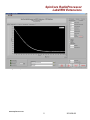
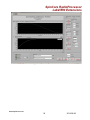
When you are ready to perform a scan, click on the “Start Acquire” Button at the
bottom of the front panel. The VI will then correctly configure and program the
RadioProcessor board and then start the acquisition. Whichever parameters tab is selected
will determine which type of scan to run. For example, if the “Single Pulse Parameters” tab
is selected, a Single Pulse scan will be run using the single pulse parameters. The current
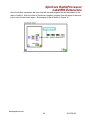
progress of the scan is shown at the bottom left (See Figure 2). When the scan is
complete, the “Start Acquire” button will raise. You can also stop the scan at any time by
clicking “Stop Acquire.” When you want to view the data that was acquired during the
scan, clicking the “Download Data” button will download the time domain data from the
RadioProcessor. At this time, the graph scales will also be adjusted, the FFT of the data
will be processed, and the file will be written (if “Output File” is selected). NOTE: Data can
be downloaded at any time, even if all scans have not completed. After the data download
is complete, you may view the real, imaginary, or FFT data by selecting the appropriate tab
at the top of the graphs.
Figure 2: Status Indicators
Single Pulse Parameters
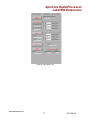
The “Single Pulse Parameters” tab, shown in Figure 3, includes all of the
parameters required to generate and acquire data for Single Pulse NMR on the
RadioProcessor boards. Following is a description of each parameter.
●
●
●
●
●
●
●
●
Figure 3: Scan Parameters for a
Single Pulse Scan
www.spincore.com
Number of Points – The number of complex
points to capture and download.
Spectrometer Frequency – Spectrometer
Frequency (in MHz). This is the frequency of the
transmitter.
Spectral Width – Spectral Width of the baseband
data in kHz.
Pulse Time – Length of pulse in microseconds.
Transient Time – Length of time to wait after
pulse before receiver is activated in
microseconds.
Repetition Delay – Length of time to wait after
each scan before continuing to the next scan in
seconds. Smaller units can be achieved by using
SI notation (e.g. 1m = 1 millisecond, 1u = 1
microsecond, 1n = 1 nanosecond).
Number of Scans – Number of scans to perform
and save to memory
Amplitude – Amplitude of transmitter signal. Can
range from 0 (off) to 1 (full power). This
parameter is non-linear.
8
2014-08-28