1
Page |
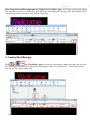
Then, ‘Single Line Text Editor’ page open. On ‘Single Line Text Editor’ page, you can type your message, change
font, font color as well as size, define Stay Time and speed. After editing your message, click ‘Exit’ button to Exit.
Your message will be showing on ‘Play window setup’ page.
3. Creating Word Message
Click
→
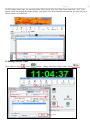
. On ‘Word Editor’ page, you can type your message, change font, font color as well as
size, define Stay Time and speed. After editing your message, click ‘Exit’ button to Exit. Your message will be
showing on ‘Play window setup’ page.
7