1
Page |
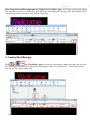
On ‘Play Image Setup’ page, you can choose Play Effect, Speed, Stay Time, Play Count, then Click ‘Exit’. Your
picture will be showing on the window display. your picture size can be automatically adjusted. It’s better for you to
choose pictures of 16x80 Pixel.
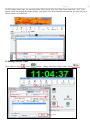
5. Adding current Time
Click ‘Add New Page’
--‘Time’
Button—Change Font color or Play Count—Click
9