1
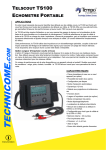
TEMPO — TS100 TELSCOUT®
Metallic Time-Domain Reflectometer
OPERATING MANUAL
CUSTOMER TRAINING & TECHNICAL SUPPORT
NOTICE: This document is an unpublished work
protected by United States copyright laws and is
proprietary to Tempo. Disclosure, copying,
reproduction, merger, translation, modification,
enhancement or use by anyone other than
authorized employees or licensees of Tempo and
its affiliate companies without prior consent of
Tempo is prohibited.
Copyright © 2002
Tempo - a Textron Company. All rights reserved.
Tempo Research, a Delaware Corporation
TS100-3000-A
Printed in U.S.A.
12/2/2002


![AISER [USER MANUAL OF AISER] - Internet Banking](http://vs1.manualzilla.com/store/data/005712358_1-d8e4e34a51ac40b22276b6e3d3c9bbc0-150x150.png)