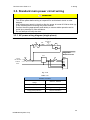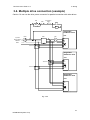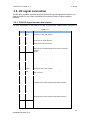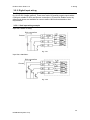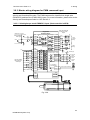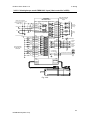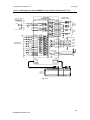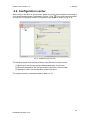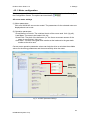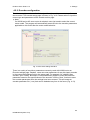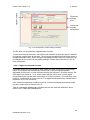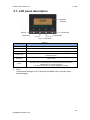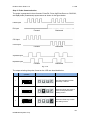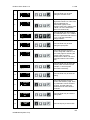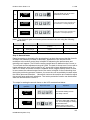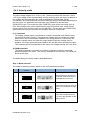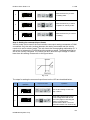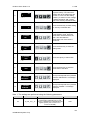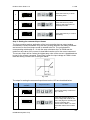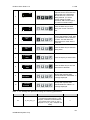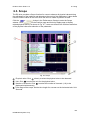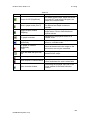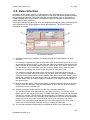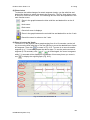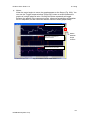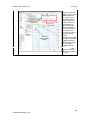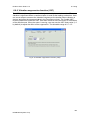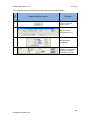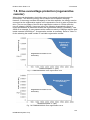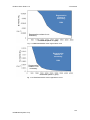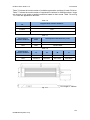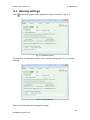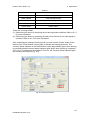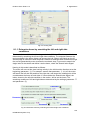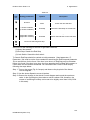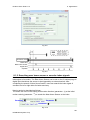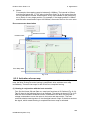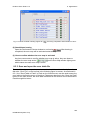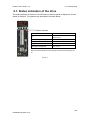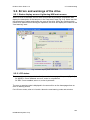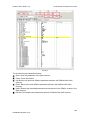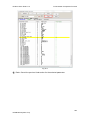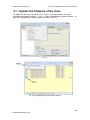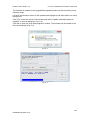
1
D2 Drive User Guide v1.2 D2 Drive User Guide Version 1.2 May 2014 HIWIN Mikrosystem Corp. D2 Drive User Guide v1.2 Table of Contents Table of Contents 1. About the User Guide ............................................................................................... 1 1.1. Instructions before use ................................................................................... 2 1.2. Safety instructions .......................................................................................... 3 2. Overview of the Specifications .................................................................................. 7 2.1. Safety certification .......................................................................................... 8 2.1.1. Nameplate information......................................................................... 9 2.1.2. Model number...................................................................................... 9 2.2. Servo drive specifications ............................................................................. 10 2.2.1. Servo drive specifications (full function) ............................................. 10 2.2.2. Servo drive specifications (pulse type) ............................................... 12 2.3. Dimensions of the drive ................................................................................ 14 2.4. Installation of the drive ................................................................................. 16 2.5. Computer requirements ................................................................................ 17 3. Wiring ..................................................................................................................... 19 3.1. System configuration and wiring ................................................................... 20 3.1.1. Master wiring diagram ....................................................................... 20 3.1.2. CN1 power connector ........................................................................ 21 3.1.3. Motor wiring diagram ......................................................................... 23 3.1.4. Regenerative resistor (optional) wiring diagram ................................. 23 3.1.5. CN2 brake connector ......................................................................... 25 3.1.6. Mini USB communication (CN3) ........................................................ 28 3.1.7. CN6 connector................................................................................... 29 3.1.8. CN7 connector................................................................................... 31 3.2. D2 drive accessories .................................................................................... 32 3.2.1. Motor power cable ............................................................................. 32 3.2.2. Feedback signal cable ....................................................................... 32 3.2.3. Control signal cable ........................................................................... 32 3.2.4. USB communication cable ................................................................. 32 3.2.5. Accessory kit module ......................................................................... 33 3.2.6. EMC accessory kit ............................................................................. 33 3.2.7. Regenerative resistor......................................................................... 33 3.2.8. Connector specifications .................................................................... 34 3.3. Standard main power circuit wiring ............................................................... 35 3.3.1. AC power wiring diagram (single-phase) ........................................... 35 3.3.2. AC power wiring diagram (three-phase)............................................. 36 3.4. Multiple drive connection (example) ............................................................. 37 3.4.1. Selection of no-fuse breakers (NFBs) ................................................ 38 3.5. I/O signal connection .................................................................................... 39 3.5.1. CN6 I/O signal function description .................................................... 39 3.5.2. Digital input wiring ............................................................................. 40 3.5.3. Digital output wiring ........................................................................... 42 3.6. Wiring examples by mode ......................................................................... 43 3.6.1. Master wiring diagram for pulse command input ................................ 43 3.6.2. Master wiring diagram for analog command input .............................. 50 3.6.3. Master wiring diagram for PWM command input ................................ 53 4. Settings................................................................................................................... 57 4.1. Installation and connection ........................................................................... 58 4.1.1. Setup file ........................................................................................... 58 4.1.2. Communication setup ........................................................................ 59 HIWIN Mikrosystem Corp. D2 Drive User Guide v1.2 Table of Contents 4.1.3. Main HMI window .............................................................................. 61 4.2. Configuration center ..................................................................................... 63 4.2.1. Motor configuration ............................................................................ 64 4.2.2. Encoder configuration ........................................................................ 65 4.2.3. Mode configuration ............................................................................ 70 4.2.4. Completion of the configuration procedure ........................................ 74 4.3. Auto phase center ........................................................................................ 75 4.3.1. Method overview ............................................................................... 75 4.3.2. Pre-operation for auto phase initialization .......................................... 76 4.3.3. Auto phase initialization setup procedure........................................... 76 4.3.4. Troubleshooting for auto phase initialization ...................................... 77 4.4. I/O center ..................................................................................................... 78 4.4.1. Digital inputs and their functions ........................................................ 78 4.4.2. Digital outputs and their functions ...................................................... 91 4.5. In-position setting ......................................................................................... 95 4.5.1. Function overview .............................................................................. 95 4.5.2. Settings ............................................................................................. 95 4.6. Parameter overview and configuration of mode............................................ 97 4.6.1. Position mode .................................................................................... 97 4.6.2. Velocity mode .................................................................................. 101 4.6.3. Force/torque mode .......................................................................... 104 4.6.4. Stand-alone mode ........................................................................... 107 4.7. Save to Flash ............................................................................................. 109 5. LCD ...................................................................................................................... 111 5.1. LCD panel description ................................................................................ 112 5.2. Motor set .................................................................................................... 113 5.3. Four LCD pages ......................................................................................... 115 5.3.1. Home page ...................................................................................... 117 5.3.2. Display parameters page ................................................................. 118 5.3.3. Change parameters page ................................................................ 120 5.3.4. Actions page .................................................................................... 130 5.4. LCD configuration by mode ........................................................................ 136 5.4.1. Position mode .................................................................................. 136 5.4.2. Velocity mode .................................................................................. 142 5.4.3. Force/torque mode .......................................................................... 145 5.4.4. Stand-alone mode ........................................................................... 148 6. Tuning .................................................................................................................. 151 6.1. Status display and quick view..................................................................... 152 6.1.1. Status display .................................................................................. 152 6.1.2. Quick view ....................................................................................... 153 6.1.3. Basic common physical value .......................................................... 154 6.1.4. Software shortcuts ........................................................................... 154 6.2. Performance center .................................................................................... 155 6.3. Scope ......................................................................................................... 159 6.4. Data collection............................................................................................ 161 6.5. Plot view..................................................................................................... 162 6.5.1. Graphical display mode ................................................................... 162 6.5.2. Save/open files ................................................................................ 167 6.5.3. Mathematical operation ................................................................... 168 6.6. Advanced gains.......................................................................................... 171 6.6.1. Filter ................................................................................................ 172 6.6.2. Acceleration feedforward ................................................................. 175 HIWIN Mikrosystem Corp. D2 Drive User Guide v1.2 Table of Contents 6.6.3. Schedule gains and velocity loop gain ............................................. 178 6.6.4. Analog input .................................................................................... 181 6.6.5. Current loop ..................................................................................... 182 6.6.6. Vibration suppression function (VSF) ............................................... 183 6.6.7. Friction compensation...................................................................... 184 6.7. Encoder signal confirmation ....................................................................... 188 6.7.1. Encoder signal confirmation function ............................................... 188 6.7.2. Encoder reading confirmation .......................................................... 188 6.7.3. Index signal confirmation ................................................................. 188 6.8. Loop constructor ........................................................................................ 189 6.8.1. File load/save .................................................................................. 190 6.8.2. Tool ................................................................................................. 191 6.8.3. Filter ................................................................................................ 194 6.8.4. Gain tuning ...................................................................................... 196 6.8.5. Spectrum analysis ........................................................................... 197 6.8.6. Bandwidth........................................................................................ 200 7. Protection ............................................................................................................. 201 7.1. Motion protection........................................................................................ 202 7.1.1. Function overview ............................................................................ 202 7.1.2. Velocity, acceleration and deceleration limits ................................... 202 7.1.3. Cancelation of velocity, acceleration and deceleration limits ............ 203 7.1.4. Applicability of emergency stop deceleration (Dec.kill) ..................... 203 7.1.5. Smooth motion ................................................................................ 204 7.2. Position and velocity error protection.......................................................... 205 7.2.1. Position error limits .......................................................................... 205 7.2.2. Position and velocity error warning .................................................. 205 7.3. Brake output ............................................................................................... 206 7.3.1. Function overview ............................................................................ 206 7.3.2. Brake/stop sequence ....................................................................... 206 7.3.3. Settings ........................................................................................... 206 7.4. Hardware limit protection ............................................................................ 208 7.4.1. Function overview ............................................................................ 208 7.4.2. Settings ........................................................................................... 208 7.5. Software limit protection ............................................................................. 209 7.5.1. Function overview ............................................................................ 209 7.5.2. Settings ........................................................................................... 209 7.6. Soft-thermal ............................................................................................... 210 7.7. Drive over temperature protection .............................................................. 211 7.8. Drive overvoltage protection (regenerative resistor) ................................... 212 8. Applications .......................................................................................................... 215 8.1. Homing settings ......................................................................................... 216 8.1.1. Determine home by searching the left and right side conditions ...... 218 8.1.2. Searching near home sensor or encoder index signals.................... 221 8.1.3. Home offset ..................................................................................... 223 8.2. Backlash compensation ............................................................................. 224 8.3. Error map ................................................................................................... 225 8.3.1. Operation of error map .................................................................... 226 8.3.2. Activation of error map..................................................................... 228 8.3.3. Save and open the error table file .................................................... 229 8.3.4. Error map value and encoder resolution .......................................... 230 9. Troubleshooting .................................................................................................... 231 9.1. Status indicators of the drive ...................................................................... 232 HIWIN Mikrosystem Corp. D2 Drive User Guide v1.2 Table of Contents 9.2. Errors and warnings of the drive ................................................................. 233 9.2.1. Status display area on Lightening HMI main screen ........................ 233 9.2.2. LCD status....................................................................................... 233 9.2.3. Error and warning logs..................................................................... 234 9.3. Error codes and actions ............................................................................. 237 9.3.1. Supplements to E03 PEBIG error elimination .................................. 238 9.3.2. Supplements to E11 PHINI error elimination .................................... 239 9.4. Warning codes and actions ........................................................................ 240 9.4.1. W03 HWLL and W04 HWRL supplementation ................................. 241 9.4.2. W09 ACC.L and W10VEL.L supplementation .................................. 241 9.5. Troubleshooting of common errors ............................................................. 243 A. Axis Enable Setting .............................................................................................. 247 A.1. Axis enable via the host controller.............................................................. 248 A.2. Temporary hardware enable ...................................................................... 248 A.3. Confirmation of the enabled state .............................................................. 249 A.4. HMI control of axis enable.......................................................................... 249 B. Parameter Comparison Function .......................................................................... 251 B.1. Compare parameter RAM to Flash ............................................................ 252 C. How to Update the Firmware of the Drive ............................................................. 255 C.1. Update the firmware of the drive ................................................................ 256 HIWIN Mikrosystem Corp. D2 Drive User Guide v1.2 Table of Contents Revision History: Version Date 1.0 2012-06-05 D2-series Drive Frist Release. 1.1 2012-08-30 D2-series Drive Renew Figure 2-1 and Figure 2-2. Renew CN6 connector part number. D2-series Drive (1) Update the description of LCD operation. (2) Update the description according to motor model. 1.2 2014-05-15 HIWIN Mikrosystem Corp. Applicability Remarks D2 Drive User Guide v1.2 1. About the User Guide 1. About the User Guide 1. About the User Guide ............................................................................................... 1 1.1. Instructions before use ................................................................................... 2 1.2. Safety instructions .......................................................................................... 3 1 HIWIN Mikrosystem Corp. D2 Drive User Guide v1.2 1. About the User Guide 1.1. Instructions before use This document is suitable for both HIWIN D2 drive and mega-fabs D2 drive. Read the Operation Manual carefully before using the product. mega-fabs Motion System (‘the Company’) will not take any responsibility for damage, accidents or injuries caused by installation or use that is not performed according to these instructions. Do not dismantle or modify the product. The product has been subject to structural calculations, computer simulation and physical testing to verify its design. Do not dismantle or modify the product without the consent of the Company’s professional technicians. The Company does not take any responsibility for accidents or damage resulting from such dismantling or modifications. Before installing or using the product, check the external appearance and ensure there is no damage on the surface of the product. If any damage is identified, please contact the Company or one of the Company’s dealers immediately. Please refer to the performance specifications on the product label or manufacturer's document before using the product. Only install the product with reference to these performance limits and in accordance with the installation instructions. Please read the power voltage specifications and labeling before using the product and confirm that the power supply to be used meets the product requirements. The Company does not take any responsibility for product damage or personal injury resulting from incorrect power use. Do not use the product over the rated load. The Company does not take any responsibility for damage or injury caused by such misuse of the product. Do not use the product in an environment where shocks may occur. The company does not take any responsibility for damage, accidents or injuries of any kind attributable to such shocks. Do not try to repair any product malfunctions. The product can only be repaired by qualified technicians. The warranty period is one year from the ex-factory date. The Company does not take any responsibility for product replacement or repair caused by inappropriate use or natural disasters. (Please refer to the notes and installation instructions in the Operation Manual.) 2 HIWIN Mikrosystem Corp. D2 Drive User Guide v1.2 1. About the User Guide 1.2. Safety instructions Please read this Operation Manual carefully before installation, transportation, maintenance and inspection, and ensure the product is used appropriately. Users should read the EM information, safety information, and all related instructions before using the product. The safety instructions in the Operation Manual are categorized under the "Warning", "Attention", "Prohibited" and "Required" sections. Warning Inappropriate operation may bring about danger or result in serious injury or death. Inappropriate operation may bring about disability, light injury or material damage. Attention Actions marked Attention may have a serious consequence. All such instructions are important and must be followed. Prohibited Indicates that the action is forbidden and must not be done. Required Indicates that the action is compulsory and must be done. 3 HIWIN Mikrosystem Corp. D2 Drive User Guide v1.2 1. About the User Guide Usage instructions Warning (1) Do not touch the terminal or the inside of the product when it is powered in order to avoid electric shock. (2) Do not cut the cable, apply too much stress to it, or place heavy objects on it. Laying the cable between objects may increase the risk of fire or electric shock. Attention (1) Do not install the product in a place exposed to moisture or erosion, or in an environment containing ignitable gas. Do not use the product close to any flammable objects. Storage Prohibited (1) Do not store the product in a place exposed to water, moisture, direct sunlight, or harmful gas or liquids. Handling Attention (1) Be careful when handling the product to avoid damage. (2) Use appropriate handling methods and do not apply too much pressure to the case. (3) The product shall not be stacked to avoid instability or collapse. Installation location Required (1) The product shall not be installed in a place exposed to high temperatures, high humidity, or flying dust, iron powder or metal fragments. (2) Install the product in a place where the ambient temperature meets the requirements of the Operation Manual. Use a cooling fan in case of potential high temperatures. (3) Do not install the product in a place exposed to direct sunlight. (4) Since the product does not have a waterproof or moisture-proof case, do not use it outdoors or install it in a place where water or other liquids exist. (5) Install the product in a place vibrations are as low as possible. (6) Depending on the frequency of use, heat is generated when the motor is used continuously. Use a cooling fan, or set the product to standby if it stops, in order to lower the ambient temperature of the product so it does not exceed the specified value. 4 HIWIN Mikrosystem Corp. D2 Drive User Guide v1.2 1. About the User Guide Installation Attention (1) Do not place any heavy objects on the product to avoid damage. (2) Do not mix with foreign matter or debris to avoid fire. (3) Ensure that the product is oriented and installed in the specified direction to avoid fire. (4) Protect the product from high impact shocks to avoid damage or injury. (5) The product weight must be taken into account during installation. Inappropriate installation may cause damage or injury. (6) Install the product on a metal or similar noncombustible rack to avoid fire. Wiring Attention (1) Correct and reliable wiring must be used to ensure stable operation and avoid damage, fire or injury. Operation and transportation Attention (1) Ensure the power source specifications are correct to avoid fire or injury. (2) The product may restart suddenly after power is restored. Do not come too close to the product. Required (1) An external emergency stop line must be wired to cut power and stop the product at any time. Maintenance Prohibited (1) Do not dismantle or modify the product. (2) Do not attempt to repair any product malfunction. Instead, send the product back to the Company’s professional technicians for repair. 5 HIWIN Mikrosystem Corp. D2 Drive User Guide v1.2 1. About the User Guide (This page is intentionally left blank.) 6 HIWIN Mikrosystem Corp. D2 Drive User Guide v1.2 2. Overview of the Specifications 2. Overview of the Specifications 2. Overview of the Specifications .................................................................................. 7 2.1. Safety certification .......................................................................................... 8 2.1.1. Nameplate information......................................................................... 9 2.1.2. Model number...................................................................................... 9 2.2. Servo drive specifications ............................................................................. 10 2.2.1. Servo drive specifications (full function) ............................................. 10 2.2.2. Servo drive specifications (pulse type) ............................................... 12 2.3. Dimensions of the drive ................................................................................ 14 2.4. Installation of the drive ................................................................................. 16 2.5. Computer requirements ................................................................................ 17 7 HIWIN Mikrosystem Corp. D2 Drive User Guide v1.2 2. Overview of the Specifications 2.1. Safety certification The product complies with the requirements of the following safety standards. CE Compliance Table 2-1 EMC LVD EN55011 EN61000-6-2 EN61800-3 EB61800-5-1 8 HIWIN Mikrosystem Corp. D2 Drive User Guide v1.2 2. Overview of the Specifications 2.1.1. Nameplate information Model no. Input/output voltage Phases Rated input/output current Input/output frequency Fig. 2-1 2.1.2. Model number Column Example Item number D2 drive ··································=D2 Rated output 50W/100W ··············································=01 200W/400W ············································=04 750W/1000W ··········································=10 AC voltage Single-phase ······················································=1 Three-phase ······················································=2 AC voltage range 110V/220V ·························································=3 Control interface Pulse type (for position control) ······································=P Full function ································································=S Frame A Frame ·············································································· =A B Frame ·············································································· =B C Frame ·············································································· =C Encoder type 13-bit standard and wiring-saving incremental encoders ························=0 17-bit serial incremental encoder ······················································=4 Fig. 2-2 9 HIWIN Mikrosystem Corp. D2 Drive User Guide v1.2 2. Overview of the Specifications 2.2. Servo drive specifications 2.2.1. Servo drive specifications (full function) Table 2-2 A-C Single/three-phase, 200-240V 50/60Hz Frames Power input 220V Control A-C Single-phase, 200-240V 50/60Hz power Frames Operating temperature: 0-45°C (Air circulation must be available when the ambient temperature is higher Temperature than 55°C) Storage temperature: -20°C to +65°C Ambient conditions Humidity 0 to 90% RH (non-condensing) Altitude Elevation less than 1,000 meters Protection against 1G (10-500Hz) vibration Main circuit control mode IGBT PWM space vector control 13-bit (10,000 count/rev) standard incremental encoder (9-line) and wiring-saving incremental Encoder/feedback resolution encoder 17-bit (131,072 count/rev) serial incremental encoder (5-line) Input 9 (general purpose) Control signal Output 4 (general purpose) Input 1 (12-bit A/D) I/O signal Analog signal Output 2 (analog monitoring: 2 outputs) connector Input 2 (low-speed channel, high-speed channel) Pulse signal 4 (differential line driver with 3 outputs; open collector Output with 1 output) Brake Used for direct connection to the brake. It can also be Control signal Output connector used for programmable general purpose output. Communication function USB For PC connection, 115,200 bps 4-key, dot-matrix, 8*2 character LCD status display Panel/indicator with LED status indicator (green/red) External connection is needed as no built-in Regenerative function regenerative resistor is available The control mode is switchable: (1) Position mode (2) Velocity mode Control mode (3) Torque mode (4) Position/velocity mode (5) Position/torque mode (6) Velocity/torque mode (1) Pulse inhibit command (2) Clear position error (3) Servo on (4) Switch between first and second gain Control input (5) Electronic gear ratio selection (6) Left limit switch (7) Switch between primary and secondary mode (8) Clear error (9) Right limit switch etc. (1) Servo ready (2) Error Control output (3) In-position output (4) Zero speed detection For optical coupler interface (single-ended input): 500 Maximum input pulse kpps frequency For line driver interface (differential input): 4 Mpps (16M cnt/s at AqB) Pulse input (1) Pulse/direction (Pulse/Dir) Input pulse signal (2) Clockwise/counterclockwise (CW/CCW) format (3) A/B phase (AqB) Gear ratio: pulses/counts Electronic gear Pulses: 1-2147483647; counts: 1-2147483647 Main power Basic specifications Position control mode Function specifications 10 HIWIN Mikrosystem Corp. D2 Drive User Guide v1.2 2. Overview of the Specifications Smoothing filter Vibration suppression function (VSF) Control input Velocity control mode Control output PWM input Velocity command input Analog input Velocity command input Zero speed clamp Control input Torque control mode Control output PWM input Torque command input Analog input Torque command input Velocity limitation function Auto tune Emulated encoder output Common Protection function Error log feature Error mapping Miscellany Smoothing filter coefficient: 1-500 (0: no smoothing filter) VSF can eliminate vibration frequency during motion and suppress vibrations generated due to the system structure to improve the machine productivity (1) Zero speed clamp (2) Servo on (3) Switch between first and second gain (4) Left limit switch (5) Switch between primary and secondary mode (6) Clear error (7) Right limit switch etc. (1) Servo ready (2) Error (3) In-speed output (4) Zero speed detection. The velocity command can be provided via the PWM input duty cycle. Parameters can be set for the ratio and command direction. The velocity command can be provided via the analog voltage. Parameters can be set for the ratio and command direction. Zero speed clamp input is possible (1) Servo on (2) Switch between first and second gain (3) Left limit switch (4) Switch between primary and secondary mode (5) Clear error (6) Right limit switch etc. (1) Servo ready (2) Error (3) In-speed output (4) Zero speed detection The torque command can be provided via the PWM input duty cycle. Parameters can be set for the ratio and command direction. The torque command can be provided via the analog voltage. Parameters can be set for the ratio and command direction. Setting the velocity limitation is possible. The auto tune procedure starts automatically after execution. The load inertia is automatically determined without the need to set it manually. All required gain values are set using a key on the LCD display. Can be set freely (maximum frequency 18M cnt/s) (1) Motor short circuit detection (2) Overvoltage (3) Position error too big (4) Encoder error (5) Soft thermal protection (6) Motor disconnection detection (7) Amplifier overheating (8) Under voltage (9) Abnormal 5V encoder power source (10) Phase initialization error (11) Abnormal serial encoder communication Errors and warnings can be logged and reviewed Method: Establish error mapping using linear interpolation encoder error compensation Sampling: maximum 16,000 points Storage: Flash ROM; hard drive file Unit: um, count Activation: After internal homing or activated by external input signal Friction compensation, backlash compensation 11 HIWIN Mikrosystem Corp. D2 Drive User Guide v1.2 2. Overview of the Specifications 2.2.2. Servo drive specifications (pulse type) Table 2-3 A-B Single-phase, 200-240V 50/60Hz Frames Power input 220V C Frame Single/three-phase, 200-240V 50/60Hz Control A-C Single-phase, 200-240V 50/60Hz Power Frames Operating temperature: 0-45°C (Air circulation must be available when the ambient temperature is higher Temperature than 55°C) Storage temperature: -20°C to +65°C Ambient conditions Humidity 0 to 90% RH (non-condensing) Altitude Elevation less than 1,000 meters Protection against 1G (10-500Hz) vibration Main circuit control mode IGBT PWM space vector control 13-bit (10,000 count/rev) standard incremental encoder (9-line) and wiring-saving incremental Encoder/feedback resolution encoder 17-bit (131,072 count/rev) serial incremental encoder (5-line) Input 9 (general purpose) Control signal Output 4 (general purpose) I/O signal Input 2 (low-speed channel, high-speed channel) connector Pulse signal 4 (differential line driver with 3 outputs; open collector Output drive with 1 output) Brake Used for direct connection to the brake. It can also be Control signal Output connector used for programmable general purpose output. Communication function USB For PC connection, 115,200 bps 4-key, dot-matrix, 8*2 character LCD status display Panel/indicator With LED status indicator (green/red) External connection is needed as no built-in Regenerative function regenerative resistor is available Control mode Position mode (1) Pulse inhibit command (2) Clear position error (3) Servo on (4) Switch between first and second gain Control input (5) Electronic gear ratio selection (6) Left limit switch (7) Switch between primary and secondary mode (8) Clear error (9) Right limit switch etc. (1) Servo ready (2) Error Control output (3) In-position output (4) Zero speed detection. For optical coupler interface (single-ended input): 500 Maximum input pulse kpps frequency For line driver interface (differential input): 4 Mpps (16M cnt/s at AqB) (1) Pulse/direction (Pulse/Dir) Input pulse signal format (2) Clockwise/counterclockwise (CW/CCW) Pulse input (3) A/B phase (AqB) Gear ratio: pulses/counts Electronic gear Pulses: 1-2147483647; counts: 1-2147483647 Smoothing filter coefficient: 1-500 (0: no smoothing Smoothing filter filter) VSF can eliminate vibration frequency during motion Vibration suppression function (VSF) and suppress vibrations generated due to the system structure to improve the machine productivity Main power Basic specifications Position control mode Function specifications 12 HIWIN Mikrosystem Corp. D2 Drive User Guide v1.2 2. Overview of the Specifications Auto tune Emulated encoder output Common Protection function Error log feature Error mapping Miscellany The auto tune procedure starts automatically after execution. The load inertia is automatically determined without the need to set it manually. All required gain values are set using a key on the LCD display. Can be set freely (maximum frequency 18M cnt/s) (1) Motor short circuit detection (2) Overvoltage (3) Position error too big (4) Encoder error (5) Soft thermal protection (6) Motor disconnection detection (7) Amplifier overheating (8) Under voltage (9) Abnormal 5V encoder power source (10)Phase initialization error (11) Abnormal serial encoder communication Errors and warnings can be logged and reviewed Method: Establish error mapping using linear interpolation encoder error compensation Sampling: maximum 16,000 points Storage: Flash ROM; hard drive file Unit: um, count Activation: After internal homing or activated by external input signal Friction compensation, backlash compensation 13 HIWIN Mikrosystem Corp. D2 Drive User Guide v1.2 2. Overview of the Specifications 2.3. Dimensions of the drive The drive dimensions and location of the holes are shown in the following figures. The dimension units are in mm and the diameter of the mounting hole is 4 mm. Fig. 2-3 Dimensions of A Frame Fig. 2-4 Dimensions of B Frame 14 HIWIN Mikrosystem Corp. D2 Drive User Guide v1.2 2. Overview of the Specifications Fig. 2-5 Dimensions of C Frame 15 HIWIN Mikrosystem Corp. D2 Drive User Guide v1.2 2. Overview of the Specifications 2.4. Installation of the drive Fix the drive in the electric cabinet using conductive screws. All insulating materials on the contact surface of the cabinet must be thoroughly removed so that the drive can connect to the ground through the machine. The ground resistance must be less than 50Ω at 220V and less than 100Ω at 110V. If more than one drive is installed, a distance of more than 20 mm must be maintained between the drives to ensure heat dissipation. Fans can be attached to the electric cabinet to facilitate heat dissipation. 50 mm or more 20 mm or more 20 mm or more Electric cabinet case 50 mm or more 50 mm or more 50 mm or more Fig. 2-6 Distance between drives 16 HIWIN Mikrosystem Corp. D2 Drive User Guide v1.2 2. Overview of the Specifications 2.5. Computer requirements Table 2-4 CPU 1.0 GHz or better RAM 512 MB or more Hard drive space 50 MB or more Communication port USB Operating system Windows 2000, Windows XP, Windows 7 Screen resolution 1024x768 pixels or more 17 HIWIN Mikrosystem Corp. D2 Drive User Guide v1.2 2. Overview of the Specifications (This page is intentionally left blank.) 18 HIWIN Mikrosystem Corp. D2 Drive User Guide v1.2 3. Wiring 3. Wiring 3. Wiring ..................................................................................................................... 19 3.1. System configuration and wiring ................................................................... 20 3.1.1. Master wiring diagram ....................................................................... 20 3.1.2. CN1 power connector ........................................................................ 21 3.1.3. Motor wiring diagram ......................................................................... 23 3.1.4. Regenerative resistor (optional) wiring diagram ................................. 23 3.1.5. CN2 brake connector ......................................................................... 25 3.1.6. Mini USB communication (CN3) ........................................................ 28 3.1.7. CN6 connector................................................................................... 29 3.1.8. CN7 connector................................................................................... 31 3.2. D2 drive accessories .................................................................................... 32 3.2.1. Motor power cable ............................................................................. 32 3.2.2. Feedback signal cable ....................................................................... 32 3.2.3. Control signal cable ........................................................................... 32 3.2.4. USB communication cable ................................................................. 32 3.2.5. Accessory kit module ......................................................................... 33 3.2.6. EMC accessory kit ............................................................................. 33 3.2.7. Regenerative resistor......................................................................... 33 3.2.8. Connector specifications .................................................................... 34 3.3. Standard main power circuit wiring ............................................................... 35 3.3.1. AC power wiring diagram (single-phase) ........................................... 35 3.3.2. AC power wiring diagram (three-phase)............................................. 36 3.4. Multiple drive connection (example) ............................................................. 37 3.4.1. Selection of no-fuse breakers (NFBs) ................................................ 38 3.5. I/O signal connection .................................................................................... 39 3.5.1. CN6 I/O signal function description .................................................... 39 3.5.2. Digital input wiring ............................................................................. 40 3.5.3. Digital output wiring ........................................................................... 42 3.6. Wiring examples by mode ......................................................................... 43 3.6.1. Master wiring diagram for pulse command input ................................ 43 3.6.2. Master wiring diagram for analog command input .............................. 50 3.6.3. Master wiring diagram for PWM command input................................ 53 19 HIWIN Mikrosystem Corp. D2 Drive User Guide v1.2 3. Wiring 3.1. System configuration and wiring This chapter introduces the drive configuration and functions of each part. The following figure shows the details of drive configuration. 3.1.1. Master wiring diagram Breaker (MCCB) Filter (Optional) LCD display Magnetic contactor Two lines of dot matrix strings Display messages and parameters Reactor (L) Status LED Rapid indication of Ready/Error To PC Regenerative resistor (Optional) Download from: www.hiwfnmikro.com.tw To connector Connector 50 pin SCSI (Std. accessory) Brake power DC24V (external) To encoder Encoder cable (optional) Servo motor lIf the motor with a brake needs connection to this wire (brake optional) Fig. 3-1 Table 3-1 Item no. Name AC main power cable (CN1) Motor power cable (CN1) Regenerative resistor (CN1) Control power cable (CN1) Description L1, L2: Single-phase 110-240V AC, 50/60Hz L1, L2, L3: Three-phase 200-240V AC, 50/60Hz Control signal (CN6) Connection to motor, three-phase motor power ( , U, V, W) Connection to motor regenerative resistor (optional/mounted according to actual application design) (REG-/REG+) For drive internal control and IO power (L1C, L2C) L1C, L2C: Single-phase 110-240V AC, 50/60Hz Connection to brake (optional/mounted according to actual application design) Connection to PC (for setting parameters; to be removed after setting) Mini USB and the PC are used as links for monitoring, drive test runs, or writing parameters Connection to the host controller Feedback signal (CN7) Connection to the motor encoder Brake (CN2) Mini USB communication (CN3) 20 HIWIN Mikrosystem Corp. D2 Drive User Guide v1.2 3. Wiring 3.1.2. CN1 power connector Ensure that the drive has been grounded appropriately before connecting the drive to the main circuit. The CN1 power wiring description includes single/three-phase power input, motor power output, single-phase control power input, and regenerative resistor wiring. For D2-xxxx-x-B (F) Connector to the extended line: Wago 2092-1112 (female) Fig. 3-2 CN1 connector Fig. 3-3 CN1 installation and removal steps 21 HIWIN Mikrosystem Corp. D2 Drive User Guide v1.2 3. Wiring For D2-xxxx-x-B (G) and D2-xxxx-x-B0 Connector to the extended line: Wago 721-112/026-000 (female) Fig. 3-4 CN1 connector Fig. 3-5 Installation and removal steps 22 HIWIN Mikrosystem Corp. D2 Drive User Guide v1.2 3. Wiring 3.1.3. Motor wiring diagram Well grounding is needed between the drive and the motor. mega-fabs D2 Series drive CN1 L1 L2 L3 U V W REGREG+ L1C L2C Motor Fig. 3-6 3.1.4. Regenerative resistor (optional) wiring diagram The regenerative resistor is mounted optionally according to the actual application design. mega-fabs D2 Series drive CN1 L1 L2 L3 Regenerative resistor case Fuse U V W REGREG+ L1C L2C Fig. 3-7 23 HIWIN Mikrosystem Corp. D2 Drive User Guide v1.2 3. Wiring Attention ● ● ● ● ● ● ● ● ● ● ● ● ● ● ● ● Wiring and inspection must be conducted by professional technicians. Turn off the power before wiring or inspection to avoid electric shock and other dangers. High voltage may remain in the drive after the power is turned off. Wait for a while (up to five minutes) before touching the power terminal. Perform the wiring appropriately and reliably to ensure stable operation and avoid injury, damage or other accidents. Do not connect the motor U, V or W terminal to the power source. The motor power terminal must be securely connected to the power source to avoid fire. Ensure that the drive and motor are grounded appropriately. Wiring must be conducted after installation of the drive and motor to avoid electric shock. Do not damage, pull or squeeze the wire so as to avoid electric shock. The drive may interfere with the operation of nearby electronic equipment. A noise filter can be used to reduce such electromagnetic interference. Do not attempt to modify the drive. Do not put the main circuit cable, I/O signal cable, or encoder cable in the same duct or bind them together. A distance of more than 30 cm must be maintained between the cables. The following instructions must be observed for wiring the main circuit terminals: ※ Do not insert more than one wire in the same socket. ※ Check there is no short circuit with any nearby wires after inserting the wire. ※ Ensure the specified power voltage is used to avoid fire or damage. If the drive is to be used under poor or significantly fluctuating power conditions, ensure power is supplied within the specified voltage fluctuation range so as to avoid damage. Install a breaker or other safety devices to prevent external short circuits from damaging the drive. Appropriate isolating and sheltering measures must be taken if the drive is used in the following places to avoid adverse operation. ※ Places exposed to static interference. ※ Places exposed to strong electrical or magnetic fields. ※ Places exposed to radiation. 24 HIWIN Mikrosystem Corp. D2 Drive User Guide v1.2 3. Wiring 3.1.5. CN2 brake connector The brake can be wired with or without a relay. Refer to the wiring diagram for connection to the 24V DC brake. 3.1.5.1. CN2 connector For D2-xxxx-x-B (G) and D2-xxxx-x-B (F) Connector to the line: WAGO 733-103 Wire diameter: 20-28AWG Fig. 3-8 For D2-xxxx-x-B0 Connector to the line: WAGO 734-104 Fig. 3-9 25 HIWIN Mikrosystem Corp. D2 Drive User Guide v1.2 3. Wiring 3.1.5.2. Brake wiring with a relay For D2-xxxx-x-B (G) and D2-xxxx-x-B (F) DC24V power D2 series drive Isolation control power Fig. 3-10 Brake wiring with a relay for D2-xxxx-x-B (G) and D2-xxxx-x-B (F) For D2-xxxx-x-B0 Power Isolation control power Fig. 3-11 Brake wiring with a relay for D2-xxxx-x-B0 26 HIWIN Mikrosystem Corp. D2 Drive User Guide v1.2 3. Wiring 3.1.5.3. Brake wiring without a relay Direct mounting to the HIWIN motor is allowed. For D2-xxxx-x-B (G) and D2-xxxx-x-B (F) DC24V power D2 Series drive Isolation control power (Current<600mA) Fig. 3-12 Brake wiring without a relay for D2-xxxx-x-B (G) and D2-xxxx-x-B (F) For D2-xxxx-x-0 Fig. 3-13 Brake wiring without a relay for D2-xxxx-x-0 For wiring without a relay, the dynamic or electromagnetic brake on the motor is activated directly using the open-drain switch on D2. The brake output BRK is open drain and can sustain a maximum of 40V voltage and 1A current. Use this in conjunction with the Brake/BRK output of the HMI I/O center. 27 HIWIN Mikrosystem Corp. D2 Drive User Guide v1.2 3. Wiring 3.1.6. Mini USB communication (CN3) Mini USB and a PC can be used as links for monitoring, drive test runs, or writing parameters. Refer to Chapter 4 for the operation. 3.1.6.1. Mini USB communication wiring diagram Refer to HIWIN with a USB 2.0 Type A to mini-B 5-pin (1.8M) cable. Fig. 3-14 mega-fabs D2 Series drive PC USB Serial port CN3 N/C USB_D+ 4 USB_D+ 3 3 GND 5 GND 5 USB_D- 2 USB_D- 2 +5V 1 USB_VBUS 1 Fig. 3-15 28 HIWIN Mikrosystem Corp. D2 Drive User Guide v1.2 3. Wiring 3.1.7. CN6 connector SCSI 50PIN (Female) SCSI 50PIN (Male) Fig. 3-16 29 HIWIN Mikrosystem Corp. D2 Drive User Guide v1.2 3. Wiring 3.1.7.1. CN6 pin definition Table 3-2 1 3 4 2 5 6 13 21 22 48 49 23 24 25 19 14 15 16 17 18 20 43 42 44 45 46 47 Pin Signal CWL CWL+ CWLCCWL CCWL+ CCWLSG A /A B /B Z /Z SG CZ ADC0+ ADC0ADC1+ ADC1ADC2+ ADC2DAC1 DAC2 CWH+ CWHCCWH+ CCWH- 7 COM 33 30 29 27 28 26 32 31 9 8 35 34 37 36 39 38 11 10 40 12 41 50 I1 I2 I3 I4 I5 I6 I7 I8 I9 N/A O1+ O1O2+ O2O3+ O3O4+ O4N/A N/A AGND FG Function Low-speed (500 Kpps) pulse command Channel 1: Pulse, CW, A phase Low-speed (500Kpps) pulse command Channel 2: Dir, CCW, B phase Digital signal ground reference Output pulse of feedback (buffered encoder or emulated encoder) RS422 Digital signal ground reference Z phase output (open collector) Analog command input(Velocity/Torque) N/A N/A N/A High-speed (4 Mpps) pulse command Channel 1: Pulse, CW, A phase High-speed (4 Mpps) pulse command Channel 2: DIR, CCW, B phase Common port for general purpose input signal; can be either Sink or Source General purpose input signal (‘Hardware Enable’ by default) General purpose input signal (programmable function) N/A General purpose input signal (programmable function) N/A N/A Analog signal ground reference Frame ground reference 30 HIWIN Mikrosystem Corp. D2 Drive User Guide v1.2 3. Wiring 3.1.8. CN7 connector Press and pull these clamps to remove CN7 connector SCR connector 10PIN (male) SCR connector 10PIN (female) Fig. 3-17 Table 3-3 Pin 1 2 3 4 5 6 7 8 9 10 Signal +5V DC SG PS+ PSA /A B /B Z /Z Function Encoder power output(+5Vdc) Signal ground and +5Vdc ground Serial encoder input Digital incremental encoder input 31 HIWIN Mikrosystem Corp. D2 Drive User Guide v1.2 3. Wiring 3.2. D2 drive accessories 3.2.1. Motor power cable Table 3-4 Part name Description Model no. Without brake signal Motor power cable With brake signal HVPS04AA□□MA Not flex resistant HVPS04AA□□MB Flex resistant HVPS06AA□□MA Not flex resistant HVPS06AA□□MB Flex resistant □□ Represents cable length as the following: Table 3-5 □□ 03 05 07 10 Wire length (m) 3 5 7 10 3.2.2. Feedback signal cable Table 3-6 Part name 13bit Feedback signal cable 17bit Model no. Description HVE131AB□□MA Not flex resistant HVE131AB□□MB Flex resistant HVE171AB□□MA Not flex resistant HVE171AB□□MB Flex resistant □□Represents cable length as the following: Table 3-7 □□ 03 05 07 10 Wire length (m) 3 5 7 10 3.2.3. Control signal cable Table 3-8 part name Control signal cable Model no. Description LMACK02D 2m in length and connected to the host controller. The wire at the controller end of the signal cable is free and can be soldered depending on the host controller connector. 3.2.4. USB communication cable Table 3-9 Part name USB communication cable Model no. USB 2.0 Type A to mini-B 5-pin Description 1.8m in length with a mini-B connector at the drive end. 32 HIWIN Mikrosystem Corp. D2 Drive User Guide v1.2 3. Wiring 3.2.5. Accessory kit module Table 3-10 D2 drive model no. D2-xxxx-x-B(G). D2-xxxx-x-B(F). D2-xxxx-x-B0. Model no. Description Quantity CN1: AC power, motor power, Regenerative resistor, and control power connector: 12 pins, pitch 5mm. Wago 721-112/026-000 1 CN2: Brake connector: 3 pins, pitch 2.5mm. Wago 734-104 1 D2-CK1 CN6: Control signal connector: 50 pins solder type. 3M 10150-3000PE + 10350-52A0-008 1 CN1 connector fixture: Wago 231-131 1 CN2 connector fixture: Wago 733-103 1 CN1: AC power, motor power, Regenerative resistor, and control power connector: 12 pins, pitch 5mm. Wago 2092-1112 1 CN2: Brake connector: 3 pins, pitch 2.5mm 1 CN6: Control signal connector: 50 pins solder type. 3M 10150-3000PE + 10350-52A0-008 1 CN2 connector fixture: Wago 733-103 1 CN1: AC power, motor power, Regenerative resistor, and control power connector: 12 pins, pitch 5mm. Wago 721-112/026-000 1 CN2: Brake connector: 4 pins, pitch 3.5mm 1 CN6: Control signal connector: 50 pins solder type. 3M 10150-3000PE + 10350-52A0-008 1 CN2 connector fixture: Wago 734-230 1 D2-CK2 D2-CK3 3.2.6. EMC accessory kit Table 3-11 Item name Model no. D2 EMC accessory pack for single-phase D2-EMC1 D2 EMC accessory pack for three-phase D2-EMC2 Description Quantity Single-phase filter FN2090-6-06 1 EMI core KCF-130-B 2 Three-phase filter FN3025HL-20-71 1 EMI core KCF-130-B 2 3.2.7. Regenerative resistor Table 3-12 Item name Model no. Resistance value Rated power/instantaneous power Regenerative resistor RG1 68 Ω 100W/500W Regenerative resistor RG2 120 Ω 300W/1500W 33 HIWIN Mikrosystem Corp. D2 Drive User Guide v1.2 3. Wiring 3.2.8. Connector specifications Table 3-13 Connector Specifications HIWIN parts no. Wire diameter Remarks EU 12-pin 5.0mm pluggable female connector 051500400269 WAGO: 2092-1112 12-24AWG Recommended: 12AWG/600V Note 1 Control signal connector (CN6) 50-pin .050" Mini D Ribbon (MDR), standard solder connector 051500400272SCSI 50 pin (male) 24-30AWG Note 1 Feedback signal connector (CN7) HIWIN standard encoder cable Brake connector (CN2) EU 3-pin 2.5mm pluggable female connector 051500400251 WAGO: 733-103 20-28AWG Fixture/tool: 733-130 Note 1 Mini USB communication connector (CN3) USB 2.0 Type A to mini-B 5-pin (1.8m) (Shielded) 051700800366 AC main power cable connector (CN1) Motor power cable connector (CN1) Regenerative resistor connector (CN1) Control power cable connector (CN1) Optional Note 1: Accessories include CN1, CN2, CN6 (with 733-130 fixture/tool) connectors, HIWIN P/N: 051800200070. Note 2: When wiring the product, turn off all power sources and use the fixture to avoid electric shock. 34 HIWIN Mikrosystem Corp. D2 Drive User Guide v1.2 3. Wiring 3.3. Standard main power circuit wiring Attention ● ● ● ● ● Wiring and inspection must be conducted by professional technicians. Turn off the power before wiring or inspection to avoid electric shock or other dangers. High voltage may remain in the drive after the power is turned off. Wait a while (up to five minutes) before touching the power terminal. Perform the wiring appropriately and reliably to ensure stable operation and to avoid injury, damage or other accidents. Do not attempt to modify the drive. 3.3.1. AC power wiring diagram (single-phase) It is recommended to use the FN2090-6-06 single-phase filter. ON OFF Emergency Stop KM KM SK mega-fabs D2 Series drive Filter NFB KM 1-phase 100~240VAC 50/60Hz CN1 L1 L2 L3 Earth L1C L2C Fig. 3-18 Table 3-14 FN2090-10-06 filter Maximum continuous operating voltage 250V AC, 50/60Hz Operating frequency DC to 400Hz Rated current 10A@40°C, 11.2A@25°C Surge pulse protection 2kV, IEC 61000-4-5 35 HIWIN Mikrosystem Corp. D2 Drive User Guide v1.2 3. Wiring 3.3.2. AC power wiring diagram (three-phase) It is recommended to use the FN3258-7-45 three-phase filter. ON OFF Emergency Stop KM KM SK mega-fabs D2 Series drive NFB Filter CN1 KM 3-phase 200~240VAC 50/60Hz L1 L2 L3 Earth L1C L2C Fig. 3-19 Table 3-15 FN3258-7-45 filter Maximum continuous operating voltage 3 x 480/277V AC (FN3258) Operating frequency DC to 60Hz Rated current 7A@50 C, 7.7A@40 C Drive power rating 4 KW Current leakage@400V AC/50Hz 33.0 mA Surge pulse protection 2kV, IEC61000-4-5 ° ° 36 HIWIN Mikrosystem Corp. D2 Drive User Guide v1.2 3. Wiring 3.4. Multiple drive connection (example) Caution: Do not use the drive power connector for parallel connection with other drives. ON OFF Emergency Stop KM KM SK mega-fabs D2 Series drive NFB Filter 3-phase 200~240VAC 50/60Hz KM CN1 L1 L2 L3 Earth L1C L2C Terminal mega-fabs D2 Series drive CN1 Terminal L1 L2 L3 L1C L2C Terminal mega-fabs D2 Series drive CN1 L1 L2 L3 L1C L2C Fig. 3-20 37 HIWIN Mikrosystem Corp. D2 Drive User Guide v1.2 3. Wiring 3.4.1. Selection of no-fuse breakers (NFBs) Table 3-16 Rated current of the D2 Series drives Drive model no. Rated input current A (rms) D2-0123--A 1.5 D2-0423--B 4.1 D2-1023--C 7.5 When NFB is used for motor shunts, the rated capacitance is usually 1.5-2.5 times the rated current of the motor. The selection is described below: One motor: IB=C×In Two or more motors that are started one at a time: Two or more motors that are started simultaneously: [Note] IB: NFB rated current value. In: Motor rated current value. InMAX: The maximum rated current value among different motors specifications. C: Multiple of the rated current, usually 1.5-2.5, or 1.5 if the final multiple cannot be determined. Cmax: The multiple of the rated current based on the maximum rated current among the motors. K: Demand rate; 1 is recommended if the final value cannot be determined. Calculation example: If five D2-0123--A□ and one D2-0423--B□ drives are used (assuming that C and CMAX are doubled) Started one at a time: IB = (1.5*5+4.1-4.1) *1+4.1*2 = 15.7A Started simultaneously: IB =2*1.5+2*1.5+2*1.5+2*1.5+2*1.5+2*4.1 = 23.2A 38 HIWIN Mikrosystem Corp. D2 Drive User Guide v1.2 3. Wiring 3.5. I/O signal connection The D2 drive provides 9 general purpose inputs and 4 general purpose outputs on its CN6 connector for use. Users can define the function of each I/O point using the software. 3.5.1. CN6 I/O signal function description For more information on the function of CN6 I/O signal pins, please refer to Section 4.4. Table 3-17 Pin 1 3 4 2 5 6 13 21 22 48 49 23 24 25 19 14 15 44 45 46 47 Signal CWL CWL+ CWLCCWL CCWL+ CCWLSG A /A B /B Z /Z SG CZ ADC0+ ADC0CWH+ CWHCCWH+ CCWH- 7 COM 33 30 29 27 28 26 32 31 9 35 34 37 36 39 38 11 10 41 50 I1 I2 I3 I4 I5 I6 I7 I8 I9 O1+ O1O2+ O2O3+ O3O4+ O4AGND FG Function Low-speed (500 Kpps) pulse command Channel 1: Pulse, CW, A phase Low-speed (500 Kpps) pulse command Channel 2: Dir, CCW, B phase Digital signal ground reference Output pulse of feedback (buffered encoder or emulated encoder) RS422 Digital signal ground reference Z phase output (open collector) Analog command input(Velocity/Torque) High-speed (4 Mpps) pulse command Channel 1: Pulse, CW, A phase High-speed (4 Mpps) pulse command Channel 2: DIR, CCW, B phase Common port for general purpose input signal; can be either Sink or Source General purpose input signal (‘Hardware Enable’ by default) General purpose input signal (programmable function) General purpose input signal (programmable function) Analog signal ground reference Frame ground reference 39 HIWIN Mikrosystem Corp. D2 Drive User Guide v1.2 3. Wiring 3.5.2. Digital input wiring The D2 general purpose input pins use an optical coupler input interface that is suitable for 12-24V DC voltage systems. There are a total of 9 general purpose inputs with a COM port suitable for Sink and Source connections. I3 uses Axis Enable control by default and others are available for users to define HM functions based on their requirements. 3.5.2.1. Sink input wiring example Input via a switch or relay: Sink connection Current Fig. 3-21 Input via a transistor: Sink connection Current Fig. 3-22 40 HIWIN Mikrosystem Corp. D2 Drive User Guide v1.2 3. Wiring 3.5.2.2. Source input wiring example Wiring for input via switches or relays: Source connection Current Fig. 3-23 Wiring for input via transistors: Source connection Current Fig. 3-24 41 HIWIN Mikrosystem Corp. D2 Drive User Guide v1.2 3. Wiring 3.5.3. Digital output wiring The D2 general purpose output pins use an optical coupler Darlington output interface that is suitable for a voltage system of less than 24V DC. There are 4 general purpose outputs. Each output has an independent Darlington open collector circuit. The maximum allowable current is 100 mA. Users can define the function of each D2 output using the software. Fig. 3-25 3.5.3.1. Wiring for output via relays (example) Fig. 3-26 3.5.3.2. Wiring for output via optical couplers (example) Fig. 3-27 42 HIWIN Mikrosystem Corp. D2 Drive User Guide v1.2 3. Wiring 3.6. Wiring examples by mode 3.6.1. Master wiring diagram for pulse command input The host controller sends a pulse to the drive, which drives the motor to move a corresponding distance every time it receives a pulse. This pulse has a similar function to a position control command. : Twisted pair Voltage input (+/-10V) (4) The host controller is PNP using 24V power without an external resistor: (3) The host controller is PNP using 12V/24V power in conjunction with an external resistor: Z phase output (open collector) C phase output B phase output A phase output (2) The host controller is NPN using 24V power without an externa resistor: (3) The host controller is NPN using 12V/24V power in conjunction with an external resistor: The position mode (P Command) receives host controller commands in three modes: PLS+DIR, CW/CCW and A/B Phase. Fig. 3-28 43 HIWIN Mikrosystem Corp. D2 Drive User Guide v1.2 3. Wiring 3.6.1.1. High-speed pulse command Wiring for the host controller with differential signal (example): High-speed pulse command (4 Mpps or less) User can define the function for each output mega-fabs D2 Series Drive Host controller High speed pulse input CN6 PLS 44 CWH+ CW / A 45 CWH- 121 DIR 46 CCW / B 47 CCWH- 25 SG Signal output 1K 1K 1K CCWH+ 121 1K Signal input CN6 24V IHN 7 COM 33 I1 4.7K 24V CN6 O1+ 35 O1- 34 O2+ 37 O2- 36 O3+ 39 O3- 38 O4+ 11 O4- 10 30 I2 CN6 A 21 SVN 29 I3 /A 22 GNS B 48 27 I4 /B 49 DIV1 28 I5 Z 23 /Z 24 LL 26 I6 MOD 32 I7 CE 31 I8 9 INP R Relay wiring R ( CPE RL PhotoCoupler wiring ALM D2 wiring exa Position mod input. 0V Encoder output User can define the function for each input RDY :Twisted pair) A-phase output B-phase output Z-phase output Ic=0.6A(Max.) Vce=40V(Max.) I9 CZ 19 SG 25 Z output (open collector) 0V 0V CN1 CN7 U V W D2-ENE01A DATE Fig. 3-29 DRN E CHK APPD 44 HIWIN Mikrosystem Corp. D2 Drive User Guide v1.2 3. Wiring 3.6.1.2. Host controller is Sink (NPN) with current-limiting resistance Wiring for the host controller with single-ended signal (example): Low-speed pulse command (500 Kpps or less) 12~24VDC Host controller NPN type CN6 Low speed pulse input PLS 3 CWL+ 4 CWL- 220 CW / A 2K R DIR 5 CCWL+ 6 CCWL- CCW / B Resistor (R) 1KΩ , 0.5W 24V 2KΩ , 0.5W 220 Signal input 0V Vdc Signal output 2K R 12V User can define the function for each output mega-fabs D2 Series Drive CN6 24V IHN 7 COM 33 I1 4.7K 24V CN6 O1+ 35 O1- 34 O2+ 37 O2- 36 O3+ 39 O3- 38 O4+ 11 O4- 10 30 I2 CN6 A 21 SVN 29 I3 /A 22 GNS B 48 27 I4 /B 49 DIV1 28 I5 Z 23 /Z 24 LL 26 I6 MOD 32 I7 CE 31 I8 9 INP R Relay wiring R ( CPE RL PhotoCoupler wiring ALM D2 wiring ex Position mo input. Contr resistor. 0V Encoder output User can define the function for each input RDY :Twisted pair) A-phase output B-phase output Z-phase output Ic=0.6A(Max.) Vce=40V(Max.) I9 CZ 19 SG 25 Z output (open collector) 0V 0V CN1 CN7 U V W D2-ENE02A DATE Fig. 3-30 DRN CHK APPD 45 HIWIN Mikrosystem Corp. D2 Drive User Guide v1.2 3. Wiring 3.6.1.3. Host controller is Sink (NPN) without current-limiting resistance Wiring for the host controller with single-ended signal (example): Host controller NPN type User can define the function for each output mega-fabs D2 Series Drive Low-speed pulse command (500 Kpps or less) 12~24VDC CN6 PLS CW / A 1 CWL 4 CWL- 2 CCWL 6 DIR Low speed pulse input Signal output 2K 2K 220 2K CCWL- CCW / B 2K 220 Signal input 0V CN6 24V IHN 7 COM 33 I1 4.7K 24V CN6 O1+ 35 O1- 34 O2+ 37 O2- 36 O3+ 39 O3- 38 O4+ 11 O4- 10 PhotoCoupler wiring ALM INP D2 wiring ex Position mo input. Contr internal resi R Relay wiring R 0V ( Encoder output User can define the function for each input RDY CPE 30 I2 CN6 A 21 SVN 29 I3 /A 22 GNS B 48 27 I4 /B 49 DIV1 28 I5 Z 23 /Z 24 LL 26 I6 MOD 32 I7 CE 31 I8 RL 9 I9 :Twisted pair) A-phase output B-phase output Z-phase output Ic=0.6A(Max.) Vce=40V(Max.) CZ 19 SG 25 Z output (open collector) 0V 0V CN1 CN7 U V W D2-ENE03A Fig. 3-31 DATE DRN CHK APPD 46 HIWIN Mikrosystem Corp. D2 Drive User Guide v1.2 3. Wiring 3.6.1.4. Host controller is Source (PNP) with current-limiting resistance Wiring for the host controller with single-ended signal (example): Low-speed pulse command (500 Kpps or less) Host controller PNP type User can define the function for each output mega-fabs D2 Series Drive 12~24VDC CN6 Low speed pulse input Signal output PLS CW / A 2K R 3 CWL+ 4 CWL- 220 DIR CCW / B 2K R Vdc Resistor (R) 12V 1KΩ , 0.5W 24V 2KΩ , 0.5W 5 CCWL+ 6 CCWL- 0V 220 Signal input CN6 24V IHN 7 COM 33 I1 4.7K 24V CN6 O1+ 35 O1- 34 O2+ 37 O2- 36 O3+ 39 O3- 38 O4+ 11 O4- 10 30 I2 CN6 A 21 SVN 29 I3 /A 22 GNS B 48 27 I4 /B 49 DIV1 28 I5 Z 23 /Z 24 LL 26 I6 MOD 32 I7 CE 31 I8 9 INP R Relay wiring R ( CPE RL PhotoCoupler wiring ALM D2 wiring ex Position mod input. Contro resistor. 0V Encoder output User can define the function for each input RDY :Twisted pair) A-phase output B-phase output Z-phase output Ic=0.6A(Max.) Vce=40V(Max.) I9 CZ 19 SG 25 Z output (open collector) 0V 0V CN1 CN7 U V W D2-ENE04A DATE Fig. 3-32 DRN CHK APPD 47 HIWIN Mikrosystem Corp. D2 Drive User Guide v1.2 3. Wiring 3.6.1.5. Host controller is Source (PNP) without current-limiting resistance Wiring for the host controller with single-ended signal (example): Low-speed pulse command (500 Kpps or less) Host controller PNP type Users can define the function for each output mega-fabs D2 Series Drive 12~24VDC PLS CN6 CW / A DIR CCW / B 1 CWL 4 CWL- 2 CCWL 6 Low speed pulse input Signal output 2K 2K 220 2K CCWL- 0V 2K 220 Signal input CN6 24V IHN 7 COM 33 I1 4.7K 24V CN6 O1+ 35 O1- 34 O2+ 37 O2- 36 O3+ 39 O3- 38 O4+ 11 O4- 10 30 I2 CN6 A 21 SVN 29 I3 /A 22 GNS B 48 27 I4 /B 49 DIV1 28 I5 Z 23 /Z 24 LL 26 I6 MOD 32 I7 CE 31 I8 9 INP R Relay wiring R ( CPE RL PhotoCoupler wiring ALM D2 wiring ex Position mo input. Contro internal resis 0V Encoder output User can define the function for each input RDY :Twisted pair) A-phase output B-phase output Z-phase output Ic=0.6A(Max.) Vce=40V(Max.) I9 CZ 19 SG 25 Z output (open collector) 0V 0V CN1 CN7 U V W D2-ENE05A Fig. 3-33 DATE DRN CHK APPD 48 HIWIN Mikrosystem Corp. D2 Drive User Guide v1.2 3. Wiring ※ Note: The signal logic of the pulse command received by the D2 drives (D2-0423-S-B(F) and D2-0423-S-B(G)) is shown below. Table 3-18 Pulse command Positive logic Negative logic Pulse Dir CW CCW A B If the host controller has a single-ended negative logic CW/CCW signal, it can be converted to a positive logic CW/CCW signal using the wiring below. Fig. 3-34 Wiring for conversion from a single-ended negative to positive logic CW/CCW signal 49 HIWIN Mikrosystem Corp. D2 Drive User Guide v1.2 3. Wiring 3.6.2. Master wiring diagram for analog command input The drive can receive voltage commands from the host controller (known as V command). The input voltage ranges from -10V to +10V. The drive can control velocity or current of the motor corresponding to the external voltage commands from -10V to +10V. A phase output B phase output Z phase output Z output (open collector) Voltage input (+/-10V) : Twisted pair Fig. 3-35 50 HIWIN Mikrosystem Corp. D2 Drive User Guide v1.2 3. Wiring 3.6.2.1. Velocity mode Wiring for the host controller with a voltage of -10V to +10V (example): mega-fabs D2 Series Drive Host controller Velocity mode input R CN6 Vcmd+ Vcmd- 14 ADC0+ 15 ADC0- Signal output Vref Signal input CN6 ZSC COM 33 I1 35 O1- 34 O2+ 37 O2- 36 O3+ 39 O3- 38 R Voltage range -10V~+10V 7 O1+ 10K 10.2K 10K 10.2K 24V CN6 User can define the function for each output 4.7K O4+ 11 O4- 10 I2 CN6 A 21 SVN 29 I3 /A 22 GNS B 48 27 I4 /B 49 28 I5 Z 23 /Z 24 LL 26 I6 MOD 32 I7 CE 31 I8 9 PhotoCoupler wiring ALM IN-V R Relay wiring ZSPD R ( 30 RL D2 wiring exam Velocity mode 0V Encoder output User can define the function for each input 24V RDY :Twisted pair) A-phase output B-phase output Z-phase output Ic=0.6A(Max.) Vce=40V(Max.) I9 CZ 19 SG 25 Z output (open collector) 0V 0V CN1 CN7 U V W D2-ENE06A DATE Fig. 3-36 CHK APPD 51 HIWIN Mikrosystem Corp. 20 DRN Er D2 Drive User Guide v1.2 3. Wiring 3.6.2.2. Force/Torque mode Wiring for the host controller with a voltage of -10V to +10V (example): User can define the function for each output mega-fabs D2 Series Drive Host controller Torque mode input R CN6 Vcmd+ Vcmd- 14 ADC0+ 15 ADC0- Signal output Vref Signal input CN6 ZSC COM 33 I1 O1- 34 O2+ 37 O2- 36 O3+ 39 O3- 38 O4+ 11 O4- 10 R Voltage range -10V~+10V 7 35 10K 10.2K 10K 10.2K 24V 24V CN6 O1+ 4.7K I2 CN6 A 21 SVN 29 I3 /A 22 GNS B 48 27 I4 /B 49 28 I5 Z 23 /Z 24 LL 26 I6 MOD 32 I7 CE 31 I8 9 INP R Relay wiring R ( 30 RL PhotoCoupler wiring ALM 0V Encoder output User can define the function for each input D2 wiring exa Torque mode RDY :Twisted pair) A-phase output B-phase output Z-phase output Ic=0.6A(Max.) Vce=40V(Max.) I9 CZ 19 SG 25 Z output (open collector) 0V 0V CN1 CN7 U V W D2-ENE07A DATE Fig. 3-37 CHK APPD 52 HIWIN Mikrosystem Corp. 2 DRN E D2 Drive User Guide v1.2 3. Wiring 3.6.3. Master wiring diagram for PWM command input In addition to the analog command, D2 drives can receive PWM commands in the velocity and force/torque modes. The PWM command is classified into single-wire (PWM 50%) and two-wire (PWM 100%) types. For more information, please refer to the velocity and force/torque modes in 4.6.2 and 4.6.3. 3.6.3.1. Velocity/torque mode PWM 50% input (Host controller is NPN) User can define the function for each output mega-fabs D2 Series Drive PWM 50% command Host controller 12~24VDC NPN type CN6 PWM 0V 1 CWL 4 CWL- 2 CCWL 6 CCWL- Velocity / Torque mode Signal output 2K 2K 220 2K 2K 220 Signal input CN6 24V ZSP 7 COM 33 I1 4.7K 24V CN6 O1+ 35 O1- 34 O2+ 37 O2- 36 O3+ 39 O3- 38 O4+ 11 O4- 10 I2 CN6 A 21 SVN 29 I3 /A 22 GNS B 48 27 I4 /B 49 28 I5 Z 23 /Z 24 LL 26 I6 32 I7 CE 31 I8 RL 9 I9 INP R Relay wiring R ( 30 MOD PhotoCoupler wiring ALM D2 wiring exa PWM 50% co control. Cont internal resis 0V Encoder output User can define the function for each input RDY :Twisted pair) A-phase output B-phase output Z-phase output Ic=0.6A(Max.) Vce=40V(Max.) CZ 19 SG 25 Z output (open collector) 0V 0V CN1 CN7 U V W D2-ENE13A DATE Fig. 3-38 DRN CHK APPD 53 HIWIN Mikrosystem Corp. D2 Drive User Guide v1.2 3. Wiring 3.6.3.2. Velocity/torque mode PWM 100% input (Host controller is NPN) PWM 100% command Host controller NPN type User can define the function for each output mega-fabs D2 Series Drive 12~24VDC CN6 PWM 1 CWL 4 CWL- 2 CCWL 6 DIR Velocity / Torque mode Signal output 2K 2K 220 2K CCWL- 2K 220 Signal input 0V CN6 24V ZSP 7 COM 33 I1 4.7K 24V CN6 O1+ 35 O1- 34 O2+ 37 O2- 36 O3+ 39 O3- 38 O4+ 11 O4- 10 I2 CN6 A 21 SVN 29 I3 /A 22 GNS B 48 27 I4 /B 49 28 I5 Z 23 /Z 24 LL 26 I6 MOD 32 I7 CE 31 I8 9 INP R Relay wiring R ( 30 RL PhotoCoupler wiring ALM D2 wiring exa PWM 100% co control. Contr internal resist 0V Encoder output User can define the function for each input RDY :Twisted pair) A-phase output B-phase output Z-phase output Ic=0.6A(Max.) Vce=40V(Max.) I9 CZ 19 SG 25 Z output (open collector) 0V 0V CN1 CN7 U V W D2-ENE14A DATE Fig. 3-39 2 DRN E CHK APPD 54 HIWIN Mikrosystem Corp. D2 Drive User Guide v1.2 3. Wiring 3.6.3.3. Velocity/torque mode PWM 50% input (Host controller is 5V TTL) mega-fabs D2 Series Drive PWM 50% command Controller 5VDC CN6 Velocity / Torque mode General output Definited by user Signal output 5V TTL type 2K PWM 3 CWL+ 4 CWL- 220 2K 0V 5 CCWL+ 6 CCWL- 220 Signal input CN6 24V ZSP 7 COM 33 I1 4.7K 24V CN6 O1+ 35 O1- 34 O2+ 37 O2- 36 O3+ 39 O3- 38 O4+ 11 O4- 10 PhotoCoupler wiring ALM INP D2 wiring ex PWM 100% control. Con R Relay wiring R 0V ( Encoder output General input Definited by user RDY 30 I2 CN6 A 21 SVN 29 I3 /A 22 GNS B 48 27 I4 /B 49 28 I5 Z 23 /Z 24 LL 26 29 I6 MOD 32 I7 CE 31 I8 RL 9 I9 :Twisted pair) A-phase output B-phase output Z-phase output Ic=0.6A(Max.) Vce=40V(Max.) CZ 19 SG 25 Z output (open collector) 0V 0V CN1 CN7 U V W D2-ENE15B Ver. DATE Fig. 3-40 DRN CHK APPD 55 HIWIN Mikrosystem Corp. D2 Drive User Guide v1.2 3. Wiring 3.6.3.4. Velocity/torque mode PWM 100% input (Host controller is 5V TTL) mega-fabs D2 Series Drive PWM 100% command Controller 5VDC CN6 Velocity / Torque mode General output Definited by user Signal output 5V TTL type 2K PWM 3 CWL+ 4 CWL- 220 2K DIR 5 CCWL+ 6 CCWL- 220 Signal input 0V CN6 24V ZSP 7 COM 33 I1 4.7K 24V CN6 O1+ 35 O1- 34 O2+ 37 O2- 36 O3+ 39 O3- 38 O4+ 11 O4- 10 PhotoCoupler wiring ALM INP D2 wiring ex PWM 100% c control. Con R Relay wiring R 0V ( Encoder output General input Definited by user RDY 30 I2 CN6 A 21 SVN 29 I3 /A 22 GNS B 48 27 I4 /B 49 28 I5 Z 23 /Z 24 LL 26 29 I6 MOD 32 I7 CE 31 I8 RL 9 I9 :Twisted pair) A-phase output B-phase output Z-phase output Ic=0.6A(Max.) Vce=40V(Max.) CZ 19 SG 25 Z output (open collector) 0V 0V CN1 CN7 U V W D2-ENE16B Ver.B DATE Fig. 3-41 DRN CHK APPD 56 HIWIN Mikrosystem Corp. D2 Drive User Guide v1.2 4. Settings 4. Settings 4. Settings................................................................................................................... 57 4.1. Installation and connection ........................................................................... 58 4.1.1. Setup file ........................................................................................... 58 4.1.2. Communication setup ........................................................................ 59 4.1.3. Main HMI window .............................................................................. 61 4.2. Configuration center ..................................................................................... 63 4.2.1. Motor configuration ............................................................................ 64 4.2.2. Encoder configuration ........................................................................ 65 4.2.3. Mode configuration ............................................................................ 70 4.2.4. Completion of the configuration procedure ........................................ 74 4.3. Auto phase center ........................................................................................ 75 4.3.1. Method overview ............................................................................... 75 4.3.2. Pre-operation for auto phase initialization .......................................... 76 4.3.3. Auto phase initialization setup procedure........................................... 76 4.3.4. Troubleshooting for auto phase initialization ...................................... 77 4.4. I/O center ..................................................................................................... 78 4.4.1. Digital inputs and their functions ........................................................ 78 4.4.2. Digital outputs and their functions ...................................................... 91 4.5. In-position setting ......................................................................................... 95 4.5.1. Function overview .............................................................................. 95 4.5.2. Settings ............................................................................................. 95 4.6. Parameter overview and configuration of mode............................................ 97 4.6.1. Position mode .................................................................................... 97 4.6.2. Velocity mode .................................................................................. 101 4.6.3. Force/torque mode .......................................................................... 104 4.6.4. Stand-alone mode ........................................................................... 107 4.7. Save to Flash ............................................................................................. 109 57 HIWIN Mikrosystem Corp. D2 Drive User Guide v1.2 4. Settings 4.1. Installation and connection The human-machine interface (HMI) that D2 drives use is called Lightening. The communication between drive and PC is a USB connection. The Lightening graphical HMI on your PC can perform the functions including motor initialization, motor configurations, motion control, motor test runs and the corresponding parameter saving. This section describes how to install the product and connect it to your PC. 4.1.1. Setup file The setup folder of the Lightening graphical HMI contains, among others, an auto execution file ‘setup.exe’ and a firmware folder ‘dce’ as shown in Fig. 4-1. Fig. 4-1 Setup file Please log in and download the setup file from the Internet. The path to the file is: http://www.hiwinmikro.com.tw/hiwintree/Product_SubType.aspx?type=D2. Execute ‘setup.exe’ directly after completing downloads. The installation screen is shown in Fig. 4-2. The preset destination for the installation is “C:\mega_fabs\” for Lightening 0.177 or below and “C:\HIWIN\” for Lightening 0.178 or above. Do not try to change this path. Press ‘Start’ to perform the auto installation procedure. When the setup procedure is completed, a popup window appears to show successful installation of the software as shown in Fig. 4-3. If the USB drive installation screen (Fig. 4-4) appears during the setup procedure, click ‘Install’ and ‘OK’ to finish the setup procedure. Fig. 4-2 Installation screen of the software 58 HIWIN Mikrosystem Corp. D2 Drive User Guide v1.2 4. Settings Fig. 4-3 Successful installation of the software Fig. 4-4 Installation window for USB driver The execution shortcut of the Lightening HMI program (Fig. 4-5) will appear on your PC desktop after installation. The path for this shortcut is: “C:\mega_fabs\dce\toolswin\winkmi\lightening.exe” for Lightening 0.177 or below; “C:\HIWIN\dce\toolswin\winkmi\lightening.exe” for Lightening 0.178 or above. Fig. 4-5 Execution shortcut of the Lightening HMI program 4.1.2. Communication setup Connect the drive via USB and turn on the power before opening Lightening. The drive will automatically connect to the Lightening HMI when it is opened. If not, click ‘Communication setup’ in the ‘Tools’ menu to change the communication setup”. The shortcut for this task is Ctrl+N. Fig. 4-6 Communication setup The communication setup screen is shown below. The D2 drive supports USB connections. "BPS" field shows the transmission rate and the default value is 115,200 bps (this should not be changed). The communication port is set in "Port" field. The field will display the existing port on your PC. Select the port that drive is actually connected 59 HIWIN Mikrosystem Corp. D2 Drive User Guide v1.2 4. Settings to. Use default values in the remaining fields and the Lightening can be successfully communicated with drive. Fig. 4-7 Connection and transfer rate settings 60 HIWIN Mikrosystem Corp. D2 Drive User Guide v1.2 4. Settings 4.1.3. Main HMI window The main HMI after the connection is shown in the following. The function of each button in the main toolbar is described as below. : Save parameters in the RAM to file. : Load parameters in the file to RAM. : Save parameters in the RAM to FLASH. : Reset the drive. Main toolbar Drive connection Status message display area Error message display area Quick View signal monitoring area Connection status display area Fig. 4-8 Main HMI window Status message display There are three indicators for displaying the status message. : The green light is on when the drive is enabled and goes out when the drive is disabled. : The green light is on when the hardware is enabled. The drive cannot enable the motor if hardware is not enabled. Please refer to Appendix B for more information to enable hardware by using external input. : The green light is on when the software is enabled. Both hardware and software must be enabled for driving the motor. Click the ‘Enable’ button in the ‘Performance Center’ to enable the software, or click the ‘Disable’ button to disable the software. If there is no connection between your PC and the drive, the status of Software Enable is changed with the status of Hardware Enable. If you close Lightening when PC is connecting with drive, the Lightening HMI will query whether you want to enable or disable software after the window is closed. 61 HIWIN Mikrosystem Corp. D2 Drive User Guide v1.2 4. Settings When using Lightening 0.144 (or older versions) for connection to a D2 drive, an installation error message as shown in Fig. 4-9 appears after the connection. This is because these HMI versions do not contain and thus cannot identify the firmware version (e.g. v0.006) of the D2 drive. Please click ‘Do nothing’ and download the latest Lightening HMI software version from the HIWIN website. Fig. 4-9 Firmware version installation error message 62 HIWIN Mikrosystem Corp. D2 Drive User Guide v1.2 4. Settings 4.2. Configuration center When using a new drive or a new motor, please set up all required options according to your actual needs through ‘Configuration Center’. Click in the main function toolbar to enter the Configuration Center. The position of the button is shown in Fig. 4-10. Fig. 4-10 Main functions screen The following steps must be finished when using D2 drive to drive a motor: (1) Motor type: Set the type and all related parameters of the motor. (2) Encoder parameters: Set the type and the resolution of the encoder. (3) Operation mode: Set the operation mode of the drive. The setup procedure is described step-by-step in 4.2.1. 63 HIWIN Mikrosystem Corp. D2 Drive User Guide v1.2 4. Settings 4.2.1. Motor configuration D2 drive supports AC servo motors. The motor configuration page is at the first page of the Configuration Center. The options are listed below . AC servo motor settings (1) Motor parameters Click on a HIWIN AC servo motor model. The parameters for the selected motor are displayed and can be set. (2) Operation parameters Screw Moment of Inertia: The rotational inertia of the screw used. Unit: (Kg∙m2). Load Mass: The mass to be loaded. Unit: Kg. Screw Pitch: The pitch of the ball screw (i.e. the linear movement amount of the screw in a revolution). Unit: mm Gear Ratio: The ratio of the gear teeth number at the load end to the gear teeth number at the drive end. Correct motor operation parameter values can help the drive to calculate the suitable values for the driving parameters and thus successfully drive the motor. Operation parameter setup area Motor parameter setup area Fig. 4-11 Motor parameter settings 64 HIWIN Mikrosystem Corp. D2 Drive User Guide v1.2 4. Settings 4.2.2. Encoder configuration The drive normally receives a feedback signal from the position encoder to perform servo control. The encoder setup page is shown in Fig. 4-12. Please select or input the correct type and parameters of the encoder on this page. ※ Note: If a HIWIN series AC servo motor is adopted, users just need to select the correct motor model. The program will automatically create a link to the encoder parameters applicable to this motor after the motor model selection. Fig. 4-12 Encoder settings interface There is a variety of resolution parameters commonly used with HIWIN motor on Encoder settings page. Besides, users can enter parameters for any third-party encoder in the customized settings field on the same page. For example, for a digital rotary encoder, open ‘Rotary’ and select ‘Customized Rotary Digital’ to enter the resolution parameter based on the specifications of the encoder. Use the ‘Save’ function to save the encoder parameters after the settings have been entered. This will create an encoder parameter file (*.enc) that can be loaded at any time in the future (Fig. 4-13). 65 HIWIN Mikrosystem Corp. D2 Drive User Guide v1.2 4. Settings Encoder selection Resolution settings area Save/Load encoder parameters Fig. 4-13 Customized encoder settings interface The D2 drive can be used with a digital rotary encoder: To work with the host controller, the D2 drive can transmit an encoder signal in addition to receiving a signal from an encoder. The drive can provide buffered encoder output or emulated encoder output. When using the emulated encoder output, the resolution can be changed for the output via the scaling settings. Please refer to Section 4.2.2.3 for more information. 4.2.2.1. Digital incremental encoder If a HIWIN series AC servo motor is used, users just need to select the motor model name. The program will automatically create a link to the encoder parameters applicable to the motor; no other encoder settings are required. For HIWIN motors, the ninth digit of the model is 1 or 5, which means that the motor uses a 13-bit digital incremental rotary encoder with a resolution of 10,000 counts/rev. The ninth digit of the model is 3 means that the motor uses a 17-bit digital incremental rotary encoder with a resolution of 131,072 counts/rev. If the resolution parameter needs to be set for a customized digital incremental rotary encoder, please refer to Section 4.2.2.2. Table 4-1 shows the digital rotary encoders that can be used with HIWIN AC servo motor FRLS, FRMS and FRMM series. 66 HIWIN Mikrosystem Corp. D2 Drive User Guide v1.2 4. Settings Table 4-1 AC servo motor model FRLS05XX5, FRLS10XX5, FRLS202X5, FRLS series FRLS402X5 FRMS series FRMS202X5, FRMS402X5, FRMS752X5 Count/rev 13-bit Incremental (10,000 counts/rev) FRMM series FRMM1K2X5 FRLS05XX3, FRLS10XX3, FRLS201X3, FRLS202X3, FRLS401X3, FRLS402X3 FRMS201X3, FRMS202X3, FRMS401X3, FRMS series FRMS402X3, FRMS752X3 FRMM series FRMM1K2X3 FRLS series 17-bit Incremental (131,072 counts/rev) 4.2.2.2. Customized digital incremental encoder If the resolution for a customized encoder (e.g. digital rotary encoder) needs to be set, open ‘Rotary’ and select ‘Customized Rotary Digital’. Enter the resolution parameters according to the specifications of the encoder. In the ‘Encoder Resolution’ field, shown in Fig. 4-14, enter the total number of encoder position signals after one revolution of the motor. The unit is counts/rev. The software will automatically calculate the “Linear Resolution” according to the screw pitch and the resolution of the encoder. The unit is um/counts. Resolution settings area Fig. 4-14 Customized resolution parameter settings 67 HIWIN Mikrosystem Corp. D2 Drive User Guide v1.2 4. Settings 4.2.2.3. Encoder output settings The D2 drive transmits an A&B square wave encoder signal via CN2. This can be connected to the host controller if needed. Check the ‘Use buffered encoder’ or ‘Use emulated encoder’ in the encoder output area accordingly (Fig. 4-15). The value in the ‘Output Resolution’ field will be updated for the selected output mode. ※ Using AC servo motors with a 17-bit encoder, users can use the emulated encoder (Fig. 4-17, Emulated Index Output in every revolution) to output the Z phase signal to the host controller. Encoder output settings area Fig. 4-15 Encoder output settings Buffered encoder output When this setting is selected, the drive will forward the signal sent by the encoder to the host controller. The ‘Invert’ function can also be checked, if needed. It allows the drive to inverse and then sends it. The resolution of the signal outputted is displayed on the screen for reference. Fig. 4-16 Buffered encoder output 68 HIWIN Mikrosystem Corp. D2 Drive User Guide v1.2 4. Settings Emulated encoder output When this setting is selected, the drive will multiply the position signal received from the encoder by a ratio (scaling) and send the result to the host controller. If the ratio is 1:1, the drive will directly output the encoder signal based on the encoder and the resolution that has been set. Sometimes the host controller cannot receive an encoder signal set at higher frequency. In this case, a different ratio (e.g. 5 encoder count = 1 emulated encoder output) can be used. If an analog signal from an analog encoder is divided into very small segments, scaling might be needed to reduce the output resolution of the encoder. The output direction can be changed when the ratio is set to 1 encoder count = -1 emulated encoder output. In Fig. 4-17, for example, the encoder resolution is 10,000 counts/rev and the scaling for the emulated encoder output is 5 encoder count = 1 emulated encoder output, so the ‘Output Resolution’ becomes 2,000 counts/rev. Fig. 4-17 Emulated encoder output Transmission of Z phase signal to the host controller When an AC servo motor with a 17-bit encoder is used, and the encoder output mode is set to emulated encoder output, the Z phase signal can be sent to the host controller. The option for this setting is the ‘Emulated Index Output in every revolution’ in Fig. 4-17. Transmission of Z phase signal: (1) If the ‘Emulated Index Output in every revolution’ option is not checked, the drive sends the Z phase signal only when it reaches the index position for the first time. (2) If the ‘Emulated Index Output in every revolution’ option is checked, the drive sends the Z phase signal every time when it reaches the index position. 69 HIWIN Mikrosystem Corp. D2 Drive User Guide v1.2 4. Settings 4.2.3. Mode configuration The settings screen for the operation mode is shown in Fig. 4-18. After the parameters of the previous three steps have been set, the operation mode parameters of the drive must be set. Mode selection area Parameter settings area OK/Cancel buttons for parameters Fig. 4-18 Operation mode settings 4.2.3.1. Position mode principles The host controller sends a pulse to the drive, and this pulse is equivalent to a position control command. Thus the drive moves a corresponding distance every time it receives a pulse. The host controller is responsible for route planning. The pulse is sent more frequently when the motor is accelerating, and is sent at a fixed frequency when the motor moves at a constant speed. As shown in the following figure, the pulse is generated in three formats: Pulse/Dir, Pulse Up/Pulse Down or CW/CCW, and AqB phase (Quadrature) square wave. The electronic gear can be set in the pulse mode. One input pulse normally corresponds to one encoder count. A gear ratio of 2:3, for example, means 2 input pulses correspond to 3 encoder counts. The pulse signal is classified into TTL differential and single-ended signals according to the wiring method of the hardware. 70 HIWIN Mikrosystem Corp. D2 Drive User Guide v1.2 4. Settings Pulse input Dir input Normal Inverse Normal Inverse Normal Inverse CW input CCW input A phase input B phase input Fig. 4-19 4.2.3.2. Setting the position mode If the host controller only sends pulse command, the position mode must be selected to receive the external motion pulse command. The close-loop control is dealt with by the drive. The D2 drive supports three pulse formats and the electronic gear ratio is also allowed to be set for the high-speed application system. Fig. 4-20 Position mode settings 71 HIWIN Mikrosystem Corp. D2 Drive User Guide v1.2 4. Settings 4.2.3.3. Velocity mode principles (1) V command The drive can receive command from the host controller via voltage (known as V commands). The input voltage ranges from -10V to +10V. The drive maps the received -10V to +10V input voltage to corresponding velocities. The analog voltage signal is converted to a velocity command and the drive controls the operating velocity of the motor. The higher the voltage value, the higher the output speed (but it will not exceed the upper limit set by the drive). Conversely, the lower the voltage value, the lower the output speed. When the voltage value is negative, the output speed also becomes negative and the motor operates inversely. The command speed to which the unit voltage corresponds can be set in the drive. (2) PWM command In addition to the voltage, the host controller can send commands via PWM signals (known as PWM commands).The PWM command converts to different velocity or current commands depending on the duty cycle. It is classified into single-wire (PWM-50%) and two-wire (PWM-100%) types. The single-wire (PWM-50%) type refers to the duty cycle of 50%. An inverse motion occurs when the duty cycle is less than 50%, while normal motion occurs when the duty cycle is more than 50%. The two-wire (PWM-100%) type needs one more pin to control the operation direction of the motor. The PWM command is converted to a velocity command to directly control the operation speed of the motor. The velocity to which the Full PWM corresponds can be set in the drive. 4.2.3.4. Setting velocity mode Velocity mode can be selected if the host controller is used to send analog commands or PWM commands. Only the ratio (scaling) between the external command and velocity has to be set for the velocity mode. The unit shows the corresponding relationship between 1V and mm/s or rpm or between the Full PWM and the highest speed. Dead band definition Fig. 4-21 Setting velocity mode 72 HIWIN Mikrosystem Corp. D2 Drive User Guide v1.2 4. Settings 4.2.3.5. Force/torque mode principles (1) V command The drive can receive commands from the host controller via voltage (known as V commands). The input voltage ranges from -10V to +10V. The drive makes the received -10V to +10V input voltage correspond to the current control to drive the motor. The analog voltage signal is converted to a current command to directly control the current output of the drive and thus the force and torque of the motor. The higher the voltage value, the higher the output current (but it will not exceed the upper limit set by the drive). Conversely, the lower the voltage value, the lower the output speed. When the voltage value is negative, the output speed becomes negative too and the motor operates inversely. The current to which the unit voltage corresponds can be set in the drive. (2) PWM command In addition to the voltage, the host controller can send commands via PWM signals (known as PWM commands).The PWM command converts to different velocity or current commands depending on the duty cycle. It is classified into single-wire (PWM-50%) and two-wire (PWM-100%) types. The single-wire (PWM-50%) type refers to the duty cycle of 50%. An inverse motion occurs when the duty cycle is less than 50%, while normal motion occurs when the duty cycle is more than 50%. The two-wire (PWM-100%) type needs one more pin to control the operation direction of the motor. The PWM command is converted to a current command to directly control the current output and thus the force and torque of the motor. The current to which the Full PWM corresponds can be set in the drive. 4.2.3.6. Setting force/torque mode Force mode is another application of the host controller that can send analog commands or PWM commands. Only the ratio (scaling) between the external command and the current has to be set for the force/torque mode. The unit shows the corresponding relationship of 1V with the ampere or between the Full PWM and the highest ampere value of the current. Fig. 4-22 Setting force/torque mode 4.2.3.7. Stand-Alone mode Stand-Alone mode can be selected for drives that will be tested alone or used without any host controller (e.g. only the servo end and drive end are used). This model allows the drive to handle all loop controls. 73 HIWIN Mikrosystem Corp. D2 Drive User Guide v1.2 4. Settings Fig. 4-23 Stand-Alone mode 4.2.4. Completion of the configuration procedure After completing four parameter-setting steps above for the motor, encoder, hall sensor and operation mode, click ‘OK’ at the bottom of the screen. A window, as shown in Fig. 4-24, shows the parameters before and after the settings for comparison. After confirming the settings, click ‘Send to RAM’ to send the parameters to the drive. The screen returns to the Configuration Center if ‘Cancel’ is clicked. To retain this set of parameters, click (‘Save to Flash’) in the main HMI window to save the parameters in the flash memory. Parameters saved in the flash memory will be retained even if the drive is turned off. The parameters are sent to the drive or cancelled Fig. 4-24 Completion of the configuration procedure To save the parameters to a file on your PC, click (‘Save Parameters from Amplifier RAM to File’) to save the parameters to a file. The file extension is *.prm. 74 HIWIN Mikrosystem Corp. D2 Drive User Guide v1.2 4. Settings 4.3. Auto phase center 4.3.1. Method overview Click in the main function tool bar to open the auto phase center. The drive provides the following two phase initialization methods: LSWIR (SW method 4) This method features a hall sensor built in with the wire-saving incremental encoder. No additional wiring is needed for a successful phase initialization. This method is used in conjunction with drives that have 0 in the 9-th bit of the model number, and with motors that have 5 in the 9-th bit of the model number, such as the drive D2-0423-S-B0 and motor FRLS4020506A. Fig. 4-25 Auto phase center screen for LSWIR STABS (SW method 3) This mode is used in the phase initialization of 17-bit serial encoders. This mode is used in conjunction with drives that have 4 in the 9-th bit of the model number, and with motors that have 3 in the 9-th bit of the model number, such as the drive D2-0423-S-B4 and motor FRLS4020306A. Fig. 4-26 Auto phase center screen for STABS 75 HIWIN Mikrosystem Corp. D2 Drive User Guide v1.2 4. Settings 4.3.2. Pre-operation for auto phase initialization ※ ※ ※ ※ ※ Confirm the connection to the motor is correct. Confirm the encoder signal is correct. Confirm the drive can receive the hardware excitation signal (‘Hardware Enable’) Confirm if the motor overheat signal is connected. Confirm the AC main power has been turned on. 4.3.3. Auto phase initialization setup procedure In this subsection, the operational flow of the LSWIR method is given. As for the STABS method, it can use the same flow of the LSWIR. Step Graphical (HMI) description 1 2 Operation Phase initialization method: If user selects that motor of model number ninth digit is 5. Lightening will automatically set LSWIR. Phase initialization and auto tune: Click the ‘Execute’ button, as in the left figure, to start the phase initialization. The ‘auto tune’ window pops up when the initialization is complete. Use and to drive the motor and keep it operating continuously. Confirm that the motor has moved far from the stop. After the motor has moved, click the ‘Proceed’ button to start the auto tune. Click the ‘Close’ button to close the window after the tuning has been completed. Now the auto phase initialization is complete and test run functions can be performed. ※ Note: Hardware enable needs to be triggered for this step. ※ Note: Observe whether the and lights are green to check if the phase initialization was executed successfully and if the servo close-loop control is ready. ※ Note: The status indicator flashes green during the auto gain process. The auto tuning is complete when it is continuously lit green or not continuously lit red. In this case, close the auto tune window and repeat Step 2. 76 HIWIN Mikrosystem Corp. D2 Drive User Guide v1.2 3 4. Settings If in the previous step, user finds that the positive moving direction is not according to expectation, it is possible to reverse the direction definition. Please use the "Toggle Direction" as shown in the left screen shots, and then carry out the previous step again. 4.3.4. Troubleshooting for auto phase initialization ※ Make sure that the motor power line and the feedback signal line of the encoder has been correctly connected. ※ Make sure that the settings of the encoder and parameter settings of the motor are correct, such as the resolution of the encoder or the pole-pair counts of the motor. ※ Make sure that the encoder uses a differential signal. ※ Make sure that the grounding system is suitable. ※ Make sure that the exciting signal of the host controller has been triggered. ※ Make sure that the drive software excitation has been executed. ※ Make sure that there is no mechanical interference. ※ Make sure the power line of the motor is connected correctly. ※ Make sure that the resistance of the motor is correct. 77 HIWIN Mikrosystem Corp. D2 Drive User Guide v1.2 4. Settings 4.4. I/O center 4.4.1. Digital inputs and their functions Click in the main function keys area in the main screen to open the I/O Center. Click the dropdown button ( ) in the input function menu to select the digital input pin and its function, as shown in Fig. 4-27. Fig. 4-27 Input function settings Status indicator The corresponding input pin has been enabled if the status indicator is lit green. The input pin has not been enabled if the indicator remains off. Logic inversion setting (Invert) When ‘Invert’ is checked, the trigger condition will be inverted. 78 HIWIN Mikrosystem Corp. D2 Drive User Guide v1.2 4. Settings Table 4-2 Symbol Input function Description Trigger SVN Axis Enable Excitation/de-excitation for I3 by default, with edge trigger as the activating condition Level Trigger LL Left Limit Switch Hardware left limit for I6 by default Level Trigger RL Right Limit Switch Hardware right limit for I9 by default Level Trigger MAP Home OK, Start Err. Map The homing okay command from the host controller Edge Trigger RST Reset Amplifier Drive reset Edge Trigger DOG Near Home Sensor Near home sensor Level Trigger CE Clear Error Clear error Edge Trigger INVC Invert Command Inversion of the analog voltage command in velocity or force/torque mode Level Trigger GNS Switch to Secondary CG Switch to secondary common grain Level Trigger JSEL Switch to Secondary VPG Switch to secondary VPG gain Level Trigger When this signal is received in velocity mode, and the speed is lower than the setting value, the motor servo will be locked in a fixed position Level Trigger Inhibit pulse command Level Trigger ZSC Zero Speed Clamp INH Inhibit Pulse Command PSEL Switch HI/LO Pulse Input Switch high/low speed pulse input channels Level Trigger EMG Abort Motion The motor enters the emergency stop procedure after receiving this signal during operation Level Trigger CPE Clear Position Error Clear position error Level Trigger MOD Switch to Secondary Mode Switch from the primary to the secondary operation mode Level Trigger HOM Start Homing Start the built-in homing procedure of the drive Edge Trigger DIV1 Electronic Gear Select (DIV1) Selection of the electronic gear ratio in pulse mode Level Trigger DIV2 Electronic Gear Select (DIV2) Selection of the electronic gear ratio in pulse mode Level Trigger 79 HIWIN Mikrosystem Corp. D2 Drive User Guide v1.2 4. Settings Table 4-3 D2 Drive Input default settings Specified signal input Pin Signal 33 Inversion Stand-Alone mode Position mode Velocity mode Force/torque mode I1 Start Homing Inhibit Pulse Command Zero Speed Clamp Zero Speed Clamp 30 I2 Abort Motion Clear Position Error 29 I3 Axis Enable Axis Enable Axis Enable Axis Enable No 27 I4 Switch to secondary CG Switch to secondary CG Switch to secondary CG Switch to secondary CG No 28 I5 Near Home Sensor Electronic Gear Select No No No <DIV1> 26 I6 Left (-) Limit Switch Left (-) Limit Switch Left (-) Limit Switch Left (-) Limit Switch No 32 I7 Switch to Secondary Mode Switch to Secondary Mode Switch to Secondary Mode Switch to Secondary Mode No 31 I8 Clear Error Clear Error Clear Error Clear Error No 9 I9 Right (+) Limit Switch Right (+) Limit Switch Right (+) Limit Switch Right (+) Limit Switch No 80 HIWIN Mikrosystem Corp. D2 Drive User Guide v1.2 Input Function Symbol 4. Settings Abort Motion EMG Default Input No. Operation mode I2 Circuit diagram Pos Vel Trq Std Refer to 3.5.2 Function description: A user can use his host controller to trigger this input signal of D2 under position, velocity or Stand-Alone mode. The drive will decelerate the motor to stop as a result of the emergency stop function. (The deceleration value for the emergency stop can be set in the ‘Dec. kill’ field in the Performance Center.) Instructions for use: A users select ‘Abort Motion’ (I2 by default) in the ‘Inputs’ tab of the I/O Center. The signal is triggered externally to immediately decelerate the motor to a full stop. The signal is triggered externally and the motor immediately decelerates to a full stop. When the input point of the Abort Motion is ‘true’ (indicator on), the external pulse command is ignored and the drive decelerates the motor as a result of the emergency stop function (‘Dec. kill’). 81 HIWIN Mikrosystem Corp. D2 Drive User Guide v1.2 Input Function Symbol 4. Settings Invert Command INVC Operation mode Default Input No. None Pos Circuit diagram Vel Trq Std Refer to 3.5.2 Function description: This inverts the command from the host controller. Instructions for use: Specify the ‘Invert Command’ as the input function in velocity or force/torque mode. When Invert checkbox is not ticked, positive voltage means forward motion and negative voltage means backward motion. When Invert checkbox is ticked, voltages have opposite meaning. Yes Whether Invert checkbox is ticked No Forward Backward Forward Backward 82 HIWIN Mikrosystem Corp. D2 Drive User Guide v1.2 Input Function Symbol 4. Settings Switch to Secondary Mode MOD Default Input No. Operation mode I7 Circuit diagram Pos Vel Trq Std Refer to 3.5.2 Function description: This enables users to switch the mode using the I/O signal from the host controller. Instructions for use: User can set the modes in the ‘Mode’ tab of the Configuration Center as shown in the figure below. When the input point State indicates off, “Primary Operation Mode” is activated. When the input point State indicates on, “Secondary Operation Mode” is activated. The green light is on. 83 HIWIN Mikrosystem Corp. D2 Drive User Guide v1.2 4. Settings Input Electronic Gear Select (DIV1, Operation mode Pos Vel Trq Std Function DIV2) Default Input Circuit Symbol DIV1, DIV2 I5 Refer to 3.5.2 No. diagram Function description: This enables users to switch between four sets of electronic gear ratios. Instructions for use: The following two figures show the settings for electronic gear selections. There are four gear ratios that can be set. User can use input points to select the desired gear ratio according to the DIV0 and DIV1 input states. Electronic gear settings screen (Primary Operation Mode) Electronic gear settings screen (Secondary Operation Mode) 84 HIWIN Mikrosystem Corp. D2 Drive User Guide v1.2 4. Settings The desired electronic gear ratios are selected from different combinations of DIV1 and DIV2. The corresponding combinations are shown in the table below. DIV2 0 0 1 1 Input Function Symbol DIV1 0 1 0 1 Inhibit Pulse Command INH Default Input No. Numerator 1st 2nd 3rd 4th Operation mode I1 Circuit diagram Pos Vel Trq Std Refer to 3.5.2 Function description: This enables users to inhibit the reception of pulse commands from the host controller by triggering the input signal. Instructions for use: When a user specifies ‘Inhibit Pulse Command’ as the input function in pulse mode, reception of pulse commands from the host controller will be prohibited when a ‘true’ signal is received. The drive will receive pulse commands from the host controller to drive the motor when a ‘false’ signal is received. External signal is triggered and the motor stops. 85 HIWIN Mikrosystem Corp. D2 Drive User Guide v1.2 Input Function Symbol 4. Settings Switch HI/LO Pulse Input PSEL Default Input No. Operation mode None Circuit diagram Pos Vel Trq Std Refer to 3.5.2 Function description: This enables users to trigger the input signal via the host controller to switch high/low speed pulse input channels. Instructions for use: Users can select ‘Switch HI/LO Pulse Input Command’ (as in the figure below) in the ‘Inputs’ tab of the I/O Center. (I1 to I9 are selectable; the following figures show I8 as an example.) The high/low speed pulse input channel is switched by an external trigger signal. External signal is not triggered and remains a high-speed pulse channel. External signal is triggered and becomes a low-speed pulse channel. Note 1 High speed channel of pulse input is engaged when the input point signal is off. Low speed channel of pulse input is engaged when the input point signal is on. Green is on and dark is off. ※ Note: If any one of the input points (I1~I9) is configured as Switch HI/LO Pulse Input, the settings for hardware interface in Configuration center will be irrelevant. Switch HI/LO Pulse Input Command is not selected. High/low speed pulse input channel can be set in the Configuration Center. Switch HI/LO Pulse Input Command is selected. High/low speed pulse input channel cannot be set in the Configuration Center. 86 HIWIN Mikrosystem Corp. D2 Drive User Guide v1.2 Input Function Symbol 4. Settings Switch to Secondary VPG JSEL Default Input No. Operation mode None Circuit diagram Pos Vel Trq Std Refer to 3.5.2 Function description: This enables users to switch between velocity loop gains. Instructions for use: Users can set the input function in the ‘Schedule Gains + vpg’ tab in ‘Advanced gains’, as shown in the figure below. When the input point State is on, Secondary vpg is used. When off, Primary vpg is used. 87 HIWIN Mikrosystem Corp. D2 Drive User Guide v1.2 Input Function Symbol 4. Settings Switch to Secondary CG GNS Operation mode Default Input No. None Pos Circuit diagram Vel Trq Std Refer to 3.5.2 Function description: This enables users to switch between CGs. Instructions for use: Users can set the input function in the ‘Schedule Gains + vpg’ tab in ‘Advanced gains’, as shown in the figure below. When the input point state is on, Secondary CG is used. When off, Primary CG is used. Input Function Symbol Start Homing HOM Default Input No. Operation mode I1 Circuit diagram Pos Vel Trq Std Refer to 3.5.2 Function description: This allows the execution of the homing action. Instructions for use: The homing action will be executed using the homing method set in the Application Center when the input state of ‘Start Homing’ is changed from off to on. Green is on and dark is off. 88 HIWIN Mikrosystem Corp. D2 Drive User Guide v1.2 Input Function Symbol 4. Settings Zero Speed Clamp ZSC Operation mode Default Input No. I1 Pos Circuit diagram Vel Trq Std Refer to 3.5.2 Function description: This input function is only applicable to velocity mode and is level triggered. This input function is only applicable to velocity mode and is level triggered. When the input point state is on, motor will be immediately servo locked, when the velocity command decreased below the vel_stop threshold. If the velocity command becomes above the threshold, it starts running again according to the command. Please refer to the figure below. Motor speed CW The brake starting speed (vel_stop) is not related to the rotation direction of the motor. It is applicable to CW and CCW directions. Analog input voltage Dead band CCW Velocity mode Stand-Alone mode Velocity mode Instructions for use: In velocity mode, enter the I/O Center and set the ‘Zero Speed Clamp’ as the input function. Please refer to the figure below (with I1 as an example): 89 HIWIN Mikrosystem Corp. D2 Drive User Guide v1.2 4. Settings Next enter the ‘Protection Center’ and set the brake starting speed (vel_stop) to a suitable value (500 count/s by default). Please refer to the figure below. Zero Speed Clamp will be activated when State of I1 is on. Input Function Clear Position Error Symbol CPE Default Input No. Operation mode None Pos Circuit diagram Vel Trq Std Refer to 3.5.2 Function description: This allows resetting the Position Error value back to 0. Instructions for use: The Position Error value will be reset to 0 when the input state of the ‘Clear Position Error’ is on. Green is on and dark is off. Input Function Symbol Clear Error CE Default Input No. Operation mode I8 Circuit diagram Pos Vel Trq Std Refer to 3.5.2 Function description: This allows error states to be cleared. Instructions for use: Error messages will be cleared when the input state of ‘Clear Error’ is on. Green is on and dark is off. 90 HIWIN Mikrosystem Corp. D2 Drive User Guide v1.2 4. Settings 4.4.2. Digital outputs and their functions The drive provides five sets of programmable digital outputs. Four of them (O1-O4) are general purpose outputs (CN6 connector) and the fifth output (CN2BRK) is specially designed as a brake output or used as a general purpose output. Logical value Output state Invert output state Output function Configure button Default function setting Fig. 4-28 Digital output (1) Logical value The logical value of each output signal is displayed here. The value is indicated as ‘True’ or ‘False’. (2) Output function When any item in the configuration function menu is checked, the name of the item will be displayed in the status display field. If two or more items are checked, "Customized" will be displayed. If all error items are checked (as shown in Fig. 4-28), "All Errors" will be displayed. If no items are checked, "PDL usage (General Purpose)" will be displayed for general purpose output and the output function can then be controlled by PDL program language. (3) Output state The output pin state of the drive is displayed here as CLOSE or OPEN (transistor conducting or non-conducting). In this way, users can understand the state of the hardware signal that the drive outputs and use this to identify wiring errors. (4) Invert output state If required, this option can be checked to invert the polarity of the output state. Please note that the internal logical value of the drive will not be affected by the invert output setting. (5) Output function setting Every output port (O1-O4) has a corresponding ‘Configure Setting’ button. Click the ‘Configure O1’ ( ) button to open the ‘Configuration Setting’ window. This menu provides categories for ‘Statuses’, ‘Errors’ and ‘Warnings’ (Fig. 4-29). If users select two or more items in the same configuration, the output function works when one of the items is triggered. Users can click the ‘Not Configured’ ( ) button to cancel all checked options. After selecting the desired function, users need to click 91 HIWIN Mikrosystem Corp. D2 Drive User Guide v1.2 4. Settings ‘Apply’ ( ) to save the settings or click ‘Cancel’ ( ) to discard any changes. As for the ‘Set all errors’ ( ) button in the ‘Errors’ category, it is recommended to use this button to quickly select all errors. This is helpful for users to finish the settings more quickly. Fig. 4-29 Output function settings Table 4-4 Symbol BRK RDY DIS INP MOV HOMD EMI ZSPD Output function Brake Servo Ready Axis Disable In-Position Moving Homed Emulated Index Zero Speed Detected ALM Errors LS RS LH RH SVB PEW VEW Left Software Limit Right Software Limit Left Hardware Limit Right Hardware Limit Servo Voltage Big Position Error Warning Velocity Error Warning CUL Current Limited ACL Acceleration Limited VL BOHL Velocity Limited Both HW limits are active Description Statuses Brake signal (This setting is exclusive. No other options in Statuses, Errors or Warnings can be selected after this is checked.) Servo is ready Servo is off In-Position signal In a moving state Homing completed Emulation of Z phase index signal Zero speed detection signal Errors All errors are normally checked (by clicking the ‘Set all error’ button), but users can change the error combinations to meet their actual requirements. Warnings Trigger software left limit Trigger software right limit Trigger hardware left limit Trigger hardware right limit PWM command greater than threshold Position error greater than the warning setting value Velocity error greater than the warning setting value Current has been saturated; motor peak current specification value Motor operation has reached the acceleration protection setting Motor operation has reached the velocity protection setting Both left and right hardware limits have been triggered 92 HIWIN Mikrosystem Corp. D2 Drive User Guide v1.2 4. Settings Table 4-5 D2 Drive Output default settings Specified signal input Inversion Pin Signal Stand-Alone mode Position mode Velocity mode Force/torque mode 34、35 O1 Servo Ready Servo Ready Servo Ready Servo Ready No 36、37 O2 Errors Errors Errors Errors No 38、39 O3 In-Position In-Position 10、11 O4 Zero Speed Detected Zero Speed Detected Zero Speed Detected Zero Speed Detected No 2 CN2 BRK Brake Brake Brake Brake No Input Function Zero Speed Detected Symbol ZSPD Default Input No. No Operation mode O4 Pos Circuit diagram Vel Trq Std Refer to 3.5.3 Function description: The signal is outputted when the motor speed is approaching zero. Instructions for use: The speed approaching zero means that the movement speed of the motor is lower than the threshold value set by the ‘vel_stop’ parameter. This function provides a 12 rpm delay to avoid ZSPD output signal bouncing. For more information about ‘vel_stop’, please refer to 7.3.2. 93 HIWIN Mikrosystem Corp. D2 Drive User Guide v1.2 Input Function Symbol 4. Settings Errors ALM Default Input No. Operation mode O2 Circuit diagram Pos Vel Trq Std Refer to 3.5.3 Function description: This provides an error output status for users. Instructions for use: Users can set the availability of ‘Errors’ in the ‘Outputs’ tab of the I/O Center (O2 by default). Click ‘Configure O2’ to open the ‘Configuration of O2’ settings window. Click ‘Set all errors’ to check all the options in the ‘Errors’, as shown highlighted in red in the figure below. In this example, the output currently indicates all available errors. If users do not select all error options, but only part of them, the output currently used indicates ‘Customized’. Trigger method: Level trigger 94 HIWIN Mikrosystem Corp. D2 Drive User Guide v1.2 4. Settings 4.5. In-position setting 4.5.1. Function overview In the servo system, both the target position and encoder feedback position have a position error. A setting period (or setting time) is needed for the motor to enter the target radius when it moves to the target position. The D2 drive provides an In-Position settings interface. This enables users to observe if the motor reaches the target position by setting the target radius and debounce time. This status can be sent to the host controller in the form of a digital signal. 4.5.2. Settings Click to enter the Performance Center. The In-Position settings screen is displayed in the ‘Position’ tab. Users can click the “Set scope…” ( ) button to capture the waveform, if needed, from the scope window. The in-position signal is used by O2 by default. Please refer to 4.4.2 for digital output settings. Fig. 4-30 Scope window 95 HIWIN Mikrosystem Corp. D2 Drive User Guide v1.2 4. Settings Table 4-6 Parameter name Description Target radius In-Position is confirmed if the error is within the target radius setting. The default value is 100 times the resolution of the encoder. Debounce time In-Position is not confirmed until the error keep under target radius for a preset debounce time after entering the In-Position target radius. Move time Settling time Total Route planning time Settling time Total time (move time + settling time) 96 HIWIN Mikrosystem Corp. D2 Drive User Guide v1.2 4. Settings 4.6. Parameter overview and configuration of mode 4.6.1. Position mode The host controller sends a pulse to the drive, and this pulse is similar to position command, thus the drive moves a corresponding distance when it receives a pulse. The host controller is responsible for planning the route. The pulse is sent more quickly on acceleration, and is sent at a fixed frequency on constant speed. The basic setting of the position mode is described below. Step 1: Mode selection The steps for selecting the position mode via HMI are described below. Step Graphical (HMI) description Operation 1 Execute the Lightening HMI Program 2 Click the Configuration Center icon (as shown on the left) in the main function tool bar of the HMI, or select the Configuration Center option from “Conf/Tune” in the function menu. 3 In the Configuration Center, select the “Mode” tab, as shown in the left figure) 4 In the mode operation page, select ”Position Mode”, as show on the left figure) 97 HIWIN Mikrosystem Corp. D2 Drive User Guide v1.2 4. Settings Step 2: Selecting the pulse format The pulse is generated in three formats: Pulse/Dir, Pulse Up/Pulse Down or CW/CCW, and AqB phase (Quadrature) square wave as shown in the figure below. Pulse input Dir input Normal Inverse Normal Inverse Normal Inverse CW input CCW input A phase input B phase input Fig. 4-31 The steps for selecting the pulse format via HMI are described below. Step Graphical (HMI) description 1 Operation In the Mode operation page, select the pulse format on the “Control Input” for the requirement, as shown on the left figure. Select the pulse command trigger method on “Increment Position On” for the requirement, as show on the left figure. 2 (Note: This setting is only needed when ‘Pulse and Direction’ or ‘Pulse Up/Pulse Down’ is selected) 98 HIWIN Mikrosystem Corp. D2 Drive User Guide v1.2 4. Settings Step 3: Electronic gear setting The electronic gear can be set in the pulse mode. One input pulse normally corresponds to one encoder count. For example, the gear ratio is 2:3, means two input pulses correspond to three encoder counts. Total of four sets electronic gear radio can be set. They can be switched using two I/Os (DIV1 and DIV2). They can be switched using two I/Os (DIV1 and DIV2). The steps for setting the electronic gear ratio via HMI are described below. Step Graphical (HMI) description 1 2 3 4 Operation In the Mode operation page, set the electronic gear radio on “Electronic Gear” for the requirement, as show (a) on the left figure. In the Mode operation page, select the pulse command invert on “Invert Command” for the requirement, as show (b) on the left figure. In the Mode operation page, depending on the hardware wiring method, select high/low command pulse input on “Hardware Interface”, as show (c) on the left figure. After finishing all the setting, click the “OK” button, as show on the left figure. 5 The parameter confirmation screen appear, click the “Send to RAM”, as show on the left figure. 6 Click the ‘Save to Flash’ button in the HMI main function tool bar to save the parameters in the flash memory. This will retain the parameters 99 HIWIN Mikrosystem Corp. D2 Drive User Guide v1.2 4. Settings even if the drive is turned off. Step 4: Smooth factor Rapid increases or decreases in acceleration in a short period of time mean that the force on an object in motion can suddenly increase or decrease. Application of the smooth motion technique to the motion control loop is helpful for maintaining performance and reducing such impacts. The D2 drive uses a smooth factor to determine the S-curve or T-curve track and the adjustment range is 0-500. The track is closer to an S-curve with a higher adjustment value, and is closer to a T-curve with a lower adjustment value. A value of 1 means no smooth function is enabled. When a higher smooth factor is used, in some cases the reduced output force of the motor is helpful for the final settings during the positioning process. However, the move time will unavoidably increase when the motion becomes smoother. Tests on the machine are needed to adjust the smooth factor and reach a balance. The motion protection function can be disabled when the smooth factor is set to 0. The steps for setting the smooth factor via HMI are described below. Step 1 2 Graphical (HMI) description Operation Click the Performance Center icon (as shown on the left) in the main function tool bar of the main HMI window, or select the Performance Center option from ‘Conf/Tune’ in the function menu. In the Performance Center, set Smooth factor for the requirement, as shown on the left figure. 100 HIWIN Mikrosystem Corp. D2 Drive User Guide v1.2 4. Settings 4.6.2. Velocity mode The drive can receive commands from the host controller via voltage, named V commands. The input voltage ranges from -10V to +10V. The drive makes the received -10V to +10V input voltage correspond to the velocity or current control to drive the motor. In addition to the voltage, the host controller can send commands via PWM signals, named PWM commands. The PWM command converts corresponding to different velocity commands depending on the duty cycle. It is classified into single-wire type (PWM-50%) and two-wire (PWM-100%) type. The single-wire type (PWM-50%) type refers to the duty cycle of 50%. An inverse motion occurs when the duty cycle is less than 50%, while normal motion occurs when the duty cycle is more than 50%. The two-wire type (PWM-100%) needs one more pin to control the operation direction of the motor. (1) V command The analog voltage signal is converted to a velocity command and the drive controls the motor to operate at that velocity. The higher the voltage value, but it will not exceed the maximum speed set by drive. Conversely, the lower the voltage value, the lower the output speed. When the voltage value is negative, the output speed becomes negative correspondingly and the motor operates inversely. The command speed to which the unit voltage corresponds can be set in the drive. (2) PWM command The PWM command is converted to a velocity command to directly control the operation speed of the motor. The velocity to which the Full PWM corresponds can be set in the drive. The basic setting of the velocity mode is described below. Step 1: Mode selection The steps for selecting velocity mode via HMI are described below. Step Graphical (HMI) description 1 2 3 Operation Execute the Lightening HMI program Click the Configuration Center icon (as show on the left figure) in the main function tool bar of the HMI, or select the Configuration Center option from “Conf/Tune” in the function menu. In the Configuration Center, select the ‘Mode’ tab (as shown on the left)-> In the Configuration Center, select the “Mode” tab, as show on the left figure 101 HIWIN Mikrosystem Corp. D2 Drive User Guide v1.2 4. Settings In the mode operation page, select “Velocity Mode”, as shown on the left figure. 4 Step 2: Setting the command input format Velocity mode can be selected if the host controller used can send analog command or PWM command. Only the Scaling between the external command and current has to be set for the force/torque mode. The unit shows the corresponding relationship of 1V with mm/s or between the Full PWM and the highest speed. A dead band can be set for the velocity command. This will be zero when the input voltage or PWM is lower than this setting. Please refer to the figure below. Fig. 4-32 The steps for setting the command input format via HMI are described below. Step Graphical (HMI) description 1 Operation In the mode operation page, key in the required command input format from the “Command Types”, as shown on the left figure. 102 HIWIN Mikrosystem Corp. D2 Drive User Guide v1.2 2 3 4 5 4. Settings In the mode operation page, set the scaling between external command and velocity for requirement. The unit shows the corresponding relationship of 1V with the mm/s or rpm, or between the Full PWM and the highest speed, as shown in (a) on the left figure. Set the ‘Dead Band’ for the current command, as shown in (b) on the left figure. Select “Invert Command” to invert voltage or PWM command for requirement Select “Invert Command” to invert voltage or PWM command for requirement 6 The parameter confirmation screen appears; click the ‘Send to RAM’ button (as shown on the left) 7 Click the ‘Save to Flash’ button in the HMI main function tool bar to save the parameters in the flash memory. This will retain the parameters even if the drive is turned off. 103 HIWIN Mikrosystem Corp. D2 Drive User Guide v1.2 4. Settings 4.6.3. Force/torque mode The drive can receive commands from the host controller via voltage (known as V commands). The input voltage ranges from -10V to +10V. The drive makes the received -10V to +10V input voltage correspond to the velocity or current control to drive the motor. In addition to the voltage, the host controller can send commands via PWM signals (known as PWM commands).The PWM command converts to different velocity or current commands depending on the duty cycle. It is classified into single-wire (PWM-50%) and two-wire (PWM-100%) types. The single-wire (PWM-50%) type refers to the duty cycle of 50%. An inverse motion occurs when the duty cycle is less than 50%, while normal motion occurs when the duty cycle is more than 50%. The two-wire (PWM-100%) type needs one more pin to control the operation direction of the motor. (1) V command The analog voltage signal is converted to a current command to directly control the current output of the drive and thus the force and torque of the motor. The higher the voltage value, the higher the controlled current output (but it will not exceed the upper limit set for the motor). The lower the voltage value, the lower the controlled current output. When the voltage value is negative, the controlled current output becomes negative correspondingly and the motor operates inversely. The current to which the unit voltage corresponds can be set in the drive. (2) PWM Command The PWM command is converted to a current command to directly control the current output and thus the force and torque of the motor. The current to which the Full PWM corresponds can be set in the drive. The basic setting of force/torque mode is described below. Step 1: Mode selection The steps for selecting of force/torque mode via HMI are described below. Step Graphical (HMI) description Operation 1 Execute the Lightening HMI program 2 Click the Configuration Center icon (as shown on the left) in the main function tool bar of the main HMI window, or select the Configuration Center option from ‘Conf/Tune’ in the function menu. 3 In the Configuration Center, select the ‘Mode’ tab, as shown on the left figure 104 HIWIN Mikrosystem Corp. D2 Drive User Guide v1.2 4. Settings In the mode operation page, select “Force/Torque Mode”, as shown on the left figure. 4 Step 2: Setting the command input format The force mode is another application of the host controller that can send analog commands or PWM commands. Only the Scaling between the external command and current has to be set for the force/torque mode. The unit shows the corresponding relationship of 1 V with the amp or between the Full PWM and the highest amp value of the current. A dead band can be set for the current command. This will be zero when the input voltage or PWM is lower than this setting. Please refer to the figure below. Fig. 4-33 The steps for setting the command input format via HMI are described below. Step Graphical (HMI) description 1 Operation In the mode operation page, key in the required command input format from the ‘Command Types’ (as shown on the left) 105 HIWIN Mikrosystem Corp. D2 Drive User Guide v1.2 2 3 4 5 6 7 4. Settings In the mode operation page, set the scaling between external command and current for requirement. The unit shows the corresponding relationship of 1V with the amp, or between the Full PWM and the highest amp value of the current as show (a) on the left figure. Set the ‘Dead Band’ for the current command, as show (b) on the left figure. Select “Invert Command” to invert voltage or PWM command for requirement, as show (c) on the left figure. After finishing all the setting, click the “OK” button, as show on the left figure. The parameter confirmation screen appear, click the “Send to RAM”, as show on the left figure. Click the ‘Save to Flash’ button in the main function tool bar in the main HMI window to save the parameters in the flash memory. This will retain the parameters even if the drive is turned off. 106 HIWIN Mikrosystem Corp. D2 Drive User Guide v1.2 4. Settings 4.6.4. Stand-alone mode Stand-alone mode is a mode for independent operation. The drive has a high-speed DSP that can perform motion planning by itself. With the support of the DSP, the drive can execute the internal motion program and drive the motor independently without using the external motion control card. The basic setting of Stand-Alone mode is described below: Step 1: Selection of the mode The steps for setting Stand-Alone mode by via HMI are described below: Step Graphical (HMI) description Operation 1 Execute the Lightening HMI program 2 Click the Configuration Center icon (as shown on the left) in the main function tool bar in the main HMI window, or select the Configuration Center option from ‘Conf/Tune’ in the function menu. 3 In the Configuration Center, select the ‘Mode’ tab (as shown on the left) 4 In the mode operation page, select ‘Stand-Alone Mode’ (a) on the left figure 5 After the settings are completed, click the ‘OK’ button (b) on the left 107 HIWIN Mikrosystem Corp. D2 Drive User Guide v1.2 4. Settings 6 The parameter confirmation screen appears; Click “Send to RAM”, as shown on the left figure 7 Click the ‘Save to Flash’ button in the HMI main function tool bar to save the parameters in the flash memory. This will retain the parameters even if the drive is turned off. 108 HIWIN Mikrosystem Corp. D2 Drive User Guide v1.2 4. Settings 4.7. Save to Flash Click the ‘Save to Flash’ button in the main HMI window to save the current parameters in the flash memory. Parameters saved in the flash memory will be retained even if the drive is turned off. (1) The emulated encoder output function will temporarily fail when the parameters are saved. If the host controller is connecting to the emulated encoder output signal, the encoder information that the host controller receives may be lost. (2) The compensation table of the error mapping function will not be saved. A save action must be executed on the ‘Error Map’ page to save the compensation table. 109 HIWIN Mikrosystem Corp. D2 Drive User Guide v1.2 4. Settings (This page is intentionally left blank.) 110 HIWIN Mikrosystem Corp. D2 Drive User Guide v1.2 5. LCD 5. LCD 5. LCD ...................................................................................................................... 111 5.1. LCD panel description ................................................................................ 112 5.2. Motor set .................................................................................................... 113 5.3. Four LCD pages ......................................................................................... 115 5.3.1. Home page ...................................................................................... 117 5.3.2. Display parameters page ................................................................. 118 5.3.3. Change parameters page ................................................................ 120 5.3.4. Actions page .................................................................................... 130 5.4. LCD configuration by mode ........................................................................ 136 5.4.1. Position mode .................................................................................. 136 5.4.2. Velocity mode .................................................................................. 142 5.4.3. Force/torque mode .......................................................................... 145 5.4.4. Stand-alone mode ........................................................................... 148 111 HIWIN Mikrosystem Corp. D2 Drive User Guide v1.2 5. LCD 5.1. LCD panel description Display (Cursor) Enter key Up key Down key Function key Fig. 5-1 LCD panel Table 5-1 ※ Name Function Display For displaying changes in values, statuses, parameters and actions. Up key For the selection and setting of parameter values or jogging. Down key For the selection and setting of parameter values or jogging. Function key For switching among the four LCD page and switching the edit modes when setting parameter values. Enter key For entering the status display options, saving parameter settings and confirming input actions. Cursor Static cursor: A flashing underscore means that a parameter can be edited. Dynamic cursor: A solid flashing box means that parameters are being edited/motion is in progress (jogging). No cursor: Parameters can only be displayed, not edited. Note: Pressing and holding the Up or Down keys enables users to quickly switch between pages. 112 HIWIN Mikrosystem Corp. D2 Drive User Guide v1.2 5. LCD 5.2. Motor set The following example shows the actions necessary to select the model number of the motor and perform the three initialization steps on the LCD to drive the motor. Please refer to the following description for the procedure. A motor with model number FRLS402X5, operating in the Stand-Alone mode, is used as an example below. (1) Press the Enter key to enter the MOTRSE setting, then press the Up or Down key to select a model number (LS402X5) to which the drive is to be connected. Press the Enter key to confirm the selection. (2) The LCD screen automatically moves to the ZERO TUNE (ZT) page. Press the Enter key to enter the ZT setting screen, then press the Up or Down key to select the Load Level (LV) of the ZT. Users can refer the Table 5-2 to select the Load Level corresponding to the reference mass. Press the Enter key to confirm the ZT (3) The LCD screen next automatically moves to the MODE page. Press the Enter key to enter the MODE setting screen. Press the Up or Down key to select STNDALON, then press the Enter key to confirm the selection. (4) The LCD screen now automatically moves to the SAVE TO FLASH (SAVEFL) screen. Press the Enter key to enter the SAVEFL setting screen, then press the Up or Down key to select No. Press the Enter key to confirm that no parameters will be saved to the flash memory. Please refer to 5.3.3.1 for a detailed description of the procedure. Table 5-2 Selection bases for the Load Level of the Zero Tune Motor power LV1 LV2 LV3 LV4 LV5 50W,100W 5kg 15kg 30kg 45kg 60kg 200W,400W 10kg 25kg 50kg 75kg 100kg 750W,1KW 20kg 50kg 80kg 110kg 140kg ※ Note: LV1~LV5 is the load level. Different motor power and load level will display the corresponding reference mass. 113 HIWIN Mikrosystem Corp. D2 Drive User Guide v1.2 LEVEL ONE 4 MOTRSE LS05XX5 5. LCD LEVEL TWO 4 MOTRSE LS05XX5 Use the Up or Down key to select the motor model name. 3 ZT LV5 100 3 MODE STNDALON 4 MOTRSE LS402X5 3 ZT LV5 100 3 ZT LV3 50 3 ZT LV5 100 Please refer to Table 5-2 and use the Up or Down key to select the load level of the Zero Tune. 3 MODE STNDALON Please refer to 5.3.3.3 (change of non-numeric parameters) for setting the operation modes. 3 SAVEFL NO Please refer to 5.3.3.1 (SAVE TO FLASH) for saving the parameters to flash. 3 SAVEFL NO 1 SVNRDY X Fig. 5-2 Operation of MOTRSE 114 HIWIN Mikrosystem Corp. D2 Drive User Guide v1.2 5. LCD 5.3. Four LCD pages There are four LCD pages on the display panel: Home Page, Display Parameters Page, Change Parameters Page and Actions Page. Press the Function key to switch between pages. The operation structure of the LCD is shown in Fig. 5-3 (1) Home page Displays the servo state, error messages, warnings and motor state (phase initialization, motor movement, homing and error mapping). (2) Display parameters page Displays the motor feedback position, position command, position error, feedback velocity, velocity command, I/O state and other parameters. (3) Change parameters page Allows changing the common gain (CG), velocity loop gain (VPG), phase initialization gain (ST_CG), operation mode and pulse format, save the parameters from RAM to the flash memory, and provide settings for 200 advanced parameters. (4) Actions page Allows the servo to perform enable, disable, jogging and moving to an absolute target position. 115 HIWIN Mikrosystem Corp. D2 Drive User Guide v1.2 01FBPO 02RFPO 04POSE 10FBVE 30ACTC Feedback Position 0 Reference Position 0 Position Error 0 Feedback Velocity 0 Reference Velocity 0 Velocity Error 11RFVE 12VELE 0 0 Actual Current 0 Command Current 40ANAC -0.0202 Analog Command 41DCBU 0.991 Bus Voltage 31CMDC 5. LCD Soft 51SWTH 0.014 Thermal 61 I1 62 I2 63 I3 64 I4 65 I5 66 I6 71 I7 72 I8 67 I9 OFF I1 OFF I2 OFF I3 OFF I4 OFF I5 OFF I6 OFF I7 OFF I8 OFF I9 81 O1 TRU-OPEN O1 82 O2 TRU-OPEN O2 83 O3 TRU-OPEN 84 O4 TRU-OPEN 2 1 Display Parameters Page HOME Page Notes for HOME Page(Display Status): 1. It shows on the first line, ENABLE or DISABLE 2. If there is a warning, it shows on 2nd line the warning message. 3. If there is an error, the 2nd line will show error message. Examples: DISABLE ENABLE W03 HWLL Enable/Disable 91 MOVI OFF 4 Actions Page O3 O4 Homed ERR.MAP 94 VER 0.028 VERSION Move to previous Move to next SETZER 0 Set Encoder Position to Zero Move to previous Move to next AUTOTU YES Auto Tune 3 SAVEFL NO 000 2000 001 2000 Common Parameters . . . Save to Flash 0 Move to previous Move to next Moving to desired MOV2PO 0 destination position Move to previous Move to next MOV PO 10000 Target Position Moving 93 ERRM OFF Enable Disable Go back one level Move to previous Move to next VEL LC Velocity 4e+05 (JOG/MOV PO) Phase Init 92 HOME OFF ENA/DIS ENABLE Move to previous Move to next JOG Jog 85 BRK TRU-OPEN CN2BRK 90 PHAS ON ENABLE DISABLE E09UND.V Change Parameters Page X_acc Positive jog Negative jog Go back one level Move to target Back to Home Go back one level Set Velocity(JOG/MOV PO) Go back one level Set desired destination position Go back one level YES NO Go back one level Move to previous Move to next MOTRSE LS402X5 Motor Set Choose motor type Go back one level X_dcc 003 500 X_vel_max 024 500 028 0 X_f1.fr X_f2.fr 243 Invert of input point 3 1 280 Invert of CN2 brake output 1 340 Zero tune level TUNED Advanced parameters +++ setting area Fig. 5-3 LCD operation structure 116 HIWIN Mikrosystem Corp. D2 Drive User Guide v1.2 5. LCD 5.3.1. Home page When the drive is powered on, the servo state of the drive is first displayed on the LCD. The servo state codes are described as follows. Table 5-3 Code SV RDY SVNRDY Description Servo is ready. Servo is not ready. When the D2 drive detects errors, an error or warning message will appear on the second line as shown in Fig. 5-4. Definitions of these error and warning codes are shown in Table 5-4 and Table 5-5 respectively. 1 SVNRDY Error 1 SV RDY Warning 1 SVNRDY E01SHOR T 1 SV RDY W01 HWLL Fig. 5-4 Errors and warnings Table 5-4 Description of error codes No. 1 2 3 4 5 6 7 9 10 11 12 14 15 17 19 Code E01SHORT E02OVERV E03PEBIG E04ENCOD E05SWHOT E06UVWCN E07D.HOT E09UND.V E10V5ERR E11PHINI E12SER.E E14PHERR E15CURER E17HYBDV E19HFLT Lightening error messages Motor short (over current) detected Over voltage detected Position error too large Encoder error Soft-thermal threshold reached Motor maybe disconnected Amplifier over temperature Under voltage detected 5V for encoder card fail Phase initialization error Serial encoder communication error Hall phase check error Current Control Error Hybrid deviation too big HFLT inconsistent error Table 5-5 Description of warning codes No. 1 2 3 4 5 6 7 8 9 10 11 12 13 14 Code W01SWLL W02SWRL W03HWLL W04HWRL W05SVBIG W06PE W07VE W08CUR.L W09ACC.L W10VEL.L W11BOTH W12I2T W13HOM.E W14HOM.C Lightening warnings Left SW limit Right SW limit Left HW limit Right HW limit Servo voltage big Position error warning Velocity error warning Current limited Acceleration limited Velocity limited Both HW limits are active I2T warning Homing Fail Pulse command and homing conflict 117 HIWIN Mikrosystem Corp. D2 Drive User Guide v1.2 5. LCD 5.3.2. Display parameters page In the display parameters page, press the Up or Down key to change the parameter to display. Please refer to Fig. 5-5 for an illustrated description of the procedure. The definition of each parameter display code is shown in Table 5-6. The name of the parameter is shown on the first line, and its value and status are show on the second line of the display. 2 01FBPO -369 2 02RFPO -369 2 04POSE 10 Fig. 5-5 Operation of the parameter display mode The status display of parameters O1-O4 is shown in Fig. 5-6 and the status codes are described in Table 5-7. Input Voltage 2 81 O1 TRUE-HI Input Voltage 2 81 O1 FLSE-LO W Output logical value Output Fig. 5-6 Output status display logical value 118 HIWIN Mikrosystem Corp. D2 Drive User Guide v1.2 5. LCD Table 5-6 Definition of parameter display codes Code Actual Value Description Unit 01FBPO 02RFPO 04POSE 10FBVE 11RFVE 12VELE 30ACTC 31CMDC Feedback Position Reference Position Position Error Feedback Velocity Reference Velocity Velocity Error Actual Current Command Current count 40ANAC Analog Command 41DCBU 51SWTH 61 I1 62 I2 63 I3 64 I4 65 I5 66 I6 71 I7 72 I8 67 I9 81 O1 82 O2 83 O3 84 O4 85O5BK 90PHAS 91MOVI 92HOME 93ERRM 94 VER Bus Voltage Amplifier Temperature I1 I2 I3 I4 I5 I6 I7 I8 I9 O1 O2 O3 O4 CN2 BRK Status: Phase Initialized Status: Moving Status: Homed Status: Error Map Active Status: MDP Version Motor feedback position Drive reference position Position error Motor feedback velocity Drive reference velocity Velocity error Motor Actual current Drive Current command Analog voltage command (from the host controller) Bus voltage Amplifier Temperature Input point 1 Input point 2 Input point 3 Input point 4 Input point 5 Input point 6 Input point 7 Input point 8 Input point 9 Output point 1 Output point 2 Output point 3 Output point 4 Brake signal output Phase initialized status Moving status Homed status Error map active status MDP version status count count count/s count/s count/s A_amp A_amp Volt Volt - Table 5-7 Definition of output status codes Code TRUE FLSE HI LOW Description True False High voltage Low voltage 119 HIWIN Mikrosystem Corp. D2 Drive User Guide v1.2 5. LCD 5.3.3. Change parameters page Press the Up or Down key to switch the parameters to be changed in the change parameter page. Please refer to Fig. 5-7 for an illustrated description of the procedure. The detailed operating procedure is described in the next section. Static cursor Common parameter change 3 SAVEFL NO Save the parameters from the drive RAM to the flash memory 3 000 2000 Acceleration setting 3 001 2000 Deceleration setting 3 003 500 3 024 500 First filter frequency setting 028 0 Secondary filter frequency setting 340 3 Zero Tune Level 3 Velocity setting • • • 3 Advanced parameter change 3 +++ 0 Note: (1) Static cursor: Parameters can be edited. (2) Dynamic cursor: Parameters are being edited or motor are jogging. (3) No cursor: Parameters can only be displayed, not edited. Press to enter advanced parameter change Fig. 5-7 Operation of the parameter change mode 120 HIWIN Mikrosystem Corp. D2 Drive User Guide v1.2 5. LCD 5.3.3.1. Save to Flash The following operation shows the steps to save the parameters from the drive RAM to the flash memory (SAVEFL): (1) Press the Enter key to enter the SAVEFL option. (A solid flashing cursor appears on the left side of the second line.) (2) Press the Up or Down key (YES/NO) to select whether to save the parameters from the drive RAM to the flash memory. Select YES to continue. (3) When the servo is disable (DI), press the Enter key and the message ‘PROCESS.’ will appear on the screen, indicating that the parameters are being saved to the flash memory. The ‘FINISH!’ message will appear after completing the save. Please refer to Fig. 5-8 for an illustrated description of the procedure. LEVEL ONE LEVEL TWO 3 SAVEFL NO 3 SAVEFL NO No keys will respond when pressed while the ‘PROCESS.’ is message displayed. Dynamic cursor 3 SAVEFL YES 3 SAVEFL PROCESS. Wait 2 seconds No keys will respond when pressed while the ‘FINISH.’ is message displayed. 3 SAVEFL FINISH ! Wait 2 seconds Fig. 5-8 Operation of ‘Save to flash’ 121 HIWIN Mikrosystem Corp. D2 Drive User Guide v1.2 5. LCD 5.3.3.2. Parameter edit function The editable parameters of the drive, such as CG/VPG/ST_CG/MODE/PULSMODE /ACC/VEL_MAX/advanced parameters, are variables which can be used to set values. The parameter edit function on the LCD can be used for setting values, or use the Up and Down keys to move the cursor or switch the values based on users’ needs. Press the Function key to switch between functions. The following example is used to perform how to change the CG (LCD No. 065) parameter, and the changes of all other parameters can be referred to this example. If the CG needs to be changed from 0.5 to 1.2, enter the CG editing page and follow the below setting procedure to change the parameter. Please refer to Fig. 5-9 for an illustrated description of the procedure: (1) Press the Enter key to enter the CG edit mode. (A solid flashing cursor will appear on the left side of the second line.) (2) Press the Down key and the flashing cursor will move to the "0" position. (3) Press the Function key. (This allows the Up and Down keys to change parameter values.) (4) Press the Up key twice and stop when the number turns to "1". (5) Press the Function key. (This allows the Up and Down keys to move the cursor.) (6) Press the Down key twice to move the flashing cursor to the "5" position. (7) Press the Function key. (This allows the Up and Down keys to change parameter values.) (8) Press the Down key three times and stop when the number turns to "2". (9) Press the Enter key and the CG changes to 1.2. Note: The following instructions are for the Function key when using the LCD parameter edit function: (1) When pressing the Function key for less than one second, the operation function switches the Up and Down keys between moving the cursor and changing parameter values. (2) When pressing and holding the Function key for more than two seconds, the screen will return to LEVEL ONE and any changes will be discarded. 122 HIWIN Mikrosystem Corp. D2 Drive User Guide v1.2 LEVEL ONE 5. LCD LEVEL TWO 3 065 1.5 3 065 3 065 0.5 0.5 Use the Up and Down keys to change the values 3 065 0.5 Use the F keys to change the values 3 065 0.5 Press the key twice and stop when "1" appears (in the sequence of 001) 3 065 1.5 3 Press the key twice to move the cursor two steps to the right. 3 065 1.5 Use the F keys to change the values 3 065 1.5 Press the key three times and stop when "2" appears (in the sequence of 5432) 3 065 1.2 065 1.2 Fig. 5-9 Operation of CG parameter (LCD No. 065) change (example) 123 HIWIN Mikrosystem Corp. D2 Drive User Guide v1.2 5. LCD Fig. 5-10 Number switching sequence in parameter edit mode 124 HIWIN Mikrosystem Corp. D2 Drive User Guide v1.2 5. LCD 5.3.3.3. Changes of non-numeric parameters The drive operation mode and the pulse format of the host controller allow for changing non-numeric parameters. Operation Mode Follow the operation steps below to change the operation mode settings. Please refer to Fig. 5-12 for an illustrated description of the procedure. (1) Press the Enter key to enter the non-numeric parameter change mode. (A solid flashing cursor appears on the left side of the second line). (2) Press the Up or Down key to select the Position, Velocity, Force/Torque (Current) or Stand-Alone mode. (3) Press the Enter key to confirm the setting change. LEVEL ONE 3 MODE POSITION LEVEL TWO 3 MODE POSITION CURRENT Position mode 3 MODE VELOCITY Velocity mode or 3 MODE VELOCITY or 3 MODE CURRENT 3 MODE CURRENT Force/Torque mode or 3 MODE STNDALON 3 MODE STNDALON Stand-Alone mode Fig. 5-11 Changing the operation modes 125 HIWIN Mikrosystem Corp. D2 Drive User Guide v1.2 5. LCD 5.3.3.4. Setting advanced parameters There are over 100 variables to change in LEVEL ONE. The variable codes are shown inTable 5-8. Here, the symbol “*” means that the variable is inapplicable to Drive with Pulse Only function. Table 5-8 Advanced parameters LCD No 0 1 2 3 4 5 6 7 8 24 25 26 27 28 29 30 31 32 33 39 40 44 Parameter Definition Unit X_acc X_dcc X_dcc_kill X_vel_max X_sw1_pos X_sw2_pos X_p2p_del X_p2p_pos1 X_p2p_pos2 X_f1_fr X_f1_xi X_f1_k1 X_f1_k2 X_f2_fr X_f2_xi X_f2_k1 X_f2_k2 X_Upi_kp X_Upi_ki X_index_vel X_index_tout X_pitchScrew Maximum acceleration of the motor output in motion Maximum deceleration of the motor output in motion Deceleration of the motor output in an emergency stop Maximum velocity of the motor in motion Lower SW limit Upper SW limit Point to Point (P2P) delay time Point to Point (P2P) position 1 Point to Point (P2P) position 2 Frequency of the closed-loop filter 1 Damping ratio of the closed-loop filter 1 Parameter of closed-loop filter 1 Parameter of closed-loop filter 1 Frequency of closed-loop filter 2 Damping ratio of closed-loop filter 2 Parameter of closed-loop filter 2 Parameter of closed-loop filter 2 Current loop proportional gains (D axis) Current loop integral gains (D axis) Slow homing velocity (slower speed) Time out of homing process. Screw pitch 46 X_sm_ampl Current for Phase initialization 50 51 53 59 64 65 66 67 68 74 75 79 80* 81 82 X_max_err X_curr_mot_peak X_curr_mot_cont X_vpg X_affg X_CG X_sg_run X_sg_idle X_sg_stop X_tr_time X_tr X_gearRatyio Vcmd_offs X_cmd_ext_N X_cmd_ext_M 83* X_cmd_ext_v_sc 84* X_cmd_ext_v_dz Maximum position error Motor peak current Motor continuous current Closed-loop velocity proportional gains Closed-loop acc feedforward gains Common gains Schedule gain in movement Schedule gain in In-position Schedule gain in settling In-position debounce time In-position error target radius Reduction gear ratio Analog input Numerator of the electronic gear ratio (output) Denominator of the electronic gear ratio (input) Velocity command ratio, indicating the rotational speed of 1V Dead band for the velocity command; the velocity command is 0 when the input voltage is lower than this setting count/s2 count/s2 count/s2 count/s count count msec count count Hz Hz count/s 66.67µS mm (A_ampx 1000)/(curr_d rv_peak) count A_amp A_amp 66.67µS count Volt rpm/V Volt 126 HIWIN Mikrosystem Corp. D2 Drive User Guide v1.2 LCD No Parameter 85* X_cmd_ext_i_sc 86* X_cmd_ext_i_dz 92 93 94 95 115 129 130 131 132* 133 134 135 136 137 138 139 140 141 142 143 144 145 146 147 148 149 150 151 X_pos_err_warn _win X_vel_err_warn _win X_ vel_stop X_delMaxEnToBrk X_delBrkToDis X_index_offs X_new_sm_fac X_pulse_mode X_pulse_dir X_fall_rise X_cmd_pwm_mode out_config[0] out_config[1] out_config[2] out_config[3] out_config[4] out_config[5] out_config[6] out_config[7] out_config[8] out_config[9] out_config[10] out_config[11] out_config[12] out_config[13] out_config[14] out_config[15] X_StIdenext X_StIdRL X_StIdLL 153 X_StIdhome 154 155 156 157 158 159 160 162 163 164 165 172 173 X_StIdOutBrake X_sw_pos_prot_en X_hw_lim_prot_en X_emu_N X_emu_M X_emap_en X_StIdReset X_home_smoot h ver_mdp X_emu_i_radius X_emu_i_jitter X_vsf.fr X_vsf.xi 88 89 5. LCD Definition Current command ratio, indicating the rotational speed of 1V Dead band for the current command; the velocity command is 0 when the input voltage is lower than this setting Unit A/V Volt Position error warning count Velocity error warning count/s Brake starting speed Brake starting delay time The brake active time Home offset Smooth factor Pulse format Inverse pulse command Pulse command trigger Command input format in the velocity and current modes count/s 66.67µS 66.67µS count - O4 output signal setting O1 output signal setting O2 output signal setting O3 output signal setting Hardware enable signal setting (Axis Enable) Hardware right limit signal setting (Right Limit Switch) Hardware left limit signal setting (Left Limit Switch) The homing okay command from the host controller (Homing OK, Start Error Map) Brake signal setting On/Off SW limit On/Off limit switch Numerator of emulated encoder output Denominator of emulated encoder output On/Off error mapping Drive reset signal setting (Reset Amplifier) Homing smooth factor Firmware version Emulated encoder home radius Emulated encoder filter factor VSF frequency VSF damping factor count count Hz - 127 HIWIN Mikrosystem Corp. D2 Drive User Guide v1.2 5. LCD LCD No 174 175 176 177 Parameter Definition Unit X_vsf_en X_cmd_ext_N2 X_cmd_ext_N3 X_cmd_ext_N4 VSF switch Numerator of the electronic gear ratio (second output set) Numerator of the electronic gear ratio (third output set) Numerator of the electronic gear ratio (fourth output set) 178 X_fric_comp_up Friction compensation 179 180 181 X_home_vel X_home_option X_home_DIR X_home_opt0_inde x X_home_left_SW X_home_right_SW Fast homing velocity (Faster Speed) Homing mode Homing start direction 0.1%*curr_dr v_peak (A_amp) count/s - Homing mode 1 index searching setting - Left condition for homing Right condition for homing (Aampx1000) /(curr_drv_pe ak) 182 183 184 185 X_home_wall_Curr Thrshld 189 191 192 193 194 195 196 197 198 199 200 201 X_home_wall_Curr Time X_home_select_Sp eed X_home_search_op tion X_backlash X_StIdNearHome X_StIdClrErr X_StIdInvCmd X_StId2ndCG X_StId2ndVPG X_StIdZSC X_StIdINH X_StIdPS X_StIdAbort X_StIdClrPE X_StId2ndOperode 202 X_StIdStartHome 203 204 205 206 207 208 212 213 214 215 216 217 218 219 241 242 X_StIdDiv1 X_StIdDiv2 out_config [16] out_config [17] out_config [18] out_config [19] X_oper_mode1 X_oper_mode2 X_second_cg X_second_vpg LCD.low_or_high LCD.buff_inv LCD.emu_or_buff LCD.cw_ccw_inv LCD.I1_inv LCD.I2_inv 186 187 188 Current threshold of hitting the hard stop Duration time of hitting the hard stop msec Homing mode 2 initial speed selection count/s Search homing method option 2 - Backlash Near home sensor. Clear errors Invert command Switch to secondary CG Switch to secondary VPG gains Zero speed clamp Inhibit pulse command Switch HI/LO pulse input Abort motion Clear position error Switch to secondary mode Start the built-in homing procedure of the drive (Start Homing) Electronic gear select DIV1 Electronic gear select DIV2 CN2BRK brake output signal setting count - Primary operation mode Secondary operation mode Secondary CG Secondary VPG Switch High speed/ low speed pulse input Buffered encoder invert Switch buffered encoder/emulated encoder output Switch positive/negative logic of CW/CCW pulse Invert of input point 1 Invert of input point 2 - 128 HIWIN Mikrosystem Corp. D2 Drive User Guide v1.2 LCD No 243 244 245 246 247 248 249 280 281 282 283 284 340 5. LCD Parameter Definition Unit LCD.I3_inv LCD.I4_inv LCD.I5_inv LCD.I6_inv LCD.I7_inv LCD.I8_inv LCD.I9_inv LCD.brk_inv LCD.O1_inv LCD.O2_inv LCD.O3_inv LCD.O4_inv X_ZT_loadLV Invert of input point 3 Invert of input point 4 Invert of input point 5 Invert of input point 6 Invert of input point 7 Invert of input point 8 Invert of input point 9 Invert of CN2 brake output Invert of output point 1 Invert of output point 2 Invert of output point 3 Invert of output point 4 Zero tune level - 129 HIWIN Mikrosystem Corp. D2 Drive User Guide v1.2 5. LCD 5.3.4. Actions page In the action mode, users can perform enable/disable, JOG and absolute coordination motion, and SETZER functions. The velocity and target coordinates for motions can also be set, or press the Up or Down key to switch the actions to be performed. Please refer to Fig. 5-12 for an illustrated description of the procedure. The detailed operating procedure is described in the next section. 4 ENA/DI SV RDY Servo Enable/Disable 4 MOV2PO 4 JOG Set a target position for MOV2PO (Unit: count) 0 Jog -8 4 SETZER 4 MOV2PO -8 Start absolute coordinate motion and move to the target position -8 4 AUTOTU NO 4 VEL_LC 300 Auto tune Velocity for the motion (JOG/MOV2PO) (Unit: rpm) Fig. 5-12 Operation modes example 130 HIWIN Mikrosystem Corp. D2 Drive User Guide v1.2 5. LCD 5.3.4.1. Auto Tune The following operation shows the steps to select whether to execute the AUTOTU setting. Please refer to Fig. 5-13 for an illustrated description of the procedure. (1) Press the Enter key to enter the AUTOTU option. (A solid flashing cursor appears on the left side of the second line.) (2) Press the Up or Down key to select whether to execute AUTOTU. (3) The drive will execute AUTOTU when AUTOTU YES is selected and the Enter key pressed (AUTOTU do not be executed if AUTOTU NO is selected). LEVEL ONE LEVEL TWO 4 AUTOTU NO 4 AUTOTU NO 4 AUTOTU NO 4 AUTOTU YES Execute AUTOTU Fig. 5-13 Operation of AUTOTU 131 HIWIN Mikrosystem Corp. D2 Drive User Guide v1.2 5. LCD 5.3.4.2. Enable/Disable The following operation shows the ENA/DI setting steps. Please refer to Fig. 5-14 for an illustrated description of the procedure. (1) Press the Enter key to enter the ENA/DI setting. (A solid flashing cursor appears on the left side of the second line.) (2) Use the Up or Down key to select ENABLE or DISABLE. (3) Press the Enter key after selecting to finish the setting. LEVEL ONE LEVEL TWO 4 ENA/DI DISABLE Disable 4 ENA/DI ENABLE Enable 4 ENA/DI SVNRDY or 4 ENA/DI SV RDY Fig. 5-14 Operation of excitation/de-excitation (ENA/DI) 132 HIWIN Mikrosystem Corp. D2 Drive User Guide v1.2 5. LCD 5.3.4.3. JOG The following operation shows the JOG setting procedure. Please refer to Fig. 5-15 for an illustrated description of the procedure. (1) Press the Enter key to enter the JOG mode. (A solid flashing cursor appears on the left side of the second line.) (2) Use the Up or Down key to allow the motor to rotate normally or inversely (motion). The feedback position will display on the LCD when the motor is in motion. The motor stops immediately when the key is released. LEVEL TWO 2 01FBPO Press and hold the Up key 4 JOG 323088 (CW) 4 JOG -8 -8 Press and hold the Down key Feedback position 2 01FBPO -65810 (CCW) Feedback position Fig. 5-15 Continuous motion (JOG) operation 133 HIWIN Mikrosystem Corp. D2 Drive User Guide v1.2 5. LCD 5.3.4.4. Move to position The following operation shows the setting procedure for movement to an absolute coordinate position. Please refer to Fig. 5-16 for an illustrated description of the procedure. An absolute coordinate position of destination, 2000, is used as an example below. (1) Use the Up or Down key to enter the MOV2PO setting page. Please refer to the parameter edit function in 5.3.3.2 for the input method. In this example, the coordinate position of destination will be set to 2,000. (2) Move to the MOV2PO option and press the Enter key. (A solid flashing cursor appears on the left side of the second line.) The current position is displayed, but the motion has not yet started. (3) Press the Up key to start the motion. The motor moves to the destination (MOV2PO) at the speed as set in VEL_LC. The feedback position (01FBPO) information is displayed on the second line on the LCD during the movement. To stop the motion during movement, simply press the Enter key to stop the motor. To resume the motion, press the Up key and the motor will move to the preset destination. (4) Press the Enter key to return to LEVEL ONE. LEVEL TWO LEVEL ONE 4 JOG The position feedback value is displayed on the LCD during the movement 20 4 MOV2PO 20 4 MOV2PO 20 2 01FBPO 178 8 The coordinate position 2000 is displayed on the LCD when the motor reaches the destination 4 VEL_LC 300 Fig. 5-16 Absolute coordinate motion (MOV2PO) operation 134 HIWIN Mikrosystem Corp. D2 Drive User Guide v1.2 5. LCD 5.3.4.5. Set zero The following operation shows the steps for setting the current position to zero. Please refer to Fig. 5-17 for an illustrated description of the procedure. Press the Up or Down key to enter the SETZER setting. Press the Enter key to set the current position to zero. LEVEL ONE 4 VEL_LC 300 4 SETZER 4 SETZER 0 20 4 ENA/DI SV RDY Fig. 5-17 Operation of set to zero (SETZER) 135 HIWIN Mikrosystem Corp. D2 Drive User Guide v1.2 5. LCD 5.4. LCD configuration by mode 5.4.1. Position mode The host controller sends a pulse to the drive. This pulse is the same as position command and the drive moves a corresponding distance each time it receives a pulse. The host controller is responsible for trajectory planning. The pulse is sent more quickly when the host controller is on acceleration motion, and is sent at a fixed frequency when the host controller transmits the signal at a constant speed motion. The basic setting of position mode is described below. Step 1: Mode selection The steps for selecting position mode on the LCD are described below. Step LCD display after operation 1 1 SVNRDY X When the drive is powered on, the enable state of the drive is first displayed on the LCD. 2 3 SAVEFL NO Press the Function key twice to move to the parameter change mode. 3 212 0 Press and hold the Down key to move to the operation mode setting screen. 3 212 0 Press the Enter key to enter the setting state. 3 212 1 Press the Down key to select the option for position mode. 3 212 1 Press the Enter key to confirm the setting. 3 4 5 6 Keys to be used Operation 136 HIWIN Mikrosystem Corp. D2 Drive User Guide v1.2 5. LCD Step 2: Pulse format selection The pulse is generated in three formats: Pulse/Dir, Pulse Up/Pulse Down or CW/CCW, and AqB phase (Quadrature) square wave as shown in the figure below. Pulse input Dir input Forward Backward Forward Backward Forward Backward CW input CCW input A phase input B phase input Fig. 5-18 The steps selecting the pulse format on the LCD are described below. Step 1 2 3 LCD display after operation Keys to be used Operation 3 212 1 Use the last setting screen from Step 1 above. 3 129 0 Press the Down key twice to move to the pulse format setting screen. 3 129 0 Press the Enter key to enter the setting screen. 137 HIWIN Mikrosystem Corp. D2 Drive User Guide v1.2 4 3 129 0 3 129 0 3 129 2 3 5 5. LCD Press the Up or Down key to select the required pulse format for the Control Input. 129 1 Press the Enter key to finish the pulse setting. Step 3: Electronic gear setting The electronic gear can be set in Pulse Mode. One input pulse normally corresponds to one encoder count. A gear ratio of 2:3, for example, means two input pulses correspond to three encoder counts. A total of four sets of electronic gear ratios can be set. They can be switched using two I/Os (DIV1 and DIV2). The steps for setting the electronic gear ratio on the LCD are described below. Step 1 LCD display after operation 3 129 1 Keys to be used Operation Use the last setting screen from Step 2 above. 2 Press and hold the Down key to move to Page with LCD No. 81. This is the page for selecting the numerator (output) of the electronic gear ratio. (Please refer to Note 1 for more information about the LCD number 81). 3 Press the Enter key and change the parameter from 1 to 3. Please refer to the parameter edit function in 5.3.3.2 for the parameter change method (in this example, a gear ratio of 2:3 is used). 3 3 3 81 1 81 138 HIWIN Mikrosystem Corp. D2 Drive User Guide v1.2 4 3 3 5 6 7 10 11 82 1 3 2 82 3 82 2 Press the Enter key to finish setting the encoder count. Press the Up key once to move to Page with LCD No. 82. This is the page for selecting the denominator (input) of the electronic gear ratio. (Please refer to Note 1 for more information about LCD number 82). Press the Enter key and change the parameter from 1 to 2. Please refer to the parameter edit function in 5.3.3.2 for the parameter change method. Press the Enter key to finish setting the input pulse. Press and hold the Up key to move to Page with LCD No. 130. This is the page for selecting the inverse pulse command. (Please refer to Note 2 for more information about LCD number 130). 3 130 0 3 130 0 Press the Enter key to select the inverse pulse command (in this example, no inverse pulse command is selected). 3 130 0 Press the Enter key to finish the setting. 8 9 81 3 5. LCD 3 SAVEFL NO Press and hold the Up key to move to the SAVEFL page. Here the parameters can be saved to the flash. This will retain the parameters even if the drive is turned off. 12 3 SAVEFL NO Press the Enter key to enter the setting state. 13 3 SAVEFL YES Press the Up key to select YES. 139 HIWIN Mikrosystem Corp. D2 Drive User Guide v1.2 5. LCD 14 3 SAVEFL YES Press the Enter key to save the parameters to the flash. 15 3 SAVEFL PROCESS. No keys will respond when pressed while the ‘PROCESS.’ is message displayed. 16 3 SAVEFL FINISH ! No keys will respond when pressed while the ‘FINISH !’ is message displayed. Note1: The electronic gear and inverse pulse commands are set using the following parameters. LCD no. Parameter 81 Xcmd_ext_N 82 Xcmd_ext_M 130 X_pulse_dir Definition Numerator of the electronic gear ratio (output) Denominator of the electronic gear ratio (input) Inverse pulse command Initial value 1 1 0 Step 4: Smooth factor Rapid increasing or decreasing the acceleration in a short time means that the force for an object can suddenly increase or decrease. Application of the smooth motion technique to the motion control loop is helpful for enhancing the performance and reducing such impacts. The D2 drive uses a smooth factor to determine the S-curve or T-curve track and the adjustment range is 0-500. The track is closer to an S-curve with a higher adjustment value, and is closer to a T-curve with a lower adjustment value. A value of 1 means no smooth function is enabled. When a higher smooth factor is used, in some cases the reduced output force of the motor is helpful for the final setting time during the positioning process. However, the move time will unavoidably increase when the motion becomes smoother. Henceforth, tests on the machine are needed to adjust the smooth factor and reach a balance. The motion protection function can be disabled when the smooth factor is set to 0. The steps for setting the smooth factor on the LCD are described below. Step LCD display after operation 1 3 SAVEFL NO 3 2 115 100 Keys to be used Operation Use the last setting screen from Step 3 above. Press and hold the Down key to move to Page with LCD No. 115. This is the page for setting the smooth factor. (Please refer to Note 2 for more information about LCD 140 HIWIN Mikrosystem Corp. D2 Drive User Guide v1.2 5. LCD number 115). 3 4 3 100 115 3 115 100 Press the Enter key and set the required smooth factor. Please refer to the parameter edit function in 5.3.3.2 for the setting method. Press the Enter key to finish the setting. Note 2: The smooth factor is set using the following parameters. LCD no. Parameter Definition Initial value 115 X_new_sm_fac Smooth factor 100 141 HIWIN Mikrosystem Corp. D2 Drive User Guide v1.2 5. LCD 5.4.2. Velocity mode The drive can receive commands from the host controller by voltage (V commands). The input voltage ranges from -10V to +10V. The drive converts the received -10V to +10V input voltage to the corresponding velocity control to drive the motor. In addition to the voltage, the host controller can send commands by PWM signals (PWM commands).The PWM command converts to different velocity commands depending on the duty cycle. It is classified into single-wire type (PWM-50%) and two-wire (PWM-100%) type. The single-wire type (PWM-50%) type refers to the duty cycle of 50%. An inverse motion occurs when the duty cycle is less than 50%, while normal motion occurs when the duty cycle is more than 50%. The two-wire type (PWM-100%) type needs one more pin to control the operation direction of the motor. (1) V command The analog voltage signal is converted to a velocity command, such that the drive can control the motor velocity. The higher the voltage value, the higher the output speed (but it will not exceed the maximum limit set by the drive). Conversely, the lower the voltage value, the lower the output speed. When the voltage value is negative, the output speed becomes negative too and the motor operates inversely. The command speed corresponds to how many unit voltages can be set in the drive. (2) PWM command The PWM command is converted to a velocity command to directly control the operation speed of the motor. The velocity corresponds to how many Full PWM can be set in the drive. The basic setting of velocity mode is described below. Step 1: Mode selection The steps for selecting velocity mode on the LCD are described below. Step LCD display after operation 1 1 SVNRDY X When the drive is powered on, the enable state of the drive is first displayed on the LCD. 2 3 SAVEFL NO Press the Function key twice to move to the parameter change mode. 3 Press and hold the Down key to move to the operation mode setting screen. 3 212 0 Keys to be used Operation 142 HIWIN Mikrosystem Corp. D2 Drive User Guide v1.2 4 5 6 5. LCD 3 212 0 Press the Enter key to enter the setting state. 3 212 2 Press the Down key to select the option for velocity mode. 3 212 2 Press the Enter key to confirm the setting. Step 2: Setting the command input format Velocity mode can be used if the host controller can output analog commands or PWM commands. Only the ratio (scaling) between the analog commands and the velocity needs to be set for velocity mode. The unit shows the corresponding relationship of 1 V with mm/s or between the Full PWM and the maximum speed. The dead band can be set for the velocity command. The velocity will be 0 when the input voltage or PWM is lower than this setting. Please refer to the figure below. Fig. 5-19 The steps for setting the command input format on the LCD are described below. Step 1 LCD display after operation 3 3 2 212 2 83 0 Keys to be used Operation Use the last setting screen from Step 1 above. Press and hold the Down key to move to Page with LCD No. 83. This is the page for selecting the velocity command ratio. (Please refer to Note 1 for more information about LCD number 83). 143 HIWIN Mikrosystem Corp. D2 Drive User Guide v1.2 5. LCD Press the Enter key and set the required velocity command ratio. Please refer to the parameter edit function in 5.3.3.2 for the setting method. (To set an inverse voltage or PWM command, add a minus sign to the velocity command ratio). 3 0 83 3 83 0 Press the Enter key to finish setting the velocity command ratio. 5 3 SAVEFL NO Press and hold the Up key to move to the SAVEFL page. Here the parameters can be saved to the flash. This will retain the parameters even if the drive is turned off. 6 3 SAVEFL NO Press the Enter key to enter the setting state. 7 3 SAVEFL YES Press the Up key to select YES. 8 3 SAVEFL YES Press the Enter key to save the parameters to the flash. 9 3 SAVEFL PROCESS. No keys will respond when pressed while the ‘PROCESS.’ is message displayed. 10 3 SAVEFL FINISH ! No keys will respond when pressed while the ‘FINISH !’ is message displayed. 3 4 Note 1: The settings are performed using the following parameters. LCD no. Parameter 83 X_cmd_ext_v_sc Definition The velocity command ratio, indicating the corresponding relationship of 1V with count/s, or between the Full PWM and the highest speed. (Unit: count/s=1V or count/s=Full PWM) Initial value 1000 144 HIWIN Mikrosystem Corp. D2 Drive User Guide v1.2 5. LCD 5.4.3. Force/torque mode The drive can receive commands from the host controller by voltage (V commands). The input voltage ranges from -10V to +10V. The drive makes the received -10V to +10V input voltage correspond to the current control to drive the motor. In addition to the voltage, the host controller can send commands by PWM signals (PWM commands).The PWM command converts to different velocity current commands depending on the duty cycle. It is classified into single-wire (PWM-50%) and two-wire (PWM-100%) types. The single-wire (PWM-50%) type refers to the duty cycle of 50%. An inverse motion occurs when the duty cycle is less than 50%, while normal motion occurs when the duty cycle is more than 50%. The two-wire (PWM-100%) type needs one more pin to control the operation direction of the motor. (1) V command The analog voltage signal is converted to a current command to directly control the current output of the drive and thus the force and torque of the motor. The higher the voltage value, the higher the output current (but it will not exceed the maximum limit set by the drive). Conversely, the lower the voltage value, the lower the output current. When the voltage value is negative, the output current becomes negative too and the motor operates inversely. The current correspond to how many unit voltages can be set in the drive. (2) PWM command The PWM command is converted to a current command to directly control the current output and thus the force and torque of the motor. The current to which the Full PWM corresponds can be set in the drive. The basic setting of force/torque mode is described below. Step 1: Mode selection The steps for selecting the force/torque mode on the LCD are described below. Step LCD display after operation 1 1 SVNRDY X When the drive is powered on, the enable state of the drive is first displayed on the LCD. 2 3 SAVEFL NO Press the Function key twice to move to the parameter change mode. 3 Press and hold the Down key to move to the operation mode setting screen. 3 212 0 Keys to be used Operation 145 HIWIN Mikrosystem Corp. D2 Drive User Guide v1.2 4 5 6 5. LCD 3 212 0 Press the Enter key to enter the setting state. 3 212 3 Press the Down key three times to select the option for force/torque mode. 3 212 3 Press the Enter key to confirm the setting. Step 2: Setting the command input format The force mode is another application of the host controller that can output analog commands or PWM commands. Only the ratio (scaling) between the analog command and current for the force/torque mode is needed to be set. The unit shows the corresponding relationship of 1 V with the amp or between the Full PWM and the maximum amp value of the current. A dead band can be set for the current command. The current output will be 0 when the highest amp value of the current. A dead band can be set for the current command. This will be 0 when the input voltage or PWM is lower than this setting. Please refer to the figure below. Fig. 5-20 The steps for setting the command input format on the LCD are described below. Step 1 LCD display after operation 3 3 2 212 3 85 0 Keys to be used Operation Use the last setting screen from Step 1 above. Press and hold the Up key to move to Page with LCD No. 85. This is the page for selecting the current command ratio. (Please refer to Note 1 for more information about LCD number 85). 146 HIWIN Mikrosystem Corp. D2 Drive User Guide v1.2 3 0 85 3 85 0 5. LCD Press the Enter key and set the required current command ratio. Please refer to the parameter edit function in 5.3.3.2 for the setting method. (To set an inverse voltage or PWM command, add a minus sign to the current command ratio). 3 4 Press the Enter key to finish setting the current command ratio. 3 SAVEFL NO Press and hold the Up key to move to the SAVEFL page. Here the parameters can be saved to the flash. This will retain the parameters even if the drive is turned off. 3 SAVEFL NO Press the Enter key to enter the setting state. 3 SAVEFL YES Press the Up key to select YES. 8 3 SAVEFL YES Press the Enter key to save the parameters to the flash. 9 3 SAVEFL PROCESS. No keys will respond when pressed while the ‘PROCESS.’ is message displayed. 10 3 SAVEFL FINISH ! No keys will respond when pressed while the ‘FINISH !’ is message displayed. 5 6 7 Note 1: The settings are performed using the following parameters. LCD no. 85 Parameter Definition Initial value X_cmd_ext_i_sc The current command ratio, indicating the corresponding relationship of 1V with ampere, or between the Full PWM and the highest speed. (Unit: (A_amp x 1000)/36=1V or (A_amp x 1000)/36=Full PWM) 0 147 HIWIN Mikrosystem Corp. D2 Drive User Guide v1.2 5. LCD 5.4.4. Stand-alone mode Stand-alone mode is a mode for independent operation. The drive has a high-speed DSP that can perform motion planning by itself. With the support of the DSP, the drive can execute the internal motion program and drive the motor independently without using the external motion control card. The basic setting of Stand-Alone mode is described below. Step 1: Mode selection The steps for selecting Stand-Alone mode on the LCD are described below. Step LCD display after operation 1 1 SVNRDY X When the drive is powered on, the enable state of the drive is first displayed on the LCD. 2 3 SAVEFL NO Press the Function key twice to move to the parameter change mode. 3 212 0 Press and hold the Down key to move to the operation mode setting screen. 3 212 0 Press the Enter key to enter the setting state. 3 212 0 The operation mode is set to the Stand-Alone mode by default. It is no need for selection. 3 212 0 Press the Enter key to confirm the setting. 3 4 5 6 7 3 SAVEFL NO Keys to be used Operation Press and hold the Up key to move to the SAVEFL page. Here the parameters can be saved to the flash memory. This will retain the parameters even if the drive is turned off. 148 HIWIN Mikrosystem Corp. D2 Drive User Guide v1.2 5. LCD 8 3 SAVEFL NO Press the Enter key to enter the setting state. 9 3 SAVEFL YES Press the Up key to select YES. 10 3 SAVEFL YES Press the Enter key to save the parameters to the flash memory. 11 3 SAVEFL PROCESS. No keys will respond when pressed while the ‘PROCESS.’ is message displayed. 12 3 SAVEFL FINISH ! No keys will respond when pressed while the ‘FINISH !’ is message displayed. 149 HIWIN Mikrosystem Corp. D2 Drive User Guide v1.2 5. LCD (This page is intentionally left blank.) 150 HIWIN Mikrosystem Corp. D2 Drive User Guide v1.2 6. Tuning 6. Tuning 6. Tuning .................................................................................................................. 151 6.1. Status display and quick view..................................................................... 152 6.1.1. Status display .................................................................................. 152 6.1.2. Quick view ....................................................................................... 153 6.1.3. Basic common physical value .......................................................... 154 6.1.4. Software shortcuts ........................................................................... 154 6.2. Performance center .................................................................................... 155 6.3. Scope ......................................................................................................... 159 6.4. Data collection............................................................................................ 161 6.5. Plot view..................................................................................................... 162 6.5.1. Graphical display mode ................................................................... 162 6.5.2. Save/open files ................................................................................ 167 6.5.3. Mathematical operation ................................................................... 168 6.6. Advanced gains.......................................................................................... 171 6.6.1. Filter ................................................................................................ 172 6.6.2. Acceleration feedforward ................................................................. 175 6.6.3. Schedule gains and velocity loop gain ............................................. 178 6.6.4. Analog input .................................................................................... 181 6.6.5. Current loop ..................................................................................... 182 6.6.6. Vibration suppression function (VSF) ............................................... 183 6.6.7. Friction compensation...................................................................... 184 6.7. Encoder signal confirmation ....................................................................... 188 6.7.1. Encoder signal confirmation function ............................................... 188 6.7.2. Encoder reading confirmation .......................................................... 188 6.7.3. Index signal confirmation ................................................................. 188 6.8. Loop constructor ........................................................................................ 189 6.8.1. File load/save .................................................................................. 190 6.8.2. Tool ................................................................................................. 191 6.8.3. Filter ................................................................................................ 194 6.8.4. Gain tuning ...................................................................................... 196 6.8.5. Spectrum analysis ........................................................................... 197 6.8.6. Bandwidth........................................................................................ 200 151 HIWIN Mikrosystem Corp. D2 Drive User Guide v1.2 6. Tuning 6.1. Status display and quick view In the Lightening GUI, status display tool and Quick view tool are indispensable assistant tools for adjustment of the machine. They help users understand the system of the drive and display many important values for the motion control. 6.1.1. Status display There are 2 status display tools as shown in Fig. 6-1 below. The left figure shows the Status area on the main screen while the right figure shows the Status area in the Performance Center. The status display provides the status and error/warning messages for users to know the system status. (1) Status: Hardware Enable Input: To indicate whether the hardware enable signal is on or off. Software Enabled: To indicate whether the software enable is on or off. Servo Ready: To indicate whether the motor is enabled. Servo Ready: To indicate whether the motor is excited. Phase Initialized: To indicate whether the phase initialization of the motor is completed. Moving: To indicate whether the motor is in motion. Homed: To indicate whether the homing of the motor is completed. SM mode: Motor enabled in the SM mode. (2) Errors and warnings: Last error: The latest error message. Last warning: The latest warning. Refer to Chapter 9 "Errors and Warnings" for more information. Fig. 6-1 Status display 152 HIWIN Mikrosystem Corp. D2 Drive User Guide v1.2 6. Tuning 6.1.2. Quick view There is a Quick View area at the bottom of the GUI main screen. It provides users to better understand the details of the system status. The interface provides 3 physical values for display. Users can select the physical values to be observed. These values will be updated at real time for users to observe and analyze the system status (Fig. 6-2). Fig. 6-2 Quick view physical value setting menu Unit settings (Position Units) For the change of the position unit, users can select the preferred unit to display the related physical value (position and velocity) as shown in Fig. 6-3. Fig. 6-3 Unit setting menu 153 HIWIN Mikrosystem Corp. D2 Drive User Guide v1.2 6. Tuning 6.1.3. Basic common physical value No. 1 2 3 4 10 11 12 20 30 31 40 41 42 43 44 Physical value Feedback Position Reference Position Target Position Position Error Feedback Velocity Reference Velocity Velocity Error Reference Acceleration Actual Current Command Current Analog Command Bus Voltage Servo Voltage Percentage SIN-Analog Encoder COS-Analog Encoder 45 PWM Command 46 50 51 61 62 63 64 65 66 71 72 67 81 82 83 84 85 Digital hall bits Amplifier Temperature Soft-Thermal Accumulator I1 I2 I3 I4 I5 I6 I7 I8 I9 O1 O2 O3 O4 CN2_BRK Table 6-1 Description Feedback position Position command Target position Position error Feedback velocity Velocity command Velocity error Acceleration command Actual current Current command Voltage command (from the host controller) Line voltage Servo voltage Sine signal of an analog encoder Cosine signal of an analog encoder Torque/force/velocity command (from the host controller) Digital hall signal Temperature of the drive Temperature estimation of the software Input point 1 Input point 2 Input point 3 Input point 4 Input point 5 Input point 6 Input point 7 Input point 8 Input point 9 Output point 1 Output point 2 Output point 3 Output point 4 Brake signal output 6.1.4. Software shortcuts There are 2 shortcuts (F6 and F12) on the GUI of the D2 drive. The function is effective only when the Lightening GUI is active in the Windows operating system. F6: Move the main window of the Lightening GUI to the top. F12: Emergency stop. For example, click F12 when the motor is in motion to perform the emergency stop, or click F12 to servo off the motor. 154 HIWIN Mikrosystem Corp. D2 Drive User Guide v1.2 6. Tuning 6.2. Performance center Most of stage turning are performed by using the functions in Performance Center. You can perform a trial run after the auto phase initialization of the motor is completed (Chapter 4). The Performance Center allows users to perform the trail run so that they can make tuning and observe the motion performance by assistant tools. There are three motion modes in the Performance Center for the trial run. The motion-related parameters, such as velocity, acceleration, deceleration, emergency stop deceleration and smooth factors, are also set here. The 3 motion modes are: (1) Point-to-Point (P2P). (2) Relative motion. (3) Continuous motion (Jog). Fig. 6-4 Performance Center 155 HIWIN Mikrosystem Corp. D2 Drive User Guide v1.2 6. Tuning The Point-to-Point (P2P) is used as an example for the following description: Step Graphical (HM) description Operation 1 Click motor to enable the 2 Select 3 Set P1 and P2 positions.(if SW limits are used), set the position between Lower SW limit and Upper SW limit.) 4 Set in the Motion Protection area velocity, acceleration and smooth factor. Refer to 7.1 for more information. The default value can be used if users do not have any special requirements. 5 Click to move P1 position and click P2 position. If you want to perform a point-to-point motion, check the, enter delay time (Dwell time) and click or button to perform the Point-to-Point motion. The Performance Center provides a settling time measuring function. Users can use Target Radius to set the error target radius and debounce time. Refer to 4.5 for more information. User can also adjust the Common Gain during motion to meet requirements of settling time. The higher the Common Gain, the faster the response and the shorter the settling time. Further, user can using the Move Time, Settling Time and Total Time fields to observe the time needed from moving to entering the radius. Click to open the scope window, which can be used to observe the motion waveform of the setting time. The Performance Center provides a velocity ripple measuring function. User can observe the performance of velocity ripple in P2P motion. The Vmax, Vmin, Vavg and Velocity Ripple stand for the maximum velocity, minimum velocity, average velocity and velocity ripple in the uniform motion segment, respectively. Click to open the scope, which can be used to observe the motion waveform of the velocity ripple. In addition to the P2P function, the Relative Move is used for setting the distance of the movement and Jog is used for setting the normal or inverse jogging movement. Users only needs to click the or button for the setting. The velocity, acceleration or deceleration and smooth factor set in the Motion Protection area are also used for motion protection. Therefore, if users forget to set the motion protection values after the test run, the motor may not reach the expected velocity or acceleration when the host controller sends the motion command. 156 HIWIN Mikrosystem Corp. D2 Drive User Guide v1.2 6. Tuning Description of the operation functions on the screen: Fig. 6-5 Performance Center - Position page Enable: Motor excitation. Disable: Motor de-excitation. Zero: Set the current position to zero. Stop motion: Stop the motor. Position Units: Set the unit that the use prefers for the operation. This has the same effect as the setting function in Quick View on the main screen. Motion Protection: The motion protection parameters of the motor are also the velocity, acceleration, deceleration, emergency stop deceleration and smooth factor for the test run. Users can use the smooth factor to determine the S-curve or T-curve track and the adjustment range is 1~500. The track is closer to an S-curve with a higher adjustment value, and is closer to a T-curve with a lower adjustment value. Refer to 7.1 for more information. Position Units: Setting the unit that users prefers for the operation. This has the same effect as the setting function in Quick View on the main screen. P2P: Point to Point. Relative move: Relative motion. Jog: This stands for a continuous motion. Users can define a current value in the current mode to perform the continuous motion at a constant current. Home: Homing. Common Gain: The higher the common gain, the higher the servo stiffness. Users can use this value to adjust the servo stiffness. However, if the servo stiffness is too high, the system may become unsteady and cause vibration and electric noise. The stiffness value must be reduced in this case. Status Display: Display the status. enable sw limit: Enable the software limit. The function will restrict the travel of the motor. 157 HIWIN Mikrosystem Corp. D2 Drive User Guide v1.2 6. Tuning Fig. 6-6 Performance Center - Velocity Ripple page V max: The maximum peak value of the velocity ripple. V min: The minimum peak value of the velocity ripple. V avg: The average peak value of the velocity ripple. Velocity Ripple: Velocity ripple. 158 HIWIN Mikrosystem Corp. D2 Drive User Guide v1.2 6. Tuning 6.3. Scope The D2 drive provides a Scope function for users to observe all physical values during the adjustment of the machine and determine the result of the adjustment. It also allows users to find the cause of the error when the drive is unable to perform its task. Click the or button in the Performance Center to enter the Scope window. Click on the Position page and Velocity Ripple page to display related physical values. As shown in Fig. 6-7, users can observe the real-time waveform of the physical value after selection of the parameter. Fig. 6-7 Scope Physical value: Click directly to select the physical value to be observed. Unit: Click to select the unit for the physical value. Number of channels: Click to select the number of channels (1~8) to be displayed simultaneously. Time range of the scope: Set the time length for a screen on the horizontal axis. Unit: Seconds. 159 HIWIN Mikrosystem Corp. D2 Drive User Guide v1.2 6. Tuning Table 6-2 Symbol Name Description Scope On/Off (PageDown) The switch of the scope. When the switch is turned OFF and turned ON again, the scope will re-retrieve data. View in paper mode (Ctrl+T) Change of the display waveform mode. The Normal and Paper modes are available. Toggle scopes window (PageUp) Display of all selected physical values on a single screen. Click to switch between physical values. Fit graph to window Adjustment of all physical values to a suitable scale. Fit graph to window dynamically Dynamical adjustment of all physical values to a suitable scale. Fit graph to window dynamically + clip Same as the above but the range on the vertical axis can only be increased. Show last data with plot view tool Drawing using the plot view tools based on the data of the scope. Reset scope The scope will re-retrieve data. Show all plots in same window All physical values are drawn on the same screen and share the same vertical axis. Open recorder window Connecting the physical value set in the Scope window to the Data Collection function. 160 HIWIN Mikrosystem Corp. D2 Drive User Guide v1.2 6. Tuning 6.4. Data collection In addition to the Scope function for observation of the physical values, there is a tool that offers more setting options for data collection and more advanced graphical display and processing functions. The Data Collection function allows users to set shorter or longer sampling time and provides a conditional trigger mechanism for activation and deactivation of data collection. In the open recorder window (Fig. 6-8), the program automatically picks up the physical value selected on the Scope page for future data collection. The main function is described as follows: Fig. 6-8 Data collection (1) Automatic collection by condition: For setting the start and stop conditions for data collection. For example, to capture the graph of the motion cycle, check Start Event to set to X_run and check Stop Event to set to X_stop. After the setting is completed, click Start to bring Data Collection to the standby state. When the motion of the motor starts, collection of the data begins; when the motion ends, the collection of data stops. When the data collection is completed, click Graph to plot the graph of the motion cycle. For example, to retrieve the graph of the velocity cycle, check Start Event to set to X_vel_fb>0 and check Stop Event to set to X_vel_fb<0. After the setting is completed, click Start to bring data collection to the standby state. When the motion speed is more than 0, the collection of the data begins; when the speed is less than 0, the collection of the data stops. When the data collection is completed, click Graph to plot the graph of the velocity cycle. (2). Manual collection button: Click the Start button to start the collection and click the Stop button to stop the collection. Click the Graph button to open the Plot View and draw a graph based on the collected data. (3) Sampling frequency (Rate) and the number of the samples (Samples): The sampling counts. Rate determines the sampling frequency. For example, when Rate is set to 1, the sampling frequency is 15000Hz and when it is set to 2, the sampling frequency is 7500Hz. The maximum sampling frequency is 15000Hz. If too many data are collected, early finish of the collection may happen due to the limit of the bandwidth. Users can reduce the number of the physical values to be collected to solve this problem. dt is the sampling time. Samples*dt is the total collection time of the data. Users can increase the total collection time by increasing the Samples. (4) The internal variables corresponding to the physical values of the collected data. 161 HIWIN Mikrosystem Corp. D2 Drive User Guide v1.2 6. Tuning 6.5. Plot view The Plot View is a function of the Data Collection. It allows graphs can be drawn based on the data collected in the Data Collection, and provides powerful analysis function for different measurements and operations. There are 4 areas (function menu area, main function key area, physical value display area, graphical frame area) and a timeline scroll bar in the Plot View, as shown in Fig. 6-9. Function menu Main function keys area Physical value display area Graphical frame area Fig. 6-9 Plot view introduction A 6.5.1. Graphical display mode The graphical frame displays the number of channels. The graphical frame area is mainly for displaying the graph of physical values. When the graphs of physical values are collected in the Scope or Data Collection window, all physical values selected by the scope are shown in the Plot View. Users can adjust the number of the channels for the graphical frame within an upper limit of 8. The icons in the main function keys area are described below: : Set the maximum number of channels. : Display a single channel. To observe the graphs of 2 physical values, click and select 2 graphs to set the number of channels to 2. To observe the graph of 1 physical value, click and select graphs to set the number of the channels to 1. The Fig. 6-10 shows the situation in which only two physical values are selected in the Scope or Data Collection windows. 162 HIWIN Mikrosystem Corp. D2 Drive User Guide v1.2 6. Tuning Fig. 6-10 Plot view introduction B (1) Display or hide physical values If users uncheck a physical value, the graph of the physical value will be hidden in the graphical frame area. Fig. 6-11 shows that 2 physical values are unchecked. To uncheck all physical values, click the icon in the main function keys area: : Uncheck all physical values.(Or click the Delete button.) Fig. 6-11 Plot view introduction C 163 HIWIN Mikrosystem Corp. D2 Drive User Guide v1.2 6. Tuning (2) Zoom in/out To observe the subtle change of a certain segment closely, use the solid-line and dashed-line borders to select the area to be zoomed in. The Plot View allows users to zoom in/ out the X and Y axes. The followings are the icons and operations in the main function menu: Zoom in the graph between the blue solid line and dashed line on the X : axis. : Undo zoom. : Redo zoom. : Cancel all zoom-in displays. : Zoom in the graph between the red solid line and dashed line on the Y axis. : Cancel the zoom-in action on the Y axis. (3) Zoon in/ out on the X axis To zoom in on the physical value graph ranging from 6 to 10 seconds, use the left key to move the blue solid line or use the right key to move the dashed line to frame this segment. Then click to zoom in Fig. 6-12. To zoom in on a much smaller segment (e.g. 7~9 seconds), repeat the above steps. To see the previous zoom-in segment (6~10 seconds), click . If is clicked again, the zoom-in segment within 7~9 seconds will be displayed. Regardless of how many times you zoom in, use to display the original graph (Fig. 6-13). Fig. 6-12 Plot view introduction D 164 HIWIN Mikrosystem Corp. D2 Drive User Guide v1.2 6. Tuning Fig. 6-13 Plot view introduction E (4) Zoon in/ out on the Y axis To zoom in on the Y axis, press and hold the Ctrl+X and left keys to move the red solid line, or the Ctrl+X and right keys to move the red dashed line to select a suitable segment (Fig. 6-14). Then click at the upper right corner of the screen to enlarge the graph within the selected segment on the Y axis (Fig. 6-15). If the values on the Y axis in the graphical frame are locked and shows red, the vertical display range will not be dynamically adjusted when you drag the horizontal scroll bar (Fig. 6-15). If you click the icon at the upper right corner of the screen, the original graph on the Y axis before the zoom-in will be displayed. Refer to Fig. 6-16 for the illustrated description. Fig. 6-14 Plot view introduction F 165 HIWIN Mikrosystem Corp. D2 Drive User Guide v1.2 6. Tuning Fig. 6-15 Plot view introduction G The parameters are not adjusted automatically to match with the graph. Slider moving direction Fig. 6-16 Plot view introduction H When the area is framed using the blue solid and dashed lines, the value of dt, 1/dt and dSamp will appear at the bottom of the graphical frame area. dt refers to the time in the area and dSamp refers to the sampling numbers in the area. (5) Display one physical value in different channels To move the physical value to another channel for display, click the physical value to form a box of dashed line and drag the box to the specified channel. 166 HIWIN Mikrosystem Corp. D2 Drive User Guide v1.2 6. Tuning (6) Physical value display When the blue solid line moves to a specific time point, a figure that shows the amount of the physical value at this time point will appear below the physical value. The figure is displayed decimally or hexadecimally. The icons in the main function keys area are as follows: : Display the value hexadecimally. : Display the value decimally. 6.5.2. Save/open files In the Plot View, the types of the files which can be saved are text files (.txt), picture files (.bmp) and special Plot View files (.gpp). The .txt file is used for saving the figures of all physical values within the retrieving time, while the .bmp file is used for saving the graphs of all physical values as pictures. The .gpp file is the only file which is allowed to be opened in the Plot View. Therefore, if User needs to open a file in the Plot View, remember to save it as a .gpp file. Click the following icons in the main function keys area to save the files as the .txt and .bmp files: : Save the figures of the physical values as a .txt file. : Save the graphs of physical values as a .bmp file. Select Save (Open) in the File function menu to save or read the Plot view .gpp file (Fig. 6-17). Fig. 6-17 Save as .gpp file 167 HIWIN Mikrosystem Corp. D2 Drive User Guide v1.2 6. Tuning 6.5.3. Mathematical operation The Plot View also provides the operational function of physical values, such as integration, differentiation, addition and multiplication. It allows User to operate in the Plot View and observe the operational result directly. It also provides the maximum (minimum) of the physical value, ripple calculation and spectrum analysis functions. (1) Statistics table Click to show the table in Fig. 6-18. The table shows the maximum (minimum), average, standard deviation (rms), Rip and RipA of the physical value in the selected segment. Among them, Rip = standard deviation/average, RipA = (maximum-minimum) /average. Main function icons are as follows: The maximum (minimum), standard deviation (rms) and ripple calculation of the : physical value. Fig. 6-18 Statistics table Select Tools Math Operation from the function menu or click to open the window (Fig. 6-19). Then select a suitable mathematical operation. In the case of addition, for example, click Linear and select pos_err and vel_fbf from the drop-down list. Then name the new physical value in the "New plot name" field and set the color. Click Create to generate a physical value (lin_1) by adding the pos_err and vel_fbf (Fig. 6-20).Other mathematical operations are same as the addition in the operation method. The icon in the main function keys is as follows: : Mathematical operation. 168 HIWIN Mikrosystem Corp. D2 Drive User Guide v1.2 6. Tuning Fig. 6-19 Math operation Fig. 6-20 Math operation connected to Plot View 169 HIWIN Mikrosystem Corp. D2 Drive User Guide v1.2 6. Tuning (2) Fast Fourier Transform (FFT) Click in the main function keys area to open the window as shown in Fig. 6-21. Select a physical value (e.g. pos_err) for implementation of FFT. Click Run FFT to generate the transformed graph as shown in Fig. 6-22. Users can click to cancel FTT. The icons of the main function keys are shown below: : Implement FFT for a physical value. : Cancel FFT. Fig. 6-21 FFT settings Fig. 6-22 FFT Plot View (3) Natural logarithm The natural logarithm function to express the X axis in logarithmic form and it is only applicable after FFT is completed. Main function icon is as follows: : Express the X axis in logarithmic form. It is only available after FFT is completed. 170 HIWIN Mikrosystem Corp. D2 Drive User Guide v1.2 6. Tuning 6.6. Advanced gains Important tasks of the servo drive include the time it takes for the motor to move from start point to the specified position (of Move & Settle), the position error and the velocity ripple. The improvement of these performances is to be achieved through tuning of gains and parameters. Tuning common gain is the simplest way for the D2 drive to improve the motion performance of motor. The higher common gain causes higher servo stiffness. However, if the servo stiffness is too high, it will bring about system vibration or electric noise depending on the mechanical status. Fig. 6-23 Performance center The system also provides advanced gain tuning functions in case that the common gain cannot fulfill required performance. These functions include the Filter, Acc feedforward, Gain Schedule, Analog input and current loop. 171 HIWIN Mikrosystem Corp. D2 Drive User Guide v1.2 6. Tuning 6.6.1. Filter The filter is located inside of servo control loop and mainly used to eliminate the problem caused by high frequency vibration of the system or deal with the resonant frequency of the mechanical system to improve the control performance of system. The D2 drive has two filters that can be used concurrently and set as a low pass filter or a notch filter. To design a filter is often done by analyzing the system characteristic in frequency domain. User can click the button in Fig. 6-24 to open the emulated interface of Bode plot. The settings of two commonly used filters are described as follows. Fig. 6-24 Filter (1) Low pass filter A setting of a typical low pass filter is set as follows: Fr: Cutoff frequency. The unit is Hz. 500Hz can produce an excellent result in general applications and reduction of the frequency can be considered in some cases. However, control performance will be affected if the cutoff frequency is too low. xi: Damping ratio of the filter. The value ranges from 0 to 1.; k1: 0. k2: 0. Fig. 6-25 Low pass filter 172 HIWIN Mikrosystem Corp. D2 Drive User Guide v1.2 6. Tuning (2) Notch Filter When there is an improper resonate frequency in the mechanical system, (e.g., 10~250Hz) and the resonance cannot be eliminated through mechanical correction or design, a notch filter can be used to solve this problem. The setting of a notch filter is usually configured with reference result of the frequency analysis. A setting of a typical notch filter is set as follows: Fr: Cutoff frequency. The unit is Hz. xi: Damping ratio of the filter. The value ranges from 0 to 1. The band of the filter becomes narrower when the ratio is closer to 0. It becomes wider when the ratio is closer to 1. k1: 0. k2: 1. Fig. 6-26 Notch filter 173 HIWIN Mikrosystem Corp. D2 Drive User Guide v1.2 6. Tuning (3) Automatic resonance suppression filter (f3) The completion of the auto gain tuning will also start the f3 filter. However, when user drives the motor and finds that system vibration is not effectively suppressed by f3 filter, user can uncheck the Activate f3 option (the red frame in Fig. 6-27) in the Filter tab of the Advanced Gains, and manually set up Filter 1 and Filter 2 to suppress resonance effectively. Fig. 6-27 f3 filter 174 HIWIN Mikrosystem Corp. D2 Drive User Guide v1.2 6. Tuning 6.6.2. Acceleration feedforward The position error is usually more significant during acceleration and deceleration, especially when a higher moving mass or moment of inertia is applied. Setting the acc feedforward parameter can effectively reduce the position error during acceleration and deceleration. Fig. 6-28 Acceleration feedforward (Acc feedforward) The procedures for adjusting the acceleration feedforward are described below: Step Graphical (HM) description Operation 1 Click the Set scope button to show the scope screen. 2 Set Acc feed forward gain to 0. 3 Set the maximum acceleration as required. 4 Use the P2P function to move the motor back and forth. 175 HIWIN Mikrosystem Corp. D2 Drive User Guide v1.2 6. Tuning 5 Record the command value of the maximum current in the acceleration segment. You can see the Command Current is 16 in the acceleration segment in this example. 6 Record the maximum reference acceleration value in the acceleration segment. The reference acceleration is 950,000 count/s^2 in this example. 7 Divide the value in Step 5 by the value in Step 6: Acc feedforward gain=Command Current/Reference Acceleration=16/950000=1.68 421e-5. 8 Enter the result acquired in Step 7 in the "Acc feed forward gain" field. 9 Observe the position error value and you will find it decreases from 90 counts to 65 counts in the acceleration segment. Position Error is 65 counts. 176 HIWIN Mikrosystem Corp. D2 Drive User Guide v1.2 ※ 6. Tuning Notes: When the motor begins to move, the graph appears on the Scope (Fig. 6-29). You can use the "Toggle scopes windows (Page Up)" button to switch between the graphs of a single physical value. Clicking this button repeatedly will toggle between the graphs of the command current, reference acceleration and position error in sequence, so that users can read the values of these graphs easily. Command Current is 16 Reference Acceleration is 950000count/s^2 Switch between Scope screens Position error is 90 counts Fig. 6-29 Motion track of the motor 177 HIWIN Mikrosystem Corp. D2 Drive User Guide v1.2 6. Tuning 6.6.3. Schedule gains and velocity loop gain (1) Schedule gains A complete motion control can be divided to three stages: Move: From the start to the end of trajectory planning. Settling: From the end of trajectory planning to the in-position stage. In-position: Completion of the position settling. The purpose of the schedule gain is to adjust the servo stiffness to be output at each motion stage (Move, Settling, In-position) based on the common gain. Adjustment of the gain at each stage is conducted proportionally. The original common gain is used when the setting value is 1 and the gains are reduced when the setting value is less than 1. The corresponding parameters at each stage: Move: sg_run. Settling: sg_stop. In-position: sg_idle. If common gain=0.5 and sg_run=1.2, the common gain that is practically used at the Move stage is changed to 0.5*1.2=0.6.. The same is applicable at the Settling and In-position stages. The constant common gain is changed appropriately by using the schedule gain to meet the requirements at different stages. Fig. 6-30 Schedule gains 178 HIWIN Mikrosystem Corp. D2 Drive User Guide v1.2 6. Tuning (2) Velocity loop gain (vpg) The velocity loop gain (vpg) is an internal control parameter of the D2 drive. The default value is computed by using the parameters user defined in the Configuration Center. Modification of vpg is not needed in general condition, but User can use the Freq analyzer to adjust its value. The steps are as below. Step Graphical (HM) description Operation 1 Click the button on the page as shown in Fig. 6-30. Then following screen appears. 2 Click the button. 3 Click the button to activate the frequency analyzer. Motor vibrates from LF to HF, you may head the HF sound at the end. Then a frequency response diagram appears on the screen. 179 HIWIN Mikrosystem Corp. D2 Drive User Guide v1.2 6. Tuning Acquired from auto computation Cursor line 4 Frequency response-bode diagram 5 Left click on the frequency response diagram and a line of -20dB appears on the screen. Press and hold left key to drag the line to the position close to the bode diagram as shown in the figure below. The Gain is re-computed during the movement of line, and vpg value is displayed on the screen. The Gain is increased when the cursor line is dragged downward, and decreased when the cursor line is dragged upward. Click the button to save vpg value to the RAM of the drive. 180 HIWIN Mikrosystem Corp. D2 Drive User Guide v1.2 6. Tuning 6.6.4. Analog input When in current/velocity mode, the voltage command transmitted from the host controller may have a bias for many reasons. This may bring about distortion of the command and affect the performance. In this case, the analog input function can be used for bias correction and compensation. User only needs to click the Set Offset ( ) button for system to execute the auto measurement and modify the offset. Fig. 6-31 Analog input 181 HIWIN Mikrosystem Corp. D2 Drive User Guide v1.2 6. Tuning 6.6.5. Current loop The gain values (Ki and Kp) of current loop are basically calculated by using the parameters of motor which is selected in the Configuration center and No adjustment is needed normally. But they can be adjusted by using this function if the parameters of motor were not set correctly. Noise might be generated if the gain of current loop is set too high. Fig. 6-32 Current loop 182 HIWIN Mikrosystem Corp. D2 Drive User Guide v1.2 6. Tuning 6.6.6. Vibration suppression function (VSF) The VSF is used to suppress the vibration generated by the motor in motion. The vibration is significant when a cantilever beam is used as the loading mechanism. User can use a scope to measure the vibration frequency at the location where vibration is obvious and enter the measured value in the Frequency column. The "enable VSF" must be checked to enable the VSF. User then needs to move the motor for verification of the effectiveness. When the motor is moving, user can use the VSF factor value (1.0 by default) to adjust the effect of the suppression. The allowable range is 0.7~1.5. Fig. 6-33 Vibration suppression function (VSF) 183 HIWIN Mikrosystem Corp. D2 Drive User Guide v1.2 6. Tuning 6.6.7. Friction compensation The position error is usually more significant in the period of acceleration and constant speed motion, especially for the use in a higher moving mass or moment of inertia. Setting the friction compensation parameter can effectively reduce the position error in the acceleration period. Fig. 6-34 shows the setting page of the friction compensation. Fig. 6-34 Friction compensation 184 HIWIN Mikrosystem Corp. D2 Drive User Guide v1.2 6. Tuning The operation steps of the friction compensation are described below. Step Graphical (HM) description Operation 1 Click the Set scope button to enter the scope screen. 2 Set the Friction Compensation to 0. 3 Set the desired acceleration. 4 Set the Dwell Time to 500msec. Use the P2P function to move the motor back and forth. 185 HIWIN Mikrosystem Corp. D2 Drive User Guide v1.2 6. Tuning 5 As the figure shows, the average of the command current is -0.61 and the position error is -581~550 counts. 6 Enter the average command current of Step 5 in the Friction Compensation field. 186 HIWIN Mikrosystem Corp. D2 Drive User Guide v1.2 7 6. Tuning Observe the position error value and you will find it decreases from -581~550 to -523~495 counts during the acceleration. 187 HIWIN Mikrosystem Corp. D2 Drive User Guide v1.2 6. Tuning 6.7. Encoder signal confirmation The encoder plays an important role in the servo motor control. It provides the drive with the position or angle information to ensure the servo loop control. In D2 drives, the functionality of the encoder output signal can be checked via the HM interface. 6.7.1. Encoder signal confirmation function Click on the Performance Center screen or select Tools -> Encoder test/tune in the function menu to open the function window and check the reading or signal of the encoder for anomalies. The function window is shown in Fig. 6-35. Fig. 6-35 Digital encoder 6.7.2. Encoder reading confirmation The signal of the digital encoder is comprised of two digital pulses with a phase difference of 90°. Users of the D2 drive can use this function to check the encoder for correct readings by, for example, rotating at a given angle and confirming whether the position reading is same as the angle value. 6.7.3. Index signal confirmation The Index lamp in Fig. 6-35 can be used to confirm the reception of the Z-phase signal. It flashes green once when the drive reads the Z-phase signal. 188 HIWIN Mikrosystem Corp. D2 Drive User Guide v1.2 6. Tuning 6.8. Loop constructor The Loop Constructor function allows users to confirm the stability of the control system. It provides spectrum analysis tools such as Nyquist, Nichols and Bode. In addition to adjusting the filters and gain values (vpg, vig, ppg and CG), users can use this function to change the parameters directly and observe the frequency response of the control system. To enter the Loop Constructor screen, open the Lightening main screen and select Tools->Loop constructor as shown in Fig. 6-36. Fig. 6-37 shows the Loop constructor interface. Fig. 6-36 Tools->Loop constructor Gain tuning Control loop Filter gain margin and phase margin Spectrum analysis Gain tuning Window adjustment Fig. 6-37 Loop constructor interface 189 HIWIN Mikrosystem Corp. D2 Drive User Guide v1.2 6. Tuning 6.8.1. File load/save When using the Loop constructor function to analyze the control system, users need to load the control system and gain parameters by selecting File->Load from the Loop Construction interface. There are three kinds of files can be loaded, such as (1) Load plant+gains from file... (2) Load plant from file… (3) Load gains from file… as shown in Fig. 6-38. (1) Load plant+gains from file…: Load the .lop file. This file contains the control system and gain parameters. (2) Load plant from file…: Load the .fgr file. This file contains the control system. (3) Load gains from file…: Load the .gns file. This file contains the control gains. Fig. 6-38 Loop constructor load data from file When it is needed to save the control system and gain parameters is needed after the loop constructor analysis, users can save them by selecting File->Save from the Loop Construction interface. There are three kinds of files can be saved, such as (1) Save plant+gains to file... (2) Save plant to file… (3) Save gains to file... as shown in Fig. 6-39. (1) Save plant+gains to file…: Save the .lop file. This file contains the control system and gain parameters. (2) Save plant to file…: Save the .fgr file. This file contains the control system. (3) Save gains to file…: Save the .gns file. This file contains the control gain. 190 HIWIN Mikrosystem Corp. D2 Drive User Guide v1.2 6. Tuning Fig. 6-39 Loop constructor save data to file 6.8.2. Tool The spectrum analysis provided by the Loop Constructor function can analyze the Nyquist, Bode and Nichols plots of the emulated control system and generate frequency responses. 6.8.2.1. Frequency response function The frequency response can be represented by the transfer function of a dynamic system and indicates the relative relationship between the input and output signals of that system. Fig. 6-40 shows the control structure of the drive. Fig. 6-40 Control structure of the drive U (s): System input. Here it stands for a command from the drive. Y (s): System output. Here it stands for a position feedback from the encoder. 191 HIWIN Mikrosystem Corp. D2 Drive User Guide v1.2 6. Tuning Plant: PL(s) represents the relationship between the drive command and feedback position. This Plant contains the mechanical platform, motor and feedback system. Controller: P(s) is the position loop controller, V(s) is the velocity loop controller and C(s) is the current loop controller. Open loop: The transfer function of the open loop system is G(s) =P(s)*V(s)*C(s)*PL(s), meaning to ignore all feedback signals. Close loop: The transfer function of the close loop is T(s) = P(s)*V(s)*C(s)*PL(s)/((d/dt*P(s)*V(s)*C(s)*PL)+P(s)*V(s)*C(s)*PL(s)). 6.8.2.2. Nyquist The Vel open loop (velocity open loop) and Pos open loop (positionopen loop) of the emulated control system can be analyzed on the Nyquist plot for their frequency responses. You can analyze the emulated velocity or position open loop by checking the Nyquist plot. Analyzing two loops simultaneously is also possible. Fig. 6-41 shows the Nyquist plot of the velocity open loop. When you click the curve on the Nyquist plot, the frequency response value will be displayed for analysis of the control system. (1) Vel open loop: The frequency response of the velocity open loop. (2) Pos open loop: The frequency response of the position open loop. Fig. 6-41 Nyquist plot of the velocity open loop 192 HIWIN Mikrosystem Corp. D2 Drive User Guide v1.2 6. Tuning 6.8.2.3. Bode The Vel controller, Vel open loop, Vel close loop, Pos controller, Pos open loop and Pos close loop of the emulated control system can be analyzed on the ph+gain plot for their frequency responses. You can analyze the emulated velocity or position loop by checking the Bode plot. Analyzing six loops simultaneously is also possible. Fig. 6-42 shows the Bode plot of the velocity open loop. When you move the cursor over the curve on the Bode plot, the frequency response value will be displayed for analysis of the control system. (1) Vel controller (Velocity controller): The frequency response of the velocity controller. (2) Vel open loop (Velocity open loop): The frequency response of the velocity open loop in the control system. (3) Vel close loop (Velocity close loop): The frequency response of the velocity close loop in the control system. (4) Pos controller (Position controller): The frequency response of the position controller. (5) Pos open loop (Position open loop): The frequency response of the position open loop in the control system. (6) Pos close loop (Position close loop): The frequency response of the position close loop in the control system. Fig. 6-42 Bode plot of the velocity and position close loops 193 HIWIN Mikrosystem Corp. D2 Drive User Guide v1.2 6. Tuning 6.8.2.4. Nichols The Vel open loop and Pos open loop of the emulated control system can be analyzed on the Nichols plot for their frequency responses. You can analyze the emulated velocity or position open loop by checking the Nichols plot. Analyzing two loops simultaneously is also possible. Fig. 6-43 shows the Nichols plot of the velocity open loop. When you click the curve on the Nichols plot, the frequency response value will be displayed for analysis of the control system. (1) Vel open loop (Velocity open loop): The frequency response of the velocity open loop in the control system (2) Pos open loop (Position open loop): The frequency response of the position open loop in the control system Fig. 6-43 Nichols plot of the velocity and position open loops 6.8.3. Filter The control loop of the drive provides two filters to deal with HF noise, machinery vibration and deficient structure rigidity. 6.8.3.1. Low pass filter The low pass filter is used to deal with HF noise and machinery vibration. Fig. 6-44 shows the Bode plot of a low pass filter. Modification of the filter parameters (fr, xi) may affect the frequency response used for the control loop analysis. The emulated control system in combination with the frequency response of the low pass filter is very helpful in real applications. (1) fr: The cutoff frequency of the filter (unit: Hz). 500Hz can produce an excellent result in general applications and lower frequency can be considered in other applications. However, the control performance will be affected if the cutoff frequency is too low. (2) xi: The damping ratio of the filter. The value ranges from 0 to 1. 194 HIWIN Mikrosystem Corp. D2 Drive User Guide v1.2 6. Tuning (3) k1: Low pass filter=0. (4) k2: Low pass filter=0. Fig. 6-44 Low pass filter 6.8.3.2. Notch filter The notch filter is used when a resonant frequency exists in a system and cannot be eliminated by modifying the system mechanism. Fig. 6-45 shows the Bode plot of a notch filter. Modification of the filter parameters (fr, xi) may affect the frequency response used for the control loop analysis. The emulated control system in combination with the frequency response of the notch filter is very helpful in real applications. (1) fr: The cutoff frequency of the filter (unit: Hz). (2) xi: The damping ratio of the filter. The value ranges from 0 to 1. The band of the filter becomes narrower when the ratio is closer to 0. It becomes wider when the ratio is closer to 1. (3) k1: Notch filter=0 (4) k2: Notch filter=1 195 HIWIN Mikrosystem Corp. D2 Drive User Guide v1.2 6. Tuning Fig. 6-45 Notch filter 6.8.4. Gain tuning Loop constructor provides gain values and common gains (CGs) for the velocity loop (vpg, vig) and position loop (ppg). Please refer to 6.6 for more information about VPG and CG. These parameters can be used for gain tuning to emulate the stability of the system after the tuning (Fig. 6-46). Fig. 6-46 Loop constructor gains 196 HIWIN Mikrosystem Corp. D2 Drive User Guide v1.2 6. Tuning 6.8.4.1. Velocity loop vpg is the proportional gain and vig is the integral gain. Both are the gains for the velocity loop. vpg: Adjustment of the vpg value many affect the transient response of the velocity loop and increase its bandwidth. vig: Adjustment of the vig value may affect the steady state error of the velocity loop, and excessive adjustment may affect the stability of the system. 6.8.4.2. Position loop ppg is the proportional gain for the position loop. ppg: Adjustment of the vpg value many affect the transient response of the position loop and increase its bandwidth. 6.8.5. Spectrum analysis Loop constructor provides gain margin, phase margin and bandwidth settings for the velocity and position loops. These parameters can be used for gain tuning to emulate the stability of the system after the tuning. In Fig. 6-47, P margin means phase margin, and G margin means gain margin. Fig. 6-47 Loop constructor: P margin and G margin 197 HIWIN Mikrosystem Corp. D2 Drive User Guide v1.2 6. Tuning 6.8.5.1. Gain margin and phase margin of Nyquist The gain margin is the loop gains (dB) that can be added before the close loop system becomes unsteady. The phase margin is the amount of the phase delay that can be added before the close loop system becomes unsteady. (1) Gain margin: The relative distance from the intersection of Nyquist with the negative real axis to the (-1, j0) point is represented by ; and stands for the frequency at the phase crossover. Fig. 6-48 shows . For the transfer function G(S) in a loop system: Gain margin = GM = The following results are derived from Fig. 6-48 the characteristics of Nyquist: (1) If does not intersect with the negative real axis, then and . If Nyquist does not intersect with the negative real axis at any finite frequency, then GM = 0 dB. Theoretically, the loop gain can be magnified infinitely before the insteadbility occurs. (2) If ) intersects with the negative real axis between 0 and -1, then . If Nyquist intersects with the negative real axis between 0 and -1 at any frequency, the gain increases and the system is steady. (3) If the is at the (-1, j0) point, then .If Nyquist is at the (-1, j0) point, then GM = 0dB. This means that the system has become unsteady and the loop gain cannot be increased any more. (4) If passes through the (-1, j0) point, then . If Nyquist passes through the (-1, j0) point, then GM is -dB and the loop gain must be reduced by GM to ensure the steadiness. Fig. 6-48 Gain margin of Nyquist 198 HIWIN Mikrosystem Corp. D2 Drive User Guide v1.2 6. Tuning (2) Phase margin In Fig. 6-49, the phase margin is the included angle form by the straight line passing through the phase crossover and the negative real axis on the plane. Phase margin = PM= -180° Fig. 6-49 Phase margin of Nyquist 6.8.5.2. Gain margin and phase margin of Nyquist Fig. 6-50 Bode gain margin and phase margin 199 HIWIN Mikrosystem Corp. D2 Drive User Guide v1.2 6. Tuning 6.8.6. Bandwidth The Bode bandwidth is defined to -3dB as shown in Fig. 6-51. Fig. 6-51 Bandwidth 200 HIWIN Mikrosystem Corp. D2 Drive User Guide v1.2 7. Protection 7. Protection 7. Protection ............................................................................................................. 201 7.1. Motion protection........................................................................................ 202 7.1.1. Function overview ............................................................................ 202 7.1.2. Velocity, acceleration and deceleration limits ................................... 202 7.1.3. Cancelation of velocity, acceleration and deceleration limits ............ 203 7.1.4. Applicability of emergency stop deceleration (Dec.kill) ..................... 203 7.1.5. Smooth motion ................................................................................ 204 7.2. Position and velocity error protection.......................................................... 205 7.2.1. Position error limits .......................................................................... 205 7.2.2. Position and velocity error warning .................................................. 205 7.3. Brake output ............................................................................................... 206 7.3.1. Function overview ............................................................................ 206 7.3.2. Brake/stop sequence ....................................................................... 206 7.3.3. Settings ........................................................................................... 206 7.4. Hardware limit protection ............................................................................ 208 7.4.1. Function overview ............................................................................ 208 7.4.2. Settings ........................................................................................... 208 7.5. Software limit protection ............................................................................. 209 7.5.1. Function overview ............................................................................ 209 7.5.2. Settings ........................................................................................... 209 7.6. Soft-thermal ............................................................................................... 210 7.7. Drive over temperature protection .............................................................. 211 7.8. Drive overvoltage protection (regenerative resistor) ................................... 212 201 HIWIN Mikrosystem Corp. D2 Drive User Guide v1.2 7. Protection 7.1. Motion protection 7.1.1. Function overview It is mainly for restricting (or designating) the maximum velocity, maximum acceleration (deceleration) and emergency stop deceleration of motor output in motor motion. When the host controller is used, the protection function will be activated and the motion features will be restricted within the set limit value if the responding velocity and acceleration of the pulse or voltage commands sent by the host controller is too big. The drive has different protection functions for different operation modes. The followings are the suitable parameters for all modes: Table 7-1 Acceleration Deceleration Emergency stop Operation mode deceleration Position Mode O O O O Velocity Mode O O O O Force/Torque Mode O X X X Stand-Alone Mode O O O O Note: "〇" means active and "X" means inactive. Limit parameter Velocity 7.1.2. Velocity, acceleration and deceleration limits Click to enter "Performance Center" which shows the settings of motion protection. Fig. 7-1 Table 7-2 Parameter name Speed Acc. Dec. Dec. kill Smooth factor Description Set the maximum velocity of the motor in the motion Set the maximum acceleration that the motor outputs in the motion Set the maximum deceleration that the motor outputs in the motion Set the deceleration that the motor emergency stop Smooth factor You can also click to enter "Protection Center" and observe the same group of motion protection settings in "Motion Protection" on the "Protection" tab. The settings can only be displayed, not written. 202 HIWIN Mikrosystem Corp. D2 Drive User Guide v1.2 7. Protection Display only. Cannot be modified. Fig. 7-2 In the Motion Protection area (Fig. 7-2), you can set the maximum velocity, acceleration and deceleration for motion. Click Position Unit to set units according to users' preference. These settings are used in motion protection and the parameter for the testing run. Therefore, users must confirm whether Motion Protection is set in accordance with users' settings after using P2P, Relative Move, JOG and other motion functions in the Performance Center. When using the host controller to send motion commands (i.e., operating in the Position Mode, Velocity Mode or Force/Torque Mode), it is strongly suggested that users set Acc. and Dec. to 10 times the value of expected acceleration or deceleration to avoid the restriction of motion protection. If you ignore the action and use the host controller to send motion commands, the expected acceleration or deceleration may be not reached. 7.1.3. Cancelation of velocity, acceleration and deceleration limits In the Position Mode, the velocity, acceleration and deceleration fields in the Motion Protection of the Performance Center will be greyed out to show that the velocity, acceleration and deceleration are cancelled when the Smooth Factor is set to 0. At this time, the motor moves completely according to the pulse command of route planning from the host controller and users can decide whether to cancel the drive limit function based on needs. 7.1.4. Applicability of emergency stop deceleration (Dec.kill) The emergency stop deceleration (Dec. kill) will be activated in the following situations: In the Position and Velocity Mode, the rotating motor will stop emergently at Dec. kill deceleration when being disabled. After users chooses "P2P" and "Relative Move" motion on the "Performance Center" tab and presses Stop Motion ( ). After home is found during homing procedure, the motor will stop at home. The motor will stop in the JOG motion. 203 HIWIN Mikrosystem Corp. D2 Drive User Guide v1.2 7. Protection Dec.kill is used for high deceleration. Thus, it is suggested using the maximum capacity of the motor to set Dec.kill. The formula is described as follows: Peak current=min (motor peak current, drive peak current). Linear: Dec.kill= (peak current x force constant) /Total mass of a moving objects. Rotation: Dec.kill= (peak current x torque constant) /load inertia. 7.1.5. Smooth motion The smooth motion is used to lower the impact of motor force on load in the acceleration and deceleration segment during motion. The purpose can be met by setting the smooth factor. The value of a smooth factor is between 0 and 500. The higher the value, the less the impact. A value of 1 means that the smooth function is not active. When a higher smooth factor is used, in some cases the reduced output force of the motor is helpful for the final settings during the positioning process. However, the move time will unavoidably increase when the motion becomes smoother. Henceforth, tests on the machine are needed to adjust the smooth factor and reach a balance. The motion protection function of the drive can be disabled when the smooth factor is set to 0. Moreover, the smooth factor is only effective and can only be set when the drive is operated in the Position and Stand-Alone Mode. The factor is ineffective and the velocity mode and the Force/Torque Mode. 204 HIWIN Mikrosystem Corp. D2 Drive User Guide v1.2 7. Protection 7.2. Position and velocity error protection 7.2.1. Position error limits The position error exists in the servo control. When motor moves, the position error becomes bigger. And some external factors may make the position error abnormally big, such as the high friction caused by bearings or linear guide ways on machinery for lack of lubricators, winding or overly tight chains in the case tray, foreign objects in the motor stroke, motor clashing foreign objects or stops, the abnormal position encoder or interference. For all abnormalities that lead to bigger position errors, an Error Window is configured in the D2 drive. When the position error exceeds the Window, the drive will generate an error message of "Position Error Too Big", start the emergency stop procedure, send the brake signal and disable the motor. Refer to the Maximum Pos Error Settings in 7.2.2 for more information. 7.2.2. Position and velocity error warning In addition to the above-mentioned settings of the position error limits, the D2 drive also has the pre-warning function. When the Position Error and Velocity Error exceed the setting in the "Warning Windows", the warning will show in the Status column on the main screen to remind users of the abnormality. Fig. 7-3 Table 7-3 Parameter name Maximum pos error Position Error Velocity error Description Maximum position error limit value Position error warning value Velocity error warning value 205 HIWIN Mikrosystem Corp. D2 Drive User Guide v1.2 7. Protection 7.3. Brake output 7.3.1. Function overview In order to protect the motor and the system structure, the D2-series drive provides a brake signal output for actuating the external electromagnetic brake. It is commonly used in the actuation of motor in Z direction. There are some sequential motion issues in this application. For example, when motor moving in Z direction at great speed receives disable command from drive and activates brake directly, it will cause huge vibration and damage in machinery. Moreover, if disabling motor too early, the machinery and motor may slide down. The D2 drive has the exclusive brake parameter to reduce the aforesaid risks. 7.3.2. Brake/stop sequence After the drive receives the hardware input signal or the software disables, the following sequential actions will begin: Step 1. In counted, the brake will be activated after the delay time (delMaxEnToBrk) which starts from receiving the disable command by the drive. However, if the motor decelerates to the brake starting velocity (vel_stop), the brake will be activated first. Step 2. The post-stage power will be shut down and the motor will be disabled after the setting brake time (delBrkToDis), which is counted from the activation of the brake. The purposes are for the complete brake action counted. Table 7-4 Parameter name Brake starting delay time (delMaxEnToBrk) Emergency stop deceleration (Dec. kill) Description The maximum time from receiving the de-excitation command to activate the brake The deceleration of the motor brake in the emergency stop. Refer to 7.1.4. The speed for activating the brake after the Brake starting speed (vel_stop) disable command is received. The delay time from activating the brake to The brake acting time (deBrkToDis) shutting down the post-stage current. 7.3.3. Settings Click to enter "Protection Center". Select the "Brake" tab to open the brake setting page. Users can use the button on this page to set the brake output pin. The default pin is CN_BRK and no modification is needed. Click the button to show the IO Set/test ( ) setting window. Refer to 4.4.2 for the information about the settings. 206 HIWIN Mikrosystem Corp. D2 Drive User Guide v1.2 7. Protection Fig. 7-4 207 HIWIN Mikrosystem Corp. D2 Drive User Guide v1.2 7. Protection 7.4. Hardware limit protection 7.4.1. Function overview The D2 drive has hardware limit protection. The hard limit is usually the photoelectric switch or minor vibration switch installed on the positioning platform by users in order to identify the mechanic motion stroke. When the motor collides with the hardware limit, the protective measure of the emergency stop will be activated. The hardware limit switch is usually the close sensor. When the hardware limit switch is turned on, motor will stop urgently at Dec. kill deceleration. After that, the drive can only accept the motion command in the opposite direction. 7.4.2. Settings After clicking to enter "Protection Center" and select the "HW Limit Protection" tab to open the hardware limit setting page. If you want to activate the hardware limit, check Enable HW Limit ( ). Users can use the button on this page to set the hardware limit output pin. Click the button to open the IO Set/test ( ) setting window. Refer to 4.4.2 for the information about the settings. Fig. 7-5 208 HIWIN Mikrosystem Corp. D2 Drive User Guide v1.2 7. Protection 7.5. Software limit protection 7.5.1. Function overview Except for the hardware limit protection, users of the D2-series drive can also select the software limit protection which serves as the same function of protecting the stroke. When the motor stops at the coordinate of the software limit, the drive can only accept the command to move in the opposite direction. 7.5.2. Settings After clicking to enter "Protection Center", select the "Limits" menu on the "Protection" tab to show the software limit setting screen. Users must check the enable sw limit ( ) option before setting the upper and lower software limits. In addition, you can check Enable Sw Limit enable sw limit ( ) in the Performance Center to activate the software limit protection. Fig. 7-6 Table 7-5 Parameter name enable sw limit Lower SW limit Upper SW limit Description For activating the software limit. Check to activate. Lower SW limit position Upper SW limit position 209 HIWIN Mikrosystem Corp. D2 Drive User Guide v1.2 7. Protection 7.6. Soft-thermal The D2-series drive also has the software to estimate the motor temperature in addition to the motor over temperature protection. The current output is used to calculate the motor power that is used to estimate the motor temperature. When reaching the drive default value, the drive will send error messages (Error: Soft-thermal threshold reached), begin the emergency stop procedure and disabled. Select "Soft-thermal Accumulator" in the Quick View to see the current estimated motor temperature. 210 HIWIN Mikrosystem Corp. D2 Drive User Guide v1.2 7. Protection 7.7. Drive over temperature protection The D2-series drive has a protection function to detect drive over temperature. When the drive temperature reaches 80 °C, an error message will appears (Error: Amplifier over temperature) and the motor stops running. Select "Amplifier Temperature" in the Quick View to see the current drive temperature. 211 HIWIN Mikrosystem Corp. D2 Drive User Guide v1.2 7. Protection 7.8. Drive overvoltage protection (regenerative resistor) When the motor decelerates, the kinetic energy is converted to thermal energy for consumption. The remaining energy will be used for drive capacitor charging. However, if the energy exceeds the capacity of the drive capacitor, the energy must be consumed on the regenerative resistor in the regenerative circuit in order to protect the drive. The turn-on voltage of the D2 drive regenerative resistor is 370Vdc while the turn-off voltage is 360Vdc. Users can refer to the following characteristics figure of motor specifications to determine whether the regenerative resistor is necessary. Take 200W as an example. If users operate at the maximum velocity of 3000rpm and the load inertia exceeds 0.00032Kg-m2, a regenerative resistor is necessary. Refer to Table 7-6 for the selecting the model number of a suitable regenerative resistor. Total load inertia Regenerative resistor is necessary. RG1 Regenerative resistor is not necessary. Rotational speed ω (rpm) Fig. 7-7 FRMS202XXXXX motor regenerative curve Total load inertia Regenerative resistor is necessary. RG1 Regenerative resistor is not necessary. Rotational speed ω (rpm) Fig. 7-8 FRMS402XXXXX motor regenerative curve 212 HIWIN Mikrosystem Corp. D2 Drive User Guide v1.2 7. Protection Total load inertia Regenerative resistor is necessary. RG2 Regenerative resistor is not necessary. Rotational speed ω (rpm) Fig. 7-9 FRMS752XXXXX motor regenerative curve Total load inertia Regenerative resistor is necessary. RG2 Regenerative resistor is not necessary. Rotational speed ω (rpm) Fig. 7-10 FRMS1K2XXXXX motor regenerative curve 213 HIWIN Mikrosystem Corp. D2 Drive User Guide v1.2 7. Protection Table 7-6 shows the model number of suitable regenerative resistors for each D2 drive. Table 7-7 shows the model number of regenerative resistors for HIWIN products. Users can choose to use series or parallel connection based on their needs. Table 7-8 and Fig. 7-11 show the appearance and size. Table 7-6 D2 drive model no. Regenerative resistor model no. A frame - B frame RG1 C frame RG2 Table 7-7 Regenerative resistor model no. Resistance value Rated power/instantaneous power RG1 68Q. 100W/500W RG2 120Q. 300W/1500W Table 7-8 Regenerative resistor model no. L1 L2 W H RG1 165±2mm 150±2mm 40±0.5mm 20±0.5mm RG2 215±2mm 200±2mm 60±0.5mm 30±0.5mm Line length L: 500mm Fig. 7-11 214 HIWIN Mikrosystem Corp. D2 Drive User Guide v1.2 8. Applications 8. Applications 8. Applications .......................................................................................................... 215 8.1. Homing settings ......................................................................................... 216 8.1.1. Determine home by searching the left and right side conditions ...... 218 8.1.2. Searching near home sensor or encoder index signals.................... 221 8.1.3. Home offset ..................................................................................... 223 8.2. Backlash compensation ............................................................................. 224 8.3. Error map ................................................................................................... 225 8.3.1. Operation of error map .................................................................... 226 8.3.2. Activation of error map..................................................................... 228 8.3.3. Save and open the error table file .................................................... 229 8.3.4. Error map value and encoder resolution .......................................... 230 215 HIWIN Mikrosystem Corp. D2 Drive User Guide v1.2 8. Applications 8.1. Homing settings Click on the main page to enter "Application Center" as shown in Fig. 8-1. Fig. 8-1 Application Center The first tab in the Application Center is the "Homing" setting page (Fig. 8-2 Homing settings). Fig. 8-2 Homing settings There are 5 basic parameter settings for homing: 216 HIWIN Mikrosystem Corp. D2 Drive User Guide v1.2 8. Applications Table 8-1 Parameter name Description Slower Speed Slow homing velocity Faster Speed Fast homing velocity Smooth factor The smooth parameter range between 1 and 500. Timeout Time out Home offset Home offset There are 2 homing modes: (1) Determining the home by searching the left and right side conditions: Refer to 8.1.1 for more information. (2) Determining the home by searching the Near Home Sensor or the index signal of encoders. Refer to 8.1.2 for more information. After completing the setting of homing mode, you can click the "Home" button at the bottom of the "Performance Center" page to activate the homing procedure. The "Homed" status indicator on the Performance Center page flashes green when homing is proceeding and the Homed status indicator lights green when homing is completed (Fig. 8-3). If no homes are found before Time Out, the "Homed" status indicator lights red, meaning homing fails (Fig. 8-4). Fig. 8-3 Homing succeeds 217 HIWIN Mikrosystem Corp. D2 Drive User Guide v1.2 8. Applications Fig. 8-4 Homing fails 8.1.1. Determine home by searching the left and right side conditions This is a built-in multi-functional homing mode in the D2 drive. The home position is determined by searching the left and right side conditions. The midpoint between the two boundaries is the home. Users can choose the Left, Right Limit Switch on the IO Set/test page or search the End Stop that is search left and right side conditions through the current generated by motor touches the mechanic stop. If you want to search the single index in the stroke and define it as the home, check the Search Index Signal. Homing in this mode is described as follows: The motor will move at the slow homing velocity in the initial motion direction set at the beginning (parameter ○ 1 ). For example, assume that parameter ○ 1 is Left, the motor will search the left side first and then the right side, and stop at the middle point will be considered as the home of both sides. If users checks the Search Index Signal, the index, closest to the left side condition in the motion, will be set the home. The searching conditions of left and right side are determined by the settings (parameter ○ 2 and parameter ○ 3 ). Parameter Parameter Parameter Parameter Parameter Fig. 8-5 Determine home by searching the left and right side conditions 218 HIWIN Mikrosystem Corp. D2 Drive User Guide v1.2 8. Applications Table 8-2 Param eter no. Setting parameters Options Description Initial motion direction Left Search the left side first Right search the right side first None Not to use the left side condition End Stop Search the End Stop on the left side Left Limit Switch Search the limit switch on the left side None Not to use the right side condition End Stop Search the End Stop on the right side Right Limit Switch Search the limit switch on the right side Left side condition (Left side condition) Right side condition (Right side condition) Current of searching End Stop Time parameter End Stop (Time) Select one of the following for the left or right side conditions. (1) None: Non-search (2) End Stop: Search the End Stop (3) Limit Switch: Search the limit switch To Search End Stop should be carried out with parameter ○ 4 and parameter ○ 5. Parameter ○ 4 is used to set the force needed for searching the End Stop and parameter ○ 5 is to set the time for the force. If the time is too short, an End Stop may be mistaken before it is found. If the time is too long, the force pressing the End Stop will increase, or it well reach the soft-thermal threshold. You can search the current of End Stop by following the steps below. Step 1. Turn on the scope (Fig. 8-6 scope) and observe the physical of the Actual Current diagram. Step 2. Use the slower Speed to move all strokes. Step 3. Observe the change in the Actual Current diagram and record the maximum value. In the figure below, the maximum value is about 0.2A; therefore, the current of searching End Stop can be set to be slightly more than 0.2A (0.23A in this case). 219 HIWIN Mikrosystem Corp. D2 Drive User Guide v1.2 8. Applications Fig. 8-6 Scope Exception When the Left Side Condition is set to None (i.e., not to use the left side condition), the Right Side Condition is set to End Stop or Right Limit Switch and the initial motion direction (parameter ) is set to left, it will be determined that homing fails and the Homed status indicator will light red (Fig. 8-7) in homing and vice versa. Fig. 8-7 If users checks Search Index Signal but there are multiple indexes in strokes (e.g., the Z-phase signal of the AC encoder of servo motor), the drive will choose the index closest to End Stop or Right Limit Switch as the home. The Homing example In the settings of Fig. 8-8, the motor will move at the slow homing velocity in the negative direction to search the Left Limit Switch and search the first Z-phase index signal at the slow homing velocity in the positive direction when the homing procedure begins. Refer to Fig. 8-9 for action process. 220 HIWIN Mikrosystem Corp. D2 Drive User Guide v1.2 8. Applications Fig. 8-8 AC Servo motor Lower limit Near home sensor Upper limit Z-phase Fig. 8-9 8.1.2. Searching near home sensor or encoder index signals Another multi-functional homing method is to search the Near Home Sensor or the index signal of encoders. The Near Home Sensor can be set on the IO set/test page to digital input that allows the sensor to be triggered by an external switch. After completing the search of Near Home Sensor, users can search the index signal of encoders on left or right sides for better accuracy. Homing action is described as follows: 6 ) at the initial The motor will move in the setting initial motion direction (parameter ○ 7 motion velocity (parameter ○) to search the Near Home Sensor or the index. Parameter Parameter Parameter Fig. 8-10 221 HIWIN Mikrosystem Corp. D2 Drive User Guide v1.2 8. Applications Table 8-3 Param eter no. Setting parameters Initial motion direction Options Description Left Set to search the left side first Right Set to search the right side first Slower speed Search at the low homing velocity. Set the velocity in the Slower Speed area (Fig. 4-36) Faster speed Search at the fast homing velocity. Set the velocity in the faster Speed area (Fig. 4-36) Index signal only Search the index signal of encoders only Near Home Sensor only Search the Near Home Sensor only Initial motion velocity Searching homes method Near Home Sensor then After the Near Home Sensor is found, switch change to lower speed, move to search the index signal of encoders on the left, search index left side at low homing velocity. Near Home Sensor then After the Near Home Sensor is found, switch change to lower speed, move to search the index signal of encoders on the right, search index right side at low homing velocity. If user uses the Near Home Sensor for homing, Please connect the photoelectric and mechanical switches to the digital input of the drive. For example, set I2 to the Near Home Sensor on the IO set/test page as shown in Fig. 8-11. Fig. 8-11 The Homing example In the settings of Fig. 8-12 the motor will move at the fast homing velocity in the negative direction to search the Near Home Sensor and search the first Z-phase index signal at the slow homing velocity in the negative direction when the homing procedure begins. Refer to Fig. 8-13 for the action process. 222 HIWIN Mikrosystem Corp. D2 Drive User Guide v1.2 8. Applications Fig. 8-12 AC Servo motor Lower limit Near home sensor Upper limit Z-phase Fig. 8-13 8.1.3. Home offset If the Home Offset is set to a non-zero value, a new home will be set by being moved from the original home by a distance. Take the left and right side conditions are not set to None, the drive will move the original home by a distance to become the new home (Fig. 8-14). If the Home Offset value is positive, the new home will be on the right side of the original home. If the Home Offset value is negative, the new home will be on the left side of the original home. Left border Original home (found according Home to the original conditions) Right border Fig. 8-14 223 HIWIN Mikrosystem Corp. D2 Drive User Guide v1.2 8. Applications 8.2. Backlash compensation The backlash error is a platform that moves along a fixed axis and stops, and when it begins to move in the opposite direction, the platform does not move immediately but stays in the same position and waits for the motion command to accumulate to a certain degrees. The setting page is shown on the "Backlash" tab. As it is shown, the backlash compensation setting can be used for backlash compensation to improve bidirectional repeatability. Fig. 8-15 Backlash compensation settings Backlash setting method: Enter the measured backlash value in the settings to complete the backlash compensation setting. 224 HIWIN Mikrosystem Corp. D2 Drive User Guide v1.2 8. Applications 8.3. Error map A systematic error in the machinery often exists in the positioning system of the AC servo motor driving screw. A laser interferometer is generally used to measure the positioning accuracy. The positioning error table obtained from the measurement coupled with error map can improve the accuracy. The error table is entered to the drive via the HMI input and saves. The drive applies the information in motion to calculate the error value through the linear interpolation in certain distances in order to improve the positioning accuracy. When using the laser interferometer in measurement, users can use the integer multiple of the screw pitch as the sampling distance of laser measurement to measure the error value of every stop point and obtain the systematic error of screws. The values will be entered to the drive for the improvement of accuracy. After obtaining the error table from the positioning accuracy measurement, you should set the Interval and Total Points and enter the error map value to the table one by one. The effective range of the error map table is divided by index. The area in the positive direction of the index is mapped while the area in the negative direction of the index is not mapped. The effective ranges when users use the non-zero Home Offset and zero Home Offset are the same. Refer to the figure below. Refer to the figure below. The mapping effective area when Home Offset is set to 0. When Home Offset is set to 0 Mapping effective area +Position Drive coordinate =0 Fig. 8-16 When Home Offset is set to 100 Mapping effective area +Position Drive coordinate = -100 Drive coordinate =0 Fig. 8-17 225 HIWIN Mikrosystem Corp. D2 Drive User Guide v1.2 8. Applications 8.3.1. Operation of error map The steps to activate the error map in D2 drive are described as follows: Step Graphical (HM) description Click in the main function area or click the error map option in the Setting/Adjustment (Conf/Tune) on the function menu to open the window as shown in the left figure. 1 2 Operation Reminder that the revised mapping value has not been saved to the drive Flash Set the Interval and Total points. If you have a preferred unit system, click the field below Position to set the suitable unit. Then enter the error map value to the error table. 226 HIWIN Mikrosystem Corp. D2 Drive User Guide v1.2 8. Applications 3 Check to activate the error map. 4 The drive has the general servo parameter and error map parameter. Click "Send table to flash" in Flash on the function menu. If the general servo parameter was revised but not saved to Flash, the window will show a reminder (left figure). It is suggested that users should click Cancel to return to the main screen, and save the general servo parameter to Flash .After general servo parameter is saved, the error map parameter. 5 If clicked Continue in the above-mentioned step, the drive will force it to Reset and save the Error Map parameter. Yet, the revision on the general servo parameter will lose. 6 Same as above The confirm window appears. Click "Confirm" to save the error map parameter to Flash and the drive will automatically Reset. 227 HIWIN Mikrosystem Corp. D2 Drive User Guide v1.2 ※ 8. Applications Notes: For example, the mapping range is between 0~1000mm. The interval is 100mm and the total points are 11. The value in the Error field (Fig. 8-18) comes from the error measurement of laser interferometer. Every value stands for the positioning error (Error) of every target position. For example, if the target position is 100mm and the laser measurement report 100.002mm, then enter the 2um for error value. Error map screen description Read/Save to Flash Read/Save files Error Map run chart Error Map value Fig. 8-18 8.3.2. Activation of error map After completing setting the aforesaid error map parameter will have the ability to error map, the drive as long as motor homing is completed, drive activates error map immediately. There are two ways for the D2 drive to complete homing. (1) Homing in conjunction with the host controller First, Set the Home OK and Start err. map input functions at I/O Set/test (Fig. 8-19). Take I2 input in the following figure is an example. The setting is shown in Fig. 8-19. After the host controller sends the motion commands to the drive via the pulse or voltage commands to move the motor to the home and stop motion. The host controller should send signals to I2 via the digital control output. If the drive receives the signal, which means homing is completed and error map is activated. 228 HIWIN Mikrosystem Corp. D2 Drive User Guide v1.2 8. Applications Fig. 8-19 Host controller sending signals to notify of homing completion and Activation of error map (2) Stand-Alone homing Open the Performance Center window to run homing completed, the error map will be activated automatically. . After homing is (3) How to confirm whether the error map is activated Any time users wants to confirm whether error map is active, they can observe whether the error map active ( ) on the Error Map window lights green which status at means error map is active. 8.3.3. Save and open the error table file The established error map value can be saved to the disk, and load directly from the disk also. Click "File" on the tool bar in the following figure to access. As mentioned in 8.3.1, the "Send Table to Flash" in Flash on the function menu can be used to save the error table to the flash memory of the drive. Please pay attention to the “Save the Flash” button on the main screen, the error table mentioned in this section will not be saved to Flash through this button. 229 HIWIN Mikrosystem Corp. D2 Drive User Guide v1.2 8. Applications Fig. 8-20 8.3.4. Error map value and encoder resolution When the error map value is entered to the table, the value will be rounded up or down to integer or its multiple of the encoder resolution. For example, if the encoder resolution is 2μm and the entered error value is 1μm, the program will forcibly convert. 230 HIWIN Mikrosystem Corp. D2 Drive User Guide v1.2 9. Troubleshooting 9. Troubleshooting 9. Troubleshooting .................................................................................................... 231 9.1. Status indicators of the drive ...................................................................... 232 9.2. Errors and warnings of the drive ................................................................. 233 9.2.1. Status display area on Lightening HMI main screen ........................ 233 9.2.2. LCD status....................................................................................... 233 9.2.3. Error and warning logs..................................................................... 234 9.3. Error codes and actions ............................................................................. 237 9.3.1. Supplements to E03 PEBIG error elimination .................................. 238 9.3.2. Supplements to E11 PHINI error elimination .................................... 239 9.4. Warning codes and actions ........................................................................ 240 9.4.1. W03 HWLL and W04 HWRL supplementation ................................. 241 9.4.2. W09 ACC.L and W10VEL.L supplementation .................................. 241 9.5. Troubleshooting of common errors ............................................................. 243 231 HIWIN Mikrosystem Corp. D2 Drive User Guide v1.2 9. Troubleshooting 9.1. Status indicators of the drive The status indicator of the drive is a LED lamp on the front panel to display the current status of the drive. The statuses are described in the table below: Status indicator Status indicator Status of the drive Off The drive is not connected to the power source. Both red and green lamps flash The drive is booting. Flash green The motor is not powered. Light green The motor is active. Flash green and light red The motor is not powered and an error occurs. Note: The status indicators look orange when both the red and green are on. Fig. 9-1 232 HIWIN Mikrosystem Corp. D2 Drive User Guide v1.2 9. Troubleshooting 9.2. Errors and warnings of the drive 9.2.1. Status display area on Lightening HMI main screen When an error is identified, the D2 drive will activate the protection mechanism and display the description of the last error in the "Last error" area (Fig. 9-2). Users can use this description to adjust and confirm the error of the drive. When any incident which needs to be warned occurs during the operation, the drive will display the incident in the "Last warning" area. Fig. 9-2 Status display area of the drive 9.2.2. LCD status The servo status is displayed in the first line on the home page of the panel (Fig. 9-3). SV NORDY: Servo disabled, servo off, motor is not powered. SV RDY: Servo enabled, servo on, motor is powered. The error or warning code is displayed in the second line on the homepage when an error or warning occurs. For LCD error codes, refer to 9.3 and 9.4 about the error/warning codes and solutions. 233 HIWIN Mikrosystem Corp. D2 Drive User Guide v1.2 9. Troubleshooting Warning Error Servo status Error/warning message Fig. 9-3 9.2.3. Error and warning logs When D2 drive detects the identified error or warning, it will store them in the Errors and Warnings Log in addition to displaying in the error/warning status display area on the main screen (Fig. 9-2). The steps to open the Errors and Warnings Log window is shown in Fig. 9-4. Lightening provides this function to prevent the displayed error or warning message that the D2 drive reports from being lost by users. All errors and warnings messages occurring after the drive is powered and the numbers of the occurrences are recorded in the Errors and Warnings Log. The Time Log of the Errors and Warnings Log is shown in Fig. 9-5. The messages of all error and warning that have happened to the drive are recorded in the "Type of error/warning" column, and the time of each occurrence is recorded in the "Time (seconds)" column. Fig. 9-4 Open the Errors and Warnings Log 234 HIWIN Mikrosystem Corp. D2 Drive User Guide v1.2 9. Troubleshooting Fig. 9-5 Errors and Warnings Log The Statistics of the Errors and Warnings Log is shown in Fig. 9-6. The numbers of the errors or warnings (Frequency) that have happened to the drive are recorded in this window. With this information, users can understand the errors or warnings that happened most frequently and take appropriate actions. Fig. 9-6 Statistics of the Errors and Warnings Log 235 HIWIN Mikrosystem Corp. D2 Drive User Guide v1.2 9. Troubleshooting Users can double click the type name of an error or warning to show “Help tips” dialog box (Fig. 9-7) and view the contents of the message. In this example, click “E06 Motor may be disconnected” to open the dialog box and read the possible cause and solution for the error. Fig. 9-7 Help tips window of the Errors and Warnings Log 236 HIWIN Mikrosystem Corp. D2 Drive User Guide v1.2 9. Troubleshooting 9.3. Error codes and actions No. Errors LCD error codes Actions A three-phase short circuit is detected. 1 Motor short (over current) detected E01 SHORT (1) Disconnect the drive, remove the UVW connector at the drive end and check whether the short circuit happens between the UVW and ground. The motor might be burned out if short circuit occurs. (2) Measure the motor UVW resistance to make sure it is close to the specifications. The motor might be burned out if this resistance is much lower than the specifications. (3) Separate the motor from the motor wire and use a multimeter to check the motor wire for shirt circuit. The voltage of the DC bus in the drive is too high. 2 Over voltage detected E02 OVERV When the motor sustains a high load and operates at a high speed, this error may occur if the back electromotive force exceeds the voltage limit. A regenerative resistor can be used to solve this problem and the selected regenerative resistor must conform to the load and motion specifications. The position error is bigger than the maximum pos error value defined in the Motion Protection. 3 Position error too big E03 PEBIG (1) The gain is tuned inappropriately. (2) Confirm that Application center->Protection-> maximum pos error is set appropriately. Refer to 9.3.1 for more information. (3) The motion of the motor is obstructed. (4) Check if the load is too high. (5) The guideway has not been maintained for a long time. (6) The cable trays are too tight. (7) W05 SVBIG happens continuously before E03 occurs. Encoder signal error. Digital encoder - AB phase sequence error. 4 Encoder error E04 ENCOD (1) Make sure that all connectors of the encoder are connected firmly. Check that the encoder is wired correctly. (2) The error may be brought about by external interference if a digital encoder is used. Check that the encoder has an anti-interference twisted wire and shield or is equipped with an iron core. The motor is overloaded. (The software detects over-temperature of the motor.) 5 Soft-thermal threshold reached E05 SWHOT (1) Confirm that the continuous current and peak current of the motor conforms to the specifications of the motor during the motion. (2) The motion of the motor is obstructed. (3) This error can be eliminated by resetting and re-enabling the drive, but it may recur if the current output exceeds the specified value due to load and motion parameter settings. (4) Reduce the speed, acceleration or deceleration. (5) The model number or current parameter of the 237 HIWIN Mikrosystem Corp. D2 Drive User Guide v1.2 No. Errors 9. Troubleshooting LCD error codes Actions motor is set incorrectly. 6 Motor may be disconnected (1) The power line of the motor is not connected to the drive correctly. E06 UVWCN (1) Check that the UVW power line connector is connected firmly. (2) Check that the model number of the motor is set correctly. The drive sustains over-temperature. 7 Amplifier over temperature 8 Under voltage detected E07 D.HOT (1) Check that the position where the drive is installed is well ventilated. (2) Check that the ambient temperature is not too high. (3) Wait for reduction of the temperature inside the drive. (4) The error may be brought about by the high load or frequent operation cycle of the drive. A cooling fin can be mounted if needed. The voltage of the DC bus in the drive is too low. E09 UND.V Confirm that the drive (L1, L2) is connected to a 100 or 220Vac power source. Use a multimeter to make sure that there is a 100 or 220Vac power input. The 5V power supply for the encoder card is abnormal. 9 5V for encoder card fail E10 V5ERR (1) Remove the CN6 and CN7 connection of D2 as well as the power line connector of the motor. Confirm whether E10V5ERR still occurs. If yes, please contact the manufacturer to repair and check. If not, please check if short circuit happens and modify the wiring. (2) If applicable, do not hot-plug the CN6 and CN7 connection of D2. Initialization of the motor fails. The trunk line of a 17-bit encoder is connected to the motor of a 13-bit encoder. 10 Phase initialization error 11 Serial Encoder Communicati on Error E12SER .E 12 Hall sensor error E13 HAL.E E11 PHINI (1) Check that the UVW three-phase motor wire of the drive is connected. (2) Check that the encoder is connected. (3) The phase initialization parameter is not set appropriately. Refer to 9.3.2 for more information about the setting. The serial encoder has a communication error. (1) Check that the encoder is connected. (2) Check that the extended line of the encoder conforms to the specifications of the motor. The signal output of the Hall sensor is abnormal. Check that the encoder is connected correctly. 9.3.1. Supplements to E03 PEBIG error elimination (1) The max. position error can be modified according to the steps as shown in Fig. 9-8. (2) It is not recommended to set the position error higher than the default setting. Adjust the servo stiffness if E03 PEBIG appears with the default setting in use. (3) If no Hall sensor is used and the max. position error is to be modified by searching 238 HIWIN Mikrosystem Corp. D2 Drive User Guide v1.2 9. Troubleshooting the motor angle, repeat the startup test to make sure that no E03 PEBIG appears during the search. Fig. 9-8 9.3.2. Supplements to E11 PHINI error elimination If use SW5 to phase initialization, E11PHINI may appear, E11PHINI may appear if the current is not set appropriately. In this case, set the current again with reference to Fig. 9-9. Step 2 Wait for green light Step 1 Click Tuning Step 3 Fig. 9-9 239 HIWIN Mikrosystem Corp. D2 Drive User Guide v1.2 9. Troubleshooting 9.4. Warning codes and actions No. Errors LCD error codes Actions 1 Left SW limit W01SWLL Software left limit is triggered. 2 Right SW limit W02SWRL Software right limit is triggered. Hardware right limit is triggered. 3 Left HW limit W03HWLL If the erroneous triggers occur without any connection from hardware limit to the drive. It is recommended to deactivate the hardware limit enabling the hardware limit enabling state. Refer to 9.4.1 for more information. Hardware right limit is triggered. 4 Right HW limit W04HWRL If there is no connection from the hardware limit to the drive and erroneous triggers may occur, it is recommended to remove the hardware limit enabling state. Refer to 9.4.1 for more information. The PWM output switch of the drive has exceeded the limit and the current output cannot be increased any more. The error code E03 PEBIG will show if this warning occurs repeatedly under the position control. Servo voltage big W05SVBIG 6 Position error warning W06PE The position error is greater than the warning setting value. 7 Velocity error warning W07VE The velocity error is greater than the warning setting value. 5 8 Current Limited (1) Change the power source to 220V if 110V is used currently. (2) Reduce the speed, acceleration or deceleration. W08CUR.L The current has been saturated and reached the peak current value of the motor. Repeated occurrence of this warning may bring about E05 SWHOT and power blackout or W12 12T. (1) Reduce the speed, acceleration or deceleration. (2) Reduce the load. 9 10 Acceleration Limited W09ACC.L Velocity Limited The motor has reached the acceleration protection setting value when it operates in the torque or velocity mode. To increase the acceleration, set a higher protection setting value for the acceleration and deceleration. Refer to 9.4.2 for more information. The motor has reached the velocity protection setting value when it operates in the torque or velocity mode. W10VEL.L To increase the velocity, set a higher protection setting value for the velocity. Refer to 9.4.2 for more information. Both left and right hardware limits have been triggered. 11 Both HW limits active W11BOTH If the erroneous triggers occur without any connection from hardware limit to the drive. It is recommended to deactivate the hardware limit enabling the hardware limit enabling state. Refer to 9.4.1 for more information. 240 HIWIN Mikrosystem Corp. D2 Drive User Guide v1.2 9. Troubleshooting 9.4.1. W03 HWLL and W04 HWRL supplementation If the erroneous trigger occurs without any connection from hardware limit to the drive. It is recommended to deactivate the hardware limit function. Fig. 9-10 9.4.2. W09 ACC.L and W10VEL.L supplementation The W09 ACC.L warning message shows and the acceleration is limited if the Acc. and Dec. settings in the Performance Center are less than the command setting. This problem can be solved by increasing the Acc. and Dec. settings. It is recommended to increase the Acc. and Dec. settings to 10 times the current speed. Fig. 9-11 241 HIWIN Mikrosystem Corp. D2 Drive User Guide v1.2 9. Troubleshooting The W10 VEL.L warning message shows and the velocity is limited if the Speed setting in the Performance Center is less than the command setting. This problem can be solved by increasing the Speed setting. For example, W10 VEL.L appears if the required speed is 500mm/s2 and the Speed setting is 100mm/s2. This problem can be eliminated by increasing the Speed setting to a value higher than the target value (e.g. 600mm/s2). Fig. 9-12 242 HIWIN Mikrosystem Corp. D2 Drive User Guide v1.2 9. Troubleshooting 9.5. Troubleshooting of common errors Serial no. Situation LCD code 1 The speed or acceleration is limited when the motion command is transmitted via the pulse or voltage command. If the motor moves slowly to the destination after the host controller has transmitted all pulse commands for the movement. W10VELL W09ACC.L 2 The motion direction of the motor is opposite to the direction defined by the customer. 3 4 5 6 Enable the error map. The motor moves by itself after enabled. The motor does not move according to the command after enabled. The pulse has been transmitted but the motor does not operate. Actions Check if the Speed, Acc. and Dec. values in the Motion Protection of the Performance Center are set too low. None Check "Invert" in the mode setting. None Open the Conf.Tune\Error Map window to confirm the followings: (1) Confirm that the "Error map enable" has been checked. Refer to 8.3.2 for more information. (2) Confirm that the Home action has been performed or homing signal has been set in Input. None (1) Use Quick View or Scope to confirm that Target Position has received the input pulse signal. (2) Confirm that the pulse signal cable is not disconnected or no poor contact is identified. (3) Confirm that the signal 0V is connected to the shield or ground. (4) Confirm that the drive and machine are well grounded. (5) A core can be mounted to the pulse cable as a filter, if needed. None (1) Confirm that the unit is correct. (2) Confirm that the speed or acceleration is set to 0. (3) Confirm whether the SW limit has been enabled. If yes, check that the Upper or Lower limit is set correctly. (4) Push the platform after the motor is disabled, and confirm that it moves smoothly. None (1) Use Quick View or Scope to confirm that Target Position has received the input pulse signal. (2) Check whether the pulse cable is connected, disconnected or contacted poorly. (3) Check whether the electronic gear is set to low. 243 HIWIN Mikrosystem Corp. D2 Drive User Guide v1.2 Serial no. LCD code Actions 7 The analog voltage (V Command) has been transmitted but the motor does not operate. None (1) Use Quick View or Scope to check whether the analog command is input successfully. (2) The voltage offset can be set in the Advanced gains->Analog input window. 8 Noise is too loud during the operation None (1) Reduce the Common Gain value. (2) The filter can be set in the Advanced gains/Filter window. 9 The temperature of the drive is too high. E07D.HOT (1) Check that the position where the drive is at well ventilated. (2) Check that the ambient temperature is not too high. 10 The position feedback sensor (reader) transmits an incorrect signal. E04ENCOD Check that the drive, machine and shield have been grounded. The voltage of the DC bus is too low. E09UND.V (1) Check the drive is connected to a 100 or 240Vac power source or whether the power source is disconnected. (2) Use a multimeter to check whether it is a 110 or 240 Vac power source 12 The voltage of the DC bus is too high. (1) Confirm that the speed, acceleration and load conform to the specifications. (2) Check whether a regenerative resistor is needed for the motor operating at a high speed. The E02OVERV selected regenerative resistor must conform to the load and motion specifications. (3) Check if the load is too high. (4) Check if the speed is too high. 13 The position error exceeds the maximum position error setting. E03PEBIG The motor UVW is in short circuit. (1) Solve the UVW short circuit and wiring problems. (2) Solve the UVW and ground short circuit problem. E01SHORT (3) Check the UVW line-line resistance separately and confirm that the resistance is same between lines. (4) Check whether the motor wires are too old. 11 14 Situation 9. Troubleshooting (1) Check whether the CG value and the maximum position error value are set too low. (2) Motor is obstructed when moving (3) Check if the load is too high. 244 HIWIN Mikrosystem Corp. D2 Drive User Guide v1.2 Serial no. Situation 15 The equivalent current output from the drive exceeds the continuous current limit of the motor. 16 The PC cannot communicate with the drive. 17 The host controller receives an incorrect position signal when the emulated encoder function is used. 9. Troubleshooting LCD code Actions (1) Confirm that the continuous current and peak current of the motor conforms to the specifications of the motor. (2) The acceleration command for the E05SWHOT route planning exceeds the rated value of the motor. W12 I2T (3) The motion of the motor is obstructed. (4) The drive is reset and re-enabled. (5) Check if the model number or current parameter of the motor is set incorrectly. None Check that the BPS and Port are set correctly. None When the drive is set to “use emulated encoder”. Because the emulated encoder output function does not work during operation of the “save to flash”. function. If the motor moves by different reasons, when operator the “save to flash” function on the main screen. The host controller may lose the position signal. 245 HIWIN Mikrosystem Corp. D2 Drive User Guide v1.2 9. Troubleshooting (This page is intentionally left blank.) 246 HIWIN Mikrosystem Corp. D2 Drive User Guide v1.2 A. Axis Enable Setting A. Axis Enable Setting A. Axis Enable Setting .............................................................................................. 247 A.1. Axis enable via the host controller.............................................................. 248 A.2. Temporary hardware enable ...................................................................... 248 A.3. Confirmation of the enabled state .............................................................. 249 A.4. HMI control of axis enable.......................................................................... 249 247 HIWIN Mikrosystem Corp. D2 Drive User Guide v1.2 A. Axis Enable Setting A.1. Axis enable via the host controller Usually, the host controller must send a command to the drive via its input port to enable the motor. The Axis Enable function is usually set to the digital input I3 as shown in Fig. A-1. A.2. Temporary hardware enable If users do not have a host controller and cannot input a Hardware Enable signal to the drive, the Hardware Enable can be provided temporarily after completion of the following settings. Click "IO set/test" in the main function keys area to open the window in Fig. A-1. Confirm that the status indicator of the Axis Enable lights green. I1 is usually used for the Hardware Enable signal. Since the Invert function is available for each input point, it can provide a cheating Hardware Enable signal by inverse the logic value of the signal. The drive receives a Hardware Enable signal when the indicator in the State column lights green. Fig. A-1 248 HIWIN Mikrosystem Corp. D2 Drive User Guide v1.2 A. Axis Enable Setting A.3. Confirmation of the enabled state The drive receives the enabling signal from the host controller when the state indictor of the "Hardware Enable Input" lights green (Fig. A-2). Fig. A-2 A.4. HMI control of axis enable Usually, the Axis Enable signal that the host controller sends through the input port controls the excitation of the motor. The following instructions must be observed when the HMI is opened. (1) When the HMI (Lightening) is the active window on the screen, users can press F12 to disable the motor. This function is usually used in the emergency situation. (2). When the Performance Center is opened from the HMI (Lightening), users can click the Disable button (same as F12) to disable the motor. Click the Enable button if users need to enable the motor again. In this case, the status indicator of the Hardware Enable Input must remain green. 249 HIWIN Mikrosystem Corp. D2 Drive User Guide v1.2 A. Axis Enable Setting (This page is intentionally left blank.) 250 HIWIN Mikrosystem Corp. D2 Drive User Guide v1.2 B. Parameter Comparison Function B. Parameter Comparison Function B. Parameter Comparison Function .......................................................................... 251 B.1. Compare parameter RAM to Flash ............................................................ 252 251 HIWIN Mikrosystem Corp. D2 Drive User Guide v1.2 B. Parameter Comparison Function B.1. Compare parameter RAM to Flash The "Compare parameter RAM to flash" window pops up (Fig. B-1) when users changes the motor parameters in the Lightening program and exits the program before saving them to the flash memory of the drive or when users performs the error map and does not save the parameters in the flash memory. (Refer to 8.3.3) .This window is used to remind users that some parameters have been changed and not saved to the flash memory yet. Fig. B-1 An advanced comparison window will be opened when users clicks the "Details” button. Users can see the different parameter settings (Fig. B-2 and Fig. B-3) between the RAM and the Flash in this window. The different parameter is indicated with blue color. The following two states are displayed in the "Flash value" column: “=”: The value stored in the flash memory is same as that in the RAM. “: The parameter has performed Undo and the value in the RAM has been change to a parameter value in the flash memory (Fig. B-3). 252 HIWIN Mikrosystem Corp. D2 Drive User Guide v1.2 B. Parameter Comparison Function Fig. B-2 The function keys are described below: Save: Save the parameter in the flash memory. Close: Close the window. Up: Move to the previous different parameter between the RAM and the flash memory. Down: Move to the next different parameter between the RAM and the flash memory. Undo: Restore the selected parameter that was stored in the RAM to a value in the flash memory Refresh: Re-compare the parameters stored in RAM and the flash memory. 253 HIWIN Mikrosystem Corp. D2 Drive User Guide v1.2 B. Parameter Comparison Function Fig. B-3 Redo: Cancel the previous Undo action for the selected parameter. 254 HIWIN Mikrosystem Corp. D2 Drive User Guide v1.2 C. How to Update the Firmware of the Drive C. How to Update the Firmware of the Drive C. How to Update the Firmware of the Drive ............................................................. 255 C.1. Update the firmware of the drive ................................................................ 256 255 HIWIN Mikrosystem Corp. D2 Drive User Guide v1.2 C. How to Update the Firmware of the Drive C.1. Update the firmware of the drive To update the firmware of the drive, click "Tools" on the main screen and select "Upgrade/Down grade firmware..." (Fig. C-1).Click "Upgrade/Down grade firmware..." to open the "Upgrade/Down grade firmware" window (Fig. C-2). Fig. C-1 Fig. C-2 Upgrade/Down grade firmware window 256 HIWIN Mikrosystem Corp. D2 Drive User Guide v1.2 C. How to Update the Firmware of the Drive The firmware is updated in the Upgrade/Downgrade firmware window according to the following steps. Left click the firmware version to the updated and highlight it with white letters on a blue background. Click "File" at the left corner of the window and select "Update selected firmware to amplifier" to open a dialog box (Fig. C-3). Click OK to open the "Auto load programs" window. The firmware will be loaded in the drive automatically (Fig. C-4). Fig. C-3 Fig. C-4 257 HIWIN Mikrosystem Corp. D2 Drive User Guide v1.2 D2 Drive User Guide v1.2 ○ C HIWIN Mikrosystem Corp. 258 HIWIN Mikrosystem Corp.