1
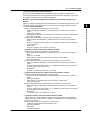
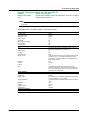
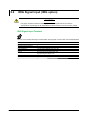
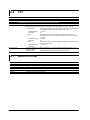
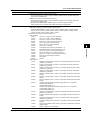
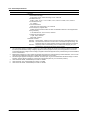
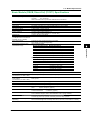
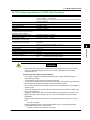
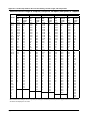
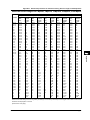
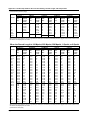
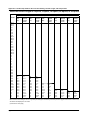
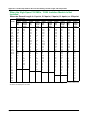
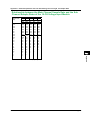
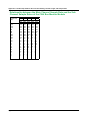
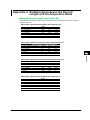
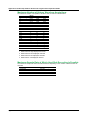
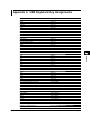
Appendix 4 USB Keyboard Key Assignments
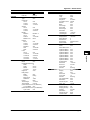
DL850/DL850V
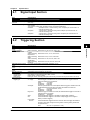
1 (CH key)
2 (CH key)
3 (CH key)
4 (CH key)
5 (CH key)
6 (CH key)
7 (CH key)
8 (CH key)
9 (CH key)
0 (CH key)
ENTER (CH key)
. (CH key)
– (CH key)
ESC
Select soft key 1
Select soft key 2
Select soft key 3
Select soft key 4
Select soft key 5
Select soft key 6
Select soft key 7
SNAP SHOT
Turn ZOOM MAG to the right
Turn VERTICAL SCALE to the right
Turn HORIZONTAL TIME/DIV to the right
Turn ZOOM MAG to the left
Turn VERTICAL SCALE to the left
Turn HORIZONTAL TIME/DIV to the left
Right arrow
Left arrow
Up arrow
Down arrow
App-22
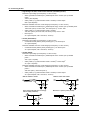
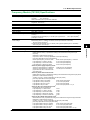
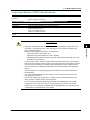
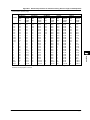
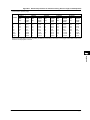
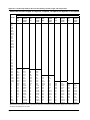
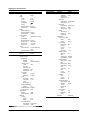
USB Keyboard
1 when NUM LOCK is illuminated on the DL850/DL850V
2 when NUM LOCK is illuminated on the DL850/DL850V
3 when NUM LOCK is illuminated on the DL850/DL850V
4 when NUM LOCK is illuminated on the DL850/DL850V
5 when NUM LOCK is illuminated on the DL850/DL850V
6 when NUM LOCK is illuminated on the DL850/DL850V
7 when NUM LOCK is illuminated on the DL850/DL850V
8 when NUM LOCK is illuminated on the DL850/DL850V
9 when NUM LOCK is illuminated on the DL850/DL850V
0 when NUM LOCK is illuminated on the DL850/DL850V
ENTER when NUM LOCK is illuminated on the DL850/
DL850V
. when NUM LOCK is illuminated on the DL850/DL850V
– when NUM LOCK is illuminated on the DL850/DL850V
ESC or F8
F1
F2
F3
F4
F5
F6
F7
PAUSE
INSERT
HOME
PAGE UP
DELETE
End
PageDown
→
←
↑
↓
IM DL850-03EN